 Problems? See this thread at archive.org.
I have already mentioned that the scaling option is not configurable with my CCP (I tried 13,1 and 13,4 ). It is set to full screen , and still are stripes on the sides .There is nothing I can change there .
-
If the game doesn't support 16:9 widescreen you wont get rid of the stripes.
-
hey guys, Just bought one 2 weeks ago, and times are getting unexpectedly tough financially. I'm selling my GX60 Hitman edition if anyone is interested send me a pm.
-
Hello, I wanted to extend memory, someone could recommend GX60 kit hitman memory modules that are compatible, thanks
-
How much,post pics płease
-
FFS, Saints Row 3 is simply unplayable on GX60, no matter what settings I get 15-20 fps... I bought it on Steam lately and wanted to try it out, turns out - the game is fun, but I can't play it on this notebook.
"Thanks" MSi for a gaming notebook witch doesn't play games very well at all. -
Sorry, no, but have you tried contacting msi directly?
-
I just got my GX60 (with the 5750m processor) and I swear it runs BF3 choppy. I have it on the performance setting and I downloaded the latest drivers. Anyone else having this issue and what did you do to resolve this? Thanks.
-
Mine ran fine on SP campaign 30fps and above most of the time with ultra settings....more choppy when playing MP online...
-
Try 720p if choppy
-
It is a great pity. Nvidia copes with it much , much better. Btw - fix mod for nfs wm doesn't work for me and I'm sure I do correct steps with it - where could be the problem ? . Windows 8 maybe ?
-
afaik the fix was written for nvidia cards...nvidia don't cop with it uch better, people just seem to blind...
When there's a problem on a amd-machine everyone is like "uh, they fukked up the catalyst again" if it's th same problem on a nvidia machine people are like "oh, it's gotta be windows or the game" lol
look for the resolution changer mod:
NFS-Planet - Need for Speed Rivals, World, Most Wanted -
I'm not nVidia or AMD fan . Simple thing - when I played on Nvidia I had no problem with full screen mode in any game . Now I have . Thanks for the link - I'll try it

-
And how did they do that, zoom in so you cut off the top and bottom? I wouldnt want that anyway.
-
hmmmm...well I would suggest you look into Intel's HD Graphics then, they got some crazy set up
-
I remember a friend trying to play 64 player BF3 mp on an FX-4100 @ 3.6GHz and it would stutter frequently, especially when there were huge explosions but he was playing with everything on Ultra. I would try turn down the mesh setting to Low as I remember reading about how it really started to become a CPU hog after one of the patches.
-
I have it set to the auto setting which is 1920x1080 with ultra for texture but medium everything else. Has anybody been playing bf3 multiplayer who's managed to get good framerate out of it on multiplayer? What did you do?
-
Quick question: Do you guys enjoy your GX series laptops? From what ive heard from several posters on this fourm is that the amd cpu/apus are a severe bottleneck in some applications/games, causing the 7970m or 8970m to vastly underperform. From what I've seen the richland and trinity apus perform similar to a dual core intel cpu.
-
First of all, richland is not much more expensive so there is no reason to take lappy with trinty now. Well, the CPU is just weak as you read. You need to be sure that you want a good lappy (sound, GPU, quality, cooling, good keyboard, 2 hhds etc) with a big gap hole that is a CPU. In pair with the HD7970m it provides really good performance but it is not comparable with i7 + HD7970m
-
It really depends on the games...While bottleneck is to be expected for a CPU that is about 3x slower than i7, the overall setup is still decent when comparing to other specs that are similarly priced (i7 + GTX660m, GTX670mx)...Intel i7 solution seems to be cheaper in US but not so in Australia...
Sager i7 + 770m can be found for ~$1200 at XOTICPC but a similar specced Clevo in Australia is costing $1800 and above when factoring in operating system..
For CPU bottlenecking, it is worse in some games, not so bad in others...I'm happy with FPS above 35..I don't really care how the 7970m/8970m is performing in other systems. as long as i can achieve playable FPS i am fine with it. And i think if a person is going to play online multiplayer game a lot, this is not the machine for you. you'll have to either fork out more money for an i7, or settle for an i7 with lesser GPU.. -
But I would like to .
Very valuable and useful note in the process of solving my problem . I think CCC setup is crazy enough for me ..
-
I agree with all this. I'm from Australia as well :hi2:
Newer MMOs and RTS games or any kind of game with lots of players (64p BF3, Planetside 2) are better off played on an i7 laptop but games like Far Cry 3 and Bioshock Infinite take full advantage of the 7970M and will run better than on an i7/660M (which here is the best i7 setup you can get in the same price range as a GX60). -
Windows 8 x64 Brightness issue is now solved for me.
I can confirm that using regedit and searching for all (EnableBrightnessInterface) <- Don't use brackets when searching in regedit, fixed all my issues in Windows 8 x64 regardless of using the "mobility" version or not.
Just change the DWORD value from a 1 to a 0 for all of them. I found 3 main keys that needed to be changed and the others made no difference.
You can also create a registry entry .reg file like I did so you can play with the latest BETA drivers and just re-run the patch if it breaks.
I have placed a copy of the entries here if anyone wants to just save them as a file however, I take no responsibility if you use it.
All you need to do is copy below -----Clip----- to before ------End of Clip------ and paste the contents in to notepad and save the file as a .reg file e.g. brightnessfix.reg and then you can just load it with a right mouse click. You will need to be an administrator account or have elevated rights to do this.
** As always, Backup your registry before changing stuff **
-----Clip-----
Windows Registry Editor Version 5.00
[HKEY_LOCAL_MACHINE\SYSTEM\ControlSet001\Control\Class\{4d36e968-e325-11ce-bfc1-08002be10318}\0000]
"KMD_EnableBrightnessInterface2"=dword:00000000
[HKEY_LOCAL_MACHINE\SYSTEM\ControlSet001\Control\Class\{4d36e968-e325-11ce-bfc1-08002be10318}\0001]
"KMD_EnableBrightnessInterface2"=dword:00000000
[HKEY_LOCAL_MACHINE\SYSTEM\ControlSet001\Services\amdkmdag]
"KMD_EnableBrightnessInterface2"=dword:00000000
------End of Clip------ -
GX60 is still more powerful than Y580, unless you want to play MMO's only or sandbox games (Skyrim works no problems tho').
Y500 with SLI 650m is a better option only, if you want to sacrifice more powerful GPU and no SLI problems for possibility to upgrade to i7.
GX60 is like Achilles, it has many perks and only one weakness witch is the mediocre CPU. -
Hello everybody
I just made the acquisition of the Msi GX60 3AE-212FR, Hitman Edition, with the A10-5750M, 4096 Mo, 500 Go 5400rpm.
I have a little (pretty big in fact) problem :
I did the windows updates correctly and installed league of legends to try the ping with this nice wifi card and i was not disappointed going down from 50+ on my old pc to 38.
But the FPS were barely around 40 and there were drops at 25+ FPS during big animation sequences, with a general "twitchy" feeling. The graphic options were on High(not Very High), I unabled shadows completely and the v-sync, nothing changed about FPS. I thought LoL was not really demanding on graphics so I was kind of surprised, having read reviews of the computer showing 40+FPS on games like BF3 and Skyrim on HIgh graphics.
Then I decided to check the drivers on a french reliable website, "touslesdrivers" (all the drivers) to analyse my computer and check the latest drivers. I downloaded the last amd catalyst control center version 2013.0604.1838.31590 (I think 13.6 was written on the website).
I installed ccleaner that got rid of a lot of things and the last version of Razor game booster as I thought it wuld help me gain some FPS.
After many restarts and little pauses for my computer as I had other things to do, I decided to try again, with razor soft on, and what a surprise! I fell at barely 10 fps, I put the graphics on medium and nothing changed!
Now I dont really know what to do. Should I get rid of this catalyst version and install another one? Or totally recover the computer cause i maybe did something wrong? (don't know what it could be...)
I also have a few question :
-Where is the Msi Turbo Drive Engine evoked in the "User Manual"?
-Where are the coler booster and overclock tools also evoked in this manual? (I checked msi website for this and couldnt find them, at least onthe french site)
I have a general feeling of "slowness" on the computer, I thought it was because of the Hard drive that could be better, and maybe windows 8 weirdness, but after this demonstration of power in a little game, I feel disappointed now!
Thank you for reading this and I hope any of you can give me some advice to make my computer work properly! -
Right click on desktop, configure switchable graphics, set the game to hi-power. done.
-
I have an original GX60 A10-4600M (not Hitman edition) and enjoy playing Skyrim in Ultra Settings (took off AA for ENB mods which enable it through dx wrapper) with FULL mods including EMB graphics updates and HD skins, Area detail upgrades like Enhanced Whiterun, grass, rocks, misc objects etc and have NO slowdowns or issues.
The only upgrade I have done is go from HDD to SSD for my drive.
*Edit - I am on Windows 8 x64 8Gb RAM -
lol, honestly I never heard anyone complaining about Intel's graphic card..like literally they never had a driver issue...
-
Love it. My mate has a brand new 3 day old AlienWare i7 that cost him $3,700.00
Sure he has a nice backlit keyboard and can compress a file with 7zip faster than me but I play StarCraft2, Tomb Raider, Battlefield, Metro just as well as he can and I paid $1200 for mine.
I have another friend, also bought a gaming rig, ASUS ROG with 560m NVIDIA on board. Mine's faster in most games. ESP Skyrim
His was $2,600.00 roughly
Oh, and he has had 3 RMAs with overheating graphics cards so far!!. Which is insane for a 2.5 grand laptop!
I know my mate loves his AlienWare and it looks great but I also know, he sees me pull just about the same frame rates he does and he's thinking, "did I really pay that much more for the name brand, the etched plate with my name on it and a backlit keyboard??"
He's hurting. I know it. the wonder of just getting it has already worn off 3 days later and it's just his gaming laptop now. Sure he's happy with it, it does what he wants but I know he's hurting when I play exactly what he is with no noticeable difference even on Valley Benchmark :-D which KILLS him lol
My other friend with his ASUS ROG, well, mine gets better framerates on MOST games.
He'd never admit mine is better and he bags me about it saying "it's an ASUS and a ROG laptop, yours is an MSi." Well yes, mines an MSi and it's faster in games! he comes back with, "oh well, that's just your graphics card" and I say, well yes it is but I also haven't returned mine on RMA 3 times since I bought it either and our conversation normally ends there with a "I don't care I like mine better. It was just bad luck"
Yup, I like mine better too dude is all I am thinking It was a STEAL for the money
-
Hi all!
Past week I bougth a new GX60 hitman edition with A10-5750M but i can't play all games in "good conditions", for example crysis 3 is unplayable or I can't get a good set up, a lot of slow down. And with battlefield 3 its really strange, sometimes works ok and sometimes works very bad with the original set up.
I'm thinking to OC the cpu with OVERDRIVE but I don't think thats good idea with a laptop buyed past week.
Any suggestions?
Thank you all!! -
Hi everyone,
I spent some time looking through this tread to hopefully answer my questions. I'm a newbie when it comes to this stuff.
I wanted to check temps and stumbled upon something confusing....
No matter what program i use ( Cpu-z; HWmoninterPro; or even screen resoulstion in win8) Its telling me my GPU is a 7660G not a 7970M ?
What am I doing wrong? I have updated to the newest drivers. (beta ones)
From what I understand all you do for a game is set it as high performance under switchable graphics?
I'm really not that great with this stuff some if someone could point me to a thread or guide so I can better understand what im doing. -
double posted sotty
-
Don't worry your 7970M is in there it's just not being reported by software.
The software that is currently popular tends to read the gpu that's activated, this being a low power scenario it's normally the apu providing the graphics horsepower.
When your 7970 is working the power led will switch from white to orange. -
You must force 7970 to activity first . Then you can switch on software to monitoring and set monitoring data and OSD mode .
-
Hey guys,
I was wondering if anyone with a win8 GX60 without the MLCC fan noise glitch, if someone could extract their 506 bios MSI is refusing to send me a bios to fix this fan issue.
I don't feel like taking it apart to get at the battery, or go without a laptop for 2 weeks shipping it to them. If anyone had this problem and found a way to fix it please let me know. I did their soft EC reset removing battery pressing power button for for 60 seconds, that did nothing.
Cheers!
Also I will be getting a MSI Global GX70 3BE
I should write a review about it when I get it if anyone is considering a GX60 or now the GX70. -
Whatß in a old gx70
-
This is the file I used to fix my fan (Hitman Edition GX60)
MSI Global â Download Center -
I appreciate the effort but that's what I've tried about 6 times and it does nothing sadly. My roommate is buying my GX60 when my GX70 comes in this week he said he doesn't mind so I guess I'm free of that hassle.
-
Yeah, I use it also for work as i dont have a desktop-pc, and the fan never stopping really is annoying sometimes, but I think the 7200rpm hdd is worse, I'll put a 5400rpm model in mine.
-
There are already 506 EC for download
-
THAAAANKS
I hope it has solved the problem of fan noise when turned on
Sorry , can you pas me the link ? I dont see. -
Sorry guys, i think i have a problem with new GX60 hitman A-10-5750M.
Today I tryed to play skyrim with auto-detect configuracion of the game and it plays at 15-20fps...
I also play battlefield in 64players map and get 20-30 fps... The strange thing is configured in LOW settings don't give more FPS...
All of that with overdrive and turbocore at 3.2 CPU.
What can I do? I think i got the last drivers of all.
I hope any of you can help me!!
Thanks!! -
Is the power light orange when playing? If not try assigning skyrim to play using the 7970m manually via amd vision.
-
The battlefield 3 64 MP FPS sounds normal...I usually play on 24 or 32 players server and the fps can range from 25 to 50 fps....
But skyrim shouldn't be that bad..
Anyway, how did you manage to get Overdrive to work? -
Does anyone know why for Windows 7 there is a new bios "Modify DGPU power up sequence" , and for Windows 8 is not ?
-
Because it does not affect Win8, this is just to skip the wlan boot under Win7, which takes about 5-7seconds on every startup.
Edit: New Bios again for Win7??? just saw it, probably to keep from switching back to the iGPU as some people have mentioned. -
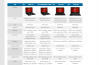
Now MSI is confusing, they have 4 GXs now listed....
Whats the difference between the Hitman and the 3BE except the chipset? I thought the Hitman had the 5750m already?
-
BE is normally a reference to Black Edition to my knowledge . But i dont think its the case here
-
Basic Edition most likely, but itf it was Black Edition an unlocked cpu shure would be nice
-
GX60-3BE Have " AMD 8970M "
Not is Black Edition
*The Offical MSI GX60 Owners Lounge*
Discussion in 'MSI Reviews & Owners' Lounges' started by layjohn, Oct 12, 2012.


