 Problems? See this thread at archive.org.
Does the second drive have the hidden 100MB boot partition on it that may be conflicting the startup?
-
-
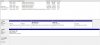
I deleted those partitions... -
Did you install any programs onto the second hard drive that tries to load on startup?
-
Yeah highwind that's exactly why I know its the problem is because when you remove the conflicting drive your boots time are proper, trust me if you do a clean install on the SSD you wont have any more problems same with a proper wipe of the HDD. Your method of transferring windows to the SSD is worse or just as worse as cloning the drive.
You can do what you wish but you have not found a solution for the problem this would be your best bet and would eliminate any software issues and leave physical ones. -
Anyone upgrade their A10-4600m yet? If so, where did you source the CPU? Last time I looked I could just find engineering samples.
-
nope. The second drive was wiped and totally empty..
-
sometimes I regret buying this laptop..
I'm an online gamer and most of the games I find it very laggy
The cpu bottlenecks gpu I guess..
I tried playing hawken, turned off the PhysX with everything on Ultra. getting 20-25fps when playing 20vs20 T___T
The only online game that I can play very smooth is Warframe.. I hateeee this laptop T____T
-
First time buying an expensive pc lol (well expensive for me)
anyways, i'm really happy was just wondering if i could get more out of my A10-5750 cpu? I love playing MMORPG like rift wow etc
feels like the gfx is amazing but it could be smoother cpu wise
read like 90% of this thread and to my knowledge my cpu is the best for this laptop atm (got the hitman edition)
so yeah is it possible to get lil bit more out of my cpu? and ive read about this turbo mode. does it automatically go past 2.5ghz? -
Also i was wondering what settings to avoid when you have a less powerful cpu?
So that i can set up my games at optimal performance, what gfx settings is cpu based and have to be put down and what settings could be left high-ultra?
referring to MMORPG's like WoW -
Ive checked in overdrive apparently my 2.5ghz cpu's are already running to 3.5ghz on default... is this correct? (windows 8 64bit)
-
The player movement calculations will take a toll on a lower end CPU, and there's frankly not much that can be done about it, other than going in areas where there are less players. In WoW, View Distance and Shadows seem to have the biggest impact on FPS, so those are the two settings you want to play around with. Lowering anything else won't do much other than give you worse image quality.
MMOs, RTS and probably simulators(like Sim City) will all be rough on this laptop, as they're all very CPU bound. -
This laptop isn't really meant to play things in Ultra, and giving you 60 fps doing so. It's a budget gaming setup. If you wanted the best performance, you would have dished out an extra 300-500$ for an i7. Lower your settings a little bit. Be a little more realistic. And Im sure you'll find the sweet 30+ fps spot.
-
Im playing WoW with 50-60 fps on high settings @ instances . Middle of oggrimar is 15-30 fps but i dont really care about that . Pandaria with people questing is 40- 55 fps . So i really dont have much to complain about it
-
I play Borderlands 2 on A-10 4600m version of GX60.
After turning off dynamic shadows manually in .cfg you gain a lot of fps, because the cpu works on shados aswell.
So in all games try to reduce or disable shadows and draw distance -> everything else can be on ultra since the gpu works on that. -
turn on the fan spinning up. Is this normal?
-
I recon you ask why fan turns up when you boot up your GX60.
It is normal, it gets rid of dust from fans. -
anyone with Windows 8.1 and killer 1202 have bluetooth problems ? I cant seem to connect devices anymore...
-
Make sure the SCM utility is installed :}
-
Yeah the installer does not work for 8.1 Bluetooth and LAN sadly. -
Huh,it worked on my killer...
-
Well the installer and program worked on my 8.1 but i couldnt connect bluetooth device due bluetooth driver problems. I installed W7 and i could can connect them again. Only W7 feel sluggish comparing to W8....
-
I'm not sure comparing 3dmark11 scores in W7 to W8 I can see a huge downgrade, plus I only use desktop mode for W8 anyways haha.
Guys check out AMD Over-drive you can force 2.7/3.2ghz on windows 8 now!!
-
To me 8 feels sluggish
-
OK, SMC is installed and run when Windows starts. But then there is a bug and it is killed:
Unhandled exception has occurred in your application. If you click Continue, the application will ignore this error and attempt to continue. If you click Quit, the application will close immediately.
Could not load type 'WPFOSD.CGetDeviceCount' from assembly 'WPFOSD. Version=1.0.0.0, Culture=neutral PublicKeyToken=null'
See the end of this message for details on invoking
just-in-time (JIT) debugging instead of this dialog box.
************** Exception Text **************
System.TypeLoadException: Could not load type 'WPFOSD.CGetDeviceCount' from assembly 'WPFOSD, Version=1.0.0.0, Culture=neutral, PublicKeyToken=null'.
at MSI.SCM.SCMII.CheckMouseDeviceClass(Boolean CheckFirst)
at MSI.SCM.SCMII.MainForm_Load(Object sender, EventArgs e)
at System.Windows.Forms.Form.OnLoad(EventArgs e)
at System.Windows.Forms.Control.CreateControl(Boolean fIgnoreVisible)
at System.Windows.Forms.Control.CreateControl()
at System.Windows.Forms.Control.WmShowWindow(Message& m)
at System.Windows.Forms.Control.WndProc(Message& m)
at System.Windows.Forms.Form.WndProc(Message& m)
at MSI.SCM.SCMII.WndProc(Message& m)
at System.Windows.Forms.NativeWindow.Callback(IntPtr hWnd, Int32 msg, IntPtr wparam, IntPtr lparam)
************** Loaded Assemblies **************
mscorlib
Assembly Version: 4.0.0.0
Win32 Version: 4.0.30319.18046 built by: FX45RTMGDR
CodeBase: file:///C:/Windows/Microsoft.NET/Framework64/v4.0.30319/mscorlib.dll
----------------------------------------
SCM
Assembly Version: 10.13.6287.0
Win32 Version: 10.013.06287.0
CodeBase: file:///C:/Program%20Files%20(x86)/SCM/SCM.exe
----------------------------------------
System.Configuration
Assembly Version: 4.0.0.0
Win32 Version: 4.0.30319.17929 built by: FX45RTMREL
CodeBase: file:///C:/Windows/Microsoft.Net/assembly/GAC_MSIL/System.Configuration/v4.0_4.0.0.0__b03f5f7f11d50a3a/System.Configuration.dll
----------------------------------------
System
Assembly Version: 4.0.0.0
Win32 Version: 4.0.30319.18045 built by: FX45RTMGDR
CodeBase: file:///C:/Windows/Microsoft.Net/assembly/GAC_MSIL/System/v4.0_4.0.0.0__b77a5c561934e089/System.dll
----------------------------------------
System.Windows.Forms
Assembly Version: 4.0.0.0
Win32 Version: 4.0.30319.18046 built by: FX45RTMGDR
CodeBase: file:///C:/Windows/Microsoft.Net/assembly/GAC_MSIL/System.Windows.Forms/v4.0_4.0.0.0__b77a5c561934e089/System.Windows.Forms.dll
----------------------------------------
System.Drawing
Assembly Version: 4.0.0.0
Win32 Version: 4.0.30319.18022 built by: FX45RTMGDR
CodeBase: file:///C:/Windows/Microsoft.Net/assembly/GAC_MSIL/System.Drawing/v4.0_4.0.0.0__b03f5f7f11d50a3a/System.Drawing.dll
----------------------------------------
System.Xml
Assembly Version: 4.0.0.0
Win32 Version: 4.0.30319.18046 built by: FX45RTMGDR
CodeBase: file:///C:/Windows/Microsoft.Net/assembly/GAC_MSIL/System.Xml/v4.0_4.0.0.0__b77a5c561934e089/System.Xml.dll
----------------------------------------
WPFOSD
Assembly Version: 1.0.0.0
Win32 Version: 1.0.0.0
CodeBase: file:///C:/Program%20Files%20(x86)/SCM/WPFOSD.DLL
----------------------------------------
PresentationFramework
Assembly Version: 4.0.0.0
Win32 Version: 4.0.30319.18046
CodeBase: file:///C:/Windows/Microsoft.Net/assembly/GAC_MSIL/PresentationFramework/v4.0_4.0.0.0__31bf3856ad364e35/PresentationFramework.dll
----------------------------------------
WindowsBase
Assembly Version: 4.0.0.0
Win32 Version: 4.0.30319.18046 built by: FX45RTMGDR
CodeBase: file:///C:/Windows/Microsoft.Net/assembly/GAC_MSIL/WindowsBase/v4.0_4.0.0.0__31bf3856ad364e35/WindowsBase.dll
----------------------------------------
PresentationCore
Assembly Version: 4.0.0.0
Win32 Version: 4.0.30319.18046 built by: FX45RTMGDR
CodeBase: file:///C:/Windows/Microsoft.Net/assembly/GAC_64/PresentationCore/v4.0_4.0.0.0__31bf3856ad364e35/PresentationCore.dll
----------------------------------------
System.Management
Assembly Version: 4.0.0.0
Win32 Version: 4.0.30319.17929 built by: FX45RTMREL
CodeBase: file:///C:/Windows/Microsoft.Net/assembly/GAC_MSIL/System.Management/v4.0_4.0.0.0__b03f5f7f11d50a3a/System.Management.dll
----------------------------------------
MSIECO
Assembly Version: 1.0.1305.1302
Win32 Version: 1.0.1305.1302
CodeBase: file:///C:/Program%20Files%20(x86)/SCM/MSIECO.DLL
----------------------------------------
************** JIT Debugging **************
To enable just-in-time (JIT) debugging, the .config file for this
application or computer (machine.config) must have the
jitDebugging value set in the system.windows.forms section.
The application must also be compiled with debugging
enabled.
For example:
<configuration>
<system.windows.forms jitDebugging="true" />
</configuration>
When JIT debugging is enabled, any unhandled exception
will be sent to the JIT debugger registered on the computer
rather than be handled by this dialog box.
So now my P1, screen off and eject ODD button doesn't work. I'll have to start SCM every time when I want to use those buttons, with the annoying debug window on the screen. Anyone with the same problem? -
How do I do that? I'm a complete noob with using Over-drive.
-
Does AMD-Overdrive allow 3.2 Ghz (A-10 4600m) on Win 7?
So far I could set 2.7 Ghz with PSCheck, but never 3.2 Ghz on all 4 cores. -
hell yeah! im able to access overdrive with windows 8 now! im running a10-5750m, anyone can guide me to overclock to 3.2ghz?
-
I get an "Cannot detect an AMD CPU" error with AMD Overdrive on my GX60 ;/
Anyone can help? Win7, A-10 4600m. -
So W7 is faster at 3dmark11 ?
Same here , over-drive has so much options compairing to pscheck
-
Anyone can post a tutorial how to turbo APU with OverDrive?
I cant seem to be able to set x27 multiplier, much less x32, it resets the damn setting back to x23 even when I accept everything. -
Anyone can post a tutorial how to turbo APU with OverDrive?
I cant seem to be able to set x27 multiplier, much less x32, it resets the damn setting back to x23 even when I accept everything. -
yeh anyone? that will be very helpful!
-
Me too, it defaults to x25 on the 5750m...no use at all..
-
Well it says it supports APU's now, so Overdrive 4.2.6. should allow us to turbo A-10 somehow...
Also, OverDrive seems not to integrate with CCC, I don't get Overdrive Tab under the Performance section of CCC, any ideas? I use 13.6 beta 2.
I don't know guys, but whoever decided to lock these APU CPU's at AMD is and idiot, any potential power this measly line of CPU's could give is sealed off. -
Just accept all the pop-ups they are all warnings saying AMD hates you for unlocking the full potential of their APUs

Once you go ahead and match your settings (A10-4600m) Might be slightly different when it comes to max multiplier Ill see this once my roommate wakes up with his GX60.
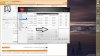
YOU MUST RESTART AFTER YOU ARE DONE TO MAKE THIS WORK!!
You will notice that clicking the Green Circle will turn the OverDrive on and you should also notice the actual clocks of my CPU you can monitor this with HWinfo64 but word of warning it seems opening task manager performance tab locks the CPU @ 2.5Ghz for the 5750m prob 2.3Ghz for the A10-4600m if you do this by mistake from my little testing you have to restart to get the OD to get back up.

Rep if you found this helpful, It sure helped me from not quitting my current MMORPG boosted my FPS about 10-15 and made the game just so much smoother XD -
so does this mean mine is overclocked?

-
Dude, could you write a step-by-step detailed tutorial for us? On my GX60 it always returns to standard 2300mhz. I try to force 3200 mhz, but it returns to 2300mhz even when I turn off that turbo management.
-
yup, doesn't work on mine either....force 3,2Ghz just seems impossible, after 30 secs of prime95 it starts jumping from 1,8Ght - 3,2Ghz on all cores -> just like before, no improvement at all.
-
Yup! Your 5750m is overclocked!
-
You turn it on not off the turbo management, its 7am and I havent slept yet ill put in more details once I wake!
-
Even with the turbo management ON, it just doesn't jump to 32 X when I want to force it, the highest I can go is 27 X (2700 mhz).
Someone seems to have pushed his 3.2. Ghz, any hints how to do that ? -
It wont be possible to force 3.2ghz on all four cores for a 4600 remember some of us here also have the 5750m where we can force 3.2ghz. The best you can get is TWO cores at 3.2ghz and TWO cores at 2.7ghz but expect some fluctuation on the TWO 3.2ghz cores.
The reason you cannot force 3.2ghz and it drops when you run prime95 is because its not physically possible to push that much power on a 35W TDP chip. We should be greatful we are even able to force 2.7/3.2 in windows 8. -
Anyone did 3dmark 11 benchmark after forcing turbo with Overdrive? I actually see a dip in Physics score despite Overdrive showing a constant multiplier of 32-35x..
-
Any idea how I can force 2.7 Ghz on 2 cores and 3.2 Ghz on other 2 cores?
-
Yeah but I don't really trust 3dmark11 on windows 8 let alone 8.1 mine went down also but fluctuation in scores is natural by a points, I noticed a big increase in performance for all my CPU heavy games though so in real life setting its working for me and my roommate.
You just do what was posted you will notice your cores will stay around 2.7ghz but TWO of the four will jump to 3.2ghz as I said it will have fluctuation between the Pstate's based on TDP....Same goes with my 5750m.
EXPECT an mean of 2.7ghz (We can force 2.7ghz now on in windows 8 HURRAH!!!! not sure about anyone else but going from PScheck in windows 7 to letting the CPU adjust clocks in windows 8 I noticed a negative difference in performance. Not anymore with overdrive though!) -
Monitoring my the CPU Status page with Overdrive, I see two(sometimes three) cores fluctuating between 2.7 and 3.2, but as soon as I launch a game, they all settle to 2.7, so a 3.2-3.2-2.7-2.7 setup doesnt seem possible under full load.
-
no wonder its working better for you, on Win8.1 the APU-support has evolved as MS included some more cpu-extensions
on Win8 I dont see any improvement for me. but I've been quite happy since the 5750m upgrade anyway.
-
That makes sense..I don't see improvement either..
Another thing i noticed was the clockspeed showed by AOD and HWInfo64 are different, especially when the toggle on AOD is off (the green button).
And when the AOD toggle is off, the CPU Processor Speed range is 1.4Ghz - 2.5 GHz (in AMD Catalyst Control Center under Clock Controls).
When the AOD toggle is on, the slider shifts to 2.5Ghz - 2.5Ghz. So i guess for those who already tweak the slider to 2.5Ghz-2.5Ghz, we wont see much difference... -
Deleted AOD, A-10's are crap and these it nothing we can do about that. What a pathetic line of CPU's...would swap this for an i3 with kissing of the hand.
-
I just bought my A10-5750M for my GX60-1AC for 153 €.
I hope the decrease bottleneck
*The Offical MSI GX60 Owners Lounge*
Discussion in 'MSI Reviews & Owners' Lounges' started by layjohn, Oct 12, 2012.


