The Notebook Review forums were hosted by TechTarget, who shut down them down on January 31, 2022. This static read-only archive was pulled by NBR forum users between January 20 and January 31, 2022, in an effort to make sure that the valuable technical information that had been posted on the forums is preserved. For current discussions, many NBR forum users moved over to NotebookTalk.net after the shutdown.
Problems? See this thread at archive.org.
← Previous pageNext page →

    *The Offical MSI GX60 Owners Lounge*

    Discussion in 'MSI Reviews & Owners' Lounges' started by layjohn, Oct 12, 2012.

  1. dabidbobol

    dabidbobol Notebook Guru

    Reputations:
    2
    Messages:
    72
    Likes Received:
    10
    Trophy Points:
    16
    thank atom
     
  2. RIPGreave

    RIPGreave Notebook Geek

    Reputations:
    0
    Messages:
    88
    Likes Received:
    0
    Trophy Points:
    15
    In my opinion lower cl. Iv compared 1866 cl11 to 1600 cl9 on the same systym and the 1600 out performed the 1866
     
  3. Rano91

    Rano91 Notebook Enthusiast

    Reputations:
    0
    Messages:
    11
    Likes Received:
    0
    Trophy Points:
    5
    Dos anyone else find BF4 choppy?

    I seem to get okay frames (30-40 FPS) on Ultra using fraps but for some reason it almost looks as if the game "stops" every couple of seconds even though the framerate on fraps doesn't go down.

    Just wondered if anyone else was experiencing this or knew a fix? Dropping resolution and settings doesn't seem to make any difference to FPS or the choppiness.

    Thanks
     
  4. dabidbobol

    dabidbobol Notebook Guru

    Reputations:
    2
    Messages:
    72
    Likes Received:
    10
    Trophy Points:
    16
    [​IMG]

    with 1600@ 9/8/8/22/1T
     
  5. tollingalong

    tollingalong Notebook Enthusiast

    Reputations:
    0
    Messages:
    16
    Likes Received:
    0
    Trophy Points:
    5
    It is because of ppl like you that I went out and upgrade from a 4600m to a 5750m. With that and bar edit it looks like my laptop rivals one of my mid range desktops now... wow that GX60 rocks now haha!
     
  6. sniffin

    sniffin Notebook Evangelist

    Reputations:
    68
    Messages:
    429
    Likes Received:
    256
    Trophy Points:
    76
    Turn mesh quality to low if you haven't already. It shouldn't be stopping. If turning down mesh quality doesn't fix it then it would probably be you have something running in the background thats using the cpu too much. BF4 will peg the cpu at 100% so if junk is running in the background things will slow down.
     
  7. raiz7

    raiz7 Newbie

    Reputations:
    0
    Messages:
    1
    Likes Received:
    0
    Trophy Points:
    5
    How is the GX60 performance in 64 player BF4 maps?
     
  8. Mullrof

    Mullrof Notebook Consultant

    Reputations:
    5
    Messages:
    233
    Likes Received:
    20
    Trophy Points:
    31
    @dabidbobol

    I would say WOW.

    What soft are you using to play with memory timings?
     
  9. rayven1lk

    rayven1lk Notebook Enthusiast

    Reputations:
    0
    Messages:
    24
    Likes Received:
    0
    Trophy Points:
    5
    I'm kind of a noob at this, but is this considered overclocking? and is there a chance of damaging my CPU due to overheating or will the turbo fan keep that in check?

    Thanks.
     
  10. dabidbobol

    dabidbobol Notebook Guru

    Reputations:
    2
    Messages:
    72
    Likes Received:
    10
    Trophy Points:
    16
    actually i was @

    cpu 3.7 & gpu 1030/1500 realy good
     
  11. dabidbobol

    dabidbobol Notebook Guru

    Reputations:
    2
    Messages:
    72
    Likes Received:
    10
    Trophy Points:
    16
    hi mullrof

    i use pscheck pstate 2 or 3 and overdrive for memory timings
     
  12. RIPGreave

    RIPGreave Notebook Geek

    Reputations:
    0
    Messages:
    88
    Likes Received:
    0
    Trophy Points:
    15
    What memory are you using?
     
  13. dabidbobol

    dabidbobol Notebook Guru

    Reputations:
    2
    Messages:
    72
    Likes Received:
    10
    Trophy Points:
    16
    this one:
    CMSX8GX3M2A1600C9
     
  14. RIPGreave

    RIPGreave Notebook Geek

    Reputations:
    0
    Messages:
    88
    Likes Received:
    0
    Trophy Points:
    15
    Im going to try and tweak my mem aswell but i see you have memory running at 1.5 v and mine is running at 1.25v will that influence the stability ? What program are you using to test the stability?
     
  15. yaboss

    yaboss Notebook Enthusiast

    Reputations:
    0
    Messages:
    22
    Likes Received:
    1
    Trophy Points:
    6
    Hello

    i ve put 1866 16Gb memory in my GX60. Is there a way for making them worked at 1866 ?

    thanks !
     
  16. RIPGreave

    RIPGreave Notebook Geek

    Reputations:
    0
    Messages:
    88
    Likes Received:
    0
    Trophy Points:
    15
    What model numer of your ram? Fo you ha a A10 or A8?
     
  17. yaboss

    yaboss Notebook Enthusiast

    Reputations:
    0
    Messages:
    22
    Likes Received:
    1
    Trophy Points:
    6
    A10 with CMSX16GX3M2A1866C10
     
  18. RIPGreave

    RIPGreave Notebook Geek

    Reputations:
    0
    Messages:
    88
    Likes Received:
    0
    Trophy Points:
    15
    Thats strange the once that I tested picked up by it self. Are you using the latest bios?
     
  19. Meaker@Sager

    Meaker@Sager Company Representative

    Reputations:
    9,431
    Messages:
    58,194
    Likes Received:
    17,901
    Trophy Points:
    931
    Which CPU do you have? The 4600 series does not support 1866mhz ram.
     
  20. sniffin

    sniffin Notebook Evangelist

    Reputations:
    68
    Messages:
    429
    Likes Received:
    256
    Trophy Points:
    76
    Welcome to the world of Corsairs overpriced garbage memory. Unfortunately you probably won't be able to run it at 1866MHz. The RAM is "rated" for 1600, but is "tested" to run at 1866. Catch is it only runs at this higher speed if you're running a 2nd or 3rd gen Intel CPU. From the product page:

    "If your notebook is equipped with a 2nd Generation Intel Core i5 or Core i7 processor, it will automatically detect the faster speed supported by the Vengeance laptop memory upgrade kit. No BIOS adjustments are necessary to take advantage of the faster memory speed."

    and

    "A 2nd Generation Intel Core i5 or i7 processor is required for Vengeance memory to run at its maximum rated speed"

    Sorry bud :(

    Thankfully no other memory vendors use this idiotic system. 1866 memory will normally run at 1866 (provided you have a Richland A10).
     
  21. RIPGreave

    RIPGreave Notebook Geek

    Reputations:
    0
    Messages:
    88
    Likes Received:
    0
    Trophy Points:
    15
    @dadidbobol i tested my Gx60 and wow your cinbench score is good I only managed 2.56 locked at 3.2
     
  22. RIPGreave

    RIPGreave Notebook Geek

    Reputations:
    0
    Messages:
    88
    Likes Received:
    0
    Trophy Points:
    15
    I boost my score to 2.59 by changing my timing to T1. What is the differance between T1 and T2?
     
  23. dabidbobol

    dabidbobol Notebook Guru

    Reputations:
    2
    Messages:
    72
    Likes Received:
    10
    Trophy Points:
    16
  24. matrax

    matrax Newbie

    Reputations:
    0
    Messages:
    8
    Likes Received:
    0
    Trophy Points:
    5
  25. RIPGreave

    RIPGreave Notebook Geek

    Reputations:
    0
    Messages:
    88
    Likes Received:
    0
    Trophy Points:
    15
    No its not normal it is very good
     

    Attached Files:

  26. RIPGreave

    RIPGreave Notebook Geek

    Reputations:
    0
    Messages:
    88
    Likes Received:
    0
    Trophy Points:
    15
    Thid is what i achived with normal clocks and locked at 3.2
     
  27. Atom Ant

    Atom Ant Hello, here I go again

    Reputations:
    1,340
    Messages:
    1,497
    Likes Received:
    272
    Trophy Points:
    101
  28. dabidbobol

    dabidbobol Notebook Guru

    Reputations:
    2
    Messages:
    72
    Likes Received:
    10
    Trophy Points:
    16
    a wait a better 5550es :D
     
  29. LisuPoland

    LisuPoland Notebook Deity

    Reputations:
    150
    Messages:
    830
    Likes Received:
    21
    Trophy Points:
    31
    Does not seem safe :p I would not play with such frequencies, but still for benching purposes - this is a nice score indeed.
     
  30. dabidbobol

    dabidbobol Notebook Guru

    Reputations:
    2
    Messages:
    72
    Likes Received:
    10
    Trophy Points:
    16
    realy 3.7 and 1050/1500 it's totally stable ( games and bench )

    max oc not stable 3.9 and 1060/1550
     
  31. matrax

    matrax Newbie

    Reputations:
    0
    Messages:
    8
    Likes Received:
    0
    Trophy Points:
    5
    Edit: Sorry for this post.
     
  32. matrax

    matrax Newbie

    Reputations:
    0
    Messages:
    8
    Likes Received:
    0
    Trophy Points:
    5

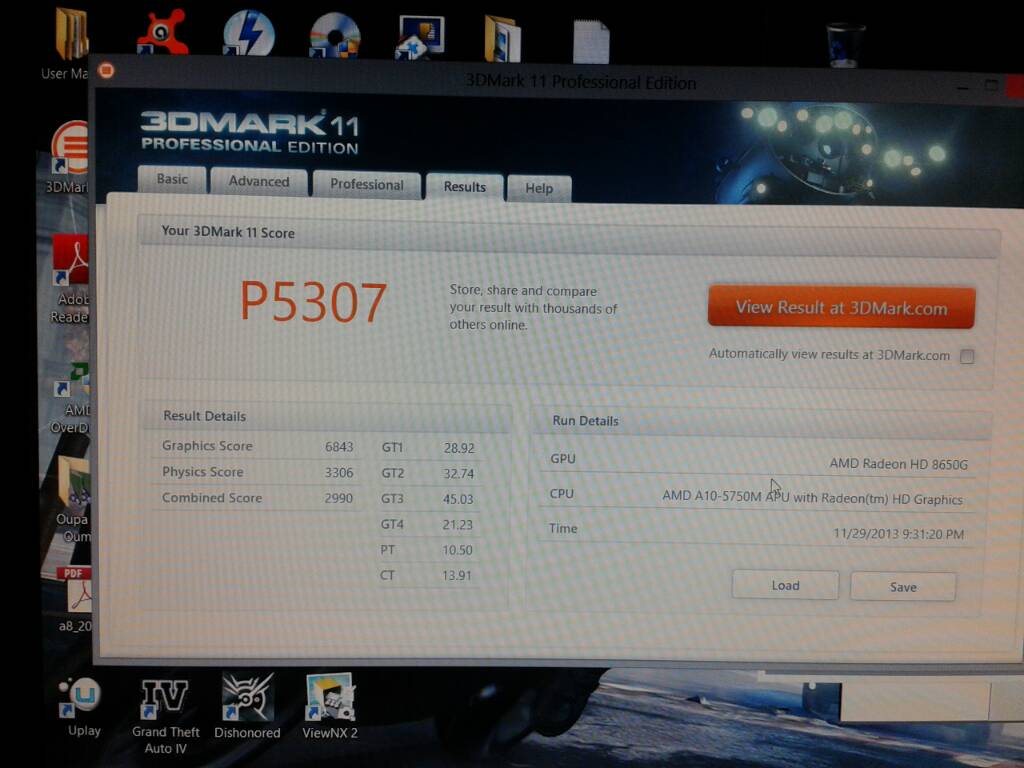
    How did you get 5300 points ? Overclocking the GPU?
     
  33. dabidbobol

    dabidbobol Notebook Guru

    Reputations:
    2
    Messages:
    72
    Likes Received:
    10
    Trophy Points:
    16
  34. Atom Ant

    Atom Ant Hello, here I go again

    Reputations:
    1,340
    Messages:
    1,497
    Likes Received:
    272
    Trophy Points:
    101
    When I think scores cannot be higher, you just do some magic and it is again higher...:thumbsup: Will you also run some game tests to see how it is effect gaming experiences, or first you waiting for the new A8ES?
     
  35. dabidbobol

    dabidbobol Notebook Guru

    Reputations:
    2
    Messages:
    72
    Likes Received:
    10
    Trophy Points:
    16
    yes i will do some benchmark game:
    X3 terran conflic
    lost planet 2

    i play at metro last light, planet side 2, skyrim, bf3 ( so good fps highter alal are +++++ )
    i am happy bau i wait my new 5550m es
     
  36. RIPGreave

    RIPGreave Notebook Geek

    Reputations:
    0
    Messages:
    88
    Likes Received:
    0
    Trophy Points:
    15
    Can you please post the download link for the drivers?
     
  37. RIPGreave

    RIPGreave Notebook Geek

    Reputations:
    0
    Messages:
    88
    Likes Received:
    0
    Trophy Points:
    15
    No i replaced the origenal memory with 1600cl9 locked the cpu at 3.2 and updated the bios of gpu to the 8970 bios.
     
  38. matrax

    matrax Newbie

    Reputations:
    0
    Messages:
    8
    Likes Received:
    0
    Trophy Points:
    5
    What bios? Do you have the link?
     
  39. RIPGreave

    RIPGreave Notebook Geek

    Reputations:
    0
    Messages:
    88
    Likes Received:
    0
    Trophy Points:
    15
    Ill have to go and look for you. I found it on the forum, if u remember corectly at about page 160. If I find it ill post the bios for you. As the 7970 and 8970 is the sam but just with higher clock the bios change the 7970 into 8970.
     
  40. RIPGreave

    RIPGreave Notebook Geek

    Reputations:
    0
    Messages:
    88
    Likes Received:
    0
    Trophy Points:
    15
    I have found however that i have to enable powerfan to keep the gpu cold.
     
  41. LisuPoland

    LisuPoland Notebook Deity

    Reputations:
    150
    Messages:
    830
    Likes Received:
    21
    Trophy Points:
    31
    Flashing 7970m into 8970m is completely pointless with GX60...

    If anything, you void your warranty.
     
  42. dpas2012

    dpas2012 Notebook Enthusiast

    Reputations:
    0
    Messages:
    46
    Likes Received:
    0
    Trophy Points:
    15
    Hey guys, how do I improve my framerate in BF3? I updated to the latest AMD Catalyst 13.11 driver, set the graphics setting to high, and closed out everything that would slow down the CPU, but all I get is anywhere from 10-20 FPS. Thanks!
     
  43. LisuPoland

    LisuPoland Notebook Deity

    Reputations:
    150
    Messages:
    830
    Likes Received:
    21
    Trophy Points:
    31
    You can't do anything.

    With A-10 we are f*cked until change of laptop/switching onto PC.
     
  44. Mullrof

    Mullrof Notebook Consultant

    Reputations:
    5
    Messages:
    233
    Likes Received:
    20
    Trophy Points:
    31
    can you give me some tips how to change timings for memory. there is so many options o.0
     
  45. Atom Ant

    Atom Ant Hello, here I go again

    Reputations:
    1,340
    Messages:
    1,497
    Likes Received:
    272
    Trophy Points:
    101
    That is not quite right, he can lock an A10 to higher frequency or upgrading to A8-5550M ES can help even more.
     
  46. RIPGreave

    RIPGreave Notebook Geek

    Reputations:
    0
    Messages:
    88
    Likes Received:
    0
    Trophy Points:
    15
    Is this in sp or mp?
     
  47. dpas2012

    dpas2012 Notebook Enthusiast

    Reputations:
    0
    Messages:
    46
    Likes Received:
    0
    Trophy Points:
    15
    Multiplayer.
     
  48. dabidbobol

    dabidbobol Notebook Guru

    Reputations:
    2
    Messages:
    72
    Likes Received:
    10
    Trophy Points:
    16
    oups i lost my 7970m bios for my gx60? anyone could send me a mail with this one?

    thank very much
     
  49. dpas2012

    dpas2012 Notebook Enthusiast

    Reputations:
    0
    Messages:
    46
    Likes Received:
    0
    Trophy Points:
    15
    How would I lock it to a higher frequency and not damage it?
     
  50. Meaker@Sager

    Meaker@Sager Company Representative

    Reputations:
    9,431
    Messages:
    58,194
    Likes Received:
    17,901
    Trophy Points:
    931
    Define "damage" overclocking will always increase the wear on a chip.
     
← Previous pageNext page →