Problems? See this thread at archive.org.
From what I understand, Mantle hasnt been patched into it yet, and this performance has only varied very little patch to patch, although when it comes in, I will definitely post again with results (and maybe video evidence for proof, maybe with DxTory running to show the fps nice and cleanly).
-
Thank you! Ive been getting 100% utilization in *some* games (Battlefield 4 being one of them), but other than that, undervolting may be a good idea if I dont truly need it, besides, those temps sound very nice.
Yeah, I knew I wasnt crazy, 93C is quite high. I'll stay away from them, and that is why I was worried about OC being possible at all for me, when in real world applications, instability is unlikely because I'm not usually maxing out.
Thank you again, and I didnt think Mantle was in the game yet, thanks for confirming! -
Hey, anybody know how i can lock a10 at two cores only?
-
I hate to question your reasoning behind this... but why? I don't exactly know how, but I am very interested in why that would be needed?
-
hi guy
i search Vbios Patcher RC-1
do you where i can download it?
i don't have te permission to download it in techinferno :/ -
I have a game which is using two cores at max.
-
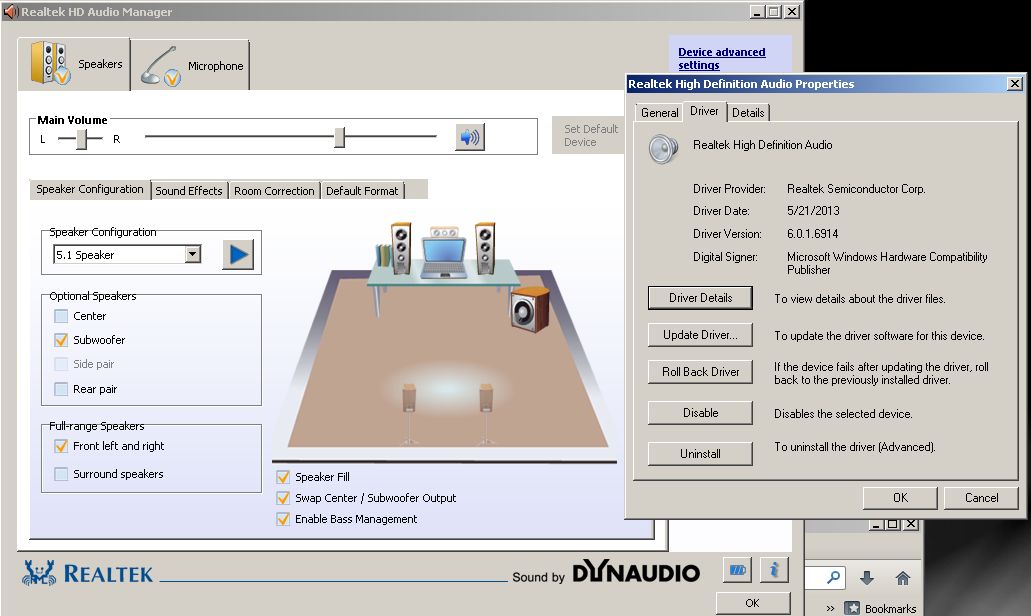
Okay, so quick question, Ive had this computer for a while now, and I *still* can barely hear the subwoofer, it is barely audible in Realtek's test playback, and I hear it not at all during games or music, its a tad frustrating, any of you figured out how to boost it a bit? I have it configured in 5.1 with only stereo and subwoofer enabled, but alas, no luck.
EDIT: Realtek doesnt have a 2.1, so... yeah, no hope choosing that option. -
It should be pretty noticeable, it may be there is a physical fault with the speaker.
-
The subwoofer is a weak bass but it's still noticeable.
Use K-Lite Mega and normalize audio in the Media Player Classic and see if it helps. -
New Bion and EC GX60 3BE
Bios D0K w8_E16FKAMS.D0K.zip (2,16 MB) - uploaded.net
EC 504 w8_16FKEMS3.504.zip (263,65 KB) - uploaded.net -
Hey Gang!
Lets share knowledge with fellow users..
Dayz Alpha access is available, can anyone out there that's committed report their performance?
If possible include your processor and overclocks.
I briefly played original Dayz on gx60 and was underwhelmed, 25-35 fps in low population area, probably teens in cities, regardless of graphics (ie sorely CPU bound)
Let us know if they've fixed things with the standalone
Thanks in advance! -
@ Stadler whats the new bios for?
-
have you an idea? -
Why not use VBE 7?
-
i am not sure that VBE work fine ....
i am abble to modyfying vbios but there are some freeze.
the most stable are 1020/1570 @ 1.075v but when i put 1.1v or more there is a stange issu ( freeze 1020/1570, crash etc... )
do you know if 7970m dell bios work with 7970m.
for me when i flash with 8970m bios when windows start ====> blue screen :/ -
Is there a way to test that out, and be sure it isnt a hardware issue?
-
How exactly do I do that?
-
Okay, Made sure the normalize option is checked, boosting anything with that slider causes audio distortions, and the options apparently only apply to things being played *within* the player, which is kind of disappointing, because if I enable the low frequency settings under the two input channels, I can hear my bass a bit more, meaning games still wont have a nice deeper sound.
Here are the settings:
-
Hi guys! I have a brand new you ... I really need your help. I'm from Russia, so that I can express a little strange. It's all Google translator.
1. I read the last three pages forum and saw that you are using what that program to change the voltage card. What's it called? And what are the safe limits voltage to get a 1000/1400 ~?
I just flashed the new 8970 just to increase the overclocking features. If there is a way to achieve the same performance on the old firmware for 7970m I'm just glad. Or maybe someone has a modified BIOS with such characteristics to 7970m from the MSI?
2. in Russian forum MSI laptop who does not know how to beat the problem with amd werification tools. She just closed with error. Therefore, almost all have to use the beta driver or outdated 13.10, How do you fight it?)) Or can somebody to fill in for sharing 8970m 13.10 8.1 x64?
Thanks in advance. -
Now that you mention about the subwoofer, i find there's no sound at all coming out from the subwoofer when performing audio test in Realtek Audio Manager...
I remember there was some sound coming out from the subwoofer when i performed the test previously...
Is there a way to test if a laptop subwoofer is working? -
Play a movie or music with heavy tempo to feel the bass.
-
You should feel sound pressure from the subwoofer with those bass sounds playing too.
-
When I do that however, outside of MPC, the bass is barely barely audible. Basically useless unless volume is at 100, but then the regular dual speakers would probably have a heart attack being that loud.
-
fa** why i cant delet this message&!
-
Hello friend! I see you are well versed in the laptop and I would like to ask you. Can you send me an email with your bios for the 7970m with a maximum stable frequency and temperature. on the similarity of 1000/1500 if you can. Huge thanks in advance. I just would like to know what program you use to change the voltage? My mail [email protected]
sorry for my English. it's all Google translator
Bonjour ami! Je vois que vous êtes bien dans l'ordinateur portable et je voudrais vous demander. Pouvez-vous m'envoyer un email avec votre bios pour la 7970M avec une fréquence stable maximale et la température. sur la similitude de 1000/1500 si vous le pouvez. Un grand merci à l'avance. Je voudrais savoir ce que le programme utilisé pour modifier la tension? Mon courrier nosferatu_90 @mail.ru
Je suis désolé pour mon français. c'est tout traducteur de Google -
hmm..the subwoofer doesn't seem to vibrate..the vibration i feel is from the 2 main speakers...the subwoofer does nothing when i turn the main speakers off...
is Realtek the only audio drivers i need? i did reinstall my win8 and subsequently win 8.1 a few months ago...wonder if the subwoofer stopped working since then... -
It's amazing after all this time and the amount of notebooks with 2.1 that there's no 2.1 choice.
IMO,the 5.1 selection is the best option for notebooks with 2 speakers and a subwoofer.
In the Realtek HD Audio Manager set to this attachment example.
Then click on each of the speakers and the sub to see if sound is emitted.
BTW,the newest working driver is build 2.73 7106
http://www.station-drivers.com/inde...-definition-audio-hda-version-r2-73-7106-whql
K-Lite Mega Pack is at 10.2.0
http://www.majorgeeks.com/files/details/k_lite_mega_codec_pack.htmlAttached Files:
-
-
Can someone please try to help me, i'm using gx60-1ac, and having a problem with the os
First it takes forever to update the windows, second the startup crashes and the automatic repair cannoT fix it, its either refresh the os or reset, this happened to me twice, the first one i tried to refresh the os, and now im doing a full reset.. why is this happening? -
Just an idea: Why dont you get a hold of a DVD/Blu-Ray calibration disk and play the sub sound calibration part with a discplayer-software like TotalMediaTheater or PowerDVD? That should tell you for sure if the low frequencies are being played with the sub woofer.
-
Have you tried another drive or different ram?
-
I haven't tried anything on the hardware yet, do you think i have a faulty hardware? Everytime i restart, the os always updating..
-
hey guys. I have problem. My 3 USB 3.0 ports are not working. USB 2.0 works normal. I think I need some drivers for it but have no idea where to get it to our GX.
I have A8 ES if it does any matter.
edit
ok I got it -
AMD Chipset Drivers for win 8 64
on page amd driver support built-in 7 series graphics option (HD7970) or 8 series (hd8970), operating system win win 7 or 8 and dowload -
on page amd driver support built-in 7 series graphics option (HD7970) or 8 series (hd8970), operating system win win 7 or 8 and dowload
AMD Chipset Drivers -
Hi all I put a video battledield 4 on my GX60: https://www.youtube.com/watch?v=yvJIvJYeyKY
-
Suprisingly smooth.
Try to post a footage from 64 players map with a lot of action going around. -
Faulty ram or a bad HDD could cause that issue.
-
Thinking of selling my GX60 and go back to a gaming desktop again.. Anyone an idea what to ask for a GX60 with an A8-5550M ES and an extra 120gb Intel SSD?
-
Well I would say around 850-900 $, if it is in good shape.
-
sell A8 and SSD separately
-
Yes the ES is in demand so I would sell that by itself and put a retail CPU into the machine.
-
I can't seem to get this to work, if I have the A8 ES in my MSI gx60 the laptop refuses to use the 7970m with all the AMD drivers I have tested, it seems the intergrated GPU works for me. I've tried using high performance mode in all the graphical options and individually on applications but nothing works.
Could anyone advise me on how to fix this?
Running windows 8 64 bit version. -
What if you switch back to the original processor? Would the graphic switch?
-
Yes, I've had to switch back. When I first put in the ES processor the Intergrated GPU didn't work then suddenly it did and started causing issues with switchable graphics.
-
Happy holidays all. First post.
Just got a GX60 Hitman (A10 5750 + 7970 - win8)
Trying to set it up for my kiddo for xmas - he's mostly going to play minecraft. I'm a newb at win8, so that's been interesting, but another story.
Anyway, I've read the whole 300 pgs & seen very little mention of minecraft on here - at least in regard to how this machine will run it. My first pass was a disaster. Download java - don't think it got 64 edition because of 8/desktop/ie stupidity. Installed minecraft. Ran like absolute CRAP. maybe 15 fps. Turned down all kinds of things. Still Crap. Never did light up the power button light to orange, but I was on battery, so maybe that was the issue - although I've read conflicting reports of whether it'll hit the 7970 on battery.
Tried installing new Catalyst driver from amd site. Trainwreck. Opening graphics optimization control panel then only showed a control for the "radio" on off (no longer showed apps or allowed graphic setting choices).
uninstalled all that. got original driver/catalyst from msi site & reinstalled. At this point, I've manually installed java 7 64bit, so I know that's good, and am going to start in on the minecraft part again.
Before I do that, was just hoping that someone might be able to throw some insight my way into what other steps to take to solidify this thing. If you HAVE minecrat up & running, and its working well, and its something stupid like "switch your desktop to 1366" then please chime in. If its incredibly complex. chime in. etc.. Any help I can get.
Just trying to get this running for the kiddo for christmas, and with 300+ pages, there's experts abounding in here.
Thanks in advance.
Kyle -
Kyle and others having issues with their GX60's. I am no expert, however I know I fixed my issues by making sure I downloaded the correct drivers. Make sure you download the Catalyst 'MOBILITY' Drivers. The newest should be something like 13.11 beta 9.5. Google it. If you download the amd driver that just says catalyst control center you are downloading the desktop drivers. This driver doesn't allow for switchable graphics.
To those using the A8 ES chip. I have it in my laptop. The newest 'Mobility' driver correctly reads this as well. Maybe that's not the issue but I had problems at first with my switchable graphics AND the APU, and this fixed both. I'm now overclocked, and stable at 3.4 gighz. That's my two cents. I am no expert and don't want to appear as one, just suggest you check it out. Download the correct drivers and before installing, completely uninstall the old ones and restart. -
I'm not sure but minecraft depends at CPU ?

-
Hello, please tell the link where to buy a8 es version?
-
One thing you must learn about GX series, is that it's a big ripoff.
MSi put high-end GPU in there to make it look good, but only on paper.
When it comes to delivering the actual performance this serie fails big time, the only exception are games witch put enormous load on the GPU and low demand on the CPU, but those aren't that numerous.
Given the sector this serie is placed in (gaming sector) - it is a mediocre laptop with terrible component balance. (I'm not talking about the case and the screen witch are great).
Minecraft is a sanbox type of a game and need a rathers powerful CPU, the A-10 5750m are meant to be "quad-cores", but in reality they behave like a dual-core in games due to their architecture (witch wasn't developed for games). Suffice to say, in games A-10 can for ex. be as slow as old Core 2 Duo T5800 from 2007... yea I know it's terrible.
But games, that work quite well are Dishonored, BioShock Infinite, Civilization V, Batman series, Metro Last Light, Mass Effect series, Deus Ex: Human Revolution, Battlefield 4 (witch seems to run a lot better, than Battlefield 3, sic!), Call of Duty series.
Just accept the fact, that around 45% of that HD 7970m is wasted due to the CPU and in reality you got Nvidia 660m performance in games.
Also, AMD seems to boast a lot about their Mantle technology witch is meant to take off load from the CPU by a large number and FrostBite 3 engine is going to always utilize this.
So, many games that are being developed on FrostBite 3 will have Mantle - this gives some hope for better performance in newer games compared to current games.
All this does not mean I do not recommend this series. It is a good deal, but only for up to 800$.
Since I got my GX60-1AC for the initial release date price of 1200$ (witch was hailed as a "great deal" for gamers, *cough cough*) I feel heavily ripped off.
MSi should abandon the GX series, because AMD GPU + AMD CPU concept just won't work as it should.
Intel has an enormous advantage in the CPU departament and I doubt AMD will ever catch up.
The best thing you might do is force turbo on your A-10 5750m to make it run at 3.2 Ghz constantly. This will give you a noticable boost in games (2-5 FPS) and does not cost you anything plus there is no risk of damaging your hardware at all.
Try using AMD Overdrive or PSCheck to force turbo on the CPU - there are many hints how to do that in this entire topic. -
Has anyone tried to unlock the bios and disable the onboard graphics as well and run only the 7970M.
*The Offical MSI GX60 Owners Lounge*
Discussion in 'MSI Reviews & Owners' Lounges' started by layjohn, Oct 12, 2012.