Problems? See this thread at archive.org.
I think it won't need to support DX12 on the screen, because it will implement same low level access like Mantle.
So, if Mantle will work on DX 11 cards with it's features, DX 12 should also at least allow the use of it's low level access for the GPU, even if the visual DX 12 features in games will be unavailable for DX 11 GPUs.
-
-
who cares about it really. for 2 years this card will be a trash also ;p
-
is it possible to have 90+ °C on 3be's 8970m with cooling pad and cooler boos enabled ? playing archeage
-
lol 96°C now and it freezed, notebook stants on cooling pad and cooler boost on...
How can i return my 3be's stock bios and firmware (i have E16FKAMS.90L + w8_16FKEMS3.506 now) -
96 C' is way too hot. I suggest checking, if the fan/paste on the chip are OK.
-
I got silly problem that I hadnt before.
Always everything worked fine till I reinstalled OS few days ago. There is still no problem while CPU is at stock clock but when I overclock there is so hard lagging at youtube video (sounds normal) and League of Legends.
More silly thing is that games like BF4 works fine while overclocked. There is problem with those two things only. Have you any idea how to fix it? Before formatting my disk the LOL and youtube worked normally
-
help me, my laptop reaches 120 degrees c when gaming
-
What are you using to report that. At those temps you should get a throttle or shut down from thermal protection. HWMonitor or MSI Afterburner are good programs for temps.
-
im using speccy
-
Does that mean it ain't reaching 120 degrees c
-
Sounds wrong to me, try HWMonitor, its free.
-
HW monitor reports the cpu package temp to be 90deggrees idle, gaming 119 degrees c
Do you think its actually that temp, or is there something wrong -
Silly question but you're looking at C and not F right?
-
im looking at C not f, on f it's 200
The thing is that since my cpu is an apu (a10 5750m), the integrated gpu which is below the cpu has a temp of 40degrees. Why is that cooler than the above silicon as the gpu is inside the cpu -
You can always try the regular treatments. Open up the bottom and clean out the vents and fans from dust. Reapply thermal compound on the CPU/GPU (may void warranty). What is the full model number of the computer you have.
-
Msi gx70 3be
-
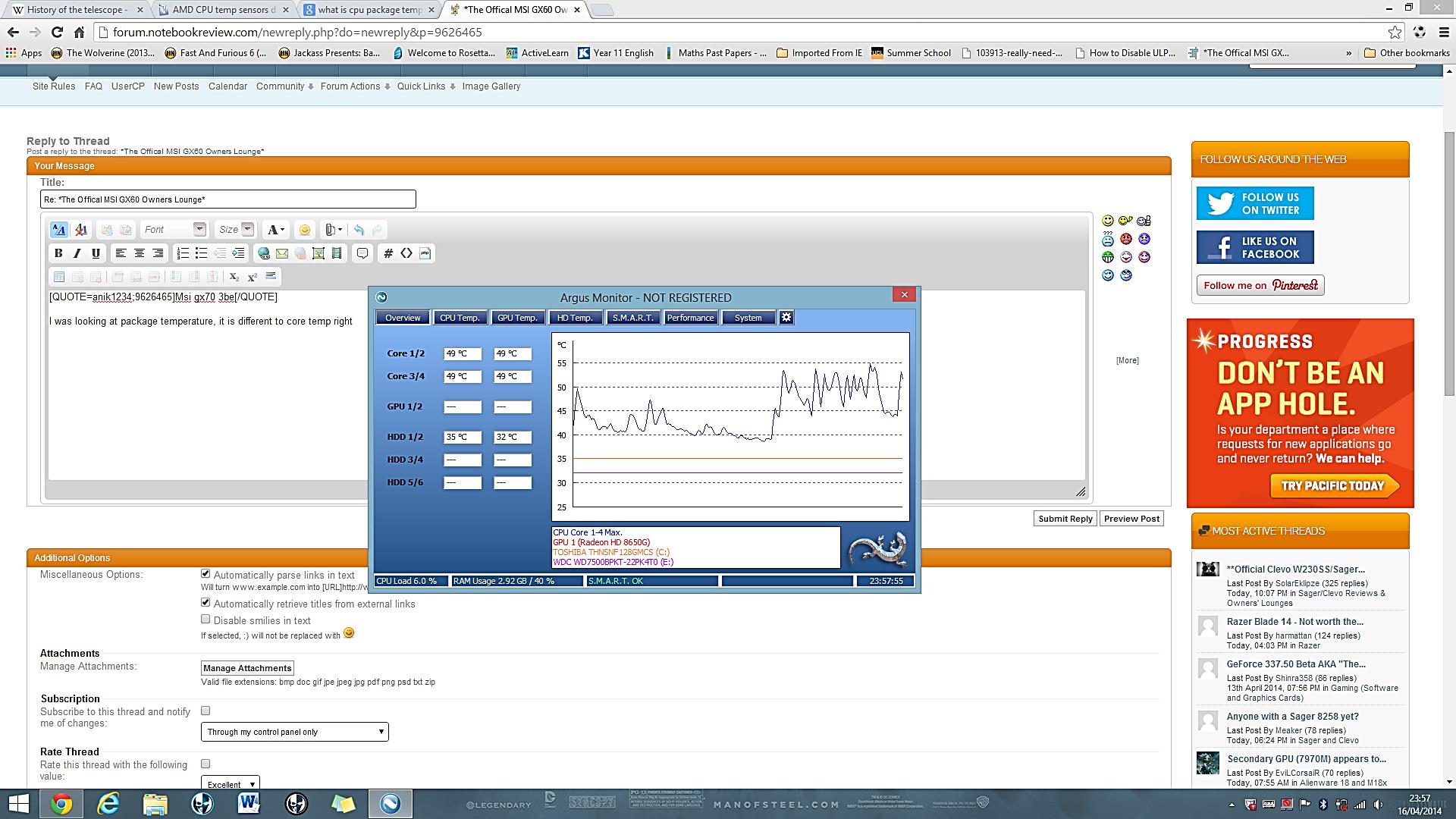
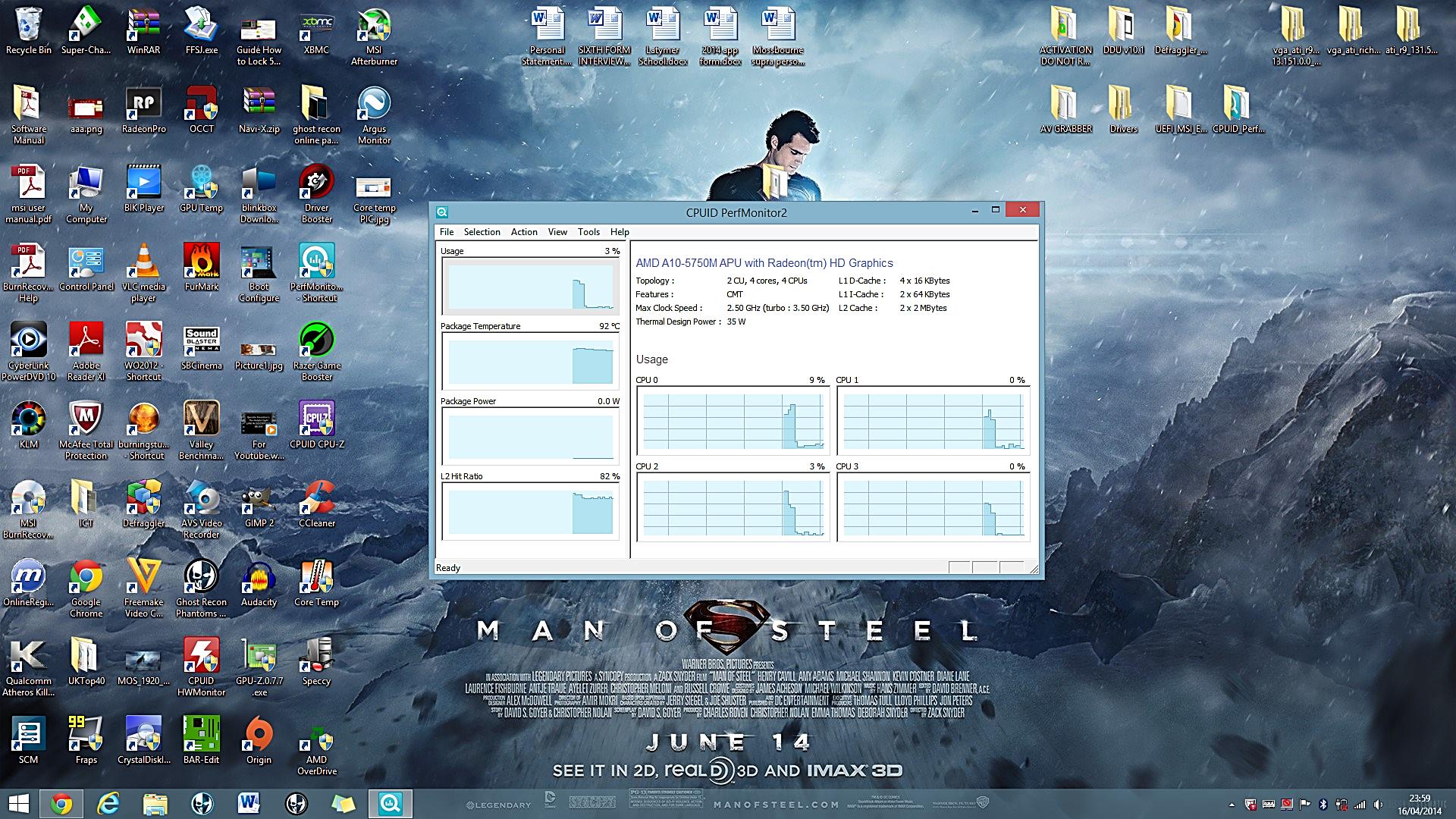
I was looking at package temperature, it is different to core temp right
Look at the core temp one (left) and Look at the package one (right)
The Core temp one is like 40-50ish but the package is 90-120 degrees, that means the core temp one is correct right not the package. 90-120degrees c will be too hot for a laptop isn't it so am i right and which one is correctAttached Files:
-
-
hwMonitor shows wrong. just dont look at that. there is no mobile component that works with that degree.
btw for me shows wrong also
use HWInfo64. more interesting features and reliable degrees. -
255 is a maximum 8 bit value which the temp sensor reports, it just means it has gone a bit funny.
-
Hello everybody. I have a MSI gx60. I have a problem with the sound driver. Without the realtek HD driver the sound is okay. When i try to install the realtek driver the speaker doesn't work. I need to uninstall them to hear the speaker. Can you help me? Thanks in advance.
Inviato dal mio Galaxy Nexus utilizzando Tapatalk -
have anyone played warframe with this laptop? i get very slow results when the fighting starts. I have turned down all the settings and even use the lowest resolution. Games like batman gotham city also plays badly.
-
Hello, for those who have heating problems leave here an application to control the fan works well, greetings.
https://www.dropbox.com/s/mtj1tlo7hsvxz44/setup.zip -
Somebody tried to flash video card 7970/8970 to bios 290m ??? and is there a difference ???
-
No difference really.
-
Just owners of notebooks with graphics 290m say that they have no problems with Mantle activation technology in games. At the same the burden like everyone else, closes the same four battlelfield 4 error.
-
is that worth then to flash it to play normaly with mantle at BF4?
second. is it safe to put bios from R290m to 7970m? its nor exactly the same hardware I think. R290m supports trueaudio thta 7970m doasnt -
Same hardware but it will be a risk to try. Have a recovery method handy.
-
flashing graphics card is always a risk. And I would venture, but I do not know how to restore the system correctly.
-
You can try, but 8970M is the closest thing to R9 M290X.
If VBIOS update fails, then you can recover the VBIOS under the circumstance that the VGA card is still detectable by the system. -
what about 7970m to R290m?
-
It may not work since they are different chip.
-
is that rly diffrent? I noticed only diffrence with memory that is 2gb for 7970m and 4 for 8970m
-
Hello everybody. I have a MSI gx60. I have a problem with the sound driver. Without the realtek HD driver the sound is okay. When i try to install the realtek driver the speaker doesn't work. I need to uninstall them to hear the speaker. Can you help me? Thanks in advance.
Inviato dal mio Galaxy Nexus utilizzando Tapatalk -
try stock driver from msi.com
if doasnt work then reinstal OS
after it go for service -
Hello, I recently purchased MSI GX60 Destroyer 3CC-278AU ( MSI GX60 Destroyer 15.6inch AMD A10 Gaming Notebook, GX60-278AU [GX60 3CC-278AU] - $1499.00 - Scorptec Computers). It came with 8GB RAM and 1TB HDD. Is it worth it to upgrade to 16GB RAM? Is it possible to add an extra 128GB SSD? If so, could you recommend me some such SSDs?
-
You can upgrade the system to 16GB, as well as 128GB SSD which is added into the primary slot.
-
Thank you. Another thing I have noticed is that when I'm gaming, the clock speed is at around 3.15GHz... but according to specifications it should be around 3.5GHz in turbo mode. Is there a way to fix this? With bar Edit I was able to lock it to 3.15-3.20 Ghz but how do I lock it to 3.5Ghz?
-
you cant. no known way.
even you manage it you will get lower performance cause 3.5GHz turbo is destinated only for 2 cores. the two rest will last at ~2GHz -
It's for a single 2 int 1 float module and you can't lock it to that speed.
-
So I've got a GX60 Hitman Edition, and ever since I got it it's been making some strange noises, near where the DVD tray is, when I move it sometimes. I've sent in a support ticket and I updated my firmware after they told me to try that, but so far no luck. Anyone else getting this? It's like a low buzzing sound, here's a link to what it's like https://www.youtube.com/watch?v=9ZXsCmqJV8I&feature=youtu.be
It'll also make crackling/popping noises. -
Does it change with fan speed or if a disc is in the drive?
-
Changing fan speed or having a disc in the drive doesn't seem to affect it. I am wondering if it's coming from that circular fan vent on the bottom, though.
-
Take the back cover off and have a closer inspection, fan, hdd and optical drive are the main suspects.
-
Hey guys, I've got a super annoying problem with my GX60 (first generation) and I really hope someone has any ideas that I haven't tried on how I can fix it. This morning I tried updating my video drivers, as it's been at least a year since I've done so. This...did not go so well. After installing the updated 14.4 Catalyst Mobility drivers, I started getting a pop up error on my screen. In an effort to fix it - as I hadn't yet realised it was linked to the new Quick Steam stuff - I uninstalled Raptr, which did nothing, so I ran the AMD Uninstall utility. My computer basically locked up during this and went perma-black screen, forcing me to reboot by holding the power button. After this reboot, things really went wrong - my USB ports didn't work (because the drivers for them had been uninstalled) and so I had to roll back to an earlier restore point when everything was still fine and dandy. Hooray for me, there's no more error pop ups and my USB ports are working again, because the restore is from before when I installed any drivers or uninstalled anything, so in theory I should have been back at square 1.
Here is where I get to the real issue - since the debacle with the system restore and the AMD uninstall tool, the switchable graphics has stopped working entirely. I have tried multiple different drivers, different versions of CCC (13.1, 13.4, 13.5 beta3, 14.4 all for Mobility, plus the 13.25 Embedded driver, and the 13.152 MSI driver from the GX60 Destroyer page, because the 8970M is really pretty much the same as the 7970M). At no point has my switchable graphics started working again, nor has CCC ever started again - it basically just crashes without an error every time I try to open it.
Oddly enough, I have been able to get the Catalyst Vision thing to open up (from the 13.1/13.4 drivers, it's not the same as CCC though), however that doesn't support any switchable graphics. I know the switchable graphics still 'works' in a sense, as it changes between the white and orange lights while booting up and starting Windows. At this point, I've done so many uninstalls, reinstalls etc that I'm losing my mind and I'm just about ready to throw in the towel on the laptop. If I'm absolutely forced to, I'll reinstall Windows, but I only want to take that step if I can be quite sure it'll fix the problem.
Any help, please, would be appreciated! -
Coat with 14.6 beta in the notebook usable.
AMD Catalyst 14.6 legt in Watch Dogs zu - ComputerBase -
The best, though certainly not the most convenient way - clean install OS . For me, it worked in a similar case . You can also still try to uninstall the driver using Driver Sweeper and CCC .
-
Driver sweeper/CCC usually works like a magic, unless the OS is somewhat damaged and not fixable by these utilities then it's time to move forward with a clean install.
-
So, for an update on my problem...I ended up blasting everything away, as a full driver sweep and CCC uninstall left me with a broken copy of Windows and I had to roll that back as well!
After reinstalling Windows I feared the worst, as the first thing I did was install the official MSI drivers for the GX60 (admittedly the Destroyer version, which is slightly different hardware) and then CCC started telling me there was nothing for the software to manage. So I installed the current 14.4 Catalyst drivers over the top without the reinstall, rebooted, and lo and behold I now have the latest drivers working properly with CCC and (near as I can tell) properly switchable graphics again.
Thankfully, all my games and other big apps were installed on the other hard disk, so I didn't lose any big ticket downloads, and all I have to replace are things like codecs, AV and whatever other occasionally-used bits and pieces I had installed. -
Figured out the source of it: That little fan on the back/bottom? If you look closely, it's got, like, idk, a fabric or something over it, and I'm positive the fan is hitting it or something. So I guess I have to RMA it because I don't wanna void the warranty and I can't think of what else to do. Ugh.
-
Some feedbacks on BF4 with mantle, now you can use it ? See improvements ?
*The Offical MSI GX60 Owners Lounge*
Discussion in 'MSI Reviews & Owners' Lounges' started by layjohn, Oct 12, 2012.