Problems? See this thread at archive.org.
How did you clean the dust from your notebook?
-
-
Only had some dust built up at the fan grill outside the case on the GPU side, just wipe it off, havent open it up for cleaning, I only had around 2 months of good use, mostly using my desktop
-
Well, if you used 1YO notebook only for 2 months, than you should not concern about the down time when you send it to service

Anyway, did you try to set custom colors with the Steelseries Engine software for your faulty keys? I think, it can help you to check, exactly which colors are not working for your bad keys. -
They're virtually the same: https://www.aliexpress.com/item/4000009940989.html?spm=a2g0s.9042311.0.0.6f8563c0fljcVr
I guess my original heatsink had some alignment issues with the CPU die because I had big temperature differences between CPU cores, plus very high temps compared to the new one. -
Strange say 8sf 8sg.i thing 8sg has one more pipe
-
There's another one that is more expensive with the extra pipe for the SG version. My card is the rtx 2070 and never goes beyond 70c so don't really need the 8pipe version.
-
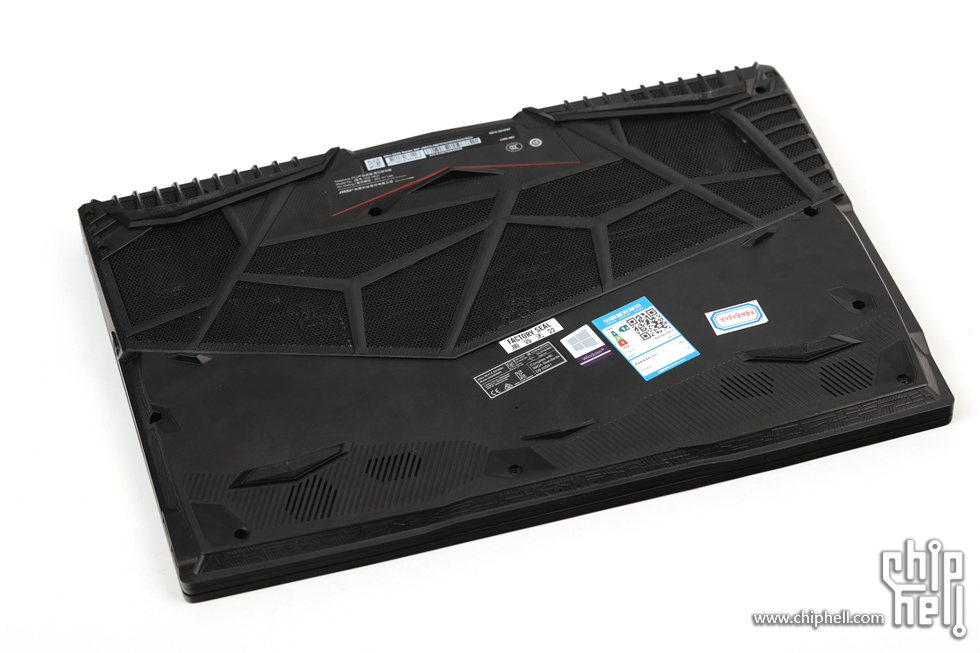
Damn look this is awesome.its like my custom made bottom cover...
ge65 raider has it from factory! I didnt knew..we need this for ge75.Attached Files:
-
-
do you know where I can find the one with the eight pipe?
-
Here, from same vendor:
https://www.aliexpress.com/item/400...d=9758amp-2QkgkytYOErrYhN5ygR7Rw1576319777399 -
good day! who knows help please. tell please I have ge75 8sg. In aida64 in the comfort mode of trolling no, in sport mode and the turbo there is a small throttle. Is this normal? have all so?
-
How is everyone enjoying their GE75. I am debating between this, the Strix III, and the Clevo PB71
-
Hi everyone, thank you for all the information you guys have provided in this forum.
I just bought my ge75 raider a couple of weeks ago and I am hoping for some help from you folks. I've been trying to do some optimization to the laptop (I have the ge75-9sg 657). My model came with 2x1tb nvme drives in raid mode from factory. I am planning to do a fresh windows 10 install from usb but I don't want the two drives in raid mode when I do the fresh install. what's the best way to go about separating the drives? I tried looking in the bios but I didn't see anything about drive configurations. Also, any guides on overclocking the ram? This model also came with 64gb of ram and performs fine but I keep seeing you guys getting amazing results from your OC'd ram and I'd love to get the most out of mine too. Thanks for any and all help.Last edited: Dec 15, 2019 -
so far I'm loving mine. I added LM to the cpu out of the box and it's been ripping through all the games I have. Also the screen on mine is damn near perfect even though I just got a random one from walmart. The only real gripe I have so far is the power supply. The lead from the brick to the power port is too short for my taste as I use the laptop in awkward positions at work and there isn't enough slack sometimes so I end up having to pick up the power supply and set it next to me.The end that goes to the wall is plenty long though.
-
Hey everyone , thanks a lot for all the info and help everyone shared with me, yesterday I sold my ge75 and will be getting a desktop soon.
-
The only clevo I like it's the p775tm1
https://clevo-computer.com/en/laptops-configurator/graphics-card/with-mxm-module-replaceable/
I was looking the scar before I buy the ge75 but I sawed this machine it's really runs hot. CPU hits 100c to many asus machines.and for some reason gpu dont give all the power at all, like this video.1500mhz gpu.when ge75 raider u will see 1800-2000mhz.
What ge75 u looking for? Rtx 2080 or 2070? But both it's very strong. I thing the ge75 it's the best choice at this money.the only laptop I would change mine it's the gt76 titan, clevo p775tm1 or area 51m.ofc very expesives laptops..
I enjoy mine so much.undervolted -150 mv.
bottom cover like ge65 raider.use on cooler pad
i use it now for desktop replacement with external screen asus xg32vq 1440p.razer keyboard and mouse. Gskills rams 3200mhz.( same perfomance like overclock stock rams).believe it or not I have same results at games like 8700k and rtx 2080 desktop.for now no reason to build desktop.i play bf5 ultra 1440p 100-120 frames. -
I have 16gig Ram Gtx2070 video card version and getting 80-90 degrees C on cpu with cpu heavy games. I am not playing demanding stuff yet but curious if these temperatures are normal. Should i get worried and start looking for repaste, liquid meta, external cooler options?
-
I had a SCARIII with 9750h+2070, and it's a beautiful computer.
It's the beautifulest laptop I've had
BUT, damn temp, even with LM, new pads, and XTU dv, it was fracking hot.
I had to send back to seller, and I took a GE75.
If I could have a GE75 in the body of the SCARIII, let's go
-
Yea its has so cool desing.very beautiful really.but damn this with temps it's very bad.every review ,every video,every forum I was looked for this laptop,all runs very hot.
-
U have undervolted it?
-
I wonder when the GE75 SKUs with the 240Hz displays are going to come available on a widespread basis. I see them advertised on MSI's website and I see one for sale in the UK on Scan, but it isn't out in the US or anywhere else that I can see.
-
Will the extra pipe make a big difference in terms of cooling?
Sent from my LM-V510N using Tapatalk -
I did not change anything on laptop. It is same as the day I bought
-
If you have a 2080 you should probably get it because it's the one that runs hotter. Otherwise, the GPU runs cool enough with the 7-pipe version (70c in my case with the 2070). I don't think it will help with the CPU temp a lot.
-
U need undervolt it with throttlestop.its easy and safe and give more life time to ur machine.all gaming laptop need undervolt.u will see -10c..if u need help ask
-
Is it cheaper anywhere else I can't find a model number on that page
Sent from my LM-V510N using Tapatalk -
Can I ask what are your undervolt settings?
Sent from my LM-V510N using Tapatalk -
-150 cache ,core too
-
@greninga what settings (Trfc, voltage, uncore, etc) did you use to reach 3200mhz ram frequency? Thanks!
-
TRFC 570 ,uncore +125 and voltage stock 1,20. Memory ratio x 11 for 2933 and x 12 for 3200mhz. Exhatly same settings has and my stock gskills 3200mhz. If u see any blue screen ( I dont thing so) try Trfc 600. 2933mhz also give very nice boost.
If u use throttlestop make system agent offset +125 for throttlestop dont get any crash. And maybe downclock ur cpu to.3,7ghz cause work faster and get higher temps.but 3,6 3,7ghz cpu with rams 3200 has same perfomance at games with i7 8750 5000mhz and stock rams lol..also dual channel rams it's big boost tooLast edited: Dec 17, 2019 -
New owner here with new GE75 Raider-655 (i9 9880h/2080). What have you guys been seeing for operating temps when gaming? I bought this laptop as an upgrade to my 5 year old Asus ROG G-751 (970m/i7) and I expected it to be a significant improvement for my use, which is Destiny 2. I'm finding that the processor temps creep up to the 80's range on anything demanding, the GPU lags about 10 degrees behind. Is this normal? It seems to effect performance at that point. I may need some optimization. I expected this machine to not break a sweat running D2, as my old machine didn't struggle, albeit at lower graphics settings than this.
-
@greninga I watched video guide and made same changes there. Now the watch begins. Any suggestions for 9750h ?
-
Man this machine u got it's a beast. Even an ge75 i7 8750 its beast so that it's awesome.all that modern cpu 6 core 8 core get high temps.that doent mean its struggle for play a game.i play modern warfare all ultra rtx on 160 frames average with i7 8750.all u have to do it's a good setup,at windows power plan nvidia panel and ofc u need undervolt it.if u are stock with no undervolt and u get 80s temp cpu this is not bad,this is really good.all laptop stock hit 95c.msi it's a little bit better at temps from others brand.u need throttlestop and undervolt with it.
-
Really everything I did at my cpu,at the end I back it to default.shift speed,remove power limit all that it's not worth.i removed power limit and the only I got it was high temps.everthing I did it was 1 or 2 more frames at game.the best think we can do it's the cooling,like cooler pad ,custom bottom cover,and undervolt.the real boost it is on rams.especially at that games don't has good gpu usage with stock rams.my friends ge75 raider has 16gb single channel ram overclocked 2933. He has at modern warfare at shoot house map 110 frames. My ge75 with gskill rams 3200mhz has at same map same place,same settings 160 frames.
-
View attachment 180835 This is my friends ge75.u can see the issue of ram.74% gpu usage and that mean 107 frames.
And this is mine.same laptops same game settings etc.but look gpu usage.95% for this 150 frames there.this difference cause of rams.we got pics hehe
View attachment 180835
Last edited: Dec 17, 2019seanwee likes this. -
Are using silent option or is Dragon center fine to use?
Sent from my LM-V510N using Tapatalk -
Anyone knows which kind of screws msi use in the GE75 GPU bracket? I stripped one real bad......
-
I've had mine since the 2nd day of release, it's been a great machine so far! Love it.
-
Would it be worth going from 2x8 2666mhz cls 16 Kingston HyperX to 2x8 3200mhz cls 20?
Have a friend willing to buy my current ram, so it'd be $20 out of pocket. -
Anyone ever tried playing on a 21:9 screen with the ge75 ? I got the rtx2070 version and i wonder if there's enough power for 3440x1440 or should I go for 2560x1080 ?
-
Dont know here..need test it.cl20 it's slow.but 3200mhz it's good.cl16 it's very fast.why u dont try overclock ur cl16 to 2933 or 3200?
-
I use dragon center 2.i like it. advance fans for gaming and auto for rest.
-
What games u play?if u play shooter like cod,bf5 I dont thing it's good.higher frames at this fast games it's awesome,and with ultrawide 3440x1440 u will have low frames.i thing at cod u will have around 70 80 frames.i play with rtx 2080 model at 2560x1440 and its awesome
-
I'm not much into overclocking anymore, for $20 out of pocket I'll give it a try and bench it and see. If it's slower I'll send it back.
Do I just leave it on XMP when I install it or do I need to manually change the settings? Is it possible once I get the new ram to leave the speed the same but just change the CLS settings?Last edited: Dec 19, 2019 -
But people were reporting on this thread that Dragon center forces an unwanted undervolt on the CPU are you noticing this?
Sent from my LM-V510N using Tapatalk -
I have 16x2 HyperX 2666Mhz CL15 overclocked at 2933, maintaining the stock timings. So far so good!
-
What were the settings you used? I might give this a try this evening.
-
Only changed the multiplier from x10 to x11
-
how do you change it sorry for stupid question.
-
Can anyone answer this for sure? Hoping I didn’t shoot myself in the foot for poor research here, but I bought an ASUS ROG Swift PG278QR (1440p with overclocked 165hz) to compliment my GE75 Raider 655, and found out after the fact that I may not have done my research. Turns out it is limited to 60hz on HDMI.
So, I ordered a Mini DisplayPort to DisplayPort cable (1.2) on Amazon. Can anyone confirm that the output port on my notebook can support 1440p at 144hz?
It’s tough to find answers, but I think it does? -
Is everyone still using silent option or dragon center for the fan controls?
*** The Official MSI GE75 Raider Owners and Discussions Lounge ***
Discussion in 'MSI Reviews & Owners' Lounges' started by Spartan@HIDevolution, Nov 12, 2018.