Problems? See this thread at archive.org.
I thing many ppls compare temps with auto fan at dragon center vs silent option maybe with higher rpm fan at silent option.
-
True, I didn't check if the DC fan & silent option custom were matching (had both programs running). Maybe We should test with coolerboost on....
I will try this after repaste, I have 15° between cores !
Edit: I tried with my "origin" throttlestop profile (only systemagent +125 & and 36x multiplier) and no temps difference with the undervolt profile.... Guess i missed something in the bios ! -
I dont thing it's from bios.i thing it's something wrong at undervolt..why u use system agent 125? U have overclocked the rams and use uncore 125 at bios?
Can u pic ur undervolt settings?u do undervolt at cache or only at core? -
Yes, overclocked RAM at 3400.
Here are the throttlestop FIVR:
![[IMG]](images/storyImages/ipXu4BX.jpg)
![[IMG]](images/storyImages/9KeMqGe.jpg)
![[IMG]](images/storyImages/YzHLxEu.jpg)
-
Yea Undervolt it's ok. So for what temps we talking about while gaming at 3,8ghz or 3,7ghz.
-
Yea I found u. U need try benchmark with fans at max before start the benchmark .if u have auto fans and start benchmark some CPU cores peak very high temps cause fans at auto need some time to spin at high rpms .so we have wrong results.try one benchmark with max fan on before start benchmark
-
But with rams at 3200 or 3400 u need forget about 3,9 or 4,0ghz ur CPU.even if repaste u will hit high temps.only if u use LM.
But even 3,0ghz if u set ur CPU u will have better results at games vs stock rams and 3,9ghz CPU.
I have clock mine to 3,6 every day use and I let it there. Gaming with 70 75c at CPU.just maybe lose 2 3 frames.i thing it's not worth that temps for that frames -
After 2 1024M throttlestop bench at 3800Mhz
![[IMG]](images/storyImages/vaKDik5.jpg)
I will try new bench after repaste, at the end of the week. -
So I did the bios mod that @AWholeHam posted back in Febuary, now the temps are better but still hot its reaching over to the high 80's. @greninga can I see your advanced fan profile for gpu and cpu?
-
Can you please link the tools and mesh you used to build the custom cover?
Thanks! -
i used a dremel-like tool with the smallest "wood/plastic" wheel (I tested 44, 32 & 22mm, My preference goes for the 32mm but the others can do the job):
![[IMG]](images/storyImages/drill-dremel-accessories-6pcs-set-hss-circular-saw-blades-power-tools-wood-cutting-disc-grinding-wheel-set-for-dremel-tools.jpg)
I don't recommend using this one because it melt the plastic :
The finishing touch with a classic metal nail file (thank you darling) like this one:
![[IMG]](images/storyImages/070020A001_80116077252725_LimaUnghieAcciaio_big_22122016171918.png)
The mesh is aluminium, I can't tell you the model, but I choosed this one cause it's 1mm thick, there was another one more studier but 2.5mm, I'm not sure it can fit (the 1mm doesn't touch the pipes so...)
I also choose to fit 1 whole piece of mesh for the "rigidity", I can't compare with other but when i press on the mesh, there is no movement at all.... but it took me 1h just to cut it as you see it Last edited: Dec 31, 2019
 -
I'm wondering, would there be any use to put in contact the mesh and the cooling pipes ? Like on the desktop CPU cooler.
With some thermal pads or someting else ? In this configuration, it would be beneficial to have the thickiest mesh ?
Or is there any risk of "electrical short circuit" ? -
-
I'm back after repaste, took me 4 hours
. Don't take this post for "here's what you have to do", it's my first repaste on a laptop (last repaste was in 2008 for my intel q6600 !)
I didn't take photos for the teardown but just unplug the AC& battery (1 screw) , the 2 fans & 1 big nap with black tap near the GPU fan.
Take off the screws (I did from N°11 to N°1, hope it was the right order?), the stock paste make the cooling system "hard" to remove, just try to pull with small rotation (I don't recommend to pull by the fans in order to prevent copper pipe from bending)
And here you are:
![[IMG]](images/storyImages/0w7WmSC.jpg)
![[IMG]](images/storyImages/lBLTqsl.jpg)
The professionnal tools....
![[IMG]](images/storyImages/cNnVc8q.jpg)
After cleaning:
![[IMG]](images/storyImages/bfBLJgL.jpg)
![[IMG]](images/storyImages/rjqf4JQ.jpg)
THE FOLLOWING PADS ARE WRONG, DON'T DO THIS
I used thermal grizzly kryonaut & minus pad 8 (120 x 20 x 0.5mm). I didn't replace the pink ones on the CPU cause it seems to be thicker (1mm maybe) and hadn't enough to cover it.
NB: One of the pink is on the cooling system, it started to tear when I tried to pull it off...
![[IMG]](images/storyImages/GO7bApu.jpg)
I don't know if the paste spread is ideal but here are the résults :
I used cooling boost with 2x Throttlestop 1024M bench (around 3min 100% CPU test at 3800MHz), temps are "lowest core - max core" , NC for noteboock cooling pad:
Stock paste Repaste
Origin cover: - on desk 84 - 96 (Prochot 95°) 73 - 77
- NC off 79 - 96 67 - 71
- NC on 79 - 94 67 - 70
Custom cover: - on desk 82 - 96 (Prochot 95°) 71 - 76
- NC off 78 - 94 66 - 70
- NC on 77 - 93 64 - 68
Damn, that's more than I hoped ! Or did I damage the thermal probe ?!?!
I had more than 19° difference between cores, and now 5° max, seems good to you ?
I Tested CPU at x40 and temps were 70 - 74 ! (with ring +125 and RAM @ 3400)
Cinebench R20 3087 , fan on "auto" --> 81 - 87 ° , 70 - 74 with custom silent option profile and 64 - 72 with cooler boost.
Now for the GPU part, I haven't played yet but 3D mark gives me 8002 / GPU 8188 / CPU 7092 , with 71° for CPU, and 79 for GPU (I never had more than 70° before so i messed up somewhere) and the graphic score is lower, does the CPU takes all the power ?
Don't hesitate to give me advices if something feels wrong to you, but for now.... TIME TO PLAY !!!!!!!Last edited: Jan 3, 2020thefatapple and Kevin@GenTechPC like this. -
It not possible as the pipes are not on the same level and the CPU screws are higher so... too much brainstorming for me
-
The stock "thermal pads" are paste so you end up lifting the heatsink a bit from the GPU die because you removed the thermal goop and replaced it with 0.5mm thick pads, you can see that at least in the VRAM chips the gap was in the 0.1mm range, better to have used K5 Pro than thermal pads, would net you even better results.
Ulukai and Kevin@GenTechPC like this. -
Nicely done, this was still a profit.
-
Do it again.first u need a gun hair from far! And not shooting to one place ,just move it for some minutes and the pipes will remove easy.
Thermal pads 0,5 dont work with pipes.u will see if u open it,u can move the thermal pads.thats mean the pipes dont touch the thermal pads..I have repaste my ge75 3 times.just for test.the one worked best was to spread kryo with kryo tool to all thinks. Cover cpu gpu with thin surface with kryo tool.vrams also with kryo paste.like stock. U need about 2grs kryo
U did great job to cpu but that pads dont work.
Edit: dont play nothing.u dont see temps at vrams and I thing it's very high.u see temp only to gpu.and that vrams tranfer +10 c to ur gpu from before.Last edited: Jan 2, 2020Kevin@GenTechPC and Ulukai like this. -
what are those pink pads? 0.5mm fujipoly? -
If i'm not wrong, he Vram doesn't risk anything as they are in contact with the pads, It's the GPU that's too "far" from the heatsink ?
-
I remember reading on this thread that MSI receommend to use 0.5mm pads, if not for the gpu, where is it ?
On this photo, every color represents a different height, but I guess the heatsink is design to apply everywhere with the same pressure ?
Or do you recommend pads / paste on those colors ?
![[IMG]](images/storyImages/LUHlg4I.jpg)
-
there is new DC update anyone try it?
-
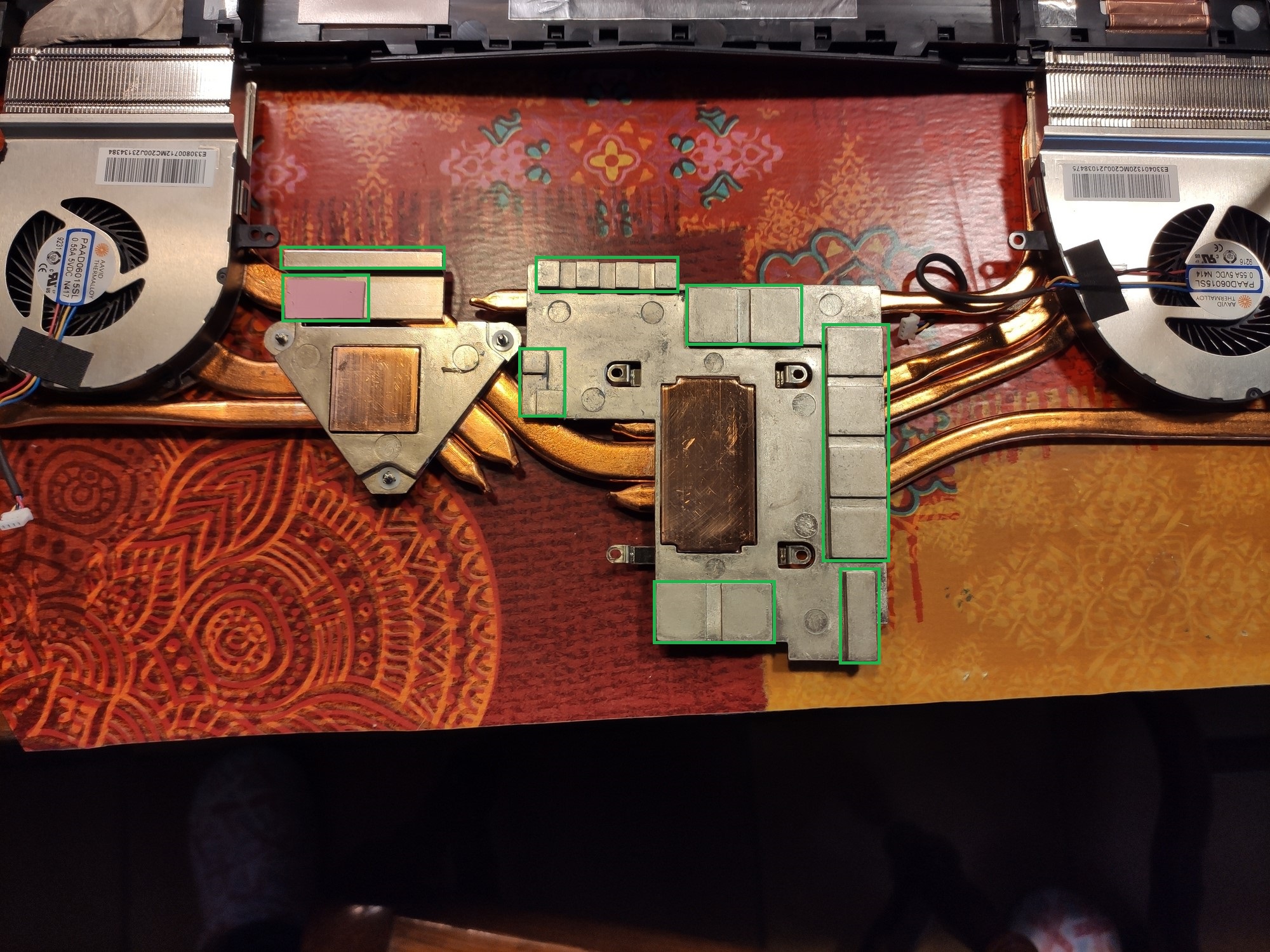
OK, K5 pro on the way ! Thx for the info, but where should I put it ? (see previous post with colored photo)
-
On the VRAM chips, MOSFETs and inductors(chokes), all the zones marked in green on the attached image.
Attached Files:
Ulukai likes this. -
-
Lol ok thx, so there's no thermal pad at all ???
For the K5 pro, you apply it on the chips or on the heatsink ? -
I'm curious:
What thermal paste did you use and how long did it last until the performance began to worsen? -
You can apply thermal pads on those area to help to transfer heat away. This can be applied either way.
-
Hey guys i have 8750h-rtx2080 version of ge75. I am using external monitor 1440p@144hz. Is there anyway to render some games 4K@60Hz. There is no DSR option and when I add from CRU i get out of range error from my monitor.
Any help is appreciated. THANKS! -
Which external monitor do you have? Do you have like a model number?
-
This is not a 4K monitor so no, you can't do 4K@60Hz, but you can do 2560x1440@60Hz.
-
I know that im trying to imitate DSR, rendering the game at 4K and showing it as 2K so that image sharpness increased.
I tried something with Intel graphics center I manage the have 4K desktop and game, after im finished with the game I reverted back the settings and now im unable to do that again. -
Did you go through Nvidia GeForce Experience to setup DSR? See below link.
https://international.download.nvid...on/dsr-auto-enabled-in-geforce-experience.png
-
Since your notebook has IGD, did you create a custom resolution using CRU?
-
I dont have any DSR option neither in nvidia control panel or geforce experience.
This is from CRU. It only worked once, now when I enable this from intel graphics command center or nvidia control panel or windows i get Out of Range. -
Kevin this options it's from desktop right?
I dont thing laptop has dsrKevin@GenTechPC likes this. -
-
Performance doesn't worsen but I've observed CM master gel maker start to get hotter at 1.5-2 years and TG kryonaut at 3 years
-
Hey guys! First problem with my MSI GE75VW.
The keyboard RGB started glitching a bit now and then...
The RGB scheme that get's activated when you press FN turns suddenly on for no reason (like blinking).
Seems to be doing that also if i don't touch the keyboard at all (need some more investigation for that, tho).
Then if i press any key, the light goes back to how i set it in SteelSeries Engine 3 (that is currently installed)
It happens once every 10 minutes or so.
It happened also when SteelSeries Engine was uninstalled, i installed it just to check.
It does this with every premade RGB configs in the software.
Now ill'check if it happens also when i don't touch it. -
What's the version of BIOS & EC? Check with MSI to find out if there's a newer firmware available for your keyboard.
-
Oh yeah it was easy as that
Updated BIOS and EC Frimware, seems to be fixed!
Thanks kevin, really kind and useful also here hahahKevin@GenTechPC likes this. -
Hello again Greninga, just to be curious, what difference in temps did you saw between stock paste and the best solution you reached with kryonaut?
-
Well mine I thing was good paste from stock.i had with stock paste and undervolt about 85c.i remember dont made big difference at all. Around 3-4cKevin@GenTechPC likes this.
-
3 - 4C is pretty good already.
-
Can someone let me see there fan profiles in Dragon center when set to performance settings?
Sent from my LM-V510N using Tapatalk -
Can't help you, since i use silentoption, the DC fan profile is the same "customised" as silentoption.
In performance mod, in DC, the default fans are on "auto" (never changed this profile)
*** The Official MSI GE75 Raider Owners and Discussions Lounge ***
Discussion in 'MSI Reviews & Owners' Lounges' started by Spartan@HIDevolution, Nov 12, 2018.