Problems? See this thread at archive.org.
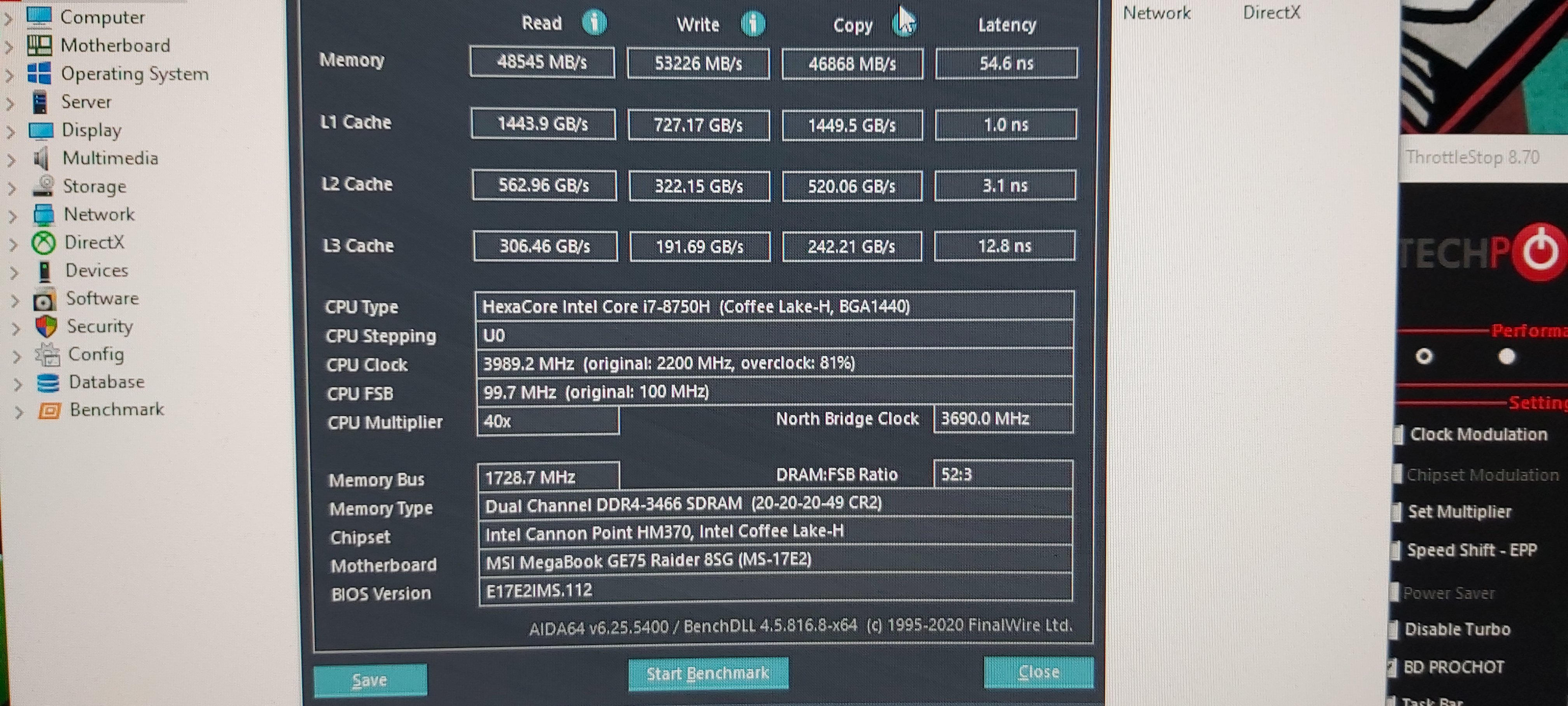
Here is 3470mhz. I wanna.try lower cl at 3470mhz.
-
Attached Files:
seanwee likes this. -
-
I there a free version of aida64 for this bench ? mine is "blured" with "trial version"
-
try this
UKW61-IRBD6-FJDNX-A4D34-FYY11 -
I have CL15 3000Mhz stable.
Is it better than CL18 3200Mhz? -
Can you run the AIDA64 RAM Benchmark?
I guess the important numbers would be the Read & Write Memory Bandwidth.
On paper CL15 3000 has better latency. -
Here are my results for today, I managed to run at 3400MHz with uncore +125 (Hackness guide) but CPU got too hot during stress test, so I stick with 3200MHz and uncore at +40 --> T° stay under 85°C
Edit: I had trouble for "stable" results in Aida64, It resolved by puting speedshift at 0 in ThrottleStopKevin@GenTechPC likes this. -
I've adjusted mine a bit after looking at other people's post's here and but i'm not sure if it's good or not based on the numbers wheni compare them.
https://imgur.com/a/S2a2fgo
-
It seems better than mine ^^
Can you post a pic of your bios setup ? uncore voltage ?
Is there a way to set the "Northbridge Clock"? Mine seems to always be at 3.9Ghz (instead of 4GHz ?)Last edited: Apr 28, 2020 -
Hey guys....what does this mean?
Edit: Nevermind...it's all goodLast edited: Apr 28, 2020 -
Try one with best perfomance at battery icon.and one with better perfomance.this.can show u and 1800mhz. Its happens.and this number it's not stable.its change every second
-
Buy a faster one
-
What ur benchmarks guys?
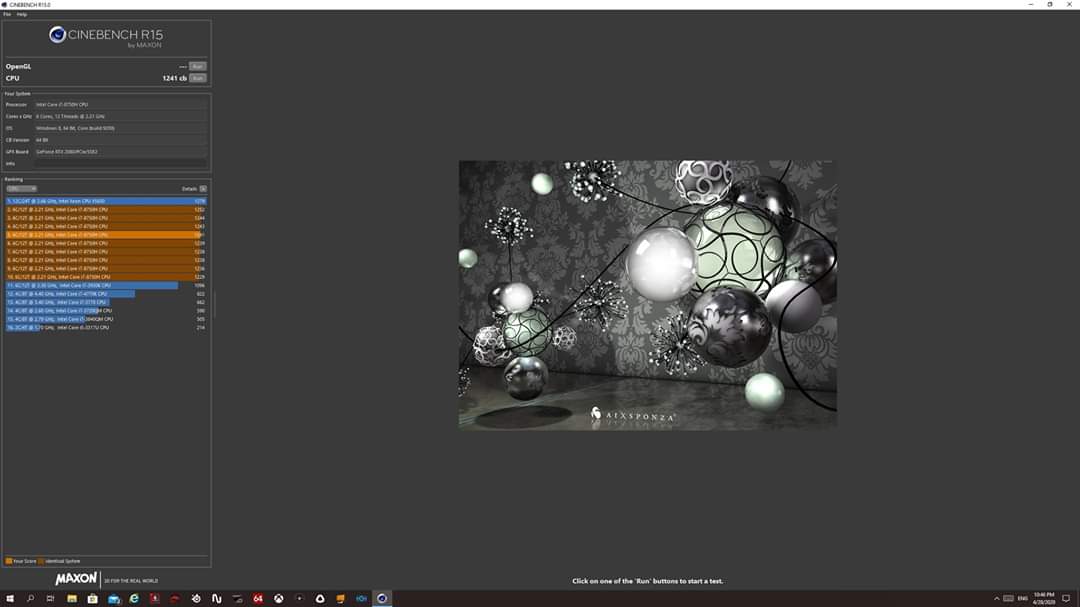
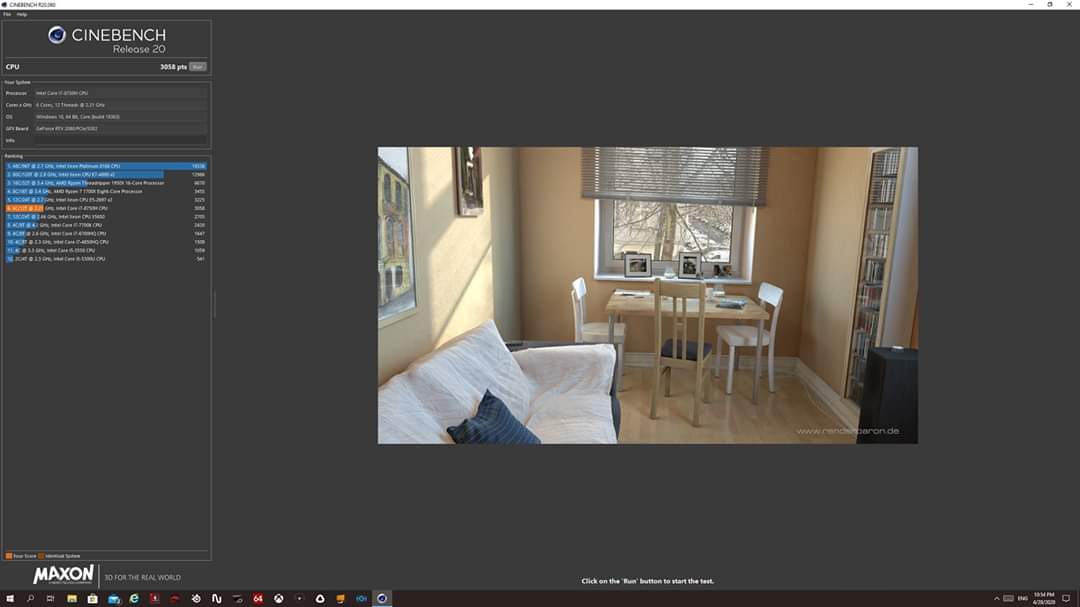
Cine 15r 1252 max cine 20r 3058 i7 8750hAttached Files:
-
-
Cinebench 20: 3066 Points @4GHZ
Attached Files:
-
-
Back when i first got LMed and bypassed the cpu power limit i got on average 1317 in cinebench R15 and average 3229 in R20.
I'll run cinebench again later -
U can push more.i have 8750h. At last 3150+ like seanwee
-
Run cinebench 4 times, discart the first result then average the rest.
The first result is always lowergreninga likes this. -
R20 with i7 9750h --> 3094 - 3104 pts
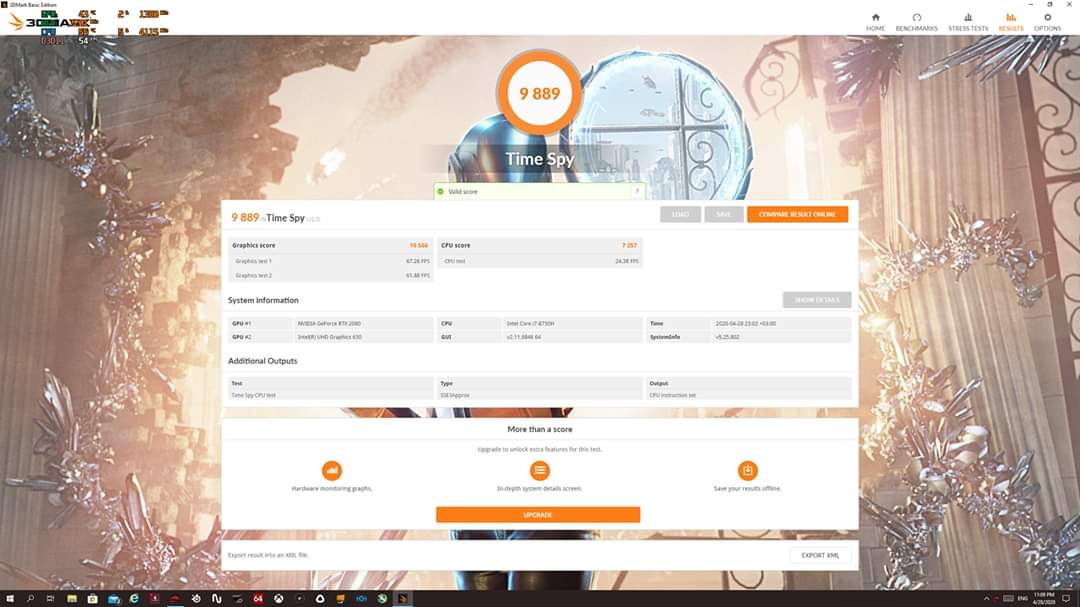
Timespy 8259 (Graphic 8431 CPU 7408): https://www.3dmark.com/3dm/46285126
Do any of you run occt stability test ? when avx2 is activated, my CPU @ 4.0GHZ reach 90° with fresh repaste..... I don't know if it's "normal" with this test or not.Last edited: Apr 29, 2020 -
Dont know but count and ur faster rams.it gives around +5c I really thinking for liquid metal but dont know if have any bad side effect after year
-
When I look at my repaste job.... I KNOW I can't play with liquid metal

-
What paste u use? I use grizzly and for the first days the temps it's really low.but for some reason every time after some days the temps increased and then stable there.
-
Ran Cinebench R15 and R20
R15
Run 1 (discarted)
Run 2
Run 3
Run 4
Average : 1321.6 -
R20
Run 1 (discarted)
Run 2
Run 3
Run 4
Average: 3243.3greninga likes this. -
Same paste here, kryonaut is the best I tried so far. But the Noctua seemed to stay in place longer.
-
Hello guys (and girls?)
Yesterday i recieve my new notebook, its MSI ge75 raider 8sg (i7 8750h and RTX 2080). Its loaded with 32 gb RAM and 2x M. 2 ssd working on RAID0.
First impresions:
-It is lightning fast (my previus laptop was 7 years old ASUS g750jx)
-And it is hot as hell...on boot up and windows start up temp were over 90°C
-And omg how he is loud under load hehe.
-i will need to get use to small enter key on keyboard (left one)
First improvments:
I apply - 142 mV undervoltage on CPU and CPU cache
I also underclock the CPU by 0,2 GHz. (2 clicks down on all combination of core multiplier)
Results so far: CPU temps now in range of 70-80 under full load with fans lightly kicking in.
I also ordered cooling pad so i can get some elevation from notepad and some cooling.
Question for you guys (and girls?!?):
1. Any way to diable intel GPU?
2. On MSI afterburner i have undervoltage for GPU locked. Is there any way to set undervoltage to GPU?
3. Here is 278 pages for owner lounge and maybe some of you can help me faster.
Any good repasting guide? Where to apply which paste or pad, etc? (i have also ordered already 10 g of kyronaut).
4. How many times per year are you repasting your ge75?
5. Any info on if repasting break your warrenty?
6....
Thank you! -
Welcome Rodo1ju !
1 - Your laptop has optimus, so you can choose the GPU to use for each program in the Nvidia config
2 - The GPU is most of the time "power limited", and (in may case 2070) never go above 70 °C, but for more perf, you can choose "curve" in afterburner, there is a test/scan included
3 - I posted photos (will had the page if you don't find), only used kryonaut everywhere but on the CPU VRM (I let the stock pink pads)
4 - 3rd time for me in 1 year use, but the first one wasn't good so only last 2 month
5 - Depends in witch country you are
6 - Sadly no "summary post", but take your time to play with your beast ! And there is Hackness post for throttling problem resolution, very usefull info there: http://forum.notebookreview.com/thr...trol-of-the-i7-8750h-advanced-version.823065/
Also, I found the AVX2 ratio in the bios (overclocking --> processor --> ...) but whatever I put in there, there's no modification in the CPU core ratio, anyone can help me on this ?Last edited: Apr 29, 2020 -
Hello mate! Well we have same model.i can tell u it's very nice laptop.and after from expesive gt76 titan and area 51m its follow this.u can push more ur undervolt I thing.around -150mv will work stable.
1) disable optimus maybe only with modded bios from svet at msi forum. For u get direct power from nvidia only with external monitor like I use,and really can get so close to desktop rtx2080 perfomance.
2) for msi afterburn use CTRL+f for open the curve voltage.but also turbo mode on dragon center works like undervolt. It use same voltage as sport mode (around 0,900) but with increased clocks speeds.and it's very close to limit.u can make curve around (0,880v) for 1800mhz clock speed.but it's really close to same as turbo mode.
3) i have use only kryonaut paste with good results. Today morning I repasted it again with pea method and less paste from last time.results it's better.need we see if will be stable at next days. I have use grizzly pads 0,5m at vrams and the results was very bad.gpu from 70 went 85c.so pads even 0,5m for me it's to thick enought for heatsink doesnt fit good to gpu.i use grizzly paste also at vrams for one year+ with no problem.at stock have paste too at vrams.
4) I repaste it every 6 months about depends of use.
5) it depends of country what "brake" warranty.
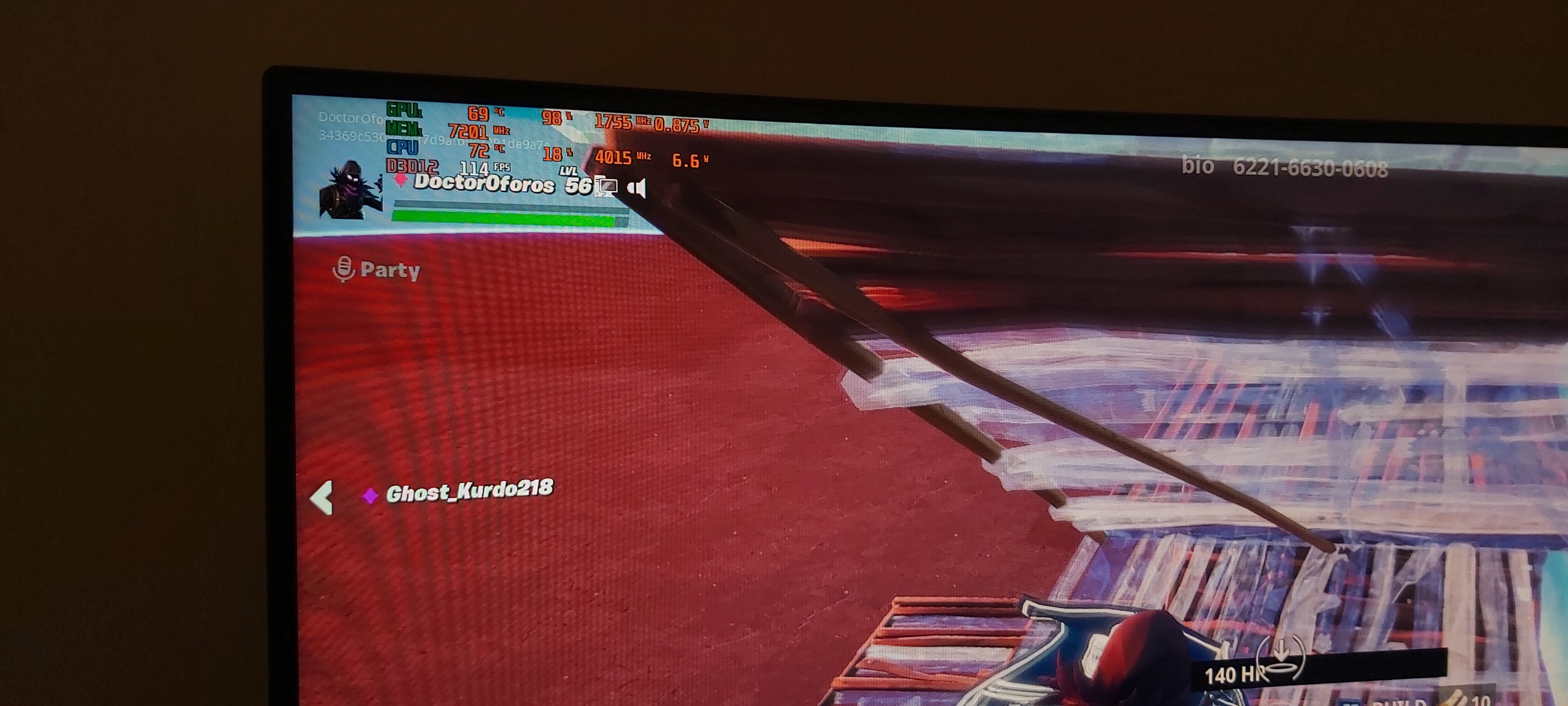
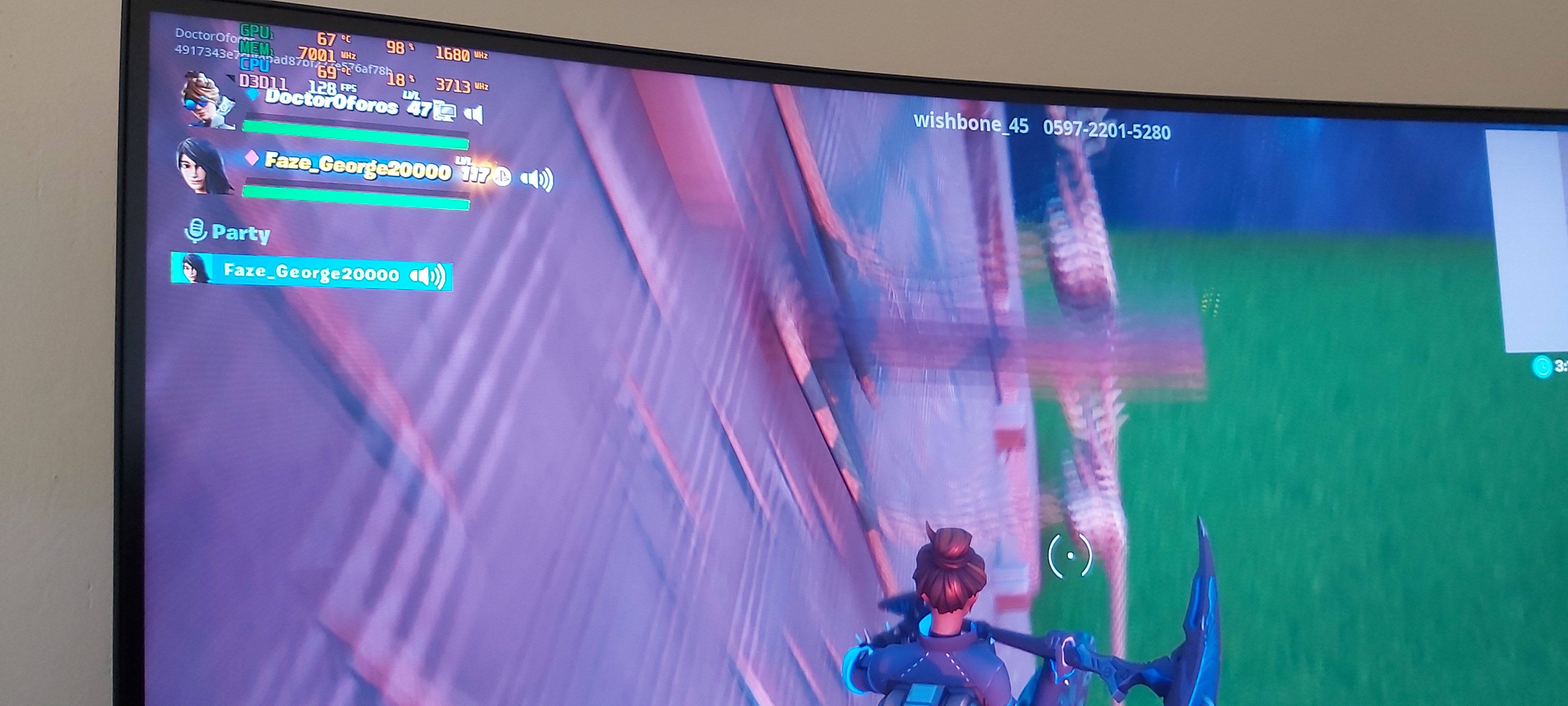
This pic its today after repasting.i use external monitor 1440p ,my son play fortnite at epic settings 1440p. and that temps its after 2hrs gaming at 3,7ghz and sport mode.
Also my rams work 3200mhz.that increase cpu temp a bit and perfomance a lot at many gamesAttached Files:
-
-
I have search a lot about overclock that cpu.really noone can.maybe with some mods at bios can give more watt? Maybe dont know.but the cpu clocks its locked inside the chip,and noone knows how.
-
It's not for overclocking, but I want to reduce the core multiplier ratio when avx2 instructions are used( I play the division 2 and It get's hot hot hot).
The idea is for exemple:
- Normal use --> CPU core ratio x40 for all core use --> 4Ghz
- AVX2 use --> CPU core ratio x36 for all core --> 3.6GHZ
without avx2 30min stress test @4GHZ = 82°max
With Avx2 30min stress test @3.8Ghz =90°max
So I want to clamp CPU @ 3.6GHz when Avx2 instructions are used but don't know how....Last edited: Apr 29, 2020 -
The only u can do about ur cpu it's to park the cores dynamically.that means some programms and games when use less cores u will see higher mhz than 4ghz.
Edit: I thought u would do overclock xd -
I dont use avx2 why u wanna do change from there?
-
Avx2 are intel instructions (like mmx, sse, etc...), some sofware use them, in my case its the game "the division 2", so instead of Seting my CPU @3.6 GHz, instead of 4Ghz on all core with thottleStop, I want to set this AVX2 ratio offset to 4 so that my CPU runs normaly at 4GHZ and whenever it detect Avx2 instructions, it automaticaly swith to 3.6GHz
This option exist in the bios but I Can't make it work -
For I understand u want make avx2 work at 3,6? Make it -4 offset
-
Create a gaming profile in throttlestop and use that for gaming.
All core 4ghz is only for benchmarking. In most games 3.6ghz performs the same. -
I tried but doesn't work...
Yes, it's for the exemple, my gaming profile is set @3.8GHZ, maybe I'll create a AVX2 profile
Ok, Got something, If i play with speedshift in throttleStop, it changes CPU ratio... but doesn't lock it at -4, it's @ 3GHZ .... -
avx offset not work only under ,.avx load
for gaming need stable freq ,,3ghz or 4ghz not different
use mem oc or dualchanel or gpu oc -
Hi,
-155 mV is stable using windows and benchmarking (TS bench). But in game it crashes, i found that only -140 mV is stable for game i am playing.
Thank you for other anwsers, firstly i need to get paste
-
The other thing that worring me is hot surfaces... I manage to keep CPU and GPU temperatures under 80 °C but keyboard keeps geting hotter and hotter, is there anything wrong?
-
Hmm dont know cause I use external keyboard.but when I touch laptop keyboard doesnt feel so hot. Make some space under of laptop for best cooling.this really work very well
-
My keyboard is warmer in the middle than to the left where the WASD keys are.
I think what you perceive as "hot" are just the "normal" thermals from the chips.
As greninga ponted out, raising the laptop for better airflow should do the trick.
You can try with a book under the backside. -
Thanks for help. What is not normal for me is that keyboard is warmer on the left side, and cool in the right side. CPU temperatures are below 80 °C. I am not using cooling pad with 4 fans....i notice some difference, but keyboard is still warm/hot.
-
Hey everyone, Long time no see
Just wanted to ask can you people please share with me the memory model on GE75-9sg and GE75-9sf (Easiest way is through the SPD tab in CPU-Z)
I wanted to share mine with Jarrod for his memory video but the problem I can't find any screenshots of my (Sold) GE75 memory model, as they were clocked at 3470mhz with low latency and 50k read.
Which helped a lot with the low 1% and in most of the new MSI laptops (10th gen) they are being shipped with 2666mhz ram instead of the recommended 2933mhz ram and he wanted to check if they are the same model as the ones I had in my GE75 to know if they are a better option than worse 2933 models as the 2666mhz clocked much higher.
Thanks a lot -
-
Update from me. After 2 days i finally figure some good throttlestop values.
It is interesting that some games are sensitive for undervoltage on CPU cache. So the settings that works for me is - 250 mV for core and - 125 mV on cache. Stable...so far. With this settings i set CPU clocks for 3,5 GHz for all cores and i am geting temps from 70-74 °C, during gaming or benchmarking.
CpU is using around 35 W with those settings.
I am hoping that when i repaste it, the same temperatures will be with power usage of 45 W.
2 Questions for you:
1. Is different undervoltage for CPU core and CPU cache bad for laptop?
2. Why is my battery loosing charge when i play games? Is it that charger is not powerfull enough? -
The cpu undervolt is tied to the cache undervolt so when you set - 250mv its not actually -250mv but rather -125mv, same as cache.
And yes, if your laptop is losing charge while gaming your adapter is too weak. Get the 280w ge75 charger.
Btw, can anyone with a stock ge75 post their cpu tdp numbers when running prime 95? Because I see many users and reviewers have very low reported tdp even at higher clocks.
Like 3.9ghz all core at just 45w in Jarrod'sTech's review which is too low.alaskajoel likes this. -
Hmmm interesting...then why my temperatures droped?
Before i was - 140 mV on both, now i am - 250 mV and core and - 125 mV for cache and temperatures droped so i rise cpu multiplaier for two clicks (200 MHz) and temperatures are on the same level then before....
And i have 280 W charger....20 V, 14 ALast edited: May 3, 2020 -
I thing only at xtu cant set different undervolt at cache core. Throttlestop works.Undervolt it's safe.the only bad think can happend it's to crash during ur work at document or creation and u lose all ur work. Do a throttlestop benchmark to see if get any error .also the charge battery starts when drop to 90%
What mean stock? Cause 45watt it's the limit for long time. I tested now. Normal stress about 75 watt stable and maxim stress test 100watt stable lol... 8750h undervolted
Btw I stopped that maximum power stress. I dont wanna see that hahahaLast edited: May 3, 2020 -
I am using 60watt 3,9ghz stable at benchmarks and games max 80c at normal games and max 80 85 peak at open worlds games. So I am running all the games at 3,7ghz and temps 68- 73 ( 3200mhz rams ) if I am using stock rams I get lower temps
This is how runs fortnite when my son play after 2 hrsAttached Files:
Last edited: May 3, 2020 -
-
Thanks a lot, can any one else also post to confirm that they are using the same model?
I remember mine would boost to 50w for a sec or two then lock @45w for the rest of the load. and the weird thing for me even with the Imon slop trick it will add up to a perfect 45w. -
Thats what im talking about. It vould be msi applying a power limit trick themselves from the factory to get better performance.
*** The Official MSI GE75 Raider Owners and Discussions Lounge ***
Discussion in 'MSI Reviews & Owners' Lounges' started by Spartan@HIDevolution, Nov 12, 2018.







![[IMG]](https://abload.de/image.php?img=untitledfdsgdsfdsi4jei.png)