Problems? See this thread at archive.org.
ok, thx for the infos, I'll take a look at this core park thing
-
I am using "quickcpu" program. It's very nice
-
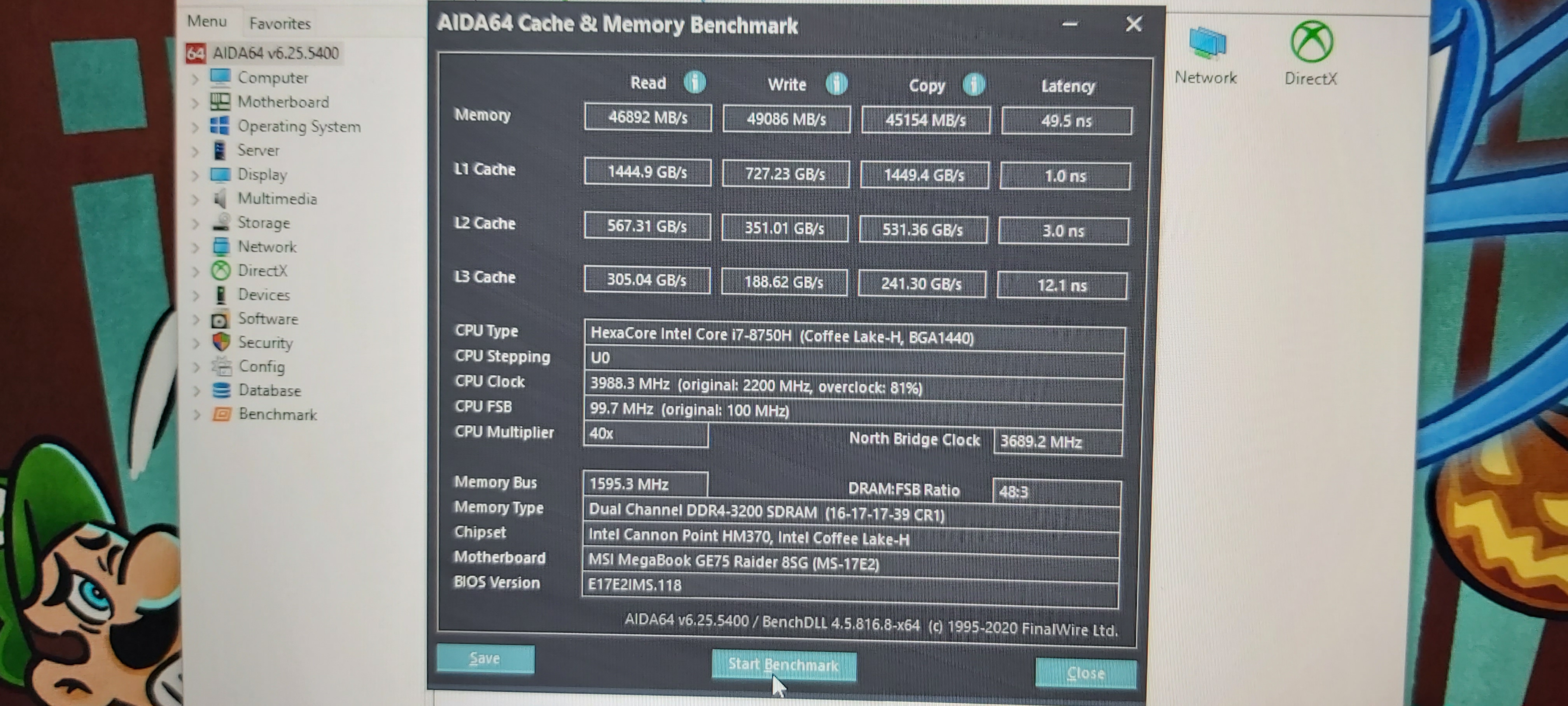
Here are my RAM timings, is there anything "wrong" to you guys ?
-
Does it boot?
There is no right or wrong when it comes to memory overclocking as the settings vary wildly from manufacturer to manufacturer. -
And anwser for question #2 and #3 ?
Correction. 11 watt is max watts display at throttlestop, but during stress test, power draw is 2,8
Update on RAM overclock:
I did some reading and find out that uncore setting is the same as system agent in throttlestop and they both control voltage for all non core things around core, including ram bus or something like this.
And next thing i did, i set my uncore for +25 only and RAM voltage on 1,3. It is the same if i would leave uncore +125 (0,125 V) and leave RAM at stock voltage (1,200). I think heating RAM only is better then heating all the non core things around core. -
Or you can keep the +125 uncore and increase the memory clockspeed/tighten timings.
-
Yes, It's been stable for a week of gaming now.
Could you share yours seanwee ? I'm curious about the secondary timing configuration. -
Reduce each one by one then test with memtest64
This is an old pic
I've since reduced the voltage to 1.3 and optimised the primary timings a bit. Bandwidth went down a bit but latency went down as well.
Secondary timings are all the same.Ulukai likes this. -
Really to make the best timings need days and many tests. It's not so easy,need time.
Also bench to bench it's never same especially if u have many programms installed on pc.
I am borring to do this but when have some time I do some testsAttached Files:
Ulukai likes this. -
-
Thx for sharing this, I'll take a look step by step, first thing I notice is the command rate: 3 for you, mine is on 1, does this have an impact ?
-
The best settings for me so far about stable / perfomance its
17
17
39
16
26
65535
480
6
4
9
18
9
3
N1
1,25 volt
Uncore 125
Average latency 50ns
But really never got a crash long long time ago
Basically this is the default setting of rams.
Just different trefi,trfc and 1,25volt -
Try lowering the TREFI as I was benching a little higher with loose timings
1.25v + 125uncore
Try playing with some timings, On Intel boards some timings are much more forgiving so sometimes a higher TCL and lower terfi is better for some applications.
I remember start with what was posted on the Ram section of "Take control of your 8750h" thread and it helped a lot (Don't have a screen shot of my final tweaks but it even benched a little higher than this one) -
Took a pic and did a bench with my current ram settings.
Ulukai and Kevin@GenTechPC like this. -
Followed Awsan's advice and loosened my trefi and tightened my other timings. Improved latency quite a bit.
-
Tightened the subtimings
TRRD_L 5
TRRD_S 3
TWTR_L 5
TWTR_S 3awsan likes this. -
I put the same timings as yours, and here's the result, I guess my windows system makes the differences ?
awsan likes this. -
I forgot to mention that because I'm using two 16gb sticks they will be dual rank so at the same clocks and timings they will perform faster than two 8gb (single rank) sticks.
Single rank sticks can clock higher and have tighter timings than dual rank sticks though so you can match my performance by pushing your clocks up and tightening your timings more.
The motherboard layout and quality of memory traces will also affect how high you can clock and bandwidth a bit.awsan likes this. -
Well something interesting..
My ge75 8sg
Cooler boost
GPU 5333
CPU 5733
My friends ge75 8sg
GPU 5333
CPU 5333
He update bios, firmware,dragon center. Still same.really strange -
Cheater !!!
Well, I'll use those timing for a week to test, but so far best perf in Aida -
But you might be able to clock higher try going for 133*13 (3466) and see if it will boot.
-
Yeah, I tried & it worked with hackness timing in his guide, but the uncore +125 & Ram at 1.35 v (i'm at uncore +40, and ram voltage 1.25v ) put +3 - 4°C on the CPU temps @4GHZ, however I didn't tried since last repaste. Should I get any better performance 3400 cl 19 than 3200 cl 17 ?
I think I'll try the stability of those timings for now. The improvement is already great for stock RAM. -
Dont know.. today its strange day ahha
Look what a friend send me. This is stock ge75 with really bad paste. But look undervolt...-900core what issue it's this?Attached Files:
-
-
For sure doesnt effect the -900but how the hell it let him? The first pic its -160
The second one -900
I am thinking he somehow have high voltage at bios for cpu. Dont knowAttached Files:
Last edited: May 10, 2020 -
-
What are these values?
As I said before, you can set a very high undervolt on the cpu and it won't matter because its linked to the cache undervolt. That's what matters. -
Hi happy owners of GE75! I am thinking about buying it now, but there is one question. What is the maximum opening angle of this laptop?
-
No if u see the pics -900mv have 1050v max cpu and -160mv have 1117v. Same cache boths.
Also at -160mv have really bad temps. Its throttling like crazy and drop to 2,8ghz...at -900mv can keep 3,4ghz but his thermal paste it's really bad.
For some reason -160mv at core doesnt effect normal. He could has about 1.050v at 8750h with that undervolt but hit 1117vLast edited: May 11, 2020 -
Hello.if noone answer I will test it when go at homeShahius likes this. -
-
hi, i have ge75 9sf, i was wondering what is your ssd temps, mine is between 60-65c most of time, isnt it too high? thanks
-
That is true. On some 8th and 9th Gen CPUs, some users have found that you can use more CPU core undervolt compared to the cache. Something like -125 mV cache and -200 mV core has helped to lower temperatures for some users in some applications compared to using -125 mV for both the core and cache. I have not done any testing of this but more than one user has confirmed that this is true.
If you keep going lower and lower with the core offset, at some point, the CPU will ignore any additional request. A request of -900 mV will mostly be ignored. That means an offset setting of -900 mV core is probably the exact same as -200 mV on the core. -
Yea that I was thinking too.the -900v has effect like -200mv. I am just supricely how the same laptop can ignore that undervolt and keep the voltages that it need and all others get blue screen.
This means that it works on the lowest voltage you can achieve.. -
A random question but does anybody know how to fix messy images like theseunless it's normal, which is doubt.
I have 0 artifact's in games and when i check Kombuster it also shows 0. My GPU temp's are never above 75 or anything as far as i've noticed.
It just bothers me not knowing if this is a normal thing or not. It kind of looks like it went lower in bits.
Also not sure if it's like that in other games but i did notice that my wallpaper has the same kind of issue, sorta. When you compare the top with the original.
https://imgur.com/balgL8a
Desktop: https://imgur.com/o8uMOUd
Wallpaper: https://imgur.com/a/7EG4o1z -
Make sure your screen resolution is 1920x1080.
Then make sure that your ingame resolution is 1920x1080 with fullscreen enabled. -
They are but for the sake of the screenshot i had it put to windowed but the result is the same.
But i feel like you are onto something. When i look at my wallpaper in comparision to the downloaded wallpaper (which is 1080) the fullsize downloaded wallpaper looks a ton sharper, clearer and doesn't have that effect in the top. But the display on my laptop does say it's running on 1980x1080. Is this just some windows issue? -
I tried with 2 profiles:
@3.7 GHz, cache -75mv & core -140, if i go lower on the core, no change in voltage during heavy load
@4.0 Ghz, cache -90mv & core -170, same thing, it seems to be the max for me
With these voltage (different core & cache) , I gain 1 or 2 less °C on Cpu (maybe my imagination ^^) -
Well about in the middle of 90* and 180* angle
-
U tried alt+enter in game?
-
About 160 degrees? Definitely not in the middle of 90 and 180.
-
170 no way .only if it's broken max 150 and with some risk if u press it morethefatapple likes this.
-
Thank you! I found the pic of it. Right, I would say approx 140! I already ordered this guy! Can't wait for the next week to play with it!
-
Have 2070 super and i9-10989hk and got a http://www.3dmark.com/fs/22591141 firestrike score and http://www.3dmark.com/spy/11983153 timespy score, is this good or should i expect higher with these specs?
for instance i overclocked gpu with +128 core and +800 memory, and when i game i see gpu hit 1980mhz. However in firestrike and timespy it doesnt go over 1680-1700mhz. Cpu was clocked at 4.6ghz. Gpu never went up to 70c and cpu didnt throttle highest temp was 94cLast edited: May 13, 2020seanwee likes this. -
Overclock the Gpu by about +160 core and + 600 memory to get a nice 10-15% performance boost.
-
So my 128 core and 800 memory boost aint optimal?
-
If you can get that memory overclock then thats great. I was just giving a safe overclock suggestion.
Push your overclock a bit more.
Edit: Ah you edited your post, no wonder i didnt see it.LocoPwnify likes this. -
Ah yeah sorry, thanks for your suggestions, however what do you think lf my scores? Sounds about right?
-
-
Awesome thanks a lot! I’ll try to boost my clock a bit and see what happens.
-
Also, i have HyperX Impact 2x 16gb 2666mhz CL15 RAM. 15-17-17-35. Should I just leave my RAM as it is or is it anything I should tweak on it?
-
Looks like good quality ram. Try pushing 3600mhz cl20 and see if it works. Raise the voltage to 1.35v as well.LocoPwnify likes this.
-
Holy, 3600mhz lol. I’ve never overclocked ram before, could you point me to the right direction or recommend a guide?
*** The Official MSI GE75 Raider Owners and Discussions Lounge ***
Discussion in 'MSI Reviews & Owners' Lounges' started by Spartan@HIDevolution, Nov 12, 2018.