Problems? See this thread at archive.org.
For this I wanna try X method.i know this is big chip but I wanna try
-
Here we are
Attached Files:
-
-
They say it spreading the paste with a shovel or a credit card is not good for the reason it maybe small bubbles of air will trap. For gpu I use the pea method and for cpu the line method. Remember always that the paste is to fill the small gaps, therefore no need too much. But for the start is better to apply a bit more than less. After a few applications you will have the experience it's easy. The above info is for not contactive pastes thoLast edited: May 16, 2020
-
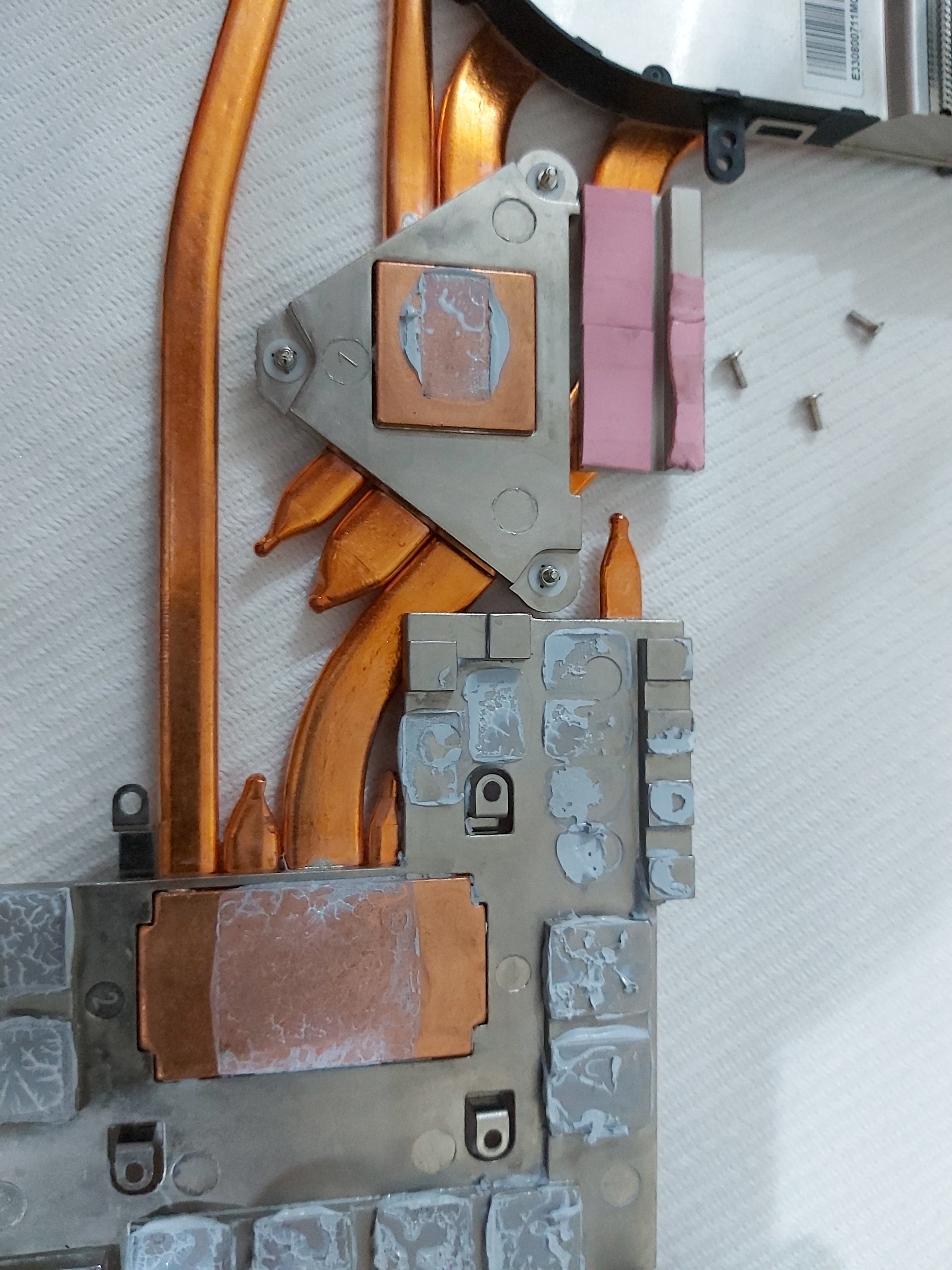
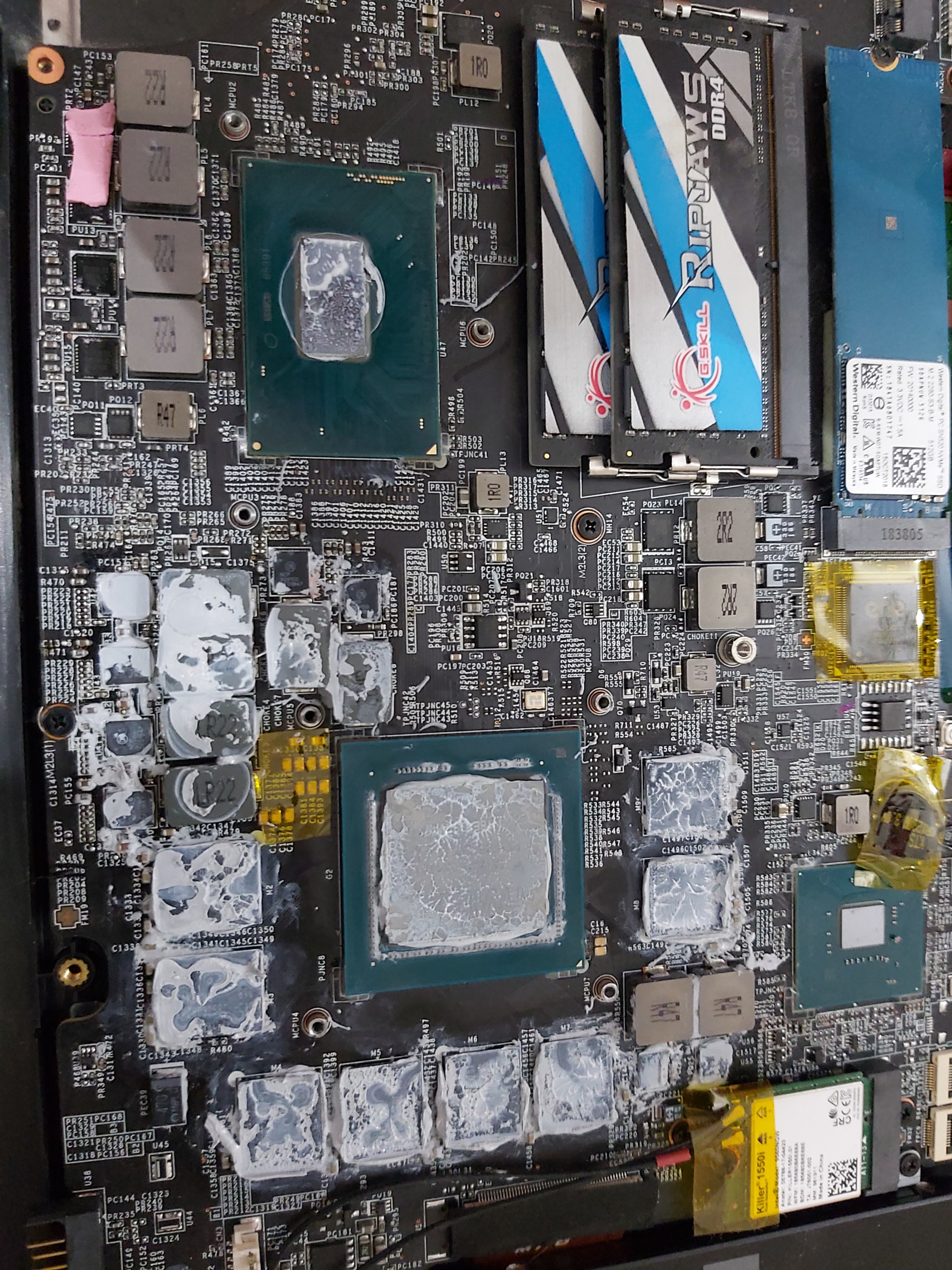
Can you see the small pump out effect on your cpu? Also the bench results you posted show uneven core temperatures due to the uneven force of the heatsink. That's why it is very important the heat sink to be tight evenly and in parallel with the cpu. That causes higher temperatures. For example you have 85 79 85 78 83 76. When you can make tight evenly you will may have 82 80 81 79 82 78. The numbers are for example only just to understand the importance of that issue
-
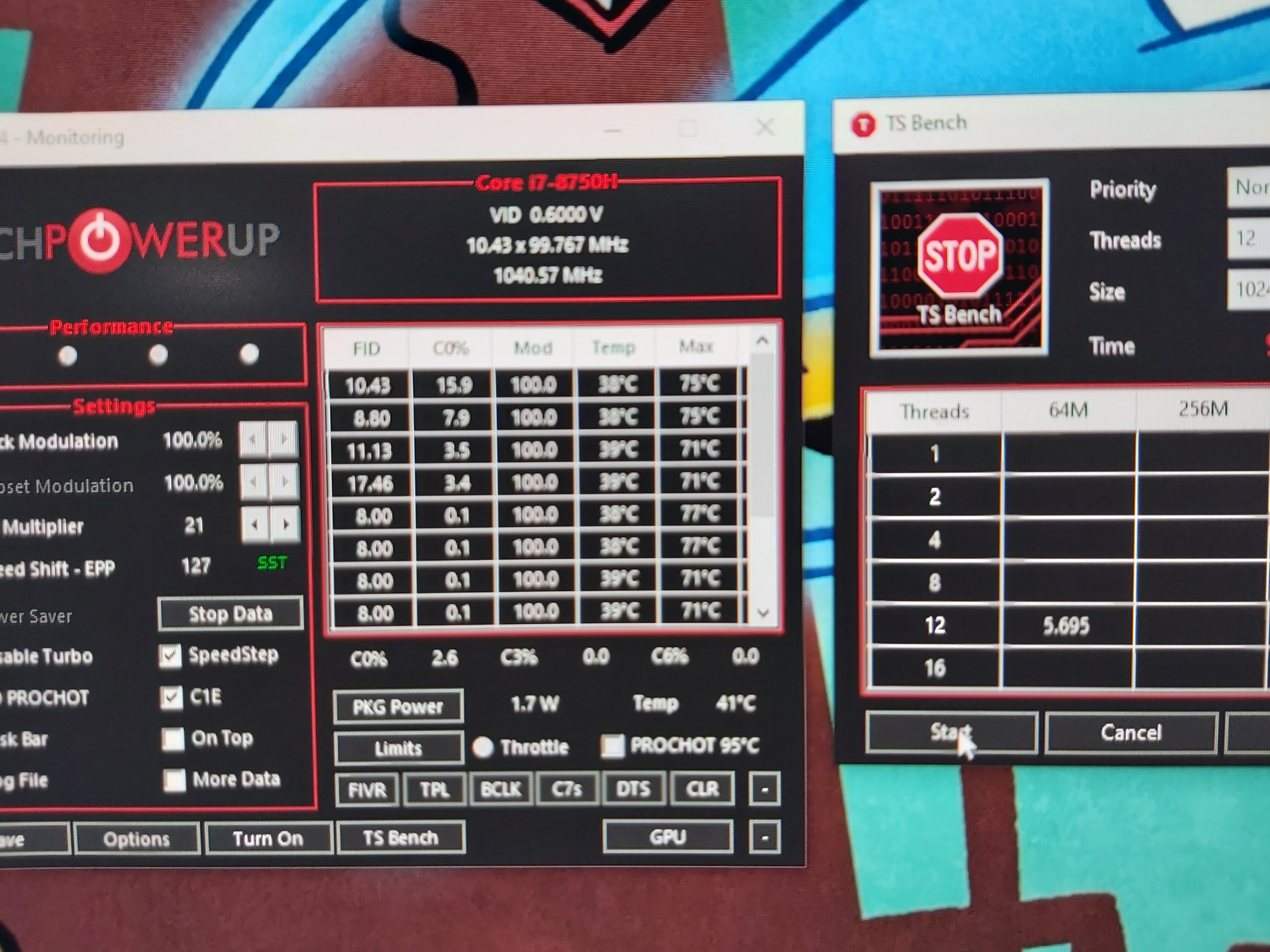
Well I did 4 benchmarks cause I would not count the first for compare with the old paste.here it is the results from 4th benchmark.
If again will happend the same I will try noctuaAttached Files:
-
-
Yea I saw...the paste on cpu was very bad
Btw why u dont like LM? -
After 1 year of contactonaut, look what happened to the heat sink. Although the temperature were not that much less of what they say. The LM is for delid and for desktop cpus with big surface and for heat sinks with high pressure on cpu. Not good for laptops. I spend 1 week for sanding and testing the heat sink
-
Yes but is a bad paste regarding the performance. I mean it is not mentioned in the top lists on the market and its very hard to apply too.Last edited: May 16, 2020
-
-
Yea that's the reason I dont apply LM too.
I want give this laptop to my son next year,so I want keep runs with no issues for long time -
Also I see tt you put paste on the vrams, but with this way the heat cannot be transferred properly if not at all. For a gap of 0.5 mm or more I suggest to use thermal pads (those arctic thermal pads are cheap and you can find on skroutz).
-
I tried grizzly thermal pads 0,5MM and my gpu temps was 88c. So I opened again and I press them all with my finger but still was gpu 88c.so I opened again 3th time in a half hr and I removed them complete.just remove the pads and close it, and I did a test.gpu 70c
The issue was that the heatsink didnt touch properlty the gpu chip. Something like needed 0,2MM pads
Maybe I have tight heatsink to vrams? Dont know -
Maybe. Mine is using 1.0 mm pads in all over the places, but this is because mine is a gtx model, I suppose.
-
You still have uneven core temperatures and as I can see, the two bolts close to the battery slot need to be more tighten or the one close to the RAMs should be more loosen.
-
Here you are.
Although I'm happy with my setup, can you pls suggest me a tFAW value and voltages? (uncore & memory) but with the less possible cost in temperatures? Tnx in advanceAttached Files:
-
-
Crap grizzly.today the temps got raised again. Tell me at skroutz what noctua u using bro
-
https://t-support.gr/index.php?route=product/product&product_id=1180513
Although it is not very thick and u might face same core differencies of temperature. Follow my advice posted above -
How hard is it to clean the fans in this laptop? I've seen pictures of it opened up and it looks like a pain in the ass.
-
Just 3 screws if u have removed the heatsink
-
Cant.understand what u mean. Not all screws full tight?
-
Can someone with stock 10980hk tell me what the Powell limit 1 and 2?
-
-
Ok thnks.u did the ac/dc loadline 5?
A friends ge75 10980hk with undervolt -90mv hit at call of duty 90c cpu and 79c gpu. CPU settings all core to 4,1ghz. How was urs as stock paste? -
He should do -90mv core -30mv cache. On MW i get 76-85 competetive settings 4.0ghz. Its the only game i downclock Severely. I now play it at 3.8ghz. Upgraded my ram so i Still get very good Fps.
-
He did -90 core - 90mv cache too with stock ac/dc loadline. But the strange also it is that gpu runs at 80c. Rtx 2080 super.
My rtx2080 never go more than 70 71. That's why I am thinking he has bad paste. -
Nope, the rtx 2080 with i9-10980hk do get that hot. He should undervolt itgreninga likes this.
-
Well my temps yesterday after repaste was max 80. Today its max 86 87. I will order that noctua.
Also I will order 3 noctua fans 120mm for make a cooler pad with controller and noctua fans -
For cpu there are three screws with spring. Right? Cpu0,2,4 inside chip are adjacent to the vrms (at the battery side). The cpu1,3,5 are adjacent to rams (south side). Higher core temperatures on cpu0,2,4 means that in this area the heatsink not pressing the cpu well. You can also see that in the picture you posted yesterday that the paste remain in the north side of the cpu (close to vrams). Before you start screw the spring bolts of the heatsink and before apply paste, check how many rounds is the full tight. Mine is 4 complete rounds. So start tight bolt 7 one round, then bolt 6 one round and finally the bolt 5 one full round. Repeat the steps until 0.5 rounds before full tight of the bolts. Let's say 3.5 rounds. Close and tight the cover. Check your machine. If temperatures of cpu0,2,4 are still higher, then open the back cover and tight a bit more the bolts 5 and 6. Did you get it now?Ulukai likes this.
-
Check also this diagram to understand the architecture of the core in a coffee lake cpu. The upper cores are the 0,2,4 and the lower are the 1,3,5
_(annotated)-preview.png) Ulukai likes this.
Ulukai likes this. -
0 2 4 cores it's the side of vrms right?
So that mean it's the side of the 2 screws ?
If I open the cover now need to unscrew a little that one screw it's the other side? Now it's all fully tight
Or I unscrew that 3 screws and I tight more that 2 on the vrms side? What u thing? I havent more paste at home -
As long as you have tighten all screws, untight them now you don't gain anything. The best way for me is to completely remove the heatsink and repaste. Maybe you need to do it several times. This is the best way for me. It is painfull and time waste procedure' but it has to be done the right way.
-
Ok then I will do it at next repaste..I will order and k5 pro for vrams
-
Hey, Try tFAW of 30 and see if you will boot? if not continue raising it @ a multiples of two 32,34 tRTP can be tightened too try 10? and can you try your current settings with voltage of 1.2 and uncore of 125? and see the difference in temps + if its stable too.
Voltages are a trail and error as it will differ from one system to another , keep trying a mixture of both and see what helps.
http://forum.notebookreview.com/thr...advanced-version.823065/page-13#post-10898033
This post is a great baseline for what you can try and what are the different errors you can get and what to change to fix them.DimitriosMSI likes this. -
Tnx for the reply, I will try yr recommendations. Now I am on uncore:125 and mem voltage: 1.20 full stable. Temperatures improved too. Still testing tho.
This post in page 13 is my general guideline since last summer. -
I am the only one that I get zero difference in temps with 0 uncore or +125uncore? Also 0 uncore it's not stable at fortnite that son's playing
The difference temps I get it's only cause faster rams and cpu working faster
Btw dimitrios check that and tell me what fans u thing it's good for cooling pad? Also u thing 2 fans its enought?
https://www.skroutz.gr/c/674/case-fans/m/7831/Noctua.html?from=catspan&o=noctua -
I prefer those
https://www.skroutz.gr/s/3698761/Noctua-NF-S12A-FLX.html
https://www.skroutz.gr/s/2270523/Noctua-NF-F12-PWM.html
https://www.skroutz.gr/s/3698761/Noctua-NF-S12A-FLX.html
I don't have time to check for you but check those fans in the manufacturer's webpage and chose those with the highest static pressure.
I think two 120 mm fans are enough but better you bye 3 x80 mm.
Most important
1. the position of the fans to be aligned with the laptop fans if 2 x 120 mm, or if you have 3 x 80 mm make it in a line so the first to hit the cpu laptop fan, the second to hit the cooling heat pipes and the third to be adjacent to the gpu laptop fan. Not put the fans at the center of the cooling pad. Put them to face towards the custom openings of the laptop
2. If you have basic knowledge of electronics you can put separate switches & regulators.
3. Prefer 12 Volts external power supply and make all fans in parrallel connection. The power adaptor tt you supply must be able to give adequate amperes for all the fans -
A quick question if I put tRTP:10 then I must put tWR: 20. Right?
The formula tWR= 2 x tRTP is correct? -
For safe timing yes but you can try tighter settings.
-
Well anything less than 36 in tFAW is giving BSOD. Anything less than 12 in tRDP cannot boot. I Stick with my initial setup but with uncore 125 and mem voltage 1.20 V. Tnx btw for yr help.Last edited: May 17, 2020
-
Also check this youtube vid
-
There is a way to use USB power for that btw. You just need a 5v to 6-15v boost converter and some soldering skills.
I have a modified cooling pad myself that runs on usb and supplies 12v to the fans.Last edited: May 18, 2020 -
Yea, but I always recommend to use external power supply either with 12v or 5 v usb.
-
With usb power you don't have to find a socket to plug in or have to carry around an external psu so its is hugely more convenient.
-
You are right but consider the following I still recommend the external source.
Using the laptop for supply power to the cooling pad you loose 1 USB port and system resources. Therefore you produce more heat on your machine and eventually you don't gain anything. Also running on battery it is obvious tt you dramatically reduce the running time of the laptop on batteries. Just saying with no offence. -
None taken, just depends on your use case after all.
With USB power you can just use your phone's charger or the laptop's usb instead of having to carry around a dedicated psu for the cooling pad. Thats a big plus for me.
And i dont think anyone uses a cooling pad when on battery, your laptop is not producing much heat when on battery anyways.DimitriosMSI likes this. -
Agree. And to be honest, who is buying GE for portability? The battery is for simple tasks and in case of emergency only. Who needs better battery but ****ty cooling and upgrades can go to GS Series

-
For the GS65 and GS66 (surprisingly) yes. GS75 not really, at least not with LM
The GE75 is really portable for its specs and size though. 2.3kg is really light for what it's packing.
The Razer Blade Pro 17 is 2.7-2.8kg yet it only packs a Max-q and runs a lot hotter than the GE75. -
Yeah. GE is performing very good with adequate cooling and its lightweight too, but with the cost of the small battery and the time need to spend for tweaking.
-
Ok guys. In this foroum I learnt how to tweak my GE75 8750H GTX1070, undervolting CPU, tweaking the GPU and overclocking my RAMs from 2666 to 3200 full stable. I'm happy with it and my laptop is a killing machine now.
Only one issue is bothering me now for almost one year and this is the booting time. I searched all possible threats and supports but without any solution.
When I make a cold boot, takes abt 5-10 seconds for the msi logo to appear, then spent another 5-10 seconds for some dots to run in a circle and then boots to windows.
Booting to windows after POST takes only 5 seconds (so it is not any windows startup issue here) but here are my total time boots:
In cold boot need abt 25 seconds and in warm boot (windows fast startup enabled) takes abt 15 seconds.
It's no problem at all and I think is normal but I'm looking my Alienware 2015 model with a slow mSATA drive that boots in 7 seconds to the windows and it is very weird.
What do you think guys? What are yr boot times and what settings you use? Is there any tweak to override the POST?
FYI I have 1 Samsung NVME EVO 970 Plus 250 GB bootable with only the Operating System on it, 1 Samsung NVME EVO 970 500 GB with software and 1 Kingston SSD SATA 960 GB with games / movies / music etc -
The GE76 with 99.9 Whr battery can never come too soon can it
And in my opinion, ALL laptops need to be tweaked for maximum performance.
On some motherboards it has been observed that SATA SSDs boot faster than NVME SSDs as the NVME controller takes longer to initialise.
And as fast as SSDs get, there will still be a hardware boot time that will depend on the motherboard as it needs to make sure all the hardware is working first before loading windows.
Some of this checking can be bypassed by using a fast boot option that can be found on some motherboards. My GS75 has the fast boot option enabled in the bios.
*** The Official MSI GE75 Raider Owners and Discussions Lounge ***
Discussion in 'MSI Reviews & Owners' Lounges' started by Spartan@HIDevolution, Nov 12, 2018.