Problems? See this thread at archive.org.
I press power button and im already in windows after 3 seconds
-
-
How this is happened? Are you resuming from sleep mode or hybernate or something? Are you use Intel Optane?
Is it possible 3 seconds with a cold boot? -
Yeah that seems too fast
What's your config @LocoPwnify -
https://imgur.com/a/OBAwj6a
I exaggerated a bit, but it does feel fast! -
It was a slight exageration, lol. Here is how fast it is from cold boot https://imgur.com/a/OBAwj6a
-
At the time of pressing start button till windows startup is abt 15 seconds in total as per yr video. It is same time like mine but with fast startup enable in power settings and fast boot enable on bios. Any other tweaks?
-
I thing it's about 10 seconds. I need count mine xd
-
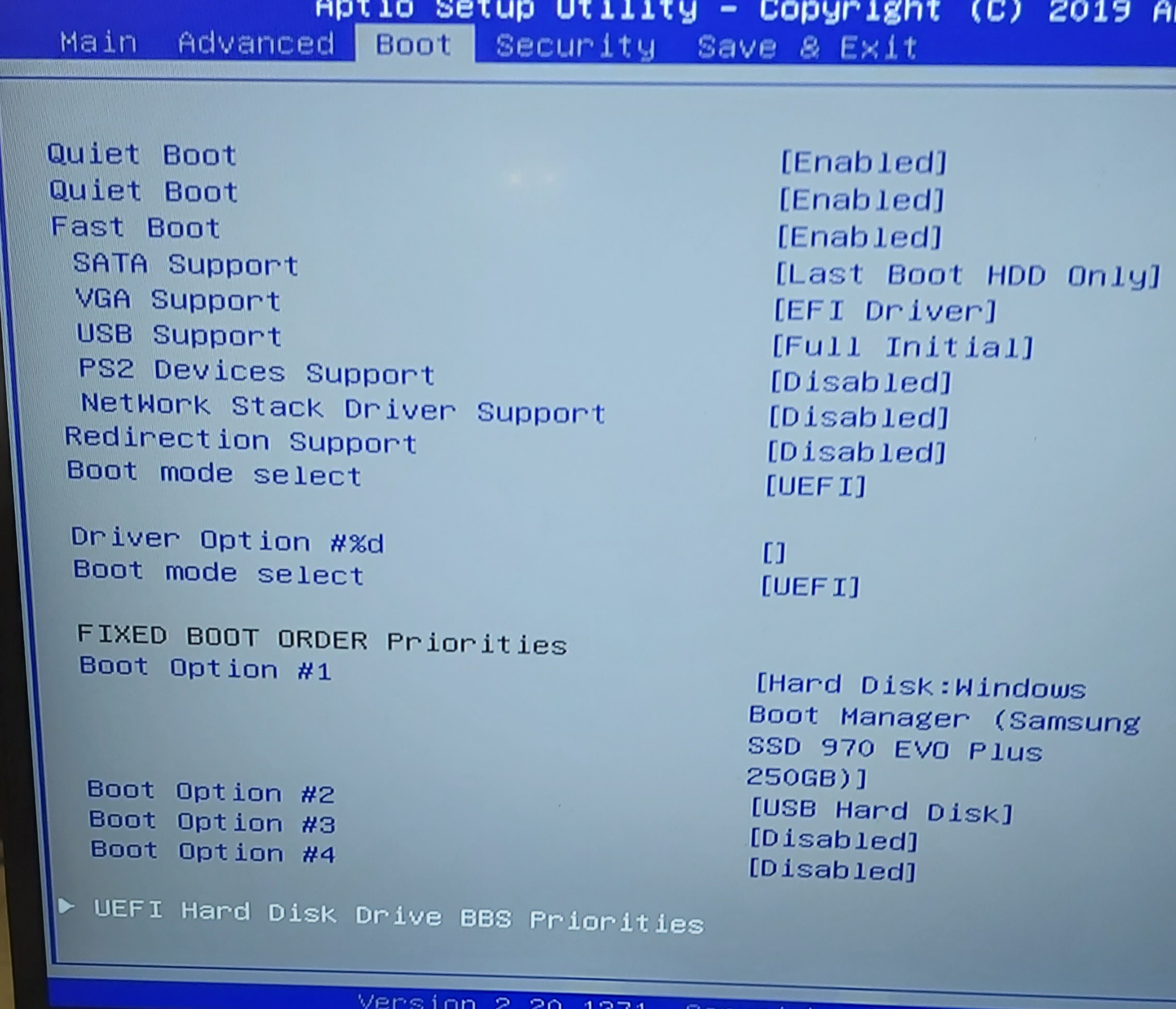
Dimitri u have priority boot 1st the disk that has the windows?i will count mine but 25 seconds seems too long.dont know
-
I dont have fast boot enabled
-
These are my settings in bios.
Cold boot abt 25 sec.
Warm boot ant 15 sec (windows fast startup enabled)Attached Files:
-
-
A question from a friend. He has ge75 10980hk. Undervolted at cod hit about 92c cpu and 82c gpu. At 4,1 ghz clock setup.
U have repaste it with grizzly? U remembers ur temps as stock just undervolted and ur temps with grizzly (stock rams)
Thnks -
I answered this before, he has 2080 super in tandem with 10980hk, thats why he has thermal issues. He needs to undervolt his gpu as much as he can.
-
I have a question. Where in MSI Bios can i find Per Core ratios? My cores never go above my 8-core multiplier even if only one core is running. If i set 8-core max frequency at 40x; Individual cores never go into their max turbo boost they seem to only follow the 8-core multiplier as «clock speed ceiling». I also want to find the cpu’s favourite cores. Where in Bios can I set multipliers for individual cores? I want the best cores to be able to boost to 5ghz
https://imgur.com/a/ZbOeuFu
As you can see on the picture, when 8 cores are active the highest clock speed is set to 4.0ghz, but this makes all cores only hit 4.0ghz REGARDLESS of how many cores are used and regardless of load. No one ever go above 4.0ghz. Anyone know how to fix this?
@FalkentyneLast edited: May 18, 2020 -
Hmm dont thing a super rtx 2080 it's an issue.i also have rtx 2080 and runs so cool
Also.at cpu tests like benchmarks the gpu sleep
And hit 95c at throttlestop benchmark very fast
And the other way u can see a.super 2080 it's not a issue its if he setup the cpu clock to 3ghz the gpu still hit full load at game and full core clock and the temp at gpu its 75c max -
He has a 2080 super AND i9-10980hk, so yes its having thermal issues. Both of them draw a lot of power. He cant compare with my 2070 super, its two different worlds. He needs to compare with other 2080 super 10980hk users
-
the fact that his gpu hits 75c when his cpu is clocked at 3.0ghz is evidence that his gpu runs hot, when i downlock to 3.1ghz my gpu never go above 63c
-
While u try this (3,1ghz )u have to check if ur gpu still work at full load.some games if u set the cpu very low got bottleneck and ur gpu use less power and ofc lower temps.
And the main reason when we have high temps at gpu its cause cpu transfers to gpu the high temps cause of heatsink.
Anyway we talking about just a simple test on throttlestop at 4,2 ghz hiting 95c way fast.thats have nothing to do with gpu -
Which one did he do? The shortest benchmark? I can check 4.2hz temps on it. Btw is this with max fans on?
-
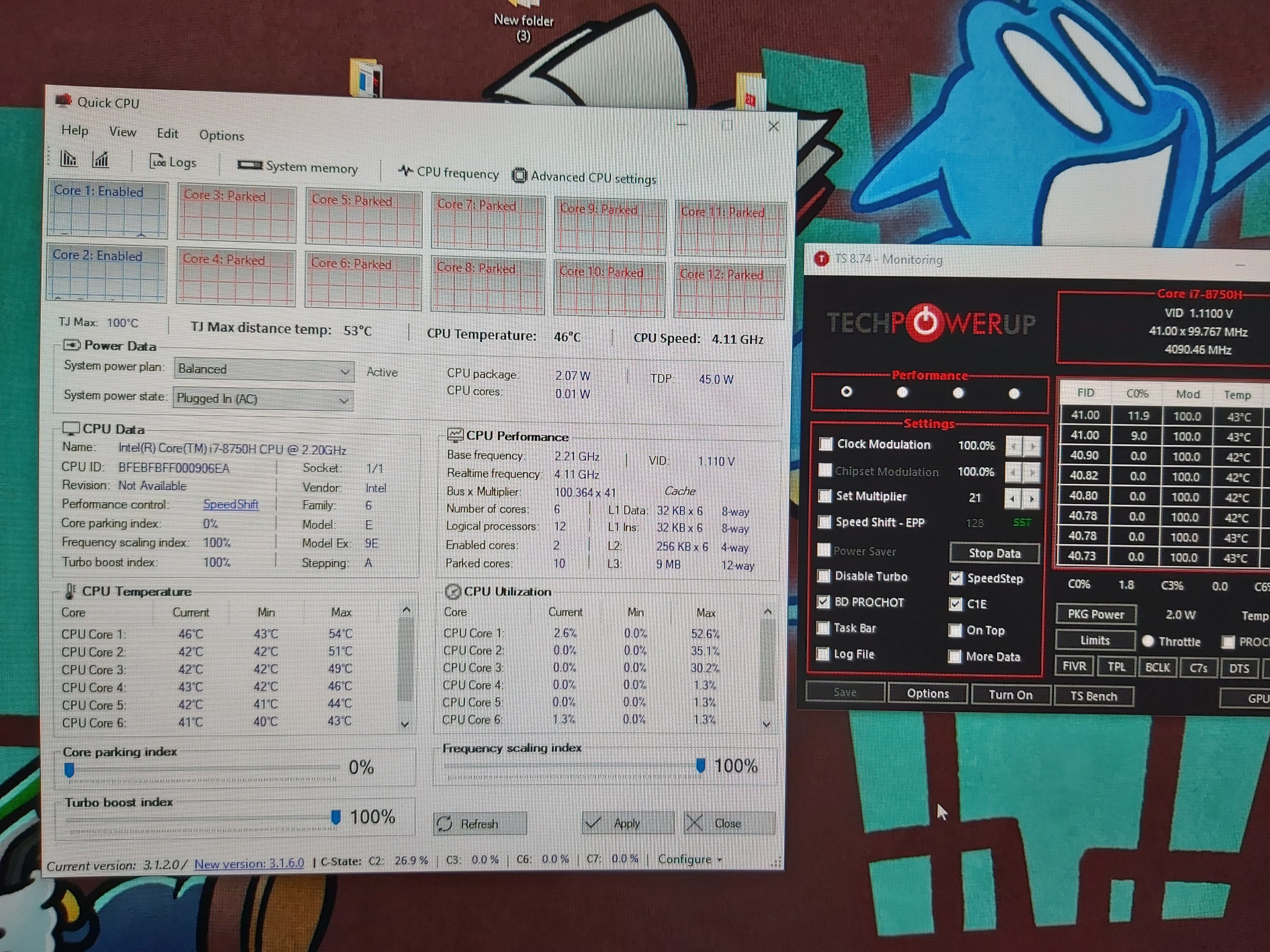
Ur pic its blurry to me.dont know why. But u have all ur cores active all the time for this hit the lowest one.i using the quickcpu programm and I have all cores parked -unparked dynamic.so if a game use 4 cores I get the ghz for 4 cores.the other 2 its parked
-
1024 but till go at 20% it has already hit 95c
-
Ah, it isnt blurry when i click it on my computer, maybe ur on mobile. Anyway i have it set as 1-vore active 53x 2-core active 53x. 3-core active 48x, 4-core active 48x. 5-core active 47x, 6-core active 46x, 7-core active 45x, and 8-core active 40x.
the max ive seen a core hit is 4.0ghz unless i up the 8-core frequency. No one EVER go above 4.0ghz, in no scenarios EVER -
yeah some of my cores hit in 90c on that bench on 4.2ghz. around 20-40%. 2 cores hit 92c, rest was on 82-83c. I have a really bad paste job i think. Or i screwed heatsink poorly.
-
Look the pic what I mean ...my 1-2 cores its set to 4,1ghz and the 6 cores it's on 3,9.
As u can see at my pic,at the moment 2 cores its active.. u can see and at throttlestop at CO% just 2 cores its active.
U have all ur cores active all the time. Even at idle it use 8 coresAttached Files:
-
-
Then whats the point of the 5.3ghz turbo boost? I NEED to use this Quick CPU software? Thats so stupid.
-
If u use dynamic cores parked-unparked ur cpu will hit 5.3ghz when 2 or 3 cores it's on use
-
No have and settings on windows about this
Google it. I using this software cause have many thinks and infos -
Is that software the only way?
-
No just I thing at ur windows the core parking its disable u have to enable it If u dont want use any program like this I have.I am using that programs cause it's better.i dont trust windows settings
I can park as many cores I want, with that bar slide u can see at pic it's set now to 0%
If I make it 50% will park the half cores. 20% 30% 80% etc.
Also it's a registry number that u can change it and after of this a cores park.unpark options will pop up at power plan -
I just read that enabling dynamic parking is stupid anyway and a reason Windows disabled it back in 2017 because of uneven heat disspersion and that the cores cant work together for better efficiency with it enabled. I guess i'll just leave it be.
-
U can try it. U will see ur cpu hit 5,3ghz. For me its better when it's all parked.
-
Nope, look: https://imgur.com/a/udgx0XC Now im using parking, no core EVER goes above the 8-core active frequency. It looks like even when parked all cores have a minimum of 800mhz clock speed. They never shut off?
-
Mhz. Doesnt stop. The load stop. Try a single cpu benchmark at cine or throttlestop
Or run a game.that u know use 4 cores. -
Nope, didnt work. Still wont clock above the 8-core active frequency, did you look at my picture? You see EVEN when I have set different values in ThorttleStop, the CPU frequency CLEARLY shows that 4.4ghz is the max any core will go. Just look at the picture again.
-
Try a cinebench single benchmark or choose at throttlestop lower thread benchmark
-
Thats what i did dude. It doesnt work
-
-
Maybe when runs 4 cores the mhz its 4,4ghz and with velocity boost its 4,8ghz? velocity boost works only at 50c. U have the cinebench to try a single benchmark?
-
I have set 4-cores active TO 4.8 ghz. not 4.4ghz. If i switch the 8-core active down to 40x again these 4 cores will never go above 4.0ghz either. It doesnt matter what i set on anything other than the 8-core ratio. They always follow that ratio, not the others.
-
https://imgur.com/a/YCHeWUg
This is with Core Parking ACTIVE. I just dont know what to do. -
I figured it out... C-states were disabled in BIOS for some stupid reason.
-
It was the reason?
-
yes
-
Well it need 11seconds for boot to password screen. Stock nvme.
-
Almost same with me. Do you have fast startup enabled in windows power settings?
-
It's under CPU Power management control / view/config turbo options
But I have no idea what it does. There are two groups of settings.
Looks like the first group sets the turbo boost ratios based on how many cores are loaded (1 core loaded to 8 cores).
And the second one re-orders the physical cores that actually get those values.
But that's just a guess. I don't know and I don't have that laptop. -
It was C-states being disabled in BIOS who was the culprit! Thanks tho!
-
Guys are u using any program for clean pc for old files and folders?
Last edited: May 19, 2020 -
Bleachbit, but proceed with caution cause maybe you lose some files actually needed (cookies, browser history etc). It is also portable with community online updates.greninga likes this.
-
Hi, did someone mount double-sided m.2 ssd into GE75? My is GE75 10sf and I would like to install m.2 Adata xpg sx8200 pro 2TB or 1TB. However if ssd does not fit, I will have to return it to seller at a loss. They are double-sided ssds.
-
As I see those nvmes are type 2280. Should feet cause I also have Samsung evo 970 m2 nvme type 2280 too. Not sure abt this "double sided" thing.
*** The Official MSI GE75 Raider Owners and Discussions Lounge ***
Discussion in 'MSI Reviews & Owners' Lounges' started by Spartan@HIDevolution, Nov 12, 2018.