Problems? See this thread at archive.org.
I asked from owners of machines with those vbioses of course. The problem is finding said users.
After that they can easily export their vbios using gpuz
-
-
Gt76 titan 9sf using 115 watt gpu like ge75?
If that titan has higher tdp can install into 9sf ge75
Can I download the 9900k from titan to ge75?

-
Great, I'll try to ask, I just hope the TDP is higher than 115w....
-
Are u using ge75 vbios?
-
Stupid question I guess, but just to be sure, I checked on techpowerup database the RTX2070 vbios, I found one for the ge75 10sf, but the device ID is different --> is it possible to flash with this one ? Or will it kill my card ?
Second question, Is there a way to check the TDP in a bios file ? -
I dont thing u have difference from 10sf. U can understand if that vbios have higher settings than urs from mhz info
-
No,I'm using my stock vbios but I have removed the power limit by using a shunt mod.
Hwid will always be different. Just make sure you're flashing a vbios from another laptop without G-sync.
In any case, laptop 2070s top out at 115w. They don't go any higher even on desktop replacement laptops. The only thing you can do to is to perform a shunt mod to remove the power limit entirely. -
I like so much this u can change every settings u want so stable. U feel free to make every profile u want on it.
-
Yea that I reading too on net. Max tdp 115watt on all models
-
Thanks for your answers, Can you tell me more about this shunt mod ? I found some videos but noting for laptops.
-
Yes there isn't any info on how to perform shunt mods in laptops as I was the first one daring enough to attempt it.
And since laptops differ so much from each other, I can't make a general guide that will work with every laptop. I'd be happy to guide you through the process though. -
That was my guess, I don't think I have enough electronic knowlegde and tools to perform this tip, so don't waste your time on this....
-
Yeah hardware mods have a few prerequisites but once you got those down it's not that hard to do it right.
-
Yes please waste your time on this.
-
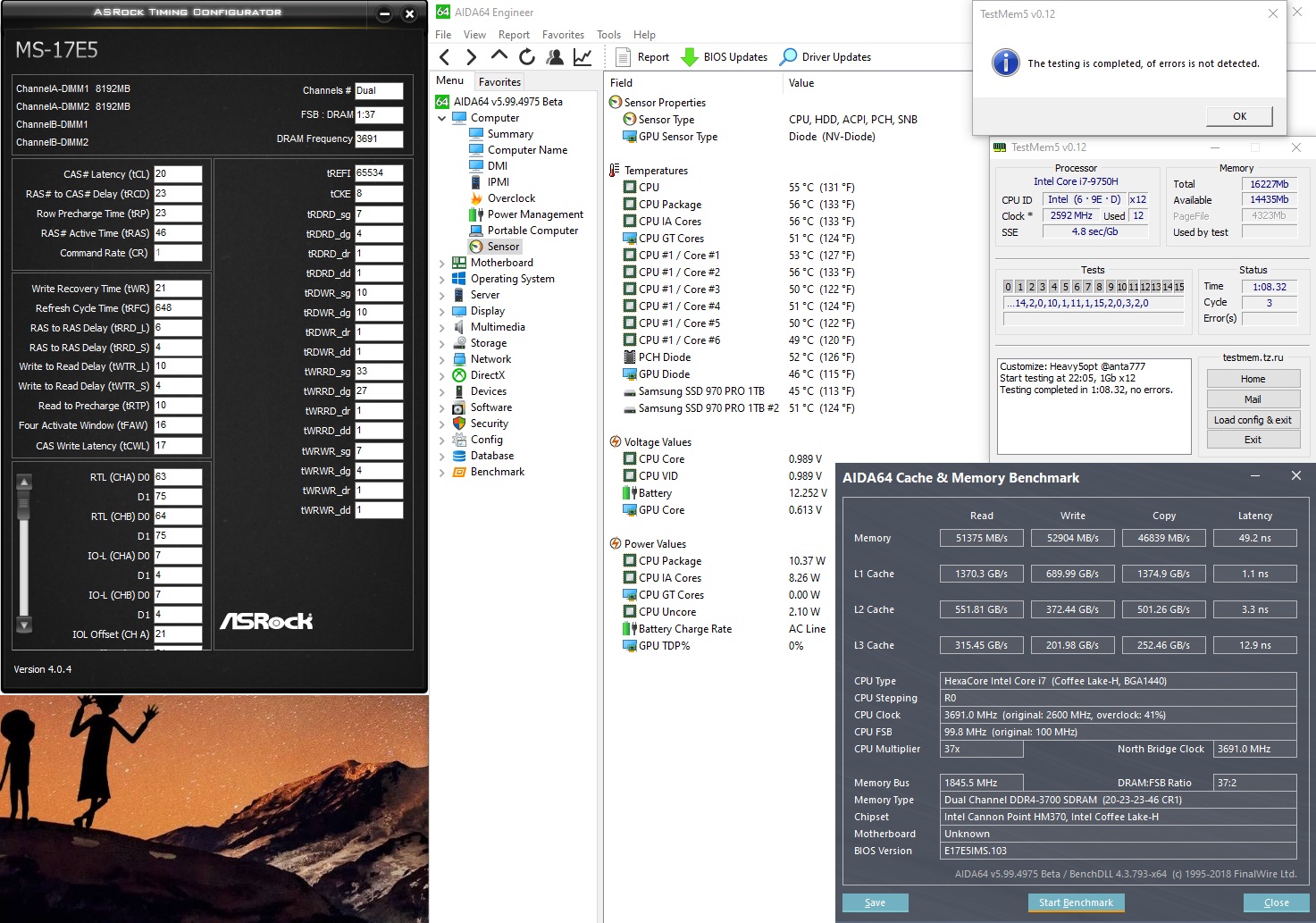
I have the same memory as you (hyperX 16gb x2) and I'm running stock timings CL15 at 3000Mhz. Just changed the multiplier from 10 to 11.
Is it worth to go up to 3200mhz with slower timings and more cpu temp? -
Also what’s the highest mem speed anyone has gotten to in the GE75?
-
3470mhz but I have see and 3700mhz
Attached Files:
Hd172 likes this. -
-
The way u OC yr Ram is not stable, I guess. Make a memory stress test for abt 5-6 hours and play some heavy demand game. Otherwise you can use my manual settings for 3200 stable, NMode:2 and Uncore: +125, posted a few pages back.
If it's worth? It is a matter of personal taste. In gaming I can see a few fps more but the most important is the low fps are more stable, but I have a few C degrees more in Cpu temp (about 3-5). The choise is yours my friend.Last edited: May 25, 2020greninga likes this. -
I did memory stress tests the first time I tried this oc.
Now I've been playing heavy games at 3000mhz CL15 for months with 0 crashes. -
If it works for you, I'll pass.
-
For those who like to improve their idle temperatures and to make C-States "actually" work, here is what I did a few hours a go, thanks to fellow members #hackness and #Che0063.
I hope they don't blame me for copyrights!!
-First of all, keep enable C states on BIOS
-On throttlestop keep the default C7s state.
-BIOS Settings.
Go to Power & Performance > CPU - Power Management Control > View/Configure Turbo Options
Set Energy Efficient Turbo to Enabled.
-On windows, Use Mobility Centre to change the power settings. (Win+X > Mobility Centre) and choose Power Saver power plan
-Reboot and voila!!
See my screenshot
Remark: Undersand tt if u make those tweaks, the processor from a deep C-state needs some time to spark and go to C-0. Therefore those settings are not suggested for benchmarking or for some high demanding programs require C0 state immediately. On the other hand it is very useful tweak for every day and normal tasks. You can also improve your battery performance as well and keep your laptop really cool.
Proceed with your own risk...Attached Files:
Last edited: May 26, 2020 -
-
Energy efficient turbo was enabled by default on my gs75.
Also power saver power plan drops performance. -
Although I have those tweaks a few hours ago, I did n't notice any performance issue so far. Ok understand tt the CPU takes longer to achieve the C0 state, but this is unnoticeable for common tasks.
See my latest bench on throttlestopAttached Files:
-
-
Thanks. What memory benchmark do you recommend to test the performance of both 3000/3200mhz?
-
I am not kidding about fortnite.
I have tight my rams and worked perfectly for one week to all benchmarks ,stress test ,testmem ,Apex legends ,call of duty.
After a week my son's tried to play fortnite and he had 3 crash in 1 hr. I change my rams settings and never again got it.
So I am thinking for check rams if its stable need long time.and I have see fortnite it's very hard about overclocked rams.if there something wrong u get crash at this game after some time,every time I wanna see if rams its stable I do benchmarks and test mem and if pass ,I bring my son play fortnite.if the rams its not 100% perfect it got crash after 20 minutes aboutLast edited: May 26, 2020 -
Memtest64. Select stop after 10 loops and select stop on error. You see BSOD and you r no good.
Also try TM5. Let run 20 tests, takes abt 4-5 hours, or leave it test overnight.
Windows also have memory diag tool and run in post boot but takes hours to complete.
Fortnite also is a good "tool" too, as per my friend above
-
Curious, I pretty much have a 32" monitor hooked up to the display port all the time.
If I was to add a usb-c dock could I use 2 other monitors with it? Only the current monitor would be used for gaming. -
What are you guys using for audio? Nahimic, Dolby, Sonic? Multiple ones? I'm curious if any can make the sound of the speakers better because none will make the audio pretty low volume.
-
I mean bechmark to test the performance (given a score), not the stability.
Thanks,
C -
AIDA64 (Tools/Cache and Memory Benchmark). It's paid software but worth it
-
Hey guys so I just installed my new ram and I’m getting BSOD when I try to run aida64 benchmark. I set it to XMP and uncore offset your +125. Anything else I should try to do?
-
Can u be more specific on this?
What was yr stock rams and what rams did u installed? -
I ended up getting it to work but not with the XMP profile. I think the timings were too tight. I used AIDA64 to see what all the timings were. There were four sets of timing numbers listed for 1600. I used a custom profile with the looser timing numbers and it seems to be working. I need to do a longer stability test but I had no problems with GTA V, which I will usually see some micro stutters if it’s not working right. Stock was 2666 TeamGroup. This is a 64GB Crucial Ballistix 3200 set.
-
Hi GE75 owners, sorry to hijack your thread but i am here to seek last minute opinion on buying GE75 i9-10980 with RTX 2080 @ approx USD 3K.
Are there any significant issues i should know about eg thermals? I am unfortunately only able to buy the i9 variant with the RTX 2080 in my region. -
Hello all!
Some ppl had alerady bought the new ones with 2070S ou 2080S?
And if yes, can you make a feedback about temperature and throttling?
-
I have the new one with 2080s. It really needs to be under clocked to keep temps reasonable while gaming. If you put the effort into dialing in the settings you’ll love it. I’ve been using 4.0 with an undervolt. Temps were in low 80’s. Stock it will be 4.4 and it will hit 90’s and throttle. My gpu has always stayed pretty cool.
-
Thanks, i wont be able to repaste it as i will not be buying from a 3rd party shop that provides such service. Will your recommendation change if i were to be limited to stock paste?
-
Stock paste will be slightly worse. I’m not sure by how much.
-
Hi,
It depends on what you currently have but I personnaly wouldn't buy now.
1) Ryzen is coming
2) i9 is too hot in my opinion
3) 3080 etc are coming in a few month and maybe a GE76 ?
BTW 2080S is a joke
2080S :
(not my score)
2080 :
https://www.3dmark.com/spy/8419921
=> 10582 vs 10586Hd172, DimitriosMSI and seanwee like this. -
Seeing Iow9’s comparison makes me agree wait.
-
Thanks for your honest opinions guys appreciate it, guess i will wait for the next version of the raider. Hopefully it gets a chasis refresh like the GE66 as well.Hope to join the community in time
-
Hey all, I've sorta tabbed through here for a little bit and saw that a lot of people were able to bring down their outrageous CPU temps through a combination of undervolting and repasting. Thought I'd take a shot at it and had... interesting results.
Did anyone experience a drastic increase in their GPU temps along the way?
Manged to go from:
All values under intense load are after about 20-30mins. Used DOOM Eternal to give it a relatively fair but demanding real life application.
Pre-Undervolt and Pre-Repaste:
55C on CPU idle
50 on GPU idle
95+C on CPU under load
75C on GPU under load
Post-Undervolt, Pre-Repaste
57C on CPU idle (speed step to constant 3.6GHz but -145mv on the core and ~130mv on everything else, somewhat expected)
50C on the GPU idle
87C-92C on CPU under load (depending on ambient air temps, Michigan's been fluctuating a lot over the last few days)
73-75C on GPU under load(same thing)
Post-Undervolt, Post-Repaste
50C on CPU idle
45C on GPU idle
80C on CPU with CPU Burner. This was what I wanted all along!
78-85C on GPU with any real stress almost instantly (went so far as to do an OC tuner and it started throwing a fit). I don't want this at all
From other reading I've done, I think I may have used too little paste on the GPU because it's under different tension than the CPU is or I maybe didn't use a thick enough paste. I wanted to hear other's experiences/opinions before tearing this thing down again because boy is it a pain and I regret ever taking the heatsink off.
- Replaced the thermal gum on the GPU VRM with K5 Pro
- Used Kyronaut for both the CPU and GPU.
- CPU got a small grain of rice. I believe temps reflect good application
- GPU got a thin, long line.
- Also read that this is too thin a paste for the GPUs because of the mounting pressure differences. Kyronaut notoriously does poorly under low pressure situations.
- Given the temps, I think I either didn't apply enough or didn't use the right technique. I think we're supposed to use a star or actually spread it manually due to the low pressure.
- Replaced the thermal pads on the CPU with K5 Pro after discovering I didn't get the right thickness/amount of thermal pads (got 0.5mm thinking I'd need 1.0mm in some places and 0.5 in others. Needed 1-1.5mm).
- Got everything screwed back in too before realizing...
tl;dr did anyone get higher GPU temps after repasting with lower CPU temps? How did you resolve it? Is it possible that too much K5 Pro is insulating the processor/preventing the pipes from effectively reaching the die?
Also, do you really need to remove and reapply thermal gum every time? -
Welcome to the club.
First of all it will be helpful if you post yr model (CPU/GPU).
Second I'd like to know yr throttlestop settings (screenshots) and/or any bios tweaks that you did.
The way I see, it is tt you have a bit high temps on idle, probably because you changed some BIOS (Energy Efficient Turbo?) settings or something in throttlestop (Speedshift or C1E).
Your idle temps should be at high 30s C or low 40s in CPU and GPU.
K5 pro is the best solution for VRAMs as repeatedly reported by lot of users and it is suggested to be replaced on every repaste and just put as much as needed (no more, no less)
Grizzly Kryo is not working so good (my personnal opinion) due to its low viscocity. You should try a more "thicker" paste.
Why?
because of the following reasons
1. Our laptops' heatsink pressure is not so strong and some times produce uneven pressure to the cpu
2. Kryo is excellent performed for a few months and after its performance is weaken, especially if you are working yr laptop close or more than 80s C due to the "pump out effect" . -
I had bad GPU temps for my first repaste but it was due to thermal pads on the VRAM insteds of paste. After another repaste it went well with K5 pro, so I guess, it could be a bad repaste on your side.... try again
I agree with Dimitrios, kryo is the best for short time, I repasted mine 1 month ago and my temps already gain 3° while gaming, I'll try noctua NT-H1 next time
Anyone put K5 pro on the CPU VRM ? I still have the stock pads, but if I remove them, maybe the contact between CPU and Heatsink will be better ? More pressure ? -
Suggest u not to use NT-H1 cause I had bad experience due to its viscosity too. Try the newest fm Noctua NT-H2 which is slightly better.
-
Arf, just got it this morning
, well..... I'll try the H2 next - next time
DimitriosMSI likes this. -
I using k5 pro on cpu vrms.well if for something I am sure ,this is we need stop benchmarks and stress tests our laptops avx2 and and and..we destroy the thermal paste for no reason. I am using now about a week the new noctua h2 and I just did some throttlestop benchmarks some time and nothing else.amd my temps it's very good.
Never again stress tests with no reasonUlukai and DimitriosMSI like this. -
I think that's the best advice on this subject, once the setup is stable / Checked.... stop testing and go playing !!!
-
Thank you all for your responses. I’ll be able to send screencaps when I’m back on the laptop itself!
Definitely should’ve given a model to y’all. It’s a GE75 9SG W/ the i7-9750H and 2080.
Important ThrottleStop settings are:
- -140mv core
- -120mv cache
- -120mv GPU and GPU Unslice
- Clock multiplier set to 37 on 1-3 cores in use and 36 for 4-6.
- No ICC Tweaks because I did the IMON Slope tweak in the BIOS.
- Core effectively runs at 3.6GHz *always* as a result.
So I think you’re right about the idle temps Dimitros, I have speedshift at 0 (so it constantly boosts) and did the IMON Slope BIOS tweak as well (so it doesn’t go down to 55W on the CPU the moment it power throttles). I managed to get the idle temps you suggested with throttlestop off, so I suspect that’s what’s up and that was my bad, thank you
As far as repasting the laptop goes, it sounds like I’ll be doing that again (reluctantly) because of the Kyronaut on the GPU. So upset that it idles okay but smacks thermal throttle within moments.
Do you/others recommend Noctua H2 or any other thermal paste for the CPU and GPU? Do you recommend using two different pastes, one for CPU and one for GPU since they appear to have different mounting tensions?
I was going to try MX-4 since I have that lying around but I don’t how much better that would perform vs. the Kyronaut for the GPU. I’ll also have to watch some more videos to see the appropriate amount of K5 pro to put down on the VRMs and VRAM.
Ulukai, I put K5 Pro on my CPU VRMS and got the temps described above as a result. Even with the GPU all funny, I saw worthwhile improvement. I suspect they’ll decrease further as I decrease the GPU temps. Had to slab it on thick to get it to the same height as the pads.
Thank you all in advance! I’ve been lurking through this post for a few months now after I bought the GE75 8SF (i7-8750H, 2070) and disastrously tried to replace the thermal gum with not K5 Pro (tried normal thermal paste. Pretty sure there’s a hole in one of the VRAM chips now. The GPU isn’t recognized in the BIOS nor any OS. Sending it back to MSI because I’m hopeful that a board through them is cheaper than a board through eBay. I’m surprised the CPU is okay.) - -140mv core
*** The Official MSI GE75 Raider Owners and Discussions Lounge ***
Discussion in 'MSI Reviews & Owners' Lounges' started by Spartan@HIDevolution, Nov 12, 2018.