Problems? See this thread at archive.org.
What settings u tried?
Trfc trefi and uncore?
-
@greninga Uncore 0
-
Change uncore 125 and prefix +
Then check it at games and tests, and if it stable start to lower the uncore.maybe 50 uncore its enought for run stable.
Also u can lower ur timmings for faster rams.
Like 18 18 43
I am running 17 17 39 at 2933 -
What settings you recommend? And why i need lower the uncore to 50 and not stay in 125?
-
This is the system agent and that feed ur memory control with voltage. Offset voltage +125.
If +50 or 80 its enought not reason u give 125 -
I am running 17 17 39 at 2933mhz.with 0 uncore.
2 thinks make the rams faster. The Timmings and the mhz. U can choose what way u wanna make it.
Lower CL = faster rams.
Higher mhz = faster rams
That I mean it's cl16 2666mhz can have the same perfomance as cl19 and 3200mhz
Ofc u can try lower ur cl at same time u give higher mhz. U need to do many tests for find the best settings. -
But with my specs in ram what you recommend?
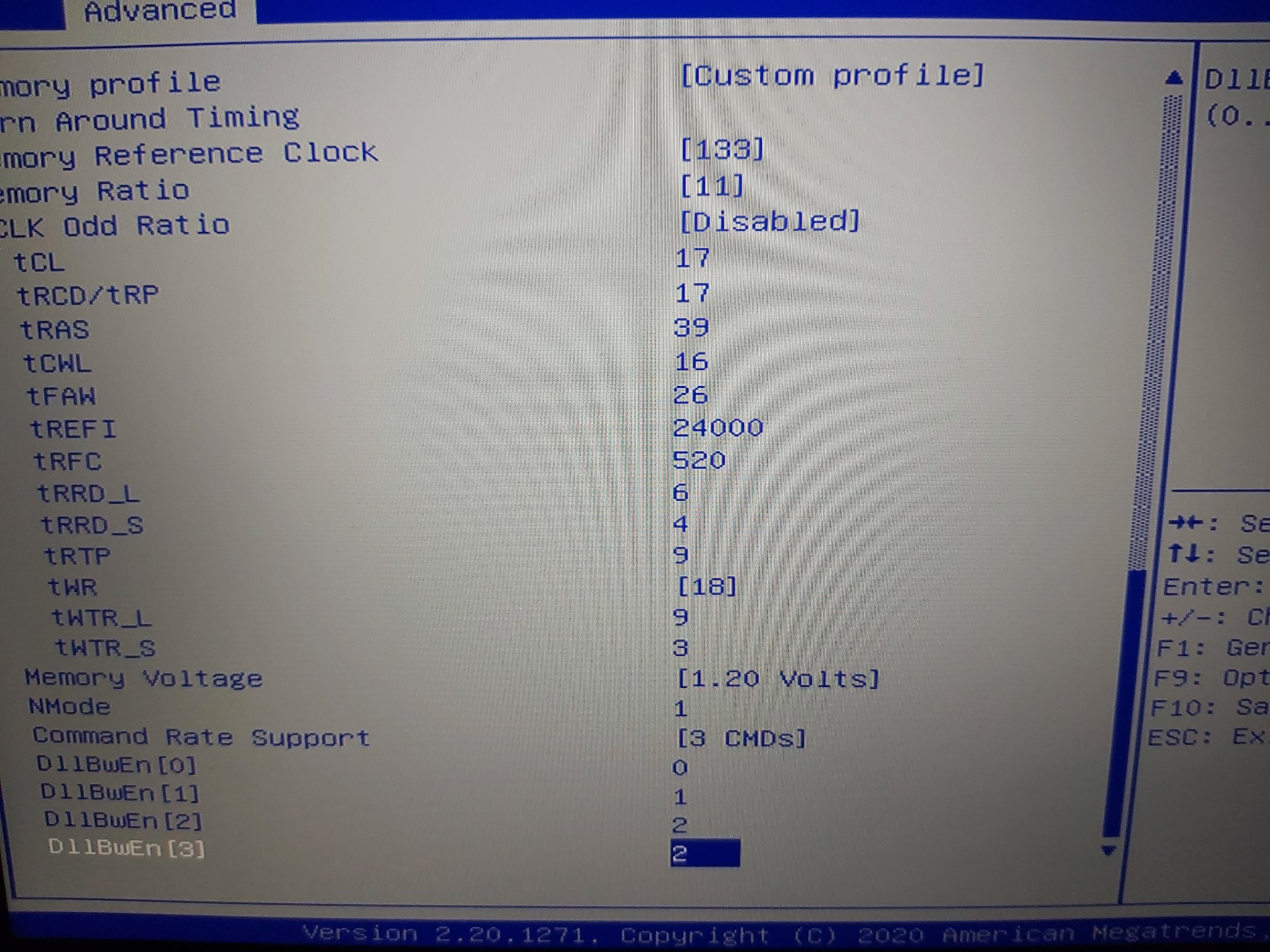
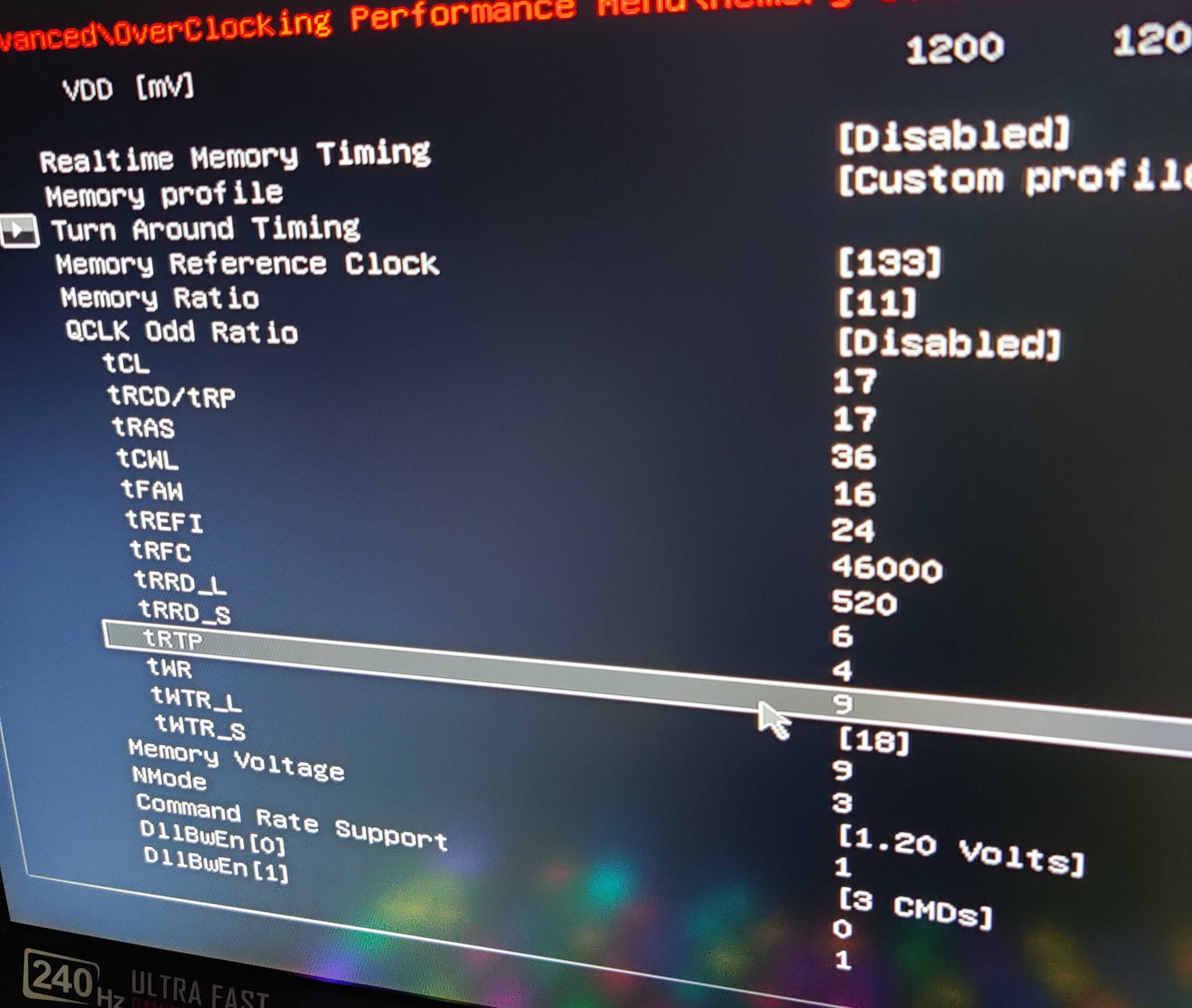
Set DRAM Reference Clock (MHz) to
Set Memory Ratio to
Set tCL to
Set tRCD/tRP to
Set tRAS to
Set tCWL to
Set tFAW to
Set tREFI to
Set tRFC to
Set tRRD_L to
Set tRRD_S to
Set tRTP to
Set tWR to []
Set WTR_L to
Set tWTR_S to
Set Command Rate (CR) to
Set Memory Voltage to -
For u get start u will change only
Uncore 125 +
Trfc 560
Trefi 14000
Memory ratio x12
This will be the huge boost.
From this point and then it start to get very little gain and need many tests for check if stable.
Trefi can u push it close to max. Around 52000 this increase read write of memory but can make pc freezing.u have lower it.
U also can try 18 18 43 or 17 17 39
This make ur rams faster.
U can change TFAW from 28 to 24 or 20.
Cr2 to cr1
Twr from 20 to 18 and trtp from 10 to 9
At a point ur rams need more voltage to works
About 1,30 voltage
All that make ur rams faster but maybe unstable.u need many tests -
And voltage?
-
Stock 1,20
This is my settings. (0) uncore..
It's not the best settings for benchmarks,but in every day use and games I didnt notice any different at all from 3200mhz or from tighten rams
With this settings I have the same frames and 1% frames compare to 3470mhz and cl20.
But never got a crash or error to anything.Attached Files:
-
-
If you leave Uncore at 0, you could start with Ram Voltage at 1.35 for testing and lower it when everything seems stable.
-
mmmm when you recommended me to make changes. You told me to set it at 17 17 36, but now 17 17 39. Will this differ in someething?
-
No u are ok. Urs actually running with lower latency.When u lower TCL-TRCD/TRP by 1 u can lower the TRAS by 3 +-2 . So 19 19 43 u can make it 17 17 36 and if works it's faster.
Dont change anything if works stable all that days. If u want to give a try for faster rams,u can try 16 16 36. -
Everything I have try for 3200 doesnt boot with 0 uncore.
Maybe I give a try again today. But really that cl17 at 2933 give very nice results. -
U also can try my settings but keep this 17 17 36.
Nmode make it 1
Trefi make it 46000
Tfaw 24
Twr 18 and trtp 9.
This all make ur rams has lower latency but I havent time to test it good.
I am at work many hrs and my son call me sometimes that his fortnite crashed.
Also when I play apex legends with very tighten rams I feeling some freezing for sec.i can find what timming it's the reason but need time that I dont have on laptop at summer
So i have found this settings I am running now it's extremely stable.Last edited: Jun 22, 2020 -
I had this issue too, I changed tWTR from 5 to 8 and its running smoothly again.greninga likes this.
-
I changed it like this. I am fine like this ?
Attached Files:
-
-
At the end I decided to buy these Crucial Ballistix 3200 MHz DDR4 DRAM Laptop Gaming Memory Kit 32GB (16GBx2) CL16 BL2K16G32C16S4B https://www.amazon.com/dp/B083W5ZRJ1/ref=cm_sw_r_wa_apa_i_wbq8EbGXGSR4H
I hope they work fine since I need the 32gb Rams and hope they are good and fast enough. Their base speed is 2666mhz, but with XMP they will go up to 3200mhz. If I am not wrong these laptops supports XMP. -
MSI after restart to save the settings put the uncore to 0 again... and i need always make a cmos reset to put the laptop operating again.
What i can tell is when added a new module of ram the pc not was able to do oc in ram anymore...
Settings that i used:
Uncore 125 +
Trfc 560
Trefi 14000
Memory ratio x12Last edited: Jun 22, 2020 -
Are u sure offset prefix at uncore its +?
Try 650 trfc
19 19 43? -
hey just wondering what audio driver versions are you using cause my 9sf isnt as loud as before
i tried the 10sf drivers on it, did get abit louder but not like before anymore
my 8sf was the same too after some windows updates, so i had to reinstall 8694.1
currently using
8sf - 8694.1
9sf - 8881.1 -
For better audio check this out:
http://forum.notebookreview.com/threads/nahimic-3-on-unsupported-systems.822763/page-90 -
well in windows is ok but stress on aida give bssod
-
Also i tried with the same values again windows and the screen was in black after some minutes in idle
-
Hey you beautiful GE75 owners. Have anyone updated to the new E17E9IMS.109 Bios update released 2020-06-19? Can you still undervolt?
-
Hi Everyone
I really need some help and hope that one of my fellow owners had the same problem.
I have a GE75 Raider 8SE and i'm getting random DPC Watchdog Violation blue screen when I play certain games that require lots of performance, Path of Exile, PUBG, etc. I also started keeping my Performance tab in Task manager open on my other screen to see what happens, basically my SSD Activity spikes to 100% and stays there 10-15 seconds as the rest of my computer freezes and then blue screens. It also doesn't want to minidump the error log and the event viewer says could not write error file and unexpected computer shutdown or something along that line.
I've read tons of pages and posts trying to fix this. Things I've done to try and fix it with no success:
-I've read that this could be an SSD issue, so I've ran chkdsk as well as other error scanning software which detected no errors.
-Updated BIOS, Updated EC Firmware. Updated almost every single driver and utility on the GE75 8SE page. Uninstalled NVIDIA graphics drivers multiple times and tried different versions of it.
-Installed Dragon Center 2
-Uninstalled Killer Service and Norton since it seemed it could maybe be the problem.
-Changed hard disk and sleep settings to never sleep
This might be relevant to debugging; the Camera also never worked for some reason (Not an FN F6 issue, it just doesn't work.) It's also happened multiple times in the past year and I sent it in for warranty repair when it got really bad (Also got VIDEO SCHEDULER INTERNAL ERROR before factory reset, now it's just watchdog) and looked like they just factory reset it etc. It worked for a while but then started doing it again now recently where it does it literally every 30 minutes of playing.
I've run out of ideas, I could factory reset again and it might work for a while, but I want to get to the root of the issue. -
You can still undervolt.
-
Just found out that for ram, tFAW should be tRRDS x 4
So i tightened it from 18 to 12 (3x4) and got a small drop in latency and slightly increased read speeds. Figured this might help those of you that are overclocking the memory.
Before
After
-
Hello owners of GE75 10SFS versions, some of you have repasted their laptop? What thermals do you get?
-
hi. can you show numbers RAM OC in bios?
-
you can also overclock the gpu.
for example, my rtx2070 clocks up to 2010mhz after set custom curve in MSI Afterburner
GPU voltage? with 1900mhz?Last edited: Jun 30, 2020 -
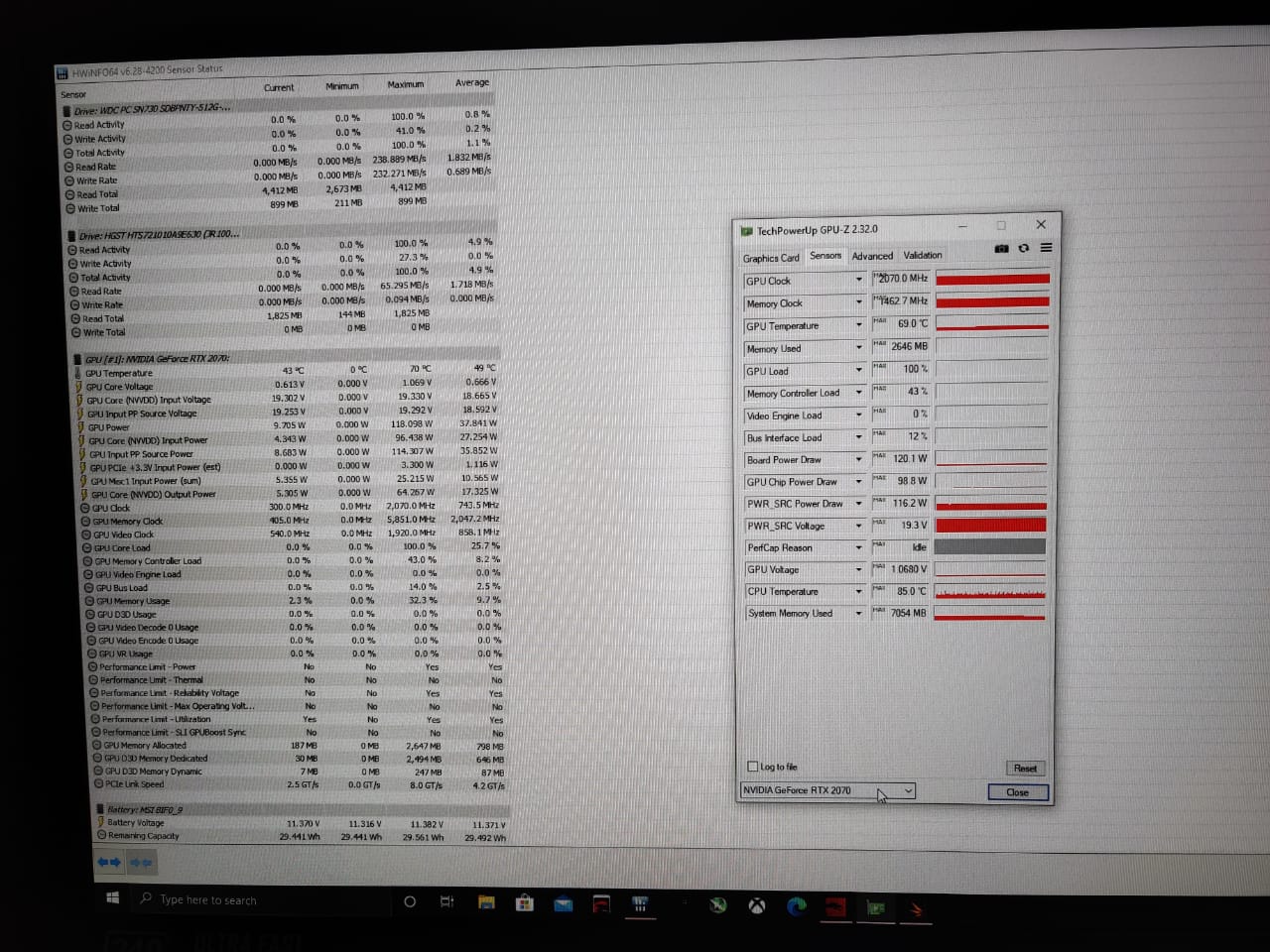
These are my results with stressing the GPU
Attached Files:
-
-
Hey everyone, A weird question I know this is a GE75 thread but I have a friend with a Mech G2r I re-pasted today and after a format It won't hit anything above 3.5Ghz.
Installed throttle stop made sure its on a turbo in the gaming center and an undervolt of -0.125 and power clamp of 70watts and still it won't go above 3.5 in cinebench and blender I tried everything.
Throttle shows 70watts temps are under 80 degrees and still its the same thing over and over again, tried different throttlestop versions tried different gaming center versions and even with out it and still the same problem.
Its undervolted it has 70w power and its cool enough, Any ideas? Thanks -
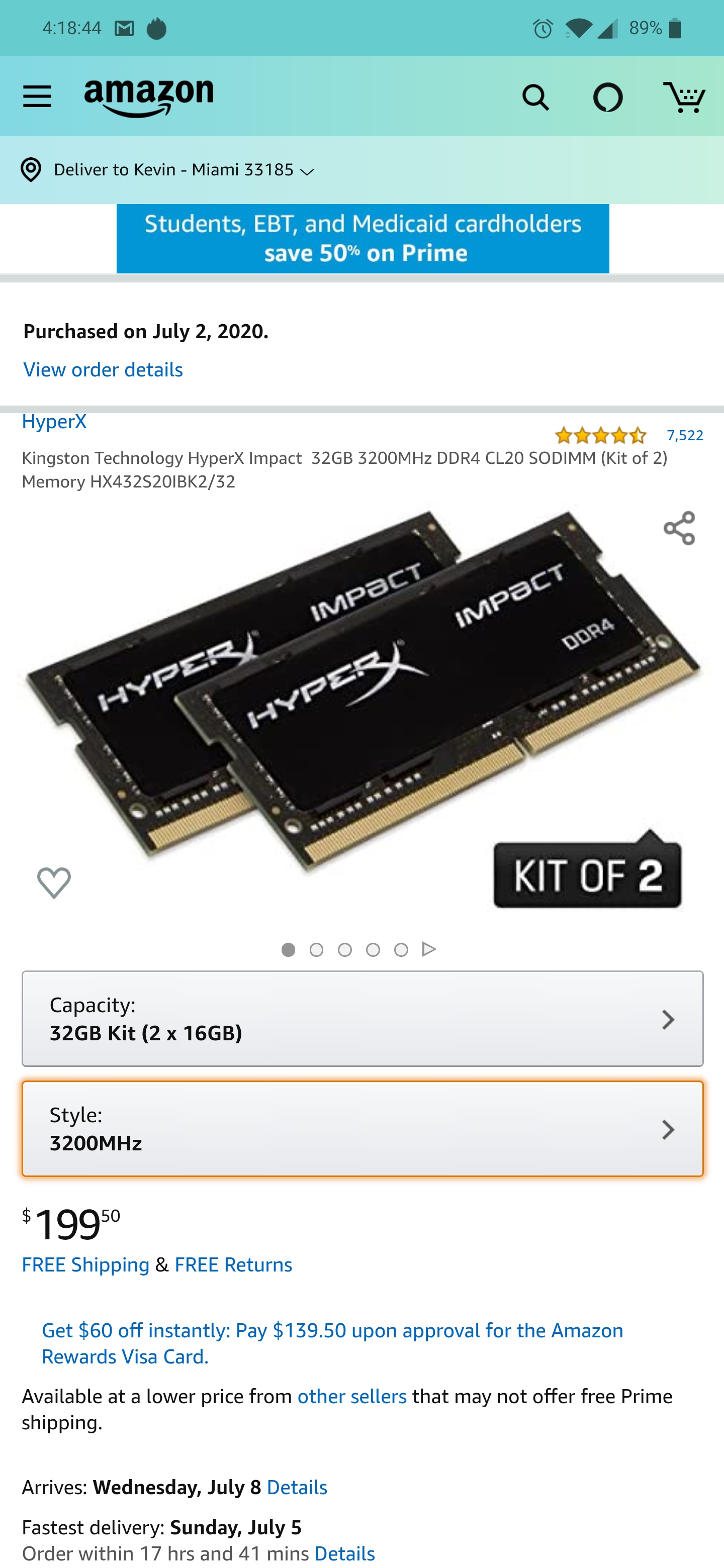
Will these work fine for a MSI GE75 Raider SF 019US? Any made a ram upgrade to the laptop?
Attached Files:
-
-
Well I have see this sometimes when speedshift it's like bugged. Try do changes with it
-
should according to notebook specs but with amazon you can always return if not. I upgraded to 32G on a MSI GE75 Raider 10SE-008(only difference is GPU), with 2x16G so-dimm ddr4 2666Hz no problems....i do believe you might have to update the bios to get the full 3200 speed though....
-
Yes, I bought the 3200mhz versions 2 sticks of 16 GB. But i do not know if the laptop will support those speed with a jedec of 3200 or I have to buy the 2666mhz ones with xmp profile to overclock it to 3200mhz. I do not know how this works.
-
They have versions of these with 3200 so it should work fine, might have to figure out some bios changes at worst.
-
Will works fine but I prefer to choose one with lower CL than 20. Ofc u can lower it at custom profil. But as stock I prefer lower cl
Ur laptop has 3 profil. Default -custom and xmp.
This memorys at xmp profile will run 3200mhz.
At default maybe 2666mhz -
The problem is to know if these memory ram are 3200mhz at stock without xmp profile.Or if they are 2666mhz at stock and 3200mhz with xmp profile. It does not specify this. And if these are 3200mhz at stock, then using the xmp profile will low the CL.
-
No no as default will works 2400mhz with lower cl or 2666mhz. Works on many mhz and get auto settings from bios. Dont worry about this.
-
For Eluktronics laptops undervolting too much sometimes screw with turbo/eluktroboost on their laptops. One of their representatives mentioned this before. You might try backing off a little bit on the undervolt and see if you can recover the original performance.
-
Tried with different speedshift settings ranging from 0-1-16-64-128, and nothing helped
Tried with the stock -50(It comes pre unvolted) tried with -0,-100 and -125 -
Try to uninstall any programm like throttlestop and do a default bios
Maybe this help.
It happens to me, to works only on base clock. And all options about turbo was enabled at bios and throttlestop too. -
Just wanted to check but you said earlier that you also reformatted the laptop. Did you also reinstall all the accompanying drivers from the Eluktronics website? Also can you check in HWINFO what your power limits(PL1,PL2) are in turbo mode.
-
Already did but will give it another try
I set it to 70/70 in Throttlestop and throttle reports 70watts , will check what HWINFO shows.
latest game center and drivers from Eluktronics site. -
Hello guys,
I would like to ask You if those SODIMM: https://www.amazon.com/OLOy-260-Pin...r4+sodimm&qid=1594478905&s=electronics&sr=1-5 will works for my GE75 raider SG9.
Thank You guys !
P. -
I just bought these and I am waiting to get them the next week. https://www.amazon.com/dp/B07BGLKD4M/ref=cm_sw_r_cp_apa_i_SBGcFbNEDEVVJ
I sent a message to the brand and the told me they should work fine. -
I just bought these and I am waiting to get them the next week. https://www.amazon.com/dp/B07BGLKD4M/ref=cm_sw_r_cp_apa_i_SBGcFbNEDEVVJ
I sent a message to the brand and the told me they should work fine. I recommend you to try these ones. Your version has the 9 gen CPU? -
Yes i got 9750H so do you think those what i have sent should work good?
Thank you
*** The Official MSI GE75 Raider Owners and Discussions Lounge ***
Discussion in 'MSI Reviews & Owners' Lounges' started by Spartan@HIDevolution, Nov 12, 2018.