Problems? See this thread at archive.org.
I recommend you the 2666mhz speeds. I think that motherboard does not support those speeds with jedec 3200mhz. With 64 GB will work fine too.
-
-
This is false.
You can easily set memory clockspeeds above 2666mhz on the bios. -
I think he does not want to play with the settings in the bios. He just want to plug and play. That is why I recommend him that. Anyways, if he get that memories. it will run with the speed that the motherboard can support. but it will be a waste of money.
-
It annoys me that MSI put my memory under the keyboard. I'd love to get some memory running at 3000MHz if possible.
I guess I'll have to just feel like doing a full disassembly one of these months.
edit: oops, wrong thread but still stands I guess -
Hi everyone! I recently purchased a GE75 Raider 10SE from Costco and i'm looking to make some upgrades. This is my first gaming laptop and first purchase since the first gen I-7's came out lol. Can I get some suggestions on RAM and storage options? I'm looking to max out both. Thanks in advance!
-
Hey guys, I've a MSI GE75 10SGS with 10750H and a RTX2080 Super with the latest bios update, which stated this in its changelog:
1. Support OEM board memory up to DDR-3200.
2. Update brightness table.
It's also stated on the official msi website that the laptop does supports ddr4-3200 rams.
So i did buy Gskill Ripjaws 2x16GB 3200MHz CL18 RAM. When i go into the bios, i can see the 3200mhz xmp profile, and i do select it.
But it doesnt boot, it resets itself and boots with 2933 cl18, why is this? Any help?Attached Files:
Last edited: Jul 13, 2020 -
-
You should contact Customer service for MSI and let us know what is their answer. Since with the new Bios update you should be able to reach 3200mhz.
-
By the way there is a new update of the Bios. Is still not in the website yet. But you can do it in device manager, go to firmware click right the bios version and press update. It will download the bios and then restart the computer when it ask so it can install the bios properly. Then try to use the 3200mhz profile to see if it works.
-
Their reply: "Since the RAM module you use is not tested by MSI, it's not guaranteed that it'll be fully compatible with the laptop.
I suggest you switch back the original RAM and check again.
To upgrade RAM, I suggest you contact the nearest service center and let the staffs perform the upgrade for you to make sure the RAM modules used are compatible with the laptop."
I did ask this in respond: "Thank you for your respond,
There isnt stated any information on the website about RAMs being compatible. Therefore I suggested that every RAM would be compatible if they did meet the DDR4-3200 value.
Is there any list of compatible 3200 MHz RAMs?"
And then they just replied with the same message again, "copy-paste". -
I wrote them and they told me this.
Dear Robert,
It is caused by this CPU can only support MAX 2933mhz. please refer to attached picture.
Our BIOS update for users can use DDR4 3200mhz in this product
So that means that you can add a 3200mhz Rams, but it will only run at 2933mhz if I am not wrongAttached Files:
-
-
I did try it, as you said there was an update available, and after the update I tried it again, with the xmp profile. The profile is loading, if I go to the bios now its still selected but my speed is at 2933 MHz.
-
The thing is, the 9750H and the 8750H is stated as supporting up to 2666mhz but as we can see in this thread, people are just using 3200mhz easily.
10750H is rated at 2933 so i think that the 2933mhz is the "officially" limit. I think that I must try doing custom profiles instead of the XMP profile, but I'm really not good at custom profiling the RAMs :/seanwee likes this. -
I also had problems with the Ballistix TM with XMP profiles. In Custom Mode my HyperX 2666 RAM runs stable at 3200Mhz. Try another manufacturer. I've never had any problems with HyperX and G. SKILL ...
Gesendet von meinem MI 9 mit Tapatalk -
Yes, is very tricky to play with the Rams in customs. Is easier just to plug and play with the spreed that the Rams supposed to run
-
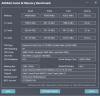
I actually managed to run stable (also with gaming) 2933 MHz with CL16, didnt try CL15 yet, its too late here I'll continue tomorrow.
Its True Latency is lower than 3200mhz with cl18 but of course not as much speedy. I think with 3200mhz cl18 I can exceed 50000 mb/s. I hope someone can help me out to get it running at 3200, I think it can run at 3200 cl17 or even cl16 once i manage it to get to 3200mhz.Attached Files:
-
-
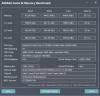
This is what I got with my 3200mhz CL18 ram.
You're still quite far bandwidth wise and latency wise.
What voltage are you running your ram at? And check what memory dies its using with thaiphoon burner.
That'll tell you how far you can go voltage wise and speed wise.rushtim3 likes this. -
At least my Rams runs at 1.20v. But how can I check the memory dies using thaiphoon burner that you mention? is that a program? I bought a the Kingston hyper 3200mhz 20cl that runs with 1.20v. I will have them next week.
-
Yes, thaiphoon burner is a program. You can look for guides on how to check memory dies using thaiphoon burner.
Check your existing one and also the Kingston ones. Take a screenshot and post it here. -
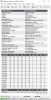
I'm running it at 1.2v, this is screenshot of thaiphoon. At the bottom I can see the XMP profile, I can also see it in the bios, when I select it it boots but just shows 2933mhz at cl18. When I check the bios if it did reset itself, it did not. XMP profile is still selected. Here is also a picture of the XMP profile in bios.
BTW: I tried both Nmode 1 and 2. 1 gave me better performance with the same stability therefore I did let it stay on 1. I tried the XMP profile with both, still didnt work.Attached Files:
Last edited: Jul 15, 2020 -
-
That's hynix CJR, a really really good ram die for overclocking. Second only to Samsung b-die in fact.
I bet you can get to 3600 cl19 with the right tuning.
Try 1.35v 3200mhz cl18-20-20-48 first. If that works try 3600mhz cl 20-24-24-52. If not, bump the voltage to 1.4v.
Test it with n-mode 2.
Edit: forgot to mention that you should also raise uncore by +75mv in the bios and system agent by +75mv in throttlestop.Last edited: Jul 15, 2020rushtim3 likes this. -
Im trying it now, no success so far for 3200mhz nmode2 1.35v 18-20-20-48. I tried the timings on
CL.................18............18
RCD/RP.........20............20
RAS..............48.............48
CWL.............20.............20
FAW.............42..............42
REFI.........12480........52500
RFC............640............640
RRDL............8...............8
RRDS...........4................4
RTP.............12..............12
WR..............24..............24
WTRL..........12..............12
WTRS...........4...............4
NMode..........2...............2
VDD............1.35..........1.35
uncore.........+75...........+75
and all subtimings on auto(0). No boot, resets itself to default setting of 2933 cl 21-21-21-47 1.2v -
Try this for 3200
CL.................20
RCD/RP.........22
RAS.............48
CWL.............22
FAW.............42
REFI.........10400
RFC............750
RRDL............10
RRDS...........5
RTP.............12
WR..............24
WTRL..........14
WTRS...........5
NMode..........2
VDD............1.35
uncore.........+75
Just to test if the system can run 3200mhz at all -
No, it doesnt boot. How can an older system(9sg) work with ~3400mhz while this system cant run above 2933mhz even when it got a bios update for supporting ddr4-3200 ?
Does this mean that the only thing I can do is to tighten the timings as much as possible for 2933mhz,and thats it? The tightest I can get stable is this:
CL.................16
RCD/RP.........16
RAS.............36
CWL.............14
FAW.............34
REFI.........52500
RFC............560
RRDL............8
RRDS...........4
RTP.............12
WR..............24
WTRL..........11
WTRS...........4
NMode..........1
VDD............1.2v
uncore.........0
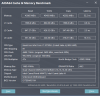
Results in picture.
Edit: MSI responded with a "compatible RAM list":
"Please find the list of the compatible RAM modules here:"
SODIMM,DDR4 SDRAM,16GB,1600(3200)MHz,HYNIX/HMAA2GS6AJR8N-XNN0
SODIMM,DDR4 SDRAM,16GB,1600(3200)MHz,SAMSUNG/M471A2K43DB1-CWE
SODIMM,DDR4 SDRAM,8GB,1600(3200)MHz,HYNIX/HMA81GS6DJR8N-XNN0
The one in bold is close to the module as I have, isnt it? Its an A die i think. "AJR"Attached Files:
Last edited: Jul 15, 2020 -
-
Im not sure, hopefully the new kit will work
-
These are my current rams. The Hyper ones, I will have them the next week.
Attached Files:
-
-
They can be overclocked right at low CL 14?
-
2933 cl14? Likely not.
Hynix c die clocks high but cannot do really tight timings. -
What about my Samsung Rams? Th ones that I posted? what should I try while I wait for the other Rams?
-
Oops I mixed up you and rushtim3
Samsung C die is a horrible overclocker. I've managed to get mine to 3200mhz cl18 but that's with a lot of effort.
Here are my settings.
robertoleont likes this. -
Did you change the uncore ?
-
No. Uncore is only needed when pushing 3600mhz or above.
-
tried with those settings but it did not boot. I was not able to changed the VDD from 1200 to 1300 since it was greyed out
-
How do you guys get to the memory screen in the Bios. I have a MSI GE75 with i7 9750h and 2060.
-
I'm in need of some help/advice after I absentmindedly tried to use MSI's factory reset feature without making a burn recovery image and ended up in an automatic repair loop. I have the 10SE-008 model that I purchased from Costco recently. Do I have any options in terms of getting a burn recovery image from someone else with that model or am I pretty much left with a fresh Windows install at this point? If I do a fresh install could someone tell me the best way to go about installing drivers from MSI in the right order? I'd really appreciate any help I could get on here.
-
If you know some one that has a recovery disk with your same model you can use it without any problem. If not, you will have to do a fresh windows install and download everything manually. Just make sure to install the version of the windows that came from the Stars since the activation key is bind to that version.
-
Once you are in the BIOS, Hold Left Alt + Right Ctrl + Right Shift and then press F2.
Go -advance- overclocking perfomance menu- enable overclock and go to menory -
Is recommended to change the thermal paste from the MSI laptops? The one that comes with it, is bad?
-
It's about luck.and it's about luck and what pressure give the heatsink on chips cpu gpu.and I mean how good fit on that chips. Some laptops (undervolt) hit 85c and other 90+ The stock paste it's not bad if they have paste good. Mine had good stock paste and with undervolt hitted around 85c.and 70 75 max on gpu. About 2 -3c different compare to top one.
For Long time ago I am using and ic graphite pad on my cpu and not thermal paste.i really love it. And the temps its same like the first day. For some other laptops ic graphite doesnt work so good like a good thermal pasteLast edited: Jul 17, 2020 -
Guys do you think it's a bad ideea to repaste only the CPU and GPU? I was thinking not to clean the thermal pads/grease from VRMs as I don't have any right now to replace.
But I will do a full repaste in the future for sure, I won't leave it like that for longer than a month.
GE 75 Raider 8SE -
I have the same question. I hope that I can only repaste the Gpu and CPU and leave the vrams untouched
-
I bought a GE75 Raider 9SE in January and need help diagnosing a problem. Whenever it's using the internal wifi card (to stream, download, or just browse), the laptop will randomly have a mini shutdown where the screen goes dark and the power light goes from white to red. Sometimes it happens every few minutes, and sometimes just once an hour. When it happens, tapping the keys or moving the mouse/trackpad will not make it come back. Only a quick press of the power button brings it back to the lock screen, and when I sign in, the online activity is still happening -- for example, if I was downloading a file, the file is still downloading. So the laptop didn't completely power all the way down. More like it suddenly went to sleep.
I installed a different internal wifi card, but it didn't help. However, the problem does not occur if I use a wifi USB plug instead of the internal card, or if I plug in an ethernet cable for a wired connection. In those cases, the laptop works fine.
Another, probably related problem is that very often, the laptop loses its connection to the router and I have to reconnect. This also seems random. Sometimes it will go for hours with no drops, and sometimes it drops the connection several times in 10 minutes. Again, this happens when using the internal wifi card, but not when using a USB plug or ethernet. (And again, replacing the internal card with a different one did not help.)
I already sent the laptop to MSI for an RMA. They replaced the motherboard, but that didn't help. Same problems. Now I have to send it off again, but I'm not confident they will fix it any better the second time.
Any idea what could be causing this problem and how to fix it? Thanks.Last edited: Jul 18, 2020 -
Well never heared this . But check at power plan -advance settings -wireless adapter settings .if it is at power saver change it to maximum perfomance
Also check the other settings on power plan like hard disk. -
If then stock paste on vrams it's still good u can let it.otherwise u can use normal thermal paste for that time till u get a paste like k5 pro. I was using at vrams grizzly thermal paste for about 1 year.
The vrams on ge75 hasn't big gap and thermal paste works too. Imagine that, I tried 0,5 mm thermal pads on my GE vrams was too thick. -
Thanks. I already set "never" for going to sleep or turning off the display -- no effect on the problem. The wireless adapter was set to max performance when plugged in, and medium on battery, so I changed that to max performance also (though I almost always have the laptop plugged in, so I'm not sure if this will help). The hard disk was set to turn off after 10 minutes (battery) and 20 minutes (plugged in), which I think means that's how long the hard disk needs to be inactive before it turns off -- but how would the disk turning off cause the laptop to shut down or sleep like it's doing? I can set the times to longer, but there is no option to never turn off the hard disk.
EDIT: This laptop only has a solid state drive anyway, no hard disk. So I doubt that setting will do anything.Last edited: Jul 18, 2020 -
Really strange issue. Are u using killer center? If yes try uninstall it,maybe it kill some services that make the issue.
I thing u already have try update all drivers ,windows update or at last fresh windows -
When I sent it to MSI to be fixed, they sent it back with a fresh installation of Windows, so it started as clean as possible. There is almost nothing on the laptop because I haven't reinstalled all my programs. Doesn't help, the problem is still happening.
-
Try uninstall all killer related software/drivers as Greninga said and put Intel drivers instead
-
I'll try that. Which Intel drivers, and where do I get them? Sorry if that's a dumb question, just want to be sure I do it right. Thanks.
-
Here is the intel drivers
https://www.msi.com/Laptop/support/GE75-RAIDER-9SE#down-driver&Win10 64
From drivers download the intel wireless lan
*** The Official MSI GE75 Raider Owners and Discussions Lounge ***
Discussion in 'MSI Reviews & Owners' Lounges' started by Spartan@HIDevolution, Nov 12, 2018.