Problems? See this thread at archive.org.
Thanks. I uninstalled Killer Control Center and Killer Performance Drive Suite UWD. Then I installed Intel PRO Set Wireless. The laptop hasn't crashed for a while, but the crashes are usually random, so I'll keep my fingers crossed that this has fixed it.
-
Hello guys,
I've been reading for several weeks the messages from this post. I've applied several tweaks from here to my GE75 8SF (8th gen RTX 2070): RAM overclock, CPU undervolt, BIOS tweaks... All have been working well. But lately I've been worried about the temps of my M.2 SSD. I've been monitoring my temps with CrystalDisk Info. I have found that my max SSD temp, while surfing the web (a ton of Firefox tabs) and watching YT videos, is about 70º celcius (158º Farenheit). I think that's pretty high for a SSD. Just after booting into Windows the temp is around 45º C (113º F). I have not changed the SSD that came with my GE75. It's a Toshiba 512 GB (KBG30ZMV512G) and it's my boot drive. I think it's life have been shortening with that temps.
Do you guys know what can I do for reducing these temps? I'm trying to find a way to extend my SSD life. I'm thinking of replacing my SSD thermal pads for other, more efficient pads, and thinking of adding something like a SSD heat spreader for laptop, but I don't know if that even exist.
What are your SSD thermals?
Is there a solution or do I need to be getting the idea that my SSD won't last nothing but 2 or 3 years more?
Thanks for reading!
PD: Don't know how to add screenshots...
Last edited: Jul 29, 2020 -
The NVMEs can run really hot, even with thermal pads or heat sinks. For this reason most of the manufacturers make their controllers to be able to slow down their performance to keep the SSDs cooler. As far as I know, only the samsung evo series have the better cooling solutions on their chips and can run a bit cooler than the others.
Now the only solution is to put some thermal pads (fujipoly), I think must be 3mm thick. Regarding the heat sink, unfortunately there is no place to fit. The ge75 is so thin that the ssd almost touching the back cover or have an allowance of 2-3 mm max. Hope that helps. -
Hmm, I see. Thanks for the answer. I found this:
https://www.amazon.com/-/es/dp/B07QNRP9HK/ref=dp_cerb_1
It's a "1mm cooper heatsink"... Maybe I'll try that. Will it work? What do you think?
Why do you recommend Fujipoli's pads? Are they the best? I was thinking in the Thermal Grizzly ones. -
Fujipoly pads have the highest advertised thermal conductivity.
Personally i perfer Gelid GP extreme pads that are far softer (fujipoly pads are practically solid pieces) and will conform better to the surface of the heatsink and ssd. Remember to get 0.5mm pads regardless of what you pick. Thinner is always better when it comes to conductivity.DimitriosMSI likes this. -
Thanks for your advice!
Ordered one of this: https://www.amazon.com/gp/product/B083FJTXNV/ref=ppx_yo_dt_b_asin_title_o00_s00?ie=UTF8&psc=1
It's 2mm thick. I think it will fit well in GE75. I'll let you know how it goes.
and Fujipoly 1.5mm. I didn't found Fujipoly 3mm... -
After removing Killer and installing the Intel drivers, the laptop worked great for about a week and a half. Yesterday I had to be in a hotel and tried to connect to the wifi, and the problem returned immediately -- the laptop went right to sleep. The same thing happens when I connect to my iPhone hotspot or to my wifi network at work. Yet when I'm on my home wifi network, there have been no problems since installing the Intel drivers.
I used Event Viewer to check out the Windows system logs. Every single time the laptop goes to sleep like this, the same series of messages shows up in the logs (listed below). It seems like the laptop is reacting as if I closed the lid or pressed the sleep button. Anyone know what driver is referred to in Message 1? Maybe that's the problem.
(UPDATE: I reset the whole laptop to factory condition and installed nothing else. Connected to my home network, no problem. Connected to my hotspot, instant sleep-crash. So I assume it's a hardware issue that I can't easily find or fix. I'll probably return it and get a different laptop.)
Message 1:
The driver \Driver\UcmCxUcsiNvppc for device PCI\VEN_10DE&DEV_1ADB&SUBSYS_12721462&REV_A1\4&38f81b6&0&0308 stopped the power transition.
(Source: Kernel power)
Message 2:
The system is entering sleep.
Sleep Reason: Button or Lid
(Source: Kernel Power)
Message 3:
WLAN Extensibility Module has stopped.
Module Path: C:\WINDOWS\system32\IntelWifiIhv08.dll
(Source: WLAN-AutoConfig)
Message 4:
8000 - Miniport Halt flow (driver disable)
(Source: Netwtw08)
Message 5:
The system has resumed from sleep.
(Source: Kernel Power)Last edited: Aug 1, 2020 -
Hi i'm new to this forum and want to ask about ram upgrade for my MSI Ge75 8se
I'm using 16gb single channel stock ram from samsung and now i want to change to dual channel, since many people said that dual channel performs way much better than the single channel (i have 144hz external monitor and it can never reach more than 100fps, no thermal problem at all).
Would it be better to buy the same ram and then overclock it or buy a higher frequency ram like from Kingston HyperX or Cosair vengeance? Which helps to increase more performance? -
That depends, if you want more performance you'll need to get a pair of Kingston HyperX or Cosair vengeance sticks. If you mix two different sticks of ram the stock 16gb will inevitably hold the other back so there's no benefit of getting a Kingston or corsair over another stick of stock ram and overclocking it.
-
Thanks for your answer. I'm considering between this 2:
https://www.amazon.de/dp/B01BMMVNL4/ref=cm_sw_r_cp_apa_i_bG6lFbVXE46RC
or
https://www.amazon.de/dp/B0722Q3243/ref=cm_sw_r_cp_apa_i_iJ6lFb1Q2JZGD
Should i go for a higher frequency with cl18 or a lower frequency but lower latency cl14? -
Since you are overclocking, the stock frequency doesnt matter. What matters are the memory ICs used in the memory sticks. Unfortunately it is very difficult to know what memory ICs are used in the memory sticks.
If Amazon allows returns I would get both, overclock them and see which overclocks higher and return the slower one. If not I would get the Corsairpak209 likes this. -
Well amazon does allow returns and i will definitely try both. I'll update later when i receive them.
UPDATE: I just received them from amazon today. But instead of buying 2400mhz/14ms HyperX i found a 2666mhz/15ms version with lower price.
Tried both and noticed a huge differences between single- and dual-channel, my fps is now consistently around 200. I can't really notice the differences between the Corsair or the HyperX, but since the HyperX is cheaper so i'm gonna go for it.
I'm reconsidering about overclocking, since i'm pretty much sastify about the improvement already. Will i get any noticeable improvement from overclocking?
I don't know how to read the Memory ICs so i have a picture here for you:
[![[IMG]](images/storyImages/yVQOUHI.png) Last edited: Aug 12, 2020seanwee likes this.
Last edited: Aug 12, 2020seanwee likes this. -
I recommend you the Kingston ones. I bought them and I did not have any issues with the xmp profile neither with overclocking the rams. -
How high did your get with the overclock? And since you have the kit, can you check what memory ICs its using with Thaiphoon burner?
INstructions omn how to get memory info with Thaihoon burner :
-
Is the HyperX automatically overclock itself above the base frequency or you have to do it yourself?
On youtube they said HyperX Impact auto-overclock up to 3200mhz:
-
So, i have a ge75 8se and i have been modding it hard lately, did custom cooling vent solution, cutouts for better thermals, kryonaut on gpu and cpu, fujypoly on nvme's, also running imon slope hack on cpu, -150mv on core and cache, thermals are stunningly good even when running conecutive cinebench runs i run ecuilibrium of 90-92w @3.9ghz on all cores @90w, also running ram overclock, 3456mhz stable, but now about gpu, 2050-2080mhz boost on core and +900 on memory stable but running into power limit @80w, doing firestrike i got 91w limiter, so first of all is the limiter 80 or 90W on this gpu? and if it is 80 can someone help me change vbios to 90-115w one? as i do have alot of cooling headroom still left this is what i would like to do next. If someone can help please do
-
The GE75 has a 150w 2080, not 80w or 90w.
-
ge75 8se has rtx 2060
-
Whoops, I misread. Skimmed through and saw 2080 and though you were talking about the 2080 model.
Here is a 115w 2060 vbios.
https://1drv.ms/f/s!ArgNvCzXGkEX5XCOU2G9j0vbH9vf
Follow flashing instructions here
https://www.overclockersclub.com/guides/how_to_flash_rtx_bios/ -
running into that problem
-
contacted the guide maker on ig, and he said you cant flash mobile gpus
-
Thats not possible, I've used the tool to flash my 2080 max-q with over 10 different vbioses. Perhaps Nvidia changed something in the microcode to make the new 115w 2060 vbios incompatible with older 2060s. You're not the first to report the unsuccessful bios flash.
The only alternative now would be to shunt mod your 2060. -
is there a way to use Pascal TDP Tweaker and just raise the tdp myself and flash it back using nvflash?
-
Mobile PASCAL tdp tweaker does not working on turing cards.
-
is there any more vbioes i could try? like some 90w? or 100w?
-
this is other error i get when trying to flash my own modified vbios
-
I have the same 8SE laptop, flashed this 2060 90W from another MSI laptop with no issues. Haven't tried DP or HDMI.
Not much of a difference in games, maybe a few fps.
https://we.tl/t-EO76Kf4yTY
Did try to flash the one from above with 115W but same error. -
OMG that worked
 got my firestrike graphics scores up to 19086 now, gpu max temp 53, so alot of headroom still
now will try and get that 115w running as i was still power limited, only got like 1780mhz on core, previously was 1600s, so a big improvement already
got my firestrike graphics scores up to 19086 now, gpu max temp 53, so alot of headroom still
now will try and get that 115w running as i was still power limited, only got like 1780mhz on core, previously was 1600s, so a big improvement already
-
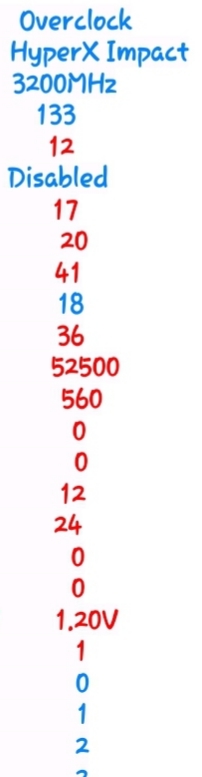
New owner for 2 months here. bought hyper x 16gb 2666 to go along stock samsung 16 gb in order to run in dual channel. succeded to run 3200 stable. my only deception is 70-72ns latency. Any suggestion?
ratio:12
Tcl:18
18
36
14
27
10400
650
8
5
9
18
12
4
1.2 v
Nmode 1
Cmd rate support: 3 cmd -
What CPU do you have? 8750h 9750h 10750h 10875h 10980k ? -
GE 75 8SG so 8750h
also forgot to mention
uncore 125 + -
Let me know if you find any 90w+ vbios working
-
Use my settings without uncore
Attached Files:
Kilador likes this. -
-
work for boot
latency down to 66 but it crash when i play game
Is it the best latency i can expect with RAM mix of stock samsung and Hyper X ?Last edited: Aug 16, 2020 -
Hello guys. I'm a bit confused with the repasting of the GE75. The doubt is regarding the parts surrounding the GPU, sorry for my ignorance, I believe these are VRAM.
I've seen some videos where they just repaste GPU and CPU and leave the other parts without cleaning leaving the old pads/paste, others where they substitute all the paste/pad with new thermal paste...
What is the ideal procedure? I didn't knew about this extra components and now I have my laptop opened not knowing what to do, I just have some kryonaut paste.
Should I clean all and apply kryonaut? Any advice?
Thanks in advance.
-
YES YES AND YES, repaste with cryo if you have it on hand, did that on mine and full load temps went down 10-20c
-
Guys. just wondering, can you give me advise on what is the best external gaming monitor for my GE75 Raider 8se? im using rtx2026.
-
On those vrams u can also use thermal pads 0.5mm or k5pro paste.
-
R
Wait a minute. Did u mixed the stock ram with the hyperx?. Then the performance of your ram will be as per the worst module. The ideal is to buy same modules with the same characteristics and even better from the same lot number. Have u ever heard about silicon lottery? U should buy those 2 modules shipping together and not separate. -
Hey i tried that setting but i have some questions. After changing uncore to 0 and Nmode 1(before i was able to do ok on uncore +125 and nmode 2), i can boot normally until i raise undervolt for cache to -140 and mine just freezes on boot. What is ur undervolt setting? And if i want the temps a bit lower should i use Nmode 1 or 2?
-
If u set uncore 0 in bios, make sure that u also have offset voltage to 0 on System Agent in throttlestop.
My undervolt is -125 my cpu core and cache.
Regarding Nmode actually is the Command Rate (CR) and I know that 1 is more fast but quite unreliable or unstable and 2 is a bit slower and more stable. A few months now I chose Nmode:2.
Hope that helps.. -
Seems like without uncore i can't go above -125 on cache. Now it's normal again. Thanks a lot
-
W
What is yr cpu? -
The i7-8750H. I was wrong, i have to set uncore +125. Without uncore it will be very unstable.
-
We have same cpus. There is a youtube video regarding the undervolting of the 8750h. "Address that hot" by bobofalltrades.
There he explains that although you can undervolt very deep those cpus (there is a resistance of 180 ohms) actually you are not gain so much if you go more than -125 mv in both core & cache. I think the best setup is the -125. More than that you get the opposite results.pak209 likes this. -
so what kind of clock speeds are you guys getting in timespy and firestrike? my best score was 7192 timespy graphics score (oc curve auto and +800 on memory, 90w vbios), cant seem to get past 1750mhz on that, but when i am gaming i get 2085-2095mhz (bf5 for example), is that normal gpu clock speeds in 3dmark or should it clock higher? i am maxing the gpu like 55c on timespy so it is not temp limit, also when i tried msi oc tool last time i saw that it said no load limit to be problem? dont get it... didnt power throttle once through octool, only voltage limit. any help is appreciated on that matter, and if someone has got 90+w vbios i could try that aswell
-
Hello guys, i have an inquiry here. My device is msi ge75 9sf updated with latest windows 20 version.. When i checked the optional updates i found msi bios update ends with A11... any idea if it is old version or new?
-
Hello i want to ask about how to raise the power limit of the rtx 2060 mobile version. I'm using the MSI Afterburner and the gpu is always limit eventhough my temperatur is only around 60. Can someone give me some tips because i don't know where to start...
-
Can someone please share the RTX 2080 200watt vbios? I have a GE75 9SG with the 2080 default 150watt vbios. I know that at least @greninga was able to flash the 200watt vbios.
-
How are you getting such temps???....my CPU and GPU are constantly in the 80's
*** The Official MSI GE75 Raider Owners and Discussions Lounge ***
Discussion in 'MSI Reviews & Owners' Lounges' started by Spartan@HIDevolution, Nov 12, 2018.