 Problems? See this thread at archive.org.
Guys with similar specs to mine and play Warzone, how's your performance?
-
I haven't seen any vbios for the 9SF on here yet. Only for the 2080 model.
FYI: If possible, you could use an external monitor instead of tweaking bios and settings. That seems to give a huge performance increase since it circumvents the display output of the iGPU. -
Thanks this point is true. That’s why I’m always benching on an external Monitor the scores a few percents better.
-
Does the USB-C port support Power Delivery?
-
No
Gesendet von meinem MI 9 mit Tapatalk -
Raider 9SF: Anyone had the issue that the keyboard lights stopped working?
Pressing the function key still make the keys light up red, but all other RGB keys stopped working, as if the RGB Controller went bust. -
Need some advice regarding replacing the HHD in my MSI GE75 8SG-009NL. It seems to be having some problems. Sometimes it will run REALLY slowly, mostly when doing multiple operations (e.g allocating space for a Steam game, or when downloading multiple files that are all being written to the same disk). I'm worried that this HDD might be on the way out
 Even though CrystalDiskInfo shows the drive health as good.
How easy is it to replace this HDD myself? It's not the OS drive, so is it as simple as swapping for a new HDD and the BIOS etc will pick the new HDD up automatically?
And does anyone have a guide / advice on how to replace it, as i've not opened this laptop up before. And do I need to replace it with another mechanical HDD, or will the slot this HDD is in also take an SSD?
And finally, any advice on which specific make/model of HDD (or SSD) I should replace it with would be most welcome. I don't need bigger than 1TB really.
EDIT: I just tried copying a 10gb file off that HDD, and writing it back, and the speeds were just fine for both reading and writing. So it seems that this drive is only showing slow behavior in certain situations. No idea if this means the drive has a problem or not....Last edited: Oct 11, 2020 -
Irregarding of the actual drive's health, you definitely want to replace that HDD with a SSD.
I'd buy a 1TB Crucial MX500. Best value right now. Or if the second M.2 slot is still free, take the Kingston SA2000M8/1000G. Even faster.
Opening the machine up is fairly easy. Take a look at some youtube videos. You might break some of those plastic pins, but that's just how it is.
You might want to be a little bit careful with the plastic shroud under the screen that is covering the wifi antenna. If you break the pins on this one, it might not fit well after reassembly.
(I guess the 8SG model has the same layout as my 9SF)
Remember that there is an additional screw under the "Varranty" sticker. And check for differences in screw lengths if there are any... -
Thanks. So will this one fit straight in the space where the HDD is currently located?
https://www.coolblue.nl/product/802565/crucial-mx500-1tb-2-5-inch.html
And is it just a case of power off laptop, open the back, swap drives, replace back then power on - or is there more to it than that?
Alterntively, I assume the 2nd M2 slot is free right - as my laptop currently has a 512Gb SSD (C drive), and a 1TB HDD (D drive). If so, then I was looking at this:
https://www.coolblue.nl/product/825820/wd-black-sn750-1tb.htmlLast edited: Oct 11, 2020 -
Yes, just replace and plug and play.
Both of them will fit, but the Western Digital is way too expensive. That's why I recommended the Kingston. You won't notice any difference anyway.
I have the Samsung 970 Evo and never even come close to the advertised speeds. So save your money.
https://www.coolblue.nl/product/838203/kingston-a2000-m-2-nvme-ssd-1tb.html
Since it's the same price as the MX500, might as well go for the M.2 NVMe. -
Just ordered this one in the end as it was on offer, so close to the price of the Kingston, but faster and with a higher lifetime write figure. From what I'm reading on the MSI website, my 2nd M2 slot is free, so instead of removing the HDD, I'll just install this and hopefully job done.
https://www.coolblue.nl/product/825616/samsung-970-evo-plus-m-2-1tb.html
Bit nervous about how fiddly removing the case seems to be, but I've watched some youtube videos and also ordered some pry tools, so I'll have everything I need.
I'm a comfortable techie and build my own desktop PCs plenty of times. Just never levered the back off a 2.5k laptop before lol -
OK, done and installed. Not too difficult in the end. Currently downloading Star Wars Squadrons to this drive from Steam, over a 250mb connection. Samsung Magician software is saying that my drive temp (during this download/writing operation) is 59c after going for 20GB sustained download and writing. Next to the temp meter it says "Too High". I've done some googling which seems to suggest this is actually not a problem, and the Samsung Magician software is just being dramatic with its "too high" warning. I also read that Samsung EVO NVMe drives do run hot, and thats fine, as they are rated to 70c and above, and will throttle as needed to ensure no damage.
Any thoughts or advice on this? I did notice that the free slot I needed to install the SSD in had a heatpipe running right across the top of it. -
Temps are fine. Don't worry about it.
In Samsung Magician you can check if the "Over Provisioning" setting is set to "Recommended". -
Thanks, and yes, its set to Recommended, is that correct?
Also, I found something interesting with HWinfo64. It shows two temps for the drive. From reading some forums, people seem to say that the 2nd temp in HWinfo is the one for the controller. But it is the 1st temp in HWinfo64 which is being displayed in Samsung Magician. The 2nd temp is higher, and has hit 70c on occasion. Now I'm a bit confused as to which temp Samsung Magician is showing, the controller temp or something else?
For example, busy downloading another game to this drive at the moment. Temp1 in HWinfo is showing as 49c. This is the same temp as is showing in Samsung Magician. However temp 2 in HWinfo is showing as 62c. This temp is nowhere to be found in Samsung Magician. Confused lol! -
HI
Anyone tried flashing 200W VBIOS on ge75 10sgs RTX2080Super.
I recieved 200W vbios from Aorus RTX2080Super laptop and wanted some feedback from you guys?
Or maybe someone have another/different 160W, 170W, 180W, 190W, 200W VBIOS that can share?
On stock 150W Vbios with some OC I am getting around 29.5K graphics score.
Also do you guys use LM on GPU in rtx2080 versions of ge75 or only on CPU? I am asking, because rtx2080s die is quite big and there is very little space to aluminium heatsing, so here I am a bit confused.
I am planing to repaste my beast with LM on CPU + K5PRO (OR GC-extreme??) on cpu powersection and LM/Mastergel on GPU + Mastergel Maker on Vram and VRMs.
And maybe some polishing on heatsinks.
What do you think?Last edited: Oct 13, 2020 -
Absolute best thermals i've gotten are with LM and carbonaut on the cpu and gpu respectively with a perfectly lapped mirror finish heatsink. LM on the rtx 2080 is finnicky and tends to pool up due to its large die.
And yes, you can use a 200w vbios safely on a GE75. It has 6 gpu phases + actively cooled vrms. -
These are the pictures of the inside of the laptop. ( Pictures are not mine, just found them on the google to show you )
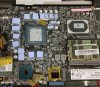
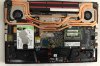
So I think that, this will handle 200W Vbios, what do you think @ seanwee
As for LM, you have just write what I tought. Honestly I have spare carbonaut, but even with perfect lapped mirror finish heatsinks thermal paste on my side in my 2 other laptops always worked better. What are your temps with carbo? And if it worked so well on gpu why you didn't go with it on cpu?Last edited: Oct 13, 2020 -
Because I have LM left and carbonaut is expensive. I'm not cutting a small piece just to use on the cpu.
Carbonaut works as well as LM on the gpu temps wise. -
does the GE75 raider have an option to disable the iGPU and run in discrete mode?
-
I do not know if it has it or not, but if it does, this is where it would be in Dragon Center:
https://www.notebookcheck.net/fileadmin/Notebooks/MSI/GE66_Raider_10SFS/tool3.jpg
In theory the option would also be available in the bios after doing the advanced settings unlock command. -
thanks for the response, being able to disable optimus garbage is a must for me
-
Don't think you can disable it. Only with an external monitor.
JRE84 likes this. -
im not sure i'd be able to overlook the ugly af keyboard anyway, it's hard to find a gaming laptop that checks all the boxes
-
No at ge75 cant disable optimus. I am sure at the new ge76 will be.
Only if u connect external monitor it get direct power from nvidia. -
Can I get a picture of the original 280W PSU?
Are there alternatives with more power? -
Last edited: Oct 16, 2020JRE84 likes this.
-
Thank you! So I also found it is 20V, 14A, 280W (Delta or Chicony)
I have the GE75 Raider 9SG
and
19V, 9,47A 180W HP
19.5V 9.23A 180W Chicony
However no original adapter... It won't detect/use the PSU.
If I remove the battery - the laptop will power on but when it loads to windows it will shut down.
When I reinsert the battery the PSUs will charge it ... but if I turn on the laptop charging stops and the PSUs are not detected.
I am starting to suspect original PSU is required as the plug has "+" "-" and Sense.
The guy I took the laptop from said these two PSUs worked before but stopped working recently. What do you think the problem might be? Could the problem be with the DC Jack/cable to the Motherboard or is there some kind of power controller?
Not to mention these PSUs are seriously under-powered for such a system (GPU alone is 150W).
Is there even more powerful PSU than the 280W model?JRE84 likes this. -
Any solution for poor contact betwean CPU die and heatsink. I have just applied LM on my ge75 and temps were skyrocketing just from power on. I allready applied LM in many laps, but didn't think that in ge75 there will be a problem with this. I have applied mastergel maker for now, better than stock but still throttle.
As for LM application I have used one layer of scotch33+ and foam barier that compress next to nothing
Maybe some 0.1 shim? LM/0,1 shim/LM
Also anyone know what is the height of 10th gen cpu die?
Maybe scotch was overlaping plus foam, even very compressable, rised the heatsink?
Also
Or only inside the metal plate?Last edited: Oct 19, 2020 -
That I have find it work on my ge75 better than thermal paste, it's the ic diamond graphite.
Ic diamond on cpu and grizzly kryonaut on gpu.
For Some other model laptop users wasnt so good .but for me 6months now it's the best.
Here is my temps , (custom bottom cover)
-
Did you used imon trick or not by the way. I already tried with carbonaut but I wasn't happy with my 8 core cpu at all 4,3GHz core. It was thermal throttling like ****.
-
Mirror finish heatsink lapping is needed for carbonaut to perform well. On a rough heatsink it will be worse than paste.
That said, liquid metal is the most suitable Tim for laptop cpus. -
Yeah I know and I am using it in other laps, but in ge75 my problem is poor contact after LM
It I could lower the heatsink a bit down it would resolve the issueLast edited: Oct 19, 2020 -
Get some pressure paper samples (free) and see which parts of the heatsink make contact. Sand the parts that make contact to lower the peaks so the rest of the heatsink makes contact.
-
you think? Beceause the screws were already tightened to max I think
-
how long did it take for you to get a sample? i requested one a few days back because the pricing on this stuff (Fujifilm Prescale ultra low) is insane
-
Yes imon trick and overclocked rams.
I hate this trash 3 screw heatsink.
I have try every top thermal paste that I can find in the world and nothing works.after some days working really bad.this is the reason I dont want try LM cause of poor contact.
I am using 6 months+ now that ic graphite thermal pad on cpu and really works like the first day (min -max core 5c.)
This cpu u have it's a monster ,its hard too cool this think with out modding ur laptop + homemade cooling pad. -
I would know if this video it's fake.50c at 4,7ghz 10980hk.. this is not impossible lol.
-
WTF, maybe he disabled most of the cores along with HT?
And I am thinking of using 0.1 mm shim in the way lm /shim/lm
The problem is only with CPU as the GPU after repaste with mastergel maker on the die and gc-extreme on the memory and power section with +140 oc on core and +1300 on memory tops at around 72 without any UV with the curve in afterburner
And as for CPU I would be happy if the cpu temps maxes at around 85 with all core boost eh
Now for example playing not demanding FIFA 20 at 270HZ (I oced my 240HZ screen xD) keeps my clocks at all 4.3GHz but the temps are around 93 - 95.
It just needs LM as all 8 cores at 4.3GHz with 1.15V needs much faster heat transfer.
What I did now I have puted 1mm gelid ultimate on top of the heatpipes so some of the heat can be transfered to the pipe that comes directly from gpu and pipe that comes from gpu and than to the cpu power section. The same thing I have made for gpu pipes so the top pipe that cools VRM only also transfers some heat from gpuLast edited: Oct 19, 2020 -
After installing my Samsung 970 EVO Plus in the spare M2 slot, I've noticed that having an active cooling stand make a MASSIVE different to this SSD's temps. I can keep the load temps approx 10-15c lower, just by switching on the fan halfway in my COOLERMASTER Notepal Ergostrand III. Its interesting as switching on this fan makes very little difference to CPU or GPU temps, but it does have a huge impact on the temps for this SSD. Even the idle temps are a good 5c lower with this fan on.
I also notice in that HWInfo there are two temps for this SSD. The second one is generally higher. From reading on the internet, the 2nd one is generally assumed to be the controller temp. However in the Samsung Magician software, only ONE temp is reported, and that is the FIRST one from HWInfo. I'm inclined to believe that this first temp (and the one reported in Samsung Magician) is in fact the controller temp (as its also logical that the memory would run hotter, as its meant to). Does anyone have more info on this regarding which temp is which? -
-
Guys, I think I have made a great revelation/discovery.
Has anyone tried charging the laptop via the USB type-c port?
Theoretically that is 100W so if you combine it with the power brick 280W, that makes total of 380W supplied to the laptop.
Can somebody test & confirm this? -
Hi guys
I already posted this on TS forum but I think here might be also good.
On 10th gen ge75 I have found something interesting within the bios settings, I have enabled one option called Easy overclocking (only on 10th gen based laptops) that is rising Power limits and iccmax so there is more room to keep the high clocks and second finding on 10th gen (maybe on 9 or 8 th gen also) bios is that by default speedstep and speedshift are enabled in bios but when you disable speedstep and leave speedshift enabled the cpu get some nice boost. For example with Both settings enabled I had only around 22400points in FS cpu score and around 9800 in combined but with speedstep disabled in bios and speedshift enabled I am getting around 23200 cpu score and around 11000 combined. Similar boost can also be found on Timespy. If someone could check this on 9th also and 10th gen it would be great.
I suspect that the little boost came from first option but 80% of it came from disabling speedstep and leaving speedshift enabled but need confirmation and feedback from you guys. For now I left c-states enabled.
BTW @greninga how much you have lowered temps with just modded bottom cover as I am thinking of buying second one and using my dremel for making something like gt76 bottom cover, as it is one of the mods I want to do.Last edited: Oct 25, 2020 -
With custom cooling pad 12volt fans at center of cooling pad drop a lot, about -10c,12c on cpu gpu too.
With normal cooling pad dont know.
At this game at video if I close the cooling pad I have 70 -72 gpu and 88-90c cpu. (Max frequency)
So the cooling pad has high effect with modded cover.
Last edited: Oct 25, 2020 -
I have thermaltake massive 20 rgb which is nice and I think with modded bottom cover and this cooling pad I could take around 5C from my 8 core and 2080s
Now during gaming my cpu is around 86-87 at all core max freq and gpu around 67-68 (oced +170 and +1200) with custom fan curve, that makes playing comfortable with fan nosie that is now producing. That is with LM carbonaut mastergel maker, after lapping and polishing and little cpu UV. I would say it is nice if you look at laptop spec.
Under full cpu load with long TS bench cpu is drawing constant around 100W and is hitting 95-96 but there are no limits showing in limit reasons.
Core temps are within 1-3 C difference now, previously The core temps difference was almost 12C
But for sure with modded cover ale temps would be much better.
Any way gaming, single benchmarks and stress test are different worlds. And during long gaming, and in some benchmarks like FS, superposition, cb15, cb20 temps are very good now with no throttling and will be better with modded cover.
Thanks guys
When I will made cover mod I will report but It will take some time.
Someone tried disabling speedstep in bios?seanwee likes this. -
Yea modded bottom cover it's good.
I never tried disable speedstep cause I have tweak the bios and the cpu work with no limits. -
Please disable speedstep in bios and leave speedshift enabled and in Windows in TS untick speedstep and enable speedshift and please compare before and after resaults in for example FS and TS.
-
Guys I have also one question.
What do you think about flashing stock 200W rtx2080s vbios that came from a Aorus laptop that have switchable graphics option (muxed and muxless) into the GE75 that is muxless -
Because MSI stock is 150W TDP and the Aorus have 200W TDP so after flashing it rtx2080s should have nice performance boost, and It is I think safer method than shunt modding.
But I am thinking about compatibility. For now this is the only 200W TDP RTX2080S vbios that I have found and recieved from kind Aourus owner.
I have programer in case of failure but I have done very good repasting and don't want to redid it just because I will end with black screen after flashing. -
Maybe u can find from gt76 titan with super gpu.
I was used 200watt vbios and all works perfect.
But I feeled the image doesnt runs so smooth like stock vbios.. it's something like tearing.. I returned to stock now . It can runs undervolt about 1800mhz. Stable.. so not big deal
*** The Official MSI GE75 Raider Owners and Discussions Lounge ***
Discussion in 'MSI Reviews & Owners' Lounges' started by Spartan@HIDevolution, Nov 12, 2018.


