Problems? See this thread at archive.org.
I've sent my GS65 in for RMA because the Battery is now swelling, causing the track pad not function correctly and Enter Key plus Fn and Windows Key losing their function due to the heavy pressure introduced by the swelling battery. I'm on battery 10 hours per day, and charge once drop below 30%, not sure what cause the battery to swell, hopefully back in a few days.
-
-
Is there a change log for the latest EC firmware update? I don't see the point of upgrading if it raises the minimum fan speed by almost 1000 RPM
 I'm guessing updating the BIOS to the latest version won't affect the fan speed?
-
Excessive heat or overcharging. It's a common enough occurrence even in premium notebooks like Dell and Apple. RMA is the right thing to do. NEVER try to remove or otherwise work with a swollen Lithium battery. It's genuinely dangerous. It can burst, start fires, and cause other injuries.
-
Does anyone know how to fix the lid of Msi GS65 not closed completely? I have both tried to loosen and tighten the screws, but to no avail. I'd like to mention that I have replaced the palm rest cover and everything seems to work fine, except the lid not closing completely. It does close if, for example, a book is on top of it for a few seconds. The lock mechanism seems to work fine when I try to open the lid a bit since it does fall back and remain closed. However the same issue occurs after using the laptop.
-
Sounds like your hinges are warped.
Sent from my SM-N960U using TapatalkEncy Suante likes this. -
Thanks for the suggestion. I checked both the hinges and they seem to be fine, no bending or misshaping to be seen
-
I believe it's the imperfection from manufacturing as some had previously reported. Please check with MSI support directly to see if this can be fixed or not as they should have a solution by now.Ency Suante likes this.
-
Does anyone know the storage configuration in the MSI GS65. I am considering upgrade to M.2 and im aware that only one of the slots support SATA M.2 drives. From the CrystalDisk benchmark i have concluded that the default 250gb drive is NVMe drive since the speeds are R/W=2800/1190MB/s. Im however not sure which slot is the one that only supports NVMe drives. Is it the slot in which the default drive installed in the NVMe/SATA slot or just the NVMe slot? Im considering getting a 1TB SATA drive but if the SATA-compatible slot is occupied by the default drive, i would obviously need to move it to the other slot.
So the question is. Which slot is NVMe only and which is NVMe/SATA? -
The change log says "Improved Fan Function" again.
It changes the minimum speed of the fans to around 2800 rpm, when setting them anywhere between 1-45%.
I flashed back to the previous FW. It has a minimum fan speed of 2000~ rpm when setting it anywhere between 1-20% or 30%.
Update basically makes the fans even less configurable. I don't recommend it. -
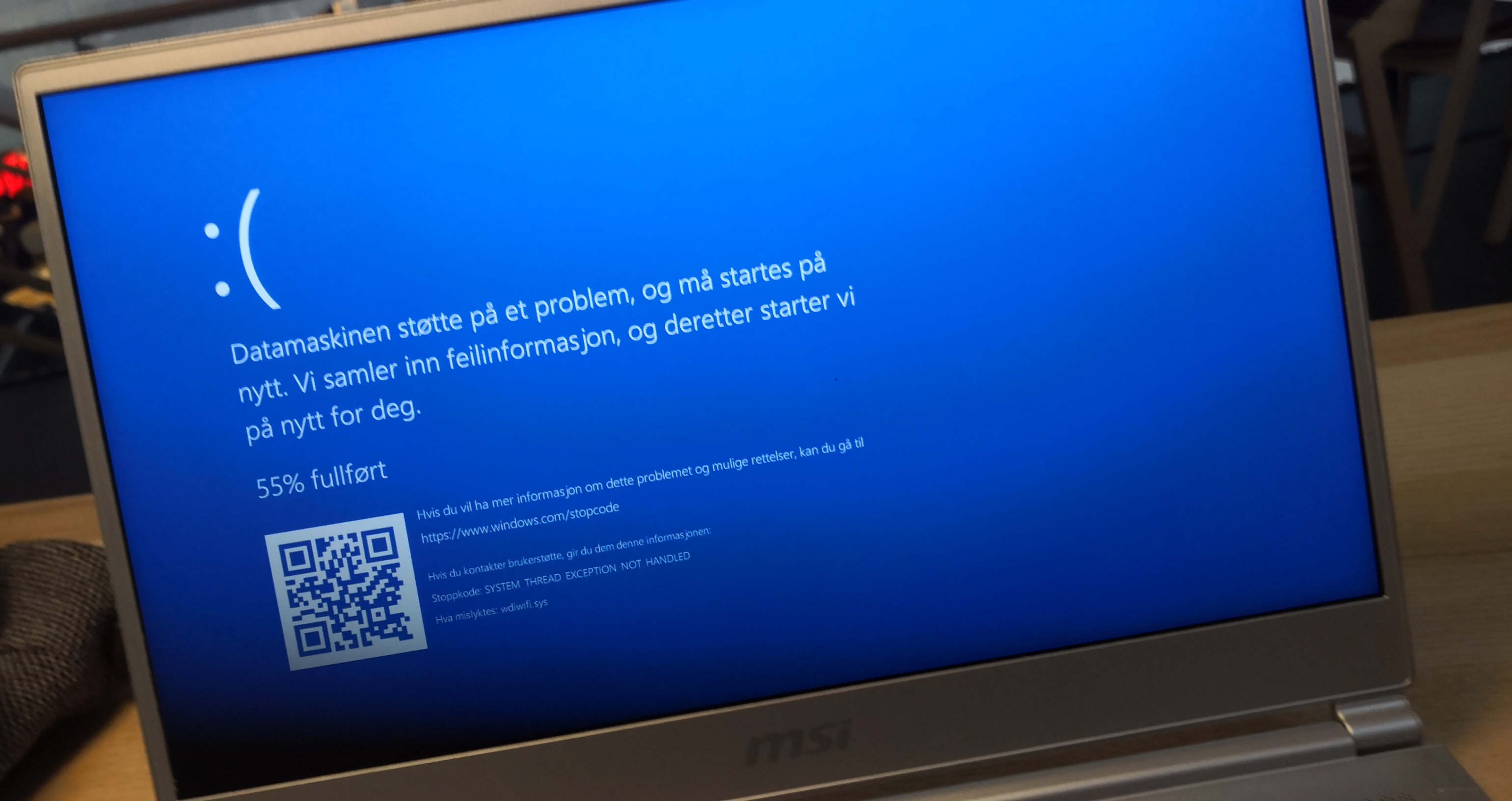
Hello, I got a bsod 30 minutes ago and now it happens all the time. It happens more or less 5 minutes after windows has loaded.
Stop code: system thread exception not handled
Wdiwifi.sys
Anyone know how to fix it?
Minidump
https://www.dropbox.com/s/e8dk0z4ryvy7hmr/030119-7359-01.dmp?dl=0Attached Files:
Last edited: Mar 1, 2019 -
-
Boot into safe mode for this.
1. Open windows power shell then copy and past this command:
DISM.exe /Online /Cleanup-image /Restorehealth
Once that completes then run this command:
sfc /scannow
Don't restart until it verifies 100%.
Once that's done it will give you a message if it found and repaired corrupted files, found but couldn't repair, or found nothing at all.
If that doesn't fix anything then you can try to reset your computer. This will reinstall the version of windows you have now but removes everything but your files.
When the computer starts, go into settings > updates & security > recovery. Then select the option to "Reset this PC". Click the option to keep your files or not, that's up to you.
Have you tried system restore yet? -
That's disappointing, I bought this laptop because of the ability to set a manual fan curve and now half the fan range is locked to one speed :/ Going from 1800-2000 to 2800rpm as a minimum makes the laptop go from very quiet to noticeable in a quiet room
Is there a place to download old firmwares? I'm not sure how new my one is and it'd be nice to have a backup of the pre 2800rpm speed update
Will updating to the latest BIOS install the latest EC? -
I will upload all BIOS and previous ECs that I own for the GS65 8RF
Sent from my BLA-L09 using TapatalkSimplyJ3sse and Skylake_ like this. -
https://drive.google.com/drive/folders/1TI6qe5Qg6sC-YVdKShSWXpDUY7VNVatd?usp=sharing
Sorry I only have the latest EC version, perhaps we can create a repository with all the firmware versions we have. @Skylake_ and sticky it or add to OP.SimplyJ3sse, dmemon and Skylake_ like this. -
EC: 16Q2EMS1.106 (min ~1800 RPM)
https://www109.zippyshare.com/v/aHw9qsYL/file.htmldmemon likes this. -
That would be good since MSI only offers the latest EC without any details
Are there different versions of 16Q2EMS1.106? My laptop has 16Q2EMS1.1060723201814:39:25, I am assuming the 07 23 2018 14:39:25 is just the datetime stamp the EC was flashed?
Cheers for the file We appreciate it
Norton doesn't like EcFlashWin_41.exe when you extract it, normal?
Nevermind Norton doesn't like it from the MSI website either lol.Last edited: Mar 2, 2019 -
(edit: wrong thread, sorry)
-
![[IMG]](images/storyImages/N7FoSeE.jpg)
This build date is EC.
No viruses, checked. KIS 19.
VirusTotal: 16Q2EMS1.106 and 16Q2EMS1.107 -
Ah ok I thought it was the flash time because of the time down to the second but that's good to know
Norton just said it was removed because of reputation not because it was a virus or anything lol, wonder why it thinks that.
Is there a way to disable the Nvidia dgpu in the bios, I haven't seen anything in the bios/advanced one? Can't run Parted Magic with switching on
Nvm it's under System Agent, panel is running at 18 bit colour?Last edited: Mar 2, 2019 -
can anyone share me the link to the version of Windows that comes with the gs65 8rf out of the box? my 9560 stopped working because of a windows update and i cannot revert it back no matter what, so i need that specific version of Windows in order to make this wifi work.
Sent from my ONEPLUS A6013 using Tapatalk -
Anyone know why switching to either Game or Internet settings in Throttlestop causes my GS65 to eventually freeze a few minutes later. It happens even when I have their settings identical to Performance and Battery which don't cause any problems.
Nvm. It actually was different. The UI was confusing.Last edited: Mar 3, 2019 -
Does anybody know why this laptop would max out at 2.9 GHz when there is no throttling of any sorts going on(according to XTU, hwinfo says some cores were throttling at 88C but that was probably when I minimised the game) and temperature is around 75C for the CPU(GPU reaches 84W)? It's on the Performance preset in Dragon Center, power mode slider is best performance, UV of 0.125
-
damn looks like not many people reply here
Sent from my ONEPLUS A6013 using Tapatalk -
If a forum member can assist you with the original image then that would be great, otherwise you can always contact MSI directly to submit an order request to purchase the recovery media.
Or if you prefer the clean install you can obtain the clean ISO from Microsoft and then load the drivers/utilities from MSI's website for your system. Feel free to post your questions here. -
yeah i tried clean installing doesn't help, probably because I'm not doing it with the correct version of Windows, only way is to contact msi and today's a Sunday so cannot talk to them today since they are closed, will have to talk to them tomorrow.
Sent from my ONEPLUS A6013 using Tapatalk -
When you tried to do the clean install, what was not working? If you can provide more details here (images, error messages) perhaps we can assist you. Yeah, MSI isn't open today but they are open tomorrow at 6am Pacific Time.
-
the wifi of course, that's what the issue is, that's the only issue in fact, shows code 10 error message when i open device manager under intel 9560 .
Sent from my ONEPLUS A6013 using Tapatalk -
Have you updated the BIOS & EC firmware already? Here's the latest version of Wireless driver.
https://downloadcenter.intel.com/do...ers-for-Intel-Wireless-Adapters?product=99446 -
i did all of that, nothing worked
Sent from my ONEPLUS A6013 using Tapatalk -
Have you tried reseating the device? What if you put the original one (Killer) back?
-
yourself I've tried resetting, and what do you mean by putting the original one back?
Sent from my ONEPLUS A6013 using Tapatalk -
Did you upgrade the WiFi device by yourself? Or through your point of purchase?
-
i didn't upgrade the wifi, i said that I'm receiving it on Tuesday (Intel 9260) which I'll replace myself.
Sent from my ONEPLUS A6013 using Tapatalk -
I see, then leave your OS as is until you are able to put in the new WiFI adapter on Tuesday.
The issue doesn't seem to be associated with your OS. If you can confirm that the issue is with the WiFi card you can contact MSI to claim warranty replacement on the existing card. -
so wifi cards go bad just like that??
Sent from my ONEPLUS A6013 using Tapatalk -
but then how were they able to make it work when i sent it to msi, all they did was reinstall the os, they did not replace the wifi card
Sent from my ONEPLUS A6013 using Tapatalk -
When was the RMA service done for your system? Are you sure it was just OS reinstall? Did you request for a repair report? If not, you can request for the report which will show more details to what were done to the system.
WiFi doesn't typically go bad that easy but they can still fail. -
yes there was a report, mentioned only os reinstall and nothing else, which further makes me think that it is the os version causing problems, of course the 9560 is also a ****ty card but yeah it will only work with out of the box os apparently.
Sent from my ONEPLUS A6013 using Tapatalk -
Gotcha, the Intel 9560 is a nice card but if your existing one isn't defective then you shouldn't have to pay to replace it unless you really want to use it.
-
i mean what else can i do if i can't get it to work, that's why i ordered the 9260 which is basically the same card but 0.3 gms heavier and probably won't be as problematic.
Sent from my ONEPLUS A6013 using Tapatalk -
I understood that you did a clean install. Which build of Win10 did you use? But that shouldn't matter.
-
when i googled windows 10, it shows only 2 versions on the Microsoft website, tried both and they didn't work.
Sent from my ONEPLUS A6013 using Tapatalk -
Was this this page?
https://www.microsoft.com/en-us/software-download/windows10 -
Maybe power limit throttling. You may have to try with IMON SLOPE edit in BIOS.
I know >45W will power limit CPU after 20+ seconds. Are you drawing that much?
Sent from my BLA-L09 using Tapatalk -
yes that's the one
Sent from my ONEPLUS A6013 using Tapatalk -
Is drawing more power than the laptop/PSU/adapter is aware of electrically safe in the short or long term? I do a lot of intense video editing so I've been interested in editing the IMON SLOPE on a 2019 GS65 with 2080MQ to have "unlimited" TDP but I'm scared to overload/overwork something irreversibly...
-
I do not know your answer to that. I know you will still be thermal throttled so if you go over your TDP, More W will generate more heat and eventually you will be limited by temperature, so there is still that system of control.
Sent from my BLA-L09 using Tapatalk -
I'm not too worried about thermals considering the LM keeps them very nicely under check... but I'm quite worried about the CPU, PSU, or power adapter being unable to handle current it wasn't designed for
-
It maxes out at 20/21W, there is 0 throttling going on when the game is actually fullscreen, it's got me stumped
*** The Official MSI GS65 Stealth Owners and Discussions Lounge ***
Discussion in 'MSI Reviews & Owners' Lounges' started by Skylake_, Apr 3, 2018.