 Problems? See this thread at archive.org.
That seems not normal hot to me. It may just need to be repasted which you could do yourself. It's not really difficult. Just a little scary the first time.If there is so much core difference after repasting, then it sounds like a heatsink problem also. Unfortunately, MSI charges one way shipping. I've sent mine in twice and it cost me $80 each time.
-
Hmmmm that is really bad warranty i guess
but was the problem solved after you sent it to them ,and did they tell you what was the issue ?Atma likes this. -
I didn't send mine in for overheating. I repasted myself. The first time I sent it to get the bezel repaired. It wasn't really fixed and took a month to get it back. I had to send it in again to get the ram replaced and the bezel repaired. It took a one day turn around time and the ram was replaced. The bezel wasn't really fixed .. again. I'm probably going to have send it again to get the video card replaced and the bezel fixed. This time I will tell them to fix the bezel for good or replace the whole monitor. I just don't have time to be without my laptop right now.
Which reminds me, I did notice a problem with my heatsink when I repasted. There is a very small protrusion on it. It almost looks like a small pointed drop of solder. You can also see an impression of it on my cpu. Very poor QC to me. My cores are all within 2 to 4 degrees of each other though. -
SO i think that I have learned the lesson in the hard way ,Never buy Laptops again for gaming no matter how they have tried to convince you that no heat issues are there, and never deal with MSI again for there poor support,and i will do it myself ,after your feedback I'll never send it to them for doing nothing
can you recommend me a good thermal paste -
I can say I have no heat problems. Even overlcocked I don't exceed the mid 70's on CPU or GPU and usually in the 60's. I think people have different tastes in paste. I used Thermal Grizzly Kryonaut and have no problems. Some *cough* @Phoenix *cough* says it dries out too fast. You can see what others may recommend and look around at some reviews/comparisons.hmscott likes this.
-
Yeah, too far, you're throwing the baby out with the bath water...
Sometimes in shipping parts shift due to the bouncing around, and heat sinks and heatpipes are sensitive to jostling.
That's why it's good to learn how to do the repaste yourself.
Although I still recommend newbies with absolutely no laptop disassembly experience to let their vendor or seller do it for them.
It's not just "gaming" laptops, this can happen with any mechanical connection in any laptop.
Calm down, relax, count the $50 return cost as your "I'm free from a laptop vacation" for the year, and let MSI set things right.
Then you can have years of enjoyment, instead of sour memories.
Papusan, Donald@Paladin44 and Atma like this. -
What in God's name are you doing to pull 72 watts of power from the CPU at 4 ghz?
Of course you're going to be at 100C doing that and you're going to need CLU or Thermal Grizzly LM (Grizzly conductonaut) for that. Even MX4 or Kyronaut or Gelid Extreme is not going to save you if you're pulling more than 70 watts; you're going to need LM.
.
My chess program at 4.4 ghz with 8 threads doesn't even pull that much. (around 62W as long as no other processes are causing usage spikes). And if you're at 4.0 ghz, you should ALSO be UNDERVOLTING by -50mv to -100mv (I can undervolt 7820HK by -100mv at 4.2 ghz).
Try NOT running a stress tester that is going to use AVX or FMA3 instructions. Those things burn out desktop CPU's, never mind laptops...
Repaste your CPU with Thermal Grizzly Kyronaut (safe), and then just USE the computer. There's NO NEED whatsoever to run stress testers like Linpack or Prime95 AVX or FMA3.
If you really really want to run prime, do prime blend, and edit local.txt and read undoc.txt files to disable AVX and FMA3 instructions.
As far as opening the laptop....
Have you EVER assembled a desktop computer before, or changed the heatsink on a desktop?
I've done multiple builds, and the MSI CPU heatsink is probably one of the easiest things to remove and reassemble. Just watch a few repaste videos and read a few threads and you'll see how easy it is. There's zero risk as long as you don't do something stupid like work on a carpet generating static electricity. It's harder to actually remove the heatsink without accidentally damaging the thermal VRM pads, than it is to repaste the CPU (it's easy).
Compared to other laptops like Dellinware or Asuck or *COUGH* RAZER OVERHEATING BGABOOK, you have it EASY with the MSI.
So....
1) order Kyronaut.
2) go buy some 99% Alcohol from Rite Aid or Walgreens or some other pharmacy.
3) buy a few microfiber cloths.
4) read some guides and repaste videos on GT73VR (there are several VERY easy guides, including one in Korean).
5) Profit.
(Hint: it's harder getting the Antenna wires back on the wifi card without removing the wifi card first, than it is repasting. I'm disabled with a metal bar in my spine and even *I* can repaste. If I can do it, there's ZERO reason why a perfectly healthy person can't do it).Papusan, Donald@Paladin44, Atma and 1 other person like this. -
that is really good temps ,how did you got those , and I prefer to stay away from grizzly bear thermals cause they are electricity conductive ,and I dont have that experience in changing thermals
-
No No NO I will not pay them i penny !!!!,they are greedy and and they have already took a lot of money and i agree with you,you don't grantee what will be the condition after they ship it to you
-
I'm pretty sure Kryonaut is not an electrical conductive paste.
-
No No, no and no.
You want KYRONAUT, not liquid metal!
Grizzly Kyronaut is NOT conductive.
Ok first: buy this:
1) https://www.amazon.com/gp/product/B00ZJS8Q6S/ref=oh_aui_detailpage_o05_s00?ie=UTF8&psc=1
2) Then buy 99% alcohol (for cleaning paste off CPU and heatsink), and microfiber cloth (local shop, pharmacy, anywhere, you can even get that in a country with bad technology).
3) Then watch this: THIS VIDEO WILL SHOW YOU EXACTLY WHAT TO DO. (GT73VR 6RE, 7RE and 7RF are identical; just 6RF and 7RF have different GPU heatsink (1080 GTX vs 1070 gtx). Note: you do NOT have to remove the GPU heatsink for repaste, just CPU only. In that video, the CPU is on the "Left" side of the video. (if you were the Korean man looking at the laptop, then the CPU is on the "Right" side).
^^ EASY.
MOST IMPORTANT THING IS TO UNPLUG THE BATTERY. (VERY important to do this. this way if a screw accidentally touches the motherboard, nothing will happen. and impossible to accidentally power it on).--pay attention to 3:05 in the video <---
*EDIT* unplug the AC Adapter from the laptop ALWAYS! <---never keep AC plugged in when opening it.
4) repaste. (be careful with the thermal pads on the heatsink).
5) plug back on wifi antenna cables if they came off.
6) plug back in battery (easy to forget to do this. so don't forget).
7) enjoy.Last edited: Jun 14, 2017 -
$50 for shipping goes to the shipping company, the repair is *free* as covered under warranty.
Find cheaper shipping, or see if there is a MSI repair depot within driving distance and save even more by using Will Call drop off.
MSI pays return shipping, so the repair costs *them* money and the return shipping costs *them* money.
You've already paid MSI for the warranty, you might as well use it
-
What is the difference in nvidia setting
Prefer maximum perfomance and optimal. Whether upon setting to maximum will make the memory of gpu always high even when idle ?DukeCLR likes this. -
If you purchased a system with a thermal compound upgrade from someplace like GenTech, but are having issues with uneven core temperatures, would you send the machine back to them to fix it, or would you have to deal with MSI?DukeCLR likes this.
-
The boutique that re-pasted, of course
You could always fall back on MSI for warranty work should you not be able to work things out with the boutique you purchased from... but give them a chance to get it fixed up for you first. -
Unless you have a business account at Fedex or UPS, shipping a laptop back for repaste is going to cost over $50. That is a lot of money. So unless you have a defective heatsink, it's definitely worth it to try repasting yourself, and it's probably safer that way since you don't have to deal with Fedex dropping the boxes. Distance also matters in shipping, so there may be closer options like having the LZ team members repaste for you (they are trusted and reputable). The only risk in repasting is using conductive liquid metal; for that you need good prep and -decent- quality electrical tape to put around the socket. It's usually not recommended that people use liquid metal on laptops if they use them like laptops (traveling with them bouncing around in your backpacks vertically); people who use them as desktop replacements at home are much safer (with good preparation), and far less risk of LM somehow dropping out of the socket area. Desktops use a LOT more static pressure on heatsinks, and even though you still have to be VERY careful with that stuff, it won't run out of the socket on a high pressure heatsink if you applied a VERY thin layer.
The MSI heatsinks are not tripod so they're better than the Alienware models, which often need work.Papusan, DukeCLR, Atma and 1 other person like this. -
Gents - you all know that it's actually very common to have an Intel CPU that has core temp differences of anywhere from 6 to 10C? Usually it is just a single core that runs that much hotter than the others.
It's happened on EVERY SINGLE Intel CPU that I've owned - even with really good thermal paste, and even with really good application methods.
Even my Xeon processors have one core that runs 6C hotter than the others (when overclocked), and that's with Kyronaut - watercooled or under big air. -
The difference like with the "tripod" CPU head plates is that they don't evenly put pressure on the CPU and core pairs have differences higher than 10c, like 20c+.
This was a whole Alienware thing for months, and really still is. @iunlock found that there was a mis-spec'd thermal pad that was too thick, and wouldn't let the "hinged" portion of the "tripod" heatsink tighten enough to make good thermal contact with the heatsink.
Changing the thermal pad, and carefully re-pasting and tightening the screws evenly gets most CPU's down to 1c-2c differentials.
So, it's a thing over and above variance in the IHS connection for desktop CPU's where there is as you say a variance of core temps.
I've actually had a couple of IHS failing desktop CPU's with more than 10c differential, which puts a real kink in the OC'ing capability of the CPU.
Laptop CPU's don't have IHS's... -
Not disputing the tripod thing, but the GT73VR doesn't have those - and I still saw up to a 6C difference on my 6820HK when it was overclocked and pegged.
Also you know that the Xeon lineup has the IHS soldered on and doesn't use ****ty paste, with gap issues, like Intel uses on their 4C/8T processors?
I've read somewhere that the temperature difference is due to the IMC and power section which is closer to one or two cores than the rest.Last edited: Jun 15, 2017DukeCLR likes this. -
Any heatsink will have a possibility of not connecting evenly across the whole surface, and uneven tightening of the screws can give higher pressure on one side, and not on the others.
I tried to find the exact specs for replacement at Intel, which I've been able to do before - it's been over a year since I looked - but as I recall it's:
Internal connectivity even on a soldered IHS can be uneven, it's a defect that Intel will replace for paste IHS at or over 10c, and soldered IHS at 6c or over.
I'm more sure of the paste IHS 10c as that was the last I did personally with Intel, Intel did mention the soldered IHS temp limit and I think it was 6c... also Intel said if you aren't happy even at 3c+ differential they will swap you for a new one if you are nice
So, there's IHS issues, and similarly physical thermal conductivity issues for heatsink to non-IHS CPU's.
You really shouldn't see a core differential of over a couple of degrees with a laptop CPU, if it's a single core maybe a defect for that core, if it's a pair of cores differential it's likely a heatplate not evenly making contact due to pressure, warpage, etc.Last edited: Jun 15, 2017 -
And that's overclocked, not stock?
Because at stock I agree - overclocked, nope - not even close to 1 to 3C tops.hmscott likes this. -
Yeah, my CPU's typically are lined up the same temps at OC... same multiplier on each core. It happens sometimes, other times the load is off and one or more cores get higher or lower.
I'm talking about prime95 small fft, which is what I usually use that has pretty even temps across all cores, among other tests.
If the OC and load are even, the temps should all be the same
Here's one at 41x x4, very close highs and idle, core 1 had a higher utilization so a bit higher temp
Last edited: Jun 15, 2017 -
Apparently my 7820HK can run at 4.5 ghz on default voltage, stable enough for 8 thread chess engine and games, as long as coolerboost is at maximum (required for full load on 8 threads) and the room has decent room temperature. Is that standard for 7820's?
-
As reported most 7820HK's can even undervolt at top OC, so give that a try. Maybe start at -10mV, and add -5mV until crash, then back off 5mV.
Great CPU, well worth paying extra over a 7700HQ. Although, the 7700HQ is no slouch as compared to the 6700HQ.
The Kabylake parts are really good OC'er's, and undervolters.DukeCLR likes this. -
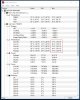
These are the temps on my GT73 with the 6820HK, stock frequency, running on the balanced power profile after some gaming and a quick AIDA64 benchmark. Note the massive difference between cores 0 and 2 versus 1 and 3. This, to me, definitely implies improper heatsink/TIM contact. I've reached out to @GenTechPC for a resolution as they're the ones who originally sold the machine.
 hmscott likes this.
 -
no, j00 have won the silicon lottery my friend Wow!
-
Yoo could try the MB lottery
@Falkentyne could
try to see how stable his OC is.
Last edited: Jun 15, 2017hmscott, DukeCLR and Spartan@HIDevolution like this.
-
Can't run that test without liquid metal. I can do it at 4.2 ghz undervolted, but at 4.4 ghz, temps get too high. I believe that test (as well as OCCT) uses some sort of linpack type testing. Even prime blend without AVX/FMA3 gets to 90C after a few iterations. So I just use stockfish (a chess engine) for real world testing. I don't want to burn out my chip with 90C+ temps. I already degraded too many 2600k cpu's using prime and stress testing so i dont do that anymore. My stress testing now: If it it can pass my 4 core 8 thread chess engine without blue screening or freezing im stable enough for gaming because no game will stress something as much as a chess engine. That's 63W at 4.4-4.5 ghz with x41 cache.
Last edited: Jun 15, 2017 -
I'm pretty sure your chip can do that too. Did you crash or anything? Didn't you already do 4.4 ghz previously? What happens if you do 4.4 or 4.5 and use prime blend and turn *OFF* AVX and FMA3 instructions? (you can do that in undoc.txt and put the strings shown in either local.txt and prime.txt). Don't touch small FFT unless you have LM.hmscott likes this.
-
OPS, I am in the wrong thread, I have a GS73VR not GT
hmscott likes this.
-
You've got a better chip than I've ever owned from intel, on any platform. I've never had temps as close as those you've got.
Then again, I do load mine at 100% for testing - not 90. And I usually stress the IMC at the same time.hmscott likes this. -
Is there a way to "restore" the default values of my i7-6820HK ? I change so many settings in XTU.
hmscott likes this. -
have u seeeen this guys:
Still our 7RF is beeter isnt it ?
hmscott likes this. -
my laptop cant update windows to
http://www.catalog.update.microsoft.com/Search.aspx?q=KB4022725
Also tried install manually, but after 1 hour still says coping ...
any solution is appreciated. -
In Bios, load defaults.
In XTU, go to profiles and load the default profile.
Then you can uninstall it and use something decent like throttlestop.hmscott and Donald@Paladin44 like this. -
XTU has a default profile with settings you can't change, select that profile, Apply it, and you are back to defaults
Atma likes this.
-
Here's one at as close to 100% CPU utilization as the tasks will sustain, just for you
At the same time I was running maximum (100%) utilization on both GPU's:
I had full fan enabled, obviously
Last edited: Jun 15, 2017DukeCLR, Atma and Spartan@HIDevolution like this. -
There seems to be a bug in the current build of Dragon Center that resets the color and gamma settings I've established in the NVIDIA control panel after a cold start or reboot. The actual numbers in the panel are the same, but the color is off. When I click on the slider, it changes back to my expected gamma/digital vibrance. I've uninstalled Dragon Center for now.
-
Regarding the uneven CPU temperatures on my system, it turns out one of the screws on the CPU heatsink was at least a quarter turn loose. I tightened that up, and while there is still a gap, it's now less than 10 degrees, which put it in the same ballpark as my P670RS.
I'm just kind of miffed that GenTech did not answer my email - I had to call for that solution. C'est la vie. -
Hey, newer is always "beeter"
There aren't many solid details available for the new GT75VR - MSI still doesn't have a detailed product page up for the new product, but it "might" have 1 less M.2 slot...it's got a new mechanical keyboard which whether it is better or not is probably a personal thing - some will probably like the old layout better because they are used to it
AFAIK there is no performance improvement brought by the GT75VR, it's just a keyboard upgrade update.
Given Coffee Lake has been delayed till 2018 and Nvidia is bellybutton gazing with it's Max-Q GPU's instead of Volta, it may be quite a while before a real performance upgrade happens to the GT7x/GT8x lineup.
MSI could release a new line of AMD gaming laptops, that's gonna likely be 2018 as well, but could easily overtake Intel mobile CPU (BGA) performance, but so far RX580 performance will only match 1060.
AMD is going to need to go through a bunch of new releases to get to a Vega laptop release that will compete with the Nvidia 1070/1080.
So, yeah, for now the 7RF is "beeter"
powerofviva and saturnotaku like this. -
One less M.2 slot would be a downgrade, unless they replace it with an additional 2.5-inch hard drive bay.
Sent from my iPhone using Tapatalk -
Yeah, it seems to be a steady theme with MSI in the last 2 generations, reducing the internal storage options.
The GT72 just before the GT73 had 4 M.2 slots - 2(?) PCIE x4 and 2 SATA, still 1 2.5" "normal" slot, and it also had the Optical 2.5" thin SATA 1.5 drive bay.
Now the GT72 has 1 M.2 and 1 2.5", the GT73 has 3 M.2 as 2 PCIE x4 M.2 + 1 SATA M.2.
The GT75 info I've seen so far says it's got 2 M.2 PCIE x4, but it doesn't mention the M.2 SATA port, but... that's kinda the way the GT73 was discussed when released as having 2 M.2 PCIE x4 ports and the 1 M.2 SATA wasn't mentioned explicitly / specifically until the Product page Specifications tab was put up.
The GT75 doesn't even have a product page yet, let along a Specifications tab, so we still don't know for sure if there is any change / reduction in M.2 slots... but it sounds like the M.2 SATA port might not be there...IDK.Last edited: Jun 16, 2017DukeCLR and saturnotaku like this. -
I thought there was a review that said it was essentially the same as the 73 except for the mechanical keyboard? Maybe some cooling? I specifically recall them saying it was basically the same as the 73
-
Yeah, well "basically the same" and "exactly the same" - down to the exact port count for storage isn't known.
MSI isn't known for pointing out what they take away from new models, we need to figure that out on our own, and without hands on with someone asking the right questions - checking the details, or a product page that lists the ports and storage options, we can't know for sure.
So if 2 M.2 ports instead of 3 M.2 ports is a deal breaker for you it's a good idea to wait until we know for sure.
You could just spend big $'s and get higher density SSD's - like 1TB or 2TB - but as PCIE x4 M.2 drives are very expensive anyway, the 1TB/2TB are even more $'s per GB.
I'd suggest contacting MSI directly, either sales or support, but often we know the answers before the staff do as MSI has restrictions on staff getting specifics on unreleased hardware.
The info should be coming soon...
-
http://www.techradar.com/reviews/msi-gt75vr-titan
Well, here's the review I was refrencing:
"... the MSI GT75VR Titan is designed to be a full-on desktop replacement with space for up to 64GB of DDR4 RAM, one 2.5-inch HDD and two NVMe M.2 SSDs."
According to them *shrug* I think they get the major questions.hmscott likes this. -
So given the info you've posted, they contradict each other
One post says "no change except for the keyboard", and now this new one says 2 M.2 PCIE x4 SSD's - but no mention of the 3rd M.2 SATA port.
Which is making my point, we don't know for certain that MSI has removed the 3rd SATA port, as originally the GT73 info about the same time in it's release said the same thing, 2 M.2 PCIE x4 ports and didn't mention the 3rd M.2 port which is SATA.
Same went for the GT80S, and GT83VR, uncertain info until actual opening of the laptops and / or exact port list in the specifications tab in the product listing.
Notice how that "hand-on review" was just them standing in front of it at a demo booth, and reading the specs MSI included on that little stand-up card.
They didn't actually get to open it up or have any more details than the major points.
So we really don't know for sure.
Just as an FYI, if there were no other hardware changes to the laptop, and MSI already has redone the M.2 storage area once - moving from a thicker 2x2 M.2 module to the current 3x thin in a row with heatsink arrangement, it's unlikely MSI would change the hardware again to reduce the capacity.
MSI might have changed it, but IDK what would have motivated them to do that - it would actually cost them more in tooling than it would to keep the 3rd connector.
That's why I can't say for sure what the GT75 M.2 layout is going to be, we just don't have enough "for sure" info.DukeCLR, aj0413 and Spartan@HIDevolution like this. -
Reduce with one M.2 port and increace to 3 with next model in 2018... Then call it an improvement And boast that this *extra* M.2 support Optane, YEEES.
-
Optane is such a joke unless you only have a spinner.
Unless that was a funny? If so, AHAHAHAHAHA! -
That's a good point, I wonder if MSI might have converted that 3rd M.2 port into an Optane upgrade.
Intel was pushing for vendors to include an Optane cache in the desktop motherboards starting this summer. I wonder if laptops are going to be included in this?
That would mean making the HDD the boot drive to make it most useful, but that would obviate the benefit for M.2 NVME SSD's as well.
Maybe that's why the details haven't been forthcoming from MSI on the GT75? Maybe they are still working this out... interesting. -
If so...
Damn nice if the Morons force in a 32 GIG Optane drive in <if 3rd M.2> to cashe an old HDD instead of that you can put in 1TB sata ssd in the 3rd M.2 slot Or if yoo have the money... The 3rd 2TB NVMe
@Phoenix
Last edited: Jun 17, 2017
Or if yoo have the money... The 3rd 2TB NVMe
@Phoenix
Last edited: Jun 17, 2017
The Official MSI GT73VR Owners and Discussions Lounge
Discussion in 'MSI Reviews & Owners' Lounges' started by -=$tR|k3r=-, Aug 16, 2016.


