 Problems? See this thread at archive.org.
Sorry for asking...I have a new msi gt73vr 7re with the same CPU (i7820hk).
How I can change this settings? In MSI software can't find...and in BIOS it is all to 0
-
-
-
In Bios it's CPU Current Limit. It says "a value of 400 is 100A". So enter 400 there.
If you set that in Bios, then you don't need XTU at all. You can undervolt and overclock the cores (both cpu and cache should be undervolted together if you are doing that). using Throttlestop.hmscott and Spartan@HIDevolution like this. -
Yes i saw that, but there i cannot see the minus sign....so i am scared about overvolting instead of undervolting...
Regarding gtx 1070 i cannot overclock it..i put +150 and +300 (gpu and memory) in afterburner but the max it does is 1442 (should do more then 1700 and 1500 by default) my temps are good (around 65/66 for CPU @42 and 67 for GPU maximum) so i don't see throttling.
What could be the problem?
Thankshmscott likes this. -
Vincent, that's NOT a voltage. The "Current limit" is a LIMIT on how much current (TDP) can go into the chip. It's not voltage.
It's like having a highway where if you go faster than 45 MPH, magnets slow down your engine piston to wheel rotations forcing you down to 45 mph maximum. Changing current limit removes that limitation.
Having a "-" is pointless. Why would you want to have a negative TDP?
You're getting confused with "VOLTAGE OFFSET". that's for LOWERING the amount of voltage going to the chip to "Undervolt" it. You can set negative offsets in Throttlestop. Voltage is like changing the potency of gasoline in a car. More potent gasoline= car runs faster, but may also run hotter. The car may still run at a certain speed with a less volatile gasoline, just fine (stable) or the engine may stall (BSOD).
With an unlocked BIOS, you can also set a "-" offset manually in the Bios, but you're best off using Throttlestop for it. You run far less risk of OS corruption if you undervolt while already in windows, instead of while windows is loading. -
I am considering to do purely clean install on my GT73VR -7RE laptop. I delete all the partitions and do clean install on c drive. Is there something I should be careful with? How about the raid system?
DukeCLR likes this. -
As long as you did a backup with MSI BurnRecovery creating a 32GB USB 3.0 flash boot recovery drive, you can do anything you like and still restore back to the out of the box OS.
And, to save time do a Macrium Reflect Free image of your boot drive + Macrium Reflect Free boot recovery flash drive to restore.
Just in case you don't like the from scratch build, and want to go back.DukeCLR likes this. -
Thanks for the answer. How about installing all the essential software like Dragon Center? I've read in the past, that installing the right software in right order is not the easiest task as one would suppose.
-
IDK about MSI DGC having problems installing, but I guess it could be that installing over previous version(s) might work while installing from scratch doesn't?
That and there are MSI tweaks and tunings that for whatever reason don't come through when installing the OS from scratch plus installing the downloads.
You can improve the chances of the from scratch succeeding by either installing drivers while installing - or build an installer with the drivers slip-streamed in for similar install while from scratch.
And, not everything is available for download, case in point is the MSI BurnRecovery, unless something's changed no download link is available for it so if you blow away your boot drive and still have your recovery partition on the HDD, you still can't work out a backup of it.
I've never seen a from scratch build improve performance over taking the original install and uninstalling the parts you don't want. It's much shorter job to do a few uninstalls than a complete from scratch install + utilities / app download / install.
So, I'd start with the MSI BurnRecovery and Macrium backups, and then remove any extra drives from the case - other than your boot drive(s) + HDD - and disconnect any USB drives / flash other than the boot flash (MSI *or* Macrium), and do the restore - uninstall what you don't want, and do the updates.
Then after all the updates, do a Macrium image. Again when you have all your apps and their updates done. Then you have an image for each stage and can restore at the point you feel necessary to save time.Last edited: Jun 17, 2017 -
If any of you wants to buy a laptop sleeve for your GT73VR, the Slappa SL-SV-111 18-in matrix sleeve https://www.amazon.com/gp/product/B003SOZHWQ/ref=oh_aui_detailpage_o00_s00?ie=UTF8&psc=1 houses it perfectly. It even fits inside the MSI freebie backpack that came with my 6RF.
P.S. I don't know how to put a link and change the URL to another word lol. -
How do you stop/disable DGC's automatic update? Also, what's the Intel Graphics Card of 6RF? Is it Intel HD Graphics 630 (the same as 7RF)? Thanks!
Last edited: Jun 18, 2017 -
Need some help please.
Just purchased a GT73VR-7RE which came with 2 Toshiba 256gb M.2s setup as striped RAID 0.
I did a system recovery from a USB boot disk that I had created from the Burnrecovery software, however after the system recovery the system drive has now been split into 4 partitions - a windows partition and data partition and 2 small recovery partitions. So it seems that after a full recovery RIAD 0 or striped has not been set.
How am I able to recover back to the factory setup where the 2 M.2s are configured as a single striped RAID 0 device?
I've tried both Recover windows partition and Recover Factory options in the MSI Recovery software but both end up not setting the main drive as striped RAID 0.
Any help much appreciated. -
See the pict. Click the link aka the chain link and put in URL address.
Spartan@HIDevolution and HardCoreGamer4Life like this. -
-
Hello again friends, i'm a bit in a pinch, just a moment ago a closet the laptop to put it to sleep then some 30 minutes after that what i trying to wake it up the screen didn't turn on, the laptopwas on but the screen black, even after I rebooted the screen stayed black, i got some backlight but nothing on, not even the MSI logo, no even the BIOS, i don't understand, the HDMI is working my 1070 is working so i dont understant what may be the problem... thank you for your reply.
-
Screwed by Windows 10 issue
 Fast startup (aka: hiberboot, hybrid boot, or hybrid shutdown) is turned on by default in Windows X.
Nobody should use this trash!! SSD's are more than fast enough. No need for it. Maybe you are
as lucky
Fast startup (aka: hiberboot, hybrid boot, or hybrid shutdown) is turned on by default in Windows X.
Nobody should use this trash!! SSD's are more than fast enough. No need for it. Maybe you are
as lucky
-
GPU output bug which was supposed to have been FIXED in bios .313 but was NOT fixed at all (YES IT STILL HAPPENS).
The easy way to fix it is to TRIGGER the bug a second time, which you have to do blind.
But to get the DISPLAY back, hold down the power button (so it turns OFF, not on) and HOLD IT DOWN for 40 seconds. Then release it and power it on. This will clear the CMOS completely (like the CMOS jumper on desktop motherboards, although it is far less "graceful" and takes much longer with the power cycling and failures to POST).
It will power cycle by itself after about a minute and start boot cycling.
If it does NOT power cycle, just hold the power button down until it turns off, then turn it on again. It will start cycling after three or four attempts.
(proof: I've reset my CMOS over 20 times, messing around with RAM Command Rate (CR) timings, trying to get "1" to work and actually retrain without boot looping and freezing.
Anyway in the future, this bug happens when you switch from integrated GPU to dedicated GPU after "loading CMOS defaults." The output doesn't work on dgpu and just black screens.
To fix this bug, you need to know how to switch BACK to igpu blind. This only works easily (without guessing) however if you have NO programs loaded on startup that actually appear in the taskbar (not tray icons, but programs; for example: malwarebytes does not appear in the taskbar, but internet explorer, Throttlestop, etc, do appear.
To fix the bug by triggering it a second time:
Press the GPU switch button.
Press ALT TAB, Tab, Spacebar.
This will put the GPU switcher to switch to iGPU and reboot.
When you get the MSI logo, press Del, enter Bios, load defaults, exit and save, and then get to windows, then switch back to dedicated GPU and the "Bug" will be reversed and you will get a screen again. Then you'll be able to switch from igpu and back without losing the display.
(if you can do this blind right away, you don't have to clear the CMOS. Since clearing the CMOS will "cause" the bug anyway, after the display works again and you switch to iGPU).Last edited: Jun 18, 2017Atma likes this. -
Any of you guys manage to run at Command Rate (CR) 1 (1N or 1T) instead of 2T, without getting boot loops or post freezes requiring a CMOS reset?
Did it once successfully, over 2 weeks ago, which stuck and worked fine all day (RAM got retrained), then when I set it to 2T to compare benchmarks, the system failed to POST and required a hard CMOS reset, even though I simply set it back to the original settings...
.
With difficulty, it would change to 1 again, either after doing a cmos recovery reset, or after a boot loop, and would work fine and be perfectl stable in windows, but would freeze hard on reboot and not POST again until hard CMOS reset.
Gave up trying for many days, then tried again today and it retrained and 1T stuck and it posted and rebooted fine.
Any of you guys running 1T or are all of you running 2T? -
I don't understand the driver version of the iGPUs. In the support page of MSI GT73VR and in the Device Manager it says the version of my iGPU driver is 21.20.16.4534. But if I look it up on the Intel Graphics Driver page, it says the latest is 15.45.19.4678. What should I download? Any help would be really much appreciated.
-
The driver versions on Intel's website is newer. It's a generic driver for desktop/Mobile. Use the drivers suggested by MSi support or bruh @Phoenix New ain't always better. And don't be the others Guinea Pig!!
HardCoreGamer4Life and Atma like this.
-
-
I should add that when Command rate 1T worked without causing boot loops or post black screen lockup after rebooting from windows, the system rebooted in <15 seconds after changing Command Rate to 1T (which it's at right now).
*Edit* What is a GT73EVR?
A Titan with a 7700HQ?Last edited: Jun 19, 2017 -
the link is dead!
where did u find the EC Firmware 17A1EMS1.112 ? -
Hello i need help
i can't accessi some site .with notification 'getting this message from they're site "Checking your browser before accessing na.leagueoflegends.com. This process is automatic. Your browser will redirect to your requested content shortly.
Not responding and freeze loading.but when i acces site with chrome . The site is succesfully pass ddos protection -
It's for some "GT73EVR Titan"
I have no idea what a GT73EVR is. The only link I could find shows it coming with a 7700HQ processor.
MSI says the GT73VR Titan (the one I have) comes with this:
- Latest 7th Generation Intel® Core™ i 7-7820HK processor
- Next Generation VR Ready graphics with NVIDIA GeForce® GTX1070
It was there a few hours ago....
And all it said was "Up to 7th generation Intel Core processor"...didn't even saw which processor.
Now it's not showing up at all....
um..........
*EDIT oops*
https://www.msi.com/Laptop/GT73EVR-7RE-Titan.html#hero-overview
- Latest 7th Gen. Intel® Core™ i7 processor
- Windows 10 Home / Windows 10 Pro
- Latest GeForce® GTX 1070 8GB GDDR5 with desktop level performance
Ok someone explain this.
In Google chrome, GT73EVR appears in the list on MSI's notebook homepage.
In internet explorer, it doesn't ....
Anyway, the EC is on that link.
I wouldn't flash it without a changelog.
Unless one of you guys want to be brave, flash it, load Bios defaults, set GPU To iGPU, reboot, set GPU to dgpu and see if you get a black screen or not. (Known bug that was not fixed at all on Bios .313 despite being claimed to be fixed, OR .319).Last edited: Jun 19, 2017 -
Just got my laptop back from the repair depot. So far so good - anyone know a wood storage facility near Boise? I need to knock on about 120 metric tons of wood for good luck. All they did was " reassemble VGA card and LVDS cable, updated VBIOS."
Interestingly, the VBIOS version is one that I've not seen, and I am not able to save it as it spits out an error that my cards aren't compatible with VBIOS export. Also, it shows that the cards are not UEFI compatible, and I could swear that they were before. GPU Boost 3.0 is definitely disabled, as at stock it stays at a rock stable 1443MHz.
No shut offs while gaming yet. No video out problems yet.
![[IMG]](images/storyImages/r7x.png) Last edited: Jun 19, 2017
Last edited: Jun 19, 2017 -
Here it is again, I initially deleted it to do more testing
Just upgraded my GT73VR to EC Firmware 17A1EMS1.112powerofviva and Papusan like this. -
Aaaaaaaand I jinxed myself.
The "fixed" laptop, which was sent in for no video out and shutting off during gaming, shut itself off and restarted while looping Valley.
Temps are actually better than they were before, especially the secondary GPU which now matches the primary instead of being 10 to 15C hotter, so that's not the problem
I guess it's time to set everything 100% stock - the only thing that wasn't was a 4.2GHz CPU OC that MSI Dragon allows - not even the RAM is OCd as it is stuck at 2133MHz since I flashed a BIOS update.hmscott likes this. -
The problem with this is Phoenix's Thread shows v15.45.19.4678 which is the same as what Intel's page has while MSI's page shows v21.20.16.4534. I don't know which of the two I should download. Can you help me with this bro @Phoenix? Thanks!
-
I have no idea. I have an even newer driver, Intel HD Graphics 630 Driver v21.20.16.4664
And I'm sure someone in one of the forums posted that. -
I'm sure bruh @Phoenix would removed v15.45.19.4678 from his MSI GT73VR 7RF TITAN PRO Drivers thread if it had caused big problems. BTW Release Notes v15.45.19.4678
If you search, you'll see that this driver is a bit quirky. And please for the second time... If it ain't broken, don't fix it!!
![[IMG]](images/storyImages/giphy.gif) Last edited: Jun 20, 2017steberg, Spartan@HIDevolution and Atma like this.
Last edited: Jun 20, 2017steberg, Spartan@HIDevolution and Atma like this. -
LOL nice gif!
 I'm not going to update my current version since it's already the latest. It has the
v21.20.16.4534 from MSI's page. I'm planning to clean install my laptop and I would like to download what version's right for my system before going though the clean installation.
Papusan likes this.
I'm not going to update my current version since it's already the latest. It has the
v21.20.16.4534 from MSI's page. I'm planning to clean install my laptop and I would like to download what version's right for my system before going though the clean installation.
Papusan likes this. -
As I said... iGPU driver v15.45.19.4678 is valid for both Desktops/Mobile...This download is valid for the product(s) listed below.
- Intel Xeon Processor E3-1225 v5 (8M Cache, 3.30 GHz)
- Intel Core i5-6600 Processor (6M Cache, up to 3.90 GHz)
- Intel Core i7-6700K Processor (8M Cache, up to 4.20 GHz)
- Intel Core i7-6820HK Processor (8M Cache, up to 3.60 GHz)
- Intel Core i3-6100H Processor (3M Cache, 2.70 GHz)
- Intel Core i3-6102E Processor (3M Cache, 1.90 GHz)
- Intel Core i3-6006U Processor (3M Cache, 2.00 GHz)
- Intel Core i7-6650U Processor (4M Cache, up to 3.40 GHz)
- Intel Core i7-6970HQ Processor (8M Cache, up to 3.70 GHz)
- Intel Core i3-6098P Processor (3M Cache, 3.60 GHz)
- Intel Core i3-7100U Processor (3M Cache, 2.40 GHz)
- Intel Core m3-7Y30 Processor (4M Cache, 2.60 GHz )
- Intel Celeron Processor 3965U (2M Cache, 2.20 GHz)
- Intel Celeron Processor 3865U (2M Cache, 1.80 GHz)
- Intel HD Graphics 500
- Intel Core i3-7100 Processor (3M Cache, 3.90 GHz)
- Intel Core i5-7360U Processor (4M Cache, up to 3.60 GHz)
- Intel Core i7-7560U Processor (4M Cache, up to 3.80 GHz)
- Intel Xeon Processor E3-1268L v5 (8M Cache, 2.40 GHz)
- Intel Pentium Processor G4400 (3M Cache, 3.30 GHz)
- Intel Core m5-6Y54 Processor (4M Cache, up to 2.70 GHz)
- Intel Core i5-6440HQ Processor (6M Cache, up to 3.50 GHz)
- Intel Xeon Processor E3-1505M v5 (8M Cache, 2.80 GHz)
- Intel Core i5-6442EQ Processor (6M Cache, up to 2.70 GHz)
- Intel Core i3-6100 Processor (3M Cache, 3.70 GHz)
- Intel Core i5-6287U Processor (4M Cache, up to 3.50 GHz)
- Intel Celeron Processor N3450 (2M Cache, up to 2.2 GHz)
- Intel Atom x5-E3930 Processor (2M Cache, up to 1.80 GHz)
- Intel HD Graphics 620
- Intel Core i5-7500 Processor (6M Cache, up to 3.80 GHz)
- Intel Core i7-7700 Processor (8M Cache, up to 4.20 GHz)
- Intel Pentium Processor 4410Y (2M Cache, 1.50 GHz)
- Intel Core i5-7400T Processor (6M Cache, up to 3.00 GHz)
- Intel Celeron Processor G3950 (2M Cache, 3.00 GHz)
- Intel Pentium Processor G4600 (3M Cache, 3.60 GHz)
- Intel Xeon Processor E3-1505M v6 (8M Cache, 3.00 GHz)
- Intel Core i3-7350K Processor (4M Cache, 4.20 GHz)
- Intel Core i5-7267U Processor (4M Cache, up to 3.50 GHz)
- Intel Core i7-7660U Processor (4M Cache, up to 4.00 GHz)
- Intel HD Graphics 610
- Intel Core i3-6100U Processor (3M Cache, 2.30 GHz)
- Intel Core i3-6100TE Processor (4M Cache, 2.70 GHz)
- Intel Core i5-6400 Processor (6M Cache, up to 3.30 GHz)
- Intel Core i5-6600T Processor (6M Cache, up to 3.50 GHz)
- Intel Core i7-6600U Processor (4M Cache, up to 3.40 GHz)
- Intel Core m5-6Y57 Processor (4M Cache, up to 2.80 GHz)
- Intel Core i7-6820HQ Processor (8M Cache, up to 3.60 GHz)
- Intel Core i3-6100E Processor (3M Cache, 2.70 GHz)
- Intel Pentium Processor G4400T (3M Cache, 2.90 GHz)
- Intel Xeon Processor E3-1505L v5 (8M Cache, 2.00 GHz)
- Intel Celeron Processor G3900TE (2M Cache, 2.30 GHz)
- Intel Pentium Processor G4500T (3M Cache, 3.00 GHz)
- Intel Celeron Processor G3920 (2M Cache, 2.90 GHz)
- Intel Core i3-6167U Processor (3M Cache, 2.70 GHz)
- Intel Core i5-6267U Processor (4M Cache, up to 3.30 GHz)
- Intel Core i5-6685R Processor (6M Cache, up to 3.80 GHz)
- Intel Core i7-6870HQ Processor (8M Cache, up to 3.60 GHz)
- Intel Xeon Processor E3-1578L v5 (8M Cache, 2.00 GHz)
- Intel HD Graphics 615
- Intel Celeron Processor G3930 (2M Cache, 2.90 GHz)
- Intel Core i5-6400T Processor (6M Cache, up to 2.80 GHz)
- Intel Core i5-6200U Processor (3M Cache, up to 2.80 GHz)
- Intel Core m7-6Y75 Processor (4M Cache, up to 3.10 GHz)
- Intel HD Graphics P530
- Intel HD Graphics 510
- Intel Pentium Processor G4400TE (3M Cache, 2.40 GHz)
- Intel Core i7-6560U Processor (4M Cache, up to 3.20 GHz)
- Intel Core i5-6350HQ Processor (6M Cache, up to 3.20 GHz)
- Intel Core i7-6785R Processor (8M Cache, up to 3.90 GHz)
- Intel Xeon Processor E3-1545M v5 (8M Cache, 2.90 GHz)
- Intel Core i7-6498DU Processor (4M Cache, up to 3.10 GHz)
- Intel Core i5-6198DU Processor (3M Cache, up to 2.80 GHz)
- Intel Xeon Processor E3-1585 v5 (8M Cache, 3.50 GHz)
- Intel Core i7-7500U Processor (4M Cache, up to 3.50 GHz )
- Intel Iris Plus Graphics 640
- Intel HD Graphics for 6th Generation Intel Processors
- Intel Core i3-7101E Processor (3M Cache, 3.90 GHz)
- Intel Core i5-7Y57 Processor (4M Cache, up to 3.30 GHz)
- Intel Core i7-7820HK Processor (8M Cache, up to 3.90 GHz)
- Intel Pentium Processor G4560T (3M Cache, 2.90 GHz)
- Intel Core i5-7287U Processor (4M Cache, up to 3.70 GHz)
- Intel HD Graphics 630
- Intel Xeon Processor E3-1275 v5 (8M Cache, 3.60 GHz)
- Intel Core i5-6500T Processor (6M Cache, up to 3.10 GHz)
- Intel Core i5-6500 Processor (6M Cache, up to 3.60 GHz)
- Intel Core i5-6300U Processor (3M Cache, up to 3.00 GHz)
- Intel Core i7-6500U Processor (4M Cache, up to 3.10 GHz)
- Intel Core m3-6Y30 Processor (4M Cache, up to 2.20 GHz)
- Intel Core i7-6700T Processor (8M Cache, up to 3.60 GHz)
- Intel Iris Pro Graphics 580
- Intel Iris Graphics 550
- Intel Core i5-6300HQ Processor (6M Cache, up to 3.20 GHz)
- Intel Pentium Processor G4500 (3M Cache, 3.50 GHz)
- Intel Core i3-6300 Processor (4M Cache, 3.80 GHz)
- Intel Core i5-6402P Processor (6M Cache, up to 3.40 GHz)
- Intel Xeon Processor E3-1575M v5 (8M Cache, 3.00 GHz)
- Intel Celeron Processor N3350 (2M Cache, up to 2.4 GHz)
- Intel HD Graphics 505
- Intel Core i5-7500T Processor (6M Cache, up to 3.30 GHz)
- Intel Core i3-7101TE Processor (3M Cache, 3.40 GHz)
- Intel Pentium Processor G4560 (3M Cache, 3.50 GHz)
- Intel Core i5-7600K Processor (6M Cache, up to 4.20 GHz)
- Intel Core i7-7920HQ Processor (8M Cache, up to 4.10 GHz)
- Intel Core i5-7260U Processor (4M Cache, up to 3.40 GHz)
- Intel Core i7-7567U Processor (4M Cache, up to 4.00 GHz)
- Intel Xeon Processor E3-1235L v5 (8M Cache, 2.00 GHz)
- Intel Iris Pro Graphics P580
- Intel HD Graphics 515
- Intel Pentium Processor 4405U (2M Cache, 2.10 GHz)
- Intel Core i7-6822EQ Processor (8M Cache, up to 2.80 GHz)
- Intel Celeron Processor G3902E (2M Cache, 1.60 GHz)
- Intel Celeron Processor G3900E (2M Cache, 2.40 GHz)
- Intel Pentium Processor G4520 (3M Cache, 3.60 GHz)
- Intel Core i3-6320 Processor (4M Cache, 3.90 GHz)
- Intel Core i3-6100T Processor (3M Cache, 3.20 GHz)
- Intel Core i5-6585R Processor (6M Cache, up to 3.60 GHz)
- Intel Core i7-6770HQ Processor (6M Cache, up to 3.50 GHz)
- Intel Xeon Processor E3-1558L v5 (8M Cache, 1.90 GHz)
- Intel Core i7-7Y75 Processor (4M Cache, up to 3.60 GHz)
- Intel Core i5-7200U Processor (3M Cache, up to 3.10 GHz)
- Intel Pentium Processor N4200 (2M Cache, up to 2.5 GHz)
- Intel Core i3-6157U Processor (3M Cache, 2.40 GHz)
- Intel Core i7-7700T Processor (8M Cache, up to 3.80 GHz)
- Intel Core i7-7820EQ Processor (8M Cache, up to 3.70 GHz)
- Intel Core i5-7600T Processor (6M Cache, up to 3.70 GHz)
- Intel Core i7-7700HQ Processor (6M Cache, up to 3.80 GHz)
- Intel Core i5-7440HQ Processor (6M Cache, up to 3.80 GHz)
- Intel Pentium Processor G4600T (3M Cache, 3.00 GHz)
- Intel Core i5-7440EQ Processor (6M Cache, up to 3.60 GHz)
- Intel Iris Plus Graphics 650
- Intel HD Graphics P630
- Intel Xeon Processor E3-1245 v5 (8M Cache, 3.50 GHz)
- Intel HD Graphics 530
- Intel HD Graphics 520
- Intel Iris Graphics 540
- Intel Xeon Processor E3-1535M v5 (8M Cache, 2.90 GHz)
- Intel Celeron Processor G3900T (2M Cache, 2.60 GHz)
- Intel Celeron Processor G3900 (2M Cache, 2.80 GHz)
- Intel Xeon Processor E3-1585L v5 (8M Cache, 3.00 GHz)
- Intel Atom x5-E3940 Processor (2M Cache, up to 1.80 GHz)
- Intel Atom x7-E3950 Processor (2M Cache, up to 2.00 GHz)
- Intel Pentium Processor 4415U (2M Cache, 2.30 GHz)
- Intel Core i7-7700K Processor (8M Cache, up to 4.50 GHz)
- Intel Core i5-7400 Processor (6M Cache, up to 3.50 GHz)
- Intel Core i5-7600 Processor (6M Cache, up to 4.10 GHz)
- Intel Core i3-7300T Processor (4M Cache, 3.50 GHz)
- Intel Core i3-7300 Processor (4M Cache, 4.00 GHz)
- Intel Core i7-7600U Processor (4M Cache, up to 3.90 GHz)
- Intel Xeon Processor E3-1535M v6 (8M Cache, 3.10 GHz)
- Intel Core i5-7300U Processor (3M Cache, up to 3.50 GHz)
- Intel Core i3-7100T Processor (3M Cache, 3.40 GHz)
- Intel Core i5-6500TE Processor (6M Cache, up to 3.30 GHz)
- Intel Core i5-6600K Processor (6M Cache, up to 3.90 GHz)
- Intel Core i7-6700 Processor (8M Cache, up to 4.00 GHz)
- Intel Core i7-6700TE Processor (8M Cache, up to 3.40 GHz)
- Intel Core i7-6700HQ Processor (6M Cache, up to 3.50 GHz)
- Intel Core i7-6920HQ Processor (8M Cache, up to 3.80 GHz)
- Intel Pentium Processor 4405Y (2M Cache, 1.50 GHz)
- Intel Core i5-6440EQ Processor (6M Cache, up to 3.40 GHz)
- Intel Core i7-6820EQ Processor (8M Cache, up to 3.50 GHz)
- Intel Core i3-6300T Processor (4M Cache, 3.30 GHz)
- Intel Core i5-6360U Processor (4M Cache, up to 3.10 GHz)
- Intel Core i5-6260U Processor (4M Cache, up to 2.90 GHz)
- Intel Core i7-6567U Processor (4M Cache, up to 3.60 GHz)
- Intel Core i7-6660U Processor (4M Cache, up to 3.40 GHz)
- Intel Celeron Processor 3855U (2M Cache, 1.60 GHz)
- Intel Celeron Processor 3955U (2M Cache, 2.00 GHz)
- Intel Xeon Processor E3-1515M v5 (8M Cache, 2.80 GHz)
- Intel Core i5-7Y54 Processor (4M Cache, up to 3.20 GHz)
- Intel Pentium Processor G4620 (3M Cache, 3.70 GHz)
- Intel Celeron Processor G3930T (2M Cache, 2.70 GHz)
- Intel Core i3-7320 Processor (4M Cache, 4.10 GHz)
- Intel Core i7-7820HQ Processor (8M Cache, up to 3.90 GHz)
All depends if you prefer Gaming on iGPU. Shall we say portable gaming like adverticed by Dellienware? Then I think yoo should update
Last edited: Jun 20, 2017HardCoreGamer4Life likes this. -
Thanks man! I can see my processor in the list you've given.
Papusan likes this.
-
Can someone help me
-
This is a question that belongs in the networking or Windows sub-forums.
-
I sometimes post an update to a new driver, then after testing, if it gives any errors, I revert back to the stock OEM Driver
![[IMG]](images/storyImages/tlmRgDI.gif) Papusan likes this.
Papusan likes this. -
Okay thanks. Can you acces this site on firefox
http://fitgirl-repacks.site -
I can. Try deleting your cookies for that site in Firefox or whatever browser you are having the trouble with. Wait .. is that a warez site?
-
I have done it . Thank you for the help. Sorry if i'm out of topic in this forum
-
Hi guys, I've been set on the gt73vr 7rf for months now, as the cooling and easily accessible parts has won me. However for the same price I can get a clevo P775 with desktop gpu and cpu and QHD screen with both chips LM repasted.... I can't decide which to pick now, which would last longer into the future??
-
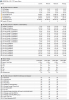
hey guys! I have only had my GT73VR-6RE for a couple of days and am not exactly good with computers....but when I got HWinfo running in the background when playing quake champions, I found something that worries me. Something called "Total system Power" and I have seen this go over 400 W, isnt this problematic when my PSU only support 230W?
 hmscott likes this.
 -
If you regularly use the built-in keyboard, keep the MSI. The ones on Clevo's desktop replacement models (P7xXX, P8XX) are terrible.
-
Yes I will be, only connecting an external DAC and mouse for my university room and wherever else I take it. Had the original GS60 2PE but died after due to heat, boi was it a waste of money so I'm trying my best to make sure I don't make a bad purchase now lol
-
You need to do your research and find out what CPU is in that clevo.
If it's a 7700K, then that's probably the end of the road, because it's still unlikely that a kabylake chipset can be upgraded to a coffee lake / cannon lake, and if it can do one, you need to go check the Clevo forums to see if laptop motherboards will have Bios upgrades for any future refresh CPU upgrades in the same socket. I can't help with this because I'm still on a 2600k, so x299 with MOAR COREZ is on my horizon.
So just find out what possible CPU upgrades are available for your socketed CPU. There was some forum topics debating on whether CPU's past Kaby Lake will still work in the socket.
Right now though all the rage is on X299. With people being able to buy 4C/8T X299's that will overclock higher and cooler than a 7700K, and then upgrade in the future to a 12-18 MOAR COREZ monster when they need moar corez! -
I'll give it a try, as soon as gets free from work and will report back.
you can check website is online or not or accessible by using free web proxy services or can use a tool like hotspot shield
yeah it is, it's been long I saw someone mentioning "warez".....
-
No one that knows if this is normal and ok or if I should return the laptop?hmscott likes this.
-
It's has to be a glitch in the monitoring software. 430-36W for Cpu package power. Aka remaining 393W for the rest of the machine(gpu-screen-ssd's-wifi-fans). This is on level with power draw from an desktop with HEDT prosessor and Gtx1080Ti.
The Official MSI GT73VR Owners and Discussions Lounge
Discussion in 'MSI Reviews & Owners' Lounges' started by -=$tR|k3r=-, Aug 16, 2016.


![[IMG]](images/storyImages/wjvybs.jpg)
![[IMG]](images/storyImages/2cf6rrt.jpg)