 Problems? See this thread at archive.org.
Zoom pictures. Could you see black dotes on metal parts of the cabel?
-
The only other quirk was the back screen panel, didnt have the protectibe plastic over it -
How loud are the fans when gaming over the Alienware 17r4 I'm thinking about switching to Msi
Sent from my iPhone using Tapatalk -
Thank you so much, yes i think this is the best option i have. Thanks againArestavo likes this.
-
In Notebook Check's tests, both equipped with GTX 1080s, the GT73 reached 50db while gaming, the AW17 reached 50.2db.
The MSI has dual 65mm fans, the AW17 has dual 60mm fans.hmscott likes this. -
Well shoot I thought for sure the 73 be quieter being that it's thicker in the fans were bigger
Sent from my iPhone using Tapatalkhmscott likes this. -
Wow, both the MSI and the AW run quieter at load than the Asus Zephyrus GX501

-
Which system would you take Alienware or GT73
Sent from my iPhone using Tapatalkhmscott likes this. -
It depends on the entry price for a 7820HK / 1080, whichever I can get cheaper - sales discounts from stores can happen more with MSI as they sell retail too.
As always AW is way too expensive.
I'd likely get the MSI retail and past experience has shown the paste job works great out of the box with an undervolt. Re-pasting can get some improvement at the risk of short term or long term damage from continual re-pasting.
I find putting up with a few more degrees heat and enjoying the laptop as is is far less stressful and time wasting than re-pasting. I'd rather use the laptop than re-paste it.
AW can maybe be equal performing given tearing it down and re-pasting, re-shimming, re-thermal padding.
And, you can get deep discounts at their refurb outlet, but don't count on fixed cooling from there either.
It's really up to your response to using them both, maybe try both and see which you like.Darkhan likes this. -
Yeah I really just want which ever will stay quite the best lol hmmm
Sent from my iPhone using Tapatalkhmscott likes this. -
Most gaming laptops, except for the Max-Q money pots, strive for best performance over noise generation.
MSI and Asus a few years ago did reduce noise a lot, I mean *a lot*, so what is out there today is much more livable.
You can do a lot of tuning to reduce FPS to refresh - frame limiter or G-sync, and undervolt, change game settings, create custom fan curves - all aimed at reducing load, thermal generation, and therefore fan noise.
But, if you want full performance - why else would you spend so much money on a high performance laptop? - it's going to be "not" quiet.
And, all the laptops have different sound profiles, directions of sound projection, pitch / tone, and ramp up time.
If you are OCD about temps, you are going to be fighting your fan noise OCD, pitting them against each other, and no matter how far you go in either direction it's going to be audible.
If you want a silent laptop, don't get a gaming laptop - even the Zephyrus is going to project the sound away from you and into the ears of others in the room.
It's all a learning process, don't expect quiet operation from any gaming laptop, learn that now and you won't be disappointed later
Last edited: Jul 16, 2017BanditBuzz and Cerreta28 like this. -
Could anyone help me? I just asked couple of question here and nobody answer to me.
-
Yes, it's normal, and there aren't any black dots showing on those connector pins. There is some normal wear marks from the pressure of the socket to hold in the plug pins, but that is normal.
Even if there were dirty black dots, you can clean them off with Alcohol, and plug into a different socket. Those metals aren't going to grow black dots.
It's dirt from the socket, or arc'ing from plugging it in while the device's power switch is in the on position - always plug / unplug with the device fully shutdown to avoid massive power drawn and arc's pulled while plugging / unplugging.
Maybe focus on enjoying your laptop, gaming, internet browsing, social media, and defocus from hyper-criticality of minutia about your new laptop. It's easy to do that when you first get a new laptop. Relax
Ivan994 and BanditBuzz like this. -
I purchased both the Alienware 15R3 and the MSI GT73VR 6RE Titan Pro. I ended up returning the Alienware. It was a very nice machine, but I feel that I got a lot more for the money with the MSI.
-
Thanks for the info I'm gonna go with the Msi my Alienware as 2300 and Msi I got for 1850
Sent from my iPhone using TapatalkBanditBuzz and hmscott like this. -
I couldn't agree more. I was an emotional basket case when I first got my laptop. I should have steered clear of the forums until after I had a few weeks of run time. Oh well...live and learn.hmscott likes this. -
Thank you for good explanation and an answer. I thought it is some burned pits on prongs. I am not sure that I can clean that with alcohol because I can fell pits under fingers. I will enjoy my new laptop just I want to make sure everything is all right. I am currently in the Usa and could repair laptop hear if is something wrong. In my country there is no msi repair centre. I would like also to ask about coil whine. I could hear a lot of coil whine on turbo in sport mode even in comfort mode but much less. I could hear that when I play some video-movie or even sometimes when I am doing some lite work like reading this forum. Could some of you guys has it and is it worth to rma or is some kind of normal?
Thank you in advice for help!BanditBuzz and hmscott like this. -
The Alcohol is to clean off the carbon deposits if any.
Coil whine is everywhere, if you don't like how it sounds, try another unit, maybe it will be better, maybe it will be worse.
Some of the sound comes from the HDD, some from the CPU, some from the GPU, some from the other components - fans too.
I've heard of people going through 5 laptops or more looking for a low whine noise laptop, and not finding one.
If your 2nd one from the same source sounds the same, try another source - hopefully a different production run - as most times all made from the same batch have the same characteristics.
If you are that sound sensitive, maybe don't get a gaming laptop, they all make noise. -
I am not sound sensitive on fan noise just on that high pitch sound
All the units have it? I think it is coming from motherboard because I could hear it on left side on my laptop and in advance settings I put fans to 0% and still I could hear it.
Thank you for help!hmscott likes this. -
Look at some internals pictures, and find the right side / top / bottom area and see if you can identify if it's HDD, GPU, CPU, or?
There are exceptionally loud whiners, and you might find the next unit is quieter, but it might be the same or noisier. Or worse yet, have other real problems.
If everything else is working on the laptop, and it's running cool and otherwise quiet, consider keeping it.
I'll let some other GT73 owners respond, as they might have some model specific suggestions
BanditBuzz likes this. -
I could hear near the cpu area but if I can not fix it I much learn to live with it
I am little perfectionist,sorry. Laptop is perfect when comes to gaming. Perform really good. On auto higher temp I saw is 84 for gpu and 80 for cpu. I made my own advance fan curve and now my temps are about 78 for cpu and gpu. I am open for any suggestions. Thank you really!
hmscott likes this. -
That all "sounds" great
You didn't mention if you undervolted the CPU, usually in a range of -50mV to -150mV, but some have reported even higher (lower) offset's possible.
Also, you can overclock the laptop using manual controls to get more out of your laptop, with Intel XTU for the CPU and MSI Afterburner for the GPU.
Lots of fun stuff for you and your laptop to explore
-
I have not undervolted cpu. Everything is stock. Why is good to undervolted cpu,cpu do not need so much power?(I am getting lower temps?) I am using turbo mode with 4ghz which is very stable.I have not got time to try more than that I will these days
hmscott likes this. -
You've got great CPU temps for not having undervolted, so you will get even better temps at load - a little better at idle maybe - by undervolting.
All the laptops ship with the same BIOS voltage setting for the CPU, but most of the CPU's don't need that much voltage to run reliably.
Undervolting is unique to each CPU, and is easy to do.
You install Intel XTU, pick a small increment and starting offset, say -50mV, and increment -10mV at a time until you crash, then back off +5mV, and then live on it doing gaming, browsing, and even let it sit idle for a few hours with the last best undervolt - usually idle time will crash and you need to change up another +5mV
You save the settings after changing, then Applying, you Save under a profile name. Then you can change back to "Default" - there's one profile named that so you can reset back to stock settings - so you can have stable operation for work or gaming if you don't have time to finish narrowing down the best undervolt.
It's worth doing, as it will reduce thermal output from the CPU, reducing fan noise - and who knows, maybe even affect the "whine"
Please come back and let us know how it works out!Ivan994 likes this. -
Thank you very much for explanation how to do it. I will try and report here everything for you guys! If reduce coil whine I will sleep much better
If I dissable c states in bios I could reduce coil whine but that also reduce my cpu turbo speed.
Thank you once again,you change my mind in rma this laptop!hmscott likes this. -
NP, please do the same for someone else, pay it forward
There might be other tweaks for reducing whine - if it happens enough to bug you when you don't need the "best" performance, you may get rid of it by doing what you are suggesting through a Windows Power plan.
Set up a custom power plan, and under Advanced settings for CPU - set the minimum / maximum to 99%/99%, or 0%/99% - the 99% setting disables turbo, and you run at stock base speed all the time - which should reduce the load on the CPU to the point of least or no whine.
Not sure if there will be any effective difference between 0%/99% and 99%/99%, but it's worth playing to see how it affects the noise.
GL
-
My gt73vr came with xtu installed.
Its louder then my gt72. Mostly on th e gpu side.hmscott likes this. -
You can tune it a bit using MSI DGC, change the mode to be less aggressive, tune the fan curve, use Nvidia 3D settings to run Adaptive instead of Prefer Performance - to downclock the GPU between demand.
Are you running G-sync? If not use a frame limiter like MSI Afterburner + RTSS to set FPS to refresh rate => 60hz = 60 FPS.
XTU is used by MSI DGC, if you make changes in the XTU interface, it might interfere with DGC and visa versa - changes you make might get undone by a DGC mode change.
It's best to either run DGC (with it's copy of XTU), or uninstall DGC / XTU bundle and then install XTU + MSI AB + RTSS to make manual settings for OC and undervolt. -
If you have a G-Sync display, you want to set the frame rate limiter to be slightly lower than the refresh rate. Otherwise, the computer will use straight v-sync or flip between v-sync and G-Sync if there's slight fluctuation. 56 is about where you want to be for 60 Hz display, 116 for 120, and 136 for 144.
hmscott likes this. -
Interesting, I use -1/-2, why go so low? What happens when you set it to -1 or -2 FPS from refresh?
AFAIK, so does everyone else I've talked with, and noone has reported a problem using -1/-2 FPS limiter setting with G-sync. This is the first time I have heard of using such a lower limiter setting -
dupe
-
Hi,
I'm trying to do a Windows 10 clean install on my GT73VR, but the windows installer cannot find the RAID partition. What driver is needed here?
Thank you
Fabian
Edit: Ah, it's that F6 driver
Last edited: Jul 17, 2017 -
The panel is 4k none gsync.
I was curious as to what people as far as oc went.
So, is it best to use dgc or uninstall
And use xtu, the biod and after burner? -
It's up to you. I'd get to know the DGC options fully before graduating to manual settings.
Make notes of where DGC sets OC for CPU / GPU, and then create a manual test profile to mimic your favorite DGC settings, that's to practice using XTU.
BIOS settings are differently set, and you'll want to look to posts here about using it - most people don't - the use XTU or TS for CPU. I don't think the BIOS has GPU OC settings at all as those are done with the vBIOS.DukeCLR likes this. -
Hello there,
I got the GT73VR 7RF with 4k screen but with gsync panel,fantastic graphics.
Im still trying around with OC'ing its new for me and i had alot of heat problems on my CPU since i had this laptop (january this year) but after a second! Repaste with thermal grizzly conductonaut its a massive difference.
I have both XTU and DGC installed and i change things in XTU,only thing i do is too set the same core ratio in DGC as it is in XTU and i tune the fans in DGC.
Ive tried alot already,undervolt,overvolt,lower core speed,higher core speed,running stress tests and benchmarks but i can have a stable laptop for days and then at once......blue screen .....i dont know why sometimes.
At the moment i have only set my cores too X42 for the rest nothing.
Before the repaste i couldnt even get too X38 and my CPU went too more then 90 degrees already,now i barely hit the 70 so im really happy with that.
But with the OC tuning its not going that great too get it stable,and i see here scores pass by from 3D mark were i start scratching my head Because i wont come further then 6750.
BUT....its new for me so maybe that has something to do with what kind of screen etc you got i dunno.
About this,were can i set these settings?
I play world of warcraft most of the times and i just made a profile in Nvidia Control Panel and they told me too set Gsync on and Vsync also,but only in Nvidia control panel,not ingame and it looks pretty smooth and i got always 60fps only in raids with alot of ppl and stuff happening it will drop too around 40 (on lowest setting possible in raid) .
But maybe i can learn something more,or am i doing things wrong. -
Can you uninstall XTU please? First and foremost (if necessary, use and activate the default XTU profile in profiles, before uninstalling).
Then go into your BIOS and set "CPU Current Limit" to 400 in the OC section.
Then use throttlestop 8.48 instead.
Goto FIVR, click the overclock button and set the multipliers to x42.
Once you do this, can you please do a test.
Download and install prime95.
GO to UNDOC.txt and read about how to disable AVX And FMA instructions (By setting the values to 0)
Those values will go in LOCAL.txt.
Then go to throttlestop, set both CORE and CACHE adaptive OFFSET voltages to -100mv.
Then run prime95 blend test and see if you get any errors. Please set advanced->roundoff error checking and sum inputs checking enabled.
This is a 7820HK cpu, right?DukeCLR likes this. -
Hm Ok thats alot for a noob you know But im gonna try some stuff.
Yes this is with the 7820HK CPU.DukeCLR likes this. -
Do you mean in the BIOS the CPU ratio or the VR Current limit?
-
VR Current limit.
You can't use a cpu ratio of 400, lolMsigamer likes this. -
No i know but i thought you maybe ment 40
-
Ah. You're going to use Throttlestop to set all of the CPU mulitpliers (in the FIVR section).
You can also activate speed shift (in a throttlestop profile), set SST to 0 to force high performance mode (you should have power plan set to high performance first).
Then run prime blend (make sure you did the TXT file commands to disable FMA and AVX for lower temps) to see how stable you are. -
I came far but im searching in the undoc file quite some time now,but i cant find anything about FMA or AVX yet,but if im correct i need too copy lines from there too the local file?
-
It's like BURRRIED in that file deeply. But it's rather close to the top.
-
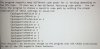
Think you mean this?
But i just had a blue screen already.....
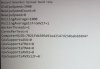
So i guess this is what you mean?yeh i want to be sure sorry.
Thnx for helping me.Last edited: Jul 17, 2017 -
Yes that's it.
If you had a blue screen, change your CPU and cache undervolt to -50mv at 4.2 ghz in Throttlestop and try again.
If you continue to blue screen, set the undervolt back to 0mv.
I have never seen a 7820HK CPU not be stable at 4.2 ghz, at least at default vcore. If yours is not, at default voltage, that would be the first.
can you take a picture of your throttlestop window at 4.2 ghz (if you are using STOCK volts) and tell me the VID shown?
(it's important to keep adaptive change voltage enabled in throttlestop, EVEN If it's at 0mv, because if you are using other profiles (like for example, 3.5 ghz at -150mv) on profile#2 for instance, then you switch to profile #1, it will apply the -150mv to 4.2 ghz, because it will think that is "default" if adaptive voltage change is unchecked (off), because it was changed in another profile, and it doesn't check the default voltage if adaptive voltage change is turned off. But if it is set to 0mv (enabled) then it does check. That's because TS has no way of knowing what the 'default' voltage is because every CPU has a different default voltage, depending on its VID programming, unless you tell it to.Last edited: Jul 17, 2017Msigamer likes this. -
Im running now still on -50mv wich now still runs fine,only coming close too 90 degrees.
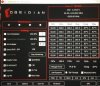
-
Nice, seems stable. If the blue screens are gone you can use that as your settings.
Those volts are mad high for 4.2 ghz though Almost feels like a 6820hk over there.
Does your prime95 say using "Type 0 FFT" or "Pentium 4 FFT"?
Is that SMALL FFT or blend? Please run blend.
the watts you are using seem awfully high for blend, especially at those temps and with Conductonaut.
Those temps should not be that high though.
Are you using cooler boost fans at maximum or automatic?
You repasted with thermal grizzly conductonaut
That paste is supposed to keep temps much lower.
What happens if you set cooler boost fans to 100%?Last edited: Jul 17, 2017Msigamer likes this. -
Yes still stable,now with coolerboost temps dropping back too 80 also.
So i will gonna use this and look how it goes.
Is it?ok Yeh i really dont know m8,ive been busy with afterburner last week also but standard my card reaches 75 sometimes already so i think i wont touch that any further.
Many many thanks for youre help and advice,appreciate it! -
Do i need too change something in DGC also or maybe remove it?
-
Sorry about the potato picture (no idea why it came out this bad) but this was a prime blend (not small FFT) run, AVX And FMT Disabled, with 4.2. ghz and -100mv undervolt. Repasted with Kryonaut (I don't trust liquid metal). Fans at 100%.
What's scary is that your VID is higher at 4.2 ghz (1.19(!)) than mine is at 4.5 ghz (no undervolt).
BTW DO NOT use DGC. That thing interferes with Throttlestop and with XTU. Best to uninstall it (and reboot).
Now I see why your temps are so high. 1.19v at 4.2 ghz....that's...very, very very high....
Can you look in FIVR And tell me what your cache speed is? It should either be x39 or x36...
![[IMG]](images/storyImages/k0Tpf91.jpg) Msigamer likes this.
Msigamer likes this.
The Official MSI GT73VR Owners and Discussions Lounge
Discussion in 'MSI Reviews & Owners' Lounges' started by -=$tR|k3r=-, Aug 16, 2016.


