Problems? See this thread at archive.org.
Ehh yeh thats a hell of a difference .
My cache ratio is at X36
-
@Msigamer @Phoenix @Papusan @iunlock
Are you sure that your undervolt is working however?
What is the VID shown in Throttlestop when you are running prime blend (at 4.2 ghz) without an undervolt? (offset at 0mv)?
Then check again at -50mv.
Make sure you undervolt both the cpu core and cpu cache separately.
Because something just doesn't seem right with your settings. Your VID should NOT be 1.19v if you are undervolting.
Are you sure that AVX is disabled in prime95?
What does the "FFT" line show when you run prime blend? (Remember, blend, NOT small FFT)?
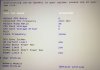
Can you check in your motherboard Bios and make sure that the voltage offset (should be in the OC section) is at 0? It might pay to check just to make sure that XTU didn't mess up something.
Because your voltages aren't right. 1.19v is something people usually use to try to reach 4.7 ghz.
Although throttlestop should override that when you unlock adjustable voltage. -
a few pages back i posted about my gt73vr heat pipes not being painted.
here is a link to the picture
https://drive.google.com/open?id=0B9QMvzh_9MxbODBBSXhUUmZMYlhIS1k3SmlDaTRacEk2ZDZr
nbr says the file is too big to host....
iv not found anything more on why they are not painted. left a mark on msi formus, well see where that gets me.
as for as OCing, i have mine set at 4 in the DGC. iv not used xtu on this notebook yet. Can i use after burner and still control the fan curve? or is that only available in DGC? and same for cpu in xtu?
my 4k panel is g sync, didnt know that.Last edited: Jul 17, 2017 -
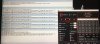
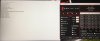
Well....Yeh im affraid everything is set like it should.
Attached Files:
Last edited: Jul 17, 2017 -
-
You didn't type anything in your reply.
-
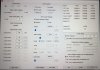
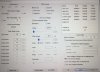
Yeh sorry im doing it on my iPad so its a bit messy,but now you can see all you want too see i think -
Thank you for the post. Yes it's set up correctly.
But wow...that voltage ID...
I have never seen a 7820HK require such high voltage. That's 1.24 VID at 4.2 ghz.
I don't think they even go higher than that.
This takes "BGA Trash" to a whole new level.
This system would not even be USABLE at 4.2 ghz with any traditional pastes...Gelid or Kyronaut...it would reach 100C....(WITHOUT AVX...)
I would have expected that from a 6820K...but not this....
@Phoenix you have anything to say about that?
If @Papusan sees this you can bet that Hamster will turn into a space monkey.... -
It's called Silicon Lottery brah, no 2 CPUs are alike and we can never generalize any voltage requirements, clock speeds, or settings but you're right, there are starting points as guidelines.
On my 7820HK I can do -100mV for 4.2 GHz on all cores and after repasting with Liquid Ultra, I can safely lower the undervolt to -50mV
![[IMG]](images/storyImages/quGf9zk.gif)
-
I knew that hamster would transform...
What's the VID on yours with your undervolt? -
fluctuates between 1.132v to 1.214v
![[IMG]](images/storyImages/LHOZI8S.gif)
-
All the talk about undervolt @Phoenix
 Why not let the voltage be stock default and rather push up the clocks? Yoo all run HQ?
See even cripple the clocks - more - more of the same undervolt
Why not let the voltage be stock default and rather push up the clocks? Yoo all run HQ?
See even cripple the clocks - more - more of the same undervolt
Last edited: Jul 17, 2017 -
http://www.guru3d.com/news-story/intel-six-core-lineup-exposed-core-i7-8700k-and-core-i5-8600k.html
Hopefully this comes with a mobile variant and/or mobile (desktop cpu) support. If not I'll probably rebuild my desktop. -
Hello,
Is there any way to fix problem when sometimes gpu core and memory clock stuck on max when get out from game. Only way to fix this is to restart laptop. It is not always but sometimes.
Thank you! -
That is a bit the same as mine then?
But i can stay it like it is now?not that its gonna explode or something
Spartan@HIDevolution likes this. -
I had a blue screen again just.....
Maybe its better too set it too 4,1GhZ? -
Try -25mv
If that fails, try 0mv (default volts). You want it set to 0mv so that if you make another profile and swap profiles, the voltages will change correctly on other profiles when switching back to the highest speed one you are working on.
Then if that fails try 4100 mhz at -50mv and so on. -
Ok im gonna try a bit,weird because it worked for long actually and then suddenly a blue screen.hmscott likes this.
-
Damn i hadnt heared or seen that GT75VR yet till now....with mechanical keyboard
Nice.
hmscott likes this. -
Prime blend uses a large range of sizes. Some are the same as prime small FFT.
If you aren't sure, you can run small FFT, this will always find blue screens fast but requires a lot more heat output.
Blend is much closer to real world (like OCCT/AIDA stress test). -
But when is the point that its not safe anymore with the voltage....maybe also good too know.
I just read the whole tutorial about throttlestop and made some profiles.
Im trying undervolts increments by 0,10 so im trying -0,40 but my VID is reaching 1,2894 at highest. -
In my experience, some games don't completely obey the limiter in RivaTuner Statistics Server. They'll sometimes pop up a frame or two over what I've set, so keeping it at 56, 116, 136 removes all doubt. I don't notice a difference at refresh rates above 100 nor at 56 if the game is not a fast-paced FPS. For example, Danganronpa: Ultra Despair Girls has a built in frame rate cap at either 60 or 67 fps (can't remember off the top of my head), and 56 in this game works just fine.
A frame rate limit can only be set via third-party software. You can use NVIDIA Inspector or RivaTuner Statistics Server. I've found the latter to be slightly more reliable in my experience, but your mileage may vary. -
-
Prime95 with full AVX is the most stressful test you can possibly throw on a PC. Full FMA3 will heat up the chip faster than anything else you can ever use on it. So it's worst conditions.
Even if you disable FMA3 and AVX support, the chip will heat up more than any real program you will use. Prime Blend comes close to a full 8 thread loaded program (Like a chess engine using 8 threads), but the lower FFT sizes will still heat things up more than Stockfish (or another chess engine with all threads) will.
It's clear that you would reach 100C with AVX even with liquid metal, because you have the worst of the high VID cpu's.
I just suggest you stop using prime now.
If you did not blue screen at STOCK volts, make a 4.2 ghz profile with 0mv offset (make sure to make an offset however so the voltage resets on the profile), and just stop stress testing on it. Just play games or use your computer normally.
If you want to undervolt, try one of the smaller speed steps where an undervolt will actually work, then you can use prime small FFT (no AVX).
4.0 ghz at -100mv should work.Last edited: Jul 17, 2017 -
My battery is reduced by about 1-2% when the state of the laptop is off. How to overcome this?
What i must enable
ErP Support Setting In Bios ?Last edited: Jul 18, 2017 -
Cool, I'll have to give it a try, why not - it's rendering even fewer frames, generating less thermal energy, and needing less fan speed, 3xWin
DukeCLR likes this.
-
There's a 4th benefit as well. If you ever hook up your PC to a TV, which obviously doesn't have G-Sync, capping the frame rate that "low" allows you to keep v-sync off, which reduces input lag. Even when setting a TV to Game mode, you still have to deal with panel response times that far exceed those of even basic dedicated computer monitors. The frame rate cap and no v-sync is a small but noticeable help.
Sent from my iPhone using Tapatalkhmscott likes this. -
I thought the solution to G-SYNC was to just set Vsync on in nvidia control panel and turn it off in game. As long as gsync is on my understanding was that you don't need to set a cap, gsync doesn't let you go above the refresh rate anyway while vsync is on. The only game I had qualms with was garry's mod, where latency shoots up unless you set the in engine cap to 1fps below refresh ratehmscott likes this.
-
It's a matter of going back and forth between v-sync and G-Sync when frame rate drops below the refresh rate. This channel did some investigating on the matter. Look through the video list and you'll find them.hmscott likes this.
-
Any of you guys know how to edit DMI tables?
Trying to find a way to change or edit the table or value "System Power Supply" or to find what writes the value (EC??)
7RE seems capped at 230W while 7RF is capped at 330W. Even if a 330W PSU is used on the 7RE. Bioses and EC main files are identical so this has to be stored or activated someplace else.
There is a value under DMI Tables called "System Power Supply" (Type 39) with weird values in it, although this is directly in the main BIos file (e.g. E17A1IMS.319). This may be programmed from someplace else.
Anyone have any idea what this value does or how to allow 7RE to use the full 330W (Instead of 230W) if you are using the 330W PSU already? -
@Falkentyne
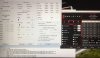
I just did a bit of testing more on lower clock speed,
And IMO that looks alot better then on 4,2 GhZ or am i wrong?
-
That's much better.
Looks like your CPU tops out at 4.1 ghz safely. And you can undervolt. -

Nope its actually getting worser and worser atm,i can benchmark and stresstest or do a firestrike test and it keeps all good but when i start doing normal things or go ingame it will bluescreen after a while..... -
Do I get a worst silicon of the year award for needing 1.35v to hit 4.2ghz stable on my 6820HK
It burns 92w in OCCT and hits 84c in the british summer heat (bless up conductonaught).
I want me one of these kaby lake models
-
I guess i have that award already

-
One of the OEMs (Gentech?) said I have a golden 7820hk because it can do 4.5 ghz at 1.12v stock volts. (and 4.2 ghz with -100mv offset). But I assumed 100% of 7820hk's would do 4.2 ghz at least without undervolting.
-
Can someone with a GT73VR 7RF (not 7RE, but not SLI 7RF) please download RW Everything, go to SMBios and look for "System Power Supply" and please screenshot the data in that field for me?
(Thank you very much).
This is from 7RE (with the 230W PSU).
*edit* if you have the 6RF, go ahead and post but I hope someone with a 7RF can post theirs too.
![[IMG]](images/storyImages/woVMa66.png) Last edited: Jul 18, 2017
Last edited: Jul 18, 2017 -
MSI GT73VR Titan Pro 7RF-425 System Power Supply on mine:
![[IMG]](images/storyImages/System_Power_Supply.png)
![[IMG]](images/storyImages/giphy.gif) Papusan and Falkentyne like this.
Papusan and Falkentyne like this. -
Hope mine stops blue screening now sometimes because it really starts irritating me
Falkentyne likes this. -
Thank you very much guys.
Looks like I'll have to continue my search.
(I'm trying to find out what is limiting the 7RE to 230W even with a 330W power supply being used).
It could be something pre-programmed or it could be some detection of the video card.
(I guess Svet will have to find that out).Spartan@HIDevolution likes this. -
I am using the latest EC Firmware. See: Just upgraded my GT73VR to EC Firmware 17A1EMS1.112
-
First-time poster and recent purchaser of a MSI GT73VR TITAN Pro-425. As the 425 comes with "only" 16GB of RAM, I'm looking to order two (2) additional 8GB sticks. The problem is I've seen mixed things as to what is currently loaded in the machine. In addition, when I called MSI customer support, all they could tell me spec-wise was the same thing available on NewEgg and other tech sites - DDR4 @ 2400MHz.
I *suspect*, but can't verify, that it may be Kingston ValueRAM 8GB 2400MHz DDR4 Non-ECC CL17 SODIMM 1Rx8 (Notebook Memory) KVR24S17S8/8.
TL;DR version - What 8GB RAM sticks do I need to buy to get an exact match of the factory-installed DDR4 2400MHz RAM in the MSI GT73VR TITAN Pro-425?
Does anyone have any insight on this question? Thanks in advance (and sorry if this was already posted in the 775 prior pages)! -
3.7GHz ? And 12C between hottest vs. coldest core. Maybe change thermal paste?
You can use Aida64, Hwinfo or Cpu-Z for seeing what ram you have and what you should opt for.Last edited: Jul 18, 2017hmscott likes this. -
Both K
Both Kingston ValueRam and Hyundai (Hynix) modules are used in stock configurations (as long as they match with pairs, e.g. two Kingstons + two Hyundais in Dual Channel).
The base 16GB comes with Kingston. -
Yes saw that also....i pasted with conductonaut about 2 weeks ago,and such a difference it wasnt in the beginning.
I had better sended the laptop back too MSI with my heating problems immediatly.
I dont really feel for a repaste again so dont think im gonna do that.
So thats 2 bad laptops i get in a row....first i had a 6RF wich chrashed when 3 days old and with this one im struggling with overheating all the time already. -
Dang, guess I got lucky with my unit (knocks on wood). Been playing BDO practically 24/7 (afk sleep/work, minus maintenance) and the laptop is going strong lol, haven't had any issues. I know its not supposed to be abused like that but its my go to till I rebuild my desktop xD
-
Did you remember looking how high Cpu Package power was during the test? And you have put PL1 and PL2 limits high enough? The clocks shouldn't drop to this level.
![[IMG]](images/storyImages/nMefq7H.png)
The Official MSI GT73VR Owners and Discussions Lounge
Discussion in 'MSI Reviews & Owners' Lounges' started by -=$tR|k3r=-, Aug 16, 2016.