Problems? See this thread at archive.org.
The person you're quoting wants a 4K screen.
-
-
I have deleted Nahimic and put Fxsound I have much less distortion sound. Today I also delete Fxsound and try speakers on max volume no distortion at all. Maybe my speakers have problem with sound enhancer?
-
The difference between 2017 and 2016 1070 cards confused me. My cards are 2016 (should've waited for the 7RE lol) but have no problems doing boost 2.
Before I raised the power limit I tried both the 8A and 5C(?) bios and found little difference between them. Other than that 8A is a debug bios with boost 2 disabled.
With power limit at 151w-170w I have no trouble hitting 2030mhz in games that don't use SLI, and about 1930mhz in games like GTA-V that do.
I used to get weird crashes before updating to 5C but those were very early days for 1070M drivers and most of its been ironed out now.
If there were a hard fault with 2016 MSI 1070's surely they'd have issued a recall?hmscott likes this. -
Im completly lost guys
 something is just very wrong with my laptop,i tried alot of things lately and i cant really run it stable.
Ive been digging back on the forum too setting from @Phoenix his BIOS but only with an OC from x40 and tried different voltage offsets with it,i tried some benchmarks in XTU were my temps maxxed at 88 degrees with -100v offset .....wich is unfortunatly low compared too other settings.
But when testing on AIDA64 im reaching 94 degrees very fast on 1 core only thats 15 degrees higher then other cores,so i guess that the repaste i did is just totally crap?
So disappointed because in the beginning after the paste my temperatures were very good.
And how can i remove this Grizzly Conductoshit the best?its a mess too apply already so i guess removing wont be any better.
O yeh and with 0 offset on x40 its reaching over 1,3V also on idle...dont think thats normal also. -
Well the problem doesn't seem too awful. I had lots of crashes until I switched to the 8a vbios. I'm not sure what to do though. Limiting the card seems like a reasonable solution. I could return it or rma it and get it fixed. Has anyone got a replacement card through rma? Those who kept theirs with the 8a vbios seem happy far as I can tell.hmscott likes this.
-
I did testing on a non crashing card with the 8A bios and with the 3A Bios (both stock TDP's)
Here's the problem.
With the default 115W TDP, you will gain absolutely ZERO benefit on ANY current benchmarks when using the 3A (with boost 2) clocks, compared to the 8A (with only boost 1, boost 2 disabled).
That's because, whenever you exceed the offset overclock (assuming you're using one) of your boost 1 clocks, TDP limitations will drop the core clock almost always below the boost 1 clock anyway, and boost 2 clocks will never be seen because TDP limitations will prevent it. Try using a +200 offset in Valley. You'll notice your core clocks will always be BELOW your boost clock if the GPU load is at 99%, because TDP will stop it from going any higher. When GPU usage drops below 90%, yes, you'll see 1900 mhz clocks, of course, but this will have no impact on your FPS because the GPU is being limited by the CPU at that point. So the power draw is lower than 115W, so the GPU will clock itself above 1900 since it can. But this won't do anything for you. You would probably see a Voltage Reliability (VREL) throttling flag here, as voltage would be limiting boost 2 clocks, since TDP would not be limiting you.
I had a 30 point Valley difference (which is irrelevent) when comparing a benchmark run with 8A bios and 3A Bios.
Now in some really old benchmark, like something made before 2010, yes you might see a score boost from the 3A Bios, because the GPU would most likely be able to clock higher. But I haven't exactly tested this.
What someone should really do is use a hardware flasher, mod the TDP to desktop (150W) then test 8A and 3A Bios, and then compare the scores when TDP is no longer limiting you. But this is clearly a lot of unreasonable work and not something I would do unless I were being paid for it.hmscott likes this. -
My results differ from yours - I see about a 15% drop in graphics performance with the neutered VBIOS compared to the latest official VBIOS listed on MSI's webpage, and overclocking the neutered VBIOS resulted in even more no video out episodes. http://www.3dmark.com/compare/fs/13020980/fs/12780773
My laptop is still "being repaired" at MSI's repair facility for no video out problems (with or without OC, and non-recoverable with the latest official VBIOS from MSI). So, this may change if they replace the 1070s with the newer revision.hmscott likes this. -
Which "neutered" vbios are you talking about here?
I read your old posts and you were discussing the vbios which had ALL boost clocks disabled.
I don't think you're talking about 8A.hmscott likes this. -
The no video issue he is mentioning is probably TDR when you overclock too much in 8A. It won't reboot but you will TDR. How much did you overclock it?
Sent from my iPhone using Tapatalk -
It's possible that it starts as a TDR (a blank, white screen counts?), yet upon rebooting there isn't any video out during POST or when Windows loads. With the neutered VBIOS, stock was 1443MHz and never went higher - when I tried overclocking to 1600MHz the no video out issues happened almost every benchmark if I left it running long enough.
1443MHz VBIOS, which might not be the 8A one - it's been a long, tiring trip trying to get this laptop functional, and it's starting to blend together. I did try the 8A one prior to sending out the laptop for repairs the first time - still lost performance in Valley (it wasn't as bad as 15% like with the last "repairs" and Firestrike), and still had no video out issues.hmscott likes this. -
I read his old posts.
He explicitly stated the NEUTERED 1443 mhz Vbios. That is NOT the 8A Vbios! That is the Vbios that has ALL boost clocks disabled (meaning max clock is 1443 mhz). The 8A Vbios disables boost 2 clocks, not boost 1 clocks. Most people never will see boost 2 clocks if not using a TDP mod, because you will reach TDP throttling in any current game or benchmark, which will stop you from reaching the end of the boost 1 clocks, never mind the boost 2 clocks. You would only see boost 2 clocks (without a TDP mod) if you were at lower than 100% GPU usage, which means zero benefit to game scores.
@Arestavo
When you used 8A Bios, did you ever overclock it.
I could clearly see you getting more FPS with the normal MSI Bios compared to 8A, if you did NOT overclock at all, (maybe because of SLI helping balance the TDP load, or because if you do NOT overclock, 1643 mhz boost clocks would exceed TDP far less than if you were overclocking. Thus, you would actually see boost 2 clocks (above 1643 mhz) a lot more often if you were not overclocking.
However when I did my own tests, I overclocked by +250 mhz offset on both 8A and 3A Bios, thus I was always at the TDP Limit, and my max clock was 1886 mhz, which I never saw....it was always going from 1683 mhz to 1825. Since it was always above the DEFAULT boost clocks (which would be 1643 mhz if you were not overclocking), of course you would get a performance loss with 8A at stock.
I overclocked 8A so I did not get a performance loss.
I'm using 8A with a TDP mod now (150W), so my clocks stay at 1886 mhz at all times, and I exceed a desktop 1070's card not overclocked. I don't know how much performance I'm losing compared to modding 3A Bios, definitely some for sure, but since the clocks are always 1886 mhz, that means more stable frametimes, and I think that's worth it.Last edited: Jul 23, 2017hmscott likes this. -
Ok 1443 is NOT 8A.
Sent from my iPhone using Tapatalkhmscott likes this. -
Yup, 200/300 on 8A gave me better performance in games than "official" vbios. Who made the 8A vbios? Was this a hotfix provided by MSI China in one of their forums?hmscott likes this.
-
Yes it was a hotfix from MSI China.
Did you say that the voltage load was DIFFERENT on 8A Bios compared to default Bios, if both were at the exact same clocks?
Someone wrote a video saying that they used a resistor / potentiometer (allowing from 0.6v to 1.075v) to force a voltage change on a desktop card (a card that already had TDP limits removed), and at the same mhz, he said that when he forced the voltage to a lower vcore, he lost FPS in Time Spy bench, even though the clocks were the same.
If you look on overclock.net in one of the 1080 or 1080 TI threads, you may find a link to it. They were discussing "pascal behaving strange."
TBH I don't remember now if it was linked on overclock.net or on linustechtips....hmscott likes this. -
I did overclock the 8A VBIOS (1643MHz right?), I did have a loss of performance (as I already stated, and not as much as with with the 1443MHz VBIOS as I already mentioned - to expand, I couldn't OC with the 8A VBIOS without getting a white sreen/no video out), and I did still have no video out issues.
However, the 8A VBIOS did seem to solve the reboot while gaming/benchmarking problem that I had just like the 1443MHz VBIOS fixed. But the no video out problem plagues that laptop.hmscott likes this. -
This might be the one you're referring to:
Falkentyne and hmscott like this. -
In 8A the voltage will be lower by default because it is locked to 0.881mv (no boost 2) and you will be using this max voltage with clocks over 1835mhz if you overclock. I wish I could control the voltage on 8A.
-
This morning when i fired up my laptop he doesnt detect my GPU (1080) at all....its gone,some Intel graphics program is installed wich i removed also,tried too download drivers but nothing works.
I just shut it down yesterday like normal and then everything was fine and now its gone? -
It sounds like you hit the GPU switch button that's next to the 100% fan speed button. It requires a restart to switch between the built in Intel APU and the discrete Nvidia GPU.
-
Ah then i guess it could have been that easy im busy with a clean Windows installation already haha,but thats ok because things didnt work really well lately already so i hope its any good.
Thanks.Atma likes this. -
Even my speakers are distorted when the volume goes above 80.
Kinda disappointing tbh. -
-
Yes, Just delete nahimic and is going to be much better
-
Doesn't that reduce the quality and the bass.
-
Has anyone got a contact for replacement parts? Ideally UK but doesn't have to be.
-
hello guys, Im new user.. sorry for my bad english here
wanna ask something about gaming performance
when I play BF1 using ultra setting, the GPU fan runs loudly than CPU fan
when I check MSI Dragon Center, the GPU performance was 99% with 75"c - 80"c, and CPU performance is <60% with 70-75"c
is it normal ? I'm using gt73vr 7rf 449-uk with i7 7700hq, gtx 1080
my friend told me my cpu is bottleneck my gpu, some of them said my gpu is bottleneck my cpu
I didn't have any idea what they meant -
For the fan noise situation your options are:
1) Make a new profile in dragon center with a lower max fan speed, the 1080 will clock slightly slower and run hotter. But be quieter.
2) Repaste the GPU (and may as well do CPU while you're in there) with some high quality TIM.
3) Do both.
You could also use gsync if you have it. As it caps the framerate at your monitors refresh rate. Saves some gpu load in low load scenes. Else use vsync but the added latency is a turn off for most.
I'm not familiar with the 7700HQ but worst case scenario you will lose ~5-10% performance in CPU bound games or workloads versus an unlocked 4.4ghz chip.
CPU bottlenecks are most apparant at high FPS so if you have a 120hz screen you might have benefited from an overclockable CPU.
That said DX12 and modern API's in general use CPU's more efficiently so in a lot of modern games and certainly future games you won't see a major bottleneck. -
If you're going to go the G-Sync route, it helps to cap the frame rate to slightly less than the refresh rate. Turn v-sync off in the control panel and in games, then use Riva Tuner Statistics Server to set the frame rate limit. For the 120 Hz display, set it to 116 as on occasion a game might break through whatever threshold you set by a frame or two. This way, G-Sync will stay active at all times, plus it will slightly lighten the load on the GPU, resulting in cooler temperatures and less fan noise.DukeCLR likes this.
-
Hello,
I need one advice of all of you,please help me to make my decision. I have coil whine on my laptop,it is not a lot but I could notice,also my speakers distorted on high volume.Newegg aprove my RMA and I am afraid to return laptop and to get new one with more issues or the more defective one. Is my issues big enough for RMA?What would You do in my case?
Thank You all for help! I really beed this! -
I too have the speaker distortion at volumes above 80.
Not sure about the coil whine though. -
The computer (mine at least) only has HDMI 1.4 which is a bit disappointing to discover now that I just got a new tv. I hope it is still possible to achieve 4k / 60 fps somehow with an adapter or something.. Any tips guys?
-
You would need Mini DisplayPort to DisplayPort and DisplayPort to HDMI 2.0 adapters in order to connect the GT73 to a 4K TV.
-
@Phoenix i cant find anywhere a layout u shared for a hw info i saw it few months ago but cant find post anywhere
-
Here you go: HWINFO64 Recommended Layout Settings
Don't forget to give rep to mr. @Papusan as he is the one who made them
Falkentyne and Papusan like this. -
PSA for anyone using loadline on modded 6Rx/7Rx bios:
Don't go anywhere near the upper limits (~8000), it's extreme LLC on steroids and will probably destroy your motherboard. A value of 100 leads to close to 1.5v so keeping way below 100 is wise.
The lowest values are strange and cause a sort of reverse LLC. For example a value of 1 will lower voltages significantly (across the range if using adaptive mode). It gives really tight voltages but causes a lot of crashing regardless of set voltage.
For my 6820HK I found the optimum is ~15 for AC and DC loadline. This tamed my ridiculous +/- 50mv fluctuations in voltage to +/- 10mv. In addition it keeps voltages at stock across the curve, just with way less fluctuation.
Not sure if anyone else was experiencing dreadful voltage regulation on the 6Rx laptops but this solves the problem for me!Falkentyne likes this. -
Are you using static voltages?
Because I have absolutely no strange 50mv voltage regulation using adaptive at all.
I have about a 0.03v (30mv?) difference between idle and load at 4.5 ghz. (1.11v at load, 1.14v at idle), without an offset.
Good note about the 15 for ac and dc. I'll look into that later.
What's your idle and load voltage after doing your tweak? -
On override my idle is actually about 30mv lower than load but under load the voltage is very tight.
On adaptive (with LLC) I need +120mv to get the same voltage as without LLC
With LLC at 0 (auto) I fluctuate 0.1v at idle and load which is huge.
So for example on override + LLC I set 1250 in bios. At idle it is 1250mv, at load it is 1280mv.
Whereas on adaptive + LLC I would get 1120mv idle, 1090mv load.
So adaptive is theoretically more stable since if it passes stress tests with slight vdrop, it should idle fine with +30mv.
It's just strange how on my 6RE without LLC the voltage fluctuation is huge under idle and load.
EDIT: With LLC on, on TS Bench I get vdrop whilst on OCCT I get vboost -
I was searching after some kind of answer for this for some time already today,well not exactly this but for an answer why there is so much difference between my voltage under load and idle.
You say that ~50mv is ridiculous......well mine is closer too ~100mv of a difference sometimes,depends on my core overclock with no voltage over or undervolt at all.
And here is the voltage under load always lower then idle. -
More strangeness!
When LLC is AUTO my power draw is much much higher at the same voltage, what is going on there?
-
![[IMG]](images/storyImages/QPp2yiQ.png)
I ran some tests. LLC on MSI default is blue. Top line is power in watts, bottom line is voltage in mV.
LLC on 10 is red.
You'll notice that for some reason power is lower on the higher voltage
I can only assume the default configuration is to deliver ghost voltage, it's very strange -
^That's why I never use Auto for LLC.
Either manual values or disable it.Spartan@HIDevolution likes this. -
The power consumption discrepancy doesn't add up though. I think MSI configure the default settings to boost voltage at the core level but display a lower VID.
That's my only explanation unless someone can explain how a CPU at 1.33v can consume less power than the same one at 1.29v.
I just find it odd, there seems to be something shady going on in the default configuration. -
well
I just tried your settings.
I set a loadline of 15 AC, 15 DC at my normally 100% stable 4.5 ghz on my 7820HK.
As soon as I switched to 4.5 ghz in throttlestop (my computer boots at 3.5 ghz) it blue screened with NO load on it in less than 3 seconds.
So well I tried a loadline of 100 AC, 100 DC.
This time it worked fine. Stockfish 8 thread chess engine full load, no crashes. and temps were 5C(!) lower than with no loadline, and less wattage used.
I was getting 79-80C max temp with default loadline at 4.5 ghz (VID ~1.12v). 73-74C temps with 100 AC/DC loadline. (fans at 100% turbo boost). Big improvement.
Thank you for that advice.
Maybe this will also help a little bit with the power limit 2 throttling when using the loaded CPU with 150W TDP GTX 1070 (when I exceed 230W total system power draw), until someone, somewhere, can find a way I can exceed 230W of total system power on the 7RE. (I already asked MSI...they absolutely refuse to release the power unlocked EC firmware...they even admitted they HAVE an EC firmware with the AC power limits unlocked......jesus christ...) -
I previously had an MSI GS60 with a 4720HQ. Modded the 970m to 1.25ghz core and 6ghz memory, with power limit increased to about 140w. The thing was as fast as a 980m. Gave it more core voltage and was close to 1.4ghz core but temperatures were silly. I never measured wall consumption but the thing only had a 120w adapter and it must've been drawing at least that from the GPU. Still it never throttled its CPU because the total power was too high. It just shut down
-
That must have been a fun machine, and you didn't have power limits on it. MSI makes really good hardware with the CPU and GPU heatsinks unlinked, then they limit what you can do with the cooling power to push it because of dem AC power throttle limits now
-
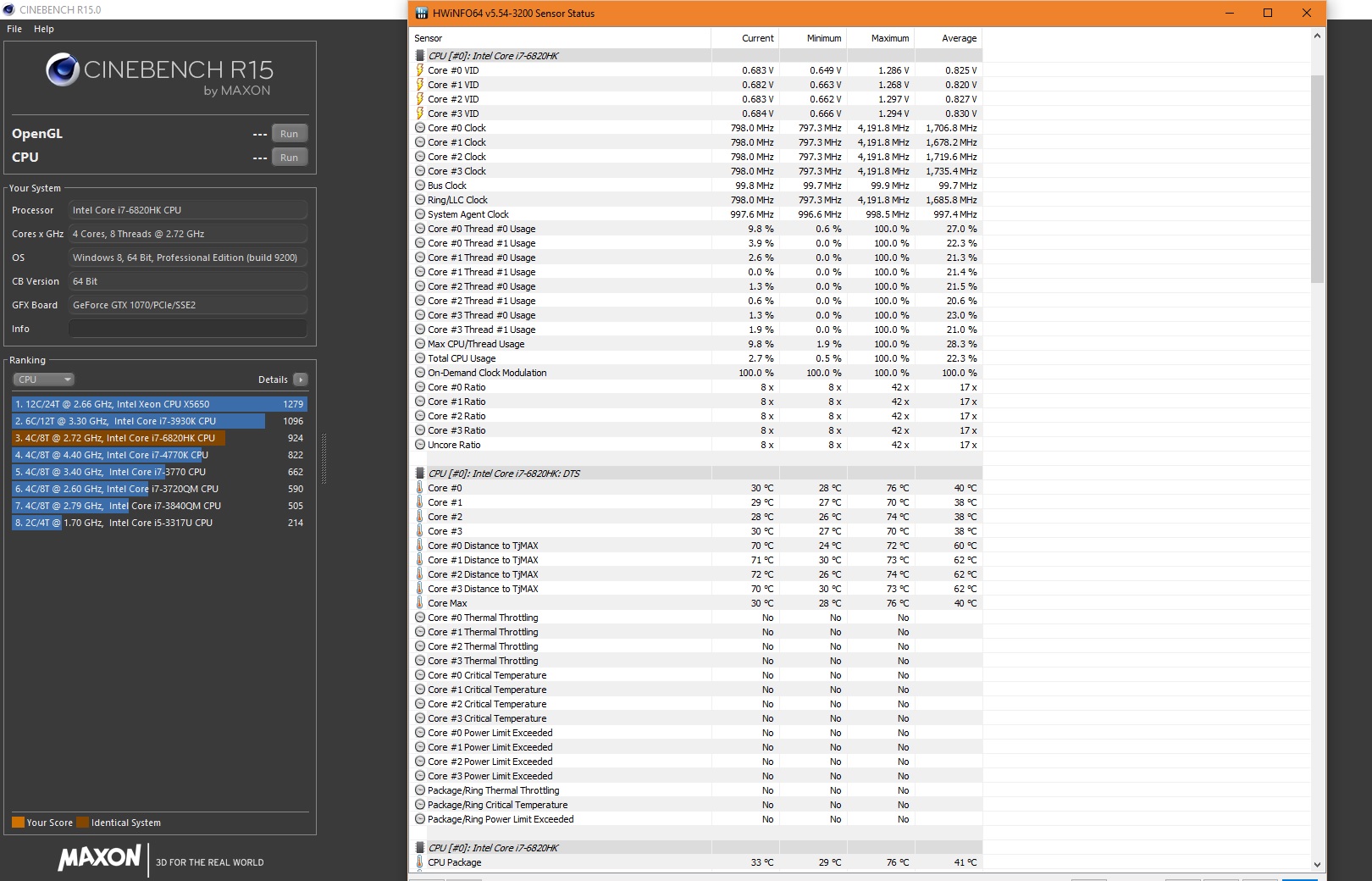
Hi everyone,
This is my score in Cinebench overclocked 6820HK : 924cb.
Power consumption at wall is about 120W
CPU Package Power is about 80 Watts
This MSI is a beast
Attached Files:
Falkentyne likes this. -
-
-
I got 939 on a 7820hk at 4.2ghz. Aren't the 6820hk and 7820hk the same IPC? I was using command rate 1T though, not sure how much difference that makes.
-
I thought than the 7820hk had a slightly better IPC due to some optimizations.
BTW, my ram is clocked at 2133mhz and 1.5% difference is small between 2 generations
-
Do the 7820HK and 7700k have the same IPC ?
The Official MSI GT73VR Owners and Discussions Lounge
Discussion in 'MSI Reviews & Owners' Lounges' started by -=$tR|k3r=-, Aug 16, 2016.