Problems? See this thread at archive.org.
I would be tempted to say yes.
After some research, may be I was wrong and 6820HK and 7820HK have similar IPC
Some people say 5% difference, other 0 difference.
With our benchmark, it seems that difference is negligible
-
All 4-core hyperthreaded *lake devices have similar IPC, whether it's the 6700HQ or the 7700K.
-
no difference in raw per core strength given if speed is the same and memory (ram) is identical
I think kabylake has smoother speedstep which might make it more responsive when boosting from idle to max? @Phoenix -
You mean speed shift, not speedstep.
Yes kabylake speedshift is improved compared to skylake! -
Could someone help me....
When I start my computer, red light bright for 3s then, I hear a *clac* and my computer restart normaly. I change some parameter in bios 400A - 230W on a 6820HK.Falkentyne likes this. -
How is it improved though? I don't notice any changes.
have try reset? -
Common sound when the computer has to reset the RAM straps after changing Bios settings. It might be a relay making that sound. Don't worry about it. You usually hear that sound when clearing CMOS with the power button and it does boot cycles, or sometimes when changing the MUX video input method.
Can you tell me what "parameter" you changed in the Bios?
Where did you change "400A-230W"?
there's no such parameter....are you talking about ICCMax ?
there's absolutely no "230W" parameter...
What exactly did you change? And where? -
I have change ICCMax (400A) and Turbo Boost Power Max (Power Limit 1 230) ; Turbo Boost Short Power Max (Power Limit 2 230) ; RAM @ 2133 in bios
-
Oh okay. Isn't the default 200W for turbo boost power max and short power max anyway?
-
yes default was 200W for both
-
Anyone here with a 4K kabylake model (7th gen CPU) can tell me the screen revision using moninfo? http://www.entechtaiwan.com/util/moninfo.shtm
Is it AUO B173ZAN01.1 or AUO B173ZAN01.0?
@hmscott @Kevin@GenTechPC @pat@XOTICPC
Thanks in advance -
No need to change any of the power limits.
Only need to change ICCMax.
After repaste, you won't have any issues with throttling or temps, unless you are using a TDP modded video card, because of MSI's draconian power limits that put restrictions on max power draw and then throttle the CPU (even if you have a 330W PSU upgrade instead of a 230W PSU on a 7RE/6RE system, which I have been complaining about).
The other issue is if you try to overclock past 4.7 ghz, you will get hard throttled PL2 throttling (only a good 7820HK can go past 4.7 ghz). -
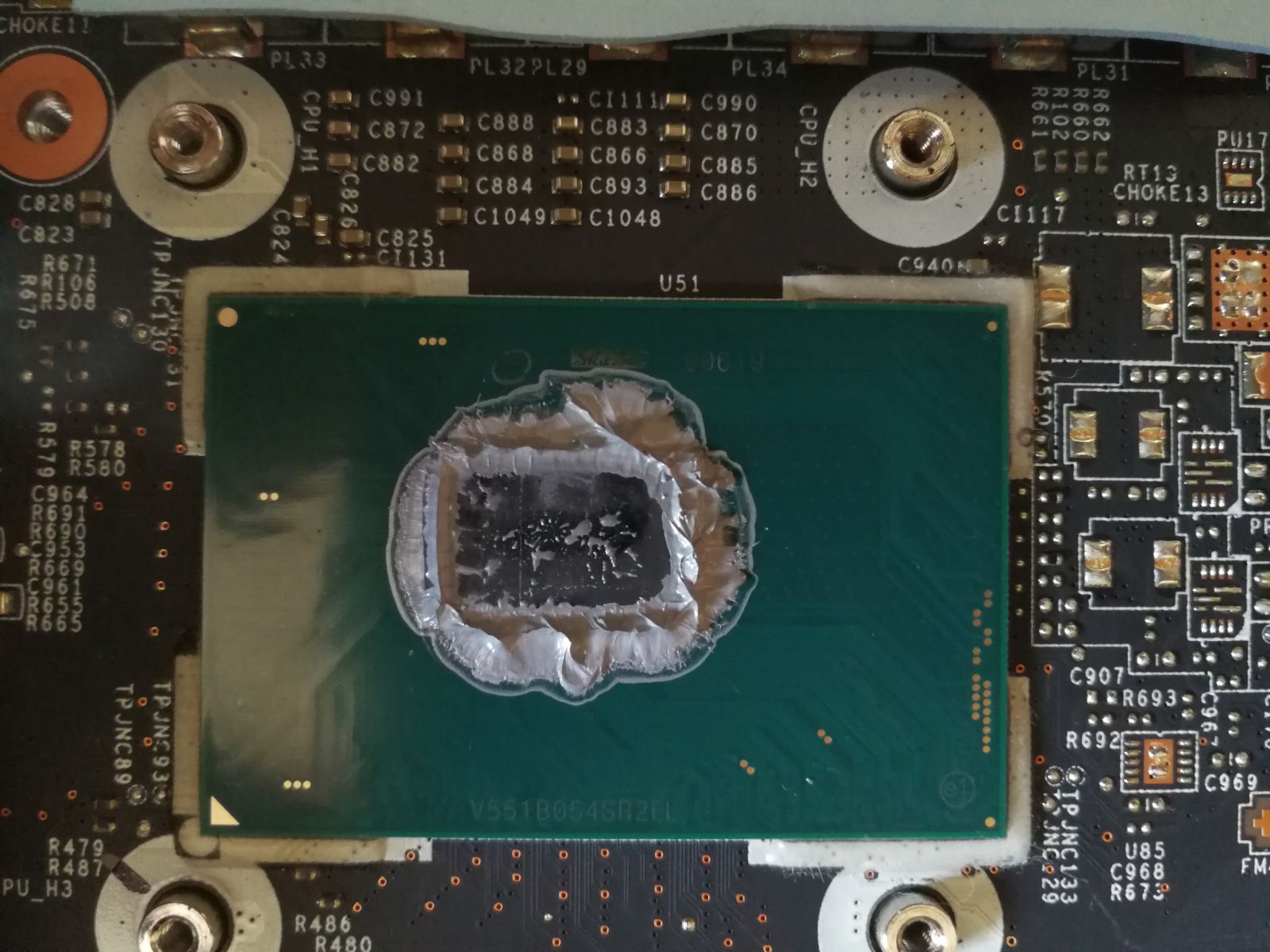
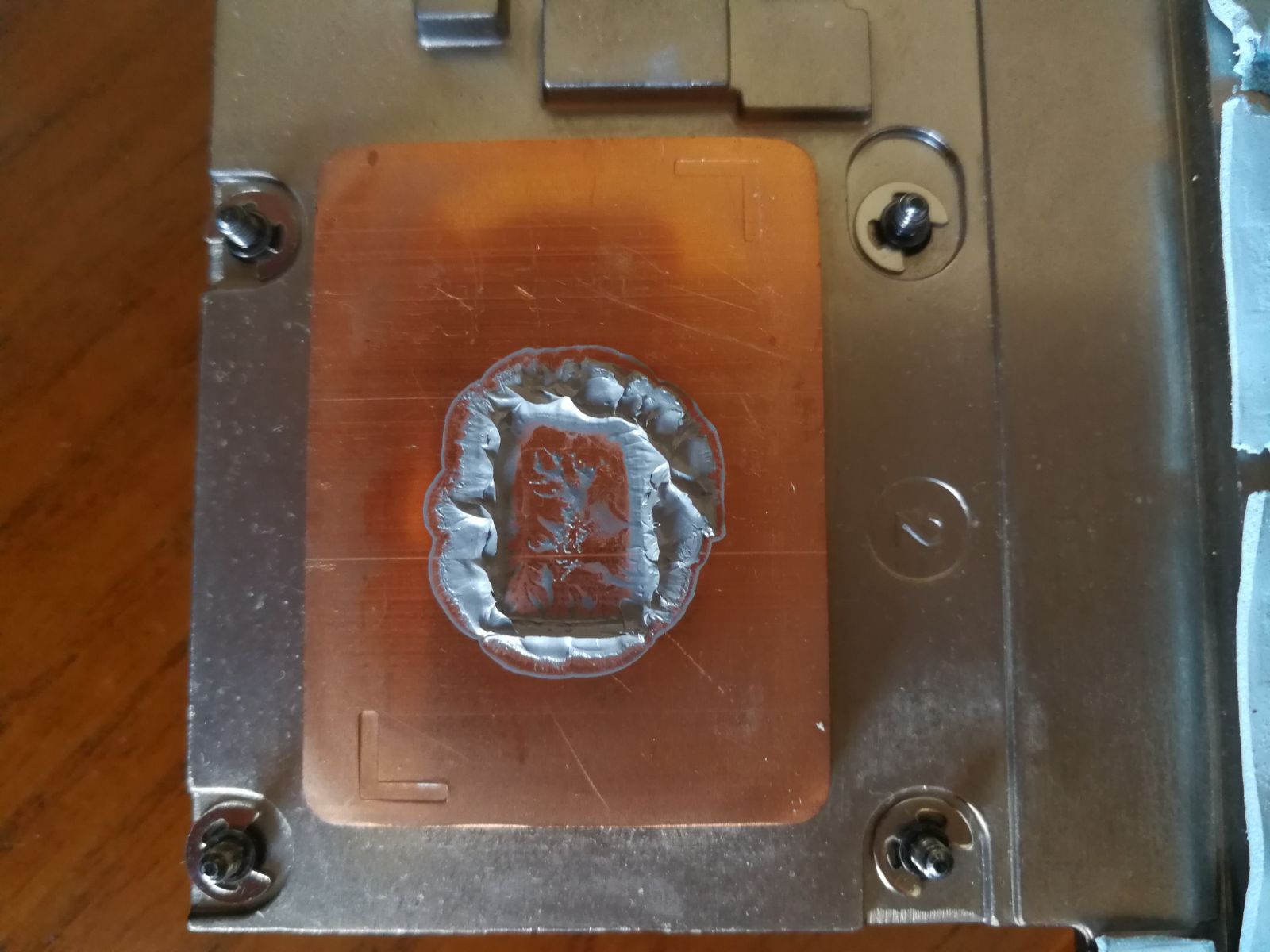
I have the same problem that you have. After some time, the thermal paste get's out of the die...and you get those horrible temperatures. Never happened this to me on any other laptop. I have repasted again today and my temperatures are incredible again, let's see how long it lasts. I don't know if I should try liquid metal to avoid this.
Look at this pictures:Attached Files:
Falkentyne likes this. -
-
That absolutely should not be happening. It also looks like you're using too much paste or mounting it wrong.
First, you need to make sure that you remount the screws in a criss cross section and do not turn one screw all the way down right away. you want to do a partial turn on each side, then go diagonally to the other and repeat. It should take three passes to get all the screws tightened fully. if you do this, you will have a solid heatsink balance on all sides, and this will help minimize dryout as well. I did this method on my last Kryonaut repaste and now I have 2-3C temp differentials on all the cores. Make sure the die is fully covered. Spread method is okay for bare dies. I would save the lines and X and dot methods for IHS CPU's. Just use the spread method and don't apply too much but make sure you have it fully covered. You don't want a razor thin coat, that's bad. it will dry out way too fast. Usually, the more grooves and imperfections on the heatsink surface, the more compound you need. Too much is bad, but too little is bad also. But it's very important to mount it correctly with the criss cross method and doing partial turns. That will give the best results, and you won't have horrible temperatures. -
I agree, this time was too much paste, but I have tried also with less with the same results. I used the x method and of course I do all the other things... Is quite weird, but I will try everything until I get it to work. I just want to see if our mate has the same problem.
-
Damn same issue with me. Going IC Diamond, i am done with this.
Sent from my iPhone using Tapatalk -
I swear by grizzly conductonaught. You can't go wrong with it on the CPU as there are no surface mount components for it to spill off and kill.
It doesn't make a massive difference on the GPU's but I used it anyway with a bit of electrical tape keeping the surrounding components covered.
I tested it against GC-Extreme on my GT73 and it blew GC away. -
Have you any fujifilm ultra low prescale film to test pressure? Usually you can get free samples.
"I am lazy to fix my heatsink problem, therefore I will use a thermal paste that the only sole purpose is to create a stopgap solution instead of fixing the actual problem"
FTFY
ICD is such a filth that should be removed from the performance laptop world -
I guess that I will try it sooner or later. Does this problem not occur with LM?
-
If you want pressure to be even the first thing i'd do is make sure the heatsink surface is actually flat.
Get a permanent marker and draw a cross over the copper surface.
Get a lapping kit off of ebay and a pane of glass from a picture frame or somewhere.
Tape the lowest grit to the pane of glass, move the heatsink horizontal for ~10 times, then vertical for ~10 times repeatedly.
Look at the cross you've drawn intermittently, if it fades more from one corner then the heatsink wasn't very flat.
Sand away until the cross is totally gone. Then it's just a matter of sanding on higher and higher grit till you get a mirror finish.
Don't actually do this but it's possible to get such a flat and perfect finish that you don't need thermal paste (speaking from experience on a lapped FX8350
Conductonaught has the highest thermal conductivity of all thermal interface materials. But all liquid metal TIM's in general will outperform pastes.
For our mobile cpu's the silicon is perfectly flat, so we only need to worry about the flatness of the heatsink.
A better TIM will reduce the temperature delta between cores by being a better overall conductor of heat.
A flat HS with proper mounting has same distance between silicon and hs at every point on the die. If the hs isn't flat some areas have bigger gaps for the thermal interface to fill, leading to worse temperatures.
tldr; flatter heatsink and liquid metal = best possible temperatures -
Lol why the icd hate. If it solves the issue and the performance is similar to the top non conductive tims I see no problem. So why is ICD such a filth that should be removed from the performance laptop world? Please explain.
-
it will dry out in max a month time on this laptop (personal experience) and it will scratch both die and HS.
Other TIM which you can get result nearly equal to ICD is Thermal Kryo and it will last average 6 months...personal experience too
The last repaste I did was back In March (CPU and GPU) and there is no min or max temp difference as compare to day one. my average usage of laptop 12 hours / day and while playing any game on ultra high settings (list is long) GPU max never cross 80 and CPU never cross 70...where ambient temp above 32.
so I agree with @Mobius 1 ICD should be removed from the performance laptop world
There are many other excellent TIMs which can beat ICD on many levels.hmscott likes this. -
Ok, going to try the Grizzly Kyro. Did not have luck with gc extreme. I don't have core diff issues, the problem is pastes like gc extreme are losing performance really quick.Last edited: Jul 31, 2017hmscott likes this.
-
That sounds like it should work, but wouldn't it be easier to ask msi for a new heat sink if mine is defective?
-
That would certainly be easier but would cost you a lot more and there's no guarantee it would be much better. Plus liquid metal doesn't usually dry out.
-
ICD is proven to have the best dry out resistance for TIM
But you really have to think why such an advantage is necessary with performance laptops. I think the heatsink should be perfectly flat so you don't ever need ICD.Mr. Fox likes this. -
Why do some people have dryout but you said it has the best resistance?
-
Perhaps Thermal Grizzly Conductonaut is better, but the two applications of Coollabratories Liquid Ultra dried out in 8 and 10 months on my CPUs. 10 on my desktop 3930K, 8 on my 3920XM laptop. Temps went up 10C on the laptop (90+C) and the desktop went up 15C (90+ C) causing thermal throttling. And I had to use steel wool to buff off the hardened metal TIM.
I've since move on to IC Diamond which has never dried out on me, and to Thermal Grizzly Kryonaut which had one of my applications start to dry out on my 1660V3 after 5 months (GPU applications haven't had any issues).hmscott likes this. -
When you have to use steel wool to clean off dried out liquid metal, that's a HUGE HUGE problem.
And if that steel wool touches something that has current still in it....
I'd consider Conductonaut if it actually doesn't dry out like Coollaboratory stuff, but is there any proof of that? The last thing I want is to have to deal with any sort of dried out LM. That, with having a metal bar in your spine, is simply unreasonable and ridiculous work when dealing with such a small surface with parts that can be destroyed, and can cause injury to people with disabilities. Sure, anyone can clean a heatsink, that's the easy part....but dried LM on a CPU?
It's easier to repaste regular paste every month (it takes longer to disassemble a laptop than to repaste) than to deal with cleaning dried metal off a CPU once a year.... -
Hey guys, my laptop speakers sound distorted at volumes above 70%.
Is it a limitation of the speakers/subwoofer, faulty software (I tried all combinations and fresh installations) or do I have a faulty device in hand?
Please assist.Last edited: Jul 31, 2017 -
-
Hit up my reply in Clevo OC thread regarding Grizzly Conductonaut and Silicon lottery.
-
His vid is 1.294v, but I don't know if he was drawing that at high load or at low load. That's an extremely high VID. Voltage scales logarithmically (I think). So very possible for that.
if he were running Prime95 with AVX, it would go over 100W..........or 100C.....
My 7820HK (939 score at 4.2 ghz) just needs 1.01v (this is an undervolt -100mv). For 4.5 ghz 997 score, needs 1.11v (no undervolt, default, but using some LLC.of 125.Papusan likes this. -
1.1(up to 1.150v)is more like 4.7GHz with the real deal... The lovely socket processors. BGA shouldn't be used in computers.Mr. Fox and Falkentyne like this.
-
Correct me if I'm wrong but 1.3v is "normal" for 6820hk running 4.2ghz.
1.28v and 70w is ok in cinebenchmark but a few games crash
At low load, vid is undervolt by 60mhz (~0.650v) and overvolted at high load.
I don't want to try Prime 95, in real life, it doesn't go so high.
This 7820HK is really gooodLast edited: Jul 31, 2017 -
That voltage seems abnormally high to me, but BGA bin quality is frequently not good, so it might be normal for BGA. For 7700K at 4.7GHz I only use like 1.150V for load voltage and don't need 1.300V load voltage until I go to 5.2GHz. That is 1.0GHz higher clock speed using 1.300V. For 5.0GHz I only need to use 1.260V. I seldom ever run 4.2GHz (no reason to run it that slow) but that only takes around 1.060V and 4.5GHz needs about 1.080V for 7700K.
Edit: Be sure to look at load voltage, as idle voltage on SKL and KBL is always higher even when using static voltage.
Last edited: Jul 31, 2017low9, Donald@Paladin44, Spartan@HIDevolution and 2 others like this. -
-
Got my laptop back from MSI's repair depot today. This was the second time I sent this particular laptop in, the first time was for rebooting under GPU load and for no video output after a white screen. Sent it back because neutered GPUs isn't a fix, and because it still went white screen / no video out during benchmarks, after coming out of sleep, and at random times. They allegedly replaced the video cards this time.
What happened not even an hour after I turn the laptop on? White screen and no video out just sitting at the desktop downloading game updates in Steam.
A "control, shift, Windows key, b" brought video back. Then, after I checked the laptop again later it had no video out at all. Tried the buffer clear trick again, and got a white screen. Putting it to sleep and waking it up brought video back.
When restarting, the graphics turn to pixelated green in large areas following the picture pattern (but only part of the picture, not all of it), and the same green pixelation after exiting Valley (lasts for about a second before normalizing) - that's new.
Oh, and the repair depot must have lost my laptop box because they sent it back in a GT83VR box that didn't fit the laptop, so they stuffed it with a bunch of random packing materials so it wouldn't break in transit.
What are the lemon laws on electronics? This POS needs to go.Last edited: Aug 1, 2017 -
What the heck? Are you sure you did not send that to the Dell/Alienware Depot by mistake? That sucks. Even the box??? I would be so angry with that level of incompetence. Seems like we are surrounded by losers now with all of the OEMs/ODMs. Cannot imagine that any of them could find their butt with both hands in a room full of mirrors. They would probably all lose their heads if they were not permanently attached, LOL. Too bad all of the OEMs/ODMs can't be like HIDevolution. (Like them as in conscientious, caring and intelligent.)
-
Left it on overnight after flashing the latest official VBIOS from MSI's support page and using DDU in safe mode and then installing the latest WHQL drivers (384.94). Was greeted by an all white screen in the morning, and the frame buffer clear and sleep tricks didn't work - hard reset worked this time.
At least it comes back from white screen, whereas before with original video cards I'd have no video out even after CMOS and EC resets and I'd be forced to remove the NVME drives to get video back (after removing the original, or upgraded, NVME drives and booting I'd get video back).
Called MSI tech support and they issued another RMA and a shipping label. Wonder if third time will be the charm? They've had it in repairs for longer than I've had physical possession of this laptop, and I bought the original in MAY! Which had no video out from the very first power on. -
Just have them send you a new one. Or tell them to replace the motherboard.
I doubt the video cards are the problem.Arestavo likes this. -
Or, better yet, get a refund for the jinxed lemon and buy a P870 from @Donald@HIDevolution, or build a desktop instead.
-
My skylake is the exact same, they suck.
Replaying the silicon lottery on BGA would require spending ~£800 on a new motherboard.
In hindsight, should've got an LGA
Also, does anyone know if 5.1 sound is supported by the left panel?
I can get center, sub and front LR speakers working, but not rear LR. -
You have to play with the "Line Out", or whatever the jack is called. It's under "Recording devices, oddly enough.
I got it to work only twice then it stopped working after a reboot. It also IGNORED volume slider controls completely.
This was a few months ago, so I haven't tried on newer realtek drivers. -
Which port is which? As in colours etc
-
The tech support guy mentioned replacing the motherboard, so we'll see. Third time is the charm, right?
I'm just about 2 months outside of Newegg's return window now, or I totally would return it and get a different laptop all together.
I do have a really nice gaming desktop, but I wanted some good power on the road for a good price, which this laptop was, yet little did I know that I wouldn't have it for my vacation this year. -
Yeah BGA sucks but in my country, good laptop @ good prices are not easy to find.
In everyday life, more than 4ghz stable, is more than enough for heavy task and not so usual here. -
Not sure right now, you should be able to find it on google. Im on my phone. No internet cuz of At&t big outage. I THINK first was front speakers, second was center/sub and third was rear.
-
Just tried Kryonaut... blown away, this thing is the real thing omg. It was much more viscous than gc extreme. Hopefully it lasts!Last edited: Aug 1, 2017jaime360 likes this.
-
I´m going to try it as well. I hope we solve our problem. Keep updating with your results
The Official MSI GT73VR Owners and Discussions Lounge
Discussion in 'MSI Reviews & Owners' Lounges' started by -=$tR|k3r=-, Aug 16, 2016.