Problems? See this thread at archive.org.
Lazy maybe? I think a lot implemented CM238 when it came out hoping to sell more Optane, not for more ports. MSI has now completely switched over to the HM175, and I don't see any performance impact, it's a noop - something to get OCD about, but otherwise no negatives.
-
-
Hi all, first time post. I recently bought the GT73VR Titan 1070 SLI and have to say ...WOW. I am looking to upgrade the HDD from 1tb to something larger and I have two questions..
1- Can I do this without voiding the warranty?
2- Any recommendations on what HDD I should upgrade too, i.e will it fit etc?hmscott likes this. -
Yes you can and I sent you a PM. Please check it.
Biggest HD that can fit is 2TB. I don't think any larger than 2TB HDD's exist in 2.5" form factor.
Otherwise you would need a 2.5" SSD.Last edited: Oct 7, 2017hmscott and greeners29 like this. -
Will check now. Many thanks
-
Seagate do a range of HDD in 2.5. I would imagine that 2tb at 6.9 x 10 x 0.7 cm is the biggest I could fit. Could anyone confirm this please.
-
I hear you say this. If this was the case... Half of the laptops from the OEM*s come with fully locked down 7700Hq. And almost all laptops models with 7700hq ships with HM175. If they were hoping to sell more Optane... Why then sell the 7700hq models with HM175 and not Hm238 ? Yeah, I know they save $2 usd on each units. This is the case. Save money on each unit sold!!hmscott likes this.
-
what is the suggestion to set the msi triue color to make the picture look better,
I just add contrast +2
-
gt73vr has a maximum of 9.7mm high hdd
and lots of hdd with 2TB capacity With a height of 9.7mm.
Other with 4tb HDD has a height of 15mm. and can`t be installed on GT73VRhmscott likes this. -
the black screen happened many time when I forget to put rams back before plugin the battery, I have to pull the rams to re-paste CPU. if you make changes in hardware while battery plugged in, sometime laptop will not boot and stuck on black screen.
only work around is hard reset the BIOS. search youtube for BIOS reset video or look for @Falkentyne excellent post in this thread how to reset BIOS. -
@greeners29
4TB can be installed on GT73VR, I'm using 4TB, it's right there in my signature.
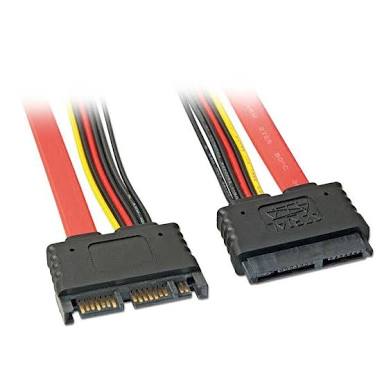
just remove 1TB, use 8" or higher length of SATA extension cable, couple of rubber pieces required to fit the 4TB in empty bay, no harm done to any OEM part and you can use 4TB or 5TB.
![[IMG]](images/storyImages/w14nrc.jpg) hmscott likes this.
hmscott likes this. -
Wow
this is what I dream of. do you put a hdd with a height of 15mm on 2nd slot gpu?
can you give me any information or picture cable needed to install that hdd in 2nd slot gpu?
if the cable is like thisAttached Files:
-
-
First, thank you for your answer.
Now, I can't pull off RAM cuz I don't have access to them. So I tried to reset BIOS by following Falkentine's guide but I'm still stuck on this freaking black screen -
Try this.
Turn off your taptop completely
Hold the power button for 30 seconds and don't release it even if you see the screen flashing, that is the BIOS reset power cycle, after 30 seconds, release the button and your BIOS should be reset and you can hopefully boot after reconfiguring your boot settings like RAID or AHCI and whatnot -
Does the laptop has to pluged?
-
I never tried without it being plugged in but you can try. I always had it plugged it when I had to do a forced BIOS reset
-
I replied to you in PM.
You repasted with AS5, which is electrically capacitive and possibly conductive too. This stuff is garbage and should NEVER be used on laptops. I suggest you open up the laptop, remove BOTH heatsinks and check and make SURE you did not get any AS5 anywhere on the conductors or resistors. Then if you absolutely need to use this crap, buy some TRANSPARENT nail polish and paint 3 coats over the little SMD conductors on the GPU and CPU, and use that AS5 TEMPORARILY until you buy something much better. Grizzly conductonaut is for experienced people (but if you did the nail polish trick you're already halfway there, nail polish works in place of the "Electrical / Super 33+ / Kapton tape" you see others use, as per this post:
http://forum.notebookreview.com/thr...al-grizzly-conductonaut.799343/#post-10411462
More proof TRANSPARENT nail polish works (including in delidded desktop CPU's):
https://www.gamersnexus.net/guides/3068-how-to-delid-intel-i9-cpu-and-apply-liquid-metal
And then you need the free insurance method:
http://forum.notebookreview.com/threads/questions-about-liquid-metal.803973/page-3#post-10535148
But for now, worry about that for the future, as that's for conductonaut repasting. But you need and I repeat ** NEED** to insulate those freaking conductors if you are using AS5 which is NOT completely safe paste, and it's garbage, right @Papusan ? If you have NOTHING but AS5, clean the entire CPU and GPU area first, insulate the conductors with nail polish (3 coats, carefully--do NOT get any on the CPU or GPU slug), then repast and reattach.
Then buy some Grizzly Kryonaut or Phobya Nanogrease Extreme and repaste with that.
YOU DID UNPLUG THE AC ADAPTER AND THE BATTERY CONNECTOR BEFORE TAKING APART ANYTHING IN THE LAPTOP, RIGHT?? -
See review of Aorus X5 v7 (i7-7820HK - GTX) NBC.com
I have never ever seen good bench results from 7820HK in models with HM175(Post if yoo find normal bench results). I assume that the 7820hk in the Aorusbook don't overheat in Cinebench R15. And the all too weak flimsy psu shouldn't hamper powa for only cpu in use. I know this is the MSI thread, but people in the thread have asked about HM175 chipset info.
![[IMG]](images/storyImages/3.jpg)
-
arctic silver 5 is crap? i havnt used it before but i was thinking about having it put on my next laptop. all the reivews on amazon say its really good stuff and many of those people used it on laptops. it also says it’s NOT conductive.
-
And reviews on Amazon is better than what you get on a laptop forum?
 I'm sure you will find a lot info regarding thermal paste and laptops in this forum. You can start with
this thread
I'm sure you will find a lot info regarding thermal paste and laptops in this forum. You can start with
this thread
-
AS5 is crap because as Papusan, low mounting pressure just makes that stuff dry out fast. It wasn't made for laptops.
Also, if you go read some old GPU or overclocking forums with posts from the last decade, before stuff like TX2/TX4/Chill Factor 2/CF3/MX-2 came out, (Grin), you will see how there are many posts cautioning you about using AS5 on the GPU die, and NEVER, EVER, EVER use it on BGA RAM chips. They all say that that stuff is capacitive and conductive or not, can cause stuff to fail if it gets off the silicon. Desktop CPU's have a gigantic IHS so unless you made a mess of it, you won't have to worry about it getting on the motherboard and shorting out stuff. But with laptops you have the same issue: less surface space, stuff can run out and start touching components and short circuiting or causing malfunctions. You don't want AS5 getting on those SMD conductors on the GPU, just like you don't want liquid metal getting on them. While AS5 has a lower chance of downright destroying a part by pure short circuit, it can still break stuff or cause nasty malfunctions. Why would anyone buy AS5 when there's so much better stuff out there now? What's the point? And if someone has AS5 from years ago or the last decade, um...throw it out.
Last edited: Oct 8, 2017Papusan and Spartan@HIDevolution like this. -
im not saying i dont believe anyone on the forum, im just saying that from what ive seen the reviews look good, this is my first time ever actually going on a forum so i have yet to read up about that stuff on here.Papusan likes this.
-
AS5 isn't as good as some of the newer pastes, but it works fine, I've used it for many years, and it's also confirmed non-conductive.
The other pastes mentioned "Grizzly Kryonaut or Phobya Nanogrease Extreme" are also non-conductive, and get better temperatures - the Kryonaut needs 24 hours curing time (you can use the laptop) to get best results.
The AS5 and MX4 which have been popular for a long time can dry out in laptop applications as the joints get stressed as the laptop gets carried and moving around can open the paste up to the air. If you are careful not to get the paste near the edge of the CPU / GPU, it helps stop this effect.
I don't recommend the conductive pastes, the extra drop in temp isn't worth the risks involved. It takes some skill and attention over and above repasting with non-conductive pastes, and if you aren't that "into it", just stick with the best non-conductive pastes.
Last edited: Oct 8, 2017danime senpai likes this. -
i appreciate the advice, glad i saw this before possibly having it put on a computer. out of curiosity how is IC diamond and coollaboratory liquid ultra for laptops? i know coollab is liquid metal so its more risky but ive heard many people like to use it for laptops like the hot running alienwares. what pastes do you think are best?hmscott likes this.
-
Go for Phobya NanoGrease Extreme(convental paste). Or Conductonaut for Liquid metal.danime senpai likes this.
-
i do plan on taking my laptop places whether i end up getting the gt73 or something else so i probably will stay away from as5 and mx4. also i was planning to have a reseller repaste the laptop for me because honestly i havnt applied thermal paste before so id rather have them do it and not screw something up. (yeah i know im a noob lol) im still new to this stuff since i never took any interest in computer stuff until recent months so im still learning stuff. but yeah im probably going to have a reseller do a liquid metal application, that way i get good temps but no risk of breaking anythinghmscott likes this.
-
would you say conductonaut is better than coollab liquid ultra or are they about the same?
-
The last GT73 I used had no need for re-pasting or undervolting, it was cold running, very satisfying.
I wouldn't get it re-pasted at all, I'd expect a GT73 to be great out of the box, and although I still undervolted, it wasn't needed / required.Kevin@GenTechPC and danime senpai like this. -
Not the big difference. But it seems Coolaboratory has changed the composition in Liquid Ultra or have bad batches. Conductonaut is what I prefer today.
-
thats pretty good, you dont hear stuff like that too often with these laptops lol. ive been looking at this laptop partly cuz its one of the only ones that people say runs cool for the amount of power its got. i dont want something thats gonna get super hot and die within the first two years of owning it hahahmscott likes this.
-
-
The MSI GT73 usually does get these low CPU / GPU temp reports too, so that's why I suggested trying it without repasting first.
The GT75 should be as good, but not enough reports yet to confirm.
You can always undervolt to get even lower temps.
Please come back and let us know how your new laptop works out
Last edited: Oct 8, 2017danime senpai likes this. -
IC diamond is good paste if you have a poorly fitting heatsink. The stuff is thick and won't dry out easily, so for people with Dellinware laptops, this is a reasonable choice to avoid big CPU core differentials.
MSI has a better fitting heatsink because it's not tripod, so the Nanogrease or Kryonaut will work well on them, and extremely well on the GPU heatsink. If you don't intend to push your CPU as hard as possible (like trying to run prime95 at 4.5 ghz with AVX/FMA3 disabled), Kryonaut or Nanogrease Extreme will be all you need.
I already repasted the CPU and GPU with Conductonaut and it's stable and I secured it by putting transparent nail polish over the SMD conductors and resistors on the CPU and GPU, then applying a nice foam dam around the CPU and GPU to prevent conductive balls of doom from escaping the confines of the "Prison Dam" and shorting out the laptop. Temps are now extremely low when not doing extreme stress testing, and I can even run Prime95 with AVX disabled at 4.5 ghz without overheating, which was impossible before. And I switched to static vcore and LLC of 25 for AC/DC and now I can run Prime WITH AVX/FMA3 at 4.3 ghz without overheating, at 100% fan. AVX/FMA3 would have been completely impossible without LM at these speeds--you try this with normal paste and you'll reach 100C within minutes. And even with LM, you have to tweak carefully because the VRM's are not meant to handle current of that magnitude, and the wrong vcore/LLC settings (LLC at auto is even worse) will just make the system power off by itself.
AVX /FMA3 at 4.3 ghz gets things VERY warm. LM can handle it (in a cool room you can get the temps down into the low 80's at full fan), regular paste cannot, and sane people don't want to be doing this anyway.
Foam dam insurance:
http://forum.notebookreview.com/threads/questions-about-liquid-metal.803973/page-3#post-10535148
Kapton Tape, Scotch Super 33+, or Nail polish coated over CPU/GPU SMD resistors/capacitors (One of these MUST be used with LM, period; recommended combined WITH foam dam for best results if carrying laptops around often):raz8020, Papusan, danime senpai and 1 other person like this. -
yeah, even just thinking about running a LAPTOP cpu at 4.3+ghz sounds insane nevermind 4.5, id never do it myself but thats pretty impressive.hmscott likes this.
-
will do, gonna try to make my decision within the next few days.hmscott likes this.
-
MSI Dragon Gaming Center lets you run all 4c/8t @ 4.2ghz, Turbo custom setting, along with a +200/+350 GPU OC.
That's the setting I ran without undervolt, and great temps even on p95 - I needed to do the reset hwinfo trick after letting the fans ramp up on Auto, or run Custom Fan Boost which is 100% fans to get enough cooling. Auto or Advanced with fan step cooling is enough 99% of the time.
You can also uninstall MSI DGC and run Afterburner for GPU OC and Intel XTU or ThrottleStop for CPU OC with undervolt / tuning.
Lots of fun stuff to do with software tuning, before pulling the laptop apart for repasting
danime senpai likes this. -
hi guys
i have gt73 7re whit 1070gtx 17.3 ips 4k gsync
the gsync is active to an external monitor through the d port?
is it worth taking a gsync monitor?
better 4k or 2k?
what do you think of this
https://www.amazon.it/HKC-NB34C-344...&qid=1507541219&sr=8-2&keywords=monitor+34+4k
many thanks to all -
Yes 4TB and 5TB both are 15mm thickness and I'm using Seagate 4TB 2.5"
I think the cable is same, I used following one
SATA III Extension cable it's 8 Inch length but I recommend get one with 12 Inch length or 20 Inch the higher the length, easy to fit, extra length cable can be hidden in 1TB bay... -
I repasted my girls mediocre HP laptop with conductonaught only to realise that the CPU (i5x00U) used an aluminium heatplate whereas the GPU used a copper one.
So I put conducto on the GPU and nothing on the CPU.
Doesn't struggle under stress tests, it's a testament to Intel's low power chips that it hasn't overheated! Probs should've put some whitening toothpaste on it though still
Papusan likes this. -
Intel Pigeon Poop!
-
thats pretty good stuff. so at the end of the day does it really matter if i get one with the hm175 chipset? its not like i really have a choice anyways since it looks like all the older models are gone.
-
As far as CPU and GPU performance, no, there might be limits on IO, but I think the provided ports on the GT73 already matched the HM175, and the CM238 extra PCIE lanes weren't used - the last reason was for the Optane socket, which noone ended up using.
I didn't notice any problems on the unit I have with HM175, but I don't have a GT75 w/CM238 to compare.
If you want the latest and greatest the GT75 is it, and reports so far have been good. It's a bit more $, but has several new tweaks that make it a bit nicer than the GT73.
The display on the GT75 is supposed to be faster in the ones that have the 3ms delay vs 5ms, but I don't see any problems at 120hz / FPS with the GT73 version.
It's up to you to try it out and see if you like it, then keep it or return it for a GT75.
danime senpai likes this. -
alright thanks, id probably go for the gt73 since its an extra 300 to step up to the gt75, doesnt quite seem worth the extra money to me.hmscott likes this.
-
Really? Only $300? That's right in the ball park to jump up to the GT75. What with the mechanical keyboard, "faster screen", CM238's zen like presence, "new" "75" vs "73", IDK, that's a tough call.
See if you can get another $50 off, let the dealer know you are on the fence. More $ is more $ from their point of view, or not, it's worth a shot.
Be sure you are getting a 7820HK in whatever you get, don't settle for the 7700HQ. If you can't afford it, save up a little longer.
Last edited: Oct 10, 2017danime senpai likes this. -
Hi.
Just to update: About my GT75VR, the retailler contacted me and told me my lappy isn't on warrantly anymore because i repasted it and I should contact MSI to repair it.
I can't really do that, too expensive to send it, I live in indian ocean and i'll have to wait months to get it back and i'll have to pay at least a fortune.
Thank for all the advices but I don't really to play inside the laptop anymore, I prefere a tech to do it.
So actually my lappy is a local tech.
Sorry for my poor english.hmscott likes this. -
That's why it's always important to file a ticket with MSI (Asus, Gigabyte, etc) support for your area after registering your laptop for support, to *ASK* if adding RAM / storage / re-pasting are allowed - do they void my warranty?
That way you have proof it is ok and supported under warranty, so you can forward their response to whoever complains about you having opened the laptop and worked inside.
In the US the answer has usually been "yes" for RAM / Storage, but over time the re-pasting answer has varied.
In your case, I'd open a ticket directly with MSI for your GT75 and ask as if you hadn't done anything yet.
If they say it's ok, then print that out and forward it to your retailer. Tell him that MSI doesn't have any problem with you doing those things on your laptop, so the retailer should stand behind the warranty too.
If MSI says no to repasting, explain if you were upgrading storage (or RAM/or both) and why you decided to re-paste, but weren't aware of any limitation against doing those thing(s). Your retailer told you so after the fact - that retailer should have laid out the limitations for you ahead of time.
Explain to MSI the problem you are having isn't related to the re-pasting or storage/RAM work, and you didn't cause any damage. Will MSI still warranty your laptop? If not ask if you can pay MSI to do the work anyway.
Also be aware that some technicians consider Liquid Metal toxic and won't work on the laptop if you have used it. Regular non-conductive non-corrosive thermal materials are ok. So if you are planning on using LM ask as a separate question if that is ok, after asking about re-pasting in general.
A lot of laptops get bricked from leaked Liquid Metal, so using it can void the warranty.
Please come back and let us know what your regional MSI says and what your retailer says in response.
Good luck!Last edited: Oct 10, 2017 -
Did you remove the video card from the laptop yet and see if it boots to the iGPU?
@J4ck974Last edited: Oct 10, 2017 -
would it still be worth getting the 7820hk even if i dont think i’ll overclock? the 7820 is only 100mhz faster at stock so it wouldnt be much different. im just a bit afraid to mess with that stuff since like i said, im not an expert and knowing my luck id screw something up lolhmscott likes this.
-
Are you using the laptop for gaming or work?
-
just gaming
-
If you don't care about overclocking and don't think you will be messing with any settings, clocks, anything.... then go for whatever you like. You will loose a bit of potential performance, but nothing earth shattering. This matters more only if you want the absolute best possible performance and ended up tweaking everything to make it work.
But there is nothing wrong if you only want to boot a new laptop and just play and ignore all the extra settings.danime senpai likes this.
The Official MSI GT73VR Owners and Discussions Lounge
Discussion in 'MSI Reviews & Owners' Lounges' started by -=$tR|k3r=-, Aug 16, 2016.