Problems? See this thread at archive.org.
I am having trouble understanding your English.
And um.....looks like I was wrong about something.
I just read all your posts again.
Samsung RAM Was installed by default? Meaning--under the keyboard?
And you added the micron RAM yourself? Ok well...
The right thing to do was to add another 2x8GB of the same part number Samsung RAM. That would give you the best compatibility.
So let's forget about the Kingston for now.
So, let's do what i told you to do, if you can understand my english clearly. I hope you can because you know I try to explain as clear as possible.
1) go download memtest86 (NOT memtest86+).
version I think is currently 7.4.
2) install it on a flash thumb drive. If you have a micro SDHC or SD card, you can use that with a USB adapter, but you can't boot from the GT73VR's SD slot because it acts like a windows PCI device rather than a drive.
3) Insert it into the laptop and reboot to Bios.
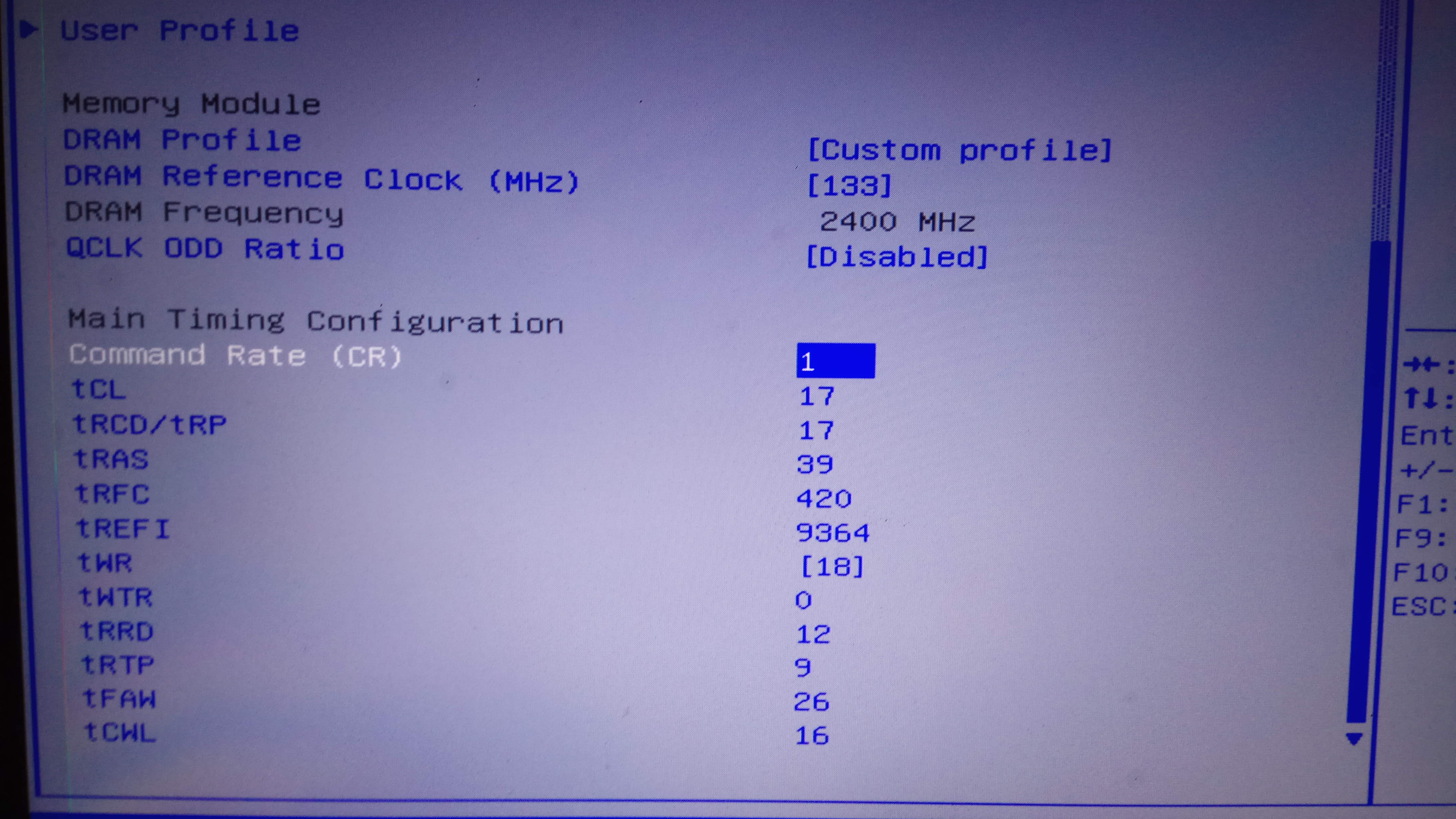
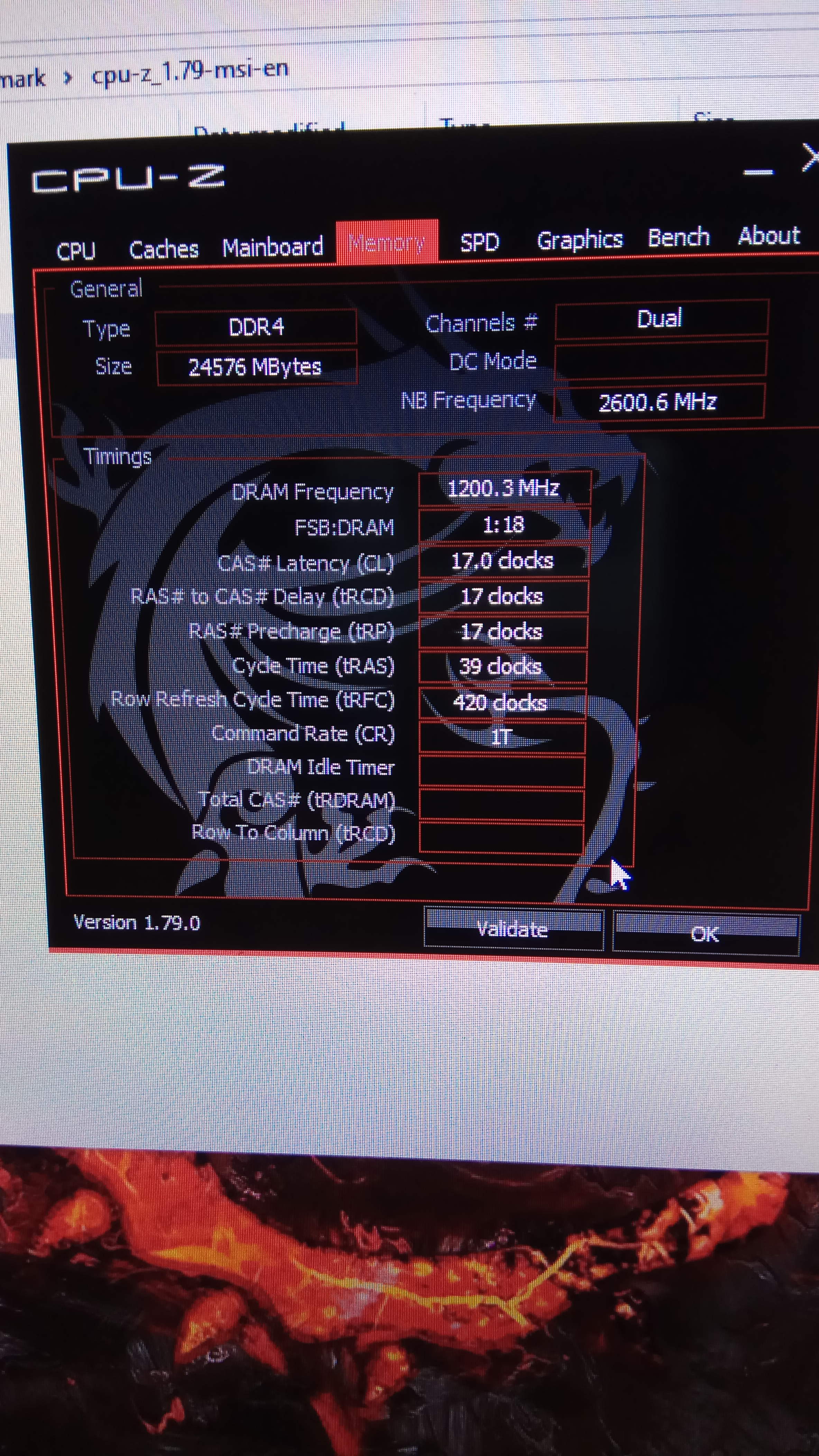
4) go into your Bios and set the RAM to 17/17/17/39 1T. This is the easiest setting to test. Also set UEFI boot to boot from the USB flash drive first, before the windows drive.
Save and wait 45 seconds. If the MSI logo appears WITHOUT the power light cycling in 60 seconds, then good. Go back into the Bios. Set it back to 2T. Try again.
If it works again, then this means this is good news--it means the motherboard can train the RAM, set it BACK to 1T, save and this time let it boot directly to the USB flash drive. And run memtests86 for a full pass. It should take awhile just to boot, I think it takes 5 minutes. A faster way is to set the Bios to "legacy" and boot, this will boot memtest86 in legacy mode, but this test is much older and slower. You will also have to press C for configuration and set the CPU to PARALLEL MODE in "legacy" memtest86, otherwise a full test pass will take hours. (In UEFI mode, it is automatically set to "Parallel").
If no errors, then that's good news.
if you have a 60+ second black screen and a power LED "reset" just by setting the command rate to 1T, then perhaps the mis-matched RAM is not fully compatible.
-
-
As a gently reminder,
Anyone found any solution for annnnnnoying "blippp" sound that generates in speaker randomly?
PS: i talked to MSI and they direct me to Sweden service Center! I donno if that is worth to send to service center or not
-
DDR4-2400 is guaranteed to work with Kaby Lake. 2133mhz was for Skylake. And 2666mhz is for Coffee.hmscott likes this.
-
Could You hear that just In sport and turbo mode or with all modes? I think that is coil whine because i have it on mine also but I can not hear it in comfort mode just sport and turbo.hmscott likes this.
-
whether this works?
when i change to 1T and save configuration . I have to wait 45 seconds
before re-entering the biosAttached Files:
Last edited: Oct 26, 2017 -
-
It worked successfully? Good.
Did you run MEMTEST86 like I told you to?
You should run memtest86 BEFORE booting into windows. The RAM is not ECC. RAM errors will not be recognized by the CPU, like CPU errors are, and can cause OS corruption, unless the error is so strong that it causes a driver or internal error.
Also if you can change it back to 2T successfully without a permanent black screen, then change it to 1T again, then I think you can keep the RAM. Successful training (the 45 second black screen) without failures means the RAM is stable on your system. -
This is one of the many ways mismatched memory screws you. 2 examples, database corruption started occurring after a client did a memory upgrade - they said they could do that on their own - they did it for their PC successfully so why not for their $500k database servers??.
They ordered the wrong memory. When the DB servers booted after adding the memory, and "showed up" with "about the right size", they thought it was ok.
After a few days their database guys asked what happened - the system people didn't even announce the memory upgrade, in case it failed they didn't want to get people's hopes up - now the DB guys sanity check run every night had failed with corruption in the database - which they couldn't fix, they were losing data.
After pulling the memory I had the DB guys re-run their nightly check to clear out the corruption, then after that the problem didn't come back.
I had to beg to return the memory for the right stuff, we're talking thousands of $$$ they would have lost if I hadn't.
2nd example. Upgrading hundreds then thousands of servers with new memory, the guys putting in the memory came to me in the data center saying they were seeing something weird when they brought up servers after adding the memory.
The size reported was varying, instead of exactly 64GB or 128GB they were seeing slightly less memory in both sizes, but not on all servers, and it wasn't exactly the same loss each time.
It turned out someone changed the order for the memory for a sku with the "exact same specs" but wasn't, saving $10k's - but it wasn't compatible when mixed with OEM memory.
If they had come to me first with all of this we could have saved the money and made the upgrade work - you scavenge the OEM memory as you fill the server with the new memory, and when you get enough OEM memory (2-4 servers worth) you then fill a server with the OEM memory, which would have saved lots of hours of downtime re-working the servers.
These are just the most typical errors I've seen repeated.
Just because it boot's up, and the memory size showing "is close enough", doesn't mean it's really working.Kevin@GenTechPC likes this. -
I decided to replace ram with the same type as my laptop. Thank you for your helpKevin@GenTechPC, Papusan, Falkentyne and 1 other person like this.
-
That's the best and easiest thing to do, if you can return the other stuff and get your money back so much the better. Good luck
Kevin@GenTechPC, Djadit and Falkentyne like this.
-
I also experience it randomly. usually when checking torrenthmscott likes this.
-
It's like that "Bzzzt-Click!!" you briefly hear when the "phone tap" kicks in...
It's Big Daddy, listening in...
-
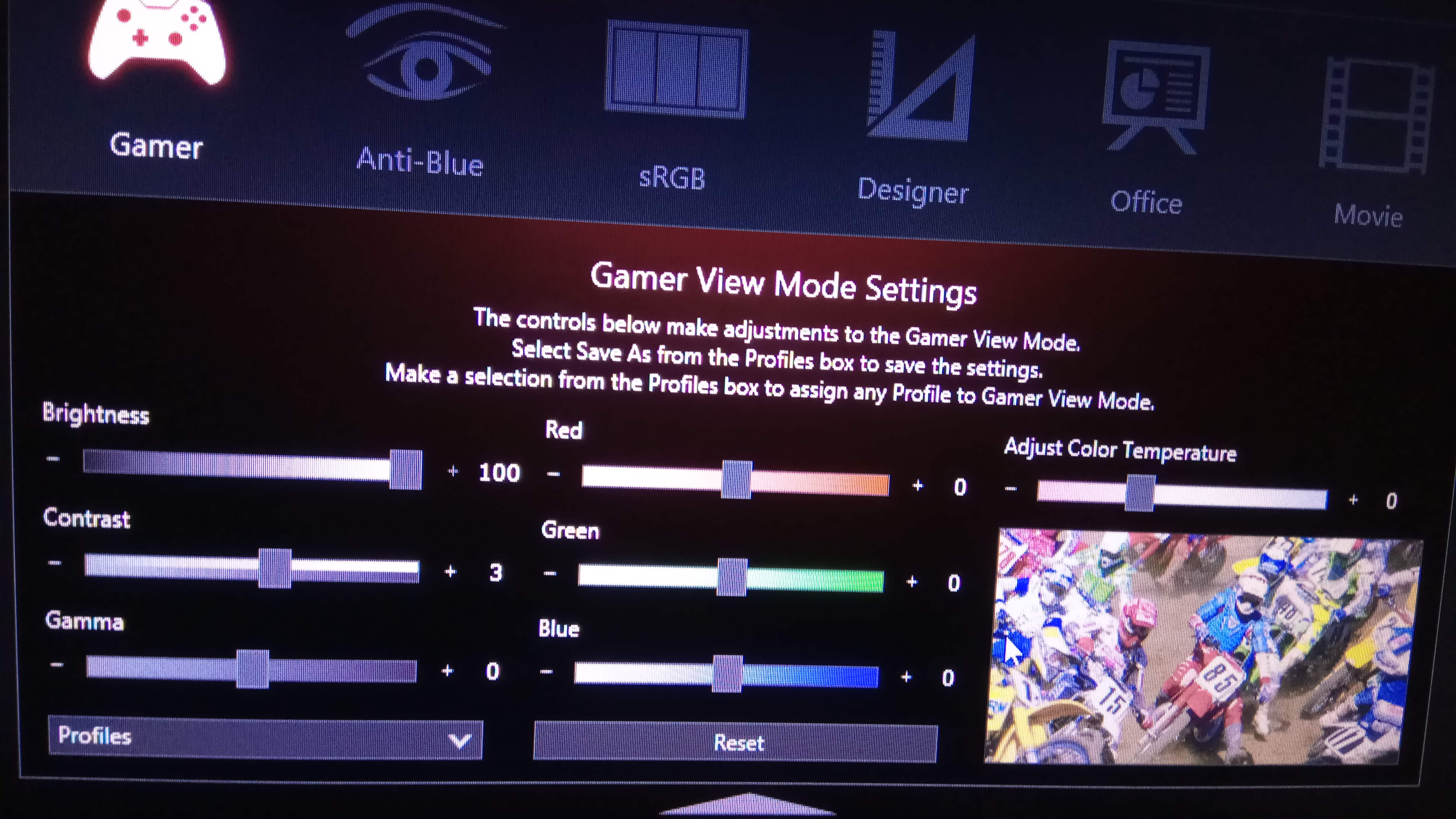
how to setup your msi truecolor with GT73vr to get a better picture
?
+Brightness
+ contrast
+Gamma?Attached Files:
-
-
after latest nvidia driver my gpu runs on 2000+ mhz is that ok ? im on 1070 , desktop driver.. before always max on 18++mhz
Papusan likes this. -
For me the True color stopped working after first update! I can just select default profiles
-
This issue has been fixed long ago after I reported it to MSI that the moment you connecct to the internet and it says profile updated, the GUI doesn't launch anymore.
Uninstall the current profile and delete the Portrait Display folder from Program Data in C:\ then reboot
then install this: MSI True Color v2.0.0.034powerofviva, Falkentyne and hmscott like this. -
Anyone tried the Windows 10 Fall Creators Update yet?
Some users are reporting FPS increases. -
Thank you Phoenix,
I have problem with Realtek driver. in fact, me and some other people are reported that our speaker is making a random "plip or click" sound (like windows xp when you open a folder) ... but MSI did nt fixed the problem yet!
they always just ask did you reinstalled? r u using last version? ...
It is appreciated to help us
hank you -
Just a quick check in:
MSI's repair depot still has my GT73VR and I haven't heard anything new in a month. It's now past 6 months since I've purchased it, and 6 months of not being able to use it because it white screens, and has been sent to the repair depot 4 times for this issue (maybe 5, it's been so long and so many that I've lost count).
Good thing that it has a 12 month warranty. All they have to do is string me out another 6 months and then tell me tough ****.DukeCLR likes this. -
How many times did you send the system back for repair? And were they all sent in for the same issue? Have you also tried to speak to a supervisor about this?
-
I tried and was having issues with sound. I had to set the speakers at 5% to have it not be blaring loud.
I tried removing and re-installing the drivers and then didn't get any sound at all.
After that, I reverted to prior edition of Windows 10 -
Also I faced to problem with ESET Smart security!!
the GUI is not starting after update!! i reinstalled several times, but still persist -
4 times for repair that I can remember, always for white screen but at first for shutoff under GPU load (which is likely all they tested for per the repair reports). Yes I've escalated to a supervisor, and Bernabe has been trying but I've had to restate the simple white screen problem 3 different ways because they didn't understand step by step instructions on how to recreate the problem.
Seriously, why would you run constant 3D stress tests when the white screen problem consistently shows when waking the monitor from sleep when copying many, many game files over a network (not the whole system, just the monitor - sleep / hibernation disabled)? -
Same with me but in 4month ago. . Cause registry error . Clean instal or create task schedule to autostart eset gui.
-
I use ESET's NOD32 on the Fall Creators Update and 0 issues with the sound.
Although this is all ona clean install with the latest version of the driver, Nahimic, and NOD32
Versions:
Realtek ALC899 HD Audio Driver v6.0.1.8172
Nahimic v2.3.21
NOD32 Antivirus v11.0.144.0 -
I am using exactly the same version as yours!!
honestly, my problem started from previous month that Eset pushed new major update for Eset Smart Security!
I did reinstall several times, but still after each reboot/turn-on i have to start GUI manually!!! -
Uninstall it, then reboot, then run the ESET Cleaner and go through the prompts, then reboot again and reinstall
ESET Uninstaller v8.0.5.0 -
isask me to run Eset in safe moode!
-
-
I did, It says you already removed it !!
so uninstalling Eset from control panel is enough
now i am installing Eset again... but wait! I did the same process hundred times
-
Please format your taptop
![[IMG]](images/storyImages/tlmRgDI.gif)
Windows 10 - Bloatware Free EditionPapusan likes this. -
is it the last version October update included?
I have Evil within 2 , hell blade and wolfenstein installed
-
That's the latest build then you will have to update it yourself as there are a few updates after that but it should take you no more than 2 mins to update as they're small.Papusan likes this.
-
same problem. After using registry cleaner but in eset 10 version. now you using eset 11 version.and eset still have same probem.If you have a backup of registry can fix the problem or clean install the windowspowerofviva likes this.
-
hello i hope i am right here. Sry for ma bad englisch ... i bought a MSI GT73EVR 7RE-838DE Titan which is the same like the GT73VR without super raid. I have some questions.
1.) I want to make a clean install with win10 pro. What software is necessary to install after that ? Nvidia new driver and dragon software ... or is there more ?
2.) i want to untervolt my laptop on cpu ( XTU ) and gpu ( afterburner ) ... i only worked with desktop pc until know. Is it all working like on desktop ? Are there any reference numbers for untervolting ( i know everything is unique ) but ... -100mv cpu and 0.9v @1700 mhz für gpu .. something like that.. CPU Turbo on or off ? Want to have the best perfomance which the most silence which is possible.
thanks. -
Windows 10 - Bloatware Free Edition
MSI GT73VR 7RF TITAN PRO Drivers
undervolt by -80mV to -100mV and you should be fine -
Well, the 5th repair wasn't the charm. They replaced drives (not sure which) and the wireless card this time.
It white screened after copying files overnight (AGAIN), and rebooting it caused no video out (AGAIN).
I'm not going to be bothered to remove the secondary GPU, then the drives, to boot it without drives to get video back this time - but I did document all changes/installs/uninstalls that I completed in text documents on the desktop. EDIT: as well as video documentation of this happening, which I submitted to Bernabe @msi repair depot.
So, I've used 3 different official, full release Windows 10 builds when this has happened to me (it's been 6 months after all), this latest time being 1709. You guys aren't having this issue with >1511 Windows 10 builds correct? 6820HK GT73VR (or the 7820HK version).
Got a call from Bernabe this morning (good turn around this time), and Bernabe finally admitted that the white screen problem is a known issue with sleep/hibernation (which I disable) as well as waking the laptop screen, and that it has become much more common with the Creator and Fall Creator Windows 10 updates. However, my no video out after a white screen then reboot issue is apparently something that they only (just now) acknowledge that my laptop suffers from (since I provided video evidence) that only my laptop suffers from.
And just because they acknowledge it, they haven't officially said that they will replace it. *IF* I can get video back there are some drivers that Bernabe wants me to try. If I can't get video back, or those drivers don't work should I do manage to get video back, I will have to send it back to the repair depot....again. And if they (once again, 6 months later) cannot replicate it, then they will just send it back once again. And once again I will do the same, precisely documented and shared with them, steps that cause this to happen because I want to copy (or download via internet) my ducking games over and play them on a $2,499 gaming laptop!
In fairness, should they miraculously (for them, anyways, seeing as how they haven't been able to do so once in 6 months) manage to replicate the no video out issue at their repair depot, THEN Bernabe *might* be able to get MSI to replace the laptop.
Less than 6 months left on my 12 month warranty, and I've legitimately played a game on it for less than 30 minutes during the brief window that I've had it in my possession when it was not messing up. MSI, it means quality!Last edited: Nov 2, 2017 -
thx 4 help .. is the GT73EVR really the same like the GT73VR ? Cooling model quality and so on ?
-
It turns out that the video drivers that he wanted me to try were the Nvidia laptop 388.13 drivers which I was already using, and an Intel GPU driver that doesn't matter as this issue happens with the Nvidia GPUs (and the Intel GPU is hard turned off, and can't be enabled with out a switch press and reboot, with this model laptop).
One glimmer of hope is that after letting it sit for a while turned off, I rebooted without AC power connected and temporarily got video back. It took me to the windows didn't boot right page, so I just selected reboot and got no video out again. So I hooked up an external HDMI monitor, rebooted a few times, and got the laptop to at least display an all white screen - and the external display works!
Oddly, no error code 43 show on the displays in the device manager, and the Windows display setting page shows the laptop's screen as only supporting 1024X768 or 800X600 (and not the 1920X1080 native).
And I got it on video doing this, clear as a perfect summer day. It's a software problem COUPLED with a hardware problem. That they magically couldn't replicate in 6 months, but mysteriously happens to me EVERY DUCKING TIME. -
Dude
Just have MSI swap you for a Gt73VR 7RE SLI (7820HK) system, not 6820hk, I.
That isn't hard to do
And it isn't hard for them to accept.
Just give them the extra $200 for the CPU swap.
Or--just in case you found a bug that no one else can find......
or hell, have them swap for a GTX 1080 7RF (7820HK).
Why are you so obsessed with having a SLI system?
Just swallow the ego and get a working system.
Ask for a swap for a single card 1080 system. 7820HK perferred.
If you don't want to take my advice that's on you.Spartan@HIDevolution likes this. -
What the duck are you going on about? Bernabe, the supervisor of MSI's repair team in the US, has told me straight out that they WILL NOT replace the laptop unless THEY can replicate the problem. He has given me ZERO other options - except to provide video documentation of this happening, which I have (within 12 hours of unpacking the laptop) - but I was still NOT given the option to have it replaced, just the same we need to replicate it at our repair facility.
Don't you ducking think that I would have taken the CPU upgrade (or the same model, but not this particular S/N) so that I could have a laptop that ducking works? Do you ducking think that I like getting the ducking run around? For 6 ducking months?
I want it ducking fixed or ducking replaced. That's a ducking no-ducking brainer! And YES I'VE ASKED THEM TO, SEVERAL TIMES! Both to actually fix it, or to just ducking replace it!
As far as I can find, there is no one higher up than Bernabe that I can speak with to get this ducking pile of steaming ducking duck duck replaced. So it's this, or take them to small claims court.Last edited: Nov 2, 2017 -
No need to cuss at me. Sorry for trying to help. I"ll just let you deal with it yourself.
-
You hit a very sore nerve with how you spoke to me.
My apologies for all the ducks given.
At this point, unless you know a number or an email to someone over Bernabe, or someone at corporate, there is little that can be done except play their run-around game until I can't take it any longer and bring them to small claims court with all of my evidence. -
is anyone experiencing something like this?
booting animated lag -
When I searched for this symptom on Google there are many reports on this, but root cause seems vary. It's going to take some time to isolate the root cause.
-
Yes, but never figured it out so I reformatted the drive.
-
what version of nvidia driver do you use?
are you experiencing things too?Last edited: Nov 3, 2017 -
hi, i cant search only in this threat .. is that possible in this forum by the way ? ...
i want to repaste my notebook with LM. I made that a lot of times in desktop and i know how to do that ... has anyone tried this and what were the temps bevor and after EXACTLY with this laptop ?
thanks -
I have noticed this after latest update.
-
I wouldn't waste time "debugging" this, I've seen this on almost all Windows computers at one point or another during startup with the startup progress animations, even the Microsoft one's, it's simply busy doing something delaying updating the progress animation.
The progress animation are supposed to show progress / work occurring and hitching or stopping should be expected.
Reformatting may help by defragging the drive, re-laying out the OS fresh usually makes things faster overall, but eventually it will get fragmented, junk will accumulate in folders being opened, and startup work will be added by installing new applications.
Windows Updates completing after boot and/or new application postinstall will add delays on startup too.
If you use a good defrag program (not Windows), and ccleaner or another system junk cleaner, it may help, or it may not. This goes for SSD boot drives too.
If you move from an HDD boot to a SSD boot that could help, but even on an SSD boot time work still needs to get done and it will still show up hitches in the progress animation.
Again, I wouldn't worry about it. If you want, try using a tool to disable all boot time systray / service startups (not the required Windows services!) and see if there are fewer hitches in the startup progress animation. -
After updating what, you have delayed boot logo?
Nvidia 388.00 and 388.13 make animation in booting delayed.
I try switch to intel hd and show normal bootimg logo.
I also do a clean install. logo experience delay when I install the driver one by one. and it happens when installing nvidia driver. make the boot logo pause for a momen
but in event viewer does not show errorLast edited: Nov 3, 2017hmscott likes this.
The Official MSI GT73VR Owners and Discussions Lounge
Discussion in 'MSI Reviews & Owners' Lounges' started by -=$tR|k3r=-, Aug 16, 2016.