Problems? See this thread at archive.org.
off-course, even if I don't there is the Placebo Effect performance boost!
![[IMG]](images/storyImages/ixqNbwc.gif)
-
-
Hope you don’t experience Stutters and freezes like Dellienware’s Jokebook’s after they got upgraded vBios due Azor’s false claims
Donald@Paladin44 and Jzyftw like this.
-
Hello,
A few days ago, I ordered a 330w PSU on Ebay for MSI, Clevo, Alienware here : https://www.befr.ebay.be/itm/Delta-...e=STRK:MEBIDX:IT&_trksid=p2060353.m2749.l2649
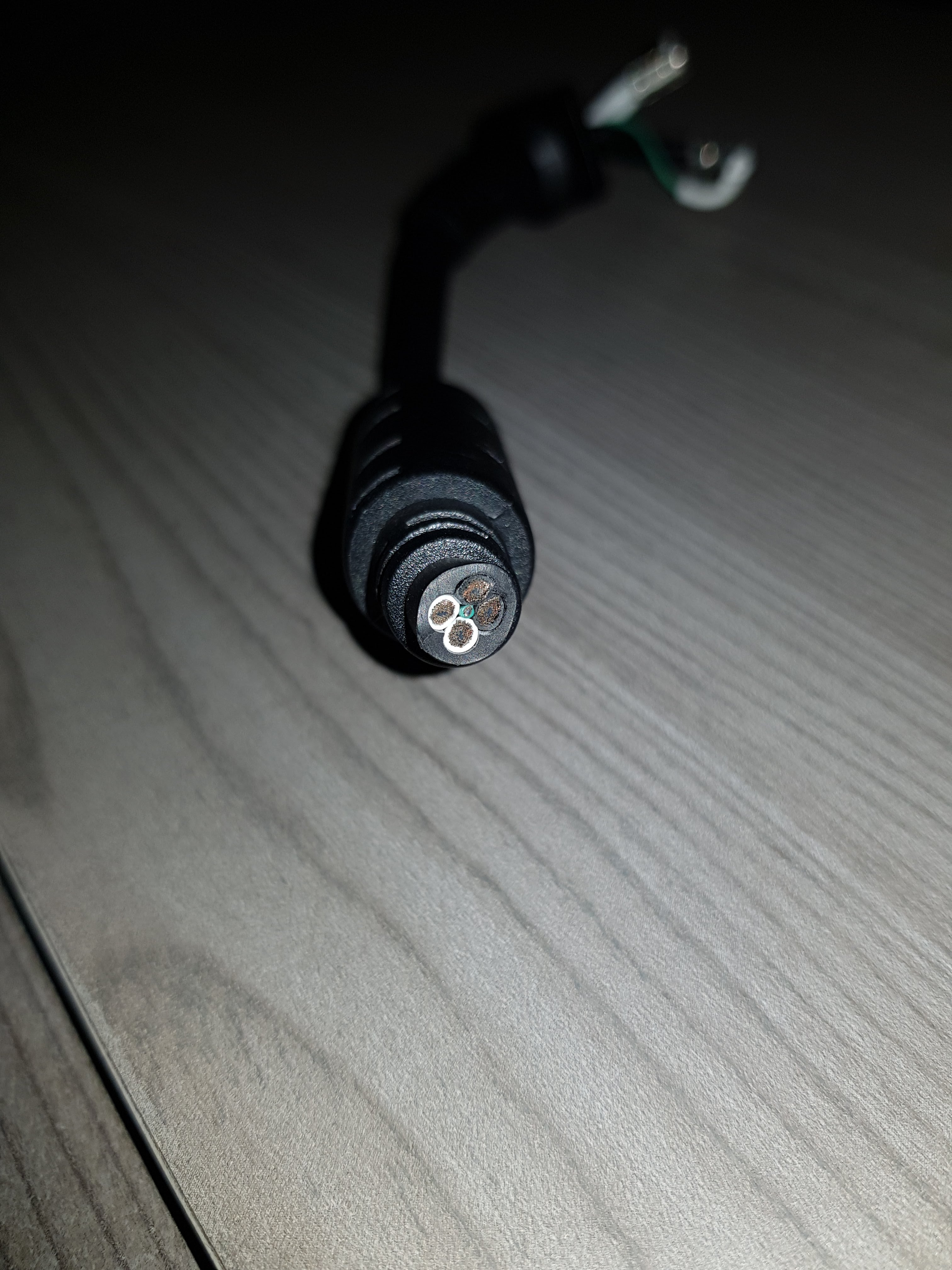
As you see, there was no cable. I took the cable from my actual PSU.
There is a few differences :
230W PSU vs 330W PSU
1 wire ground vs 2 wires ground
1 + wire vs 2 + wire : Ok, more power = more cable
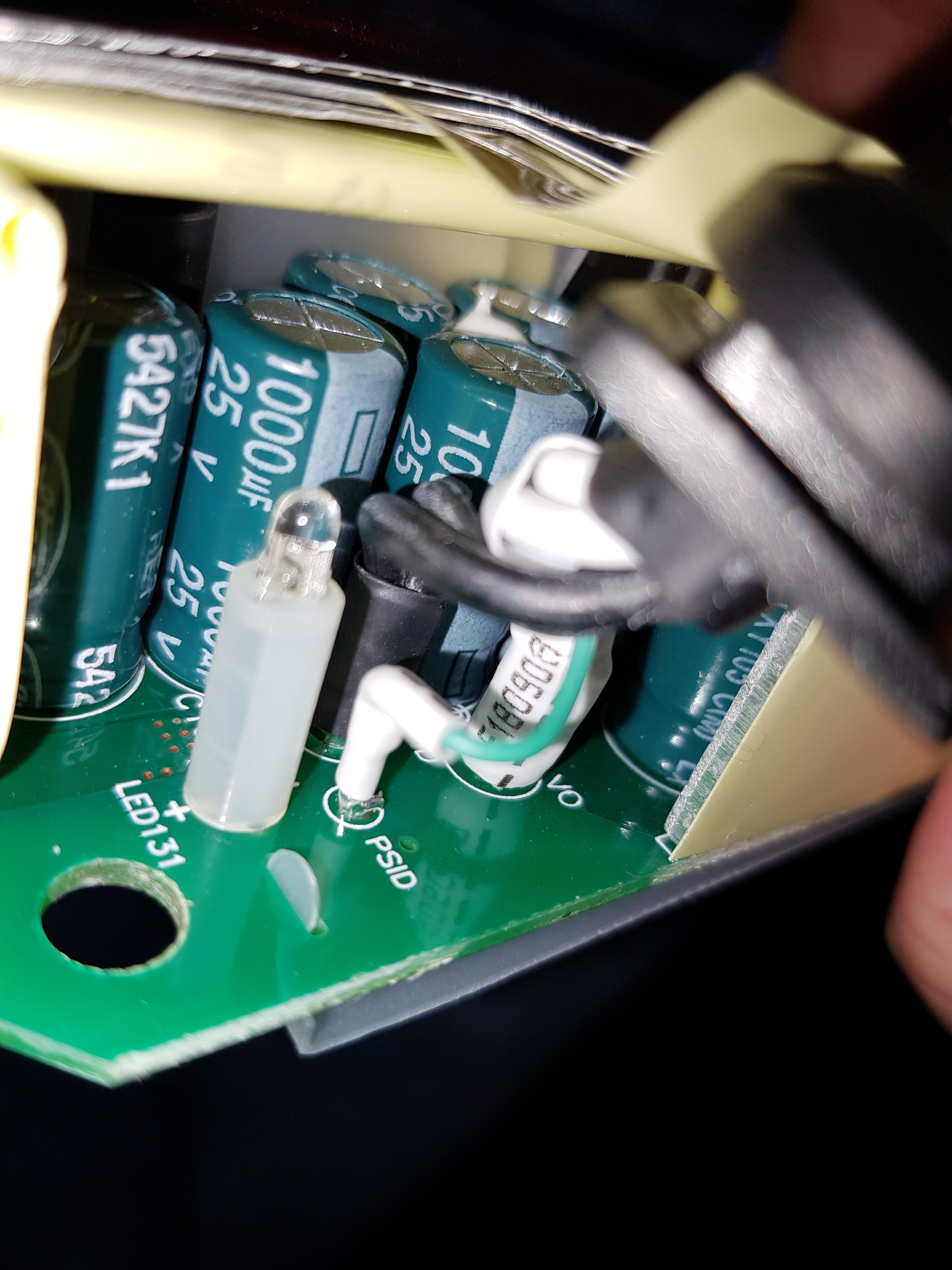
and an extra thin wire call on the mainboard of the psu : "PSID".
In the 330W PSU, the extra wire is located between the 4 other wires.
Seems like it's : "thin wire is connected to a 1-Wire EEPROM chip in the charger. The laptop reads out the contents of the EEPROM and refuses to charge if it doesn't get the correct reply from the charger."
Do you know if MSI use this?
By the way, the PSU shutdown above ~ 230W from Wall but I don't know if t's related.
See the pictures...Attached Files:
hmscott likes this. -
-
This is used for Alienware to detect power draw. MSI does not use this at all. I don't know if clevo uses this.
The external connector on the MSI 230W and 330W is the same. Are you saying all Delta 330W PSU's have that internal board sensor? Because the external connector on the 230W and 330W pin configurations are exactly the same. There is also no strange hole on the MSI connector on the laptop.
I thought the Alienware had an extra center pin that the MSI does NOT have (and thus the msi delta 330W can't even connect to it?)Vistar Shook and Donald@Paladin44 like this. -
I don't know if there is diffrerent type of the "same" psu. Do you have the exact reference of yours? (here : ADP-330AB D)
The diagram of the missing connector on the psu doesn't mention it (the schema is exactly the same vs the 230W)Donald@Paladin44 likes this. -
It's exactly the same as yours. ADP-330AB D (to be precise).
I just dont understand where the alienware "center pin" would even fit on the Delta. On my Delta there is no physical center pin.
Are you saying, on the alienware version, the center pin on the end connector on the PSU is actually there, or different than the MSI?Donald@Paladin44 likes this. -
Ok, so, you probably have the blue wire too. If you want to be sure, there are four screws under the "foot" if you have the good screwdriver.
-
No no no no NNNNNNNNNOOOOOOOOOOOOOOOOOOOOOOOOOOOOOOOOOOOOOOOOOO
@Papusan save me!
I will not, and will not, and absolutely NOT, open the power supply!
Opening laptop to repaste liquid metal, check.
Opening laptop to reflash 1070 TDP until boom point, check
Opening PSU: NEVER ! ARRGHHHHHHHHHH GASP.Donald@Paladin44 likes this. -
Ok
That was not the first time I did this. Previously, I "build" a 230W psu for a GT60
Previous problem, but same situation : https://www.techinferno.com/index.p...0w-psu-on-clevo/&do=findComment&comment=52805 -
Clevo don't use this.
Everyone knows Dell / Alienware prefer to use proprietary equipment. And the center pin is known to be the weak point. Dell will gladly selling you a replacement psu. Of course for a hefty nice price tag.
No need
Falkentyne and Donald@Paladin44 like this. -
I plan on using a 4k external monitor on gt73vr. can play games with laptop screens and monitor monitors at once or multi monitor different resolutions?
-
You can set each screen / monitor to different resolutions.Spartan@HIDevolution and Djadit like this.
-
I have a problem with the keyboard and touchpad lights on my GT73VR after I upgraded to latest Steelseries Engine provided by MSI (3.11.2).
The keyboard and touchpad are working, but they are not detected in SteelSeries Engine and thus its lights are all off.
I don't have the older version I was using before the upgrade, so I'm stuck here and need help.
Do you guys have this problem?
Edit: If I activate MSI Dragon Center LED controlling there, the lights are turned on and can be controlled, but just there, not in SteelSeries Engine.
Now if I turn MSI Dragon Center LED controlling back to off and restart SteelSeries Engine, it works. But I would have to do this steps every time I restart my laptop :/Last edited: Dec 30, 2017Xerion likes this. -
you can download the previous version from following link
http://download.msi.com/uti_exe/nb/SteelSeriesEngine3.10.6Setup_3.10.6_0x87abab2c.zip
and no I had no such problem but my steelseries version is 3.11.8 and steelseries software auto update the drivers when update available, so it should show the notification to update since you are using old version 3.11.2Last edited: Dec 30, 2017 -
Did you uninstall the older version before installing the new version?Spartan@HIDevolution and Papusan like this.
-
Yes. Tried step by step two times with no success.
I'm using the latest official MSI version, since its recommended over the latest SteelSeries version. -
Only so called official support from MSI is BIOS / EC firmware, vBIOS, Dragon Center and MSI utilities, for the rest of the hardware, you can safely use latest versions from their vendor websites.
In my last message, I said steelseries Auto Update drivers to latest version, I didn't say I download those drivers from steelseries website.
Only recommendation to use the MSI version of drivers in a mentioned sequence when you fresh install the windows, even in that case it's not necessary you must have to install the MSI version of drivers, you can just follow the sequence and download latest drivers from their respective vendor websites.Xerion likes this. -
Repasted my BGAbook again last night and shortened the pads on the chokes from 1mm to 0.5mm. Kept 1mm on the VRMs above it because magic smoke is good stuff.
1775mv static override, AC DC loadline=5 (0.05 mOhms). Please don't use Auto please. Auto=bad. Auto=high temps high power draw and very very angry @Papusan !
Also did another fine grit polish of the HS but still a silver square from previous LM applications. But wiped until copper color started to show again.
Got core temps down to 1c differentials. Not sure if it was the 0.5mm pad or the polish or both which helped but i know on every MSIbook, core 1 and 3 are ALWAYS hotter than 2 and 4...has to be a big reason for that.
@Donald@HIDevolution can you guys top the Great Falkentyne?
(Can I haz a TM1 for christmas pweez. wait..did i just beg for a taptop? Oh no....)
raz8020 likes this. -
Great advice! I already passed your last post to our Production Manager. @thattechgirl_vivSpartan@HIDevolution and Falkentyne like this.
-
@Donald@HIDevolution please PM me with your guys' findings. I'm really curious about that too. Repasting repeatedly is just too much work.
And I went back through the thread and even read some chinese forums, with people who changed for LM paste, and each and every one I saw had core 1 and 3 several C hotter than core 2/4 (maximum temps). I can't begin to count the number of repastes I did to try to get core 1 and 3 closer to 2 and 4, back when I was spamming Kryonaut and Phobya Nanogrease Extreme repasting in extreme OCD fetish....
BTW my screenshot was at 100% cooler boost fan. -
After solve my bios reset issue with the New XTU Version from Intel, all Runs Fine.
Now i get These bsod
SYSTEM_THREAD_EXCEPTION_NOT_HANDLED Bugcode 0x1000007e
DRIVER_CORRUPTED_EXPOOL Bugcode 0x000000c5
EVENT_TRACING_FATAL_ERROR Bugcode 0x0000011d
With the creators Update from March the GT73VR Runs Smooth. With the Fall Update, something is wrong.
Someone has an idea what this can be. -
If you have upgraded to Creators Fall Update on top of the old Win version, instead of making a clean Win 10 (latest version) install, expect to get trouble. But try Who Crashed and see if it can give you more answers in the error log. Then search the web for answers. I expect you use the latest drivers.
-
Please help .
I have a problem with my external monitor
when use sleep mode on my laptop. and when I turn it on my external monitor turns darker.
and I have to restart the laptop to get the color back to normal
how to solve this problem?
here's my picture before and after choosing sleep mode
Last edited: Dec 31, 2017 -
Sometimes, I face this issue on my external display and television.
Most of the time, I click a few time, on "FN" + "F2" to switch between the different options and it resolves the problem. I was tinking it's an issue with MSI True Color but not sure. -
Make sure you're running all the updated drivers from this thread:
MSI GT73VR 7RF TITAN PRO Drivers -
does anyone know then the new series with the coffee lake cpu start ? ..
-
Mid 2018
-
No, i did a fully clean install with all drivers up to Date. My Problem is, that in the Event History also the bluescreen Report no driver dll or something are Show. Only hal.dll and Kernel.
-
I have an 6RE. All drivers are up to Date.
Can Maybe the Killer Control Center the issue? -
I have the same problem. The only solution I found was to restart the laptop. :/
-
How do you guys get such low cpu temps,i've repasted my 7820hk with kryonaut and yet still manage to hit 87°C with auto fans on the cpu package even though i undervolted to -120mv using intel xtu. I'm only running at 4GHZ on all cores. I'm wondering do i need to switch from dynamic to static voltage?, do you guys know what other tweak(s) that i can do to lower the temps. My 1080 on the other hand hardly gets to 75°C especially with the undervolt.pls help
-
It's only happening when internal screen is off, right?
So switch to duplicate the internal screen, Reswitch to external screen only. Every time I face this bug, this is a way to correct it -
Kryonaut is the worst paste that I've used. I use Liquid Ultra. Decreased my temps by 10C from IC Diamond
-
Brother I was having the same problem!!!! A TON OF BSOD especially right after turning on from a shutdown or restart.
Did a clean/fresh windows 10 restart and it solved EVERYTHING. Do that and save yourself the trouble
Now hopefully I can get @Phoenix to do his tweaks again. Man after getting used to thing he did it’s beyond night and day difference.
Sent from my iPhone using Tapatalk -
sending you a PM now
-
Problem is, that i did fully clean install.
-
@Phoenix shoot me a PM, i got you some good news
Spartan@HIDevolution likes this. -
Anyone was able to unlock the "OC" menu for GT73VR on Bios settings? Not is inside the Advanced menu, is a menu like Advanced but with the name "OC".
-
Not every model has the OC menu, isn't it?
-
OC menu won't appear on locked processors even if you unlock it.
Kevin@GenTechPC likes this. -
Have you unlocked it on non-K processor? Falkentyne?
-
@Falkentyne @iunlock @Shehary
1) What is Energy Performance Gain in the BIOS > Advanced > Power & Performance? it's disabled by default? any details on this?
2) Why is it that everytime I change my FCLK from 10000 to like 10008 or 100029 it resets back to 10000? what option should I change in the BIOS to have it stick?
I have WDT disabled but XTU Interface enabled to makes any changes that I do in XTU also change in the BIOS -
Svet unlocked it when I had a 7700HQ. There was no "OC" menu, CPU multiplier change in Power and performance didn't do anything, and the RAM timings section was missing too (since it was in the OC section).
-
Energy performance gain has something to do with DRAM power in SLEEP mode. Gain does not mean "Improvement" rather it means "bias". leave that disabled.Spartan@HIDevolution likes this.
-
@Phoenix @Papusan @Falkentyne @iunlock @Kevin@GenTechPC
your thought about this
https://www.theverge.com/2018/1/3/16846784/microsoft-processor-bug-windows-10-fix
will the update patch and new intel FW update effect the GT series performance in anyway....?
Also the last intel FW update, I start seeing shuttering in game and also mouse cursor stuck sometime while multi tasking.... -
Read this thread for the flaws. And what MEI Driver are you on? Try latest .1045 on Win-raid.com (inf, not the Bloat Package).
-
on Intel MEI, last driver update Oct 2017, I read the thread and so far conclusion is Skylake will see drop in performance, I disable the windows update so I can safely say system didn't update to recent released MS security patch Cumulative Update for Windows 10 Version 1709 for x86-based Systems (KB4056892)
-
Yes, Svet told me that but and with your GT73, you was able to unlock that menu?
-
Why would I have to unlock an already unlocked menu?? I don't get it.
You have a LOCKED PROCESSOR. YOU CAN NOT USE THAT MENU.
And the other menus...
........stares at 7820HK.
........stares at IA AC DC Loadline=5
........stares at PLL Voltage Offset (whatever the hell that is doing in a laptop anyway, anyone?)
........stares at VRM's shutting off and on because SOMEONE DECIDED on how much load (current/amps) with a temperature curve they are designed to handle and Prime 95 small FFT FMA3 "burn dem power limits and make @Mr. Fox smile a LITTLE BIT" decides to make the VRM's go home and reboot the laptop...
ANYONE With a HK CPU can unlock their menus. Whether they actually WORK is a different story.
(Try setting PS Current threshold1 to 512 and watch what happens to your taptop).
ALL GT73VRs with HK CPU's have the OC menu unlocked by default. Because they have HK CPUs.Last edited: Jan 4, 2018Pedro69 likes this. -
Expect the patch will follow every Package coming out from Redmond Hq (the patch was only first step for Intel flaws).
For your other problems maybe download and try Intel MEI Driver v11.7.0.1045 (inf only). If you are on older version.
The Official MSI GT73VR Owners and Discussions Lounge
Discussion in 'MSI Reviews & Owners' Lounges' started by -=$tR|k3r=-, Aug 16, 2016.