Problems? See this thread at archive.org.
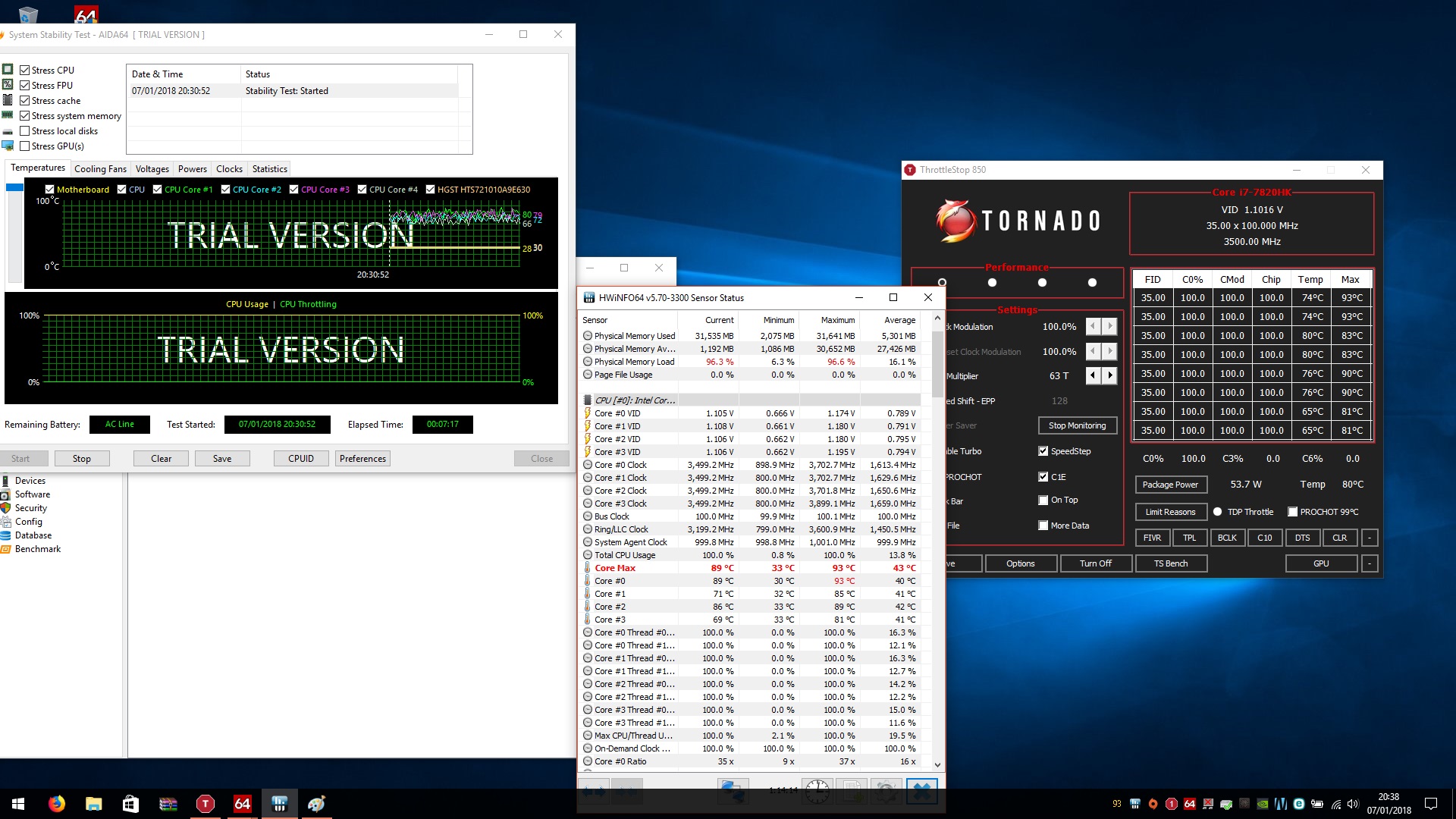
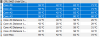
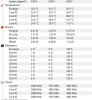
thx, this is temps on stock speeds on auto fans, in bios i set icc max to 400 and power limit 230
and a second picture is on default bios nothing touched. i bought my laptop 6 months ago tbh i wasnt runnin oc for last 2 months but still i hadnt temps like this when last time i was doin stress test i had around 86-87 as i mentioned but even now i tried 4.0ghz with -100mz went on 98 degree and throttling before again few months ago 88 on 4.2ghz with -100mz no throttling at all
in iddle all core seems to be around same temps
while at gaming demanding games like ACO i get around 86 max temps on stock speeds auto fans i didnt play for a long around 30 minits everything on ultra
-
Attached Files:
Last edited: Jan 7, 2018 -
-
Just like I thought.
You need to repaste.
At 3.5 ghz you should never even exceed 82C. Once you reach 80C, auto fans will kick in and drop temps to 80-81C and will remain there.
You also have VERY high core temp difference between core 0/2 and core 1/3. 10C temp difference between core 0 and core 3.
This is because of imbalanced heatsink.
This is very difficult to fix. Even with repasting. Here is what I would do if I were you.
1) buy some Noctua NT-H1. This is good paste for weak heatsinks.
https://www.amazon.com/gp/product/B002CQU14A/ref=oh_aui_detailpage_o00_s00?ie=UTF8&psc=1
2) buy some 0.5mm and 1mm Arctic thermal pads. Big sheets.
https://www.amazon.com/gp/product/B00UYTTXSM/ref=oh_aui_detailpage_o08_s00?ie=UTF8&psc=1
https://www.amazon.com/gp/product/B00UYTTLI4/ref=oh_aui_detailpage_o08_s00?ie=UTF8&psc=1
3) get some 91% isopropyl alcohol and some lint free cleaning cloths (coffee filters work really well for this!).
Now, the CPU has 1mm thermal pads on the CPU VRM's, however there is CPU heatsink imbalance because it has to also be mounted on the VRM's. This is impossible to fully fix, but what you can do remove the 1mm pads on the VRMs and the chokes, and put 0.5mm pads on both. The chokes (grey squares) will have a very light fit, but they don't really need good cooling anyway so it's fine. The VRM's will still be covered fully with the 0.5mm pads, but now, there will be LESS upward pressure on that side of the heatsink because the thicker pads won't be affecting balance. Even if it's a few TINY orders of magnitude, when you're dealing with any sort of heatsink imbalance, anything goes here. If I can get away with *4.7 ghz*, 1.250v, (IA AC DC loadline=10), with prime 95 small FFT (AVX/FMA3 disabled), with temps 84/82/84/82 after 1st self test pass, with liquid metal, then 0.5mm pads are perfectly fine.
DISCONNECT THE AC POWER CORD, THEN DISCONNECT THE INTERNAL BATTERY CONNECTOR FIRST.
Clean off the old MSI gunk (this stuff will probably have the consistency of putty, so take your time and go slow and EXERCISE PROPER ANTI STATIC PRECAUTIONS).
Put an even but NOT TOO THIN layer of Noctua paste on the CPU, spread it out evenly and carefully, then apply your 0.5mm pads on the heatsink that covers the chokes and VRM's. Take note of the two "ledges"--you will have a rectangle overhang which cover a smaller choke and VRM, so cut out a pad there too. Then reassemble and screw in SMALL TURNS in an "X" type pattern, partial turns each, criss-cross pattern, until finished.
For good measure, you can repaste the video card too, but use the 1mm pads on them for re-padding, and be careful because the video card has a lot of really tiny components on it. You don't need to remove the video card itself, just the VRM Sink and the GPU sink. (besides removing the card from the MXM slot (e.g. for hardware TDP modding) requires a small hex bit because the part that secures the card to the MXM slot downwards is a hex screw).Last edited: Jan 7, 2018Vistar Shook, GENOCID and Spartan@HIDevolution like this. -
thx for that tbh im not sure if i will be able to do it myself, its pretty soon after 6 months only. i post here another pic from cinebench. ill give it a try on gaming to see how cores acting but i think u are right unfortunatelly. thanks for info!
Attached Files:
-
-
It's EXTREMELY EASY to do yourself. In fact it's easier than repasting a DESKTOP because you don't have to deal with the cramped case being in the way. Trust me.
I wouldn't steer you wrong.
Also when stress testing, always use cooler boost 100% fans especially on stock paste.Vistar Shook and GENOCID like this. -
9C core difference in cinebench at just 3.7 ghz is VERY VERY bad.
I got 2C core temp difference at 4.5 ghz in cinebench (score= 1010); cooler boost 100%.Papusan, Vistar Shook and GENOCID like this. -
thx falkentyne. ill try to go back few pages around 3 months before and try to find pictures and compare them will post them here later onVistar Shook likes this. -
I made a mistake it's IGPU not DGPU.
enable Internal Graphics + set IGPU the gt73vr doesn't boot anymore you need a cmos reset.
Enviado desde mi LG-H990 mediante Tapatalk -
@Palesco
I enabled internal graphics, rebooted, Computer boot looped (turned off, turned on, turned off 4 seconds later, turned on again).
set iGPU to enabled in windows, rebooted. Computer boot looped (turned off, turned on, turned off 4 seconds later, turned on again)
iGPU is now enabled.
Looks like your system is failing to boot loop and is freezing there.Paloseco likes this. -
Lol its been almost a year and I'm still using .8A on my 1070 (no problems with other vBIOS), the only reason why is to keep fans lower and if I do want to overclock then its set at a bar instead of it jumping all over the place (gpu boost), but with streaming/gaming etc.. im fine with this because I can keep control over it. Other people may have their own preferences, I havent tested any vBIOS that came out at a later date.. maybe since I didn't have many problems and just stuck with it and played more games? after I get everything working right I tend to tweak less and less lol (lazy mode)
hmscott likes this.
after I get everything working right I tend to tweak less and less lol (lazy mode)
hmscott likes this. -
I did the same. Once I updated the Vbios and it stopped crashing I haven't touched it. I OC'd to 1650 and haven't touched it since lol
-
This is my VBIOS version on my GTX 1080. My contact at MSI hooked me up with it last week:
![[IMG]](images/storyImages/2018-01-08_195911.png)
![[IMG]](images/storyImages/BTGtDRD.gif) Shehary, Donald@Paladin44 and hmscott like this.
Shehary, Donald@Paladin44 and hmscott like this. -
Still haven’t seen scores from new vs. older vBios
Donald@Paladin44 likes this.
-
I am really busy bro.
Phoenix right now >>>![[IMG]](images/storyImages/TitkkWK.gif) Donald@Paladin44 and Papusan like this.
Donald@Paladin44 and Papusan like this. -
i found my older posts from 5-6 months old, check that and if anyone have a clue why would temps changed such a drasticlly without reason let me know, i was playing sometimes but all the time on stock speeds also in previous bios my cpu stock speed were max 3.5 ghz only when i unpluged charger it went up to 3.9 ghz. its very strange i realized it only after me fw and bios update tnh i did not run any test for last 4 months
Attached Files:
Donald@Paladin44 likes this. -
-
Notice how it's the difference in temps between cores 1 and 4 (relative to cores 2 and 3), that is what really took off?
That huge difference is all the trademarks of an imbalanced heatsink pressure, causing degradation of the paste.
So this causes degradation/dry out of the paste that is on cores 1 and 3 (0 and 2 if you want to look at the charts (I mean what is core 0?) :/ while cores 2 and 4 (the ones with more pressure) keep more integrity. This problem has to be addressed:
1) vicious thick paste (Phyoba Nanogrease Extreme, Gelid Extreme, Noctua NT-H1).
2) removal of the 1mm thermal pads on the VRMs and CPU chokes, and replacing with 0.5mm (Arctic) pads, as I linked above already. This helps eliminate upwards pressure on an already weak fitting heatsink mount, which should help keep core temps much closer. Just remember to watch the two little "overhangs" on the CPU heatsink that both go on the "smaller" size grey choke and the "two tiny" VRM's to the left of the 5 main ones.
Give it a try. You might be impressed with the results.Donald@Paladin44 and GENOCID like this. -
man thx a lot for your help.. tbh i wasnt repasting for last 8-9 years lol expect some xboxes, im more concern about the pads and stuff as i never ever seen it before so not sure if i will be able to do it unless there is some video or pics, ill have a insurance on my machine but gonna contact msi as well, btw what could happends i will leave it as it is what consequencies there would be fried cpu? thx again
-
@GENOCID You really don't need a repasting video for the thermal pads. It's completely brainless. All you have to do is line up the thermal pads like the old ones are.
![[IMG]](images/storyImages/gt73vr-heatsink-1.jpg)
Just put 0.5mm pads and cut them out to shape.
The only difference is, at the two "far right" pads, there is an overhang. I recommend cutting a tiny square out at each point like you see at the lower one, instead of having the right "overhang" connected with a continuous strip (especially since you're going to be using thinner pads, you don't want the pads to be 'moved' when having it mounted on). Just look at the bottom right square and it's obvious.
You really do not realize how EASY This is to do. You're making it out to be some huge difficult task. It's really easy, especially when you are NOT using liquid metal.Last edited: Jan 8, 2018Donald@Paladin44, Vistar Shook and GENOCID like this. -
This makes me want to check mine..... It's been almost a year, highest temps CPU wise has 72 for about 30min, usually floats between 50-60 for the games I play.
I've never re-pasted anything computer wise lol
Sorry to sound like a broken record but my windows updated with the new patch, does that mean I don't have to install the intel FW update from MSI? -
I have GT73VR 6RE with GTX 1070 revision 1. And voltage problem. I disagreed gpu replacement only. Motherboard replacement is necessary?
Revision 1.2 cards compatible with 6820hk cpu and CM236 HM170 chipset?Last edited: Jan 9, 2018 -
care to share
difference New vs Old VBIOS or may be its 6RF model limitation
![[IMG]](images/storyImages/vbios.jpg) Last edited: Jan 9, 2018
Last edited: Jan 9, 2018 -
PMing you right now
-
Don't fix it if it ain't broke. Your temps are great...why would you want to risk messing with re-pasting?Kevin@GenTechPC, hmscott and Spartan@HIDevolution like this.
-
im getting in fifa 18 for a longer time max 84 and when i try oc there is no chance im getting throttles in cinebench with same settings like when i used laptop for first two months i went up to 95 degree lol where there before max 82 in test and without cooler booster im gonna try what @Falkentyne suggested i found a few helpful videos if anyone interested like me want to open a our machines.
and here one how to repaste however im not gonna use same method but method suggested again by @Falkentyne will post results in few feeks if i dont break anything lol
Shehary, Kevin@GenTechPC and Falkentyne like this. -
Well I could have uneven core temps right? Which can cause premature problems I'm assuming?
I also don't play anything cpu intensive enough to have high cpu temps. I don't even OC really, I hit 72C when I ran witcher 3 maxed out at 4.0GHz -
Question about the ESS Sabre DAC; Does Nahimic need to be installed and Enabled to activate the DAC? Or does disabling Nahimic also work?
Thanks! -
if using tape, that nail polish thing not necessary, just make sure you get +33 not +88 and when applying tapes they not overlap, one most important thing, remove the battery before applying LM, a tiny bit of LM on wrong place while battery plugged-in.....phufff.....
good luck and post back the temps resultVistar Shook and Spartan@HIDevolution like this. -
how'd that VBIOS upgrade go d00d?
-
Just ran the Ashampoo Spectre Meltdown CPU Checker and it says my CPU is vulnerable even though I installed the latest ME Firmware a while back. so is MSI going to release a new BIOS to fix this or what?
@Kevin@GenTechPC
![[IMG]](images/storyImages/Ashampoo_Spectre_Meltdown_CPU_Checker.png) Paloseco, Shehary and Kevin@GenTechPC like this.
Paloseco, Shehary and Kevin@GenTechPC like this. -
-
-
I don't get it, what shall I do now?Vistar Shook likes this.
-
We have to wait for MSI to release proper BIOS that contains the microcode fix.Paloseco, hmscott, Shehary and 1 other person like this.
-
Has MSI revealed if and when they will be releasing the update?
-
I've already contacted them about this and waiting for a reply as they check with their engineering department.
-
Before any of us receives a BIOS update, retain the same best practice of computing.
1. Do not run/install applications of unknown origin.
2. Make sure your Windows has the latest Windows Updates on them.
3. Make sure Anti Virus software is updated as well as virus definition database. -
I think as long as you designate with auto port detection notification pops up that its a headphone it will set it automatically. I've had a few times when I didn't have Nahemic installed till recently and all it does on the GUI is show that its "ESS Sabre". But you can usually tell when the sound is amplified or your headphones are getting the proper power.
I currently have the latest Nahimic and there wasn't any noticeable difference when it was uninstalled. -
Nahimic is not necessary. You only use that for some sort of surround sound emulation. Just choose "hi-fi headphone" when you plug the headphones in.
-
I'm still holding on the update, why so hurry....
![[IMG]](images/storyImages/cpu-spectre-meltdown.jpg)
-
Crashes on 3630QM...
-
Damn it!
Attached Files:
-
-
Probably OS-related issue.
-
Yes, compatibility mode gave Spectre vulnerable, Meltdown OK.
-
What are the DAC and PA of GT73VR?
I can only find the codec is ALC-898/899.
I am considering purchasing an AKG K701 OR K712, is GT73's audio system good enough to drive them? -
hey guys, I am going to upgrade RAM on my Titan Pro-003, but I can't figure out what memory is faster and will work for it. As I understand, there's no point putting 3000mhz memory in it, as there only 2400mhz option in BIOS. What about latency? Do I just have to find 2400mhz memory with lowest latency or it doesn't work this way. I've read that someone put too low latency RAM in his laptop and it didn't work. Need your advise on this. The short question is - what RAM will work the fastest in my laptop. Thanks
-
The Bios has code for 4133 mhz memory in it and RAM multipliers higher than 9. Now whether it actually WORKS is another story. Officially, the highest RAM that HIDevolution got to work was 2666 mhz memory.
It's unclear whether 3200 mhz or higher memory would train, if for example, you set the maximum RAM speed (in the unlocked bios) to 3200 mhz and set the RAM multiplier to 12 and installed 3200 mhz memory. Maybe it would just fail to POST. No one has tried, afaik.Kevin@GenTechPC likes this. -
The only compatible RAM for the GT73VR Titan Pro is 2400 MHz and 2666 MHz with the latter having a higher latency so I chose the slightly slower RAM 2400 MHz but with lower CAS Latency
-
anybody on 7RE have a same issue im not sure if its due not updated win but when i try run me fw update tool im getting error that system needs reboot after update but its happening constantly i run update bat hmm strange, also on msi website bios for 7re date is different on 31B than advertised . slso does that win update affects performance im clean install
-
1) restore your BIOS back to defaults then set the mode to either AHCI or RAID whatever it was before and touch no other setting
2) when you run the batch file to update the ME firmware, just double click on it, don't right click and choose run as admin
Note: Everytime you download a file, right click on it, go to properties, then from the bottom right, if it says the file is blocked because it came from the internet, click the unblock tickbox and hit apply. Do this for every file you download otherwise the ZIP file and all the files within that zip will be extracted with a BLOCKED status and you may run into some serious issues. -
thx man but nothing, same thing.
Error 8703: PLEASE REBOOT YOUR SYSTEM. Firmware update cannot be initiated without a reboot.
only one think i did not do is updated windows so i guess that might be an issue but not sure, also why is fast boot always disabling itselft if im on defaults, or its not neccessary at all to have it enabled? thanks -
Fast Boot cannot be enabled if you have an overclockable CPU like the HK series since the BIOS needs to re-initialize the overclocking parameters at startup
If I disable the overclocking feature in my BIOS completely, then Fast Boot sticks to enabled but the moment I enable overclocking feature, even if I don't overclock, Fast Boot gets disabled. I've tried them both and trust me, there is almost no difference. The problem is the MSI BIOS sucks really, like it takes 16 seconds from the moment I see the MSI logo until the Windows loading icon actually starts spinning.
Heck, my wife's 4 year old Dell Vostro with a Crucial MX100 SSD boots in 8 seconds from the moment you press the power button and I'd still be starting at the MSI logo
I actually contacted my contacts at MSI today to ask them if they can do something to the BIOS to improve the boot time it's horrible for such a highly specced laptop.
As for your issue, uninstall the Intel Management Engine Interface from Programs and features, then install this one:
Intel Management Engine Driver v11.7.0.1054
then reboot again and try the ME Firmware update
Make sure you disable your Antivirus also
PS: are you sure you unblocked the ZIP file before extracting it like I mentioned above?
The Official MSI GT73VR Owners and Discussions Lounge
Discussion in 'MSI Reviews & Owners' Lounges' started by -=$tR|k3r=-, Aug 16, 2016.