Problems? See this thread at archive.org.
gonna try it in the morning man thanks a lot! yes ive check that and tick unblock ive done a tweak in a gpeditor as well gonna see hopefully it will work thanks again
-
Pretty sure the problem may be administrator access. Wasn't sure that was needed for batch files, but I guess it is.
Almost sure that is the issue. Check on that, and report back. I didn't use the msi tool, however. -
i tried both run as admin an double click i also tried other driver newer from intel i was getting same thing when fw update was at 100% then showed for a second in a red text that reboot is required and window closed rebooted immediately i will do screen shot from video and post it tomorrow.
do you suggest me to update windows snd try then? since clean install ive got is since 9/17 from @PhoenixLast edited: Jan 12, 2018 -
I used the "Fwupdate" tool from win-raid.com from that massive Intel ME thread there and the firmware update manually from there. I didn't go through MSI. All I had to do was extract the package, use the right command line switch to update, and run it as administrator.
-
While playing games I have intermittent drops of around 10 FPS. I've read that this is a know issue with GSYNC displays. I have a GT73VR 1070 7820K. Currently using RTSS with the frame-rate limiter on. Is this actually an issue with GYSNC displays and, if so, is there something that can be done to resolve it?
-
im gonna try it today ive used a driver from there as well but still same thing so gonna try phoenix’s suggestion and report back
-
I tried again with both Internal graphics and IGPU enabled, and wasn't able to reproduce the issue anymore. Even tried both latest versions E17A1IMS.10A and E17A1IMS.10C, and the system boots properly. Maybe it was a glitch or something weird.
-
thats the same driver i have installed gonna try anyway -
Awaiting your results, I won't leave you until we get this resolved. MSI Gaming Team FTW
-
same thing, god damn it immediately reboot and nothing changed
Attached Files:
-
-
are you sure you've reset your BIOS to defaults and touched nothing else, disabled your AV, and are running the batch file regularly not as admin?
finally, you need to have the folder extracted on your desktop, not anywhere else -
.
yes ive done everything like u said still nothing ive done it twice on clean install before as well unblocked disabled av reseted bios with nothing touched and extracted on desktop. the only thing i didnt do ws updated windows -
right, and you did download it from the MSI GT73VR Titan Pro page right?
If that's the case, then please contact MSI for more help on this
PS: you must be on the latest BIOS BTW for this to work -
i have 7re so i downloaded it from there i also download latest bios updated a few days ago HOWEVER on website its advertised different date but after i download and extracted date is few month older on the bios version anyway even in bios menu info but version is same. im gonna try to contact them as i cant find any solution
-
Ok guys, time for me to explain something. I'm sure most of you will be able to follow me. Maybe someone will find this useful. Maybe someone will find me insane. But if 1 person finds this useful I did my job.
The reason why UNDERVOLTING works on these MSI laptops is NOT because these chips are overvolted from the factory, as has been claimed repeated times on this and other MSI threads!
It's because of something called VID BOOSTING. Or more precisely, a hidden setting called "IA AC DC Loadline".
The Intel reference value for this setting seems to be 1.80 mOhms (this is completely estimated. It is 2.10 mOhms on Coffee Lake, but trying a manual 210 value in the Bios causes power draw to be a bit too high; 1.80 (180) is a lot more on point). The reference value is supposed to BOOST THE CPU VID based on current--the more current (higher load), the higher the boost, based on the resistance value. An extremely high resistance value would cause the VID to shoot past 1.5v and could destroy the mainboard. But anyway:
This setting is supposed to be used with adaptive (automatic) voltages, to try to give some stability to the system at full load, to counter vdroop, by causing the VID to rise at load. Unfortunately, due to MSI's cancer coding, it's completely impossible to know the true default VID of your CPU sample without an unlocked Bios, THE VID SHOWN AT FULL LOAD WITH THE AUTO SETTING BECOMES GROSSLY UNDERREPORTED AND INACCURATE, and finding the actual "VID Boost target" (your VID at load) is an exercise in complete pain--watching idle VID, watching it jump all over, using extremely light single thread loads or load chances and watching to find the high and low point. The best time to find the true 'high' VID (the vid USED at full load, which is going to be MUCH LOWER than the current VID readout in HWinfo64 or Throttlestop !!), is right after booting the system, when stuff is still loading.
And it's pretty shocking if you actually manage to see what is going on.
Example I just tested:
1.175v (1175mv) static OVERRIDE voltage + AC DC Loadline= Auto (MSI default setting) has a highest VID spike of 1.31v. What that means is that when doing a full 8 thread load test, the VID (and thus target voltage, BEFORE vdroop (which you can't measure; no vcore sensor is on these laptops)) is actually 1.31v !! But the current VID shown in HWinfo64 and Throttlestop is only 1.22v !!!
(in this test, prime 95 small FFT, AVX and FMA3 both disabled, reached 90 degrees C, after 4 minutes. This is at 4.5 ghz, 1.175v, and IA AC DC loadline=auto. Note: the EXACT same temps and power draw were shown with a manual IA AC DC value of 180 instead of Auto).
So let's set the voltage to 1.31v directly, shall we? And let's set IA AC DC loadline to 1, the lowest value, to stop all VID boosting and have the voltage you set in Bios be the true voltage.
So now...back to windows. VID is fluctuating by 0.3v. (this seems to be the AVX boost, as windows does use AVX instructions).
Anyway, now, VID at idle is showing up as 1.31v or 1.32 (close enough).
VID at full load, 8 thread small FFT prime 95, AVX and FMA3 disabled....is.........1.31v !
And the temps and power draw are IDENTICAL to that 1.175v + IA AC DC loadline=180 (Auto) earlier.
So there you have it.
Now, on DESKTOP BOARDS (at least from most 8700K results I've seen on OCN), the IA AC DC loadline setting is ignored when using static override voltages. Example: one user said his requested VID on his 8700K was 1.5v (!) but the vcore was MUCH much lower (since he has a vcore sensor). His vcore was showing up as 1.23v while the VID was 1.5v).
Also keep in mind that VID DOES NOT show vdroop. you need a vcore sensor to see vdroop. VID is not a vcore sensor.
So.....who cares right? What does this have to do with undervolting?
Simple.
The reason why almost everyone can undervolt these processors, including both HQ and HK processors, by -100mv to -150mv, until (On HK processors) you start overclocking to a point where the CPU's default VID is no longer high enough for stability, is you are indirectly REMOVING the VID boost from the IA AC DC loadline setting. So you aren't really undervolting these processors at all, actually! The only issue then is at full idle and very light load, when there isn't any VID boost, whether the undervolt keeps the processor stable or not.
You can find your CPU's true requested preprogrammed "default" VID by using Adaptive voltage (not static) and setting IA AC DC Loadline to 1.
In this case, static voltage will override the default VID to match your static vcore override. But don't forget about vdroop (voltage drop) which VID DOES NOT SHOW!.
So TL;DR:
If you want actual control over your voltages, unlock your Bios, set the IA AC DC Loadline to between 1 and 10 (1 will show true VID but will have the most vdroop and the most chance of instability), and then either set a static voltage you find is stable, or use Adaptive voltage with a POSITIVE offset if you are overclocking a HK processor. And always check for WHEA correctable errors HWinfo64 or windows event viewer) if you think you are stable because you passed stress tests or gaming with no errors; getting those means you are not stable.Arestavo and Vistar Shook like this. -
Anything particular you can advise?
I am looking at theseFalkentyne likes this. -
Those look good, they are actually a bit faster than mine with aa 16-16-16-39 rating
these are mine but I believe only MSI has stock for them:
Kingston MSI24D4S7D8MB-16 2400 MHz.(17-17-17-39) 64GB DDR4 RAM
Make sure your entire system has the same memory though as the timings are differentFalkentyne likes this. -
What the hell happened to RAM Prices? Oh my god...
-
Yes, I am planning to ditch the kingston RAM that I have now (same as yours) and put those new G-Skill.
Edit: Just took off the cover and didn't find where those RAM modules are. I can see two empty slots, but can't find the ones installed. Do I have to take out the motherboard as they are on the back side of it?
Another question - I have 2 SSD's in RAID (not sure what type) and 1 SATA HDD as a storage. Do I still have one slot left? What type of slot is it?Last edited: Jan 13, 2018 -
One slot is empty, but I can't figure what type of slot is it.
![[IMG]](images/storyImages/731ac-clip-453kb.jpg)
-
yes the 3rd m.2 slot is a SATA III m.2 slot, not NVMe, look at my signature to understand what you can put there. I have a 1TB 850 EVO m.2 SSD in there
you see, out of the 3 m.2 slots, 2 of them are NVMe where I put my 960 Pros in, and the 3rd one is a standard SATA m.2 slot for additional storage -
Wait, what RAM do you have in there already? 8 GB? 16 GB?
1 stick or 2 sticks?
Is it DDR4-2400 ? -
right now I have 2 sticks of this
![[IMG]](images/storyImages/84a9c-clip-112kb.jpg)
I am planning to take it out and install 2 sticks of G-Skill instead, 32gb total. -
Best to not mix and match RAM.
Why not just save yourself a ton of money and buy two more of the Kingston sticks?
Plus you can overclock them too. My 32 GB of 4x8GB Kingston ValueRam is running 15-15-15-35 1T, tRFC=270, tREFI=32767.
And......you won't have to risk destroying your taptop by opening it up and removing the motherboard.
https://www.amazon.com/gp/product/B01LW6HBSM/ref=oh_aui_detailpage_o06_s00?ie=UTF8&psc=1
It was $74 when I bought 2 sticks. Now it's $94.....uh......whatever.Spartan@HIDevolution likes this. -
So they are the same and will match my current RAM fine?
-
They are identical.
MSI sticks are Kingston with a re-branded SPD.Vistar Shook and Spartan@HIDevolution like this. -
Got it. Thanks!
I guess I'll do that. Don't really want to tear the laptop apart. Thanks!Vistar Shook likes this. -
When you explain undervolting to a non-technical person - or even a technical person that just wants a solution to their thermal throttling, or uncomfortable high temperatures on their CPU, they don't want a long technical explanation that makes their eye's gloss over

Besides, truthfully out of the box the CPU voltage applied is too high - it doesn't matter what the mechanism is - whether it's a "fixed" value of voltage or a "fixed" algorithm that applies too much voltage - undervolting using a simple value solves the problem - and that's all they really came to get.
You are far more interested in looking smart - or "smartest" rather than helping people solve their problem simply. You extract too high a price, and far too much time out of the lives of people that simply don't care about the details.
They want a simple solution so they can get back to doing what they set out to do in the first place. They shouldn't need to take a trip through Alice's Wonderland of technical minutia to get a solution.
You seem to miss that point, I keep trying to help make it to you so you will lay off these technical expose's, I'm still hoping you will come around
People can be helped in a few minutes, instead of hours, that's what they need and this is about what they want, not what you want.
Anyway, try to tone down the technical excursions, and just give them the simple instructions on how to undervolt using XTU and TS, and everyone will be happy.
If you need have this for yourself, then start a thread for that technical minutia and link it as "further details if you are so interested" when you help them.
Asking the average person to install a hacked BIOS with all that goes with it, instead of a few short sentences on how to undervolt is silly, it's overkill for a simple problem.
-
I'm a chess master, Hmscott. I do what feels right. I am myself, and I'll do as I feel is right, regardless if you like it or not. Sorry for sticking up for myself, but if I don't do it no one else will.
raz8020, Papusan and Vistar Shook like this. -
Well, there are many different kind of people that frequent NBR, so there is something for everyone interested in tech. For me Falkentyne and his technical knowledge helped me overcome my technical limitations to address certain limitations of my machine. He guided me on how to unlock the Bios of my notebook, but even unlocked, none of the settings really did anything, then he suggested altering MMIO settings with RWEverything, that worked with certain machines, but to no avail, unfortunately. I basically gave up on the possibility of increasing the PL limit of my machine, when I then read a post he addressed to me from a while back, mentioning IMON offset, that I ignored obviously, and voilá, issued addressed.
Enviado de meu Pixel 2 usando Tapatalk -
That's all very selfish, don't you see that?
Think of others and what you are making them go through to get what you need. They come here looking for a quick solution, direct answers, not technical dumps and long drawn out exchanges.
I see you doing this with everyone asking for help, you can't seem to state simple directions to get them what they need.
Spend some effect optimizing your help text, maybe come up with a simple step by step without all the technical background.
You can get someone undervolted and back to gaming in a few simple lines of text and a download link, and then they are back gaming, or whatever they want to do.
You take a dozen posts to explain what should have taken a paragraph, and lose many along the way. The solution is not that complex, but you make it so. -
Putting you on ignore, Hmscott. Sorry You are very toxic.
hmscott likes this. -
Yes, a useless pointless exercise, sorry you had to go through that all. And, not everyone needs that level of wide technical excursion, just give them a simple solution so they can get back to their lives.
He uses the same hammer to deal with everyone, recommending hacked BIOS's and programmers to people clearly not technically capable of understanding why they don't need it and all this extraneous stuff when all they need is an undervolt.
And, he applies the current maximum ferocity whenever someone pops up looking for help, it's frightening how much he puts people through to no effect.
Without limiting the response to a minimum of what most people are looking for it becomes an insurmountable wall to scale just to get simple solutions that never come.
I'm trying to help him become a bit more sensitive to others, but as he simply stated, he's too selfish to do that, he's here for him, not others. It's been going on for a long time, and I finally had to give him this feedback. -
"So TL;DR:
If you want actual control over your voltages, unlock your Bios, set the IA AC DC Loadline to between 1 and 10 (1 will show true VID but will have the most vdroop and the most chance of instability), and then either set a static voltage you find is stable, or use Adaptive voltage with a POSITIVE offset if you are overclocking a HK processor. And always check for WHEA correctable errors HWinfo64 or windows event viewer) if you think you are stable because you passed stress tests or gaming with no errors; getting those means you are not stable."
Or, simply apply a -100mV undervolt and be done with it.
I know which explanation would be understood by more people, and if you give it some thought I think you will agree that the simplest non-technical as possible answer is what most people want and need.
Most people can't follow, nor care enough about the details to follow such a complex solution involving BIOS settings they don't understand vs. setting a single value through an application or BIOS setting.
You're answers to non-technical people are toxic to them, I'm trying to help you see that.Last edited: Jan 13, 2018 -
I was reading some posts at overclock.net, I didn't understand much, and going through the Bios I did get curious what some settings do. So yes, for me personally, I did find the post about vdroop, ac dc loadline very informative.
Enviado de meu Pixel 2 usando Tapatalkraz8020, Falkentyne and hmscott like this. -
I'm not saying it's not useful to some, but not to everyone, not first off when someone asks for simple help. That's why I suggested he take the time to optimize his responses and tailor them to the audience.
But his response is "he is a chessmaster", wth does that have to do with anything we are talking about?
Respect the audience and help them, don't bludgeon them with long over technical discussions in a owners thread where people come looking to get their laptops running cool enough to not throttle so they can go back to their interests.
Start with simple solutions, and offer more if asked, but don't push it on them, otherwise you are doing it for your own self-aggrandizement and not to help others.
Hopefully he reads this eventually and takes it to heart.Vistar Shook likes this. -
I really don't think that NBR shoud just turn into a forum of what notebook should I buy? or my laptop is overheating, throttling and or stuttering, what can I do? I searched around other forums, I have more affinity here and I certainly am learning a lot, never really had much tech expertise other than turning on my laptop and using the desired software. After visiting here, I learned to monitor temps, tweak windows, unlock bios, repaste, and perhaps eventually mod a vbios with a programmer, and maybe, just maybe, not buy BGA....hehe.
raz8020, Papusan and Falkentyne like this. -
Neither should we chase away laptop owners looking for simple straightforward solutions to those problems, without involving themselves in a deep dive into things they don't care about or intended to do when coming here for help.
I replied to a post he made to noone in particular because I don't want to bring this up in the middle of him helping someone - involving them in this discussion - but that's what I am talking about specifically - helping newbies, not someone like yourself.
That's all very nice for you, but do you think everyone that buys a gaming laptop needs to go through all of that to simply enjoy gaming on their new laptop?
I'm quite sure if you tried to tell someone that before buying a laptop they would elect to not step into that mess altogether, and not buy a laptop.
You probably didn't need to go through all of that either, that's what I am trying to say. It may have been fun, enlightening, maybe even finding something useful along the way, but most of it is an unnecessary waste of time.
After many years of doing this I condensed all of that into a simple set of steps, that don't involve any of that, and people are back doing what they want to do in short order, without re-pasting, or custom firmware, and while it's not optimized to the nth degree, who really *needs* that.
1% of the effort to get 90% of the benefit is what most people want. They aren't looking for a new hobby hacking laptops, or to void their warranty by removing OEM set safe limits for their hardware design.
How much performance is enough? If you watch @Falkentyne posts it's a *forever* quest that voids the warranty and endangers the hardware, most people want a solution they can leave with without changing their lives.
Last edited: Jan 13, 2018 -
This is technical forum Not a whatever forum you only discuss what colors the different notebooks comes in.
Shehary, Mr. Fox, Falkentyne and 1 other person like this.
-
We should be recommending XBOX and PlayStation for that level of gamer, along with an inexpensive disposable low-end turdbook for web browsing, email and basic office suite functionality. They can easily fit both in their backpack, and save a ton of money compared to a severely overpriced jokebook that serves the same purpose, doesn't excellent at anything, and requires a lot of maintenance they don't want to learn how to do.Papusan, Falkentyne and Vistar Shook like this.
-
I am sure my wife agrees with you about the "waste of time" part, but each has there own way at using their time. I wanted to be able to do a certain thing on my machine, didn't know how, asked for help here, and I got it. I certainly would of taken a lot lot longer on my own, probably never, and still be wanting to solve my particular issue.Last edited: Jan 14, 2018
-
The Xbox and Playstation don't come with screens, keyboards, trackpads, batteries, or come in a laptop form factor.
But, that's the entry consumer level of newbie I am talking about, further upgraded a bit to a gaming laptop.
Not a computer scientist, or electronics engineer, or even a savvy BIOS hacker - such as most of us here are - but instead a fragile newbie looking for help because their laptop CPU is getting hot and they heard that's a bad thing.
They've made the leap to a gaming laptop, a huge investment, and they are likely pretty nervous about it all.
Helping them with a simple solution to get back to work or gaming is what they are looking for, not a long endless journey of self-sacrifice to gain insights into firmware hacking, re-pasting, or even OC'ing.
Most of them are even too fragile about it all to feel comfortable using XTU or TS to change one value. And, once they set -100mV and it works, they want to stop going further - they stopped thermal throttling.
Often they won't even go that far, XTU / TS / BIOS settings are too much, it should work perfectly out of the box, completely as they expected when they bought it.
To be subjected to the full torrential force of maximum tuning full frontal upon entering the forums, is way too much for them to handle. Moderate responses, tailor them to the audience; there are finer control's and settings available than 120% overdrive all the time.
If newbies have success early on, are made to feel comfortable, are invited to stick around to read postings already made, and the new ones as they are posted, they might stick around and get interested in all the other fun stuff.
DukeCLR, Vistar Shook and Jzyftw like this. -
So what were the specific required changes you needed to solve the problem that brought you here originally? What was the problem and simplest solution?
In a few minutes I set up a GT73VR Pro-866 using RGC + XTU to get the undervolt and the 4x 4.5ghz OC for the CPU, and I didn't bother to OC the 1080 GPU. It's not the fastest possible, but I didn't need to hack the firmware, void my warranty, or waste any more time on tuning it.
CORE 18,706 with NVIDIA GeForce GTX 1080 (Notebook)(1x) and Intel Core i7-7820HK, Graphics Score 24,574, Physics Score 13,908, Combined Score 8,229
https://www.3dmark.com/fs/13826005
It runs great, doesn't stutter in games, and better yet, it's running complaint free
DukeCLR and Vistar Shook like this. -
I just wanted to point out that a -100mv does not work for all HK GT73s. I have a 6820HK with the 1070 and the lowest I can do is -55mv, it may even need to be lowered to -50mv as that is just the number I got before it was stable during gaming, I've never run prime95 for a full test. I don't know if OC'ing it would make it more unstable though, I have never needed more than the stock clock (3.6GHz) for any game I have played. If you were talking about the 7820HK I will delete this paragraph lol
Since it came up I wanted to say that unfortunately I'm not a computer scientist, computer engineer or a bios hacker and that I would fall under the newbie category... I often feel like a tool when I ask questions that I feel would be common knowledge for most of you on here but at least no one has scoffed at my questions. I have noticed however that a few simple questions get overlooked on this thread (not mine but some others) but at the same time I've seen a few people go above and beyond to help some newbies (or non newbies) out.
I often wonder if there are some tweaks in the bios or with XTU that would make my system run better/faster but some people seem to have bit more enthusiasm to help out those with the 1080 rather than the 1070 lol... Just joking I'm sure if I asked someone would help out.
All in all though this thread has been very helpful to a lot of individuals who came looking for help including newbies like myself which is appreciated
TL;DR - This thread is great even for newbies and the positive reviews and praise on here was the reason why I bought my GT73
Just my .02Last edited: Jan 14, 2018DukeCLR, hmscott, Vistar Shook and 2 others like this. -
there is no need for that everybody should be aware before buying those machines, tbh i regret a bit now that i bought 7re as im having problems from the start with it. when bought it on factory settings i was getting bsods due to killer driver i went to clean install and i was on bios 30A with a 3.5 gh max on all cores only when i updated bios my cores went as should be up to 3.9ghz. im also having very bad between core temps around 12 degree difference on core 2 and 4 and 1 and 3. i was messaging falkentyne about this he suggested me to repaste i did not understand specific things either but he had no problem to clearly explain it and it was few messages about simple stuff with a long replies. let him present himself if he has a knowledge why he wouldt share if somebody found it not helpful why not ask further i think he wouldnt have any issues to clearly explain things i cant say anything wrong about that.DukeCLR, hmscott, Vistar Shook and 1 other person like this.
-
Hello,
Yes, 2 ram on the back side of the motherboard.
Yes, you have one slot left : classic long m.2 sata3 (same size as Nvme), visible on your pictureLast edited: Jan 16, 2018DukeCLR and Vistar Shook like this. -
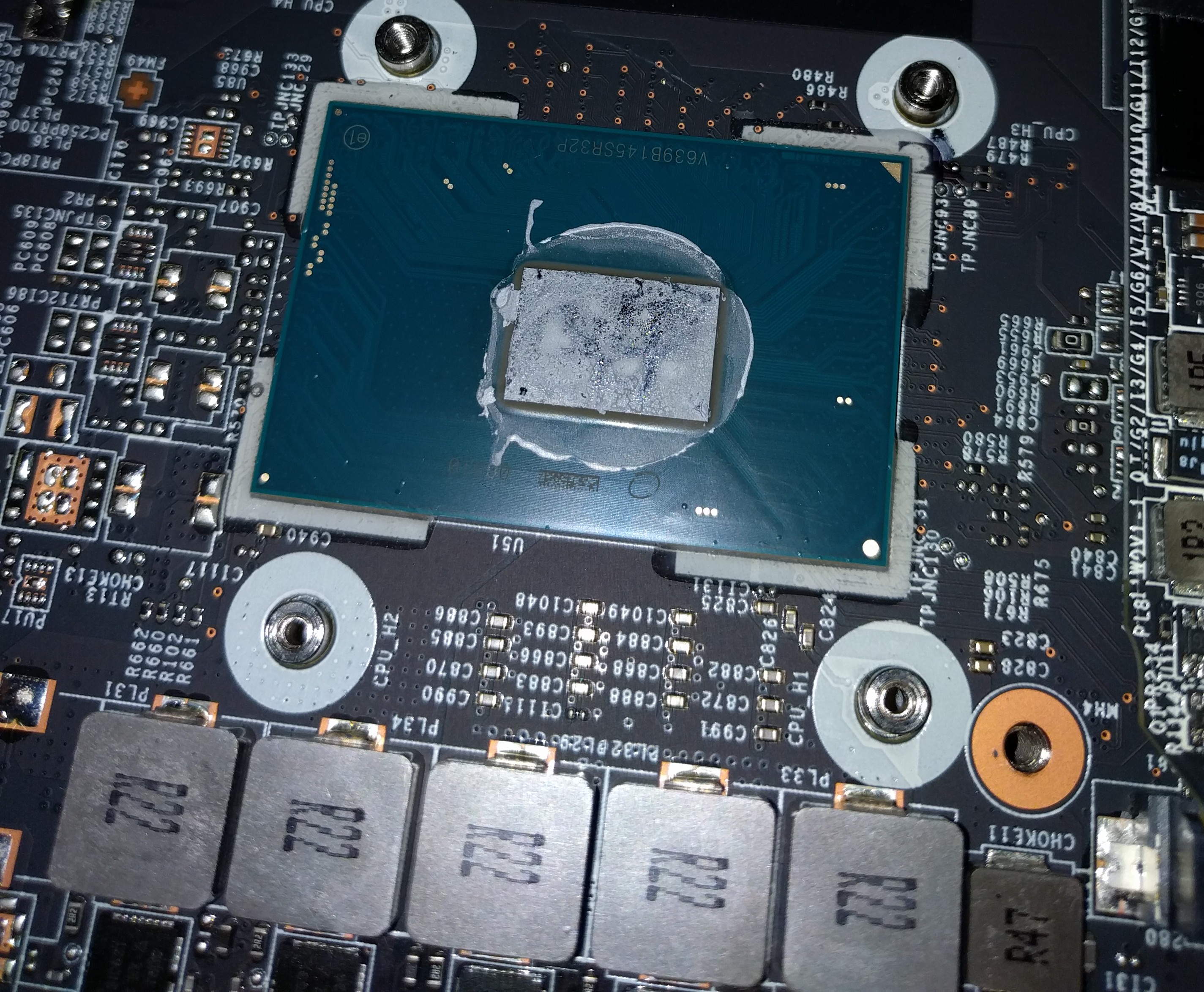
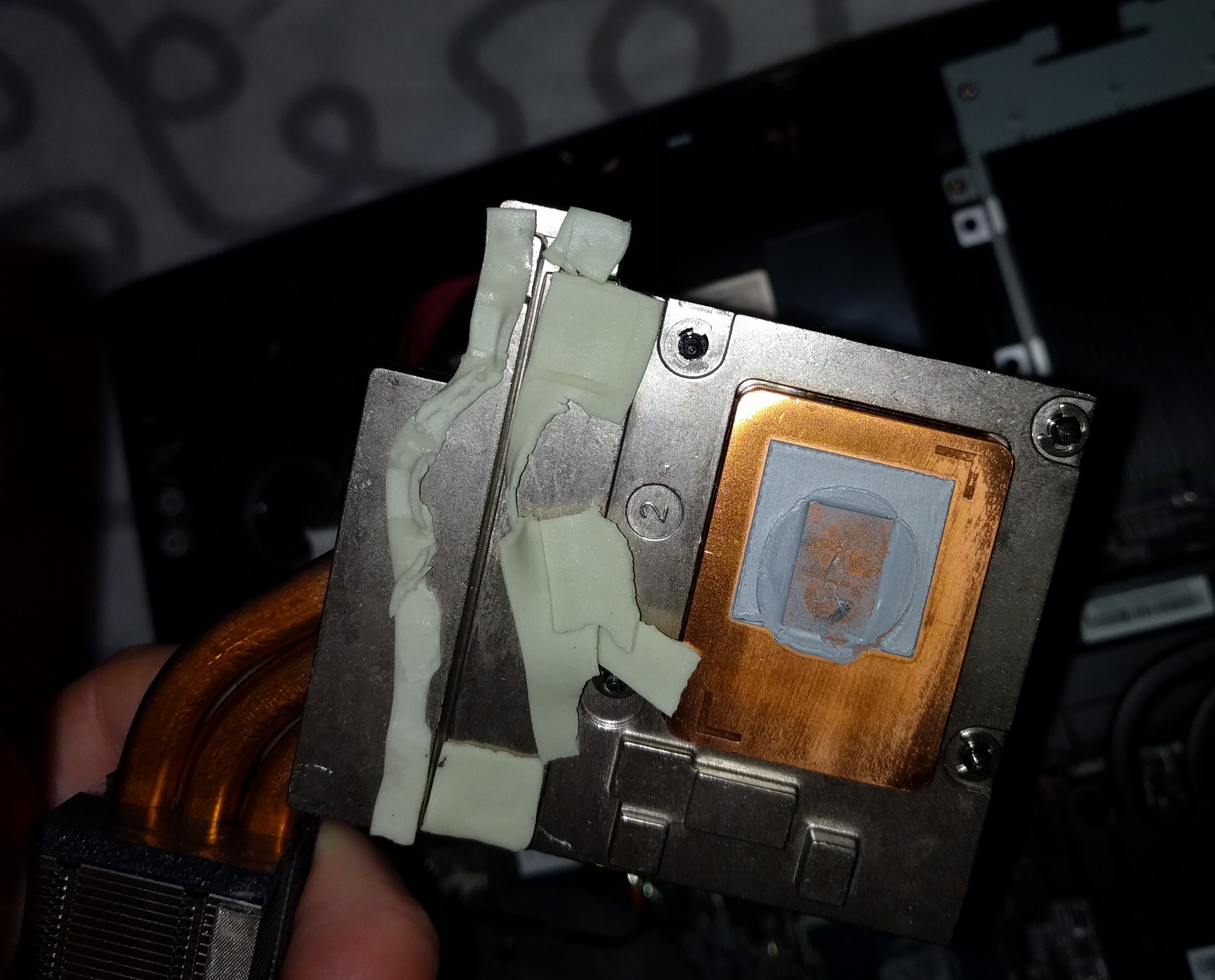
so i went to tear down and this is how it looks like. gonna clean that mess. 6 months old 7re and as falkentyne said they didnt even use a thermal paste but some kind of thermal sticker. my poor cpu no wonder why i saw 99 degree on overclock in cinebench if there is nothing to cool that cpu down. waiting for paste and pads and gonna do it properly
Attached Files:
Vistar Shook and Falkentyne like this. -
-
Hi.
Does the msi gt73 supports SLI ? there is a second slot for the GPU ?
Thanks -
@Phoenix did u get any reply from msi about new bios? ive contacted them but no reply so far
-
As answered in the other thread, for 1070's: CM238 does, yes, if you can find the correct SLI GPU heatsinks and VRM sinks and the cards themselves, and the Eurocom power adapter. HM175 chipset: no, and I do not know if could be forced to work if the .108 EC were flashed into it and GPUs and heatsinks changed out. GTX 1080? No SLI version exists so there is no heatsink available for a 1080 in the slave slot. And then you have to deal with the "missing" power connector for the slave card also...(1070 does not have an auxiliary power connector).
The Official MSI GT73VR Owners and Discussions Lounge
Discussion in 'MSI Reviews & Owners' Lounges' started by -=$tR|k3r=-, Aug 16, 2016.