Problems? See this thread at archive.org.
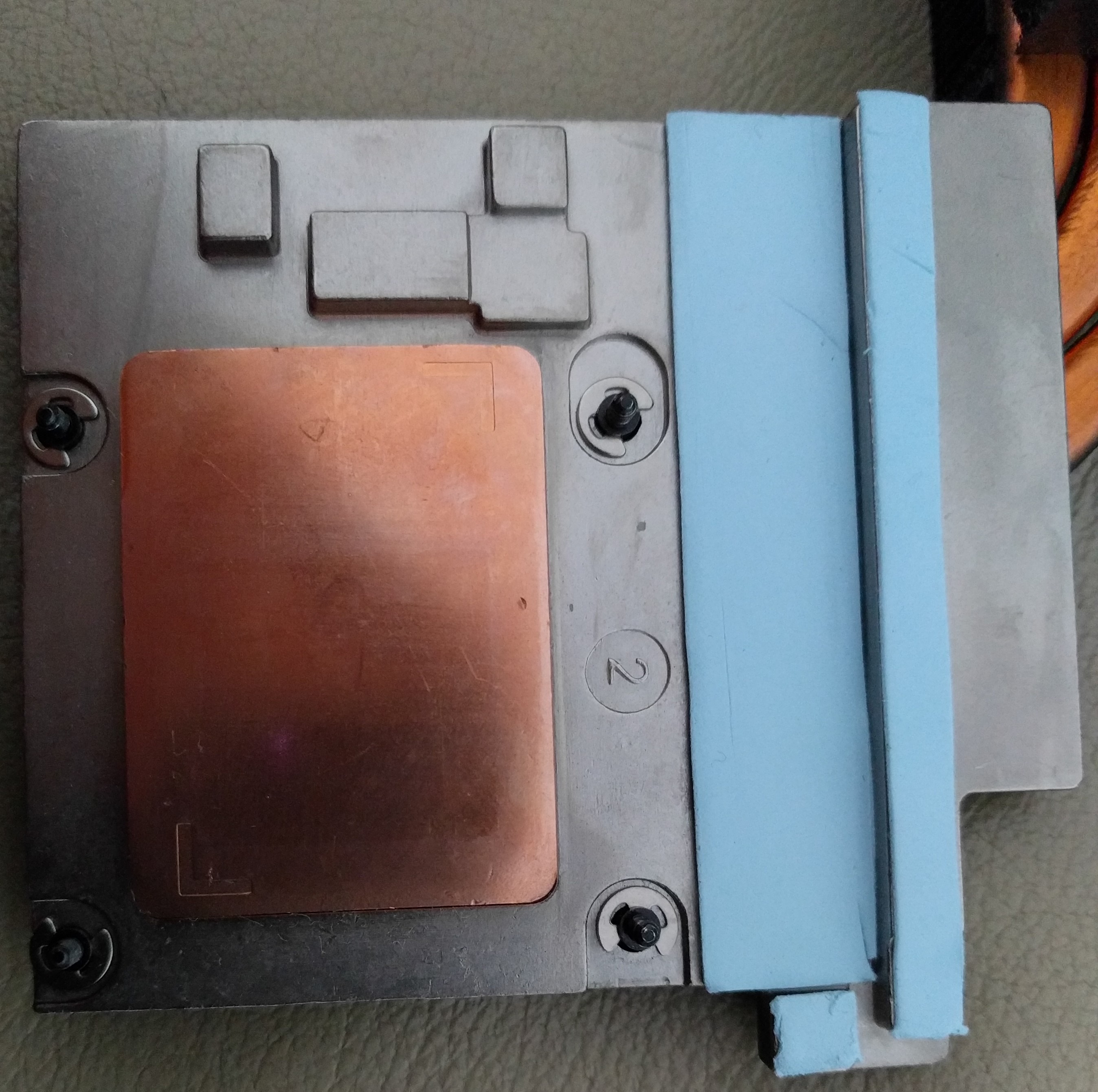
IM BACK WITH REPASTED CPU suggested method by @Falkentyne, from 85 degree back to 66 or something on auto fans, with stock cpu speeds where between core diiference temp is around 3-4 degree from 12 degree its a massive improvement!!!! i want to say big thanks to @Falkentyne for all help and infos he gave me also i want to say that i used 0.5 mm arctic pads and phobya nanogrease paste i spread it out with a finger, im gonna try oc and see how temps looks like, this is first test straight after repaste!! i was very scared to do it myself as ive not done it in 9 years but i must admit it was very easy so anyone who has a problem with they cpus temp dont be afraid do it yourself!!! the diiference is massive! gonna do oc and will post result aslo gonna run aida stability test to see whats temps now!!
-
Attached Files:
raz8020, Donald@Paladin44, Vasudev and 2 others like this. -
-
So what's this about MSI laptops having perfect paste and not needing to be repasted?
Thank god I am vindicated.
Chess and Power Limits wins again.
BTW excellent temps. Extremely well done, @GENOCIDraz8020, Donald@Paladin44, Vasudev and 2 others like this. -
You really need to stop all these theatrics, there is no reason to repaste GT73's - not until you started making a big deal about.
You aren't vindicated, there is no vindication to wasting people's time getting them to do unnecessary hacking on they perfectly functioning GT73's.
Check the posts up until you started making noise, there were just people doing undervolting and getting great temps.
There is no need to re-paste, just undervolt, and adjust the fan curves.
There is no need to hack the firmware, there is plenty of OC performance within the stock firmware.
I'm happy you've found entertainment in doing all of that yourself, and for all those that like voiding their warranty for a few FPS, but it's a nasty thing you are doing suggesting everyone *needs* to repaste and needs to hack their firmware.
Please stop wasting people's time running them around the block with your "fixes". It's completely unnecessary.Last edited: Jan 22, 2018 -
and here is an oc 4.2 -100mz done in XTU AUTOFANS TEMPS 75 degree i see core 2 goes a bit hotter but it might be a paste not spreaded 100 percent everywhere or heatsink fitting but im still very happy with results before on oc with 4.2 i went up to 99 degree with a autofans. there is no point to returning your laptop and paying for shipping and waiting even if its in warranty at least for me in my situation.
Attached Files:
Donald@Paladin44 and Vistar Shook like this. -
-
 lol, what you mean hmscott, if falkentyne would not suggested me method, what to use and go for it my cpu would be fried without even knowing it and what then? people need to start realize if they want to have a laptop every two years or much longer. im not gonna undervolt on stock i dont want lower performance i did not paid for it!!! whats the point then? my laptop went ****e after 3 4 months with stock i had a warranty but i rather did it myself and im more than happy because now i can use it as i should and as it should be straight from box! if people are happy that they gonna undervolt because msi did a shait job i mean go buy aptop for 500 and dont be bothered. we who paid a lot of dollar for this machine IT MUST BE perfect for that price, if its not send it for repair or do it myself. im sure that i did it better than msi because they would do sam **** again and it would last how long again, few months@ no thanks, im not saying everybody has an issue, but if there is a chance for a repaste go for it and dont be scared@@@ its honetsly 7 screws alltogether and its very very easy i mean even 13 yeard old kid can do this its really simple. so who has bad temps dont u ever go undervolt!!! u never paid for that u paid a price for premium stuff so if u dont want to send back in warranty for repair and ur are a more confidence go for it and repaste!! im a living example that went from oc 99 to 75 degree on 4.2 autofans
@hmscott
i mean ive contacted msi about temps etc they told me my unit needs to be collected. 12 core temp difference on cores now its 4... was it worth? hell yeah, and will do it again if paste degrade after time. all temps went down more than 20 degree, what can i say? thanks @Falkentyne!!!raz8020, Donald@Paladin44 and Falkentyne like this. -
Core 1 and core 3 being hotter than core 2 and core 4 is unavoidable. It's because of the heatsink design. Only way to avoid it is to use no thermal pads at all on VRM and chokes and that's dangerous. The 0.5mm reduction already should give you better results than 1mm pads (maybe 2 or 3C improvement).
Just be glad you don't have tripod alienware heatsink with completely wrong and mismatched pads. Only thing better than MSI solution is Clevo TM1 (they finally did some decent engineering...about time). Although still MSI routes the GPU VRM cooling to the CPU fans....but then again Pascal loves low temps....
Check your PM, unlock your Bios and get rid of that VID Boost.Last edited: Jan 20, 2018Donald@Paladin44 and GENOCID like this. -
Reported you to the moderators. I'm sick of your elitist insults and rude attitude. You didn't help Genocid drop his temps from 99C to 75C. I did. And you don't even have the simple human decency to admit you were wrong and say "I'm sorry."
Is this world filled with people this freaking evil?Donald@Paladin44 likes this. -
Just to be sure, undervolting doesn't lower performance, unless you go too far. It is absolutely normal for all notebooks to have some headroom for undervolting, and it is the first thing one should do to tackle temperatures. However in your case, the thermal paste (or was it a sticker?) was shot, and something had to be done.raz8020, Donald@Paladin44 and GENOCID like this.
-
but why i have to undervolt? i want to run everything smooth i dont want undervolt i want overclock cpu where can i get same temps as stock undervolted. i can see where you coming from but its not a solution i would take that for used or cheap laptop not from msi top stuff new. a paste or sticker was completely gone as you could see on a pics so why would i tortue my cpu even with undervolt if basically there was nothing left to cool cpu down. after 6 months its unaceptable and undervolt is not a solution as even msi said my laptop needs to be collected. if there is someone on this forum who cant repaste i think with detailed instructions and videos there is no problem at all. except for people who are affraid and wont do it but i doubt u find those kind of people here on this forum. if u dont want to doit send it back to msi if its under warranty. dont tell people to undervolt because even if a low undervold they did not paid for it if its few months old send back or repaste i personally coudnt take undervolt as asolutionDonald@Paladin44 likes this.
-
Undervolting is "required" to remove the 1.80 mOhms of vcore (VID) boost. System will boost VID by over 100mv from idle to full load (and NOT even report it properly--massively underreport the VID in respect to true Vcore), because of the IA AC DC loadline setting. Undervolting "fixes" this in a bad way, because VID boost is based on current also, so the less current, the less VID boost will happen. But undervolting makes a static set offset whether you are at 1.4v or 0.7v. while the VID boost might boost 0.7v to 0.750v, and boost 1.4v to 1.6v due to how resistances work.
With my instructions I gave Genocid in PM, he won't need to ever undervolt again. In fact he may need to OVERVOLT (adaptive+ positive offset) to avoid instability, and will STILL have lower temps than 'stock' settings would be.raz8020, Kevin@GenTechPC, Spartan@HIDevolution and 3 others like this. -
done few test via aida with stock and oc as well i know its very short time but i dont think it would change anything much idle cores are a bit higher but i had always this problem im gonna do gaming and see how temps look after few hours otherwise im very happy with it
aida test done with cooler boosterAttached Files:
Vistar Shook and Falkentyne like this. -
-
You're not paying attention to what I am saying
If there is a specific issue that's not solved by undervolting and adjusting fan curves, then it's appropriate to recommend returning the laptop to the seller for another one. Or, RMA.
Only in the most unusual, fraction of a percentage of the cases, is it necessary for the owner to repaste themselves.
If you fall into that realm then sure, do it, and lots of people including myself have helped others get the right paste, technique, and walked them through the process on how to get it done right first time. I've done it dozens of times. But, only as a last resort.
Many many years of experience have shown me that 99% of the time it's unnecessary to for the owner to repaste on their own, it's a waste of time.
You refuse to undervolt for some strange reason:
"but why i have to undervolt? i want to run everything smooth i dont want undervolt i want overclock cpu where can i get same temps as stock undervolted."
I OC'd to 4.5ghz x 4 core with a small undervolt, and got great results, and more undervolt for lower multiplier settings, with great performance, on stock paste.
You didn't even try undervolting did you? Why would you be afraid of a perfectly save software tuning, but be ok tearing apart your laptop to repaste?
I saw the photo of the paste on your laptop, there was nothing wrong with it. It was off set, but covered the CPU just fine.
We will never know if your situation could have been solved with undervolt because you were directed by @Falkentyne to not do it, did he make you afraid of trying?
@Falkentyne is doing a great disservice skipping the easiest and safest method of reducing CPU temperatures by steering people away from undervolting. That's not good for the community at large, and the sad thing is he thinks he is "helping".
I'm sorry you had to go through that all, if you had tried undervolting you more than likely would have been in that 99% that gets great temperature drops of 10c under 100% CPU load, which is more than enough to game and run applications.
You get cooler operation by repasting with enthusiast paste, because it's focus is to sell paste, not give long life operation with no owner intervention. MSI saves money by not needing to re-paste laptops during the 2 year warranty, so the paste they use lasts a long time without intervention.
Too many people get sucked into re-pasting just on their own read of these forums, not realizing the cycle of re-pasting they are committed to. They really don't need to be told it's the first and only solution, because it isn't. Undervolting does more than enough to reduce thermals 99% of the time.
It's also not a great thing to have to tell a prospective buyer. I know I wouldn't buy a used laptop from someone that disassembled the laptop to improve thermals a few degrees' instead of undervolting.
Sorry you got caught up in this all, I really am only talking to @Falkentyne , trying to get him to see the wisdom in asking people to try undervolting first before recommending BIOS hacking and re-pasting as the go to solution. I wish he had tried undervolting with you first, you might have been able to avoid all the re-pasting hassle completely. -
i forgot to add what i said before that my laptop is insured on accidentl damage thaths why i was more confident
hmscott likes this. -
The accidental damage warranty coverage doesn't include the owner mucking about inside of it. Even if opening the laptop and repasting it doesn't void the warranty, breaking something while inside does void the warranty - at least for the internal damage caused by the owner.
It's for drop damage to the case, screen, and doesn't cover owner induced damage.
But, it sounds like you did a careful job and had a successful outcome. Good training for the re-pasting every 6-18 months for the lifetime of the laptop.
There is lots of fun to tearing apart laptops and PC's to improve performance, but a lot of people just want it to work well enough to game or do their jobs, they would have never considered surgery on their brand new laptop any more than jumping out of a perfectly good airplane to float to earth dangling from a silken sheet
Anyway, I'm happy it worked out for you and now you can get to gaming or working with your new laptop instead of being a Laptop Mechanic.
-
thats what i was asking when insuring, no, my insurance cover any accidental damage, including spit drinks, drop, broken screen, just everything even if i did something wrong with it it covers it. but even if, not how would they know? they dont care in some ocasions they dont even want a laptop back, so i really doubt about that but as i said its included any accidental damage, so im ok with it. i will try undervolt next time when i will get temps problem again to see if that be a solution for now im happy as it is. my laptop lasted on stock speed and paste 5 months so that was not a good luck tho
You didn't even try undervolting did you? Why would you be afraid of a perfectly save software tuning, but be ok tearing apart your laptop to repaste?
I did undervolt with 4.2 before -100v was 99 degree now around 75-77Last edited: Jan 20, 2018 -
Actually except for a "lost / stolen" policy you have to return or prove the existence of the damage to the laptop for compensation.
And, for RMA coverage - to repair what's wrong - the owner induced damage isn't covered.
Here's a snippet from the Accidental Warranty Coverage description page (of what's covered and not covered):
- ADC is a one year warranty which covers limited accidental damage one (1) year from the date of purchase
- Limited one (1) accidental claim per notebook. (WIND Netbook is not covered).
- Product must be registered within thirty (30) days from the original purchase date to receive this coverage.
- ADC protections covers the following with exceptions to:
- Drops, spills, electrical surges, and fire.
- Does not cover:
- Cosmetic damages (scratches, dents, … etc), lost, stolen, incorrect or inadequate custom installations, intentional damage, recovery or transfer data, and natural disaster.
MSI General Product Warranty Policy
https://us.msi.com/page/warranty
Note: the description of ADC goes on to say it only applies to MSI branded laptops sold in the USA only, so if you purchase your MSI laptop in another country you don't get ADC coverage:
- Accidental Damage Coverage only applies to MSI branded laptops* which was purchased in the United States. This warranty policy DOES NOT apply to MSI Netbook (WIND), barebone, whitebox, or OEM products.
Last edited: Jan 20, 2018 -
sorry i should said that i dont have a insurance from msi but privately and im in uk but thanks for info anyway i should say it earlier. i no my insruance company in any case will ask for proof of purchase or receipt only.hmscott and Donald@Paladin44 like this.
-
What a long row of posts due a simple repaste
And undervolt is the only way to heaven. No damage and only happiness
Damn I must be the most unlucky person in the world
@Phoenix
Donald@Paladin44 and Vistar Shook like this. -
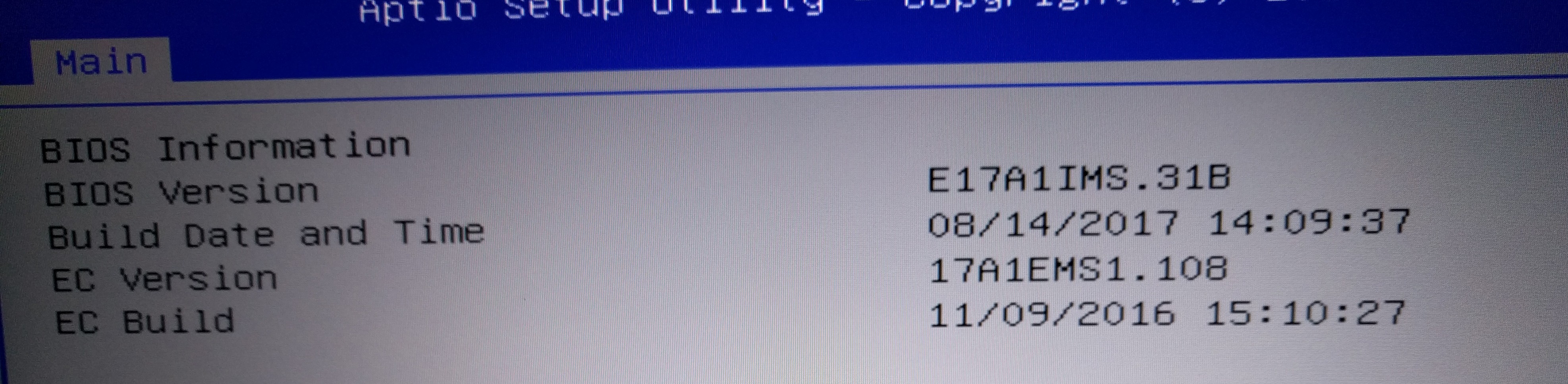
@Phoenix here is my bios version downloaded from msi and here is what i was talking about different advertised date. msi ignored it
Attached Files:
-
-
so how much should i did try with undervolt on stock speeds if i was getting 94 in aida ? would a small undervolt affect on stock speeds? bevause i was undervolt when oc before
-
Hello guys,
I had problems with temps and I fix it with repaste. I just wanna ask I still have uneven CPUcore temps when run prime 95. My CPU temp is about 73 C (hottest core). Still some cores are 8-10 C lower that hottest one. Is that dangerous for my laptop? I do not wanna repaste again I mean that is only dangerous if some cores rich TJ max some not, but my CPU temps are fine just not equal.
Falkentyne likes this. -
FMA3/AVX enabled prime 95? or AVX DISABLED? (CPUSupportsAVX=0 and CPUSupportsFMA3=0 in Local.Txt)
And......Core 1+3 hotter than Core 2+4?
which one??Ivan994 likes this. -
I just download newest version and start small fft test. I guest than it is enabled because I have not touch anything just download and run. Look at picture for cores temps. Now it is in 80+ when I run prime after repaste it was in 70s. Could paste lose cooling for 3 days
https://i.imgur.com/wbWnZh9.jpg -
FMA3 is enabled.
cores 1 and 3 much hotter than 2 and 4 is normal on this laptop
and even much more with FMA3.
This can't be avoided.
Try disabling FMA3 and AVX then try again.
Set these two variables in prime95 folder into LOCAL.TXT:
CPUSupportsAVX=0
CPUSupportsFMA3=0
Then save and run prime95 againDonald@Paladin44 and Ivan994 like this. -
Thank You for an answer. When I disabled it I got same temps almost just I can run prime 95 now in 4 GHz CPU. When Is enabled,I can run just 3.4 GHz.
You can see picture again. https://i.imgur.com/mKtLenm.jpg
Then everything is normal with my laptop? I do not need to repaste again? I mean temps are ok? -
Change ICCMAX (CPU CURRENT LIMIT) in the Bios (OC) section to 1000 (250 amps).
Ivan994 likes this. -
I will try now. Then I can run test with 4 GHz anytime even in avx is enabled?
what about repasting? Then difference of 12 C is normal on this laptop? And 84 C highest rich core temp after about 10 mins run prime 95 with cooler boost is fine? -
if you are using stock (default) original paste and you want to run prime 95, then yes you should repaste. But there is no reason to run prime95 unless you are trying to test heatsink balance and repaste quality thermal performance. The good thing about prime95 is that it puts all threads under equal, balanced load (even @unclewebb admits this in the TS thread. But you should disable AVX and FMA3 if you want to run prime95). Better is just cinebench r15 runs.
Ivan994 likes this. -
I already repaste my cpu 4 days ago. I had problems with stock paste 80 C in games. Now is 74 at max in very high end game like Witcher 3. I do not wanna run prime 95, I just wanna ask you is my prime 95 results of temps good enough that I can leave this paste on my CPU and uneven cores 1+3 with 2+4 is about 10-12 C. That is also fine with this laptop or not? Sorry if I aks to much, just wanna make sure with ppl that know this stuff better than me.
Thank you mate! -
Change your ICCMAX to 1000 (250 amps), disable AVX and FMA3 in prime95, then do a small FFT test 12K, then we'll see.
As I said you can't avoid cores 1 and 3 being hotter than 2 and 4.
Even with liquid metal with AVX and FMA3 disabled, you will have a 3-5C difference between hottest and coldest core.Ivan994 likes this. -
I did all of that. Here you are results
https://i.imgur.com/mKtLenm.jpg
Are they ok?Donald@Paladin44 likes this. -
Pretty much to be expected. You shouldn't have that big of a core difference between cores 1/3 and 2/4 however. 12C is too much for AVX/FMA3 disabled. When I had Kryonaut and Nanogrease Extreme, I had 7C difference at 4.5 ghz with small FFT with AVX+FMA3 disabled.
Only way to reduce those temps are:
1) use 0.5mm thermal pads on VRM+Chokes (instead of 1mm).
2) use a little more paste (use full spread across the die, not "dot" application).Donald@Paladin44 likes this. -
Hmm. Could I have any harm on my cpu with 12 C difference? I am not good enought to change pads, I do not wanna mess up something. Could I leave it like that? I mean my cpu is not going to die because of this?
Donald@Paladin44 likes this.
-
No harm at all. It's only going to be a problem if you want to overclock higher. That 12c difference could result in a core reaching 95C while the others are 83C...
raz8020, Donald@Paladin44 and Ivan994 like this. -
Thank you for everything! You really teach me a lot! I Did also cinebench test and there different is 7 and temps are in 70s C.
Donald@Paladin44 likes this.
-
Ok, cool, I am surprised any insurance would cover owner induced damage from customization, but if it does that's what you want when opening up a laptop to hack on it
-
Undervolting reduces temperatures, and removes the need to re-paste in 99% of the cases I've personally assisted - 100's, and I've seen others over many years passing on the method on their own recommending it to others with the same result - no thermal throttling and no need to re-paste, a simple solution to a common complaint,
You're method either doesn't work well enough, or you are recommending people re-paste their laptops that don't need to re-paste. Operating temps in the 70's-80's is fine long term. Re-pasting to briefly get lower temps is unnecessary.
The goal is to find a simple solution that a user can understand quickly, and feel comfortable doing and recommending to someone else. I don't see that with these BIOS value settings.
Why skip using a simple solution undervolting instead of confusing owners with complex concepts and questionable BIOS settings?
I think it's only to satisfy your ego, not purely to help anyone. And, that's why I think you feel "vindicated".
You found complex alternative moves to a simple solution that you can claim as a win. Serving yourself instead of others.
When helping people it's not about you, it's about them, and that's why I've been trying to get you to see this. IDK if that's possible, but I am going to keep looking for examples to help you see it.
Perhaps over time you'll learn the approach of moderation rather than excess response for all.
There is much to learn when helping people, confusing them is a sign you are using the wrong method. -
For most people undervolting is something they can be comfortable doing, far more people than are comfortable re-pasting.
The GT73 out of the box runs cool enough, and under 100% load with undervolt of -100mV it ends the *need* to re-paste.
For those of you addicted to re-pasting right out of the box without even testing the base numbers to find out if you even need a repaste it's tough to see it from a normal persons point of view.
Most people don't drop the engine on their new car to re-paste it, neither do they expect to disassemble their new laptop to re-paste it.
Taking a perfectly good model like the MSI GT73 and forcing it into the "Clevo" mold way of thinking ruins the advantage that MSI GT73 has over Clevo's, no need to repaste MSI's out of the box.
So I can understand your eager endorsement of the efforts to make re-pasting the GT73 the new norm, to level the playing field.
There's no need, and has been no need for years, for owners to re-paste 99% of the MSI GT72's, GT73's, GT80's, GT80S', GT83's, or GT75's, and no amount of "subtle" effort is going to change that.
-
You can work on the core temp differences later.
I got 86/83/86/84 during one run at 4.7 ghz, 1.260v, IA AC DC loadline=10 (Core I/A Domain), with small FFT prime 95, AVX /FMA3 disabled, for 7 minute run, then I let it cool a bit and did it again, got 85/82/85/82. 3C core temp difference.
This is with Liquid Metal (Conductonaut).
and using 0.5mm thermal pads instead of 1mm.raz8020, Donald@Paladin44 and Ivan994 like this. -
Yeah it's always been like this. Classical MSI Swiss cheeseDonald@Paladin44 and GENOCID like this.
-
ok but i you still didnt answer how much undervolt aproximately i can use on stock clocks? i will try it next time so i can compare, but as i said in my case i couldnt do oc with 4,0ghz with -100v because in tests i was getting throttles and so high temps thats why i wanted to repaste because i couldnt do any oc problems i had with stock speeds for example i played fifa 84 degree before balanced mode on stock now its 64-70 after a while, 78 on project cars 2. i really want oc for other stuff not gaming thats why i went repaste because i couldnt go oc with undervolt at all not like before when it was new. this is what im tryin to say if u cant fix temp send back or repaste dont live with temps 90+ because it wouldnt survive long. i had to do it because i cant live with 99 temps in oc with undervoltLast edited: Jan 21, 2018Donald@Paladin44, Vistar Shook and hmscott like this.
-
1) instead of me asking you every time what are your laptop specs, please copy/paste my signature and edit a few things like the SSDs to match your system. Feel free to steal the MSI Gaming Logo if you wish as well
For a 7820HK on stock clocks -100mV is good undervolt. I even ran 4.2 GHz with that -100mV undervolt before with not stability issuesDonald@Paladin44 and hmscott like this. -
MSI GT73VR 7RE (Titan) 287UK 17.3 Inch Gaming Laptop (Black) - (Kabylake Core i7-7820HK, 32 GB RAM, 512GB SSD, 1TB HDD, GTX 1070, Windows 10
thats exactly my model. im running now 4.1 with -100mv u see temps before i couldnt do 4.0ghz with -100mv because i was getting 99 degree.Attached Files:
Vistar Shook and hmscott like this. -
-
If your temps reach 99C with a -100mV then the problem is not the undervolt. Either a bad thermal paste job or a bad heatsinkhmscott and Vistar Shook like this.
-
THATS WHAT IM TRYIN TO SAY WHY I DID REPASTE because i couldt live with that!!!!!
temps were find first month or two i remember when u said thanks to silicon gods for temps ive got but they changed after few months and i was stock speeds i wasnt using oc or undervolting at all just everything default
hmscott likes this. -
![[IMG]](images/storyImages/EeChF7M.gif) Donald@Paladin44, Jzyftw, hmscott and 1 other person like this.
Donald@Paladin44, Jzyftw, hmscott and 1 other person like this. -
When you did the disassembly to repaste, did you find anything unusual? Like missing screws, popped up heatplate - from not screwed down mounting point?
Your accounting of what happened is very unusual, we rarely hear of a rapid change like that in temps, and when it happens it's usually due to some physical failure in a component or user intervention - mucking about - lifting the heatplate to look at the paste and then putting it back down without re-pasting - which can trap air bubbles in the paste causing the marked increase in temperatures before/after mucking.
There needs to be some kind of reason for this to occur, it doesn't "happen" randomly
I have heard of someone re-pasting a laptop, only to have tightened components back with stress on the heat-pipes, and hearing a loud "pop" a week or two later, the pressure broke the weld point and that caused an immediate failure of the heat pipe and immediate increase in temps, but that required replacement of the broken component before it could be resolved.
A sudden inexplicable increase in previously great temps is... inexplicable...
low9 likes this. -
yes, when i bought it and from what i remember i was i think two or three weeks running on 4.2 -100mv in xtu everything was cool temps as well.. then i noticed i dont need oc now so i went back to stock speeds. after like 4, 5 months ive seen temps were around 85 in hours of gaming maybe 86 max. but when i recently went to to cinebench which i didnt run for a few months as well as aida ive seen temps went crazy and when i went oc it was totally crazy. when i tear up i did not heard any crack sound or anything unusual even after i put everything back its just quieter than before now. i think every component is ok and was ok as well i only seen pads were damaged and a bit of thermal sticker left on cpu. i have to give it a few weeks to see if temps stays like that or go again mad. im currently on 4.1 ghz -100mv with custom fan curves in silent option. ill keep with that for now and see how it will act. i ran aida for 10 mins it looks like its stable and temps were 80 with cooler booster on. if im wrong pls correct me.
i never touchted gpu as it never eceeded 67 degree even after hours of gamingAttached Files:
Last edited: Jan 21, 2018hmscott likes this. -
-
So I've had this RMA'd TWICE now for the same issue. First time they repaired the mainboard, second time they replaced it. I just got it back from the second RMA a couple days ago and it's doing it again. Ugh. This morning I couldn't even get into BIOS, I waited a couple hours and tried again and it finally booted
-
If the power button on the GPU light switches OFF and back on after 60 seconds, then you have defective RAM.
How much RAM do you have in that system?
is it 16 GB or 32 GB?
2 or 4 dimms?
Are the dimms both the EXACT SAME BRAND? (note: MSI and kingston are identical).
The Official MSI GT73VR Owners and Discussions Lounge
Discussion in 'MSI Reviews & Owners' Lounges' started by -=$tR|k3r=-, Aug 16, 2016.