Problems? See this thread at archive.org.
Why does LM only go on the CPU? It looks like you do ICD on the GPU with the LM service.
-
-
-
I've 5.1 speakers at my other house so if you can wait till tomorrow, I will be going there, I will check and report back....
-
I have, on my previous MSI GT73VR Titan Pro-425 but that was bricked when I tried reflashing the BIOS
it works fine as the heatsink makes good contact with the CPU but it's dangerous, if anything slips through or squirts out onto the motherboard, say bye bye to your laptop
I advice you to stick to IC Diamond using the X Cross paste method:
The X Cross method is the best in my experience as once the heatsink is fitted, it provides the maximum coverage with the least air bubbles
![[IMG]](images/storyImages/BdcadBs.jpg)
-
-
I hope this isn't a dumb question. But how do you get a good deal on the 1080 equipped GT73VR Titan Pro 4K-225? Seems like it comes out to $2,799 with most retailers jacking the price even higher, or making it pre-order only. I can get a spare nvme drive, and DDR4 ram easily. I can't install the 4K screen, or 1080 MXM module as easily.
hmscott likes this. -
225 is the GS73VR:
Custom Built MSI GS73VR 7RF Stealth Pro-225 Microsoft Signature Edition 17.3" Thin & Light w/ nVIDIA GeForce GTX 1060
479 is what j00 want:
Custom Built MSI GT73VR 7RF TITAN PRO 4K-479 17.3" nVIDIA GeForce GTX 1080
Atma likes this. -
Am not sure where you live, but do check with shop like HIDevolution / Xotic pc / Gentech before you decide to buy.
They can also pricematch newegg/amazon/some other e-tailer, give cash discounts, and zero sales tax on all states other than what that particular retailer is in.
Oh hey @Phoenix I got a GS63 to play around, the keyboard is excellent as you said!
Also have a P870 coming somewhat soon so I can test that one too.Spartan@HIDevolution likes this. -
curious to know your impressions comparing both keyboards

-
If you can sacrifice the 4K screen you can order the Titan Pro-003 from HIDEvolution right for for the ridiculously low price of $2349. With the money you save you could buy a 4K screen. Heck, they might even quote you a screen upgrade.Atma and Spartan@HIDevolution like this.
-
Fangbook VR GTX1070 SLi + 7820HK is 2650usd through cyberpowerpc
dunno if he wants to get an sli laptop with barebones ram/storage though -
Already ordered a MSI GT73VR 6RF via HIDevolution. Really excited to get it mid-February. I'm still waiting for @Donald@HIDevolution to respond my emails though.
Anybody here using cooling pads or vacuum coolers? I'm planning to buy both but not sure if it's good to use them at the same time. I'm planning to buy the Cooler Master SF-19 V2 at $119 https://store.coolermaster.com/notepal-sf19-v2 and the Opolar LC06 at $30. Should I buy just the cooling pad, just the vacuum cooler or both? Any recommendation as to what cooling pad and vacuum cooler I should buy? I really want the coolest ones out there (anything under $200 usd is good). Thanks!Last edited: Feb 6, 2017Spartan@HIDevolution likes this. -
congratulations bro! welcome to the MSI / HIDevolution Gaming Team Bandwagon
BTW, why don't you make an "Ordered a GT73VR 6RE via HIDevolution" Thread like me in the Main MSI sub-forum so we can all share the joy / specs / progressLast edited: Feb 6, 2017HardCoreGamer4Life likes this. -
Thanks bro! Really excited to use it and share it with you guys here. Maybe I'll do that as soon as I get my laptop
By the way, are you using cooling pads or vacuum coolers with your GT73VR 7RF? Also I edited my post earlier as I was wrong about it, I ordered the GT73VR 6RF instead of the 6RE, I apologize for the mistake haha
Last edited: Feb 7, 2017 -
I have a U3 Cooling pad at home but I'm out mostly. The cooling on the MSI laptops is excellent when I stress tested it max temp were 80C
Email them to add this to your order bro:
"1- Please ensure GSYNC is there and working (if you ordered a GSYNC screen that is)
2- Please check to ensure there is no excessive backlight bleeding
3- Please paste my CPU + GPU using IC diamond with the X Cross method (unless you wanna stick to the stock paste)"hmscott likes this. -
To whom should I send these additions? Can I send this to @Donald@HIDevolution? Thanks for the advice bro!
-
[email protected] or open a ticket through your dashboard
-
We stopped offering Coollaboratory Liquid Ultra (CLU) on the GPU because we had a few GPU's overheating after some time. Not only that, but the CLU would become runny (like water) and run down to the resistors causing them to fall right off. This is not covered under the manufacturer's warranty if it happens.
We could apply it, but we would be responsible for the GPU overheating (more than usual) or just not working after some time, and we are not willing to take that risk, nor do we recommend that anyone should do it.
I know others do it, but only at their own risk.
.Maineiac12, Atma, ThePerfectStorm and 2 others like this. -
Have my 1080 under Grizzly conducto which is more runny than CLU since May of last year, it's outputting around 220w+ of power on every game and even madVR, haven't had any temp increase since day 1.Atma likes this.
-
Perhaps because the graphics card sits in a desktop? And not in a laptop that gets tossed here and there? + the Heatsink in the different models are of varying quality? It is well known that liquid metal is not the best choice if you have a low quality heatsink aka warped or uneven.
nightingale, hmscott, Atma and 1 other person like this.
-
That's true too, this is a desktop Zotac AMP version.
Laptop heatsinks flex a lot, though to a lesser degree the GT73VR since the chassis is so thick.
I imagine that machines like the P650 and P670 series would have a lot more flex applied onto them.hmscott, Donald@Paladin44 and Papusan like this. -
Yeah. I expect HID has a permanent policy on this, which means that they do likewise on all models after they discovered some cases. That said... If all laptops were built equally well and with premium heatsink quality, so would not this been a big issuehmscott and Donald@Paladin44 like this.
-
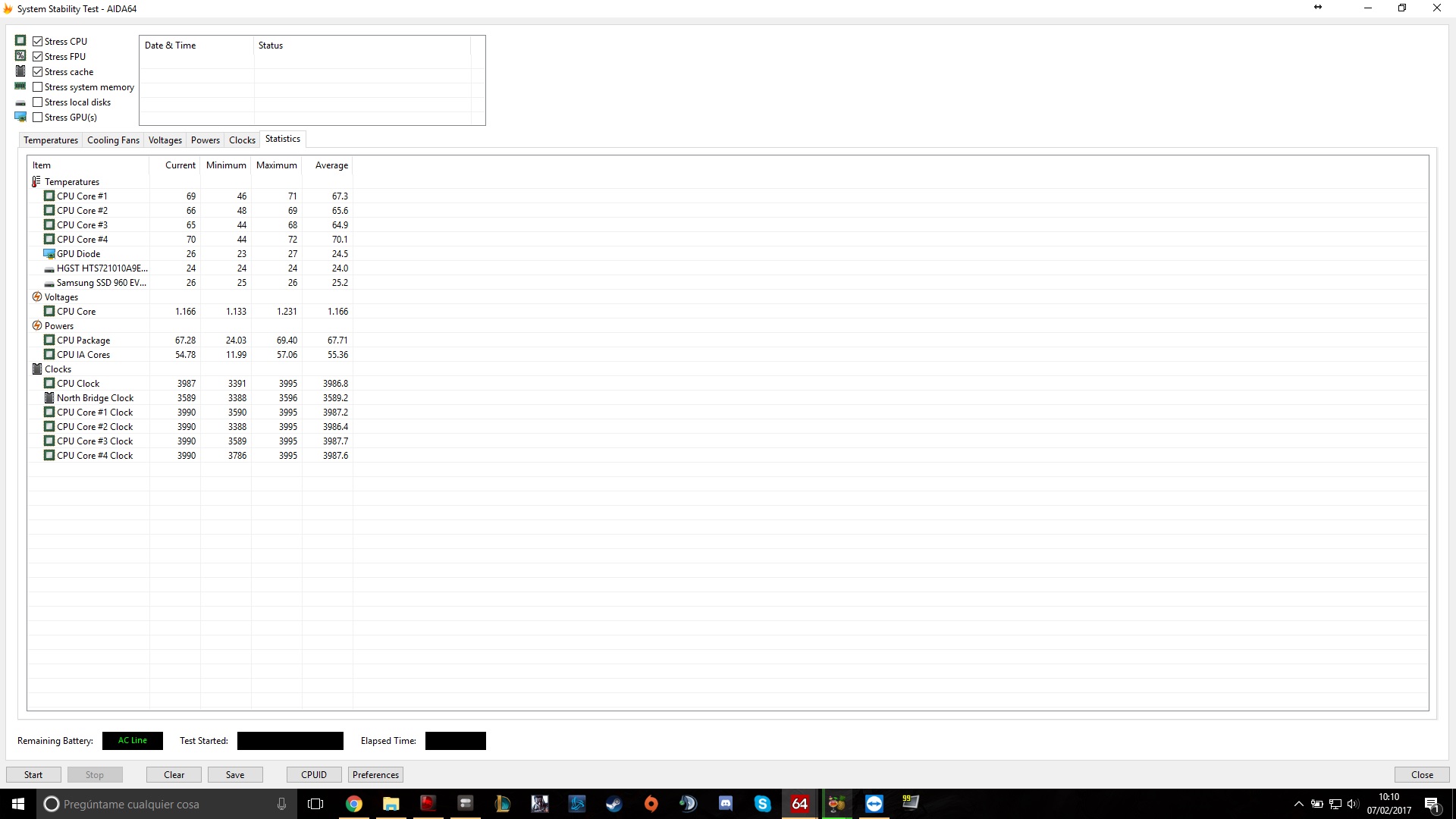
I´m having again a 5 degress difference in temps. One of the cores is warmer. I´ve been using handbrake for hours and I get the temperatures of the screenshot. Should I worry?
Attached Files:
-
-
In one word - no.
Sent from my SM-G935F using Tapatalkjaime360 likes this. -
Kinda weird that you gusy worry about a 5c temp difference while my desktop 5820K has 10-12c temp difference under OCCT lol
And that's a soldered IHS chip paired with Noctua D15 dual tower coolerhmscott, Atma, jaime360 and 1 other person like this. -
Well, if you notice, I told him NOT to worry

Sent from my SM-G935F using Tapatalk -
I never thought of gentech before, they have some pretty crazy promotions right now due to new years, a little worried they might dissapear. Xotic is the only one that right off the bat allows you to get a 4K display on the Titan Pro-003, they where at $2859. I tried LPC Digital, but they only have Sager laptops, the NP9873 being the closest to the GT73VR.
I actually asked both HIDEvolution (ticket), and GentechPC (email) how much they would charge for the 4K upgrade on the MSI GT73VR Titan Pro-003. I should probably get a response in the next 24 hours.
A side note, the Intel 8265 seems to be around $26 on ebay. I wish gaming companies would supply a mPCIe slot that would support the Sierra Wireless MC7455, a 4G modem that works on T-Mobile Bands. That way I could try setting up a Google Fi SIM for data only on a laptop, would be cool!
Edit: I hate SLI, doesn't scale very well, generates alot of heat (when active), and only shines when a game is compiled specifically for NVidia. (My opinion of course, I'll vote with my wallet!)4kintheroad, Spartan@HIDevolution and Atma like this. -
My laptop is supposed to be delivered to the MSI hospital today. A day earlier than it was scheduled. I hope it gets a doctor that takes pride in their work.
-
-
If you're going to upgrade to the intel 8265 it's cheaper to do it at the time of sale. I've seen the upgrade cost as low as $20 before. I ordered one separately from @Ted@HIDevolution and it was $35. Still better than buying from an unknown eBay seller IMO.hmscott and Spartan@HIDevolution like this.
-
Your temperature differential is enough to return to Intel for a replacement. I've done it a few times. It's not supposed to have that much of a temperature differential, anything over 10c is returnable.
And, delidding didn't help when I tried it, that didn't help the ease of the return I have to say - so I don't recommend trying it. Sometimes the die is the failure point.
If you are still under warranty you can return to Intel directly, I returned mine before the initial return period with the retailer expired, and I worked with the retailer on providing test results for them for their Intel return.
Intel later called me and asked a bunch of questions, and told me their testing showed the same results I found.
So all is not lost, use your Intel warranty
Papusan, Shehary, DukeCLR and 1 other person like this. -
But I don't have a 2nd CPU to keep my system running though
-
Try calling Intel to work out a swap that includes an early replacement - you'll probably need to give them a CC to hold the funds until you return the bad CPU, but that should solve your problem
-
Ah alright, I'll do that soon.
Also iirc, you can't delid a soldered CPU... -
That's the beauty of your situation, it's all Intel's responsibility starting at the lid, so you can't try to fix it on your own.
Papusan likes this.
-
What about five degrees???
-
No, that's not enough, it's 10c or over...last time I checked... you could call and complain to Intel, maybe they will swap you a new one to try.
The replacements I received varied from negligable difference to 4c-5c difference, it's ideal to have 0c difference.
That way one core doesn't reach throttling point before the others - shutting them all down - weakest link and all that.
Papusan likes this. -
I'm away from my desktop now so I can't access the dozens of screenshots of my temps but after reviewing the few results I posted in my i7700 build I had major temp differentials in the screenshot I posted at load with 4.8 but they were much closer at 5.0 with the new cooler. I didn't post a shot at load though maybe I can get a new one to see how high I can get too.
-
The owner's lounges exist, exactly so that everyone isn't starting another thread when they get a new laptop, or have a question about the laptop.
Just post in here when you have a question or comment about the machine.hmscott likes this. -
Who are you to tell me or others where to post?
FYI, I asked @Charles P. Jefferies where to post resellers feedback since there is no dedicated Resellers Feedback Thread like Clevo has and he told me just post it in the main MSI Sub-forum
Link: Charles' Instructions
Enjoy:
Ordered a MSI GT73VR 7RF TITAN PRO-425 from HIDevolution
Ordered an EVOC 16L-G-1080 from HIDevolution
Just ordered an EVOC 16L-G-1080
Last edited: Feb 7, 2017 -
So I have a bit more test data with the 2-4 second black screen I and other owners of the GT73 have been experiencing. In the game black mesa I can reliably get the black screen so I used it for testing. Although difficult to narrow down but this was all in sport mode for the record. When I adjusted settings in the nvidia control panel and adjusted everything to maximum quality I would get the black screen, when returning everything to default in the nvidia control panel I got no black screen. From what I have gathered so far is that there is some kind of problem with voltage or load handling, Everytime it crashed it was in an area with vast drops in FPS (God rays and lots of shadows/reflections). It normally gets 280fps roughly and in the 2 areas it would crash the fps would drop to about 70-80 and jump to 100, then 120, back down to 80 and then black screen. Of course this lead to the idea that Vsync at 60fps would stop that and yes it did, not only that but my GPU went from 60C and 84% load to 42C and 15% load with Vsync on at 60fps (My HDTV refresh rate, my laptop has the 120hz screen).
This would also make sense, while I can't have my rivatuner/afterburner HUD showing fps in starcraft 2 due to it thinking I'm cheating, every time I got a black screen was when something large and flashy happened which I am now assuming caused a large drop in fps all of a sudden and the same with diablo 3. I haven't had a problem with witcher 3 because it won't go higher than 60 fps due to my HDTV. So I'm 98% positive it has something to do with large FPS jumps up/down but having trouble figuring out if it is a driver issue or vbios. Seeing that settings all changed to maximum quality in the nvidia control panel have a direct impact and cause black screens in these games (no black screen with everything at default or even a few settings increased to highest quality) I would think it is a driver issue???
What I left to try is turn all settings to maximum quality in the control panel and turn on Vsync and see if it black screens at the same spots but I will bet that nothing happens.Atma, DukeCLR, macmyc and 1 other person like this. -
Are you offended? Did I disrespect you in any way?
I can only go off of what you say. Nowhere in your encouragement to post a thread, did you say it was for reseller feedback.
I'm not bothered in the slightest, and am just going off of the original stated purposes for the owner threads. Sorry, but joy/specs/progress falls under the owner's lounge umbrella.
It's not like I'm in the background dry snitching to the mods. I let things go as they are, if the mod team has a problem they'll sort it out on their own.
Did you put all of those post on display, to get under my skin? Please, let's be adults. It's possible to exchange view points without going to that level.
Be cool.
Does it happen with G-Sync disabled? -
The only reason why I was offended was that you made it sound like an order rather than asking or suggesting in a nice way.
I only followed what I was told by a Super Moderator, I always follow the rules.
Hope that clears the misunderstanding -
I don't think it matters if it is on or not but I believe it was off. I will test with it on and off tonight when I test maximum control panel settings with V sync on.
I will also test it on the laptop screen seeing as the TV caps at 60fps and this screen will cap at 120fps. The black screen always happened when it dropped from 280fps to bouncing in between 77-120 fps. I know that is why it runs fine at 60 fps with vsync on the tv because it doesn't bounce around but it will bounce around on the laptop with vsync at 120 fps so it will be interesting to see if it black screens.
I know witcher 3 runs fine at 60 fps on the TV but I hope it doesn't have issues trying to run at 120 fps on the laptop, I suppose that is what Gsync is for though. Based on the issue so far since other members with the GT73 have experienced this issue, would you guys say this is a driver issue or Vbios issue? I will also try Turbo mode/sport mode/comfort mode without Vsync to see if maybe it is an OC issue. I wonder if I should play with voltages with the gpu? -
That's the problem with communicating over the internet. Typed words convey no tone, intent, or inflection.
We're good.
There are a few variables I have to question:
Does it happen with G-Sync on and off?
Does it happen in Fullscreen, Windowed, and Full Window?
Does it happen when capped at 120Hz?
Does it happen across all Nvidia drivers?
Does it happen regardless of if you are overclocking?
Does it happen in any games, other than Starcraft 2?
There are a lot of variables to eliminate, probably more than I brought.
I Googled "Starcraft 2 black screen". and I found a lot of complaints, with no solutions.DukeCLR, hmscott and Spartan@HIDevolution like this. -
Well I spent an hour testing so I have more confirmed data. This time I did all my testing with the laptop screen instead of the TV
The black screen lasts 2-5 seconds. It goes black, looks likes the program minimizes, sometimes you see the desktop for a split second as it turns black, and then either comes back in game or sometimes comes back at the desktop and the game comes back up from minimized. That is all the little details.
First to answer your questions
It happens with Gsync on and off - I discovered with Gsync it stutters unless Gsync and Vsync is on. If Gsync is on and Vsync is off I get a mild flashing in menus also
Everything is in full screen but when I did my testing SC2 I did get one black screen during full screen windowed
It happens with Gsync and Gsync+Vsync capped at 120fps but not with just Vsync capped at 120 fps. On the TV it is capped at 60hz so nothing I have done yet made it black screen
It happened with 378.49 and the current driver I am using 376.33 - I did notice that MSI has its own driver which is 376.39 so I will try that next, I also noticed a newer bios and possibly newer Vbios
I mainly use sport mode but I tried Turbo mode with overclocking turned off (set all sliders to 0) and the problem persists
It happened with SC2, Diablo 3 and now black mesa. Black mesa I can consistently make the black screen happen on the intro so that is where I did all my testing tonight.
EDIT: I forgot to add that if I leave all settings in the nvidia control panel at default or even change a 2-3 to maximum quality, I get no black screen, this is with Vsync/Gsync off. But with all settings at max in the control panel, it will black screen with Gsync/Vsync off and ona nd with just Gsync on. So far with "black mesa" it will NOT black screen with just Vsync on with settings at max in the control panel. Tested twice for confirmation.
As for my testing tonight, it was all done on the game "black mesa" on the intro tram ride.
My testing data was at full screen, in sport mode, all settings turned to max quality in nvidia control panel. First run with no v sync/ Gsync it black screend right off the bat, very out of the norm, and said low memory and that DC had to close, so I closed DC and restarted the game and it black screened at the usual place in the intro vid (about 3/4 of the way through the intro). For future reference the black screen happens at the same place .
I thought it was odd that it said I had "low memory, close DC" and black mesa had a pop up window saying "no memory".
Every setting caused a black screen when playing with G sync/V sync at 120fps cap or unlimited except with just Vsync on. I ran it twice with just V sync on to be sure and no black screen. I also noticed as I mentioned, just G sync caused a stutter and subtle flashing in the game menu but both the stuttering and flashing in game menus stopped when Vsync was also on with Gsync, but still had the black screen flash as the same spot. So now I know it has nothing to do with drops in fps from 280fps to 70fps. In gsync+vsynsc and just Gsync it would be at 120 and drop to 70 and bounce around between 70-110 and then black screen in there somewhere.
The startcraft 2 black screen issues on google are not the same as what I am experiencing, trust me I spent hours using all different types of wording and the only case I found similar was back during driver 350.xx and it turned out to be a problem with the driver handling voltage drops with the GPU. Not sure if that is what I am experiencing but he had the same thing when using his TV it would go black drop signal to the TV, come back like nothing happened but he would have no sound through the TV until he restarted the computer.
Another problem I am noticing is core 1 and 2 are around 5-8 degrees higher than 3 and 4. when I started black mesa tonight I saved the screen shot (using rivatuner HUD) showing 1+2 at 52 and 3+4 at 42. That was the only time though, the rest of the time the temps for all the cores cycle up and down with 2-5C of each other. I'm going to update the Bios, intel VGA driver, nvidia driver from the MSI support page and if that doesn't fix the black screen flash I may have to send this machine back.
Sorry for the book. This problem is driving me insane!Last edited: Feb 7, 2017 -
Just got my GT73VR but I don't think the System Tuner is Shifting correctly. I have it set to Turbo and all the cores are pre-set to 40. When I run a CPU test maxing out all cores they only hit 3.19Ghz. Am I doing something wrong, how can I fix this and get it to 4.0Ghz?
Therecruit11574 likes this. -
Try to install the latest one:
http://download.msi.com/uti_exe/nb/DragonCenterv1.2.1701.1101.zip
3.2GHz would be with all cores running load on stock settings (non-OC).
The Official MSI GT73VR Owners and Discussions Lounge
Discussion in 'MSI Reviews & Owners' Lounges' started by -=$tR|k3r=-, Aug 16, 2016.


![[IMG]](images/storyImages/1245227615_colin_farrel.gif)