Problems? See this thread at archive.org.
I thought the QM processors could not be overclocked, only the XM?
Out of curiousity sake, I went to GenTech's website and the only barebone was the was the GT780DXR not the GT783 (which was offered with the 580M as an alternate). So, really, no different than what were running right now, so the barebone would not get you far, actually, it would get you right back where you started....Now if it was the GT783 barebone, that would be different. But if you would really are contemplating getting a barebone, might as well wait till the H77 chipsets and ivy bridge are released. Maybe the next Nvidia GPU would be out by then....
-
You can overclock the BLCK which clocks at 100mhz up to 104.3 stable maximum. Alienware users and MSI with the unlocked bios can to that through the bios with XMP ram only though but Meaker can tell more than me about that

Meaker, I dont have any other games than BF3
-
That's tempting, I've got Adata with XMP support....
-
I simply used Thaiphoon Burner to add an XMP profile to my RAM at pretty much the same values as the JEDEC to get the features of the unlocked BIOS to work.
-
Can't get anything from megaupload.com anyways, since that site has been seized....as far as the unlocked bios. Probably only reason why I would go to that site is for what you guys (this forum) uploads to it.
Any articles out there on how to do this 5482741? -
Actually there are two barebone MS-1761, one with 570M and the other one with 580M depends on which video card you pick.
-
5482741, that's interesting, I hear more and more about Thaiphoon Burner and seems to be a nice RAM tuner.
Can you see the overclocking options into the bios then? (Check Meaker thread about that) -
I used it to read the SPD of my RAM, and I opened up the editor to take a screenshot. Then I opened up the XMP editor, enabled profile 1, configured it with the values from the screenshot, and flashed it to my RAM's SPD.
After verifying it worked on the first stick, I added the profile to the remaining three sticks.
You do need the full version to write SPD's though.
Yes, if you're referring to the "ICC" overclocking options. -
5482741,
Please keep us posted if you manage to overclock the blck.
I am not sure my RAM will like running at higher clocks but worth trying if you report that's working
well done btw -
I keep the base clock at 102.7MHz. It doesn't seem to cause any issues.
-
Thanks very much for clearing that up Ken! It should make buyers of the MSI 1761 with 580m realise they are getting an MXM connector that properly supports 580m. Certainly puts my mind at ease. Thanks! Rep+
-
Unless your reading this thread, it's not clear. You choose 580M and it still shows the 780. Would be a great idea to actually show the change of the base model when you change the video card or create a new bare bone, one for the 780 and one for 783 to avoid the confusion.
Personally, I think there is something else were missing, if the mxm connector would not support the 580m, no 580m would work with a 780 motherboard. I can't see where a software would correct a physical connector (throttlestop correct the mxm connector). Does not make sense.... to say that the physical connector has been change to allow power for the card, thats a physical change.....still don't get it... -
Mystery solved, I was curious about what's the difference on the mainboard between the units that has 570 vs 580M.
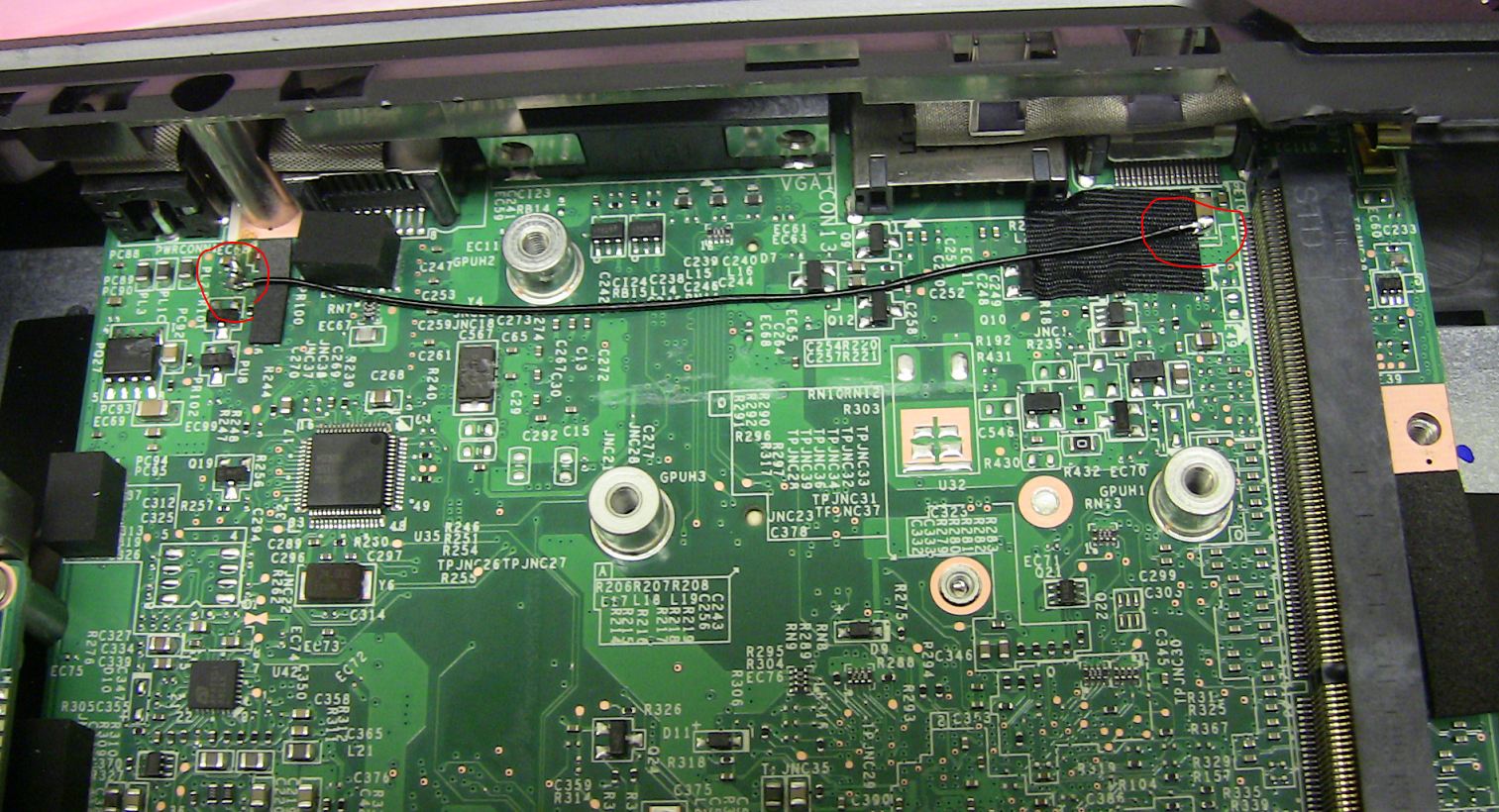
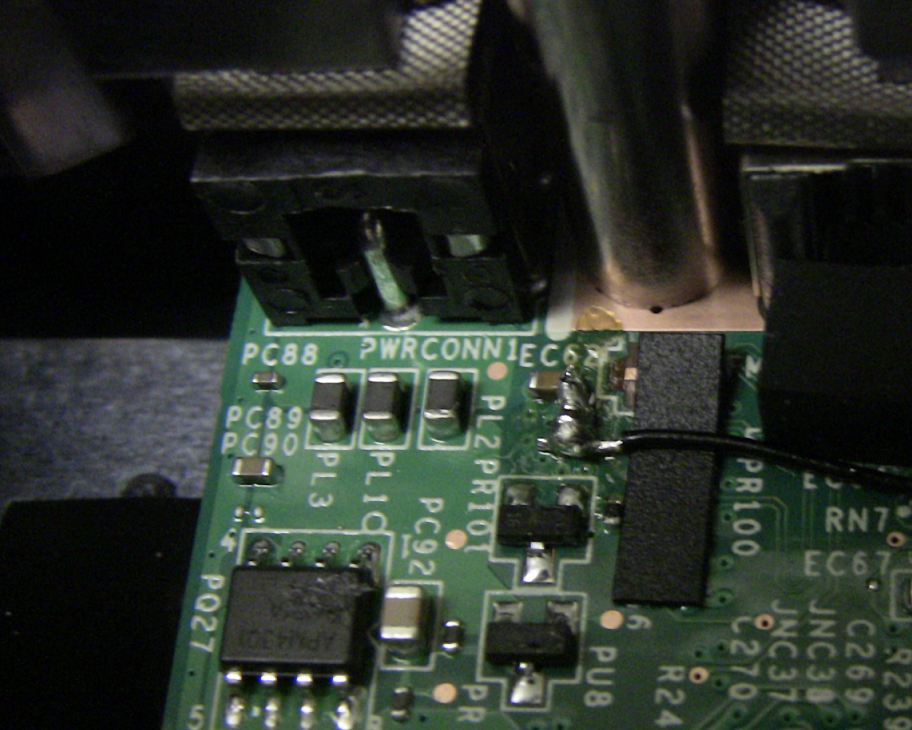
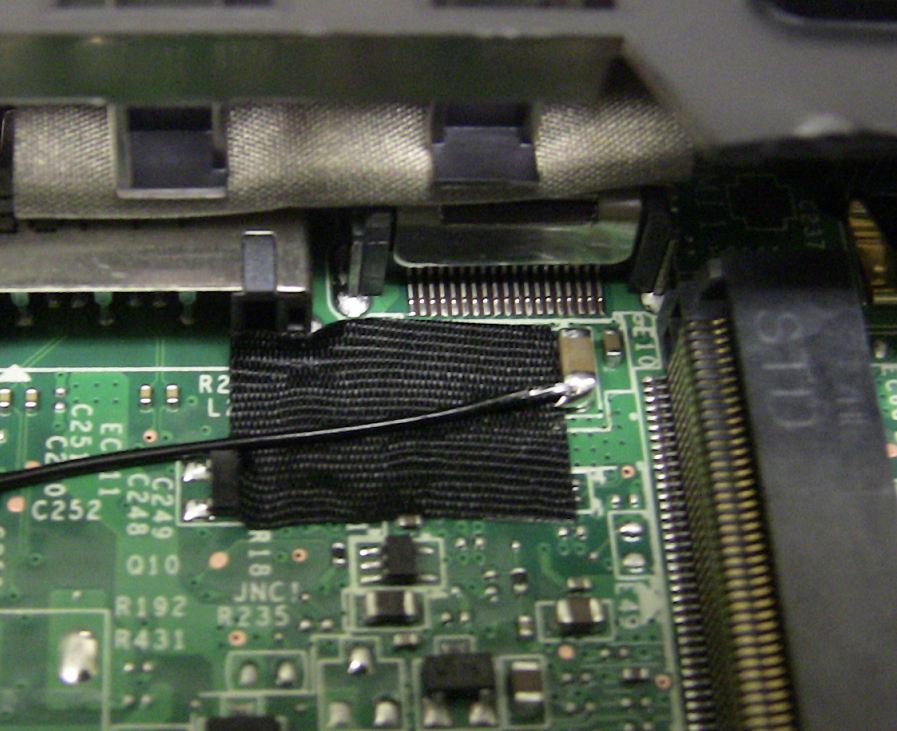
So I opened one of the barebone 1761 that originally came with GTX580M and I saw there is a wire soldered to the MXM slot, the wire will supply extra power to the MXM slot to power the GtX580M.
This is factory mod from MSI not by me and the mod can be found on bareones with 580M or GT783:Attached Files:
-
-
lol what the heck! that is interesting. And from the look of it doesnt look too hard to replicate?
Thanks Ken for this information Rep'd!
-
WHOA! YOU ARE DA' MAN, KEN!
Factory mod? Looks like some MSI engineer went, "WHOOPS! We forgot something!"
Time to break out my soldering iron, LOL!
-
Lol, it's not the first time reworks have been used.
Are these bits the same between the 560m and 570M versions? -
Looks like a easy mod to me.
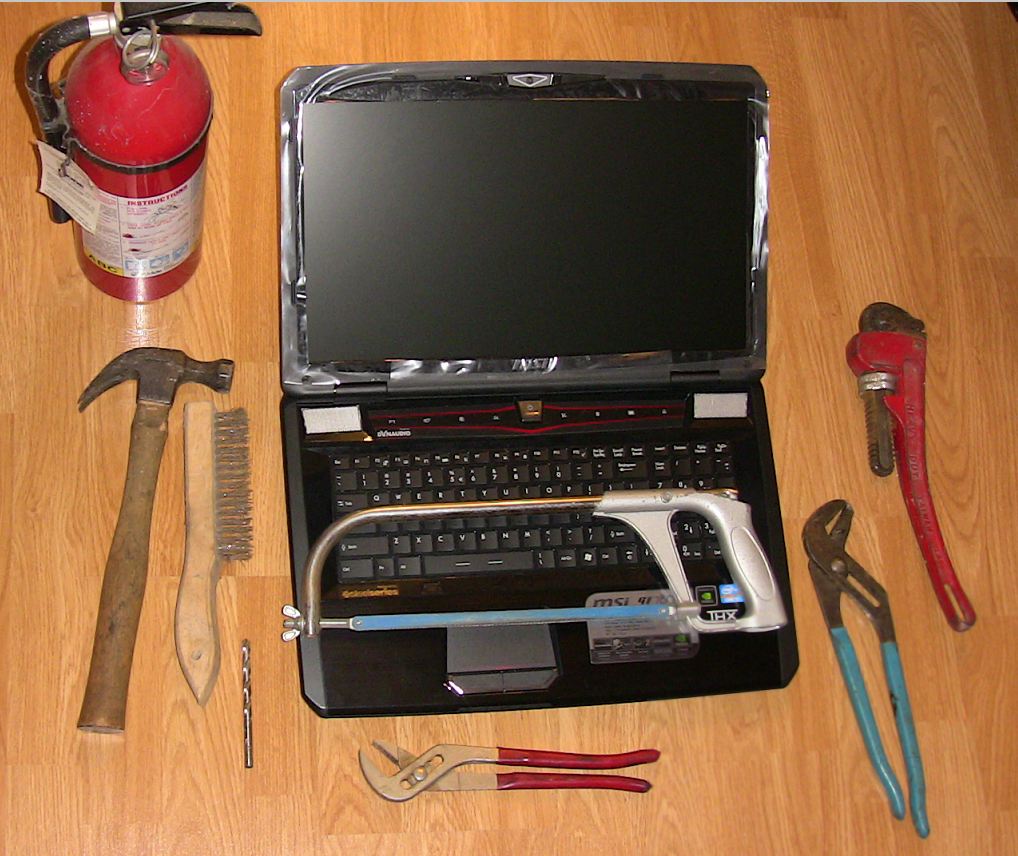
Don't forget the emergency tools in case something went wrong.
Attached Files:
-
-
![[IMG]](images/storyImages/6251913658_d924cb2414_m.jpg)
my old GT683 -
Hmmmm, I am now wondering if tonyjanderson1 applied this mod, would it eliminate the need of ThrottleStop? I think perhaps.
-
I don't know everything but during the years I did electronics, working with circuit boards, I've never seen such a bad soldering job. If MSI sold me that, I'd return it and pick up an alienware.
And what I'm gathering, throttlestop is equal to this wire running across a motherboard....
Honestly, if I was a reseller and a manufacture gave me that to sell, that would be the end of that product....I wouldnt buy it as a consumer. -
Well done Ken, dodgy looking mod by MSI, but hey as long as it works!! Good find and thanks again
-
Hmmmm, but you did buy it...... just minus a small piece of wire and two solder joints...... but I get it, you'ld rather use ThrottleStop rather than doing the simple mod. Agreed on the solder job in the photo, but I have seen worse. I could do a much nicer job myself.
-
yeah as long as it works and this is not the first time I've seen manufacturers did rework on their mobo.
-
It's not unexpected at all I agree. No one is going to reengineer a whole motherboard for that purpose, except if they charge a lot more (gt783). I priced one out and the barebones gt780 with 580m is a much more cost effective option. I've seen plenty of this and it's fine although usually the solders are underneath the motherboard not on top.. But meh, this looks like it will be easily enough replicated by those who wish to do it, and for new buyers like me, I care more about it working as advertised (taking cost/benefit into account of course).
-
Thanks Ken, very helpful again ! Let me check that tonight but as I already said, the 16f2 draws much more power with the 580m and doesnt seem to be power limited (contrary to my 6990m). I am going to upgrade my adapter so I keep you posted if there's any change and might do this connection mod to see the real purpose of that.
-
I'll stick to throttlestop as you would need a fine point soldering iron, some skill and some luck not to bridge across another component, not worth it in my opinion. Aesthetics is also important to me, I would not want to drape a 16 gauge wire across a brand new motherboard, with two globs of solder on each to fix what should work correctly in the first place. It will be a couple years till my next laptop but this will stick in my head and alienware really sounds good now....
-
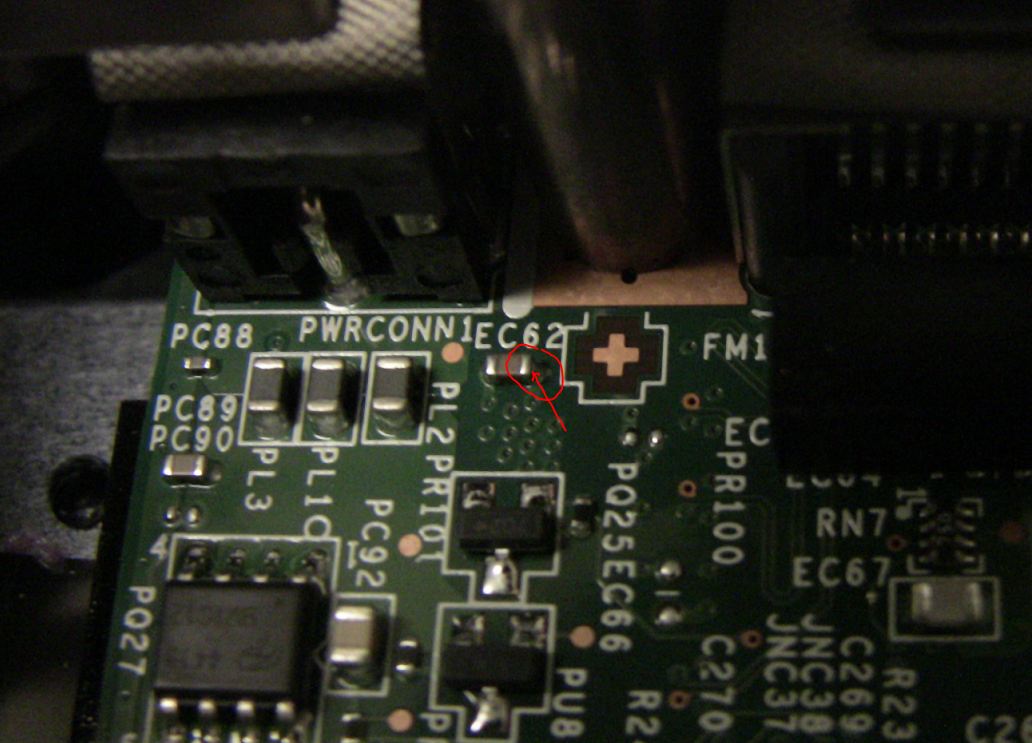
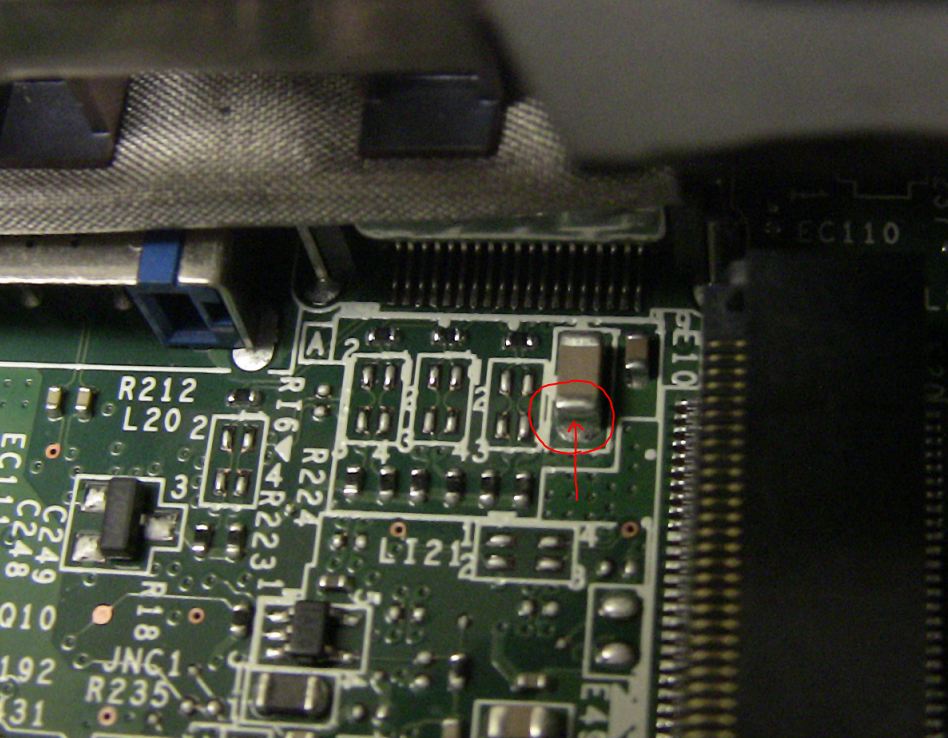
Ken I had my GT780DX apart tonight to take a peak and noticed on your pic that the connections is not on the actual chip is there a chip between. Hopefully the modified pic will describe what I mean
![[IMG]](images/storyImages/GTX580M-MB-mod-1question.jpg)
-
That looks like a resistor underneath the solder?
-
Theres just solder and flux all over that, you can see the yellow all over it and it was not cleaned after soldered, plus large globs of solder on both components, looks like a bridge between the two, thats a mess in my opinion....looks like someones first attempt in soldering.
(or the yellow could be rosin, been a decade since I've soldered) -
That's what I was thinking maybe Ken can confirm hopefully he still has one apart
So no resisitor you think it's just excessive solder they have used jst to move the wire away from other parts? -
Thanks to Saltius at MVKTech, I've overvolted to 0.92V.
It's definitely too much for my stock PSU; which cuts off the moment I stress test.
Luckily, I have a spare 180W PSU that I bought for my M860ETU; this PSU handles the overvolt much better.
Generic VGA video card benchmark result - Genuine Intel(R) CPU 0 @ 2.40GHz,Micro-Star International Co., Ltd. MS-16F2 score: P18489 3DMarks -
Well done.
Pretty nice 2920xm ES =) What are your CPU and GPU temps under this Vantage?
I ran 825/1800 OK for Vantage but PSU cuts off at 840/1800. Will try this weekend with the new 220w adapter. -
Max temps shot up to 90°C.
It might be time to do some work on the cooling. -
There is definitely a component under that solder mess and another one not that far away, globbed with solder that almost looks like they're bridged. Right where the green arrow is pointing, there is a component, above and below that are glob's of solder.
-
Anyway, CPU overclock done !
Thanks 5482741 for the instructions and Jame5 !!
Up to 103.5mhz at the moment, dont know if it needs to be higher but Intel BurnTest doesnt show any sign of unstability.
No need to upgrade to hyperx 1600 anymore. -
So, basically, if you follow posts 154 and 158 by 5482741, you can overclock the cpu without unlocking the bios?
-
You have to have the unlocked bios to get the ICC options as well as XMP support, otherwise they won't show up.
547241 trick was to avoid to have XMP ram to get ICC options to show up.
Up to 104mhz right now, testing IntelBurn Test.
Gain in 3dmarkV and 11 is 5% on CPU tests (physics). -
ah and the unlocked bios is unavailable....
-
104.3 mhz effective now, not gonna push further.
Contact Xonar to get the unlocked bios or Jame5 must have them also
-
No there is no chip between. I took a picture from a 570M mobo and I circle where the soldering goes to on the 580M mobo:
Attached Files:
-
-
Ken perfect many thanks for confirming that, looks like they just used a load of solder to bring the connection further down then it does look a bodge they could have done it alot neater.
-
I think what he meant Ken was that the solder looks to have a component added into it (not part of the mobo) like a small surface mount part.
-
Could have used a smaller guage wire most likely and connect directly to the component instead of using solder to bridge such a large gap just as james5 said. It just looks like a pre production, engineering sample to me.
-
Curious of the model, maker of the power adapter you are trying. Care to share?
-
I'd also be interested in a 220W adapter.
My more robust 180W one handles the overvolt without issue, for the most part; but around 67W from the CPU and 825/1650/1960 on the GPU, it seems to buckle.
That'll never work if I do find a way to properly overclock the CPU.
For now, I'm just looking for tip converters. -
Guys,
I did overclock CPU fine till 104.5mhz (104.3mhz reported by GPU-Z) without any troubles. Why did you stop to 102.7mhz 5482741 ? To me, it seems unlimited but I know 5% is pretty much the limit for Sandy Bridge CPU.
I got the 180w adapter from Li Shin and will get tomorrow the 220W again from Li Shin (I didnt want to change because my 180w adapter was pretty good).
Will change the output lead and keep you posted tomorrow night. -
Correct me if I'm wrong, my electronics are rusty, stock adapter is 19v 9.5a (19x9.5=180.5) 180w adapter, 19v 11.57a 220w adapter and 19v 12.63a is a 240w adapter. Then you would have to match the barrel connector.
-
No particular reason, I was just slowly increasing from 100MHz, and stopped when I got distracted by running 3DMark.
I just set it to 104; so far, IntelBurnTest shows no errors. -
Sounds likes Alienware M17X power adapter is what we need if the barrels internal and external diameter was the same...
I think if I was to buy a bare bone system, I would buy the basic Alienware M17x and transfer what I could to it.... -
Barrel's are different you have to swap the output wire for the MSI one,
MS16F2 along GTX580M (dell, rev3)
Discussion in 'MSI' started by pau1ow, Jan 16, 2012.