 Problems? See this thread at archive.org.
There isn't one that I've seen. Do be aware MSI will typically void your warranty if you remove the CPU/GPU or their heatsinks.
-
-
Oh, so the back panel is OK, just not the mother board. Even if I take it to a proper place?
-
No particular reason except for testing. I just thought the 2Ghz was reasonable for web browsing and video...And I was right ^^
I didn't play with the 2Ghz and I will not because, yes I'll notice the difference.
Let me know how low can you go. -
Thanks all for the quick help and answers, I will just be uninstalling
thanks
edit: Lol what I perceived as bloatware was in fact just Win8. I thought all those tiles/apps were preinstalled crap.....and seems like lot are -
Right and you do have to take out the motherboard to get to the CPU/GPU. If you take it to an MSI authorized center that should be OK.
-
Best I managed was 2ghz and -110mV nice and low temps. Only 53C while stressing for half and hour. That'll do me nicely.
I'll have to see how long the battery lasts.Mimo22 likes this. -
Hey Guys,
So I've had the 1080p Ghost-Pro for two weeks now (and already traveled/flown with it 4 times). Everything's amazing with the system and I'm only seeing ~85% every after hours of gaming and a stuffy NYC studio apartment. Here are a few concerns that may be helpful for people looking to buy (but also I'm hoping to get answer for from this thread)
1) When flashing the BIOS from the MSi website, make sure you set your BIOS to default and then changes your settings back after the flash ESPECIALLY if you;re running RAID0. I didn't reset before flashing and I couldnt get it to boot off the RAID even setting the SATA mode to RAID.
2) This was mentioned here already but I wanna reemphasize this again, while the fans are loud (but not really louder than any other laptop I've used) the sound is actually the WOOSH of the air going in and not the whine of Fans spinning. This makes it if you're running ANYTHING that produces sounds, the noise from the laptop is easily overlooked.
3) I had issues forcing Diablo 3 to run on my nvidia card. I tried everything mentioned in this thread (running d3 as admin, running d3 from an elevated command prompt, windowed full screen, running from GeForce Experience but it wouldn't go. I had to downgrade from the beta drivers (337.5?) to the original drivers but I think this is causing Neverwinter to drop to 0 fps in combat.
4) Lastly, hopefully someone can respond to this: What is the lastest modded vBio and Fan curves now (can't find the posts anymore). I've been following this thread for months but when I got the laptop I kinda stopped. Also, there's been new EC and vBios on the website since then (5-12-2014) and I don;t know what posts to pay attention to anymore. I'm looking for the -75 and -100 undervolts for the 870M and maybe a silent fan profile.
Also, is there an app that switches the "Enhance pointer precision" depending on whether or not I have a mouse plugged in? I usually have this off for gaming but with the GS60 trackpad, it feels tons better with the feature turned on -
Had a friend of mine today who works in air conditioning and vent related stuff, looking at a YouTube review of the ghost pro he said that the noise isn't coming from the vents but almost certainly from the air entering the upper grid. He said that the micro holes design was used in some other machines in the past because is stylish but proven to be noisy because amplifies the unavoidable "whoosh".
-
Hey everyone,
If people with the GS60 can play an intensive game for an hour (Crysis,Metro, etc) and report the temperature in this survey, I feel like it would help a lot of people decide about whether or not get the gs60 or the gs60 pro.
https://docs.google.com/forms/d/1P8ButHGZM3SYuKSomp7vlAOYYJMJbPkVBtnoUZ29z7I/viewform?usp=send_form
Thanks so much for anyone that does it . This should give concrete numbers instead of surfing through the forums trying to find temperatures.
-
Great idea, Ill add my info when I get my gs60 pro.. I think you should add a box for the gs60 pro 3k too. So people dont get confusedsjplatt likes this.
-
this makes me wonder if there was something wrong with my unit. Would you be able to take some dB measurings?
-
I have to second this. I'm coming from a older Intel Macbook Pro and I have to say I'm really chuffed with the level of noise on this laptop even when gaming - it's really not annoying in its form. I can see in a business meeting it might be intrusive if you were pushing the GPU for any reason but for general browsing and video replay this thing is really quiet.
Sadly mine is being swapped out due to a fan defect (very slight ticking when tilted as I posted earlier in the thread). -
Just an update so far:
Ghost pro: BF4 without bios change was 92
Metro 2033 with bios change 85c.
Both without cooling pads. -
I've been through most of the posts of this topic, but haven't found out whether the new bios from MSI actually do anything? Is it worth flashing? And if I flash, should I flash that first before flashing the -75V vbios? (since apparently there's "4. Update GOP and VBIOS driver version.")
Just got my Ghost Pro btw, sexy beast this is.
-
I'm wondering the same but I saw my temp peak @ 88C after several hours of wildstar with the few vBIOS. I think it helps but undervolting will still help it more -
Hello all.
I just got my gs60 pro and am very happy. i followed some tweaks in this thread and under volted my cpu and reduced the fan speeds which helped alot. Unfortunately im still having one major issue and thats the wifi speed. For some reason it is very slow compared to my old laptop. Ive tried running speedtest.net on both and there clearly is a problem. I tried changing the preferred band, transmit power, and other random settings and nothing helped. i also re-installed the intel wireless drivers and that didnt do anything either.
r
This really is a big issue. I tried searching this thread for other ideas but im having trouble digging through all the posts. does anyone have any suggestions?
Thanks,
Alex -
Did you get the new driver from the Intel website as well? Mines not perfect but it's much better than it was. Unfortunately I tried all of the fixes documented so am unsure which one actually made a difference.
-
I used the one from the MSI website, but now i tried the drivers from the intel webstite. no difference...
-
Glad you are enjoying the laptop (apart from the defect obviously), anyone else switched to the GS60/GS60 Pro after using a Macbook? How is the experience so far?
-
Coincidentally, I just got my GS60 Vanilla tonight after using a MacBook Pro for the last couple of weeks. I'll post a decent review later on, but I'll address what your questions probably are and you can PM me or reply to the thread if you want to know anything else.
Build quality - fine to me. there is a slight join at the top of the screen but it's nothing like what other people complained about. The screen also doesn't seem to have much flex to me, but I can understand where people are coming from on it a bit. It's not as bad as I thought, I really think it's just because the screen is so thin.
Touchpad - yeah, not as good as a mac, but as was suggested to me, I disabled everything except two-finger scrolling and increased the sensitivity and it seems perfectly useable now. My main issue is the positioning of it compared to where it was on the mac (just need to get used to it!) -
What graphics driver are you guys using (GTX 870M)? Besides the one MSI provides (332.38), the beta that is available (337.50) does not run D3 for me. Are there other alternatives?
EDIT: I decided to stick with 337.50, because only D3 is unable to be run but everything else is fine.
I did a simple overclock with -75 mV on the 870M at +56 Core Clock and +500 Memory Clock. I got 5.3k (5.29k) Graphics score, not too shabby.
http://www.3dmark.com/fs/2165501
PS: Does the Intel ETU auto apply on start-up? Or do I have to open it everytime? -
You could try 337.81..
http://forums.laptopvideo2go.com/topic/30939-geforce-beta-driver-33781/ -
I had this issue upon updating previously as well as following the newest update below which is what I am running. Follow the steps in this post and see if it works, fixed it for me:
Graphic Setting locked to "Integrated Graphics" - Forums - Diablo III
I had to go in and walk through manually changing the profile, the loading of theirs didn't work for me.
So I updated to 337.81, I read a lot of people have issues with it though as well as the last 2 updates. But that is where all the "Mantle Beating" updates happened so of course we want it. FYI this did not fix the Diablo 3 issue.mskiller likes this. -
I have ordered GS60 Ghost just now so tomorrow I will be part of crew here
Sorry for my English!
Sent from iPad.mardon likes this. -
After seeing how poor the performance of the kepler 860m is relative to the maxwell I canceled my ghost order. if I'm going to have to get a kepler chip I may as well wait for the 870m for an extra hundred.
-
Just another follow-up:
Ghost pro Unpasted/no bios change: 91,92,92,93
Ghost pro Unpasted/bios change: 85
Ghost Pasted: 75
Ghost Unpasted: 75
This shows that the vBios change is ~8% decrease in temperature.
If anyone has a repasted ghost pro with a bios change, I would love to know what you get
Sen7inel likes this. -
Isn't the difference mostly power related? Like a 25% increase in power efficiency? That would just mean if the kepler card was getting 60min of "gaming" time, the new one would get 75min max (and that's only assuming no power usage by other components over that span. Realistically you'd probably go from 60min to around 70min of gaming). For non-gaming, the nvidia chip shouldn't even be on, so it won't make much difference web surfing or video watching. I do like the idea of going for the 870m on the Pro, since that seems to have the most bang for the buck!
-
I am trying to look around everywhere, will this work for the gs70 stealth pro that has the 870m? I just want to be completely sure before I do this.
-
I currently have a Gigabyte P34G, which works fairly well, but I'm disappointed with the build quality. Thinking of selling that and getting the GS60 or GS60 Pro. It looks like the build quality is much higher, and everything seems to work well. Any opinions / suggestions?
Thanks! -
Most likely won't work (I don't have one and cannot test), but I transposed all my gs60 settings to a stock gs70 vbios, you can find it in the gs70 thread and use it with my guide.
-
You don't need to flash the official MSI vbios to use my modified one
-
Based on some benchmarks I saw there is a pretty drastic performance difference between the two as well. Seems weird that you're being charged for an inferior version of the "same" card. Unfortunately it seems like all the Ghost versions ship with the kepler version. Thats why I feel like the extra hundred for a lot more performance is worth it.
-
When you flash the vBios aren't you overwriting the whole thing? If so, wouldn't it be better to update your flash bios to the newest version to get even better performance? Or did the new bios update from MSI do nothing?
-
Nah, the maxwell 860 is faster than the keplar 860.. despite what nvidia says.. There are benchmarks somewhere.
-
If you really want the maxwell 860, the Lenovo y50 has it and I think the Gigabyte p35w does too
-
As does the Sager 7358 and 7378.
-
P35W is also Kepler since a 870m.
As to my knowledge P35G is Kepler as well, same reason as for GS60/GS60 Pro. -
Are those equally thin laptops? I usually don't compare thicker laptops to thin laptops.. they're like a different class in my opinion.
-
Thick laptops need love too :thumbsup:
-
They'd be about the same thickness as the Gigabyte referenced, not quite as thin but not as thick as the full blown gaming rigs.
7358 - 14.72" (w) x 9.84" (d) x 0.64"-1.68" (h)
7378 - 16.26" (w) x 10.93" (d) x 0.69"-1.73" (h)
P35w - 15.16" (w) x 10.63" (d) x 0.83" (h) -
That is the reason why I bought the GS60 Pro instead of the P34/35G. Also the GS60 is bigger than the P34G which is better for gaming and I guess the heat.
-
I guess the Gigabyte was their first attempt, while MSI has had more time to tweak their GS series.
-
Spot on with those initial thoughts. I also disabled some touchpad features - especially the swipe from the side thing. I also feel it's a little too far to the left for me and I wish it had a smoother texture but maybe that is a personal/familiarity thing that I will get used to over time.
The only other slight annoyance is the hash key over the enter key... that really was a what the hell were they thinking issue but again I'll get used to it...
Build quality is great IMO - and to be fair my 5 year old unibody Mac looks like it did the day it arrived so let's hope the GS lasts as long
-
The touchpad is still being a bit awkward for me. It'll spazz out for a minute or so every 30 minutes to an hour where the cursor jumps around all over the place when you touch it. I even uninstalled the elan stuff..maybe I need to play with the settings a bit more. What were your ones?
Asides from that my biggest problem is trying to find a new bag to fit this! It is a 15.6" screen sure, but it's more like a 16" laptop (400mm x 280mm or so, with a bit of leeway) -
Hey guys, I just got my gs60 ghost with gtx 860m yesterday and have been endlessly testing it. I had a lot of help from this forum so I'm deciding to post some of my results. I got mine repasted with the IC Diamond Thermal Compound from MSI and as I mentioned it has a gtx 860m. I played far cry 3 for around 3 hours and these are the temperatures I got with it.
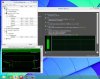 (The afterburner gpu percentage is weird but the temp readings are good) I am able to play far cry 3 on very high settings with constant frame rates around 50 fps. Anyways, as for the fan noise... It seems perfectly normal to me just on the stock settings. Its a little louder i guess but for me its completely fine. However that is a completely subjective assessment and peoples opinions will definitely vary, but I am extremely satisfied. 10/10 would buy again. Also the laptop keyboard lights and typing are amazzzzing!!
be77solo likes this.
(The afterburner gpu percentage is weird but the temp readings are good) I am able to play far cry 3 on very high settings with constant frame rates around 50 fps. Anyways, as for the fan noise... It seems perfectly normal to me just on the stock settings. Its a little louder i guess but for me its completely fine. However that is a completely subjective assessment and peoples opinions will definitely vary, but I am extremely satisfied. 10/10 would buy again. Also the laptop keyboard lights and typing are amazzzzing!!
be77solo likes this. -
I've just been speaking with a less than helpful rep at msi service centre in the UK.
Their centres won't perform a repaste on the system unless it's faulty. If it's done else where it will void the warranty. All of which I can understand but you'd think if I wanted to pay them to do it they'd take my money.
Anyway I'm gonna take it to a decent laptop repair place and get some COOLABRATORY liquid ultra put on and then get some laptop insurance. I carry it around anyway so I think it's worth having the cover on something so expensive. If anything does go wrong I'll use that route instead. -
Yours was stock paste? You had some pretty good temps.. I have IC Diamond and my temps are so so, so I'm not sure if pasting would help too much, but results may vary. Good luck.
-
I've been using a laptop cooler though.
I think Coolabratory Ultra is a step up so fingers crossed it might take a few degrees off at full load. -
I'm hitting 93 C with a cooler + -75mV vbios.. kind strange.
Games I hit 93 C with: Dark Souls 2, AC4, Metro Last Light.
EDIT: Okay I'm an idiot. Gotta keep the lid open otherwise the air can't leave the vents on top. >_> -
I'll be playing metro last light next so I'll report back how I get on.
MSI GS60 Ghost/ Ghost Pro Thread
Discussion in 'MSI' started by GreaseMonkey90, Jan 14, 2014.


