Problems? See this thread at archive.org.
Hi everybody,
Just finalized my custom EC firmware (v504) for my GS60 ( 2PC).
I revised both CPU and GPU temps about fan settings with the great tool from Svet.
Laptop is now much more silent about both browsing/working and gaming.
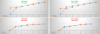
Here are my custom settings compared to stock MSI values (did a little Excel graph to understand better, CPU is in green, GPU in red) :
![[IMG]](images/storyImages/mini_850369ECsettings.png)
I picked up the firmware from the GS60-2PC but should be compatible with GS60 Pro version also since it seems they all have the same firmwares/bios, but as always, try at your own risk! (and don’t forget a hardware EC reset with the pin hole after flashing).
Don’t forget to report what do you think of it!
Happy flashing
*edit* : for those who are interested also, I might share my ICC profile (screen calibration about colors). Thanks to my i1Display Pro tool, I achieved a 0.59 deltaE (2000), so pretty an impressive score for a notebook screen!
-
Attached Files:
-
-
I'm going to be investing in some insurance from "Switched On Insurance" they will cover the laptop for everything including breakdown even if there is no manufacturers warranty in place. This way I can get upgrade the internal components and TIM if required without worrying.
-
Would be great, I was thinking to ask someone here if they can give a shot with a calibration instrument and publish the settings for a better delta-E. Thanks
-
Just checked on the msi website, there is a MSI GS60 BIOS update available as of today.
Not sure if I'll do mine because since I did the MSI official EC update Pherein's fan tool doesnt work properly anymore. E.g. When I set it for quiet or silent mode fans go down for a second then go back up to 2900rpm/3300rpm.
I have done the same as Mardon, underclocked 2Ghz and undervolted around -106Mv using Intel XTU and the fan doesn't spin up to 3300rpm while browsing, but does spin up when watching a HD video.
I will probably get Svets tool later on today to flash the EC for a better fan profile and will do Sen7inels VBios -75mV for overall better performance. -
By Pherein do you mean this one:
-
yes that's the one
-
Yes please share the ICC profile. -
Good news is this is a BIOS update, so shouldn't have anything to do with EC (fan) settings. Having said that, no idea what it "fixes":
"description
1. Disable GOP/VBIOS DRRS function."
I highly recommend Svet's tool, works great for full fan tweaking and now supports vBIOS Mods (860m for now but I'm sure 870m support is coming). -
Ok, as requested by some people, and as promised, I'am sharing my calibrated screen profile from my GS60-2PC ! :thumbsup:
Had to re-do a full calibration (so this one is fresh) because the older one was at 0.77 deltaE (2000).
This one is currently at 0.56 (I published the " measurement report", so you can find it as attachment also, read it as it's very interesting, so you can see which colors are less or more true from reality, etc).
I always calibrate my screens as 6000k color target (not too hot and not too cold also, a good mix between both).
Keep in mind that a profile is valid for a short period as generally LCD colors are not always stable, only professional monitors are able to keep values right for a good moment ( for exemple Eizo screns at 1000$+). Moreover every LCD screens are all different so if my profile is working well on my machine, it does not mean that on yours it will be perfect also, but at least it will be much better than stock.
I calibrated with 40% brightness of the screen, so it will be more accurate if you put your brightness like this from your Windows 8.1 :
![[IMG]](images/storyImages/251138Windows8brightnessbar.png)
Enjoy !
Attached Files:
-
-
Which Intel XTU slider title do i set to 2GHz bc apparently thats what all the cool kids are doing? Also anyone know good monthly laptop insurance for the US that doesnt cost and arm or leg upfront? That switched on insurance is a really good deal in the UK... Last Mardon PLease please please with the Youtube of the flashing process!!!!!!!! will be forever in debt/thankful...
-
Totally forgot sorry Vidiot5G Just doing some benchmarks at the moment.
There are 4 sliders 4 core active 3 and active and so on. Set them all to 2ghz then give Dynamic voltage a tweak. Knock it down to something in the region of - 75 and see how you get on. -
What %fan is 2600RPM? This only occurs when my CPU gets to <46C. 3300~RPM is pretty noticeable and my fan is 90% at that level on normal use. When it does occasionally drop to 2600RPM it's really nice.
-
Could someone please be so kind to make some sort of a tutorial PDF with screenshots/YouTube video for people who're new to this? I'm sure it'd be much appreciated by plenty of people, now and in the future.
Download what where, install what, flash what to what,pay attention to what, which slider does what and how will it affect your temps,vents, gpu, clock speed, preconfigured fan profiles and what to use them for ... as to know what we're actually doing and to choose for yourself which part to follow in case you only need i.e. the fan tweak.
I know ti20n made an effort to try and explain it, and although great (many thanks!), it's only one thing explained and in writing. I know this is a lot to ask, but again, It'd be much appreciated!
Cheers
Ps: Idea as to divide the workload/get the opinion of more people: some sort of public Google Drive/Microsoft OneDrive document where everybody can contribute. -
Yeah, I wish there was a youtube video on how to do the fan stuff and the undervolting stuff too. I'm not sure if I'll try to attempt it. I might just wait and hope that Msi releases their own fix.
-
ok so finally done it. Flashed VBios as per sen7inels instructions works fine, still need to do a stress test, will install a high powered game to find out, but so far no complaints with gpu-z.
Intel XTU - easiest way to under clock and undervolt ever, On the manual tuning tab on left, click on all controls, change the slider "dynamic CPU Voltage Offset" to -110mV or as close as possible, and change all 4 multipliers on the left to 20x. apply and save profile as underclock and done.
Go to profiles on the left to switch back to default when gaming.
I downloaded the official ec fw from msi website, used Svets tool to edit the ec-fw to 43% up to 55C and flashed using msi winflash.exe.
By the way, If i cover the holes at the top right with a light cloth (e.g. glasses cloth) it blocks even more sound, making this extremely quiet, (underclocked) running at around 49C when watching a movie 1080p and 44C when browsing, with no cooler underneath.
Problem is when i do cover it, it goes from 0 rpm-3300 rpm constantly, probably cos fan is spinning too slow. I'm guessing if i flash to 44% then cover that might work better. Either way it is nice n quiet now.
Very, very pleased with this laptop now and can do work without having to hear that fan spin so unnecessarily fast!
Big thanks to everyone's contributions for solutions! -
This Youtube Clip helped when i wanted to know how to underclock and undervolt. I've never done it before either and was weary about it as I didn't want to ruin my expensive laptop. I have always owned a desktop prior to this which is why I've never needed to do it.
-
I need a youtube of flashing the gpu are there any of those?
-
Change boot mode from UEFI to LEGACY in bios ...
how do i do this on this computer? What the f key when starting up to get into bios? -
Keep pressing Delete until you get into the bios when you restart/start your Ghost.
-
Thanks i found and now have successfully flashed the gpu thanks for all the help here everyone. few more questions...where can i view that the gpu bios is now running at -75 and what the temp is of the gpu processor? also the intel xtu settings dont stick after restart?? how can i have it boot into the underclocked profile in xtu? next on the list is adjust the fan profile....good stuff!
-
MSI Afterburner is great for viewing the temperatures of the GPU.
-
Also a quick question. If you do Svet's bios/ec tuner will it work with the 870 (It does not say that it is supported). More specifically, I am talking about the fan profile section.
Also, when you change the EC to change the fan profiles would downloading the newest version from MSI over-write your changes? -
Can someone who has the touchpad working nicely post their settings please? I've disabled everything in the Elan settings except left and right click (obviously), and put the Elan sensitivity up to max and have the microsoft pointer speed at the fourth notch from the top. Also have "Enhance Pointer Precision" ticked. My problem is the cursor will occasionally (every 10 minutes to an hour probably) go crazy and move all around for about a minute, which is really annoying when you're trying to do something. Did anyone else have this problem, or have different settings to mine?
-
I've got a feeling that might be hardware related. Have you uninstalled everything and tried again?
Now my insurance policy is in place I'll get my laptop Repasted next week and report back. -
Hello,
How do we add the icm profile on Windows 8.1?
Thank you in advance. -
Has anybody purchased stuff from here before? Is this a legit AC adapter?
MSI GS60 Ghost Pro AC Adapter Charger Power Supply
Or can you recommend me an alternative? -
Do you mean the colour profile?
Search "color management" then click the "all profiles" tab and then select add. Browse to where the file is stored and your sorted. -
So can someone re-post the software fan fix they used? or the hardware one...this mother of threads isnt conducive to finding things. i tried googling for it too...no dice...
-
Yeah, it's too bad you cant have like a column of information on the side of the forum that doesn't change.... The same questions get asked over and over again.
-
I think a new tweak thread with up to date first page is in order!
-
I cannot find the instructions for the fan tweak.. please someone. DO i really have to reflash again with svets tool? which i did find elsewhere but i need a dumbed down version with step by step instructions bc im nervous
-
The old fan tweak (Post #1325 in this forum) supposedly does not work with the newest EC from MSI. If you want something that will always work you should reflash using Svet's tool.
-
So my GhostPro from Gentech came with two different 8 GB RAM sticks (I ordered a 16 GB upgrade), one is Kingston branded, the other is STT (???) branded. They have the same speeds, latencies, frequencies (as far as I can tell through CPU-Z). Is this a cause for concern? Or am I completely fine?
-
Not sure if anybody mentioned this yet, but Gentech told me they are getting new versions in of the Ghost Pro with the 4710 i7 instead of the 4700. Not a big difference obviously, but most specs online have it incorrectly now! Unfortunately this means another week of waiting for my ghost pro to ship...
Also, here's a basic review of the GS60 Ghost Pro. You'll have to translate it with Chrome or whatever, but it has some pretty good info on the noise/heat/etc.
http://www.cowcotland.com/articles/1627/test-portable-msi-gs60.html -
Mine has the i7 4710HQ. Do you mean the 3k version?
-
Oh really? All the specs I see on amazon/newegg for the 1080p Ghost Pro say 4700HQ. I think the first batch had those in them, but maybe it's just listed incorrectly.
-
You're right, I checked the websites, and I just noticed that mine is 4710HQ.. o_o -
Where did you order it from?
-
Gentech. It took them 3 days to process my order, and 2 business days for the order to arrive.
GenTechPC likes this. -
Mine is arriving Monday 26, is a MSI GS60 2PE 224IT Ghost Pro (GTX870M), 15.6 FHD, i7-4710HQ+HM87, 8GB*2, 1TB+128GB SSD, ANTI-GLARE, W8.1, 3GB GDDR5, g-mouse, backpack. So it has a slightly faster cpu and I wonder if really has a maxwell nvidia as they told me when I purchased it, is it even theoretically possible?
Here's an Italian review with a very detailed display section
section
Notebook MSI GS60 2PE Ghost Pro: Recensione - Introduzione e Videorecensione | Tech Station -
The 870 is Kepler. The 860 has a maxwell and kepler version however the gs60 ghost only uses the kepler version
-
I know that the 870 doesn't come in maxwell ver, I was surprised about the unexpected upgrade on cpu and hoping for a miracle for the gpu

-
Got my Ghost (non Pro) yesterday. Awesome machine. I checked out my Lenovo 170w adapter. The polarity is the same, the tip looks to be the same. Is there anything I should be concerned about. It is a 20v adapter but the MSI read 19.8 and the Lenovo reads 20.4 so it seems its within tolerance.
-
I know that the 870 doesn't come in maxwell ver, I was surprised about the unexpected upgrade on cpu and hoping for a miracle for the gpu
-
HowTo: SSD oder RAM nachrüsten bei MSI Ghost GS60…: http://youtu.be/rsF0Bpuj8ss
Complete video of a German guy disassembling the motherboard to swap ram and ssd, not even out of the box. -
Anyone have the ghost pro with the -75mV vBios change and a thermal compound. Can you run an intensive game like crysis, bf4, metro,etc for an hour and tell us what temperature you GPU gets too?
I am trying to figure out if its worth getting the repaste from some one like xotic -
I just read a review of the Razor that mentioned turning off the Nividia graphics card and using the integrated card for better battery life (4->6 hours). Is this possible for the GS60?
I have been waiting for the G60 3K version since Christmas. I want a thin laptop with high resolution to write code and do electronic schematics with a numeric keyboard. I do not need a gaming laptop, but the GS60 appears to be the best choice. The fan noise and battery life are my main concerns.
I have an older MacBook Pro 17" that I love, but the keyboard drives me crazy with Microsoft Windows. I have considered getting both the GS60 3K and the X1 Carbon. I run three monitors on my desktops - two 30" and one 24". -
85c on metro 2033 even when i play +2hours
-
Still looking for some input...
MSI GS60 Ghost/ Ghost Pro Thread
Discussion in 'MSI' started by GreaseMonkey90, Jan 14, 2014.
![[IMG]](http://www.hostingpics.net/viewer.php?id=850369ECsettings.png)