 Problems? See this thread at archive.org.
Thanks for the update on shipping the 3k . Been a long wait but I am sure it will be well worth it over the 1080p version
-
Can anyone give me some advice on the 3k model vs the 1080p 17' model? The game I play is Dota 2 and I'm coming off an old 17' MSI. Would the 3k make a difference in this game? Can the GPU handle it? Will the screen feel small coming off a 17'? Any experienced advice or lessons learned would be great.
Sent from my XT1049 using Tapatalk -
I can give a little insight 3k resolution will be hard to see text on 15 inch display if you have any vision problems.i have several workstations in my office that have 4k displays on 28 inch screens and text and a lot of websites scale badly and make it hard to read. Gaming on high res screens eats gpu memory. Performance of this laptop with 870m at 3k I have no idea. But if you video edit 3d model etc the extra pixels are very needed
-
Thanks for the reply. I'm starting to lean towards this more and more. Is the 3k available and in stock anywhere? All I have found is waiting list...
-
As both the Xotic and Gentech guys have said, this notebook is just arriving to them to prepare to turn around
-
I have been told they will be available next week from a local seller.so that with the big online guys stating same some of us will have it midweek.
-
In that case if I order from xotic on rush is it reasonable to be here by next Thursday? I'm going out of town Friday and don't want it sitting by my door for a week...
Sent from my XT1049 using Tapatalk -
Actually now that I did this and that it's clocked at 967 no matter what, temps are hitting 93C again. hmm
-
Pulled the trigger rush delivery next day shipping. My fingers are crossed that it arrives by next Thursday. Was definitely on the high side of my budget but in this case I have a feeling that it will stand the test of time. Cheers.
-
Did you order the 3K? If so there most likely will be some waiting. The initial shipment is limited and may all be spoken for by existing pre orders. We'll know for sure once they physically are on hand. Sometimes when we contact people that have a pre order, they have ordered something else in the mean time. You can PM me your order number and I'll see what I can find out for you.
-
I did. Will PM the order number shortly. Thanks.
Sent from my XT1049 using Tapatalk -
Alright guys. After spending loads of time trying to figure out these WiFi issues, i found something very startling.
I've tried different drivers and played with all the settings. The drivers I've tried are the default Microsoft drivers (no diver installation). The MSI drivers on the website (16.10.0.5) and the latest Intel drivers (17.0.2).
The best performance was achieved with the Intel 17.02 with default settings. However, every time i did speedtest the speed would always seem random, sometimes achieving the full speed, other times not.
What i discovered was that the speed would change drastically whether the battery was plugged in, and if the computer was using the discrete or Nvidia graphics card.
I did a small test with each combination, and repeated it 5 times in order to get a better average. Here is what i found:
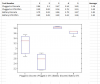
My full internet speed is about ~3.8Mbit/s when tested with my old laptop. The speed difference between being plugged in or on battery is drastic. The bottom plot is a box plot which shows the the events are statistically independent, and this isn't just random chance. It even seems that the Nvidia vs integrated makes a small difference as well, although not as much.
I'd like it if other people could please test this. Run a speedtest while being plugged in and again on battery and report their findings.
Final note: My router is a at&t 2.4ghz n/b/g. -
im very disappointed by msi gs60,
1) wifi problem - my wifi keep disconnecting, i have to use my galaxy s5 to connect to wifi n tether(usb) to my computer even on latest intel driver, like seriously ???? my frens will be laughing at me for doing that
- of coz its intel's hardware fault but MSI should have check thoroughly before using it in their laptops, i have searched the internet and found some existing problems with the intel 7260 during 2013
2) trackpad - its so hard to move my mouse between 2 characters
3) fan noise is noticeable even when browsing the internet, come on, if its Intel hardware problem, i can still blame the manufacturer, but this simple task should be handled well by MSI themself. U cant expect me to flash the bios myself for custom profile fan, what if somethin goes wrong?????
4) battery - I often use 100% of my GPU for unreal engine and the battery is draining even when plugged in.....
5) heat - not much comment on heat as im using another monitor and an external keyboard
6) build quality - overall its ok but i noticed there is some gap above the laptop screen, im disappointed again
7) keyboard is not fully lit - some of the keys without function are not lit, people will taught its defective..and how am i supposed to clean the dust and dirt under the keys? bad design
8) oh n these are the problem when i got my laptop for 1 week, not sure what surprise it will give me along the way
im very disappointed with msi gs60 for its cost and a top tier laptop, next time i might get Razer Blade instead n i wouldnt recommend msi to any1 -
Are the wifi problems solved with updating your drivers or are the problems still there? Thinking about getting a gt60 dominator pro or a gs60 ghost pro.
-
Did you update all drives (wifi) and does it still have the problem then?
-
Download the latest drivers from MSI website and try them first.
Win8.1 x64 Driver -
xoticpc,
Does the msi gs60 ghost (pro) still have wifi problems under heavy load with all drivers updated? Because that might be a deal breaker for me. And then i will just go for the gt60 dominator pro -
Have you guys tested the gs60 ghost pro with all drivers. Tested under heavy load. And does it still random disconect wifi then?
-
Can a few gs60 owners give feedback on the wifi issues it seems that this is user nor updating drivers or a major flaw. I would like to get some feedback because I would no doubt go with the asus as stable wifi is critical.
Sent from my SAMSUNG-SM-N900A using Tapatalk -
I've had no problems with wifi (2.4GHz N band). But I did make sure to turn off wifi power saving features in both Windows Power settings and wifi adapter properties.
-
That's to weird that your speed is slower when plugged in... But,, those numbers don't look that drasticly different to me... does .4 difference really matter that much?
if wifi is such a big problem just buy a little usb wifi adapter for 20 bucks and call it a day... -
You only have 3 ports so if you need 1 for a mouse, 1 for wifi its kinda messed up. Of course you could just take a hub but still it should just work (the standard wifi chip)
-
Oh, I totally agree, it should totally work and it does suck that you only have one extra usb port.. But at the end of the day its better to have something to works then your online game disconnecting every few mins..
Excuse this stupid question but is AC the newer wireless tech or is it N? (I cant keep up) -
1) Wait so your're saying that your gs60 can connect to your galaxy s5 through wireless teathering but it disconects connected to your router? Sounds like it might be a problem with your router.
Yeah, you might want to return it and get a razor, that'll fix your build quality, fan noise and probably trackpad issues. -
AC is the newest with longer signal range and faster transmission speeds.
Wiki link -
Ahhhh, maybe gs60 has a problem with N then, maybe he should test an AC router.
I'll do some wireless tests when I get my gs60. I have a usb wifi adapter ill test too, and my router is probably N -
nop u got it wrong, my galaxy s5 is connecting to the wireless router, then i use the s5 to tether to my computer, so the wifi signal path is: Router -> s5 -> gs60
btw im already on the latest intel wireless driver 17.0.2
even the download speed is 5 times faster using my s5 tether
if any1 would like to try tether, download clockworkmod tether -
Yeah thats what I said, the gs60 is connected to your s5...
and are you still saying that the gs60 doesn't drop connection when connected to your s5?
Lemme try to be clearer....
How are you connecting your gs60 to your s5? wireless? bluetooth? ethernet? usb?
if you are connecting to your s5 through wireless
then that means that your wireless works -
So tell me master how do you theter wifi? if i am connected with my note to my wifi and then try to theter it switches to 3G?
a different frequency might be the thing making it work? But still kinda weird -
Dude, you dont need to be so angry.
I just asked how your laptop is connecting to your s5.. I've never used tethering before. Since I dont think laptops have 3g i assume they connect through their wireless card?
http://mobileoffice.about.com/od/phonesformobileworkers/f/what-is-tethering.htm
This url says you can tether through bluetooth, usb or wireless.. so I was just asking if you were connecting through wireless.. -
tethering with usb
i also tried downgrading the driver to 1.6, but fail
im the 1 that post the tether post, u mistaken the wrong person -,-
connect ur phone to wifi, then use usb to tether the phone to the computer
wifi -> phone -> computer
download clockworkmod for tethering -
Wasnt a reply to you

-
About to get the 870m 1080p version, and so far it seems like I will have to:
1. Edit power savings for WiFi
2. Update WiFi and GPU drivers
3. Buy and install a custom vbios to make fans silent and lower voltage to the GPU
4. Use Intel XCU or whatever it's called to lower voltage to CPU
5. Limit frame rates to 60fps because the monitor only supports refresh rate 60 times per second (more fps physically not possible).
I am also getting a second 128gb ssd. Should I raid 0 this? Or should I dish out another $40 for a 256 gb? Would using raid 0 on my boot drive and my second 128 gb ssd delete my Windows 8 copy? -
For step 3: You need a custom vBios to change the voltage/clock on the GPU and a custom EC firmware to change the fan speeds (Both of which are in the forums).
-
Phone tethering is meant to use your phone to connect your laptop through the internet through your cell phone's internet plan, not the wifi. You can't tether to your own wifi using your phone as a secondary wireless card, at least to my knowledge. I know somebody else on the forum had a problem where their phone changes from wifi to 3G when they start tethering, but this is working as intended. It's meant to be used when you don't have a wifi signal around or don't trust the starbucks one to keep your info safe.
using the arrows people seem to be fond of:
[Phone Tethering]
Verizon/ATT/Sprint -> phone -> computer
USB/Wifi/Bluetooth are all means of connecting your computer to the phone to transfer data through your phone's internet plan. Be careful though, because you'll absolutely blow through your data cap (if you have one) using your phone to tether if you happen to download a game or do some hefty netflix/hulu watching. It can get pricey very quickly. -
it is possible to use wifi instead of data by turning off mobile data and using external software like clockworkmode tether
it wont work without a wifi tether app -
Ah ok, thanks for clearing that up. I haven't had an android phone for awhile so haven't seen clockworkmod's new versions!
-
If using the phones wifi is not much different than using direct ip so this not fixing much and seems quite crazy on a 2k laptop. Wifi issues should be none and if drivers do not work its probably a poor antenna location or has come unplugged maybe I am just guessing as I once had an asus with the wifi card antenna unplugged from the factory
-
Those looking to get the 3k version quick and fast it looks like Newegg is now selling them and shipping them!
MSI GS Series GS60 Ghost Pro 3K-097 Gaming Notebook Intel Core i7 4710HQ (2.50GHz) 16GB Memory 1TB HDD 128GB SSD NVIDIA GeForce GTX 870M 3GB GDDR5 15.6" Windows 8.1 64-Bit - Newegg.comclickclack169 likes this. -
I have to say stay away from newegg 25 percent restocking fees that's 500 bucks for them to return it to msi. If you need to refund it. Circuit city used to try and add restocking fees worked out well for them. Just looked you can join newegg premium for 50 bucks and this waives restock fees might be prudent move
-
If you're gonna do the teathering fix you might as well just get a usb adapter for 20 bucks.. since youre going to have to use the usb port anyway.
-
I finally got my gs60 ghost pro 2PE-224IT and there are some differences from the models described here and seen online on youtube and reviews.
Under it there's a big pad made of some velvet touch material, half a mm thick, shaped to fit the area from the air intakes to the rear. I don't know if it's an improvement for europe mkts, sounds more something like "ops, somebody got burn legs".
The m.2 sata primary drive is a Kingston RBU-SNS81000S3128GD, not a toshiba. -
First I've heard of that velvet, can you post a pic? I'd like to see what they are like.
-
Sounds so plush and fancy
Would like to see a pic as well, that is new. Thanks and enjoy your new machine! -
Hey one last question before I lock in the Gs60.
Can people with the non-pro version of the laptop comment on the temperature while running games like Crysis, BF4, etc. How loud do the fans get on the non-pro version compared to the pro version. I really am on the fence between the 860m and the 870m and would like to make a decision by Monday.
Thanks -
I've got the material on mine. I saw it on the gs70 and thought it was standard across the range. I'll post a picture mine has the 4710hq as well.
-

As you can see it's definitely a patch for an heat issue, I often use it on flight cases and similar dirty surfaces and I wolud prefer a nice clean surface. -
So xotic, any idea when you will get these "new" ghost pros with the 4710?
-
Hey guys, I have spent hours combing through this thread trying to find a resolution to the issue I am facing, so if I am asking a question that has already been resolved, sorry! (Feel free to send me to the appropriate page).
I, like many others, have been experiencing Wi-Fi connection problems. Specifically, every time I try to play Dota 2 I am disconnected either 1)after accepting a queue invitation, or 2) selecting a hero (or at sometime between hero selection and loading into the match). During these disconnections, I am completely disconnected from the Wi-Fi for a good bit of time (normally after 5-10 minutes).
Interestingly enough, this is the ONLY time I experience disconnections (so far). I have no problem browsing, skyping, or streaming netflix. I don't have any other games loaded on this laptop to test out their performance, unfortunately.
I have tried working with both the beta driver from the MSI site, as well as the latest driver posted through intel. I am really at a loss at this point, and I am pretty discouraged.
I would appreciate any suggestions, or directions to were I could find more solutions to attempt. -
You have no wifi issues and instead have anti virus software killing your connection
MSI GS60 Ghost/ Ghost Pro Thread
Discussion in 'MSI' started by GreaseMonkey90, Jan 14, 2014.


