 Problems? See this thread at archive.org.
That is strange. Especially with the light turning amber.
What power saving mode are you on? Set it to high performance, pull the power supply out the laptop while it's turned on then plug it back in. Then try again.
I've had mine stick in a lower power state before and that sorted it. Failing that try a new driver.
-
Check your Windows power settings to make sure its set to High Performance, also check Nvidia Control panel under 3D settings to make sure 3D mark is set to run off the Nvidia card.
-
Odd running bit hotter with cool.rom
Vally runs at 93C now up from 90C
But I think it maybe have been other factors, updated both bios, EC, and vbios
Odd things seems like fans are running asynchronously. Left one is loud and kicking out hot hot air, right one I can barely feel a bit of air.
THis is while running valley 1.0 -
Strange is this compared to stock? The right will run slower/cooler on a graphics bench as the right hand side is the CPU.
-
Did you run the benchmark on the same day same ambient temp etc.
-
Yep I am in AC'd office
I don thtink its your rom, lower voltage is lower voltage, and I know it took cause I see 2700 mem 954 core
I am ogign to try older EC revs and see if that is the culprit. -
This is strange. The EC only controls the fan I think. I know the custom ones have the GPU fan running at 100% at a certain load, unlike the stock version. Depending on which one you're running perhaps this explains the rise in temperature.
I'm pretty surprised to see you're hitting 93C!AshK likes this. -
Are there any particular performance differences when the battery is in Balanced vs High Performance modes? I know it used to make a big difference on an Alienware I had.
-
I did a restore in win 8. Also did vbios and ec updates.the laptop displays the gpu in all programs so it sees it it just does not work at performance level. I amwondering if its not the power brick.anyone else have this issue
Sent from my SAMSUNG-SM-N900A using Tapatalk -
Any software to test gpu voltage etc display.
Sent from my SAMSUNG-SM-N900A using Tapatalk -
Since the battery can't be detached unlike other laptops,
Is it okay if I plug the power supply all time? Will this reduce the battery life?
Also I notice that some keys don't have LEDs (Tab, Caps Lock, Shift, F7, F8, F9, F11, Insert, Delete, etc.). After reading an earlier page of this thread, everyone has this "problem". Is there any particular reason about this? It's really bugging me
-
Yeah gpuz will tell you your voltages as will nvidia inspector. Does the Amber light come on when benchmarking? I thought you said it was hitting 93c yesterday. Has it since stopped?
-
Those keys don't have an alternate function so the text doesn't need lighting up.be77solo likes this.
-
Hello guys, I am new to this forum and I have followed this topic for a few weeks. I am a GS60 2PC ghost owner. The laptop works great... other than the wifi issue.
I am using Netgear R7000 router. I use my laptop next to the router (a distance less than 1m), but I still have frequently disconnect issue.
I have checked my router firmware, it is the latest version. I also installed the 17.0.3.2 Intel drive. All these works did not solve the problem ...
However, I discovered something. The stability of router might be affected by this laptop. I had my printer connected to the router. When I connect my GS60 and another laptop (HP dv6) to the router and print a doc or pdf, the printer does not work properly, no matter which laptop I used (For example, it suppose to print 2 pages of PDF, but it only print half page, and print 4 more empty paper). When I disconnect my GS60 from the router and use the the hp dv6 to do a printing job, it works without any problem.
The printer will not work properly as long as my laptop is connected to the router.
I am sure there is nothing wrong with my printer. it works fine in any other case. (direct connect to GS60 via USB, direct connect to HP dv6 via USB, connect to HP dv6 via router with GS60 disconnected.)
If I did not miss anything, I think there is not any solution to solve this problem, right? does it mean we can only wait for the software update from Intel or MSI?
Moreover, I found that even if I use the LAN port to connect to the internet, the disconnect issue still appear. Does anyone have the same problem?
Thank you for reading the entire reply and sorry my English is bad
-
I'm pretty sure there is no solution at the moment. Worrying that even the lan port has drop outs for you.
Have you tried changing the band in the wifi settings. I have mine set to 2.4ghz although it's not perfect it's better than it was. -
It's weird, the issue should be on WIFI only
-
What's a good cooling pad? Anyone got a recommendation? Mine is 4 years old and only drops my temps by 1 C.
-
I use the notepal x3 and even with overclocking I've not gone over 90c when using it. It doesn't look the best but when the laptop is sitting on it it's comfortable on my lap when in bed. The x2 has a smaller fan but looks more professional.
-
Oh No! I scratched the LED indicator icons and they are completely gone
-
Is there a version of Sen7inels silent profile for the 506 EC?
-
After many wated hrs and helpbfrom msi . I have no idea why my gpu seems to be working but is not. Like I said amber button shows in gpuz and inspector latest drvers, performance profile. Even hear the fan wind up, I got all the visuals but no performance. Still hitting 1240 in 3dmark11. Plus other tests, best move now is probably get the razr blade.
-
Try this man. Go to BIOS, under Advanced tab, then go to Primary Display,change it from IGFX to SG. Hope this will help you
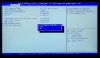
-
Hey all,
I have just bought this laptop (the GS60 normal, non pro). Still on my first 'hour' with the machine and noticed a very persistent screen flicker every minute or so with black horizontal line occasionally flicking on too. Also, the right fan seems to be on and running ALL the time. I saw one mention in this thread earlier on but that was a couple of months back. Is there a fix for this?
Thanks,
VGJFelix -
How long has it been doing this? Now and again mine will get stuck on battery saving profile. All I do is set it to high performance then remove the charger while in a game and then plug it back it. This sorts it and the performance jumps back up.
The stock fan profile has the fan turned on permanently. You'll have to flash a modified EC to fix this. -
since unbxoing and yes I have tried that when you suggested before. amazon are cross shipping me a replacement one day. ony glitch is out if stock until wednesday. I also did the bios check sg igfx modes. reset windows 8, safe mode uninstall drivers reinstall. ec and vbios and no luck. you can see 870m but it does not function at full power. light goes amber and fan sound increases but no power is generated from gpu. 3dmark11 1240 something seriously wrong. one extra detail nvidia on one driver update could not install physx until I did a clean install of drivers.
Sent from my SAMSUNG-SM-N900A using Tapatalk -
Thanks for the info. Is there an idiot's guide to doing this?
Also, I just filmed the screen flicker issue. Does it most in the first 20 seconds of the video. Look for single black horizontal lines flicking on. Also minute shifts in screen brightness.
I am using it now and it's not doing it (at all now for the past 20 minutes).
Very strange and worrying.
Last edited by a moderator: May 12, 2015 -
I wouldn't flash anything on that laptop. You may need to rma it.
Good news about Amazon cross shipping you a new one. Doesn't sound right at all. I hope the chip God's send you a nice replacement 870m that likes low voltage ;-)Last edited by a moderator: May 12, 2015 -
I noticed a similarly strange behavior, even connected to LAN. When I was downloading a game on Origin, I'd be getting a solid 2.5MB/s download, but NOTHING else internet related would even work! Steam would say it couldn't even detect an internet connection, and no Chrome tabs would load. The second I paused it, everything loaded at once instantly. I understand that Origin is hogging a lot of bandwith, but usually the computer will at least load tabs, albeit slowly. I'm not sure if it has something to do with the Killer LAN software, and I didn't get a chance to test any other devices on the internet at the same time to see if something was going on with the router itself. I haven't set any priorities for the LAN or messed with the defaults at all. Anybody else notice this before?
-
I've not even had it 12 hours so it's more likely to be a return/refund from the seller.
Did another video just now (for evidence if nothing else). Obviously the camera is not perfect and ignore the off colour in the bottom corner (just the angle I shot it at I think), but any subtle variations in brightness are the screen flickering and sometimes it flicks off completely. I know at this point I was installing a driver but I'm guessing it would apply that after a restart.
I'm trying to decide whether to install more updates or abondon now and return asap.
VGJFelixLast edited by a moderator: May 12, 2015 -
I'm not expert on this but VGA card issue might be the issue. Once you update the driver but the issue is still present I agree you should return your laptop.
-
Oddly, I use that same router with great success on my GS60 and also a HP 6700 wifi printer... I can't think of a single reason why having your GS60 would have any effect on the HP printer.
I can walk around my whole house with a fast reliable connection on the AC 5.0ghz band on the R7000, and has been stable and solid with any of the Intel/MSI drivers I've tried when using the AC 5.0 network. Also, like mardon said, it's odd you are having LAN issues as well, as the WiFI (Intel) and LAN (Killer_Qualcom) are two different controllers on the GS60 totally unrelated with different hardware and drivers.
Based on the fact you are having similar disconnect issues with both WiFi and LAN I'd lean towards suspecting an issue of some sort with your router. -
Last thing before I call an end to this night of misery.
I ran a 3D vantage mark test (free version). It took an age to load the Jane Nash and New Calico tests (2-3 minutes each) and the FPS didn't get above 30 fps.
Should I be expecting this sort of score?

-
No, about 18000 - 19000.
-
Ok, last video on the subject:
Packing it back up now. I'm done with this laptop, I have no confidence in the machine. Sorry if I've put anyone else off but best to show experiences with it.
VGJFelixLast edited by a moderator: May 12, 2015 -
It happens mate sometimes something goes wrong at a manufacturing level. I'm sure your replacement will be spot on.
-
Too late unfortunately. I'll be travelling abroad soon and I don't have trust in the brand now. Also the fan always being on and loud is a bit of a deal breaker (although that could have been part of the issue - maybe always putting too much load on itself).
I'm after a refund now.
VGJFelix -
Hiya, I just bought the 3k-095. Once I bought it I did a fresh install of Win 7 and never had any wifi or ethernet issues at all.
The one thing that bugs me and I cannot seem to figure out is the scaling for resolution. I use the software MSI provided to rescale everything at 150%, but not everything seems to resize. Alot of the windows remain the same icon size, etc. Also, he does not resize skype or any other programs. Is this something that cannot change or? -
Windows 7 does not scale as well as Windows 8 or 8.1, also some apps didn't use the Windows dpi settings, you can also try this to set a custom dpi since Windows only allows certain values
http://superuser.com/questions/706155/can-i-set-a-displays-dpi-in-windows-8-1
Enviado desde mi XT1032 mediante Tapatalk -
Thanks for the guidance mardon.
Mild underclock and undervolt achieved and I'm happy with the CPU temps.
Has anyone undervolted the GPU to for additional heat savings there? -
Yes mate. There's lots of info in this thread as well as a YouTube video from me and vbios's from myself and Sen7inel.
-
Some applications don't scale well with that setting, it's still better to work with 100% and change the resolution instead.
-
I guess you are right Thanks for all of the help. Much appreciated.
-
You are most welcome. :thumbsup:
-
Just changed the wifi security setting on my linksys WAG 320 N to WPA2Personal AES instead of AES/TKIP mixed mode and seems to work fine for now, I also added a Netgear wifi repeater on the first floor and it obviously helped a lot.
I've also updated both the modem router firmware and the Intel driver. -
I have managed to undervolt my CPU using Intel XTU (by -100mV) and everything seems stable - but I am not sure this undervolt is surviving over a boot - is there a way to check or a sure fire way to make a CPU undervolt "stick"?
Is it just as simple as putting the Intel XTU tool in startup? -
It does seem that this laptop is more of a beta. I think the maxwell version whenever that will be available feom nvidia would be the one to get. Maybe anybody reading through this long thread should wait. Heat issues and wifi issues , and the need to undervolt seems like we are the beta testers only paying full retail. My replacement is shipping from amazon, I am scared.its just going to be another problem child.
Sent from my SAMSUNG-SM-N900A using Tapatalk -
Pxj I agree with you to a point. Now mines tweaked I wouldn't swap it! I'm so happy with it. It shouldn't be down to us to repaste and changed bios's to get the best performance. I can't say I haven't enjoyed it though. But I'm sad like that ;-)
-
I love my 3k edition. Runs so well, stays cool and Wifi problems are pretty much non existent anymore.
-
mardon:
what'is the difference between 247 and 247_v2 vBios ?
Shoul i use sen7inel frimware with your vBios or not ?
actually i have stock frimware and sen7inel -75 vBios ... i hit 93C on crysis after 2 min game and the gpu start throat
thank you
-
Try the cool.rom see if that drops your temps?
247 has a memory overclock 247_v2 is stock clocks.
MSI GS60 Ghost/ Ghost Pro Thread
Discussion in 'MSI' started by GreaseMonkey90, Jan 14, 2014.


