 Problems? See this thread at archive.org.
I'm thinking about getting the 860m model. I'm also curious to know the sound levels on the gs60, especially in relation to the Sager np9150 levels posted here: http://forum.notebookreview.com/sag...ager-np9150-owner-s-lounge-9.html#post8432854.
Also, how big and how heavy is the power brick?
-
the power brick is roughly 8 x 16 x 2.5 cm
-
Would using a smaller 90W power adapter work for on the go (non gaming) purposes?
Or are there other alternatives like the Blade's smaller brick? -
Anyone? thanks
-
Hi,
I recently got an msi gs60 860m fhd version and I'm having a problem with the screen.I've seen a few others having similar problems in previous posts where blacks lines flash across the display intermittently and the backlight flickers.What could be the rootr of this issue?
Most people rma but the problem with my case is that I'm currently in India(the notebook was purchased in the US) so i would like to try and avoid rma as it would take a significant amount of time.
Incase there is no solution could someone help me out with how to go about rma from India?
Sent from my RM-821_im_india_443 using Tapatalk -
Thanks mardon. Does Sen7inel's custom fan profile work for both the GS60 and the GS60 Pro? I just bought the GS60 from Amazon and it would be great to have my new machine silent up to 50c.
-
From what I've seen the Gs70 has slightly higher temps so the extra room isn't helping. I think it's down to the extra heat sink helping to dissipate the heat. Apparently their new official vbios clocks the card under 900mhz stock.
I'm pretty sure it does. There is a tool on the msi forum by a user called Svet and you can create your own fan profile. -
I had the frequently disconnect issue with my GS60 before. However, it is solved once I un-install the Norton Internet Security software...
-
Moreover, I posted a reply about the GS60 affects the router stability... it is also solved once un-installed the Norton software....
-
So I have made my own vbios and severely undervolted my 870M to where it's 0.875V under heavy load. That, along with a 915 core underclock and 3200 memory overclock, I never go above 88C even in Crysis 3. I am now a happy camper.
I have ModRQC to thank over at the GS70 thread for showing how to edit vbios.mardon likes this. -
Great work mskiller glad your happier. What are you 3DMark fire strike scores?
-
Can you post the vbios as well so I can have a look ;-)
-
Sure thing. Here:
NVIDIA GeForce GTX 870M video card benchmark result - Intel Core i3/i5/i7 4xxx,Micro-Star International Co., Ltd. MS-16H2
Vbios here:
View attachment coldoc.zip
So this is 915 core clock, 3200 memory clock, with .875V undervolt.inc77 likes this. -
Hum... Thanks.
I'll probably still go with the GS70 though, even if I have to do some tweaking.
The 870M is just a better deal than the 860M Ghost available in my country. -
Have a read of their post they're having to significantly reduce clocks on the gs70 to the point an overckocked 860m wouldn't be far off.
Personally I'd wait out and get the 870m on the GS60 or if you really want the Gs70 get it with am 860m. -
what is the max capacity for each m.2 slots.
-
The only limit is the capacity that you can purchase on the market, but the slot itself has no capacity limitation.
-
There's a new Intel WiFi driver provided by MSI and it's listed on their FAQ too.
Intel WLAN driver 17.0.3.2 -
Wow, how did I miss this for the 506 EC? Anyway, anyone got issues using this firmware? Otherwise I'll be using it and hopefully will see cooler temps.

-
Using it atm, seems fine.
-
Thanks! Now to get off work to implement it...
-
I missed the 506 firmware also. Looks like in have some tweaking to do. The wifi card really is terrible. I need to contact overclockers.co.uk about the killer wifi card they've been selling in the gs60 recently.
-
If you find out it actually fits in the GS60 please let us know too.
-
I can't even find images of wifi cards with a single screw hole like ours. I'm wondering if it's an error.
-
Hey guys,
I just purchased MSI GS60 Ghost Pro 3K 2 days ago. I loved the laptop so far.
I tried installing Ubuntu 14.04 on it. I created a bootable USB, disabled fast boot and secure boot.
However, everytime I restarted the machine with the bootable USB plugged in, it's stuck in MSI splash screen.
For some reason it's unable to read the Ubuntu installer from USB.
Can anyone point me in the right direction to solve this problem?
Thanks beforehand. -
You need to set it to boot from legacy instead of ufei I think.
-
Hey if someone feels like uninstalling the Killer Network Manager i received the Drivers without it from Qualcomm per email!
Just tell me and i'm going to upload it!mardon likes this. -
Is it not possible to configure dual boot using UEFI?
-
Never done it. Give it a go so you can at least rule it out.
-
Thanks for the prompt reply but it still doesn't work.
It's still stuck in MSI splash screen =/ -
I think you are not in legacy mode are you? there is no splashscreen in legacy!
-
Doh! I forgot to save the changes.
I tried it again however, when I'm in legacy mode, I can't boot to windows. It seems like Windows 8.1 is preinstalled in UEFI.
Is there any way to install Ubuntu in UEFI as well? It's kind of inconvenient to switch boot mode everytime I want to switch OS. -
How did you prepare your usbstick for the ubuntu installation?
-
I used Universal USB Installer from Universal USB Installer â Easy as 1 2 3 | USB Pen Drive Linux.
Formatted it to FAT32 and used the installer to create bootable USB. -
Try Rufus
Following settings: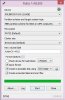
just worked for me! -
It's working now. Thanks!
-
You are welcome sir!
-
not worse, it is just smaller...
Sent from my SM-N9005 using Tapatalk -
The newest .5.8 beta wifi drivers on here
MSI Global - Computer, Laptop, Notebook, Desktop, Motherboard, Graphics and more 64
released 2 days ago may fix the disconnect problems?inc77 likes this. -
ELAN CLICK PAD ISSUES
i have uninstalled and re-installed the drivers/software, the problem still exists:
2 finger TAP (not click where you push down on pad) still works randomly. sometimes it will work 5 times in a row, then other times it takes 2 or 3 or 4 or 5 tries before it registers the pop up menu (same as right click).
i have the icon in the system tray to display actively the taps and it always shows the proper 1 finger or 2 finger tap so i know the hardware is registering the taps correctly, but it seems the software is slow because sometimes i can see the pointer icon turn into the little blue circle like it's thinking.
2 finger CLICK works every time, so does bottom right corner CLICK for the pop up menu.
is anyone else experiencing this issue and have any solutions? -
Test your USB flash drive on a different PC to verify if it works or not.
-
It's working now. I used different software to prepare the bootable USB =)
-
Hello everyone
I know there are tons of complaints on here about the wireless cards. Has anyone actually used a fix that works?
I have a GS60 that I bought for a customer and I want to jump off a bridge. I have tried AC, G, N, Apple AP's, Ubiquity APS, and the user still gets random disconnects. After that they cannot connect back to the wireless at all unless the device is removed from the device manager and reinstalled and that's doesn't even work half the time.
I purchased from hidevolution.com with all the cooling options but if I can't get this sorted this thing is going back even if I have to pay restocking.
I have tried every driver on the planet and I am using Windows 7 Pro that was installed by hidevolution.com.
I did find it odd that they sent it with a stock Win 7 install that was missing most of the primary drivers.
I installed a Ubiquity N AP in the users office to alleviate any concerns about wireless strength.
For this expensive of a unit I have to say it is a good idea but the track pad is trash and the wireless is a joke.
Thanks in advance
DBA -
Ok, So im ready to make my decision tonight on the MSI GS60 Ghost. The model i have it mind is the MSI GS Series GS60 Ghost Pro-052 Notebook Intel Core i7 4700HQ (2.40GHz) 12GB Memory 1TB HDD 128GB SSD NVIDIA GeForce GTX 870M 3GB GDDR5 .
I have a few questions though:
1. I'm reading on here that build quality isnt good, Yet other review sites are praising the quality. I mean its magnesium and aluminum, how can it be bad?
2. Is the 3k really worth the money? I feel like it takes a toll on the battery and the GPU and Windows DPI scaling isnt very good.
3. What is battery like for just normal computing (web browsing, email and youtube)
4. I hear that this thing gets hot and i expect it with a lot of gaming, but what about basic usage like browsing, email, netflix & using lightroom?
5. 860M OR 870M? -
MSI has suggested to update to the newest Intel wireless driver.
GS60 (16H2) is experiencing intermittent wireless connectivity dropouts. -
That's good to know, it must had been a boot loader issue then.
-
having the same problem with my MSI GS60 pro, just got it back after leaving it with MSI repair centre for 2 weeks
they told me the problem is cause by loose connection between screen and the main body itself.
after days of monitoring notice a bit of flickering after hours of watching YouTube .... thinking of sending it back again......
by the way apratim_pranay I think the only way is to repair it in India and void the warranty(any PC shop around your area?) , it will cost way too much money and time to forward it back to US and send it back to you again. Don't think MSI will cover the transport cost for the RMA -_- -
Good questions ... I would like to know the answers too.
+ Is there a big difference in power between Maxwell and Kepler 860M ? I know about 10% difference but is it something to consider rather GE60 with Maxwell ? -
Well, i just got the 4710HQ model with 16Gb RAM, and its brilliant!
I've upgraded from an alienware m14x, and build quality is the same! Sturdy joints, no flex in the keyboard. The Mg-Li and aluminium chassis feels solid.
I didnt bother with 3k. the 1920 x 1080 screen is great, and gets the most out of your GPU. 3K is just crazy on a laptop IMHO. I like that, unlike Razer, MSI gives you the choice of res.
Battery life for day to day stuff is good. around 3-4 hours for web browsing with 40% brightness. My alienware was around 1.5hrs!
Again, under normal load the device stays cool with a single fan on. Its gotten a smidge warmer when the CPU has had to ramp up. Gaming however is a different beast! think 93C for the GPU! This puppy gets HOT! The dual fans do what they can, making more of a woosh than a whir. quieter than my old M14x. But with a thin chassis, there's not a huge amount of space for the heat to go out! Hence exhausts on the back and side. Air is drawn in through the top, and some is vented out the bottom. If you're on a table, its no biggie and cools down within 5 mins after game play. But dont be tempted to play crysis on your lap!
ALWAYS go for the best GPU and CPU combo you can. you cant upgrade those later. The 870m has 50% more RAM, and is 40% better in crysis 3, and a 45% better 3d mark score! That being said, if you only play LoL, then save the money and get the 860m model. its about £200 cheaper. -
hey thanks for the reply. So if I understand correctly, you had the problem and sent it back and now you are having the problem again? My guess was a loose connection or a faulty gpu anyway. I do have pc shops around here.The problem with voiding the warranty is if I do try and get it fixed here and it doesn't work,it'll then cost me a ton to get it fixed from msi. Infact if it is indeed a connection problem I could look into it myself.
On the other hand if I do incur the cost of sending it to the US(rma doesn't cover transport as your rightly said) and if the problems surfaces again,then there isn't much point in sending it in the first place.So I ask again, did the problem reoccur after you got it back from repair?
It's a tough decision in any case for me.
Thanks for the help again.
MSI GS60 Ghost/ Ghost Pro Thread
Discussion in 'MSI' started by GreaseMonkey90, Jan 14, 2014.


