 Problems? See this thread at archive.org.
Ok, highly doubt they actually did anything with my device during the repair then. Makes me sad.
Did you ever consider sending yours in for repair of the spacebar?
-
thanks a lot... i will think about. Because i need the notebook to stay with me for long long time.... maybe 3 years, its worried with the performance =(...
do you guys know if the GS60 and GS70 with 860m have the same temperature performance? -
Oh wow, this particular model for France has inferior processor and lower end GPU.
Because I could tell you that all of the GS60 models sold in the US are equipped with i7-4710HQ though.
You do have a choice though, please take a look at this one instead.
GS60 2PL(Ghost)-004XFR-BB74718G1T0DXX (9S7-16H412-004) -
The temperature should be very similar at around 80-87 Celsius under load, and depends on your applications.
-
Is it true that the gs60 doesn't have backlighting from f7-f11 keys?
-
Not from above, but from the side.
It's not hard to notice if you start paying attention to it. -
Can you give me a link of this model because I don't found it

If you know a site which deliver in france and which sells a GS60 with a i7 for 1000€ (about 1450$), can you give me a link too ?
Thanks -
Yeah the fans (and more appropriately , the air coming out of the laptop) gets pretty loud when playing pretty much any game because they go full force. However, I don't know why people complain so much about it. I'm never playing in a room or place where I'll be disturbing people around me, and I always use headphones or connect to big external speakers! I definitely don't notice while I'm playing.
-
I undervolted my 4710HQ by -87mV and while running Prime95 to test the settings, it seemed to overclock itself. Before it would sit around ~2.8GHz once it hit the 47W TDP. Now with the undervolt it stays rock solid at 3.2GHz before it reaches 47W. I used XTU's monitor to verify. The cooling for the CPU is fantastic (never see temps over 85, even under Prime), so the max clock speed is limited by the TDP. You can try raising the multipliers for 1 and 2 core operation (I set mine for 3.5 GHz,), but as far as raising the max speed use 3.3 GHZ for 3 and 4 core operation, undervolt it and let the CPU use its Turbo mode.
-
But when you watch a movie, a YouTube video or when you have ten open pages, you hear them ?
-
87 celsius? so changing 870m for 860m will not change anything =X...
you guys are thinking that i'm a boring and stupid guy, but i'm very afraid if i will have problems with the notebook in the future...
another question.
what backpack should i buy?
http://www.amazon.ca/ASUS-Republic-...8568423&sr=8-1-spell&keywords=asus+rog+nomand
or
http://www.amazon.ca/gp/product/B00...d_t=101&pf_rd_p=1611805062&pf_rd_i=2404990011 -
would anyone be so kind and give me some fan tables for the gs60 / 860m?
i bought svets tuner tool and made a couple of adjustments, but i can't get it as quiet as back in the days with the quiet profile for Pherein's Fan Tool (i think it was before the 504 update).
It ran with like 2400rps or something but the closest i get is 2792rps
also, is there a chance, that the range the fan is functioning in gets fixed? 0 - 43 is a long road of nothing :O
aaand one more: can i use XTU to underclock (not sure if thats the correct term) the cpu to be less powerful but also less hot?
thanks a lot guys! btw. if you need a 507 ec firmware with special fan settings, tell me! -
Nice Asus backpack, here the one I'm thinking of getting
http://smile.amazon.com/gp/product/B00LSRW3OA/ref=ox_sc_sfl_title_5?ie=UTF8&psc=1&smid=ATVPDKIKX0DER
NewEgg and others have the Aorus in stock compared to Amazon. -
Don't worry about the temps so much. As long as you keep your machine clean and your temps remain in that range across time, it should be alright. I have hotter running laptops that work today and are 5 years old Even my original gaming laptops are still running like champs! And some of them run as hot as 90s degrees when gaming!
As for the backpack, I think I would go for the alienware one, if I had to choose. I used to have huge backpacks but I only ended up wanting to carry more stuff.
For the CPU, it's undervolting you should be able to undervolt to reduce temps with intel XTU but I don't know if the particular GS model is able to. So far all laptops I have tried and use, have been able to undervolt.
For fan tables, I have only used phereins tool and you can basically assign the range as fixed if you want, like low fan speed and high fan speed. -
Are there any other differences between the gs60 007 and 003 other than 4gb ram and 250 gb in hard drive?
-
Yes you can use XTU to under volt and under clock the cpu.
I am running mine at 32/31/30 (single,dual,quad multis) at -80mv made a great reduction in temps and fan noise.
I am interested in the 507 fan profile when you get it right, do you need a hand with the steps? I was going to get SVETS tool myself but there is no point if you are happy to share -
All my lights work perfectly fine on all the keys!
-
Im in the same spot, the only thing bothering with my 860 model is the loud fans and would be happy if you could share the fan profile
-
I have also asked a local UK MSI rep if there is any chance they could lower the rpm, I am sure they did the same on the original gs70 I had
-
I currently have over 10 pages open on Google Chrome, one playing YouTube, and a movie playing in the background on VLC player, and I'm also browsing Steam and it sounds quiet. Yes, if you want to listen closely, you can hear the fan. But not much. If you are playing sound out of your laptop, you definitely won't hear it. My ceiling fan in the background is more annoying than the computer. It never ramps up as high as it does when playing a game because it uses the Intel Graphics for all these tasks. -
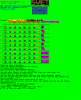
sure, i gladly will! could you suggest some values / steps? because mine are pretty random and appear to jump from time to time (got 0% rps till 50, then 43% up to 60.. and yeah, i guess that's a bit messy)
-
these are my current values, cough (which works quite good at the moment for browsing / youtubing, as the fans do not start spinning - but its cold in germany
)
-
Here are kazouls settings which look pretty good (hope you do not mind me quotting you kazoul!) he has also adjusted the gpu too. I think your 43 is hit or miss so you might want to try 44.
-
Just a small question:
What about MSI warranty after you flash with a custom vBIOS? -
thanks, i was thinking to buy an sager with 880m, but i think it is not so great idea.... the O.S come installed in the ssd right?(not at the hdd). another question the GS70 and GS60 are at the same boat? same performance(should be since the hardware is the same) and temperature? i think 3K display does not deserve the price...
just another question about temp. when browsing the gtx870 do not run at full load right? so the temps would be nice and the cooler quiet?
thanks -
When browsing and doing basically anything except gaming and heavy editing (i.e. video, photoshop, etc.) it uses the Intel Graphics by default. So yeah, much cooler and quieter. Don't worry. I just played about an hour of Titanfall and yes, it got up to max 91 at one point, but average, it logged in at about 87-89. Not bad. I also keep my laptop on top of a laptop fan, but not on. Just to give it that extra breathing room. I'll turn it on sometimes if I am playing a heavy game for a long time.
-
hey guys,
i altered the 507 ec firmware to match kazouls settings. have not flashed it yet, because i'm in the office and the fans spin up very loud in the process of flashing here are the values i used:

and here is the archive with the all the stuff you need in it:
View attachment 16H2EMS1.507_kazouvalues.ZIP
i will probably change the first step to 0rps again,because this seems to be
working quite good for light usage!
i have no clue what the extended ones do and therefore, i have not touched them. enlight me if you can
also, i'm pretty sure that nothing bad will happen, but if something goes wrong while flashing, dont blame me!
cheers -
I just tried to flash it and no change! I am running autoflash, that is correct isn't it? (oh and reset pin after with no psu)
-
i always used winflash and never touched autoflash.exe, but i'm on win8.1
- start winflash.exe
- check 'shutdown'
- press 'start'
- wait for the shutdown
- remove AC / wait 5 seconds
- press the pin-button for 5 seconds
- wait another 5 seconds
- put it back on power
- power on gs60
- enter bios / f9 to load optimal settings / f10 to save
this is how it worked for me! but still, havent flashed it. -
Yeah thanks, also tried that and nothing! It looks like it is flashing but the rpm stick at 2700rpm! Have you managed to get it lower than that?
The only thing I can think of is the extended may also be using the cpu fan and that is set to 54 at 0c, could this be over riding the cpu settings? -
i made another version where the first step is 0% rps instead of the 44%. because when i first flashed kazouls version, i did not experience any difference as well (stayed at 27xx rps).
View attachment 16H2EMS1.507_kazoulaltered.ZIP
not sure if that's a thing, but i flashed the original 507 before i flashed the altered one. -
i can try to change the extended ones as well, but i'm not really sure if they belong to cpu or gpu. i got it lower on the first step with the 0% setting.
-
I didn't flash .507 first but in BIOS it now shows 507 (your modified one so it definitely flashed ok. Thanks will give the new one a try and get back to you
-
Update, your 0% works! now it goes from 0% to 2700rpm at 55c maybe 44 just doesn't work on my machine. Thanks for all you effort, at least now when I put it in powersaver the fan is mostly off. Think I will buy SVETs tool so I can muck around some more and save hassling you
-
great to hear and bit strange. because before the 504 update, the 43% setting worked good at 2400rps (which made a real difference). if you find any new tricks, keep me updated! thanks for your help as well!
-
can you let me know if you get the 43% setting working? would love to have a lower idle setting!
-
if you have time to flash, i can test as much as you want
i have the feeling that maybe odd percentages are not working. would you mind about flashing a version with 42% as the first (or second) step? due to this thread: https://forum-en.msi.com/index.php?topic=179676.msg1294442#msg1294442
this should be working. -
this is the one with the second step to 42%. if i'm spamming too much in this thread, please let me know :O
View attachment 16H2EMS1.507_2ndTO42.ZIP -
trying it now
-
still only 0 to 2700rpm. You didn't include the png file of the settings, what were the extended settings?
Edit if we are spamming the main post maybe we should dedicate a thread to this testing
Also loving the new gpu profile, just been testing with heaven benchmark -
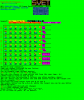
did not change anything to the extendes values. a new thread is an idea, but when i look at
the current page count, it seems like nobody cares anyway
EDIT there's also a new bios update available: http://www.msi.com/support/nb/GS60_2PC_Ghost.html#down-bios&Win8.1 64 -
hmmm, I am stumped then as to why 42 or 44 are not working for me! maybe you could try 44 on yours when you get home to see if there is just a problem with my machine
-
i'm curious why 42% & 44 % are the same and 43% appear to be a bit random (jumps to 3200rps and back). not sure if i'm able to flash it till sunday, birthday party this evening and overnight-marriage tomorrow.
maybe tonight if my gf isnt demanding playing diablo3 on console with me
but against all odds, i could try to go below 42%, like 40%? also, do you know what the different cpu rows are for? guess it has something to do with the current power settings, but not sure which is which.
if we knew, we could test multiple settings at once. -
Yeah, it is really odd. And yeah, I am sure it is power states but no idea which. I am going to try and get SVETs shortly and then also play. I am going to adjust the extended to see what happens. My hope is that there is another sensor using the cpu fan which may be over riding our settings.
-
Is there still problems with the wifi of GS60 ? I saw that a few pages before
-
My wifi problems were all solved by getting an AC router. I purchased a Belkin N750 DB and Belkin sent me a brand new N900 DB in the 750 box. Very happy with that haha. I have had 0 problems with wifi since then. It seems like the card does not agree with non AC networks
-
I will receive my GS60 tomorrow and i would like to know how I can change fans speed ?
-
I find that it works fine with my Belkin N-Router, and my brother's Linksys N router. No worries. Just update your drivers and such. I haven't had a problem since day 1 *cross my fingers*.
-
Play around with the laptop first to see if you even need to change the fans. I personally don't have a problem with the fans idle or active on this thing. People make it sound like hurricane force winds are coming through while they're typing a word document and watching a YouTube video at the same time.
-
The update to the touch pad firmware is a great update!
MSI GS60 Ghost/ Ghost Pro Thread
Discussion in 'MSI' started by GreaseMonkey90, Jan 14, 2014.


