Problems? See this thread at archive.org.
Have you got steam open in the background. The later releases use the nvidia gpu by default.
-
I think it will work just fine. I have a 2PE, but the .507 EC firmware download link on the 2PC page is identical.
-
Is it coil whine?
-
I had your exact issue. Turn the screen brightness all the way up and see if the problem stays away. If it does, a bios update will fix it, the earlier versions had flicker issues with some lcds at lower brightness levels. If it does not go away then the laptop needs to go in for service as the problem will get worse with the screen 'broken' for longer and longer at a time. It's a faulty lcd cable that needs to be replaced. MSI fixed and shipped it back out to me the very day they received it, so the turnaround wasn't long.
-
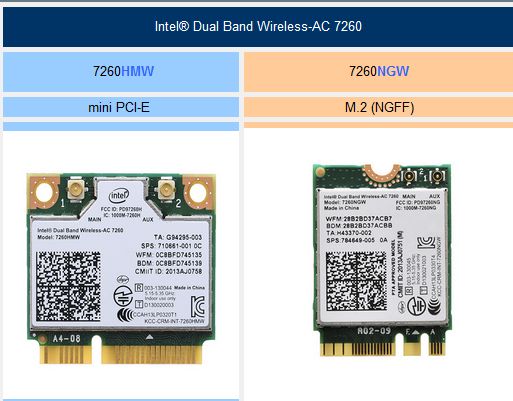
Yes,I know the stickers on the bottom of the GS60 say AC-7260HMW but they are wrong.
http://www.msi.com/files/pdf/Wierless_EN.pdf
My GS60 has the same sticker but in the linked post you can see my AC-7260NGW that was removed from my GS60.
You may need to use the magnifier tool to read the print on the card.
Here's the side by side of the N1525 and AC-7260NGW
http://forum.notebookreview.com/networking-wireless/762767-killer-n1525-wireless-ac.html
__________
If you guys havn't seen it yet there's an Elan Touchpad driver,v11.13.11.4, dated Oct 23,2014 on the GS60 driver downloads.
MSI Global - Computer, Laptop, Notebook, Desktop, Motherboard, Graphics and moreAttached Files:
-
-
As another member suggested, it's most likely coil whine you're hearing. I had some faint coil whine in mine, but it went away using an undervolted vbios. Some had success quelling the whine by letting the computer sit with a game continuously running for a day or two, but I'm not sure I'd try it on a thin laptop.
-
Not sure where the coil is located.
-
Yup, I flashed it and now its working fine.. Getting around 55~58 C on idling now... Thanks!
-
Does the 870M version keyboard have multiple levels of keyboard backlighting or is it just on and off? the 970M has 4 different levels but I remember only having 1 level on the 870M version.
-
Has anyone tried this? So far I'm pretty happy with the Samsung driver, but I still experience weird behavior like non-smooth movement of the cursor and 2-finger taps not working every now and then.
-
On the 870M version it seems to be either on or off. Would be nice with more levels...Xentar712 likes this.
-
It's weird that they would be different like that. Maybe there's a firmware update out there somewhere? Otherwise it's just a hardware update with a variable resistor but it's controlled electrically so...
-
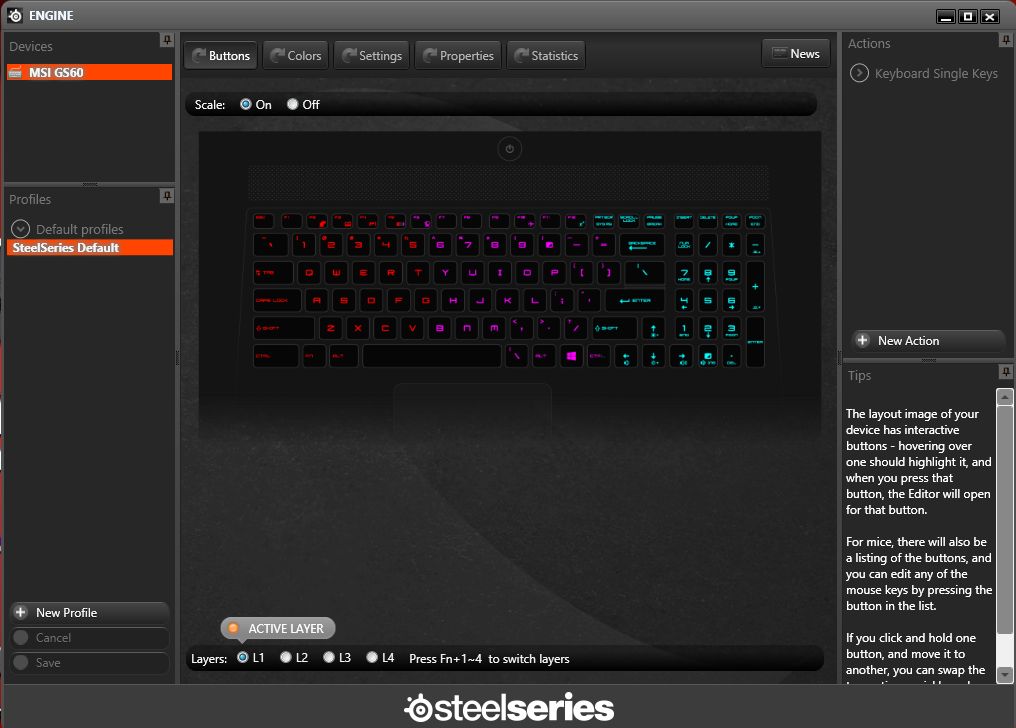
I have 4 levels in the Steel Series Engine Utility on my G60 with 850M
I installed the SSE and Dragon_Gaming utilities from the new GT72 w/980M downloads.The versions may be newer.Attached Files:
-
-
Will there be any performance increase in using a 6gb over the 3gb model? 3k screen
Bit of a bummer the m2 sata are near impossible to get to -
Only in games that require more than 3gm of vram, currently of which there are none. There are one or two games that CAN utilize more than >3gb when using optional ultra high resolution textures. The argument is that latest consoles have >3gb of available memory to store textures, and thus eventually >3gb textures may become the norm. Running a game that needs more video memory than is available causes the excess data to spill over into system memory, which may result in occasional performance issues such as stuttering etc. As such, the 6gb model, while not providing more performance is more future-proof.
That being said, I'd get the 6gb model. -
Are you talking about levels of brightness of different types or colours? How do you change levels on the 970m version?
-
I don't have the 970M only the lowly 850M
On Windows 8.1 I simply click on the Steel Series Engine Tile and it brings up the screen shown in my previous post.There I can change the level(keyboard lighting color combo) by pressing the FN key plus numbers 1 to 4 to switch "layers".
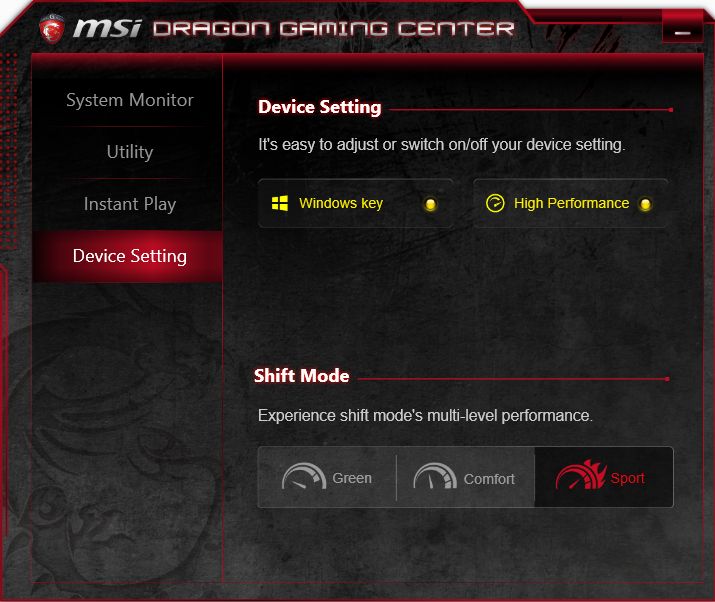
With "levels" aka Geen,Comfort and Sport I select them in Dragon_Gaming > Device SettingsAttached Files:
-
-
That's the same on the 870m version. I thought he was talking about the lighting brightness.
-
That's what I was talking about. Brightness, not layers
-
I have a problem with my GS60 Ghsost Pro (new model with Nvidia 970M), the wireless Killer 1525 Card desappear after the exit of a sleep mode, i must reboot the GS to see the card and connect ; I have tried the last Qualcomm driver with no succes, so can i replace this card by this one: Broadcom model: Broadcom BCM94352Z M.2 NGFF 802.11AC 867Mbps 802.11N Bluetooth 4.0 ?
Aliexpress.com : Buy Broadcom BCM94352Z M.2 NGFF 802.11AC 867Mbps 802.11N Bluetooth 4.0 HACKINTOSH from Reliable bluetooth braclet suppliers on Shenzhen Digsell Technology Co., Ltd
Thanks -
I don't think anyone with the 970M has opened theirs up to verify the socket yet. If it's the same socket, it should be fine though. Why not just exchange yours out though? I sounds like you just got a defect.
-
Because I'am not alone with this card problem , cf MSI Forum (driver problem / with Intel 7260 chip ? ), and i have called MSI French support, they have 2/3 weeks delay in France, so I prefer to replace the card....
-
The 1st thing to check is that both antenna wires are connected to the card by removing the bottom cover.
The wires and connectors on the N1525 are really tiny and hard to put on if needed.I used a magnifier head set and tweezers when I installed mine.
I had a similar issue with the M.2 form factor Intel AC-7260NGW that was the stock wireless card in my GS60(850M).
After I replaced it with a Killer N1525 Wireless-AC my sleep mode issue went away.
I'm using the new 1.1.48.1376 driver with the 3.0.0.400 Bluetooth driver.
Try stopping the Network Manager from running in Task Manager/Performance and in Startup also and see if it helps any.The Network Manager is not needed for wireless.
Right now the only choices for M.2 wireless cards are the Intel AC-7260NGW and the Killer N1525.The Intel AC-7265 may be available in November and it is M.2 also.
The Broadcom BCM94352Z is on ebay from China but I know nothing about it or Windows drivers for it.
http://www.ebay.com/itm/802-11-AC-W...US_Internal_Network_Cards&hash=item3a932c866e -
Have you tried the settings in my tweak guide? (see signature) I had terrible problems with my wifi.
-
If your question is for me or tb69?
The N1525 advanced setting are different from the Intel so tweaking is different.
I use my own proven settings.
On the Intel AC-7260:
Set to 20ghz only if on 2.4ghz band,leave on Auto if using 5ghz band.
The 2.4ghz band sucks on the AC-7260 so best to use 5ghz but if you for some reason need to use 2.4 then set the 2.4 to 20ghz only.
VHT not HT for AC,HT is for Wireless N
Roaming on lowest if connecting to only 1 access point
Setting band preference makes no difference but both may have an advantage in thoughput
Intel Advanced Wi-Fi Adapter Settings
Intel® Wi-Fi Products — What Are the Advanced Wi-Fi Adapter Settings?
Access Point Interoperability Issue with uAPSD
Intel® Wi-Fi Products — TechNote: Access Point Interoperability Issue with uAPSD -
I'have tried this with no succes:
The 1st thing to check is that both antenna wires are connected to the card by removing the bottom cover = no problem
Try stopping the Network Manager from running in Task/Performance and in Startup also and see if it helps any.
I have install the last Qualcomm driver for the suite (KillerSuite_1.1.48.1376_Win7_Win81.exe), but the bluetooth driver (K1525_Bluetooth_3.0.0.419_Win81.exe) installation goes at the end, but the card is in error . If i uninstall Qualcomm driver, Microsoft driver i used (i have also use Qualcomm Killer Cleaner before... )
Now after many reboots i can' t see the card in the device manager...! -
The 3.0.0.419 Bluetooth driver didn't install correctly on my GS60 also.
I sent the issue information to Qualcomm Atheros Killer Support.
I uninstalled it in Control Panel/Programs and Features and put driver 3.0.0.400 back.Now all is well pairing my Logitech M557 BT mouse and Nexus 5 smartphone.
With BT driver 3.0.0.419 the QCA61x4 Bluetooth 4.0 does not appear in Device Manager / Bluetooth -
I have resolved my problem with the Qualcomm Killer 1525
 / bad card ? (hardware problem ?) . I have replaced the card by an Intel Wireless-AC 7260 M2 (with bluetooth) see on Xotic PC (option)
The Intel card doesn't desappear and sleep mode works, so i'am happy.
It's difficult to really uninstall Qualcomm Wireless driver, i have used Qualcomm Killer cleaner...
After, I've just installed Qualcomm driver for the ethernet card.
I also add a Crucial 550 M2 512 GB on the 2nd M2 slot and replace the ram by, Kingston HyperX Impact 14900 - 2 x 8 GB - 1866 Mhz
For the new Wireless Intel 7265 AC, what are the differences between the 2 cards (7260/7265) ??? -
I learned from my experience with the Killer 1102 and 1103 to never use the Killer Cleaner.
I just go to control panel/programs and features and remove it.
I had the sleep mode problem with my Intel AC-7260NGW so I replaced it with a Killer N1525 and now I no sleep mode issue.
I put a Crucial M.2 M550 in my notebook also.
BTW,it's confusing to many when you put 512 Go and 2x8 Go instead of 512 GB and 2x8GB
On English language forums the GB,MB,Mbps,MB/s abbreviations are what are best understood. -
Any news on the front of the back lid dragon logo replacement, cover? I really don't like ithe and I need my gs60 more business like.
thanks -
@ WhatsThePoint
I have corrected my mistake (french to english translation...),thanks
For the sleep problem with AC7260 card , i use an old Intel suite in 16.6.x and not 17.x.x suite (see on Intel communities...)
https://communities.intel.com/thread/49947?start=0&tstart=0 -
Yes,16.6.0 was a great driver on the 5ghz band when I paired it with a Netgear R7000 AC router.
I had no sleep issues up to and including 17.0.6
The 17.1.0,17.12.0. and 17.13.0 all had the sleep issue when I tested them.Kevin@GenTechPC likes this. -
Just a heads up: a new BIOS Update is available on the Global and the US Site (from 10B to 10E). Just installed, so far no problems.
-
And are there any advantages of new bios?
-
There are always new fixes and enhancements, but occasionally restrictions.
WhatsThePoint likes this.
-
Hello guys,
I'm experiencing the well known Wi-Fi issue.. just not only with Wi-Fi.
The LAN connection is dropping out the same way the Wi-Fi connection is doing.
It happens when I just ping google via cmd on the desktop while idling, and the connection completely drops out when I start a program, e.g Google Chrome.
I don't really know why but if anyone has encountered a solution I'd be happy to hear it
Sadly I couldn't find a similar problem here or in the MSI forums.
My Model is the GS60 2PC with an i7 4710HQ, the 860m, 8 Gigs of ram and the 7260AC Wi-Fi card paired with the killer e2200 gbit LAN adapter.
Greetings
Spiritreader -
What version of WLAN driver are you using? Have you tried 7.0.6?
How about Killer driver version? -
I tried 7.0.6 and have installed the 7.1 driver for wifi, and 1.1.47 for the killer LAN driver.
I do not experience frequent dropouts when connecting via tethering with my phone.
Especially the complete connection loss when opening chrome is not present there
Thank you for your answer,
Greetings
Spiritreader -
Have you updated the BIOS & EC yet?
Also, what version of OS are you running? -
Have you updated the BIOS & EC yet?
Also, what version of OS are you running? -
BIOS has been updated to 10E, I still hesitate to update the EC since I've read that this version breaks Software Fan Control.
Currently I'm running Windows 8.1 64 bit, was pre installed, planned to not revert to Windows 7 until Windows 10 is out. But if that's the root of the problem I'll gladly change the OS, I'm not that happy wi
Thanks again for your support. -
Hello,
Do I need to have intel extreme tuning utility turn on so that it takes my settings?
Thank you in advance. -
Nope, once they're applied they'll stay that way even after you close XTU. They'll even be preserved across proper shutdown/restarts (aka if it was not a proper shutdown/restart, XTU resets the settings to stock since it could be caused by the changes made via XTU).soloris likes this.
-
BIOS & EC are reversible but newer are usually better.
BIOS 10E only had improved F12 LAN boot function.
EC 507 had these changes
1. Modify i-Pod charge sequence.
2. add GD25Q512 support (new SPI BIOS chip).
Did you have Win8 or Win8.1 preinstalled? -
Interested in this lap but my main criteria now is to have a fanless lap when browsing the web, COMPLETELY fanless, i just can't stand the fan noises when doing light tasks, i find it unbearable in the evening when everything is quiet around.
I have a N550JV and thanks to notebookfan control and ssd, it's TOTALLY quiet, the fans kick only above 60°C which is NEVER when doing light tasks, it's now at 29°C while i'm typing this. Meaning that fans start only when gaming. And that's just so pleasant i can't turn back. I just hate noise.
So if there is a way to get fan control on the GS60 and make them totally stop under 60°C, i would probably go for it. -
You can do just that with a custom EC file, as others on this forum have already done
-
The BIOS 10E apparently also had some voltage adjustments that according to users on the MSI forums have fixed the issue with the wifi dropping out when the nvidia card is running.
MSI GS60 WiFi drop out Fix - Page 14 -
Not sure if this has been asked before but:
I just ordered this laptop about a couple a months ago when the 970m wasn't out. I have the 870m.
Is it at all possible to get the 970m in the 870m version? Can the card be replaced or get the 970m from MSI?
...Or am I SOL (not really cause 870m is still pretty great). -
No, you can't change it. It's slim laptop so they had to use soldered GPU onto motherboard.
The only chance for you is to sell your actuall GS60 and buy a new with 970M
-
Hi,
is this working for anybody? I tried several times (also with the quite 507 posted earlier) but there is no change. Is it not working with the latest BIOS (10E) anymore?
Regards
MSI GS60 Ghost/ Ghost Pro Thread
Discussion in 'MSI' started by GreaseMonkey90, Jan 14, 2014.