 Problems? See this thread at archive.org.
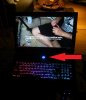
Alright, thanks. Right now it's at 100% with no indication if it's charging or not (pic below). I'm really not ok with it, but I guess there is no solution. I'd hope at this price MSI would've had more options to expand on battery life (seeing that it doesn't last long to begin with)

So what should I do? Just keep it plugged in 24/7 at 100%?
Another question, I like having the screen brightness and sound adjustment on the arrow keyes, they're easy to reach without looking. But I don't like having to use 2 hands to press Function key + volume/brightness (they are far apart). I opened the steelseries engine software to change Windows key into a second FN key. The windows key is clickable, but the FN one is not (in fact the only one you can't interact with) so I have no idea how to set a key to be FN.
I can set any key to CTRL, Alt, Tab, Caps lock or Shift, so I assumed you could also have more FN's. Is there any way to do it?
-
Usually FN key is not remapable by any software; i'm guessing it's implemented at the hardware level making it off limits.
-
hi is the 860m on this device kepler or maxwell?
MSI GS602PE Laptop (Intel Core i7 4700hq, 15.6", 1TB, 8GB RAM , 2GB VGA, Win 8, Black) -
Hey guys, what's the best driver for the GT 840m?
Thanks! -
Is there any way to dim the power light?
well, that's a shame but nothing too bad. -
I was thinking about putting a resistor in, next time I opened it up. It should be pretty easy. What's annoying is I've noticed it stays on even while the lid is closed and the computer is asleep
-
Anyone know the size of the M2 ssd screw (M2 2.5mm? M2 3mm?). Also, is it possible to turn off the lid logo light?
-
2.5mm or 3mm will both work. Go shorter just to be safe. There's no way to turn off the logo light. It's the same light that powers your screen. You could block the light by putting something behind it but that would require either removing the shield or the lcd panel
-
Hi,
I've just ordered the MSI GS60 2QE from Amazon and it should arrive tomorrow. I have spent half an hour or so reading through the thread and wondered if there are any known issues/ tips that would be worth knowing for when it arrives.
Thanks, -
Let the battery charge fully and plugged in for a bit, and you'll see it change over to something similar to this:
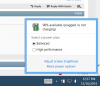
I just leave mine plugged in whenever sitting at desk and only unplug it when I take it with me without issue. -
I'm on a Ghost Pro 3K. Has anyone figured out how to run WoW at 1920x1080 in fullscreen? I can't get it to run anything other than 2880x1620 at fullscreen. The resolution option isn't there regardless of what I set my windows resolution to.
-
I am about to buy it during boxing day but I still have a few question I want to find out! the one that I am gonna buy has 12gb of ram, does that mean dual channel? or is it a good dual channel? it also only has a 128gb ssd, can I disassemble it and put a random m2 128gb sad on it and run raid 0 in the future? does the Samsung screen has light bleed? if it does or doesnt would you mind to show us a picture? people say the killer 1525 disconnects from time to time, how has that card been doing so far? I ve seen a video that a gs60 makes heavy clicking noise without the cover, have you figured it out what was the real problem? Sorry for all these questions, but consider it costs me 2000usd it really is a big investment to me, really appreciate that if the problems could be solved!
-
Hi guys,
I have been roaming the forum, but 432 pages is a lot to take-in...
I am interested in this rig, but I still have a few issues/questions that you might have the answer to.
1/ Seems like many people complain about the fan noise : is it really noisy when browsing/watching a movie ? (I have a vaio vpcF11M1E today, which is really noisy..check youtube)
2/ What are the difference between GS60, GS60 ghost or GS60 ghost pro ?
3/ What, in the references, stand 2PE, 2QE, 2PC, 2PL for ? does the screen quality change from one another ...?
4/ I like playing video games, but I don't need the crazy ultra setting, I am fine with High. Since GTX870 seems to have throttling issues and gets hot, should I not better stick with GTX860M ?
5/ Finally, do you guys trust MSI when it comes to quality of the product ?
Thanks in advance, it seems a lot of people also look for answers to these questions, so I am much it might help others than me .
.
-
Hi guys. Just got myself a fangbook edge and was told that it was based off the gs60? If this is true what are people's experiences with them? Thanks
Sent from my iPhone using Tapatalk -
I'm not really sure how to best explain this, but for a little while now, my GS60 (3K-095) has been having an issue.
Every few minutes, I will hear the fans spin up in a quick whirring (at a faster rate than their constant idle), which happens for a second or so, and then they wind down to their normal idle rate. Fan spinning, not so much of a problem.
What IS, is the fact that while this happens, my system becomes unresponsive. If I'm watching a video, the frames drop (and I don't mean the frame rate, I mean that the frames drop all together, as if they weren't there), and if I'm playing a game, the movement on the screen pauses/lags for a second or two, then resumes. This happens every few minutes and has become quite a nuisance.
I am very technically savvy, when it comes to keeping systems virus-free, but just to be safe, I'm running a full diagnostic as we speak.
I've also viewed the system logs, and the task manager, for any spikes when this happens and I'm unable to correlate any specific process that might be identified as the culprit.
In general, fan use is dictated by heat, which is produced by component, which is produced by load (generating said component heat). And with that in mind, the two biggest culprits should (in theory) be the CPU and the GPU, right?
If it was the CPU, shouldn't I be able to use the resource monitor and see a spike, followed by a drop (as the fans wind up or down, based on heat generated/component/load)?
Has anyone else experienced a similar issue with their GS60? -
I used to have an MSI-X460DX that had something similar happen every few months with the exception being that the system didn't freeze like you described. The fans would randomly start whirring at full blast for a second then turn completely off and repeat the cycle. Turns out that my vents would get clogged with dust. The dust hardly covered the entire vent/fan but it did tend to gather in one corner which I think would cause it.
-
Man I ve got the exact same random lagg spikes ... I thought it were game related but noticed ... I get those laggs in every Game.
What I ve tried ... Unlocked Bios for advanced settings like disabling hyper threading. Disabled all power saving features. forced the gpu not to go to sleep. disabled core parking. disabled apm of the hdd (spindown).
Nothing worked yet. If anybody have a solution for this. Please help! -
hi,can u share your bios?or at least share mane of the program that u used for unlocking;none of the programs that I tried worked so far.thx
-
I havent unlocked it myself i payed for it (svet) the Gpus Bios Modder also unlockes msi bios, for a little amount
amir_s_m likes this.
-
Do you have your games installed on the SSD or the HDD?
I've heard that the issue is with "having the games on a separate drive than the OS". However, this does not explain why the problem still happens when watching things like Netflix, HBOGO, YouTube, etc.
I also find it hard to comprehend that if it was a matter of the HDD initiating a sleep/idle setting, that this would be done every minute or so. Especially if a game is being run on the HDD when this happens. I mean, how could it be wanting to go to sleep/idle if it's currently being used?
So, IMO, those theories don't hold up. And the mystery continues. But what do I know. -
For real ?
I have my Games also installed on the HDD, do you have tried to install a game on the os HDD or SSD ? to give your theory a prove ? -
I have not tested the theory, nor do I plan to do so for a while. I'm in the middle of building a water cooled desktop and hoping to have that finished by the beginning of the year. Some time after that, I'll perform a complete reformat of the GS60 drives (which I've heard is a nightmare in itself). After the reformat, I'll install a game or two on the SSD, rather than the hard drive, to test the theory. Unless someone else has had better luck/can prove otherwise.
Please let us know if you try it out. -
There are no issues when running games from a different drive than the OS is installed on, need not worry about that, at least on the GS60 or any of my previous machines. I've got 900GB+ of games on my HDD and run Win8 from the SSD without any issues.
Having said that, I do have a couple games that do stutter on the HDD, but it is due to the HDD power settings. Basically what happens is the game loads into RAM, runs great, then a new file is needed from the HDD but while running from RAM the HDD went into power saving mode, thus causing a brief stutter while it powers back up. I don't have the link handy but it is a well documented problem with fairly simple fixes explained here on this forum. My simplest fix is either run HWMonitor in the background, which regularly "pings" the HDD and keeps it "awake", or use CrystalDiskMark to adjust the power mode of the HDD.
Not certain this is the problem of the original poster a few posts up, but I've been battling this problem with HDD's for my last few laptops. It's most noticeable to me in DCS:A10 type simulator games where everything loads in the beginning, and there's not much HDD activity for a while. Then bam, a big explosion or something, which accesses the HDD and instant brief stutter. It happened on my Asus G73, my MSI GT60, and my MSI GS60 when installed from HDD. When I do run then from the SSD however it doesn't happen at all, but even when run from the HDD is easily fixed. -
I actually meant to post this thread, which references the HDD activity/sleep issue:
https://forum-en.msi.com/index.php?topic=249364.0
I think I set CrystalDiskInfo up correctly, but the instructions were a bit vague in MSI's PDF:
http://www.msi.com/pic/faq/10011971@2014-1003-0401-014968@faq_0000000000977-en.pdf
After setting up CrystalDiskInfo, and rebooting, I am still having the same lag/stutter problem as before.
I did not set the KeepAliveHD program up yet though. Not sure if that will resolve the issue or not. -
Yep that exact kind of setup I´ve tried myself, disabled apm and stuff, but the stutter are not gone
-
I think I ve fixed it! . You have to choose the second msi hdd tutorial on this page where you have to install live hdd. it writes a tdxtfile every 7 seconds on your hdd so your hdd wont spindown and cause laggs. I tried it and my laggs are history now. Please givd me a feedback if it works for you or not
-
Has anyone fixed their WiFi issue by sending to the RMA?
Because its doesn't seem like the 7260 I have on my laptop is defective, this card in general just seems to be a piece of trash put in a supposedly high end laptop
I've been trying to solve mine for days but with no success, will it be fixed with the rma?
I never really had to deal with this RMA stuff before on my previous laptops so how does it work if the card is defective after coming back? Does it go back again and again until it gets fixed? or do they give the money back which I find unlikely? -
I had disconnect and resuming from Sleep Mode issues with the stock AC-7260NGW.
Replaced it with a Killer N1525 and couldn't be happier.(very hard to find if you don't want to pay $100 on ebay)
Tried an Intel AC-7265NGW(from Mouser Electronics) and it works well also but a bit less speed when transferring files across devices on my home network.
If you haven't already try disabling U-APSD in the cards Advanced settings,do so.
If you have ping spikes and lags while gaming online then you'll need to edit the registry.
https://communities.intel.com/message/246711#246711
https://forums.lenovo.com/t5/Window...etwork-unstability-on-Intel-WLAN/td-p/1461487 -
Even though I'm relatively comfortable around computer hardware and even built my desktop, I want to avoid having to break the warranty sticker and then screw something on the laptop
I followed this guide from someone in this forum and it includes disabling the U-APSD like u mentioned but it didn't fix it : http://forum.notebookreview.com/msi/761608-msi-gs60-ghost-tweak-information.html
More than ping spikes and lag the connection is overall terrible... The other laptops and phones around the house get 8-9mbps and the laptop on the same spot barely goes over 1-2mbps.. I even got one of those nano wireless adapters and it went from 1-2 to like 2-3, so still pretty terrible.
Thanks a lot for your response though ! -
Are you using the 5ghz band or 2.4ghz.
The AC-7260 is a poor performer on 2.4ghz.
802.11ac is a 5ghz technology.
Which router are you connecting to?
Try different channels in the router settings.
I use channel 161 on 5ghz but some people get best results on 36.
BTW,if you are in the US breaking the sticker and opening the bottom does not void your warranty unless you damage something doing it.In that case only the part(s) you damage will not be covered by the warranty. -
Finally pulled the trigger and ordered a GS60 064 from GentechPC. Got free IC Diamond thermal upgrade to both CPU/GPU, mouse, mousepad, external DVD writer, recovery USB, backpack, Keyboard skin, Protective sleeve, and 3 free games to boot
So very happy with my purchase as of now
Hope the feeling doesn't change once I get it! My only concerns are poorer battery life than the P35W but I guess thats something I'm going to have to live with. But otherwise, I'm happy to read about fewer reliability/driver issues than the P35W/X, the latter has a ton of them along with Power state BSODs and CPU throttling. Many people have returned their laptop due to . So for now, I feel I've made the right decision. Can't wait to get my hands on it!!
Few other concerns:
1. The glowing Dragon logo on the lid. Any way to atleast turn the light off? I noticed that a reseller was offering the option to have it turned off for 40$. Any way we can do this on our own? Or atleast buy some sort of a shield sticker to cover it when at work? I'm a doctor, so feel rather awkward taking it to the Hospital
2. Any way one can have a custom fan profile which can turn off the fan at idle, so that it can be quieter? I understand this was done for the 870M version. Can it be done for the 970M? Could the constantly spinning fan be one of the causes of a lower battery life?.....because then we can improve idle battery life a little if we can turn the fan off.
3. Is it easy to take off the bottom lid, just to periodically clean the laptop from the inside? Any wires/ribbon cables that are in the way and must be removed and then put back in place? I will be going to India for a few months, where its really dusty, so will need to do that once a month.
4. Anyone have any issues after upgrading the drivers/BIOS, etc from factory versions? Many people had them in the P35X forums, so was wondering what the case is with the GS60. Thankfully I haven't heard of any yet, but I guess I'll still feel comfortable running it with factory versions initially.
Thank you for your inputs!!
Regards -
Hello.
I've just got my hands on my new laptop for 2 hours now and i'm horrified with what i'm getting from this forum regarding the numerous problems this model have and i didn't knew. I have the following problem which can be listened in the following youtube video i've just uploaded:
https://www.youtube.com/watch?v=ndJPVYyPk9I
It starts in about 30 seconds after Windows it's on. I tried everything. I researched a bit and some say it's the hard drive( tried the quietHDD, didn't help ), some say it's Realtek Audio driver( disabled and uninstalled the audio components, didn't worked ) .
Do you think you can help me guys? As for the specs of the machine, it's the one with 1TB + 512ssd / GTX 970M. Model : GS60 Ghost Pro 3K
Please let me know. I considered to be the perfect gift for ..me and now it almost ruined my Christmas.
Regards,
George -
Let me know
George
-
Its due to a screw near the fan thats too tight and needs to be loosened a bit. Someone else had this problem and apparently loosening it made the sound go away. Check out the third reply in the link below, (post No. 903)
http://forum.notebookreview.com/msi/762769-msi-gs60-ghost-pro-970m-owner-s-lounge-91.html -
Noise is caused by the fan grinding against the housing, loosening it a little will stop the grinding.
-
Hi, I'm having my GS60 3K with GTX 870M almost 5 months already. I bought it from GentechPC. I have flashed the vbios and change the 1TB HDD to SSD myself and I have no problem ever since. Until lately, I think about 3 weeks already, when ever I played any games, my game would freeze the screen itself and the sound still playing, I can still control my character, using skill normally but the screen just freeze. I have a Notification that say Nvidia driver has stopped responding and recovered. It happened to me for many games like Diablo III, Warframe, Starcraft II etc, as long as the game is running fullscreen. I have googled and they said that is the problem with the Nvidia GTX cards which seems quite true because my Desktop which is using GTX 780 also have same problem. Anybody experience this problem before ???
-
Ok! Got it.
I loosened that a bit, it seemed at the moment it works but then suddenly, after 20 minutes i hear it again. I have loosened both but still from time to time, depends on the position of the laptop i hear it once or two. Now, i have removed both ( see picture ) from that and i hope i will not hear that sound again. I think it's very very pressed, and that's the fault? Or the fan could be not in his place or something?
Better i should open it myself or so?
P.s.: Merry Christmas! Thanks for the replies, you guys are awesome, really.
George!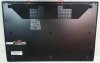 Last edited: Dec 25, 2014
 -
Still got that clicking from time to time even with both out, depends on the position of the lid.
Sounds to me like it needs professional attention, isn't it? -
Is there such a thing as a GS60 with 970m 4Gb+ and 3k or 4k display? It seems odd to me all the systems with this much vram don't have a high res display and the ones with high res only get 3gb. It seems you need more vram to handle that a 4k resolution but not necessarily for full HD. I'd like to avoid a flashy gold version. (I'd love the gold version if it weren't.. Well.. Gold.)
Last edited: Dec 26, 2014 -
Lol. My thoughts exactly. I'm not sure who chooses the configurations but they might need to think about a new guy.
-
The GS60 Ghost Pro 4K-078 from Newegg is the only one I've found available (yep, the gold one ) with the 970m 6GB and a 4K screen. All other higher res models have 3GB. I was actually begrudgingly about to accept the gold color, but the fact the 4K is always at 48hz was the deal breaker for me. Another search after this disappointing info still confirmed there were no 3K 970m 6GB options. On the plus side, the 1080p panel is a
great panel.
Still impressed with the 970m's performance after a week of usage. -
If this was just for gaming I'd be fine. But I see this as a long term investment. I also would love the 3k/4k for my primary function: design work! Gaming will be a close second on this machine. Any hope of them coming out with this soon do you think?
-
I doubt this generation will get any new versions with the 970m. I'd bet it's more likely they release a more mid-ranged unit once Nvidia releases the 950-960m GPUs. These of course wouldn't be much use with more VRAM anyhow.
I'm sure the next full refreshed generation will offer higher res screen options, so might be worth waiting for in your scenario. For what it's worth, I bought the very first version back in April, and they've already released this newer generation with Maxwell, so I can't imagine the next version is more than 6 months away, especially with Broadwell and Windows 10 looming.
From what I read, they put the higher res screens with the 3GB versions to keep the cost down, with the exception of the special gold edition for a premium. Many argue anything over 3GB is pointless for this speed GPU and current games. I personally wanted the 6GB version as I keep seeing more and more games being VRAM hungry and didn't want that to be a stumbling block next year. So, while I'd have loved the 3k or 4k screen, knowing how nice the 1080p panel is, I went with the 064 version (not to mention, a 4K screen locked at 48hz for all resolutions was the bigger deal breaker).
Good luck which ever way you go, it's a great chassis. -
Thanks for your input! Perhaps your right... Maybe at this point it is best to wait until Windows 10 comes out.
What are the benefits of broadwell? I'm new to this.
Thanks! -
Broadwell is Intel's name for their next generation of CPU's.... they are a bit more power efficient and will be a little faster, but nothing I've seen says they'll be a drastic improvement over the Haswells that we have now. It sounds like it will be more of an improvement for lower powered/smaller devices as opposed to full laptops or desktops.
Maxwell (like the 970m) is the latest and greatest version of Nvidia GPU's, which are significantly more powerful and cooler than the previous Kepler generation.
I don't think Broadwell or Windows 10 are really worth waiting for, but will be curious to see if they offer us better screen options in those revisions of the GS60. -
Windows 10 might be, specially with all this new 3k panels, a better scaling implementation is crucial for me specially on small display like laptops. But i do agree, Broadwell should be an incremental update, to me skylake is where im aiming to upgrade my laptop.
-
I hope Windows 10 addresses the scaling issues on windows.. So many people complaining and there will only be more as resolutions keep getting higher
Scaling on Windows doesn't even look like scaling its just a zoom :| -
Hello everyone.
So just today I got my very own and precious MSI Ghost Pro with 970m. I've read here, in this horrendously long chat, that there are several tweaks for the fans, energy and etc., could you all, please, remind me everything I should do for even smoother experience? Thank you. -
Hey guys I just bought a MSI GS60 15" with 970m and 2x raid 0 SSDs + 1TB hdd. I have been thinking of changing the hdd to a 500 gb ssd, would this be an easy thing to do or is it complicated ? how accessable is the hdd?
-
Just remove the screws and the bottom cover. The hdd is very accessible. You have to remove one ribbon cable and the drive comes right out
MSI GS60 Ghost/ Ghost Pro Thread
Discussion in 'MSI' started by GreaseMonkey90, Jan 14, 2014.


