Problems? See this thread at archive.org.
The SteelSeries keyboard doesn't have ghosting issues though, right? (The ones the Sager NP9150 stock keyboard has are near deal breaking, like E+2 keys won't work..)
-
Hi all, I wanted to ask your help for a problem that I have on my laptop MSI GE60.
trying to upgrade my ram 1333, at 1866 mhz corsair vengeance.
As soon as I mount 2x4 1866 the boot does not work, then even the bios and the laptop screen is totally black .. I have tested both by putting them in different slots and only work side by side from an old 1333 4gb, thereby lowering the frequency of 1866 ... I updated bios and everything I could, but I know they want to go in pairs and the frequency of 1866 ...
you can lower the frequency to 1600, if you can not start them in 1866? and how?
Otherwise I have to sell it or return it :-(
Thanks for the help -
I have a little red LED shining consistently inside my headphone jack, but the jack seems to work. What is this sorcery?
-
no clue... i got the same "issue"... but its sexy

-
I am not 100% sure but I think that red light is actually an SPDIF audio signal. I know they sometimes double up the 3.5mm audio jack with an SPDIF output which is used for digital audio. I didn't actually realise the ge60 had one, I just bought one yesterday so this is good to know.
Sent from my Transformer TF101 using Tapatalk 2 -
I got the GE-60 with the 3610QM/8 GB/GT 650M. It plays Guild Wars 2 pretty well for most of the game, exceeding 70 FPS in empty areas, and maintaining 40-60 in active areas. Zone super bosses and cities will drop it to 20-40, but overall, it handles nicely. Not sure about how it does with WvW.
The big killers for FPS were, expectantly, SSAO, FXAA, Shader Quality above Medium, and of course Shadows above Medium. Pretty much the same things you'd expect to hit your FPS in other games. The game was able to utilize 100% of the GPU's power, which I also monitored. GPU Temps from 64C to 70C, depending on ambient.
It's unquestionably a cut above the Samsung. -
The reason I got my GE70 is mainly for Distributed Computing (I'm addicted to BOINC crunching). Also, I will be attending university this month, and I needed a powerful computer with the latest processor and a very good graphic card, to perform my programming tasks and softwares I'll be working with.
-
What settings did you run it on (other than the ones you mentioned)?
-
Hmm, let's see.
Fullscreen - 1920x1080
FXAA - Off (On costs about 5-10 FPS)
Render Sampling - Default
Textures - High
Environment - High
Shadows - Medium
Shaders - Medium (High costs about 10 FPS, Low gains only a few FPS)
Reflections - Terrain & Sky [Default]
Post-Processing - Low or None (Can't remember)
Animations - High
VSync - On*
HD Character Textures - On
*Also tried Vsync off, no problems. When VSync is on, I noticed that it may have an inbuilt adaptive VSync, as it didn't default to 30/20 when under 60. Champions Online is another game that has this built into the engine. It's not part of my nVidia drivers, since I'm using v295, which predates that driver feature.
This was in the Sylvari starting area mostly, so there was a medium amount of players in most areas. I took a trip to The Black Citadel, where my FPS was about 20. There's just so much going on in TBC, so I'm not surprised.
Overall, I am tremendously impressed with how this thing handled the game, for a laptop that's not bleeding-edge. It also didn't get as hot as the 660M model, if the temps people are posting are anything to go by. It's one of the reasons I went for the 650M. -
does this laptop do adaptive brightness?
Enabled the service, wondering if there's anything else i need to do or is it not gonna happen -
I have a little red light in my headphone jack port. The port works, headphones work just fine. What is the meaning of this red light?
-
That sounds pretty good. The GTX 660m with some OC probably won't dip below 30FPS on these settings then .
-
Whats the best/easiest/safest way to OC the 660M for a complete noob?
-
do you think we can change Keyboard and use backlit for GT60 ?
maybe the motherboard GE60 have port power for LED RGB SteelSeries Keyboard << Maybe , i ask -
MSI Afterburner... push the core to max (+135) and play with the memory... i keep mine to safe +500.
The worst thing that can happen with this is... the gpu will just downclock to its normal setting...
Its not really for the max fps... but more for a more stable min fps... on my machine those setting are stable for about 8hours a night, 4 nights a weeks... I play starCraft 2 at work
-
Doesn't unfortunately.
-
Read one page back! One post after you first asked this question.
Now I remember why I don't bother spending my time posting on forums, the majority of people are too lazy to spend their time reading them.
Sent from my GT-I9000 using Tapatalk 2 -
The easiest way is to OC with MSI Afterburner, though if you want more than that, read this thread.
People got pretty high core clocks with this method (1200MHz+). -
Yeah... i might try this way soon...
-
Hi I was watching a youtube video review of the ge60 and the reviewer mentioned it throttles when both cpu and gpu have a load on them. Has anybody here noticed bad throttling problems? Thanks!
-
why when i click turbo button in GE60 0ND i see

Really in 0ND the turbo button it's just shorter key ?
-
Yes... and you need the S-bar... the turbo is all automatic on this laptop...
Gpu kicked in only if needed... and overclock only if needed (which is all the time the gpu start hahaha)...
but i pushed mine a little further +135core +500mem... -
thanks
now i have professional Question << lol
this Review Says the MSI GE60 0NC use 106W of adapter at Higher pregnancy
and as you know the original adapter very large and Heavy , at the sametime i have nice adapter but unfortunately it's just 90W ( AcBel AD9009 )
i want use it out home , but i will not use GPU 660m when i use this adapter
are you think the laptop Will not use energy higher than 90W (when 660 not use) ?
and how can i Measure all input power into laptop ?! -
If you're a "complete noob" I wouldn't suggest overclocking at all until you have a firm grasp of the risks that accompany overclocking. It's not complicated, but it's not something you should do with no knowledge, either.
The glowing "Turbo" text is just an indicator of whether you're using the GPU or the IGP. The button itself is a shortcut button. -
The maximum volume on the laptop speakers was too low for me in a few applications.
But you can raise the volume more than you think, even after checking the levels are as high as they can go.
Control Panel -> Realtek HD audio manager -> Sound effects tab ->
Look at equalizer section on this page. At top right is a button labeled "change to graphic EQ". Choose this and raise all levels. Ta da, max volume increased a lot. -
Guys which is faster, the 5870 on the MSI GX660 or the GT 650m?
-
i Measure power today (When not use GTX 660m) ,, by use multimeter << Measure Current and then we can find Power ( P = V * I )
& in high Display brightness + play Launch RealFlight 6 Demo < (1080*1920)
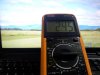
the Current = 2.45A ( P = V*I = 19*2.45 = 46.55W )
sometime go up to 3.2 A but still so far to 4.74A (90W)
(^_^) -
the 650m is maybe 5% faster, then factor in the other stuff
-
Hey im considering getting this or the GT. Does anyone have any input on suggestions between which i should get? Any glaring issues with this laptop? Keyboard... Etc..?
I am considering between the GE70 0ND-033 or the GT70 0NC-008
Sent from my SCH-I535 using Tapatalk 2 -
Keyboard is the same on the GT and GE models except for the GT ones having backlight.
-
Everything's rosy over here with my new GE60. The main gripe I have right now is the one I most expected: The keyboard layout. Part of it is just adjustment to a new layout, but the shifting of the spacebar to the left and the Windows Key to the right has had a couple of consequences. One, Win+D/R/etc. are no longer convenient shortcuts. Two, the Alt key being pushed to the left means that Alt-Tabbing (which I do constantly due to the assortment of windows I have to switch between at work) requires that I my wrist at an odd angle that has proven aggravating to my carpal tunnel.
I must be lucky in that my keyboard is moderately responsive, since a lot of the folks here apparently have issues with typing with any speed due to keys that are stiffer and require fuller strokes. Mine's pretty springy and only require a light tap to get the key to register.
It sounds like the GE60/70 should be a winner, unless you get a lemon. If you do, the busted feature should be covered by the standard 15-30 day warranty period before you get into the Mfg warranty. I do suggest getting it from a custom reseller like Xotic, GenTech, or one of the many others. They have great service and act as your frontline if you have issues, rather than having to deal with the less cooperative options presented by Newegg and the likes. -
Yes have finally gotten my MSi GE60 back from Newegg's RMA! God I missed this baby sooo much. Well it is a replacement so I'm extremely satisfied.
-
I had this problem earlier. I had to RMA my laptop to Newegg for a replacement. The audio jack had the red light and i think it had to deal with the S/PDIF output. I wasn't able to play any sound coming from the left side of my headphones or stereo. The laptop speakers worked fine. You should get this checked out. I don't think the red light is a good thing.
-
I think I might have a loose hinge problem on my GE60. I noticed today that the right hinge is kind of loose and I can move it. If I have my screen pushed all the way back and use the laptop laying down with my legs supporting it, I can feel the hinge is uneven with the left side. It is higher than the left side. Anyone have this problem too and should I contact newegg about this? Thanks!
-
Well i tried a headset and it worked fine... so... i dont know...
The red light is always on... and it work normaly...
Im very happy with my GE60... but unlike my Mac friend... i dont sleep with it
-
Whenever I play D3, even on low settings 1920x1080, my CPU reaches temps of 93C (I use HWMonitor). Is this normal? It usually hovers around high 70s-mid 80s but the fact that it can reach the 90s worries me. I ordered this from a reseller with IC7 Diamond Thermal Paste as well...
-
I cant seem to update the video drivers. Every time I try to install the new drivers, it says compatible hardware was not found. I even tried switching my gpu to be always on, but no go.
-
Hey I just did a clean install of Windows and guess what? The GE70 has the red light too! Don't know if it was a driver or something but the red light is on now that I did the clean install. Also, the audio jack works perfecly..
EDIT: I have the GT 650m version -
Doesnt really matter i guess... its just damn sexy
-
I heard that d3 has issues. Heating up the gpu and destroying desktops. Not quite sure though about this. Try googling it. I am pretty sure its not the laptop(fingers crossed as i am receiving mine soon and plan on picking up this game) hohoho
-
Hi! I'm looking at purchasing an MSI GE60 laptop soon. Do you guys who own one mind answering a few questions.
1) Does the laptop come with the ability to use an SSD in tandem with an HDD or the ability to use 2 HDD in raid 0
2) Have there been any issues with the left/right click on the touchpad being loose or difficult to click after lots of use or a jumping cursor? (My current HP DV6's left click is worn down and is loose in its bay making it very difficult to left click).
3) Does the laptop come with software that can be very annoying while playing games? Ex: My HP DV6's hotkey volume adjuster knocks me out of my game and onto the desktop just to show the graphic of my volume decreasing.
4) Does it come with an integrated GPU?
Thanks!
Katie -
1) It has an mSATA slot and one normal HDD/SSD slot. In default the laptop comes with a HDD, which you can swap out to an SSD or you can buy an mSATA SSD and use that along with the HDD. (Of course SSD RAID 0 is possible as well this way.)
2) I haven't seen anyone complaining about it getting wrecked, probably because the GE60 is a relatively new model. There is only one big rocker on the machine which handles both left and right clicks, which is in my opinion not the best design and it will probably wear out after long usage.
3) People have problems with the GPU not clocking down while idle or not activating in some situations, but after you have started a game you won't have any problems with stock software.
4) It does have an integrated Intel HD4000 GPU which is activated when no demanding apps are open. (And of course there is a dedicated GPU as well, either the GT 650m or the GTX 660m depending on which model you get.) -
Thanks, I really appreciate it!
-
Well right now Geforce GTX 660m does not have a real driver its only in the beta process. You can download the beta driver. If you have already downloaded the beta driver then your problem is that you manually have to change the driver nvam.inf files to update it. I have had this problem before and have solved it. If you go back to past pages there is the exact solution to your problem. I'm not sure exactly what page but its in the middle just spend sometime you'll find it or you can google. I personally youtubed a How TO video to solve the problem. If you do that and read some of the youtube comments that clarify you can update your driver.
-
Hi guys,
i can't decide what laptop is the best bang for the buck, here's the list
1. MSI GE60-LK321) | i5-3210M | Cool Audio Boost / 4 Speakers | 1080p matte
2. ASUS N56VZ-S3109D | i7-3610QM | External Small Subwoofer | 720p matte
3. Sager np 6165 | i7-3610QM | 720p matte
Questions:
1. in my country,
that MSI price is kinda-equal to ASUS and Sager which both come up with the i7-3610QM
i've no idea why MSI with i5 more expensive than these twos, maybe because of the 4 speakers + 1080p ?
seriously, does the audio boost and 4 speakers really good/effective ? (i always plug my shure srh440 headphones for almost 2 years)
According to Review MSI GE60-i789W7H Notebook - Notebookcheck.net Reviews
and Review Asus N56VZ-S4044V Notebook - Notebookcheck.net Reviews
ASUS has better temperature and overall points, is this review true?
In my country the price of (ASUS 56VZ | i7-3610QM | 720p matte) = ( MSI GE60-LK32 | i5-3210M | 1080p matte )
and cheaper $300 than the MSI i7 version
it doesnt make any sense, why god why @_@'
2. What makes you guys choose MSI GE60 instead of np6165 and ASUS 56VZ ?
If you were me, what will you choose ?
by the way im using crappy alienware m11 R1, seriously need to move on.
im not diehard fanboy of any specific brand.
so feel free mate
Best regards! -
Well is it the same gpu? cause the GE60/GE70 have a 660m...
if its the same GPU... i would go with the asus... lower resolution is easier for the gpu...
Also Asus are suposed to have better colling system...
Main reason why i didnt go with an Asus myself was the price... height and weight... -
Msi for the global warranty and weight
-
Do the MSI GE60's come with the ability to use an SSD and HDD at the same time? On MSI's website, it just says that the GE60 comes with a 750GB @ 7200 rpm. I've seen reviews of older MSI laptops and if I remember correctly, it had the ability to use an SSD for the OS and Apps and then use the HDD for other storage.
-
thanks for your respond,
i just did a research, and obviously i made a mistake
MSI and SAGER come up with GT650M GDDR5
ASUS comes with GT650M GDDR3
my bad
-
Didn't I answer that already?
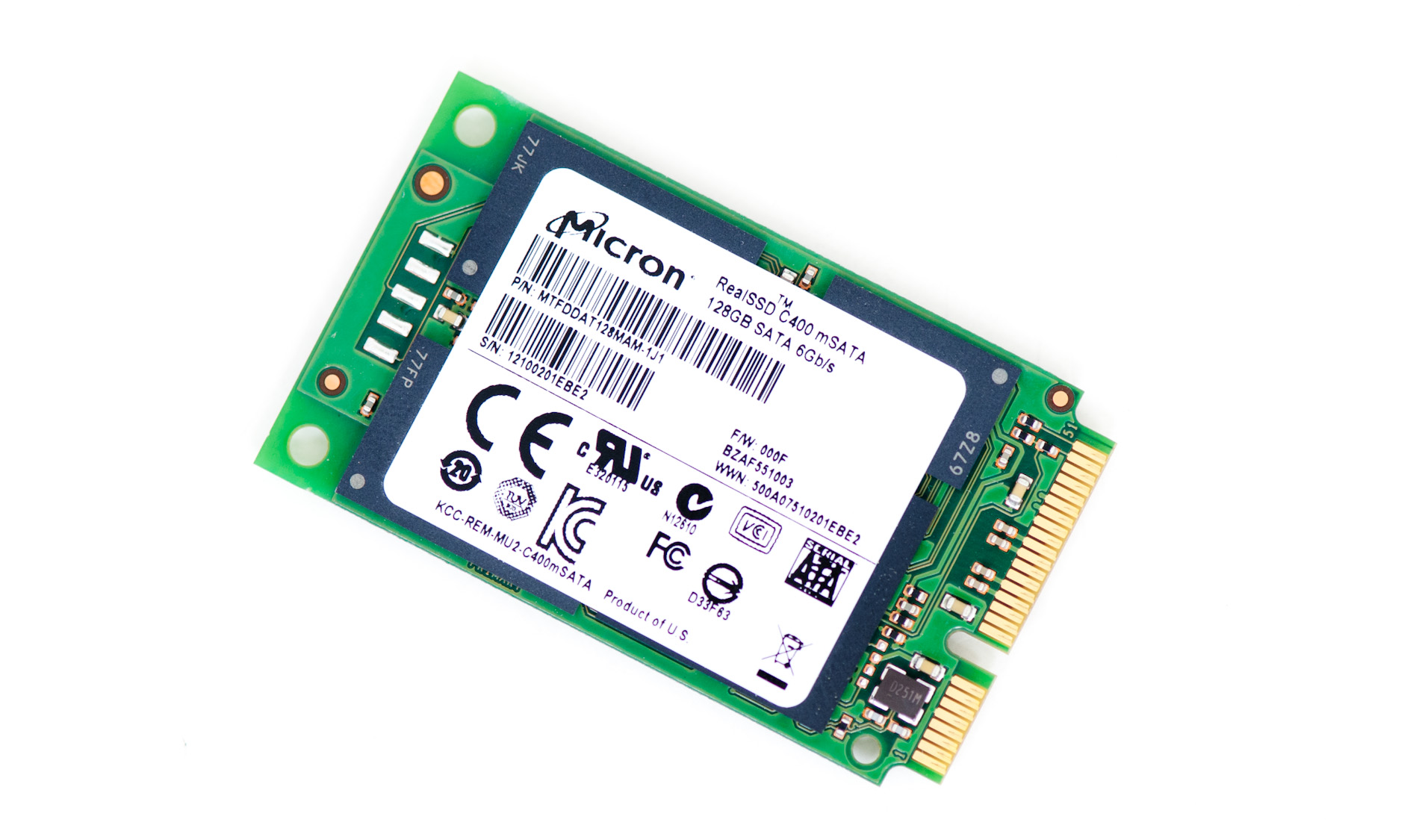
Anyway, the MSI GE60 has one normal HDD/SSD bay, but it also has an mSATA slot in which you can put an mSATA SSD. mSATA is basically a newer and thus smaller format, so they work similarly to normal sized drives.
Here's a picture so you can see the difference (first from the left is an mSATA one, third from the left is a normal sized one):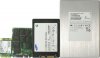
So the answer is yes, you can buy an mSATA SSD, insert it in the slot and you will be able to use the included HDD and the SSD you bought simultaneously.Attached Files:
-
Official MSI GE60 & GE70 2012 Owners' Lounge
Discussion in 'MSI' started by asurania, May 9, 2012.