Problems? See this thread at archive.org.
Thank you, thank you
-
-
What's up guys, I tried searching through the pages of this thread and didn't find anything so I'm going to post.
Got a MSI 2OE (Friday, October 25th) and the second day, after all the windows 8 updates and nvidia driver updates my physical memory / RAM usage is awfully high for no reason. After running a DOTA 2 (game), chrome (just a few tabs 2-3) and closing game the memory stays up there at times or barely reduces after closing it (from what i've been reading thats due to superfetch) Does anyone else have a similar problem?
Here is a screenshot imgur.com/CtOHdq4
You can see that steam and the killer network manager are the two highest processes taking up memory... So why would 7+ GB's be still in use?
I have system restored and it's not as bad as it was but as I write this I have 5.8GB in use (all I booted was a game today just to see what would happen, the ram usage dropped by .2 - .3 GB after closing the game)
When I restart the laptop it drops down to 3- 3.5 GB +/- which seems ridiculously high as well after just a boot!?
From what I've been reading it could be a memory leak, my other option is to reinstall gpu driver with hopes it'll make something happen.
I've went to msconfig and did boot > advanced options > checked the maximum memory box; I've played around with it back and forth but it still seems like a lot of RAM usage for running basically nothing!
All this seems harsh for owning the laptop for such a short period of time, maybe I should just contact newegg for a replacement? What do you guys think. -
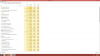
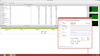
In Task Manager, if you click the "Processes" tab and sort by Memory, can you take a screenshot and post it here?
-
First one is from couple days ago
2nd one is right now
(check dates on bottom right if i messed up)Attached Files:
-
-
Hmmm. Try uninstalling applications such as Bluestacks, Avast (you'll still have Windows Defender), and the third party Start menu. I have none of those applications installed and have no issues with excessive RAM use. Also, make sure your drivers and BIOS are current MSI Global GE60 2OE
When you refreshed your laptop, did you do the factory reset or did just refresh without affecting files? -
Got the low memory problem running MSI Afterburner + logging on the background, beta15. Earlier an old version of Aida.
-
i dont know which one to choose.. since my current bios is american megatrends inc but i have 64bit windows 8 I'm a newbie when it comes to bios also.
drivers are all up to date as far as i know...
i only did a system restore point which was when i uninstall norton back up, thinking about doing a factory reset. -
Go to Charms Bar -> Settings -> Change PC settings (near the bottom) -> General -> scroll down to "Refresh your PC without affecting your files" and click Get Started. This will ONLY restore the OS, all your files and applications will stay installed.
Are you running Windows 8 or 8.1?
The new BIOS version should be 512, so choose that one. See my earlier post about how to update it. -
Anyone running Windows 7 experience freeze when downloading file (games, movie or even Windows updates, running some programs i.e. Adoble Lightroom? Is it because i simply install my old SSD (from old machine) into the GE60?
-
Hi there,
After a week of intense research and deliberation, and a very hard comparisons, I finally decided to pick up an MSI GE 60 2OE-003US and join this forum, The main reasons was the performance and portability, and of course the Price (refurbished MSI 120 warranty days for 950 bucks).
So here i am. I´ve heard about temperature issues, and i´ve read a lot of pages of this and other forums about some solutions. I gonna use mainly to internet surfing, watch HD videos, use office programs and from time to time play some games and use some CAD program.
I hope this computer have been a good choice. Please if You guys have some advice just let me know!
Cheers. -
The GE60 2OE has 2 mSATA slots so if you find running off the hard disk agonizingly slow as I do there is the option to use them.
Performance wise IMO I feel you got good performance for what you paid. The cooling could have perhaps been better considering how Haswell behaves, AFAIK the GT has 2 heat pipes for the CPU versus 1 for the GE but then the GT costs more.
Some CPU performance results.
Short Linpack run. This is probably the worst load that can be put on the CPU, normal running should have less impact.
![[IMG]](images/storyImages/dbo1.png)
Note the nice straight turbo line at 34x, before I was hitting TDP limits and power throttling see this post. Of course temperatures are now even higher.
WPrime v1.55 32M 6.846 sec, 1024M 213.07 sec
![[IMG]](images/storyImages/eie7.png)
Intel XTU score 775. Note that XTU can be used to reduce core voltage for helping with lower temps and power draw.
Cinebench R11.5 score 7.41 multicore and 1.60 single core.Kevin@GenTechPC likes this. -
does the nvidia card update normal on this laptop etc though there site or does it have to be like the GE40 drivers?etc msi drivers?
cheers -
Is the Battery issue solved? The battery still lasts only 2 hours?
-
anyone ?
-
nVidia driver should work fine - Visual Computing Leadership from NVIDIA.
You can also update Intel driver as well - support.intel.com. -
Battery life is about 3~4 hours, however it depends by the settings used.
How old is your battery? -
agh cool i only say because had some troubles with the GE40 drivers only liked the nvidia msi drivers,hmmmm
cheers m8 -
I don't have a ge60, but I am looking for a new notebook, and I liked the ge60. But the battery is a problem for me...
-
oh ps does msi live update work with the GE60 ? etc the bios update?
-
No, it doesn't. Live Update is intended for motherboard/graphics card products.
It says it in the disclaimer.
http://us.msi.com/service/download/ -
agh cheers most put glasses on
-
hi mrblue did u get this sorted??
if so what drivers work ? -
also mrblue
have u sorted the bsod out on it??
many thanks -
Hi,
I just bought MSI GE60 0NC (GE60H-i765M2811B) with preinstalled Windows 8 and decided to go back to Windows 7. I managed to format and install thanks to different forums but I am having real trouble with the drivers.
Most drivers from the MSI site are not installing (mainly "minimum requirements" error) and the Intel Driver Detect tool gets stuck at "analyzing" phase (tried both firefox and chrome) so right now I'm unable to use wifi, usb 3.0 ports and even my GPU (nvidia driver says that it requires intel drivers first). So where should I get the drivers from?
Any suggestions are greatly appreciated!
Thanks! -
Hey,
I was thinking about buying the GE60 2OD-247US, but I cannot find any reviews of it anywhere. can someone please tell me:
What is the kind of battery life when gaming and when casually browsing?
What is the performance in terms of gaming, surfing the web, etc.
Thanks -
Hi everyone!
Could anyone tell which version of BIOS I should use for updating my MSI GE60 2oc-036ne. The version provided by MSI download center and MSI support does not work. When I try to flash my BIOS says it's wrong version.
The version I was proposed to download is this: E16GCIMS.611
My current BIOS-version is AMI E16GCIMS.509.
If you compare them both, the number at the end doesn't seem to fit. I found a version called E16GCIMS.512 at the GE60 2oe website. It looks more like it is matching my BIOS but I won't install it until I am sure.
Anyone done this before and can shed some light over this? I am very thankfull for all the help I can get.
Kind regards
Karl -
Your BIOS is 509 so you can update to 512.
BIOS v5.12
EC:
EC 1.506 -
I am having an issue with my graphics processor switching over to integrated graphics when I unplug the power cord. I have messed with the power options within windows and the control panel of NVidia with no solution.
I have read this may be a problem with Optimus technology? Does anyone know if there is a fix to this, so that I can continue to game on battery power using my NVidia processor? -
Greatings!
How am I supposed to install 2 mSATA drives? The first one is clear, but am I supposed to chose between WALN card and the second mSATA drive? Or am I missing some free bay? -
AC adapter is 120W, and battery pack is 50W so It's normal to see performance drop when the NB operates on batter
the second mSATA slot is above the WLAN slot. -
So no way to play games off the power cord other than to decrease settings?
I am pretty sure it is switching to the integrated graphics when I unplug and that assumed that was the cause of the decreased fps? Your saying that isn't the case? -
Thanks for the tip!
-
Observe the LED color on the power button when you play a game.
If it's white then it's running off Intel HD, but if it's red then it's running off nVidia GPU. -
Just bought a GE60 20E & it came with Win 8 ,after installed all the Win updates i can now download win 8.1 from the store.
On my old Acer notebook it updated to 8.1 without a single problem but after reading the MSI site on 8.1 i could be in for a lot of hurt. [sound problems,blank screens etc]
I do think win 8.1 is an improvement so is it that problematic to upgrade ? i have saved all the 8.1 drivers from the msi site for the 20E so should be ok...maybe.
Anybody else use 8.1 on the GE60 series?....thanks -
Hi all
How do you setup Raid configuration from 2 msata SSD? Do I need to update BIOS for Raid version? After update, I need to go to BIOS and change from AHCI to Raid? Thx! -
No need to update the BIOS, go to BIOS setup and change SATA mode from AHCI to RAID.
Configure your RAID array in the BIOS, and press F10 to save & exit, done.
You will need to update pretty much all of the drivers manually first before updating to reduce any upcoming issues.
BIOS, EC firmware, and driver downloads -
Before the update to Windows 8.1, my touchpad worked flawlessly. I could scroll, triple click, etc. After updated to 8.1 I have lost all features except basic mouse control. I've tried uninstalling and reinstalling the updated driver from the MSI website but I can't seem to get the features back. I can't even scroll a page! Anyone else have the same problem and find a fix?
-
Have you tried getting drivers from the manufacturer directly?
-
I don't believe it is possible to get the driver directly from the manufacturer.
From the Elan website:
"Q: Where can I download the Elan's driver?
Please download it from your system manufacturer's website." -
By manufacturer I assumed you are referring to Elan. The manufacturer that is from the Elan website quote I posted would refer to MSI.
-
Just an update,
I went ahead an installed the win8.1 update.
Just followed the instructions on the MSI website & the computer eventually rebooted into win 8.1
Reinstalled the Intel & Nvidia graphics & touchpad drivers & all good to go.
Cheers -
So, can we just swap the wi fi card for a ultimate n 6300 card ?
Is the bios locked or s.th ? -
So I just checked and the reason I didn't find it before is because ITS NOT THERE
When I contacted the shop where I bought it, they told me this system comes with dual mSATA support only when ordered with 2 mSATA drives installed. I think this is bullsh**.
Do you guys know anything?
How should I proceed?
Thank you very much -
When you say it's not there can you provide a picture?
-
Which GE60 model do you have specifically. There are at least 4 different models currently made by MSI if not more. The 4 models we currently offer (2OC, 2OE, 2OD) all have built in mSATA slots. But the previous version which are ONE and OND models only had it on specific models.
For what you should do about it with your seller depends on how they advertised it when you purchased it as some had it and some didnt. -
Models with Super RAID have mSATA daughter board for 2 mSATA SSD, models without Super RAID has a standard 2.5" SATA bay.
-
I'm looking at the MSI GE60 2OC-093MY version which has i5-4200M and GT750M, the same 15.6" FHD matte display.
Just wondering whether the surface temperatures are comfortable or not because they are known to be a little heated up. Plus, I got to know that majority of MSI notebooks tend to overheat easily due to excessive use of thermal paste by the MSI engineers...
Is there a mSATA slot for this model? If so, can I add in a mSATA and reinstall Windows into the mSATA? Note that the notebook I''m talking about comes with W8 -
This unit doesn't run that hot, you should be expecting a lower temperature than the GT series.
The thermal compound is never excessive from the heatsink. It is a pre-laid dry paste on the heatsink contact with minimal amount (applying extra = more cost, uneconomical).
All laptop overheat if you don't clean up the fan/vent/heatsink regularly.
GE60 2OC has a mSATA slots, Source. -
I tried to do this thing and it is absolutely possible because some store allows the customization of the laptop using the 6300. However I have got some problem with that card, I suppose due to the driver. During normal use sometimes the connection drops showing a windows 7 typical error "no internet access". Now I use the built in wifi card but I have noticed that it is slower so I hope to solve the problem with the 6300.
-
If your GE60 is the 2O series then try to use 7260.
If your GE60 is the 0N series then you should stick with 6300.
Official MSI GE60 2013 Owners Lounge
Discussion in 'MSI' started by Grim Tuesday, Jun 18, 2013.