 Problems? See this thread at archive.org.
I have the 2oc version. However I bought the 6300 to obtain the max performance and because I wanted to add a third antenna, so I don't want to buy even the 7260 which performs less.
The 6300 is not unusable though
-
The third antenna will help your range but not your speed vs AC. 802.11 N can transfer up to 150Mb/s per antenna so three gets you up to 450Mb/s. The AC cards can do 450Mb/s per antenna so you could get 900Mb/s with just the two pre-installed antenna, as long as your other components like your router supported it.
-
Nothing stops you from buying a 3rd antenna and sticking it to the back of the display.
-
Can you check if your BIOS is up-to-date?
Even though these WLAN cards are using the same PCIe standard but I have heard that 6300 sometimes isn't compatible possibly due to BIOS issue). -
Did anyone tried to do ram upgrade?
I want to upgrade it from 8 gb to 16 gb. A-Data 8 GB 1600 Mhz CL11 1.35v ram is installed now.
I could not find any with same specifications. There is ones that have these specifications:1600 Mhz CL11 but 1.5v.
Should i mix the 1.35v one with 1.5v one, or I should check the ones with different CLs? -
Ok I will check. However after 2 days of normal use even the original wireless card has given me the same problem of limited access to internet so I think that there is a problem with my router.
-
Hello everyone im new here and cn not good english sorry for that.
I have a MSI GE60 2OE-002US for a week and the keyboard blue backlight dont work .
What is the problem.?
Or have this latop no light for keyboard>? -
Welcome to NBR!
I believe on this model you control the keyboard light with pressing Fn and + (on the numberpad) If that doesn't work try reintalling the KLM which will be on the drivers discs that came with the computer and available to download directly from MSI. -
I have try Fn and + but not work .
I cannot find the KLM driver on the drivers disc.
Maybe SCM but this is also installed . -
There is a button on the top left of the keyboard, can you press the right side of that to turn on the backlight.
-
Yes i know .
i press this button on the top left on the right side but not working . -
Try re-installing the the latest SCM.
-
Download the latest SCM here.
-
I have installed the latest version scm_w81_13.013.09262 but light is not working again.
I think the keyboard leds are broken or something. -
What's your current BIOS and EC version?
-
Hi,
the bios version is E16GCIMS.516
EC Version is 16GCEMS1 5.06 -
They are up-to-date, did you install dotnet frameworks 4.5?
-
Yes the framework 4.5 is also installed.
I think i buy a backlit keyboard : this . MSI Genuine GE60 SteelSeries Blue Backlit Programmable Keyboard Windows 8 Ui | eBay -
Thank you for your answers!
I have the GE60 2OD 247US model.
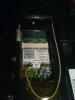
This is a picture from where I (and you) think the second mSATA drive should be installed (!?!!?)
-
That model should have two dedicated mSATA slots. Unfortunealty i couldnt find a pic of where it installs. In your picture is the wireless card which you want to leave there.
-
From that picture, it is missing the Msata connector. It should be at the end of the PC board and would installed on top of the wireless card, there would be a nut installed in that hole where the red shows under the PC board
-
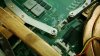
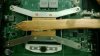
Hi all, I am trying to do thermal paste on CPU and GPU but encounter screw problem. As you can see in the 1st pic, the screw (number 2) is not in a perfect shape. I can't unscrew it ): Other screws except the #2 are fine though (see 2nd pic)
Anyway to fix this?
Thanks and appreciated all comments. -
The only thing you can try is to use crosshead screwdrivers of various dimensions until you remove the screw. Obviously you need to replace that consumed screw.
-
Or cut a slot onto it with a Dremel cutting disk and use an ordinary screwdriver.
-
I would try what tuplinux had suggested as well first, but if you still can't get it out then the last resort is to use a thinner drill bit to get it out (warning! exercise extreme caution).
-
Before using the Dremel (very last resource) you can try also with good pliers in vertical position and rotating you could remove the screw.
-
Exactly, there is no such connector on top of my WLAN card.
Thats what I thought. What should I do now? MSI has one of the worst customer services EVER, there are not responding any of my emails....
cheers -
Which model is your GE60? GE60 0N or GE60 2O?
When did you contact them? They aren't open during weekends. -
I have the GE60 2OD model.
I sent them an email several days / weeks ago, but never got an answer...
-
Not a video we posted but one I found which may help you. It is also a GE60 2OD model, its not in English but it pretty easy to figure out what hes showing you MSI GE60 - Tutorial de Ampliacion de Memoria RAM e instalación de 2 SSD mSATA en RAID 0 - YouTube.
-
Its actually in spanish so it worked perfectly for me
Yes, I saw that video and he installs the second mSATA on top of the WLAN card as it is supposed to. Since my system came without that second socket, I was wodering how to proceed. Should I demand another notebook in exchange? MSI headquarters is not answering my emails but maybe you know something else... ? -
Got my GE60 2OD-073US yesterday and I have to say that I love it. It is the first laptop that I have bought in the past 4 years since I normally just keep a desktop and running an old HP with Ubuntu when I needed to be mobile for papers and the such. It is nice moving to a i7 from an Intel Celeron single core. Mainly I needed something to get me through my Computer Science and Computational Physics double major because next semester sees me taking C++ and DE and Linear Algebra both with a heavy focus on computational methods. I figure the i7 would be more than enough computing power to get me through college and into graduate school and the 765m would allow me to do light gaming at LAN parties or other gatherings since my ~40lbs desktop isn't the most mobile of devices. I will say that it does get mighty hot when playing games but I plan on purchasing a cooler soon to carry around when I plan on gaming with it. Most days though all it will see is some light coding.
It was hard choosing a GE over a GT (the GT60 2OD-026US to be specific) but I figured I would be best off getting the GE with a less powerful GPU compared to the GT and spending the extra on a H100i, a monitor and a GTX 770 for my desktop which is in dire need of an upgrade from my 560.
So as it sits now it is running Windows 7 (what is comes with stock) but I am thinking of upgrading to Windows 8 since I find it so much faster, 2x 240GB Crucial M500 mSATAs non-raid, and the original 1TB harddrive. I don't need the 1TB HDD which I for some reason cannot completely remove because the computer derps and says no boot media installed even though I use one of the mSATAs as a boot and works fine with the HDD in and even disabled in the boot priority list... I am thinking of replacing the ODD with either a BluRay player or a harddrive caddy but I will probably never use that much storage. Thought about repasting it with some IC Diamond 7 that I have laying around somewhere from when I replaced my motherboard but since I am not going to be gaming on it much and when I do it will be with a cooling pad I think I will leave it alone (I just hate messing with thermal paste).
Has anyone been able to find a larger battery yet or where you can get one that is straight up the same? I will only have one class that doesn't have outlets but it is first thing in the morning for a hour and a half so it is not that big of a deal. I am getting around 2:45 as an average but I would like a little more headroom just encase I need to go longer if I can find it. -
Was it advertised with two slots?
-
I don't think it was ever advertised to have two slots, but it's always good to have extra features available.
I've opened up a GE60 2OC yesterday and there was only one slot available so the board design could had been altered without notice for cost-cutting reasons.
The other slot that shared the same compartment as WLAN adapter did not have the slot soldered on.
Perhaps this issue may start to appear across all GE60 2O series, but we need more confirmation. -
I've just bought my GE60 today and thought it would be a walk in the park to install an SSD (in the MSATA port) as a boot disk instead of the HDD. I've used the recovery tool to install all the files on the SSD (with and without the HD connected) and I can see it in the Sata overview in the bios. However, when I want to select it as a boot disk it doesn't show up in the selection list, only "harddisk" is shown. I've ran all the updates for the drivers and Bios but i can't get it to show up.
Any help is greatly appreciated! -
If you've used Win8 Recovery DVDs then you need to select Windows Boot Manager.
Run the Recovery one more time. -
I've made a recovery dvd on USB and used that one (3 times now). I've see I need to select Windows Boot Manager but I can't select it when the SSD is the only disk connected. I can see it in my Sata Information and I can acces it (with read and write rights). I just can't select it as a boot disk in the Bios. However, when I put the bios in Legacy mode I can select the SSD as boot disk but I can't actually boot Windows.
-
Did you try to do the recovery in UEFI mode with SSD being the only drive in the system?
What's the capacity of your SSD? -
Yes I did. The SSD is a 64GB Plextor Msata -
Might've found the issue. What's the Bios version you guys have? Mine says E16GCIMS.510 but when I download the newer version from the MSI website w8_E16GCIMS.617. When I try to install that one I get an error saying i can't install it.
-
Use 517.
Download BIOS
Unzip it, and then double-click on FLASHWIN in Windows.
EC is 1506.
Download EC -
How to access the Boot Menu?
Is there one? On Dell pressing F12 brings up the drives that can be booted. Is there an equivalent key on this MSI.
Hitting delete brings up the bios but setting the USB as the boot doesn't work...
Wait, maybe the USB is a legacy device... Hmmmm.... -
-
Thanks! That did it
Cheers, -
Problem solved... I've downloaded the 'original' windows 8 installation file, downloaded the installation files to a USB disk (using a retail W8 key). When I tried to run the installation I got an error telling me the serial from the download didn't match the serial of my device. I've solved this by adding a text file to the resources file on the USB disk named: PID. Text file contained:
[PID]
Value=xxxxx-xxxxx-xxxxx-xxxxx-xxxxx (W8 serial used for the download)
After that I've tried to install again and it worked!
I still can't select the SSD as boot disk in my Bios but when I boot my computer I do get the option to select one of two boot disks. There I can select my SSD and I can boot from it.Kevin@GenTechPC likes this. -
Does someone have a spare bracket of the optical drive?
-
Soon to be a owner of a Msi GE60 2OE !
-
Btw, my laptop will come without OS (well,it comes with FreeDOS). There are so many BIOS files, with different versions but the same date. Which one should I download? I will install Win 8.1, but that doesnt means I have the Win 8.1 BIOS version,am I right?
Thanks -
Check which one the laptop comes with. Mine also came with FreeDos and the W8 AHCI BIOS (which is now called non-raid!) but no problem running this "Non-RAID" BIOS with RAID and W8 /W7.
Usually the first number of the version (mine is still version 510 which it came with) describes which BIOS
7xx RAID W8
5xx Non-RAID W8
3xx RAID W7
1xx Non-RAID W7
The W7 and W8 descriptions are ambiguous in that they are relevant to the EC firmware rather than the OS.
Official MSI GE60 2013 Owners Lounge
Discussion in 'MSI' started by Grim Tuesday, Jun 18, 2013.


