 Problems? See this thread at archive.org.
Yes, the GPU can be upgraded, provided future cards continue the MXM standard, and you don't run into FW or VBIOS issues.
M.2 - mSATA Comparison..... please click & read.
Yes, the battery is internal, and can be replaced, but the User Manual says it's not to be replaced by end-users. If you had been following this thread, there has been much discussion on the internal battery, it's run-time, and I expect MSI will be making future changes regarding this topic, and/or the battery specification. As we speak, testing is being done to accurately determine a realistic battery run time.

-
-
It's possible, but we don't know until we see the next gen product.
-
Thanks again!
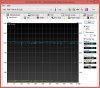
I've done the tests you wanted me to do. Here are the results, I'm guessing it's because of the manufacturers as you said? Or is there something else I should do?


 -=$tR|k3r=- likes this.
 -
Yeah, you are fine, the Kingston SSD's are just a bit slower than the Toshiba's. When I look-up the Kingston P/N, it appears "RBU-SNS8100S3128GD" is mSATA, rather than M.2 SSD's, so this offers more explanation to the differences.
For your FutureMark products, you may want to update SystemInfo.
SystemInfo 4.29
-
Cheers -=$tR|k3r=-! I thought something was wrong. So this is completely normal then. Thanks again, really appreciate it
-
Yes, it is completely normal, but are you OK with this? I ask, because earlier you indicated you expected read-speeds closer to 1500 Mbps. Were you expecting M.2 SSD's? Technically, even with mSATA drives, you still have the SuperRAID 3 configuration. Did your Turkish SKU specify mSATA or M.2 drives? If you ever decide to remove the bottom access, please send a photo of your mSATA adapter.
-
Battery life test with PCMark is completed, tested with IGP:
 ryzeki and -=$tR|k3r=- like this.
 -
All GT72 series supports M.2 only not mSATA SSDs. The part # could be confusion since if you search Crucial M.2 SSDs it may come up says it's a mSATA instead of M.2. Same goes to Kingston part #.
MSI shipped with many different brands of M.2 SSDs and I've seen Kingston, Toshiba and some other brands. I'll take picture of all 4 brands tomorrow when I am at office.-=$tR|k3r=- likes this. -
HOORAY! Finally, someone does a good battery run-time test. THANK YOU KEN!
(BTW, update your Sytem Info file, LOL!)
Approximately 2 hrs. and 9 min. is much nicer than previously indicated, and more acceptable considering the RCP technology. Also, I did think it odd the Kingston P/N could only be found as an mSATA SSD. That's why I wanted to see a photo of the adapter.
Thanks again Ken!
-
No problem Striker. I was just want to get the test start and ignore the update, you know battery test takes time.
Crucial uses same part # for their M.2 and mSATA too. I'll post pictures of all M.2 SSDs from MSI laptops tomorrow and it includes Kingston.
Are the results tested with plugged-in or battery mode? also is it at High Performance Profile? -
Yeah, I know the test is time consuming, and I DID'NT WANT TO DO IT, LOL!
Yes, please post those photos.... I'd like to see that.
-
GenTechPC
Yes the results are plugged-in and at high performance profile.
-=$tR|k3r=-
Yes, I am 100% OK with it. Though my only concern which I didnt complain much, was just that why wouldnt it get as fast as it was advertised. As for the Turkish SKU, nope they didnt. They just said it is "4x128GB SSD (512GB SSD) Super R 3 + 1TB HDD 7200Rpm" nothing more. I dont really want to open the bottom unless if I need to since it will void my warranty.
Bottom line is that I am completely OK with the speeds. I just wanted to know why others get 1500-1600 and I only 1000-1100.-=$tR|k3r=- likes this. -
Hey, no problem, and I am glad you are happy with it. Since Ken popped-in, at least we now know you do in fact have M.2 SSD's..... and yes, it's still plenty fast. Enjoy that notebook!
-
I wanted to ask about a possible concern I may have when I get the notebook based on ONE time experience.
I owned a GS70 stealthpro -024 and after all drivers updated and windows does it's thing my windows movie maker stopped working.
I found this odd so I restored my laptop back to factory settings and before updates WMM works fine and after I start updating it come only stops. It starts and immediately shuts down saying an error had occurred and to restart which doesn't work.
Just wondering if anyone has tried to run WMM on this laptop and if it works. And if it does if they could share the versions of drivers they are running. Both windows and nvidia.
Thanks in advance! -
Windows Updates doesn't work fix things but break things instead.
You should revert the update associated with WMP. -
Excellent test Ken Thanks for taking the time. 2 Hours is good enough for a gaming powerhouse. I suppose if you idle doing nothing, you get even more hahaha
Yeah I noticed many SSD makers use M.2 socket but the partnumber is the same as the sata. At points, I have seen m.2 SSDs msata... Which adds confusion but in the end its just the connection. In the end m.2 is the physical connector for the laptop regardless of what wizardry they did before the connector!
It is amazing how many times windows updates end up breaking windows software. One time I got scared because I booted after updating, and it showed me the first time screen as if I just bought the computer. I restarted and everything was back to normal!-=$tR|k3r=- likes this. -
Does the warranty get voided if I decide to open the bottom of the laptop or if I flash the vBios of the 880m?
-
No warranty voided on opening it as long as you don't break anything. Flashing the vBIOS though will most definitely.
-
Oh that's ok I guess, and have any of you lovely people noticed any dead pixels on the screens?
And Derek, the 30 day no dead pixel guarantee from xotic pc, what do you guys actually do? Do you pre-check for dead pixels and fix them or replace the laptop? -
Can't fix a pixel once it's dead. With our policy we manually go over the display with three different techs to spot any. If none are found then we continue on. If any are we'd replace the panel until one is had without dead pixels.
-
Do not flash a custom vbios unless you really have to.
At stock, the GTX880M in the GT72 is operating fine, no throttling etc, so it is not necessary to flash a custom vbios. -
You can open the bottom and so long as there is no physical damage to the area your warranty is intact.
-
New MSI GT72 Dominator Pro promotional video...... 'Forged for the Hardcore!'
Last edited by a moderator: May 12, 2015GenTechPC likes this. -
Less cheesy than they used to be lol.
-
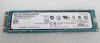
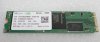
M.2 SSDs from MSI included Kingston RBU-SNS8100S3128GD:

 -=$tR|k3r=-, felix3650 and Kevin@GenTechPC like this.
 -
That was actually pretty cool. Well done, to the point, points to some of the new features.
They need to make an indept one with amplifiers, dedicated GPU switch etc etc etc.
Last edited by a moderator: May 12, 2015 -
I think they should mention in technical specs that only 60% battery capacity (60Wh of 87Wh) is usable.
Otherwise people are getting confused later and ask why there is a 30% battery wear.
Just my opinion,Kevin@GenTechPC likes this. -
Guys,
Do you have a Intel Graphics on your GT72's? Mine is just not listed (different from my old GT70).
Thanks~! -
Nevermind. Only now I noticed the iGPU/dGPU Switch...
-
Yeah I don't think you'll be the last to ask that lol.
-
Hey guys,
since I was very skeptical regarding noise of the GT72 and considering MSI's rather mixed record on that issue, I am happy to say that I love the machine. Got it a week ago from Newegg, and so far it exceeds my expectations.
Under normal windows operations the fan is running, but very very quiet. Pretty much inaudible in any office environment. Certainly less noisy than any ordinary desktop PC I know.
Under heavy load, the fans go up and are audible, but still very civil. Neither bothering the person playing, nor the person sitting a few meters apart, watching TV or even reading a "book" (whatever these things are). ;-)
All the other ...issues... mentioned in this thread are the same on my GT72-010: Benchmarks, battery "life", excellent build quality.
I am very happy I bought it.-=$tR|k3r=- likes this. -
So we got a Phison and a LinkAmedia controller on the Kingston and SK-Hynix SSDs respectively. No wonder they are not on par with the Marvel placed on the Toshiba
Thanks for the pics Ken
EDIT: Forgot to say that the advertised speed (1600MB/s) is based on fresh, newly installed drives, without an OS loaded and more importantly without any data on them. So at max you get around 1200~1400 MB/s.
Also regarding battery endurance...It's not that the battery doesn't get fully charged. It goes to 100% but part of it remains reserved and once the main power supply gets disconnected any stress put on the battery cells is compensated with the "extra charge" stashed on that 30%. Don't want to go into more detail as it gets technical and boring but to be sincere I prefer it this way. As an electronics engineer I work on CPU and GPU heavy software and do move from labs 6-7 times a day so having a "UPS" with me is really handy (so I don't have to interrupt anything on my way to the next lab).
As a gamer I'm with Striker. A vital part of any gamer's life is the power outlet
Wishfull thinking about a GT6x SKU with 980m Maxwell and same redesign as the actual GT72..-=$tR|k3r=- likes this. -
Thanks for the photos Ken!
Glad we agree, and Welcome to the Party! Enjoy!
-
Hi everyone! I am undecide between this notebook and the GT70 2PE with the nvidia gtx 880m. Do you know when it will be released in europe? Moreover, compared with the GT70 2PE having the 880gtx, what are the main improvements of this new model? Eveyone had problems with the 880m? I read in a some forums (also in the nvidia offiacial one) the card seems to overheat over time
-
Hey, fellas) Never used a steelseries keyboard before and have a question: is it any different from the GT70 type and may be there are some writers-gamers on this forum who can confirm if this kb is comfortable for long hours text typing? I undertsand that this laptop was never meant for writers, but at least is it the most comfortable among other gaming laptops, subjectively?
Regadrs -
I think you are making it a bigger deal than it actually is.
Don't think about is battery wear but as battery reserves for safety if you loose power.-=$tR|k3r=- likes this. -
That's a good point.
Since it's a high performance laptop, the battery can only give about 1 to 2 hours of usage.-=$tR|k3r=- likes this. -
Have the two of you read post #1 & 2 of this thread? If you scroll down to the bottom of post #1, HERE, you will find differences the GT72 has over the GT70. In post #2, HERE, you will find 'Initial Thoughts', and nothing has really changed in this opinion. As to the 880M, the GT72 manages temps quite well, and soon the GT72 will be released, equipped with next-gen, more efficient, Maxwell GPU.
-
How is the new Killer N1525 Wireless-AC compared to the Intel AC 7260?
-
Could you do a few benchmark with those if possible? Just to compare it to mine.
-
Im about to preorder a MSI GT72 here in the UK from here but there is a model with an extra stick of 128GB SSD for £200 more. I dont see how this is justifiable when I can just get the cheaper one and get a £60 128GB SSD and upgrade it myself or am i missing something? Also, it says on both pages that there are 2x USB2ports and 3x USB3 ports but as I am aware there are 6x UBS3 ports and no USB2 as shown here in the most expensive model.
-
Thanks I didn't saw the posts in the end I had look just at the first aprt of the post... In any case do you know when it will be released in europe? And do you knoe which are the maximum temperatures reached by the 880 in the GT70 2PE( I tryed to look for forums about this model but I can't find any..)?
Sorry for the questions, but I need to buy the portable at most in the next weeks as I move, and I would like to have a good one that I can use for a couple of years without having thermal problems (like my old Acer had..) -
The more expensive one comes with backback, mouse, headset and mouse mat I believe.
-
The GT72 has 6x USB 3.0, so I wouldn't worry about the typo errors in the reseller's specification list.
Please read HERE. Within this post, I discuss temps and if you scroll down, temps can be seen in the screenshots.
-
So that's the 256GB SSD model that this accessories pack gets shipped with? I am worried that if I get that model and I end up not receiving the accessories when they send me it, I can't complain to them because it doesn't say that it comes with it anywhere on the product page. So I end up paying £200 more for just an extra 128GB SSD stick. It's the same deal as in other resellers such as ebuyer
-
Again, I would recommend you contact the seller for confirmation..... simple!
-
Sent an email earlier and just got a reply saying:
Well that sucks. -
Then it is not the GT72. The publication is incorrect. Their model part number can be searched everywhere else and it states 6x USB 3.0 ports. Additionally, that publication you posted says GT72 has VGA port which is incorrect as well.
It seems they just posted random previous GT70 specs and called it a day. If you are hellbent on that particular site to buy it from, send them another email with official MSI specs and show them to confirm. Or buy from somewhere else that takes the time to post correct information!
And I think in general it will always be cheaper to add hardware your self. You pay a bit extra to know it will be properly installed and will have warranty with the reseller. -
LOL! This is funny because MSI is not going to change USB specification just for UK model's, and I own the notebook. I assure you, there are no USB 2.0 ports.
Also, here is the USER Manual.
Also, if you look at other UK sites, such as OverClocker's, you will see 6x USB listed for those SKU's.
GT72 2PE-018UK (no extras)
GT72 2PE-040UK - EXTRAS : SUPER PACK (SteelSeries Headset/Mouse/Mouse pad/Bag)
kiwipeter likes this. -
Striker, you stated on the first page that the thermal paste is "Thermal Paste: MX-2." Is this the stock paste or is this what you repasted it with?
If the MX-2 is the stock paste would it be worth buying the IC Diamond paste upgrade?
PS: I also have arctic mx4 and arctic silver 5 at home, i could use either on the laptop aswell
***The MSI GT72 Dominator Pro (GTX-880M) Owner's Lounge***
Discussion in 'MSI' started by -=$tR|k3r=-, Jul 17, 2014.


