 Problems? See this thread at archive.org.
Thanks mate. I have done that now. I'll let you know if that helps. If I still experience issues, I'll go to the reseller who is just 5 mins walk from where I live
-
By the way, are there any specific cares I should keep in mind regarding the laptop being plugged to the AC? I mean, is it good to be playing games while it's charging? I come from a really bad laptop and I want this one to last as much as possible, so battery related tips and general maintenance stuff are welcome c:
-
The EC monitoring and high rating brick mean you don't need to worry.
Melryk likes this. -
...GT62 w/980M?
-
Heheheheheh...... xMAR99, you really want one, don't you?
I haven't heard anything regarding a GT62, but given history, I would be surprised if MSI doesn't follow with a 15.6" version of the GT72..... barring any constraints due to the smaller chassis space.
xMAR99 likes this. -
This unit clearly rocks; I'm considering getting the extreme edition once the Maxwell cards are in. -=$tR|k3r=-, you know a bunch about these MSI's. I expect these Maxwells will be able to output far more than 60 fps in games. Any chance an extreme edition would have an extreme 120hz screen? ;D
-
what do you guys think that a GT72 extreme edition will have diferent and when it will be launched?
-
I think it'll be maxed out with regards to both RAM and m.2 ssd's. If looking at the special Dragon Edition of the GT70 offers any clues, I'd expect the processor to stay the same, the body to look different (crimson anodized aluminum, anyone?) with a large dragon logo across the body somewhere, the same top-end gpu, ports, inputs, blu-ray burner, etc. Things I want to see include: a higher model processor, and a 120hz screen. If I had to hazard a guess at a launch date, I'd say late November.
-
I know there will be a next-gen GT72 released soon, with the new Maxwell GPU, however, an 'Extreme Edition' is somewhat wishful thinking on my part. I have been encouraging MSI do an Extreme Edition, but if they must continue using HQ processors (per Intel), the best we could see for the moment is perhaps the new 4980HQ..... which I would be very happy with, but still not a socketed Extreme processor. Anyhow, I am hopeful we will see faster processors, but I have nothing to confirm this at present. As to expected specifications, I don't really know anything more, but I have been told the leaked information coming from Bangladesh and Russia is, "All wrong", though I am uncertain if this refers to specs, designation, pricing, or all of these categories. Even if the only change is the Maxwell GPU, this will be a significant improvement, in and of itself..... enough so, I am betting many current GT72 owners will wish they had waited just a bit longer.
Anyhow, my reseller has been given my authorization, essentially I am already 'pre-ordered', my new GT72 will ship 'Over-Night', and I fully expect to be one of the first owners on the planet...... so stay tuned, and keep an eye for unboxing photos and benchmarks in post #3 of this thread..... SOON!
Can't wait!
extrospector likes this. -
It would be great if MSI listened in offering an extreme edition, but I understand what you mean.
I hope to see the new GT72 modesl available, as well as a possible GT62 announcement! -
I am not really sure MSI hasn't listened, and it's my understanding that Intel is more the factor here. We have to wait and see.....
-
Hello everyone,
I am eagerly awaiting my GT72 007! It should arrive next week. I purchased it for work, and unfortunately, our IT department requires either Windows 8.1 PRO or ENTERPRISE versions for security reasons on work machines.
I have ordered a 8.1 Pro upgrade disc with my machine, but my question is related to the Super RAID 3. Will a fresh upgrade to Windows 8.1 Pro cause any issues with the RAID?? Are the drivers current out for 8.1 equally compatible with 8.1 Pro?
My IT department wants to install Windows 8.1 Pro Upgrade before they let me get my hands on my GT72... so I want to make sure I am clear on this before they go ahead and install the upgrade.
Any help would be greatly appreciated! (I have read all 82 pages of this awesome thread and it was a blast to read! My favorite post was #280 Can't wait to be a part of the "Owner's Club" )
Thanks! -
If you are awaiting your order, you're already an owner, sooooo, Welcome to the Party!...... but I am curious though, since the next-gen GT72 will be released shortly, why didn't you wait? Why the hurry? Also, you shouldn't have any problem with a WIN 8.1 Pro upgrade..... same drivers, same Intel IRST. Should you need to reinstall any MSI drivers, firmware, utilities, etc., you will find these linked on the MSI GT72 Dominator Pro site page, or on page #1 of this thread.
-
Thanks for the info about the drivers! That is such a relief. I was afraid the PRO upgrade would make it impossible to use the super raid 3.
As for my patience... I know ... :-/ ... I wish I could wait for the extreme edition! However, I was just hired on to a full time position and my company doesn't have a machine that can handle the video editing and motion graphic work I've been brought on to do. I have a Core i5 with 8GB of memory and an AMD HD7470 in my Dell Optiplex at my desk, but After Effects is just screaming at me for more RAM and a hyper-threaded processor. I have to complete the 2 video projects i have on my plate before a deadline of October 1st. I'm cutting it very close with that deadline as it is! So, I will definitely live vicariously through your next review and just try to finish my projects by the 1st and make a good name for myself in my company (Then I'll convince them to upgrade me to a dual Xeon workstation with some Titan Blacks!
)
Any thoughts on reconfiguring the SSDs so they are in raid 10 rather than raid 0? I'm new to raid so I'm not sure if that would even be possible... but as I understand it, 512 total GB on 4 drives could be turned to two mirrored raid drives in raid 10 with 256GB being accessible. This would be nice because then I would have speed and a consistent back up if any of the drives did fail... or am I completely making myself look like a n00b with that raid 10 assumption?DelFang likes this. -
That's my question, too. Is it possible to have 4x 512GB M.2 SSDs installed in RAID 10, so that we can get 1TB of storage (to be used as system drive with lots of games installed) with better performance and redundancy?
On another note, from a few youtube videos available, we can see that GT72 has space for 2x 2.5" SSD/HDD but only 1 connector. Is it possible to install another 2.5" SSD in?
If what mentioned above can be done, then we can have a laptop with 1TB of M.2 SSD in RAID 10 for system and programs, 1TB of 2.5" SSD for system backup or other storage purposes, then 1TB of 2.5" HDD for file history, and that roughly add up to £3500 (so $5000 I guess).
Buying this laptop in UK is not quite as easy as hoped, Overclocker has the date push back a couple times, and Ebuyer listed it as in stock by 15th (previously 1st of Sept.).TechnicalVisual likes this. -
That would be an awesome rig! From my understanding (trying to remember from previous posts somewhere about 30 pages back in this thread) your planned configuration COULD work.... But due to limited connectivity on the mb, you would have:
[location] drive (speed)
[Super raid 3 proprietary daughter board] 4 m.2 ssds (Gen 3 sata, 6gb/s)
[2.5" bay] 1 ssd (Gen 2 sata, 3gb/s)
[optical drive bay] 1 hdd (Gen 2 sata, 3gb/s)
So you would have to use the 2.5" ssd at slower gen2 speeds (either mobo or chipset limitation, can't remember) and you would sacrifice your blue ray drive to add the hdd. -
Hi, could you Share the link that driver pls My friends and Guys i want to ask you Something.
Which drivers do we download and install? I try some drivers on msi gt72 Official site and they are installed allready.
Which one are newest? Sorry to My English and thank you. -
Oh I'm so sad right now, also I question the purpose of that empty HDD space. There's no way I'll sacrifice the Blu-Ray drive, I wouldn't even give up the DVD drive in my old modbook.
Anyway, do you know when the GT72 is available to purchase outside of Europe? Or are they already available?
The Gentech's unboxing have only the laptop, but the Kitguru review says that they got a pair of gaming headphones, gaming mice, and what not. What is the standard package content?
Cheers, and hope my finance comes on time, and Ebuyer doesn't delay it further. -
The concept of RAID 1+0 is an interesting one, but I am not sure we can do this due to the x4 M.2 daughter board. From what I understand, MSI is the only manufacturer that has x4 working for mSATA or M.2 in RAID0..... so not certain if this will work in RAID 1+0. This is uncharted territory, but if someone has the time, let us know how it goes. If feasible, I think performance may reduce to x2 SuperRAID levels. Personally, I am good with the RAID0 configuration, and doing occasional back-ups to an external drive. To me, an external back-up is a good idea anyhow, it the event of catastrophic drive failure. Also, though we have a recovery partition, don't forget to burn your system recovery disc. Invariably, someone always overlooks this, and later begs the community for image files, after they have lost their recovery partition.
-
AFAIK the chipset supports 0, 1 and 5. MSI don't always expose all these options and you would need an unlocked bios to access them.
-
Yeah, but I am uncertain about RAID 1+0 (RAID10), given the x4 M.2 daughterboard...... not sure if it will work, but sounds like an interesting project, if someone has the time.
-
The daughter board has no impact, they are 4 independent drives like you would have hooked up in a desktop. It comes down to chipset support and bios enable/disable settings.
-
How do you know the daughterboard has no impact? I understand what you are saying, but I have also understood MSI is the only notebook manufacturer who has successfully achieve a working x4 mSATA or M.2 adapter, from a single SATA III port..... as such, not sure about a RAID 10 application, and I am reluctant telling folks it will work, until I know it's been done.... just saying. Since you are a 'Notebook Retailer', why don't you grab one of your many GT72's, and confirm this for us Meaker? That would be great!
-
The reason is that hardware support for raid exists, and what msi has done is enable 4 independent ports for the HDDs. So it will depend if the chipset supports it and if its enabled by settings. Hopefully it is, because it is a great marriage of reliability and performance.
Someone should definitely test it! -
LOL! Sounds like a fine ryzeki project. What do ya think?
-
Does it means that the SATA line is only for sending commands and the PCIe is for the data? If so I guess it still can be done and in my opinion RAID 5 would be better, given you have support for it.
-
Hi guys! I recently bought a msi gt72 and I've been waiting for a laptop to replace my very old desktop for a long long time I'm extremely pleased with the gt72 but I have a few questions of concern if you guys would be so mind to help
1. I understand there currently is a wait time before we can update the GPU drivers for the 880m but is there any update on the situation as all posts I read about it where at least a month old
2. Also I understand that nvidia is down throttling the 880m from a lost a read started by dumdum on the nvidia forum I was wondering is this going to be a be problem is it being updated? And if so what type of performance is the 880m kicking out at the moment would you recommend returning the gt72 to get the 870 version or even the 780? I might seem a bit paranoid but I've been saving my money for a machine like the gt72 for a very long time and this problem troubles me
Thanks for the help -
All the adapter does is channel 4 of the SATA lanes across to a board and then put M.2 type connectors on the end, this is how the bandwidth of 4x SATA gen III ports is done. Just like attaching 4 regular drives to the SATA III ports on a desktop motherboard. While it looks like a pci express slot, much like the little header on the motherboard on the GT60 and GT770 boards it works the same way.
-
If I had a GT72 with the 4 m2 slots, I would definitely do it Hell, I would try it with my GT60 but I only have one msata!
-
Ok checking up on it the chipset supports 0, 1 , 10 and 5. 1 and 10 will probably be disabled at the bios level.
-
I am also worry about that too. It has been over a month since i bought the new laptop and nvidia still hasn't created a updated driver for it.
-
Thanks! I will definitely be looking into this and keep you all posted when my GT72 arrives.
Two questions (maybe 3): My IT professional at my company will be installing my new Windows 8.1 Pro Upgrade before he gives me the laptop. Will he have to set up the raid at that time as well? Or will it be a simple upgrade and keep the raid set up after installation of the OS?
Will I be able to switch from raid 0 to raid 5 without re-installing my OS?
-TV -
Nvidia, when will you Upgrade driver for our Laptop?
-
Yes you should be able to migrate to raid 5 using the rapid storage software. Moving to pro is a simple license key update plus download.TechnicalVisual likes this.
-
FYI: Good stuff guys...... if you haven't noticed yet, we are now fortunate to have an MSI Rep (Geno) here, to answer all of our questions or concerns. I've asked the RAID 10 questions, he is getting with HQ, and we should hear something definitive, shortly.
http://forum.notebookreview.com/msi/761571-official-msi-rep-short-introduction.html#post9776287
Also, for those concerned with the NVidia driver update, patience..... it generally will take a month or two before the new HW ID is added to the Verde Driver Package. This happens with every new card, and I am sure there will be a working update soon. If you think this is bad, I am betting we have a longer update wait, when the new Maxwell GT72 is released.
GenTechPC, DelFang and Kevin@GenTechPC like this. -
Nvidia OEM Mobile driver 340.82 beta has:
NVIDIA_DEV.1198.1105.1462 = "NVIDIA GeForce GTX880M"
NVIDIA_DEV.1198.110F.1462 = "NVIDIA GeForce GTX 880M"
NVIDIA_DEV.1198.1119.1462 = "NVIDIA GeForce GTX 880M "
NVIDIA_DEV.1198.119A.1462 = "NVIDIA GeForce GTX 880M "
Does it match your hardware? -
am going to find that when i am at home. How can i Learn My 880m's id. Bu the way, this is beta
-
Like this:
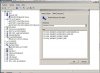
-
NVIDIA_DEV.1198.1119.1462 = "NVIDIA GeForce GTX 880M "
this is our card. driver will come soon i think -
So you could use that driver after doing Disable driver digital signature enforcement Windows 8.1 - HP Support Forum - 3521165
-
Yes. You can modify any drivers for your particular hardware ID, but in the end it is best to wait until official support appears. After all, stock drivers don't have any glaring issues, have they?
Also, thanks Striker for asking regarding RAID comments! -
Howdy everyone. Couple weeks ago I posted some questions here that were answered well enough for me to pull the trigger on a GT72 dominator 047, and now i am a proud owner. Ended up bumping the ram to 32gbs, and added two 128's in my ssd setup (guess i have a super raid 2, heh). Thanks again, Ken.
Nice to see an msi rep here now also, welcome, Geno.
Unfortunately, I havent had much time to game with the machine yet, but it seems to run office, sonar x2, guitar pro, and movies really well *chuckle*. I did grab the atto benchmark, seems my ssd's would be quicker but not complaining, and am considering running some of the other benchmarks listed on page one. However, there is one thing id really like to ask, well two things really.
1) I know you can make a restore dvd (cd, bluray, w/e), and i seem to remember reading somewhere on these forums you can make a restore usb stick, but cannot find the link to read that again (or a newb guide, talk about something i dont wanna f*** up)... can anyone help point me in the proper direction?
2) Another post on tbese forums SOMEWHERE alluded to one usb drive being the standard, fastest, best, etc.... want to say it was a corsair drive, would like to get the absolute fastest usb stick possible for this (thats reliable lol), but dont want to get one too big or too small. Advice?
Thanks again everyone, ya'll are gentlemen (or women) and scholars. Cheers.
- Dave
P.S. forgive typos, is late and i am on my phone. -
I'm finding that the Intel settings are very sporadic - setting them through the Intel Graphics Control Panel doesn't ensure the adaptive brightness is turned off.
So I went back to Control Panel > Power Options > Change plan settings (for any given power plan) > Change advanced power settings.
Firstly, ensure that for the power plan you've chosen, Display > Enable adaptive brightness is completely disabled.
Then, in attempt to overrule the Intel settings, I went to Intel(R) Graphics Settings > Intel(R) Graphics Power Plan and set everything to Max Performance.
I did this for every power plan just to be safe.
So far it seems to be cooperating and Adaptive Brightness isn't re-enabling. Let me know if it works for you. Maybe you've already done this and I'm just wasting my time.
Melryk likes this. -
Is there a way to tell which GPU is in use when the laptop is switching on?
Can I set it so that when switch on with laptop plug in, it uses Nvidia; when switch on with battery, it uses integrated?
Regards. -
Hi.
Killer network stop the internet sometimes. Restart pc and Router and it's ok. s there any solve this problem? -
I think that could be driver's problem, have you try clean installation of the Killer Network driver?
Regards. -
Coming soon to an MSI GT72 near you!
NVIDIA announces GeForce GTX 980, GTX 970, GTX 980M and GTX 970M
-
To wait or not to wait, decide!
Regards. -
Definitely wait!
***The MSI GT72 Dominator Pro (GTX-880M) Owner's Lounge***
Discussion in 'MSI' started by -=$tR|k3r=-, Jul 17, 2014.


