 Problems? See this thread at archive.org.
Ok, after a few more days I still have the same problem. The SCM still does not set. I put it on game and after a reboot it is one ECO. I have to still click the SCM and set it. Then and only then can I get the gpu button to work right. So, I guess the question is does or will it hurt the gpu to stay on all the time. Honestly I can barely hear it. If anybody has any ideas I would be more than willing to try to get to stay on game mode. Also, have not opened or installed anything out of the ordinary. Have not been in bios either. I would rather not send it RMA
PS. I forgot. When rebooted into gpu mode the wifi does not automatically connect I have to click on the and then it will connect. Mind you, just click on it and not select it.
-
It does not hurt the GPU if it's constantly on as long as temps are held in check and with the GT72 great cooling it should not be a problem at all. The only think you will hurt is battery life.
-
Well, I don't ever have it on battery only unless I am traveling. Even then when in hotel rooms and stuff its plugged in. Thx for the reply.
-
Did you try to reinstall the drivers?
-
For what..? -
SCM, etc.
Scroll down to drivers:
MSI Global - Computer, Laptop, Notebook, Desktop, Motherboard, Graphics and more
Been times i have had problems with drivers making a mess, i have reinstalled and got lucky:thumbsup: -
The GPU mode works with the button alone without any utility.
Once activated, it stays in that mode until it's pressed again.
For the wireless issue, try updating the driver to the newest version.
Killer -
So, I installed the drivers from that page and now it won't start. It says,
"unhandled exception has occurred in your application. If you click continue the application will ignore the error and attempt to continue. If you click quit the application will close immediately.
Method not found. Void WPFOSD.scm Settings window .systemruseum -
MSI Global - Computer, Laptop, Notebook, Desktop, Motherboard, Graphics and more..
Seems like it is 2 Wireless options, chicony and bigfoot. Which do you have?
e.g.
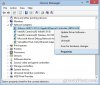
Edit: If you have the Bigfoot, try the one from Msi in the link. And manually delete the others before installing the new ones!
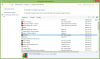
-
what exactly are you talking about? Btw that was trying to start SCM
-
Killer e200
Killer Wireless n/a/c 1525
Also, now the bd drive doesnt work. Wont load up or recognize anything
Im confused under network or bluetooth? You have a pic of network but I think you are referring to BLuetooth -
Kevin asked you to update wireless drivers, i thought that was the problem. Allways restart machine after you install a driver, and did you reinstall scm?
Anyway dude it's just drivers:thumbsup: This will get fixed one way or another!!
And!
![[IMG]](images/storyImages/keep-calm-and-relax-it-s-sunday.png)
So vague -
Well honestly I have both. Wireless does not start when gpu is activated. You have to click on notification icon for it to start. I ran drivers for SCM because that is also not working. It will not go into to gpu mode unless you start SCM and select Game Mode. And, now cd drive does not work
-
I think we're both like, where are all the smart guys now

Your BD drive stop working is weird!.. Do restart!!:thumbsup:
I sent MSIGeno a pm to look at this! -
well got the scm to work. I dled the drivers off webpage did a install and unistalled and reinstalled. Working
-
Well then, let's party What i usually do if things don't work. I uninstall the drivers manually+restart. Install new drivers+restart. If that Don't work i Yahoo (google) the driver names, find the manufactor and download the newest drivers if any available, and do the same process with those drivers. If nothing then works, i take of the back cover of computer and se if it is a hardware problem (don't know if that would void your warranty)
One time in my laptop, wireless card was not fastened with screw from the manufactor, resulting in loosing wifi because card lost connection when moving the laptop. -
Cool thx.! Weird thing. I bought a D200 mouse and it came today. I put that min disc in and it ran. I put the disc in that came with the laptop and nothing.
-
I have never heard of that d200 mouse, but even for that one i would go to their web page and find the latest driver!
-
Meh..... I see wires..... GO WIRELESS!
Steelseries Sensei Wireless
-
G502 or sensei wireless or other gaming mouse?
-
I have a razer Razer Mamba Gaming Mouse - Best Wireless Mouse for Gaming. It started acting weird and twitching so I retired it
-
Same happened to my Mamba (and other razer products) never buying that brand again!
BD drive, wireless, gpu switch working? -
BD driver yes, sorta. gpu switching no. Still doesnt work unless you set it to "game mode". Then if you reboot it goes back tot he same thing. Wireless got all effed up. I got it working again. Thx for asking
-
Nice mouse! im currently using the ds100 at work!
Also, can you let me know exactly what issues are left that you are facing (with some detail) so i can check with our tech guys to see. if i cant find any solutions for you, are you able to RMA it in for us to take a look at?Kaozm likes this. -
Razer taipan here, wireless is nice but it can never quite be as quick as a wired mouse.
-
Which is why I use Razer Naga 2014 instead of the wireless version, I don't move my mouse more than 20cm*20cm area anyway, so the wire drag doesn't bother me as much.
Regards. -
I dont know if i get a G502 or a very good wireless mouse
-
I still have the button issue. When it boots I cannot use the FN key with the F5 key to move it into any mode. It boots into ECO Off mode. GPU button does not work So, when I press the GPU button it does nothing. I have to double click he SCM button ( which probably takes 10sec to load up) and move it to Game and then it will give me the switching screen. Also, when booting to gpu the wireless does not connect. You have to click the notification icon and it will connect. Not on its own. When booting into eco mode off the wifi does connect automatically I can RMA but, don't want to lol
-
-
Have not reset os. I just did BIOS and EC and it is still doing exactly the same thing. Button does not work nor does the FN+F5key
-
Do you have SCM running in the background/system tray?
-
Checked and I did not. Must've disabled on update or somehow got disabled. I rebooted after and it seems to be working at this point. But I still have the "when it reboots" in gpu mode. wifi does not connect. Grr. Thx btw
I'm off for the night. Thank you very much to everybody who has helped me. Will work on wifi issue tomorrow. -
Or for a good balance between wireless and wired the logitech g700s is a solid choice. I've been running it for a year now and so far it still runs great (aesthetics, battery life, cable etc). 1ms polling and 1-2 days worth of battery performance. Check amazon as they have some deals of this model. I got mine for 60 bucks shipped
-
So, I rang them today and they said that everything's working fine after a factory reset. They also advised (quite strangely) to NOT update to any latest wi-fi drivers or BIOS. The guy on the phone was like "if it's all working fine, don't update any drivers."
I'll update here when I receive the laptop.
Thanks
-
That guy must be the one with loud and deep bass voice. Somewhat true, but not all the time.
Factory reset was the right thing to do, but BIOS & EC update help with bug fixes and provide enhancement.
For example, BIOS 107 has fixed boot mode issues that may render HDD boot failure. And EC 1505 has updated fan table. -
Hmmmmm, I think I am going to switch gears here. My next notebook was to be the upcoming, top model GT72 w/ 49xx processor, but now I think I'll save some pennies, and stick with the new Maxwell 4710HQ model. The 980M will be a huge improvement for the already awesome GT72, and I think it's about time I build a new MSI X99S DT, with MSI GTX 980, Haswell-e, and DDR4. I'll save my next big notebook purchase for when Intel Gen 5, Series-9, and DDR4 becomes available.
-
Hi Kevin. You know the people in Australia's service centre, too? Wow!
I played around with the notebook last night (only for about 30 mins or so) and didn't experience any wi-fi issues. No problem with using the GPU switch button and no issues shutting down. I'll get more time today after work. Will keep you updated if I come across any issues.
Thanks once again for your input. -
My bad, I thought you were referring to the US call center.
So regarding the update, it's entirely up to you, but I would do it if I were you. -
Very nice choice there I can't wait for 980m to come out and see more benches and reviews!
As for the desktop, i'd wait a bit. GTX980 is a nice card, but we both know nvidia will release a big bad boy as soon as AMD releases something. Why not wait a bit and see?
-
I think I'll go ahead with the update tonight after work. I'll update here if I experience any issues after the updates. Cheers, Kevin.Kevin@GenTechPC likes this.
-
Ok you guys might be having a new GT72 join. I've pretty much decided it as long as price stays similiar in with the 970 release.
GT72 (non pro)
4710HQ
16GB Kingston Hyper X 1866 (4x4)
970M
Downgrade to the regular DVD
Deselect the HD option (I have a Samsung 840 PRO 256 here waiting)
Would put me at $2021. Budget max was $2000
It's either that or I go with the GT70 Dominator Dragon Edition 1866 with
Matte Screen 72% Gamut
4810MQ
970M
16GB Kingston HyperX 1866 (4x4)
Crucial M550 SSD
And it'd save me $200. Maybe sell my 840, and go with a 980 again.. Depending on prices.... Decisions, decisions...
Does the GT72 come with an AC network card? I do have an Asus RT-AC68U I'd like to get to use.Cloudfire likes this. -
Yes, the included Killer card is AC
-
Man... I am beginning to think maybe a GT72 047 wasnt the best option to buy. I have been having a lot of issues, the most frustrating is losing my bluetooth capabilities. This is after spending two weeks finally getting all my recording and video editing software to FINALLY work...
I drive a truck, so having the ability to use my stereo speakers via bluetooth is a must. It worked great the first week i owned the laptop. Now, i get nothing. Bluetooth icon has disappeared off device manager, device and printer menu, and notification panel. Called gentechpc, and they emailed me a link to reinstall the qualcomm bluetooth suite, that did nothing. The SCM program still says bluetooth is installed. What the hell. I changed nothing, it just spontaniously quit.
That plus windows 8.1 frustrations are really getting to me. Over 12 hours spent now....just.....trying......to get bluetooth to work, like it does on my 12 year old laptop, my desktop, my phone, my tablet... just not my $2300.00 laptop.
Any suggestions? Apologies if this is a rant, just hella frustrated right now.
- Dave -
Have you turned your bluetooth adapter power saving off (right click bluetooth and/or wireless in device manager and properties)?
-
I think I might have had the EXACT same issue as you. Go into device manager go into universal serial bus controllers and make sure all of the intel(R) 8/series/c220.... are enabled. That is how I fixed it I hope you have better luck soon. When I enabled those Bluetooth appeared in the bottom right corner.HazrD likes this.
-
I think the introduction of the 980 Maxwell's, is the perfect point for me to have the best of both worlds.... both mobile and DT. Besides, my DT is now several years old now, and the MSI GTX-980, Haswell-e, the MSI X99S MB, Intel 9-Series, and DDR4 will be nirvana by comparison. Also, my choice of case, MB, and PS, is sure to allow GPU upgrades for some time to come.
Cloudfire likes this. -
Hi there~ Is there any software to change some of the webcam stuff like brightness, contrast, zoom, saturation and so on?
Thanks! -
You, sir, are awesome. That fixed it, one of the usb adapters was disabled for whatever reason. For good measure, i furned off power management features on all devices. Thank you very much.
- Dave -
Pretty this has been mentioned before but does anyone have an estimate on when the new GT72 extreme edition will be available. I'm a huge fan of RTSs and the additional CPU power would be more than welcome to help handle the upwards of up to 8000 units that can appear in one play through.
Also, any word on whether it'll be an i7-4910 or i7-4940mx or something else for the CPU...? I do want a more powerful CPU but the mx series just aint worth the price jump in my opinion though since it's almost 500+ more just so you can overclock higher, which most people (my self included) probably won't ever take advantage of us
***The MSI GT72 Dominator Pro (GTX-880M) Owner's Lounge***
Discussion in 'MSI' started by -=$tR|k3r=-, Jul 17, 2014.


![[IMG]](http://s17.photobucket.com/user/vrosiles/media/20140928_170233_zps3012d948.jpg.html)


