 Problems? See this thread at archive.org.
Hi Quietas, Thank you for the response.
Specifically my question is that 0NE-249 comes with firmware version 504 or not. According to the MSI site ( MSI Global - Computer, Laptop, Notebook, Desktop, Mainboard, Graphics and more), firmware version 504 is for Windows 8. Since 0NE-249 is intended for Windows 8, I feel that firmware is version 504. In the same webpage, it says not to update to this firmware when the computer comes with Windows 7. In the same page, if you update firmware to version 504 by mistake when you use windows 7, they instruct you to revert the firmware back to the original one. However, unfortunately the webpage doesn't have download link for the original firmware. Do anybody know the original firmware? If so, can you instruct me to the download link for original firmware? On the other hand if 0NE-249 comes with the original firmware, I won't have problems with installing Windows 7 myself. Please instruct me about this issue. Hopefully the person associated with GenTech PC might be able to answer this question since I am considering to buy the computer from GenTech PC.
-
It's very easy to install Windows 7 with firmware, all you need to do is insert the Windows 7 DVD and press F11 at post screen and choose UEFI CD/DVD and run Windows setup, it will install Windows 7 firmware from the Windows 7 DVD.
Or if you don't want to use UEFI you can simply go into the BIOS > Boot > and change from UEFI to Legacy mode > boot from Windows 7 DVD and install Windows 7 without UEFI.
You don't have to update or roll back to old BIOS.
The BIOS for Windows 8 worked on Windows 7 models as well, see post # 609:
http://forum.notebookreview.com/msi...w-gtx-680m-owner-s-lounge-13.html#post8953456 -
Ok I tested with Throttle Stop, Upped the core by +80 and the memory clock by +550 and got a 200 point increase which doesn't sound right.
Its also should be noted that the Power adapter was producing a loud clicking sound (kind of electrical sound)
Here are the results:
![[IMG]](images/storyImages/7lGvJ.png)
-
I agree with xMAR99. I love Windows 8 so far. Sure, we all miss that start menu (at the beginning, and we can always install some 3rd party if we really, really need that start menu) and the learning curve is a little bit high, but after few days using it now I'm very comfortable with it.
Well I'm an IT professional so what applies to me might not be the case with many of you, just wanna share my experience with the new windows, that's all. -
Thank you, GeneTechPC.
-
I have one more question for GeneTechPC. When I checked out your site, I saw two different model, 403US and 294US. However, as far as I understood, I couldn't see any differences in the specifications between these two models. What is the difference of these models? I appreciate your help.
-
I too am quite curious about this. My best guess would be that this is the new gt60 with quadro graphics( MSI unveils GT60 Workstation notebook with Quadro, Ivy Bridge - TechSpot) and that all the sites have not updated the description, but , I don't know.
-
Thanks for the links WhatsthePoint, just one last question concerning updating GPU drivers. I'm really bad at it, so could you go through the steps, IE should I boot into safe-mode and remove them or just go to the website and download the new drivers. Also, this was a question for everybody, would this CPU be compatible with the GT60?
New Intel i7 3720QM QBC1 2 6GHz Turbo 3 6GHz ES Unlocked Multipler Free UPS DHL | eBay
Would I need thermal paste if I were to do it? Thanks. -
I am not sure why, maybe you can try the firmware and BIOS for Win8 models and that should be the only difference.
Both 403US and 249US are identical and no different according to MSI, new SKU is just for internal use.
GT60 with nVIdia Quadro will be a different GT60 and not been release yet. -
Got my my new GT60-ONE-249-US yesterday. I ordered it on Sunday and was at my door in 2 days. Thanks excaliberPC. Out of the box I could tell this thing is a SCREAMER. but I took it apart and put in a Samsung 840 pro SSD 256GB in the gen3 slot and moved the 750gb to the gen2 slot. I think it takes about 2 to 3 seconds from when I push the power until it hits the login screen. Obviously the best laptop I have ever owned. My previous laptop was a I7 Hp DV6t. That was a nice laptop and could run a lot of games at med to high settings. I gave my old laptop to my buddy as a xmas gift. I think I paid about 1200 a year ago for that HP. I haven't tried any games on this yet. I can tell this laptop is really well built has a very solid feel. The touchpad feels great. The only thing I miss about my old laptop is the finger print reader haha. I installed Avid Studio for HD video editing ( I edit in 1080p AVCHD files) and my old laptop did have a bit of a struggle rendering/playback etc especially on 5+ min videos with lots of split clips. I am very curious how well this will do. Ill update later.
-
I am running Windows 7 Pro on my GT60 249us and it works just fine. All you need to do is reinstall windows and u wont have any problems. I am so glad I got windows 7 and not 8.
-
Well, I finally paid!
Should get it on the 24th(day I'm getting into Florida. Ken has been extremely helpful with timing shipping)
Awesome experience so far, I'm pretty pumped to get it -
I have a feeling that its choking on power due to the clicking sounds on the adapter and because I cannot go above 62xx score.
NVIDIA GeForce GTX 680M video card benchmark result - Intel Core i7-3610QM Processor,Micro-Star International Co., Ltd. MS-16F3 score: P6258 3DMarks +135 Core +170 Memory
Maybe the power adapter has issues?
Edit: Also, I cannot seem to figure out how to upgrade to Windows 8 BIOS. I can't find secure boot in the current BIOS, so it doesn't detect the usb properly. Any ideas?
Thanks for your help as always, Ken
-
MSI GT60 0NE-403 is coming out, with the same exact specs as the 249
-
It's exactly the same laptop. They needed a new SKU for internal reasons or something
-
Nice. Ken at MSI said mine is shipping early next week so I should have it before the holidays.
-
Welcome to the happy GenTechPC MSI Gaming Team club!!! xD
Time to put the pic on your sig now xD -
After I download a new NVIDIA driver for my MSI notebook I right click on the file and run as admin.
I choose Custom installation.
I uncheck all the boxes except the driver and PhysX.
I check the box for Clean installation.
The i7 3720QM should work fine.It's been replaced by the i7 3740QM but ES chips are engineering samples that may or maynot work as well as retail boxed CPUs or OEM tray versions.
As far as new thermal compound goes IMO any quality paste is good if properly applied after the old paste is removed from the chip and heatsink.I use Tuniq TR-1 to remove the old paste.
The surface spreed method is how I apply my Actic Silver 5 thermal compound.I've also used MX-4 and Tuniq 3 with good results..
First I wrap a piece of plastic wrap around my index finger and spreed a small dot of the TC over the surface of the chip and over the heatsink.
Next I take an old credit card or single edge razor blade and squeegee off the excess in one motion across the surface leaving only a thin film of thermal compound on the chip and on the heatsink.
Reassemble. -
HighJack3d, Thank you for your information.
-
Hi everyone. I just recieved my GT60 249US machine 3 days ago, as i live far away in dubai. Its a great machine but unfortunately i have ordered it from xotic pc and i have a few problems.
My machine has windows 8 on it. When i got it the keyboard wasnt lighting and the slc bar wasnt lit up and none of the stuff on the bar was working, but at least the turbo button was.
So apparently xotic pc didnt install for me any of the standard stuff like KLM manager and SLC.
Anyways after reading through those forums, i downloaded klm manager and slc, my keyboard lights just fine now, but when i downloaded the SLC bar my turbo button doesnt work anymore (all the other stuff do, wifi, eject blu ray) , and i checked it using the SLC program and its not even showing on there. What might be the problem ?
Also i tried to download the msi liveupdate tool but it crashes my pc when i try to run it, is it because of windows 8? Im fairly a noob when it comes to system software so what is there else that i should update ? I used nvidia updated to update my 680m graphics card.
Also when i press alt+tab to switch between the programs, i see that the KLM and SLC bar are there, even though they are minimized on the task bar, is that normal ?
Thank you in advance for your help -
I have an MSI GT-60 ONC. I am planning to upgrade to a nvidia gtx 680m videocard. My question is. Does it matter if i buy other mxm card (GTX680M) regardelss of what manfacturer it is like from , clevo/sager,alienware,eurocom 2GB or 4GB variant? Thanks a lot.
-
Try re-installing the nvidia overclock tool from here: http://www.msi.com/service/download/utility-19690.html
KLM and SLC appearing in the alt-tab menu is normal. -
Wait, can you confirm your model number? I called xoticpc 2 days ago, and they said that they have not received any shipments of the 249US, and also said that they would probably be receiving the 403US before the 249US, so they recommended to change my order from the 249US to the 403US. I placed my order with them on 10/12/12, and it is still in phase 1.
-
They are the same laptop, but the 403 hasn't been released yet.
Xotic probably got very limited shipments -
Yes..but xoticpc says that they have not received the 249US when I spoke to them two day ago. They also said that they have no idea how the other retailers are getting them.
It is strange because ikeike does not live in the US, and xoticpc would have to have shipped ikeike's laptop before I spoke to them. Also since I ordered in October, wouldn't they prioritize by first come first serve?
I think I preordered the day the laptop showed up on the page. -
Stranger things have happened with XOTICPC.
Have you contacted Gentech or Power Notebooks about availability? -
I have RMA credit with xoticpc (np9150 hd7970) so I need to stick with xoticpc or I would be losing like $100.
-
That is so wrong, now you got me worried. How do i check the model number ? my original order was with them for the 220US back in october, once i went through all the headache and wired the money to them (if your international you cant pay by card), and it finally moves to phase 2, i get an email from xoticpc telling me that there are no more 220US in stock (Thats after 2 weeks of the payment) and when i asked how come it moved to phase 2 wihout a unit, they informed me i had the last unit but it was a bad one so they didnt want to send it to me (i call bs on that one since i know that the 220 was discointued, they shouldve checked before they ask me to send my money). Anyways the guy from xotic pc tells me to buy a Sager (Since my money is already with them, $2800 USD) i said no, and that i will wait for the 249US. So 2 months later and 2 days ago i got my unit. So imagine what i would do if it was not a 249US. How do i check the model number of the unit ?
-
Could be ThrottleStop pulling too much power from the adapter.
For update to Windows 8 BIOS:
1: Download and extract Zip file for Win8:
MSI Global â Download Center
2: Download and extrat zip file for Win7:
MSI Global â Download Center
3: Copy and paste the Win8 E16F3IMS.70T BIOS to E16F3IMS.30P folder for Win7
4: Go to E16F3IMS.30P and edit flash.bat and change afudos E16F3IMS.30P /p /b /n /k to afudos E16F3IMS.70T /p /b /n /k
5: After BIOS is updated go to BIOS> Boot and change boot options from UEFI to Legacy Mode and and go to Security tab and disable Secure Boot. -
Check what processor you have. The 249 has a 3630 while the 220 has a 3610.
There should also be a serial number on the bottom of your laptop, and it should start with GT60 0NE-249USK and then 10ish numbers. -
i upgaded my processor so that wont show, but i just checked the serial number and it does say gt 60 249us. Phew !
-
Has anyone managed to get Msi supercharger to work? It's running in the background but no tray icon and everything charges slowly. The service is running as well. I tried setting the service under compatibility mode win 7, same for the main program, same issue. There isn't even a download for it under the windows 8 section on Msi site.
I haven't upgraded the bios or firmware yet, maybe that's why?
Sent from my Galaxy Nexus using Tapatalk 2 -
I think it only works for one of the USB 3 ports.
Pretty sure it's the one closest to the trackpad, but not sure. -
UPS will deliver it by next Tuesday at the latest. Can't wait to smell the new plastic.
My goal is to have the least amount of bloatware running on my system. Going to use the standard Microsoft antivrus and firewall that comes with win8. From all accounts it's really all you need. Other than that I'll get steam loaded up and start hunting around for some games to play. -
Doesn't seem to work, gives me an error about the file not being valid.
-
So just an update on my EC flashing experience. I posted this over in GT70 forum as it seemed a bit more active, but as my system is a GT60, I figured it might be more helpful for people here.
I've been trying to find a fix for my high temps while gaming. They have been reaching 90C with original EC-FW. I flashed my system with the official EC update provided by MSI to begin with. Results: Nada, my GPU was still reaching temps up to 90C within 30 minutes of gameplay. I usually test with Skyrim, which is modded with the 2K and 4K textures. Sometimes I will test with Witcher 2, which results are about the same.
I then flashed my system with the modded EC that is floating around that supposedly improves throttling a bit. My system temps now reach 92C during gaming within 30 minutes. And I don't know how to test throttling so I'm not sure if it improved any. At idle while monitoring with MSI AfterBurner, my GPU sits around 57C.
Not sure why my temps are so high now. I re-pasted my system with IC Diamond when I first received it in September. My CPU temps are good, consistently sitting at around 26-30C. All these temps are monitored with turbo fan off. I figured before I start turning turbo on, I should make sure the system runs normally on regular fan control first. Hmmmm, maybe I just need to invest in a good cooler if I want to do any serious gaming. I'm afraid for the summer to come around, because I'm sure these temps will be pushing 100C then.
-
Jax, I would seriously take a look at your gpu cooler contact patch, and make sure it is seated and your contact patch has enough, but not too much paste. That sounds suspiciously like a bad contact.
I can run kombustor with turbo and fan on in a 71 degree room and never break 55 per afterburner. However I suspect I have a miraculously cool running gpu. But I think you should be able to run skyrim without turbo on and stay below 80?
(if I am wrong someone will pop in and call me an idiot) -
Nah, i think your definitely right. Im going to repaste when i get home next week. Just until last month it had been averaging 78, which seems normal, maybe just a bit hotter than other people's, but within the last month temps have gone crazy high. I wanted to see if it was a software issue first, but it doesnt look like it is since temps are consistent despite which EC or game im running. Maybe my paste just wore in funny since it was fine before. Hope its not an issue with my card. Hopefully a repaste will tell a different story.
First repaste i did i used the droplet method, but it didnt cover the whole surface. After i used a credit card to even out the application. It seemed to work for a short time. Anybody have any prefered repasting techniques? -
Depending on the thickness of the paste, I use either a credit card, or a nitrile glove to spread the paste (after nitrile spreads it out, I still use a credit card to even it out).
All depends of how hard it is to spread out across the chip. I am also willing to waste some while spreading to get it everywhere on the chip, then even and thin with a CC. -
Nope. None of the USB ports bring up supercharger. There is supposed to be a tray icon running always. The service and the gui program are running, but no tray icon and no functionality. Test it out, I've tried countless things and nothing's worked.
-
hell I have the service running but cannot get the gui or anything else. Any ideas to even get the gui to run?
-
I will when I get mine on the 24th
Have you tried asking the store you bought it from? -
Check if the functionality is enabled in the system BIOS.
Also do you have the program installed? -
My gt60 was just shipped. So excited
Does the 249us have a uefi bios? I've heard different things -
Work for me with GT70, can you compressed your E16F3IMS.30P folder and email to me?
Do what nebbish suggested check the contact between heatsink and maybe repaste.
Are you testing it with battery mode?
All Windows 8 models have UEFI BIOS. -
Awesome, while I don't use the bios that much having one that is jazzed up is always nice.
I have to say how great Gentechpc and really Ken in specific are. I'll update in 2 weeks once I get my laptop, but so far all's good. -
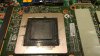
This is what my new re-paste looks like... hope it works!!!!
I was going to wait until I got home next week to do it, but I just couldn't wait, I've been too anxious to fix this thing! So I went a picked up all the supplies, then headed over to the University's Library tonight and I began to tear the thing apart Now let the testing commence.
I cleaned up all the excess paste around the surface before replacing the heat-sink. Also I didn't get any on the circuit board at all. -
That almost looks too thick.You want as close to microscopically thin as possible. Just enough to fill any microscopic gaps in between the 2 surfaces. (this is of course assuming the chip and the heatsink are both flat. Also that they are mated together properly.
You said you cleaned up the paste, did you get it off the sides of the chip and surface mount? I know you said you were using IC Diamond and that it is non-conductive, but it really helps air cooling to keep all of the other surfaces as clean as possible.
I will go pick up some IC Diamond this weekend and do a complete tutorial including maybe doing a sanding (if I can find time). -
***The Official MSI GT 60 w/GTX-680M Owner?s Lounge***
Discussion in 'MSI' started by xMAR99, Jul 20, 2012.


