Problems? See this thread at archive.org.
I don't have this laptop. It's impossible for me to help. Maybe lost bios or someone on win-raid knows more than I do. I just unlock menus and flash and if it looks ugly I disable the option.
Yes, setting options to supervisor unhides suboptions that get shown only if you enable the parent option. (User seems to do that too). Sometimes only the parent tree needs to be set to supervisor but I haven't tested that.
If you have a SPI programmer and a Pomona 5250 clip and some male to female jumper cables to hook the clip up to the programmer (easy), just backup the entire bios (that also backs up the machine DMI options and SMBUS so you preserve all data), then you can always force flash the backup if something goes wrong.
-
-
Side note, the bios chip is going to be anywhere from 8 to 16 MB. Anything lower than that and you are asking for trouble if you did not back the chip up first before assuming it's the bios chip.
nimaim likes this. -
Yeah but I ended up going back with an exacto knife and cutting the space between and under them out so that they didn't feel so mushy and hard to find. I didn't end up taking the stickers off because they are never really in the way, and the 3 seconds I tried to get them off they were stuck pretty good. I don't think most people would notice it anyways.
I was going to do 2x WD Blacks NVMe but CDW was out of stock and they are sending something "compareable" so I don't know what they are sending
But the setup is going to be 2x 512GB NVMe and a 2TB SATA Samsung 960 Evo.
If you don't have the protective covers any more you can take some parchment paper and use some double sided tape (or cellophane tape wrapped on it self) to stick a piece of parchment paper and then use a pencil to mark the edges of where you want to cut out like you would with a coin![[IMG]](images/storyImages/Rubbing.jpg)
Then you can take that piece of parchment paper and tape it to the vinyl and cut it out with a straight edge and an exacto knife.jppflg likes this. -
Correct, it's 10 MB ... looks like it's a GD25B128C GigaDevice SPI ... from everything I've seen so far, it should work.
No worries, you've already got me on a good track ... will look around some more. SPI programmer is a last resort for me, let's see what happens. -
@nimaim
SPI programmer is must if you are not 100 percent sure of what you are doing. And then it's still a must if you are experimenting with something you aren't sure about. Best to listen to Brother @Falkentyne on this....
Are you guessing what the chip is or is that what you got from the software or from reading the chip on the motherboard?
Edit:
fptw64 needs to have admin rights to run.
fptw64 -d whateverbiosname.bin
Should give you the size, ID and name of chip.
if you did this then disregard.Last edited: Dec 30, 2018 -
I see @pcfr33k around the various forums trying to get a better answer on this too ... seems that AMIBCP is not working properly for APTIO V BIOSes ... or only a certain combination of settings works. Will wait on answers from the win-raid BIOS gurus.
Yes, got it from FPT ... I use FPT in FreeDOS (so I dont have to worry about Windows processes doing anything stupid) so no admin needed there, but same thing. Also, sorry, I should clarify: flash device size reports as 16384 KB, flash contents is 10240 KB, which matches exactly the size of the 1.05 BIOS packaged in OP2's drivers package. If they didn't match or it was ridiculously smaller, trust me, I would have stopped there.Last edited: Dec 30, 2018 -
It's pretty noticeable in the video, it's why I mentioned it. The stickers probably would have come off fairly easy with a razor blade and some IPA.
-
Windows can't really do anything if all you are doing is reading it.

And the bios chip is a 16MB chip, not 10MB. 10MB is the size you dumped. I would go back and dump the whole chip instead of part of it. To make sure of the size and all parts are actually in it(If it were me that is) This is just in case you mess something up later that you have an identical copy of the original chip with all parts that can be flashed back to the chip in it's entirety with a programmer.Last edited: Dec 31, 2018 -
I
I had done it when I didn't know if I was going to return the laptop or not. If the palm rest ever starts peeling I'll prolly remove it then. For not it doesn't bother me in the slightest.clone1008 likes this. -
Roger, corrected myself above But yes, will do that ... thank you.
-
Would undervolting affect cpu package power under load?
On the 17+, the bigger the undervolt, the lower tdp during auda64 bench.
However, on the 15+, undervolting seems to have minimal effect on TDP during aida64 stress test, though temp get lower with bigger undervolt
Am I doing something wrong? Both laptop has same everything, same ram, same undervolt, same win version updates, GC settings etc -
I wonder if this could be hackintoshed
-
How does one find this configuration you speak of?abraham3991 likes this.
-
me too lmao
-
It will be tough because of the Nvidia GTX 1060.
-
Was trying to remove the fans and heatsink to repaste but unfortunately stripped a screw which was in too tightly. Sigh..
Probably a deal breaker for me as repasting and heat removal is kinda important for me!
-
I feel you ... I stripped one of the screws putting it back in (AFTER the repaste in my case) ... they seem to use a different head than the rest of the screws on the back panel. I'm anal about my stuff being in pristine condition so that pissed me off too.
Other than fixing the screw with a dremel (easiest way to be honest, use the cutting wheel to cut a deeper slit on one side and use a flathead), there are two other ways I can think of: 1) rubber band method where you place it over the screw and then unscrew through that, or 2) super glue method where you apply it to the top of the screw, wait for it to dry, and try to unscrew it with a slightly smaller screwdriver than the one that stripped it. Good luck. -
Hey guys I have an interesting update. After my extensive battling with thermal throttling and never being able to get a Cinebench score above 860, I eventually gave up and chocked all this up to a defective chassis. I started the Walmart replacement process to send it in for a new one so I began the process of restoring the laptop to how it was when I got it. I have been running BIOS 1.16 - EC 1.33.09 - Mechrevo this entire time as most regard it as the best for performance but I needed to flash an OP bios back onto the computer so the Walmart support team wouldn't go 'WTF' when they booted it up. I used the most recent OP autobatch file to go to BIOS 1.05 - OverPowered and left the EC unchanged. Flash was successful so I tested a few games to make sure all was running well. I noticed the computer didn't get nearly as hot as it did previously and checking XTU my temps were only in the 50-60s, way lower than I've ever seen before! I fired up Cinebench, turned on turbo mode, and sure enough, 1226 score on the first run. Pulled 55W max and had a max temp of 67. If anyone is having issues with thermals, try out the latest OP BIOS. May just solve your troubles. Next step for me is to repaste with kryonaught and see if I can improve even further!
richierich and Installed64 like this. -
Good news! You should probably nix the return as they are sold out anyway.
Sent from my SM-N960U using Tapatalkrutabagus likes this. -
I came close to stripping a couple of screws also. I went ahead and ordered this kit and replaced them.
https://www.amazon.com/gp/aw/d/B01GE9V55E?psc=1&ref=yo_pop_mb_pd_title
This is also a must have kit, several different Phillips heads.
https://m.aliexpress.com/item/32890...&terminal_id=8b410f11db25471089b53d5044fd2ab3
Sent from my SM-N960U using TapatalkAlias, richierich and nimaim like this. -
Can we or should we create and add the latest OP bios/EC flash tools in the original post?
For all 3 chassis. Might make things easier for the consumer.steberg, boidsonly and richierich like this. -
I'm sure they can, just gotta alert the right folks ... @Blebleuh @sicily428 ... but yes I think we should, a consolidation is in order.
-
are the laptops with 1060 eligible for the Nvidia fortnite promo? Walmart is listed an authorized retailer...
https://www.nvidia.com/en-us/geforce/campaigns/fortnite-bundle/
TERMS AND CONDITIONS
*While supplies last. Qualifying graphics cards: GeForce GTX 1060, GeForce GTX 1070, GeForce GTX 1070 Ti. Game key must be redeemed via NVIDIA Redemption Portal on a desktop with qualifying graphics card installed. Customer must meet the age requirement for the game key to redeem. Regional/Country Requirements: Some coupons require that they be redeemed in specific regions or countries they were purchased in. Please redeem the code in the appropriate region/country.
FOR NORTH AMERICA TERRITORIES
Game code offer good beginning November 29, 2018 through January 29, 2019 or while supplies last. Offer good for one digital download code (Fortnite Counterattack Set and 2,000 V-Bucks). Limit one download code per customer. Offer valid only through authorized ETAIL and Retail partners and only redeemable through NVIDIA Redemption portal -
Anyone with the 15" i5 1050 model here? Am I seeing this right about the support page BIOS is 1.00 while the installed BIOS is 1.02?
If that's wrong then let me know. Is there no EC with the i5 version either?
Their website didn't have the files and BIOS downloads back when I was covering this particular version. -
My LP-1 had 1.02 bios version and I by mistake ran the bios file(downloaded from website) assuming it's latest and now it's downgraded to 1.00 and the WiFi stopped working. Can anyone provide me the updated bios file.
-
I have the 1050 unmodded, here are my versions:
BIOS Version N.1.02
EC Version 1.33.09B0B likes this. -
You're correct. I messed up my wifi after the downgradeLast edited: Dec 31, 2018
-
A quick benchmark in CrystalDiskMark of a new 1TB HP EX920 NVMe SSD in each of the two slots on the OP 15+. The upper slot (further from the 2.5" bay) is definitely slower, and neither seem to be allowing the drive to operate at full speed. Either way, a big improvement over SATA: https://imgur.com/a/TsxnULf
nimaim, Installed64 and richierich like this. -
same mine and it works well
-
Guys, I have the op 15+ goldkey 16gb for sale if someone is interested. 80$ + shipping.
-
PM sent for the RAM. I'll buy it,
-
I had issues logging into mint with instructions earlier. Found some more items regarding nouveau.modeset=0 on installation, now it works.
https://www.pcspecialist.nl/forums/...structions-All-Working&highlight=recoil+linux
Sent from my Pixel 2 XL using Tapatalk -
You don't need to do this if you use nvidia drivers from the PPA. Nouveau is the open source X driver. That's a good failsafe driver, but does not provide any advanced features. Instead, do:
sudo add-apt-repository ppa:graphics-drivers/ppa
sudo apt update
sudo apt upgrade
sudo apt install nvidia-graphics-drivers-415 nvidia-settings
This will install the drivers and also PRIME which will let you switch between the integrated GPU (Intel) and discrete GPU (Nvidia) in userspace.steberg likes this. -
Quick question. Couldn't find it through research but is there any way to lock the function key on for this system? As far as I can tell its not listed in BIOS or settings.
-
Well my issue was using the mint instructions, I couldn't login. Login would just have a black screen. Guess I should have tried installing the Nvidia driver's using login prompt without X. But in any case happy to see it working. Maybe one day kb lighting will get fixed. For now I only need Linux occasionally.
Sent from my Pixel 2 XL using Tapatalk -
Made a huge difference. Xtu benchmark went from mid 900s to almost 1600
-
Which one do you recommend? I’m still being power throttled even with dual channel. I think I’m setup for the 150 brick
-
I downgraded by mistake when they first posted that driver pack. I am on 1.00. I have looked everywhere and even emailed their support for a newer BIOS. They sent me version 1.04 for the OP-LP2 and it wouldn't work. I have tried every BIOS in this thread it none of them are compatible.
My WIFI also turns itself off after every reboot but that can be remedied by pressing FN+F4. -
I ran into issues with the Mechrevo bios as well. Make sure your system is set for the 180 watt adapter. Mine was set for the 150 watt at default.rutabagus likes this.
-
Can someone more knowledgeable than me let me know how to upload my own custom bootup logo? The post with the oemservicewinapp.exe eludes to being able to do this but without any instructions as to how to use, it is kind of pointless. I tried doing a "oemservicewinapp.exe help" command in a command window but another command window just quickly flashes and nothing happens. Any help is appreciated.
-
Did you run the fix for that? I did and it resolved my issues.
-
First thing I did after confirming the new BIOS worked! After the reflash it reset to the old power settings. Had to run the fix again and it did the trick.
-
I don't know how to check to see if it is setup for the 150W brick, but I also tried to adjust and run the F bat file but nothing happens.
-
they used some thread locker for sure. but I didn't have any issues getting mine out. My god did they use a ton of paste.
-
I've emailed them as well as there is no other solution out there right now. Hope I get something.
-
What toolkit or bit do you recommend for the heatsink? -
Best ram right here - https://www.amazon.com/gp/product/B01N7K4CEUrichierich, Installed64 and clone1008 like this.
-
Go up a few posts
Sent from my SM-N960U using Tapatalk -
Got it, thanks. Can you confirm which bit is best for heat sink to ensure we do not strip the head. Do you recommend a different bit/tool kit for the heat sink that will reduce the damage caused by this kit?
Cross type: PH000, PH00, PH0, PH1, PH2
https://www.aliexpress.com/item/80-...bile-Phone-Laptop-PC-Repair/32889786827.html? -
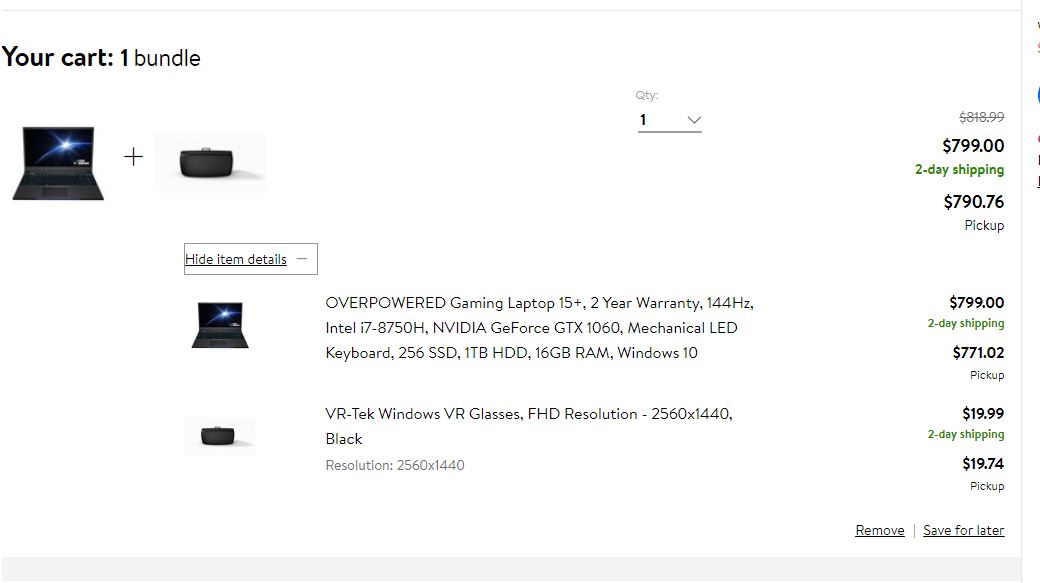
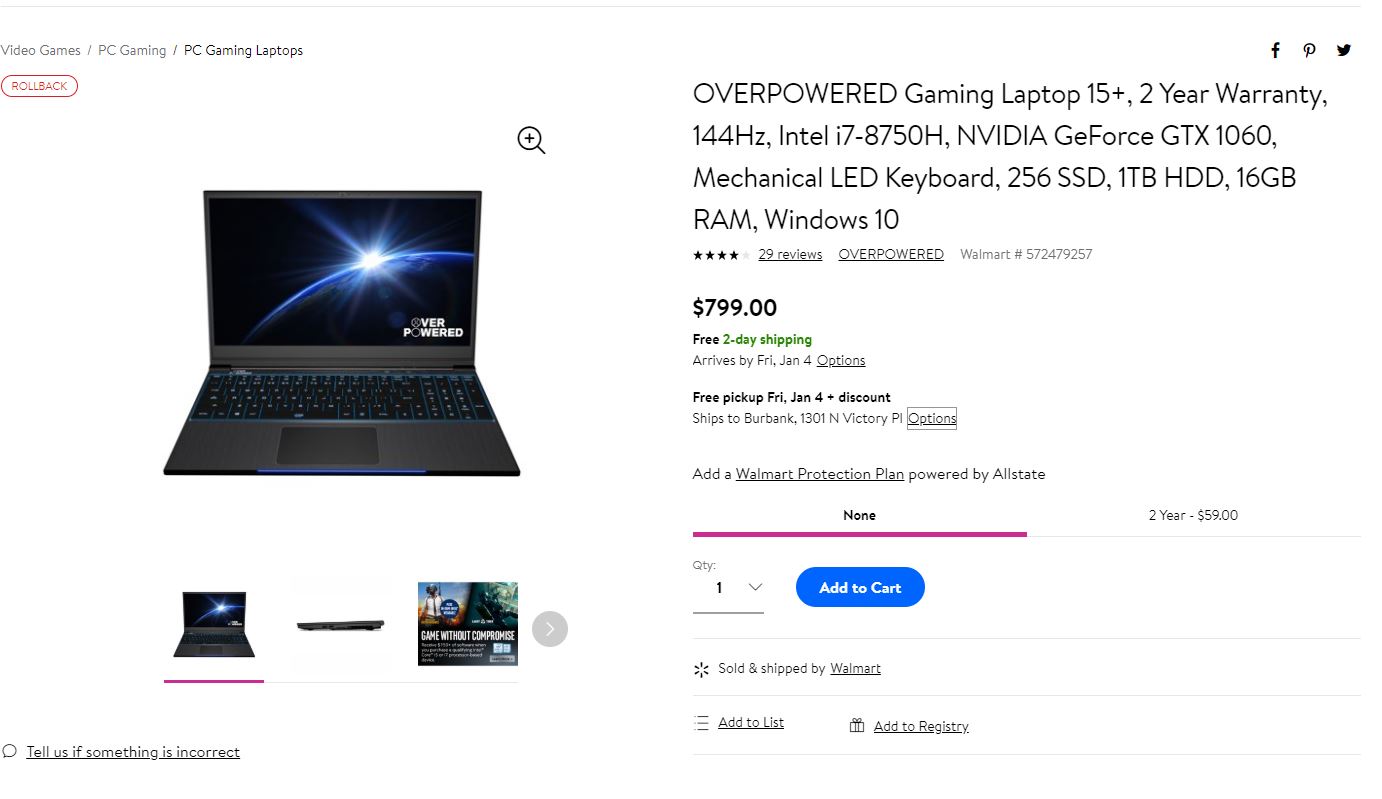
Walmart has them back in stock for $799 with free 2 day shipping. $791 if you pick it up in store and $771 if you bundle it with VR headset. You can always return the VR headset which will make your final laptop cost $771 + tax. Don't forget credit card rewards, MR Rebates for 2% and extended warranty from your credit card company or Walmart direct for 2 year accidental at $59.
As a qualifying device in the Intel Game/eSports Pack, buying the OVERPOWERED Gaming Laptop 15+ allows you to receive $150 in gaming software, including full download of Paladins, PUBG, Last Tide and more!
OVERPOWERED Gaming Laptop 15+, 2 Year Warranty, 144Hz, Intel i7-8750H, NVIDIA GeForce GTX 1060, Mechanical LED Keyboard, 256 SSD, 1TB HDD, 16GB RAM, Windows 10
https://www.walmart.com/ip/OVERPOWE...256-SSD-1TB-HDD-16GB-RAM-Windows-10/510869060Attached Files:
-
TONGFANG GK5CN5Z / GK5CN6Z / GK5CQ7Z / GK5CP0Z
Discussion in 'Other Manufacturers' started by sicily428, Apr 22, 2018.