 Problems? See this thread at archive.org.
I do plan on flashing it back to stock if changing some settings doesn't work.
-
Changed the boot setting to legacy. Same issue with the drive installed by itself. Stuck on splash screen. I guess I'll revert the bios back to stock.
Update: well I tried to flash the bios back to stock 1.08 and now the screen is blank. I went into the bios after flashing, and it was still showing the modded bios. Reset the bios settings to default and rebooted it again, then blank scree. Using factory drives only. Laptop turns on, but no splash screen or anything... gg. Keyboard still lights up though.Last edited: Apr 4, 2019 -
Sorry to hear that scope92, hopefully you will figure it out. (Hopefully not bricked completely)
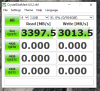
My Sabrent NVMe drive came in. Raw read/write was faster than my ex950. Not bad for $125.Attached Files:
-
-
When you got yours was the outside seals already broken? Got mine today and everything appears new (with plastic protective film etc) but the seals opened. The top part of the box was reversed and was shipped like that. Not sure if they opened it for testing or if it was a return but cleaned up to look new.
-
It appears that in the last batch of Walmart sales they decided to dump in all the returns and sell them as new. A buddy ordered one and his was missing the plastic wrap and the warranty sticker. It also had bad light bleed. I would be leery of purchasing any systems from Walmart should they come back in stock.
-
Interesting, mine still had all the plastic wrap, sticker, no physical damage, no dead pixels/backlight bleed. They clearly had applied the stock windows image which was a bad one at that. Had gaming center installer and tech user profile captured in the image lol
On top of the partial refund i'd count it as still new. -
If you guys uninstall gaming center, what color does your keyboard change too? Mine is turning blue with nothing installed, but I don't remember it always being that way.
-
iirc it was blue but can double check this weekend
-
Hello, forgive me for taking a moment to answer you.
I have been doing tests and it seems that everything works correctly.
Initially after configuring ThrottleStop, when the computer was turned on, the ThrottleStop was started and the battery was below 38% the laptop was suddenly turned off.
Now it seems that everything works well, I will continue with tests and I will comment on the results.
Thank you very much for your help!AyoMayo likes this. -
this build quality is totally wth. on the board there are a lot of screws missing. Everything is screwed down enough so nothing is moving but come on. Now I have to order more screws to properly secure every part that's missing a screw
-
Do you have pictures? It almost seems like you got a returned one that someone took apart.
Sent from my SM-G965U using Tapatalk -
On second thought, comparing where the cover screws holes are they're probably for those screws. I'll be taking it apart again later and can verify if that's the caseLast edited: Apr 6, 2019yayo685 likes this.
-
Hi there,
I decided to challenge myself into hackintoshing my GK5CN and it was quite a success (quite easily actually). Now I run Mojave 10.14.4 (on a dedicated M.2 SSD, with Windows in dual boot on another M.2 SSD) installed the vanilla way with Clover rev. 4918.
I ended up rebuilding the EFI folder seen here and there but with up to date kexts, patched voodooI2C kexts for better trackpad support, and additional kexts to monitor temps with HWMonitor. The said EFI folder did not work 'as is', for me, so I did my own one, basically with updated stuff and another theme. You can find my custom EFI here. I'm on a GK5CN6Z with BIOS N1.05 and EC 1.35.09 from OP.
I was also able to undevolt using VoltageShift. Keyboard shortcuts are very easy to set up with native System Prefs, or even with Karabiner if you want more flexibility. But I still struggle to get a perfect mapping (for example i still need to use the top '8' key to write a '!'). Reported this problem on Reddit.
As expected: no 1060 support (apparently you can use it with older OS, but its very badly supported).
Other downs I encounter: sleep work but the fans remains on (if on when you get your laptop asleep) and the HDD keeps spinning. I suspect the SSDT USB injectors included in the first EFI folder. I had a strange issue with left Windows key that strangely has been disabled into Control Center under Windows (otherwise it works well), and another issue with the trackpad being automatically handled by Karabiner (recognized as a keybord so messing it up). Just had to uncheck it into Karabiner devices.
Unfortunately reboot leads to a glitchy crash.
Performance wise, I'm ok but it could be better. Did not test battery life but I quite confident as PKG is around 3-4W when doing basic tasks. My temps are good but fans by default keep running unless you are under 30°C which is almost never the case. Quietly most of the time though. Would love to get a Mac fan control
![[IMG]](images/storyImages/JqL1j0C.jpg)
@Johnazz you said you were able to remove power throttle, how did you do ? My power limit seem fixed at 65W, which is 13W less than what I can achieve on Windows with TS, it's not a solid x39 multiplier during benchmark.
@pure.wisdom did you eventually tried VirtualSMC ? Any improvement ?derekdauzat likes this. -
Yes, I'm running on 10.14.4 too. I cannot use virtualsmc. It doesn't boot. I also use karabiner for mapping key and voltashilf with 125 100 125. I just half fix an issue with snow screen after rebooting and I also enable nightshift for monitor.
-
Jarrod'sTech reviewed the Aftershock Apex 15X (TongFang GK5CQ7Z), interesting watch.
Last edited: Apr 8, 2019Clamyboy74 likes this. -
I have this exact noisy snowy screen stuck after rebooting !
For perfs I also tryed Volta in wich you can set power limit up to 90W but it has no effect.
How did you got nightshift working ? You made me discover this feature, I want it now but its not available in my SysPref > Displays
-
Is there any way to make the keyboard lights actually white, based off of RGB sliders, like the light bar? The closest to white I can get with the keyboard seems to be sky blue. Also, is there any way to have smoother keyboard animations? The only way to make it look semi-smooth is by speeding it up, but it is still pretty jarring.
-
Check the OP for download links. You can use Myapp which will let uou actually set it to white. I found Fortnite's anticheata(easy anticheat) to have a problem with though.
You can try RevCenter as well (I think you can choose white there). I ended up going back to Gaming Center and going with the "almost white" setting since the rest of it did what I wanted best.
I really wish there was a way to have the keyboard dim to off automatically after inactivity.
I also really wish we could reverse the FN key function.nct likes this. -
How many hours of battery life do you experience on the hackintosh?
-
Just tested while light web browsing, listening music and writing documents : battery lasted for about 2h40. I think it's a bit less than on Windows, but it's still quite solid for the small battery. The result could be increased with no spinning HDD and a mac fan control (to turn fans off under 40, 50 or even 60°C instead of 30 as it is by default).em0ney14 likes this.
-
Has anyone tried running liquid metal on the i7/1060 combo? Mine currently runs full fan speed at 87c on Far Cry New Dawn. I would like to lower temps and possibly quiet it down a bit although it not necessary. I ordered Thermal Grizzly Conductonaut and conformal coating. My only fear is that the heat pipes might be an alloy instead of total copper.
yayo685 likes this. -
Whats wrong with the touchpad? Mine works fine.
-
Touchpad works fine in ubuntu. Which kernal are you on?
-
at least two users have used thermal grizzly kryonaught and had bad results after a few weeks. Temps would be great at first then it would go pass 90. What seems to be working so far is IC Diamond and Gelid GC Extreme because both are thicker. The theory is that the heat sink pushes the softer thermal compounds out after it heats up thus leaving the surface with less than ideal coverage.
I personally tried Artic Cooling MX4. Temps were upper 70's at first. Two days later, it was past 90's and thermal throttling. -
Has anyone tried using external USB 3.x SATA docks on their OP15? I just tried it with a Rosewill RX234 ( https://www.newegg.com/Product/Product.aspx?Item=N82E16817182145) and if I use either of the two USB 3.x ports (on right-side of machine) I immediately start running into USB timeouts after a few successful I/Os. I don't see the problem if I use the USB 2.x port on the left side. The same Rosewill works fine on my other systems using USB 3.x ports, and my USB 3.x thumb drives work fine on the OP15's USB 3.x ports as well...meaning this appears to be a problem specific with the Rosewill and the OP15 and only when using the USB 3.x ports/speeds.
Edit: I'm guessing this is a signal quality issue. The USB 3.x thumb drives that work on my OP15 USB 3x ports directly attach, whereas the Rosewill connects via a 1m cable. If I insert a 1m extension cable between the thumb drive and OP15 then the transfer rate drops to 1/3, whereas I don't see this throughput drop on my other systems. Last time I had my OP15 I noticed how flimsy the daughter card was that holds these USB ports. There's probably poor impedance matching on the board.Last edited: Apr 11, 2019 -
Noticed the same thing and posted about it here: http://forum.notebookreview.com/thr...gk5cq7z-gk5cp0z.815943/page-223#post-10839950
-
For those wanting to use the media keys without holding the FN key. I was able to use Autohotkey to make the F7 key to mute, F8 for volume up and F9 for volume down.
insert the following into your autohotkey script.
F9::Volume_Up
F8::Volume_Down
Still looking up what the command is to do the screen brightness.Quadzilla, ZaiArgylle and em0ney14 like this. -
I would really enjoy a MIC on/off. I'll see what Autohotkey is about I guess. -
Anyone have a link to possible replacement heatsink screws (including the large #1)? Most of mine are badly stripped by now and I want to replace them before they screw me over.
-
-
well, I have used Kryonaut for two pastes, both failed. I then used GC gelid extreme, did an innovative pasting though, it seems to be working way better than expected. so what I did was that applied both on the sink and the die. I spread it with the spreader and then what I did was remove maybe a mm off all the sides on the die and the sink with an alcohol swab, thinking that when the pressure build the paste would spread completely and not spill out. seems to be working. GPU never goes above 81,, CPU stays around 83, maxes out 90, delta between the cores is 5ish. Prop the laptop up a bit and you can see a difference of atleast 3 degrees. I getting a laptop stand a gaming keyboard to make setup. I'll next try kryonaut in the same manner I did GC, maybe it works then
-
use the right screw driver! its the one on the right in the 3rd or 4th row in ifixit protech tool kit.
https://www.amazon.com/gp/product/B01GE9V55E/ref=ppx_yo_dt_b_asin_title_o01_s00?ie=UTF8&psc=1
I stripped mine too, got theseAyoMayo likes this. -
Is it just me or are the speakers super weak and soft?
-
Using Sound Blaster Connect, turn smart volume on and click the "Loud" setting. I've noticed that with each software update, the setings revert and I have to go and turn it back on, but it makes a world of difference.
-
After having the issue with the USB 3.x ports I ordered a USB-C to USB Type B cable from Amazon to connect the same Rosewill RX234 to the rear USB-C port instead of the side-ports and it's working fine. So there definitely appears to be a problem with the signal integrity on the USB 3.x ports on the right side of the system.
-
It is more likely that the build quality of the Rosewill and your cable has space for improvement. My own USB3/SATA dock (RaidSonic) works flawlessly with our two X6807 notebooks (Medion incarnation of the tongfang).
-
If it could be of interest today I successfully modded my BIOS unlocking hidden menus using this guide https://www.win-raid.com/t4386f16-O...vo-MACHENIKE-Unlocked-BIOS-Guide-W-Files.html
I was able to slightly overclock my RAM from 2400MHz to 2666MHz using a custom profile and there is also the possibility to choose between preloaded XMP profiles.
This menu is also full of CPU/GPU overclocking settings that I still need to figure out. -
Not based on the experiment I did using a Sandisk USB 3.x thumb drive. With the drive directly attached to my right-side OP15 ports I get USB 3.x speeds. With the drive attached via a 1m extender cable the drive drops down to USB 2 speeds. That same setup doesn't drop down on any of my other systems. And that extender cable is different than the cable I'm using with the Rosewill. And my Rosewill works fine on all my other systems as well.
-
Do you know if any of the screws in that kit can replace the largest heatsink screw (#1) that holds down the CPU?
-
Something scary happened this morning when I attempted to power-on my ThongFang CK5CQ7Z. It powered-on briefly and instantly powered down! No idea how the issue resolved itself, all I did was reseated the memory modules, disconnected the battery plus CMOS battery. Everything works normally again. Any explanation or documented reason to why my ThongFang laptop powered on for a split second and shut itself down?
Last edited: Apr 14, 2019 -
I have the chinese 'Machenike f117' version of it. And also when I try to open the hback of the laptop, after removing the screws something in the middle still holds it togtether I dont know how to open it and I dont wanna break something.
-
Hi Leonard,
Based on this video on YouTube it does not look like a TongFang chassis:
It looks more like an Acer Predator.
Here is a teardown for the Predator, and it does talk about the difficulty in getting the back cover off:
-
no mine looks like tongfang models/+
I solved it. 1 screw was under a sticker that I just removed -
Cool, the TongFangs are very easy to open up. Good luck getting your thermal throttling under control. Check the screws on the heat sync
-
I tellu guys., My laptop is a TONGFANG just under Machineke brand.
My laptop has bad performance tho in games, and I have no idea why.
I t has a gtx 1060 in it.
https://www.joybuy.com/product/600295273.html
Last edited by a moderator: Apr 18, 2019em0ney14 likes this. -
From what I can find on geekbuying.com, this is not the same laptop in any way.
https://www.geekbuying.com/item/Machenike-F117-F2U-15-6-Inches-GTX1050-Gaming-Notebook-376091.html
I agree with @seahawk10 that this is an older Helios 300 clone.
The biggest drawback with gaming is the GPU being a GTX1050, I bought the one with the 8750H processor, 16 gb ram, and the GTX1060 and have no problems with any game I throw its way.
Make sure you are plugged in while gaming, you have correctly used Throttlestop, and your power profiles are setup correctly for performance.
Also, you might want to check on a BIOS update for that model.Last edited by a moderator: Apr 18, 2019 -
Is that a 17' or 15' model? -
Did your laptop ship with a 180w power brick or is it a <150w?
-
Try this @Leonard Fernandez ,
open your Nvidia Control Panel, click Manage 3D settings, then (under Global Settings) make sure the Preferred Graphics Processor is set to High-Performance NVIDIA processor.
kinda sounds like it might be on Auto or Integrated.
If that doesn't help, can you describe what games / apps you are having an issue with and more description on whats happening?
TONGFANG GK5CN5Z / GK5CN6Z / GK5CQ7Z / GK5CP0Z
Discussion in 'Other Manufacturers' started by sicily428, Apr 22, 2018.



![[IMG]](images/storyImages/MQIvEAb.gif)


