Problems? See this thread at archive.org.
Here's a question if anyone actually knows the legit answer! How much could you potentially undervolt the 8750H before it ACTUALLY starts to power limit max clock speed due to a too aggressive of an undervolt?
-
-
Bought a Crucial MX500 M.2 for cheap during Prime Day. Turns out it runs extremely hot. It has reached 80 degrees a few times during disk intensive activities.
I have a package of thermal pads from EVGA during their GTX 10XX VRM fiasco. Would the narrow or VRM thermal pads do the trick? https://www.evga.com/thermalmod/thermal_pad_mod_installation_guide.pdf
Someone in this thread said that putting a pad only on the controller should be sufficient, but I'm not too sure the location. Is it the left chip in this image? https://images-na.ssl-images-amazon.com/images/I/61-SAKPkiJL._SL1500_.jpg
I did notice a review regarding thermal pads on the MX500 though from Amazon.
-
Not sure where you think undervolting takes you, but as you undervolt you remove power limit throttling as you are causing the CPU to use less power - so undervolting actually unlocks performance 2 ways, the other by stopping thermal throttling.
When you undervolt too far the CPU becomes unstable, so you reduce the undervolt a bit. If you were increasing undervolt by -10mV each increment, I'd back off +5mV first and see if that is stable. If not then another +5mV (a total of +10mV) to get back to your previous stable undervolt.
There is no "too much" undervolt that "starts" power throttling as power throttling is started from too much power used by the CPU - undervolting "stops" power throttling by reducing the power the CPU is using.
Make sense now?
Update: @Firebat246 's example is the pseudo undervolt splitting in TS. If you are doing real undervolt with Core/Cache both set to real undervolt, it works as I explained it above.
In ThrottleStop if you increase Core undervolt -100mV or more higher than Cache (real undervolt) a side effect occurs - which now looks like more than one side effect - some positive and some negative.
I'd stick with following the CPU spec from 6th generation onward and set both Core and Cache undervolt to the same real undervolt, and skip tickling the ThrottleStop trick split of Core / Cache undervolt for a side effect.
Keeping it simple has positive side effects too.
Last edited: Jul 26, 2018raz8020 and Vistar Shook like this. -
Go 5 min's in and you'll see what I'm talking about. -
Yeah, that's the ThrottleStop "trick" as described here by @unclewebb :
http://forum.notebookreview.com/thr...-7700hq-undervolt.800689/page-4#post-10757542
My reply:
http://forum.notebookreview.com/thr...-7700hq-undervolt.800689/page-4#post-10757725
It's the ThrottleStop "trick" side effect that is said to gain some small positive effect in benchmark numbers when you set the "real" undervolt to the Cache undervolt and then crank up the "pseudo" Core undervolt as much as -100mV more.
This doesn't happen with XTU because it's not possible to set different undervolt settings for Core / Cache.
In reality the CPU ignores the higher setting and picks the lowest setting (the Cache undervolt in this case), but another function in the CPU reads the -100mV higher Core undervolt and react's differently.
Thanks for finding this, I've been trying to find an example as to why this pseudo core/cache undervolt splitting isn't good idea. Now besides confusing, it's actually detrimental to an aspect of performance.
As @unclewebb said users say the split undervolt between Core / Cache can give better results, I've see users report it gains a few points in benchmark results - with such small number improvements in benchmarks never showing up in real use, it seems like a waste of time to me.
When @unclewebb tried to remove this split Core / Cache undervolt feature after Gen 6 came out - where the CPU no longer supports split Core / Cache undervolt, he says users requested he keep it in as a feature. See the post link above.
@unclewebb , what do you think about this negative side effect? Perhaps it's time to remove split undervolt for Core / Cache from TS? Or at least make it a default to tie them together with an option to click to enable splitting them with some kind of detailed explanation as to why it's not a good idea to do it?
@B0B - what do you suggest be done with split undervolt settings in ThrottleStop?Last edited: Jul 26, 2018 -
So basically even at an offset of -.170 you should be able to keep max clock speed on the 8750H as long as you don't crash? I have yet to try to push past -.140 so far. I'm using xtu to undervolt anyways.
-
You should, but I think you are gonna either crash or thermal trhottle before reaching max turbo. at least in my experience on demanding games.
Sent from my SM-G955F using Tapatalkhmscott likes this. -
Yeah I'm sure I would too. I just didn't know if there was a specific undervolt that would start starving the cpu from enough power to hit max turbo. Like I'm not willing to lose performance just to get a better undervolt than someone else. Obviously I want what most people do...max undervolt while maintaining max turbo boost.hmscott likes this.
-
As long as you are stable - no crash, no threads exiting running prime95 (no math errors detected), no anomalous behavior observed - including odd performance drops - then the correct CPU voltage tuning gives reduced thermal load reducing temperatures at load the most - and reducing power throttling.
There seems to be a wide range of upper core/cache locked numbers that "run ok", but under load or at idle will error out, so don't be in a rush to tune the undervolt.
At least run 5 minutes of prime95 with these settings 0'd (zero'd) out to disable those special instructions which tend to unevenly load cores, just run straight computations:
Disable AVX / FMA:
Exit prime95 and add these lines to the top of local.txt:
CPUSupportsAVX=0
CpuSupportsAVX2=0
CpuSupportsAVX512F = 0
CPUSupportsFMA3=0
CpuSupportsFMA4 = 0
Then reset the readings in hwinfo64 and restart prime95 running small FFT's.
Then after you find the stable 100% load setting, you can exit all applications, exit systray apps, disable services as needed - the idea is to let the CPU sit idle so it can racket down it's voltage to the lowest setting, that's the last undervolt setting test.
Usually if you get the 100% load tested stable, your idle might be stable without reducing undervolt, but it can often take another +5mV or +10mV adjustment.
I haven't seen any performance loss from undervolting this way for many years.
The TS "trick" is really building on a stable undervolt, set in Cache undervolt, then continue to drop the "Core Undervolt" which now isn't tied to actual undervolt setting, it's value is used to trick the power usage reading fed by the CPU (according to @unclewebb ).
That must be what you are seeing, a reaction to that "trick"- which for some is a positive increase in CB15 by a few points consistently, but you are seeing a negative response.
I don't normally see that reaction using XTU with Core / Cache set to the same undervolt. And back in the 5th gen and before I reduced the cache undervolt separate from the core undervolt in XTU without issues.
See how setting the same undervolt setting in both Core and Cache with Idle tuning works.
For now, for testing purposes, try using only -100mV and see the results. Then increment by -5mV at a time until you see unstable behavior and back off +10mV, and test that.
Rather than going for broke, and trying the highest setting that doesn't immediately crash, come up from a known stable low undervolt and gradually increase instead.
Last edited: Jul 26, 2018Vistar Shook likes this. -
If you are on XTU then don't worry about it, you can find the stable undervolt then have reduced temperature at 100% load by 10c, and hopefully see power throttling end or reduced No worries.
Firebat246 likes this.
-
That's exactly what I've been doing thanks for clarifying!! Crazy to think we were messing with my clevo back in 2015 and here we are again!hmscott likes this.
-
Apparently razer is fixing the backlight bleed on the new units...
Thoughts?
I'd definitely be pretty salty if that was the case, it's not like Razer couldn't notice the BLB before releasing the laptop and thus fix it before some customers were sacrificed.hmscott likes this. -
Well let's hope they have. And the buzzing power brick. And the dodgy keys. As I want to order another one!
-
On the topic of buzzing power bricks. I did some extensive reading last night. Let’s just say I have been testing Razer power bricks lately. It’s actually fairly normal for “coil whine” in power bricks. Now to be clear not to the extent of being able to hear it across the room. Or even hear it a few feet away. But to put your ear up to the brick or say less than a foot away and hear some buzzing/whine is common.
The first time I ever heard it was because I happen to read some complaints about it... thought to myself “well mine doesn’t do that”. Then figured to put my ear up to it for the heck of it... only to hear some buzzing. Basically this leads me to believe that it’s not all bad after all. Definitely not as many cases as people have made it out to be. -
Actually it really seems like the guy reporting this messed up his comparison. His screen just looks too black on the 3rd Blade, the conditions aren't remotely the same as with his other pictures. I tried to take a picture of my perfect desktop monitor without visible backlight bleed and the result wasn't even remotely as good, IPS displays just don't look as black on photos.
Yup, it's normal to have some buzzing. Heck, even my desktop's PSU buzzes when I get close enough. It's just what having so much power going through components sounds like.Firebat246 likes this. -
What I did do is grab myself a nice 6 foot 14awg power cable to replace the stock 3 foot 18awg one. It's beautiful!
-
they arent fixing ****,fixing ****, still seems to be a lottery., this one was bought today by a friend and this pic is giving the benefit of doubt due to knowledge of pics making it look worse. the thing is backlight bleed is only bad in certain dark screen situations and to be completely honest yes there is multiple little problems with each razer device(hinge creeking sounds, bad fans that rub on shrouds and are off balance when unit is picked up tilted sideways) but this happens with any device like msi as well ive seen this and if you are lucky to get a perfect blade without all of these little issues on a unit i say a little backlight bleed on a ips panel is the last of problems
Last edited: Jul 26, 2018raz8020 and Vistar Shook like this. -
has anyone bought and used a trackpad skin from d brand? if so what are your thoughts good or bad yes or no?
-
yes here, all is working fine!
I Have the black "leather" one!
Gesendet von meinem Mi MIX 2S mit Tapatalkfedd12233 likes this. -
Mine is manufactured July 2018 from Microsoft and there is no backlight bleed.
-
So is this what it's come down to? Only blades made this month have no backlight bleed? Th blade above was manufactured June 2018hmscott likes this.
-
Not so much with low or default clocks on unlocked better binned chips. The negative come when you overclocked or you have an locked down chips who is already at the border with locked down max stock clocks.Vistar Shook likes this.
-
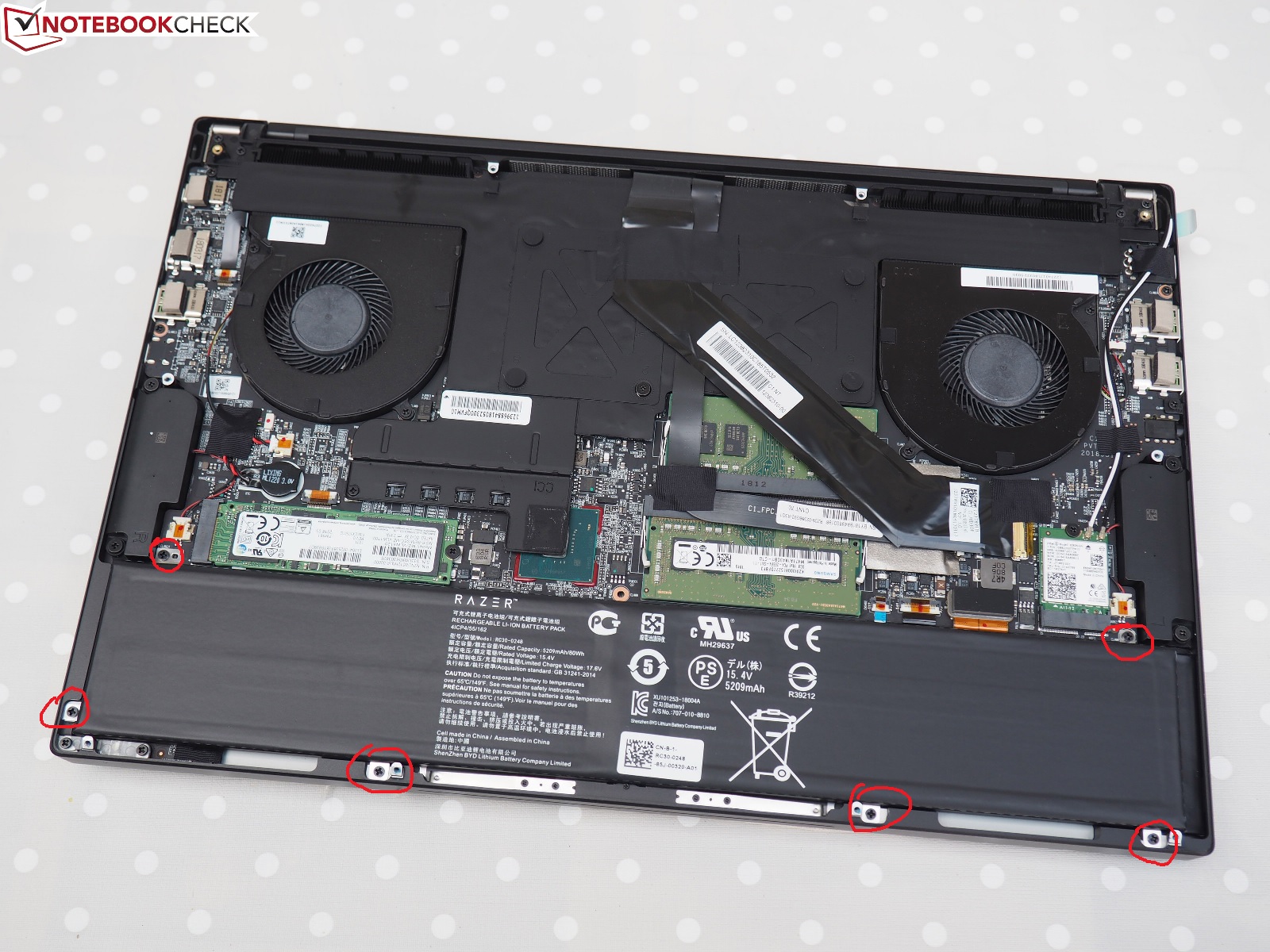
Anyone know what the thermal pad circled in the red is for? Stock photos taken from Notebookcheck.
https://imgur.com/a/4psS3kY
I didn't realize it was originally attached to the bottom plate and took it off and manually reapplied it to the heatsink. The thermal pad is a bit distorted now from the movement and I'm wondering if I should replace it.
EDIT: Ended up taking a tool and smoothing it out.Last edited: Jul 26, 2018 -
Nice one man! Would you mind taking a shot of your screen showing a black youtube video in a dark environment? Thanks a lot!
-
Don't really have a dark environment right now since it's mid-afternoon, but I used http://www.lightbleedtest.com/ with the blinds shut and it's fairly even across the screen. I will see if I can get a picture later if I can remember.
I probably got lucky, but I wouldn't mind even if there was a little backlight bleed. I'm not too picky about these kind of things.
I'm more picky that my chassis comes without small nicks or blemishes on the chassis edges, which seems to be my problem with all two of my Blades (as well as a GS65). I just take a sharpie to the exposed metal and it disappears, lol.
EDIT: I took the laptop under the blanket like a kid and it turns out I have some faint bleeding on the top right corner. It's hardly noticeable, so that's probably why I didn't notice even when using my laptop at night.Last edited: Jul 26, 2018 -
Anyone else still dealing with 25w power limit throttle on Balanced mode? I keep reading here and there that the limit was supposed to be 35w but im not getting that. My in-game temps sit at 80c with the LM on it but my clocks are around 3.3ghz-3.5ghz due to that power limit. Gaming mode handles 3.8ghz in the mid/high 80s with no power throttle but i don't want my laptop that hot lol.
Vistar Shook likes this. -
I have 35W on balanced and 45W on gaming mode.
Try the EC firmware update. -
I did, didn't help Dx did you install a bios update by chance?
-
No, but I did do a clean install.
-
When I was having the issue, clean install had no impact on the 25W balanced/35W performance throttling issues. Razer doesn't have a solution. At this point your best bet is to RMA, or replace, it if you want the full performance.
-
got it, thank you. I'm likely just going to keep my blade, i honestly get by fine without the extra wattage and have the temps down to an acceptable level. However if i do decide to have it RMA'd do you suggest i take out my LM evidence and apply paste again? Can't do anything about the fujipoly pads though.
-
Hi guys,
This is probably the dumbest question, but could some post a picture or so on how to disconnect the battery?
Most videos I see people just don’t disconnect it, even for repaste which seems a bit odd.
Thankshmscott likes this. -
Hi everyone! Got my Blade 15 (512 SSD, 1060, 144Hz) on Wednesday. So far, I'm quite happy with it. However, I have experienced one weird issue/problem and am looking for a possible solution/workaround. So basically the battery will only charge when the laptop is running and the power chord is plugged in or if I turn off the laptop/put in sleep mode with the power chord plugged in. It won't charge when the laptop is powered off and I only plug in the power chord after the laptop has shut down. Anyone else having this issue? Kinda seems like a software/firmware issue to me (rather than a hardware one). Don't wanna RMA this thing due to such a stupid/annoying issue.
Kind regards
Maxhmscott likes this. -
Just got my replacement Blade... wanted to let you guys know it was assembled on 7/18 so I do have the latest batch. I will provide any more details worth sharing as I test it today and over the weekend.
hmscott likes this. -
You going to open it again or keep the screws in tight..?
hmscott likes this.
-
haha well I do have to put my 2tb SSD in with the thermal pad mod so at the very least open it up once.hmscott likes this.
-
how can i see wich batch i have ? cause im gonna get mine tomorrow from amazon
-
It stated on the box, mine assembled in China 6/18, that’s month and year I believe.
Saw other users reported this on Razer forum, I don’t have that issue though. On power off condition it’s still charging. You can PM staff there, he said that to user with the issue on that thread.Vistar Shook likes this. -
From taking a look at the photos, there are some screws that hold down the battery. Once you remove the screws, you should be able to lift up the battery and remove a single connector that goes to the motherboard. I don't have previous experience with Razer laptops, but the ones I did work with were all like this.
Try removing only the top two screws first since I'm not sure which ones are actually holding down the battery.
On a side-note, I stripped a few of my Blade's screws. Not sure how, maybe my iFixit screwdriver isn't as good as I thought.15 minutes with support and they are sending me 15 replacement screws.
Also ordered some Gelid GP-Extreme thermal pads, both 1.5mm and 2mm for the ICC heatsink and my MX300 SSD. They have a thermal conductivity of 12W/mK. Very cheap off QuietPC even with shipping. https://www.quietpc.com/gelid-gp-padsAttached Files:
-
-
Just for reference, some people may be wondering when their machine was assembled. You can tell from the serial number.
For example, here is a picture of an older Blade I found on the internets (from ifixit I think):
![[IMG]](images/storyImages/QQpM2rr.jpg)
The serial number "BY1336102400025" is coded like this:
"BY" = manufacturer code. In this case it stands for BYD, Build Your Dreams, who currently makes all of Razer's Blades.
"1336" = Date code. This machine was assembled the 36th week of 2013.
"1024" = product code. Not sure of the exact significance, but it should identify the product and possibly the skew. Not sure how this is different from the product or model number.
"00025" = sequential # of units built that week, so this was the 25th machine assembled in week 36 of 2013. This is the last bit that makes your SN unique.Mythbuster, salada2k, Arondight and 1 other person like this. -
Hi,
I was just asking about unplug it to safely remove heatsink etc not physically remove it.
But that’s a nice input anyway -
Are you sure you stripped the screws (metal) and not the holes (plastic) themselves? There are quite a few folks on here who have stripped the holes - no the screws - which I think is not possible to fix with replacement screws? I hope I'm wrong.
EDIT: I think you're referring to internal screws, not the ones holding the rear panel on... -
You might as well physically take out the battery so you can see which one is the battery connector. It's not obvious based on pictures.
I am talking about the screws holding on the rear panel. Just the screws are stripped, not the holes, so I'm good. -
ok guys i can confirm (atleast for me ) 6/18 build model gtx 1060 60hz display 256gb has no Backlightbleed at all
does charge, no coilwhine i can hear, charger is quiet aswell, and with ambient of 30°c in our living room on idle , i was sitting at 38 to 45 ( fluctuating ) with an average of 42°c have to test load , but i wont do that here at home
.. ( defenetly to hot ambient cause no ac
SorryDuck likes this. -
Hey guys, with regard to my charging issue (see p 169): problem seems to be solved after updating the EC from 1.00 to 1.01 (as recommended in the official Razer forums). Laptop seems to charge just fine now. Apart from that, loving the laptop so far. Mine (built 7/18, 1060, 144 hz display, 512gb SSD) has a little bit of backlight bleed in the left and right bottom corner, but definitely something I can live with. Best regards
-
So my new one had a ton of backlight bleed. Made my old one look like it had none
 . Suffice to say Razer very very willingly insisted they ship another out. Honestly I have had alienware laptops... clevo/sager from Mythlogic... And Asus. Razer has not only shown the most improved customer service but also right now the best I've ever dealt with.
I don't mind waiting I have my original Blade 15 still working fine. -
i actually have to say their service is improved alot
i recently contacted them about a missing price i won in the zsilver raffle, and for a new usb stick ( actually a second one cause i managed to unlock the old one and use it as a normal usb stick
plus i wanted to give the new owner a razer windows version that had all the latest updates installed ( modified the windows image on the installer ) i contacted them via email, a day later i had info that the stick was send out and that they work on the price that is missing, another 2 days and i had letter from the german post, asking me what happend if i have seen it and if i got any letters from the german customs ( wich i did ) sadly they send the price from singapore so i have to wait another 2-3 weeks for it to arrive again and hopefully this time, to not get stuck at customs cause they did something wrong in declaring what they are sending me
-
next step for me , im gonna backup the whole drive in the blade, sector by sector and clone it to the new 1tb samsung ssd that i have here
( hope that the recovery partition stays intact this time... not like with the blade 14 i had ... even the recovery stick from razer did not want to install anymore .. dont know if i messed something up in bios or not ..
)
oh and i have to say, coming from a macbook retina ( not the new fancy usb c one ) although its already 2,5 years appart, the trackpad feels almost exactly like from a macbook i even like it more cause its not that clicky trackpack but a bit more dampened than a macbook one
Last edited: Jul 28, 2018Joikansai likes this. -
Sounds like it's still a bit random on the BLB outcome. How many have you had through your house now...?
Incidentally, I agree on the customer service - hasn't been an issue for me!Last edited: Jul 28, 2018 -
Just picked up this unit at the Microsoft Store (Thanks Military Discount!!). So far this is the best Razer laptop I have had a chance to use. The only ding I would say against it is lack of Ethernet port and only one m.2 port. This was about $500 over my budget since its my secondary computer (Used for lan party and travel) but the quality is great.
I did have one question on registering the laptop, is there a way to do this?
Razer Blade 15.6" (GTX 1060/1070, 2018 edition) Owner's Lounge
Discussion in 'Razer' started by X33nbat, May 20, 2018.