Problems? See this thread at archive.org.
Yes 4K model is free BLB due using other panel, I believe AUO, and glossy display that cover it to make better pressure that may avoid BLB. This LG high refresh ips panel seems comes always with some, similar panel on Aero 15x has also this issue, even other panel brand that is used on gs65. But even on full of dark scenes games like Vampyr, it’s only noticeable when I concentrate at that areas which i don’t do such things on gaming.
-
I have uploaded my 1st viewing of the laptop.
See what you think....
-
Yes i thought also same thing, it’s more silent than mine on first time boot. Maybe it’s already bios 1.03 updated, since I heard someone mentioned quiter fans after the update. And I kind miss the glossy screen on my old Blade 14 QHD+, couldn’t notice on that video though but it should be more crispy than FHD one.
-
Nice Video, I thought my screen was nice but yours just made me want a 4k. Congrats!
-
Hey @CSHawkeye81 , regarding the latest bios update how is it working out for you? The bios before the latest was horrible and the one before that was great, which one of the systems is still on. The later bios seems to be taking a performance hit as well from all my extensive testing that I've been doing lately.
Here's a new PR and I think the highest Firestrike score so far for the Razer 15 (2018). It's great to see the potential with Graphics scores into the 18K.
![[IMG]](images/storyImages/AXMf3ka.png)
Let me know how the new bios is working out for you. Thanks.Vistar Shook and hmscott like this. -
Hey iunlock great to see your worked on the laptop! Will you do a build thread showing your tweaks? I remembered your XPS 9650 thread with all your hardware mods and it was awesome, I replicated what you did and got crazy better temps back then (using the backplates' copper sheet to create a "chamber" to cool the VRM with some added small heatsinks).
-
@iunlock Omce I get into the office I will go into the bios to see which version is installed. Are you saying the new bios throttles the machine a little?
-
Thanks mate.
 As for a build thread, I'm not sure at this point as I have a ton on my plate right now, but if you have any questions feel free to PM me. Still have your XPS? I use mine daily along side my MBP and it has been a champ. It's usually my travel gaming laptop, but I've switched it to Linux which has been fantastic as well. The new Razer 15 really checks a lot of boxes... Once the thermals are in check with a proper repaste (LM) it'll hum away...
Thanks for checking, no rush. From what I've tested, Firmware 1.00 is far superior with how it manages its curves (overall) than 1.01 ... If you're on FW 1.01 it'll be a little more picky with when it feels like to engage the fans and be not as aggressive, thus causing higher thermal spikes. As for the BIOS, 1.03 is preferred, but 1.05 seems to be doing okay so far.Vistar Shook likes this. -
@iunlock Is there a way to revert back the firmware?
-
Unfortunately, I think it's signature locked. Once you roll up, there's no going back. Be hopeful though that the next software release will address some issues... who know's it may be even better than all the previous ones, but we won't know until it can be tested...
-
How’s everyone’s Blades been running? I’m think about buy one but wanna know if anyone’s had issues after a couple months of use. Is it really as bad as a lot oare saying?
-
Ordered mine day 1 and have had it since a couple days later.
Repasted with LM on both cpu and GPU. Additionally added a thin copper shim inbetween the CPU and heatsink for better contact as mentioned by someone way earlier in the thread.
Temps under gaming load average low 80s on both CPU and GPU on gaming mode with Auto fan. I also added thermal pads to the SSD and have an undervolt of -0.130mv.
Only issue I have so far is when I shut the laptop off or sleep mode it on battery is when I plug it in while it is powered off it will not charge until it is turned back on.
That said if I shut it down or sleep mode it while it is already plugged in it is fine. Very happy with it so far. -
As I've mentioned earlier, I'd only recommend this laptop if you'll be repasting it with LM. (For gaming..)
Otherwise, it makes for a great, well built, work laptop, but if you plan to tax the CPU/GPU at all... Ex. Long duration of gaming or rendering/encoding ... this will become your portable BBQ grill and start to eat itself from the inside out.Vistar Shook and Hattori Hanzo like this. -
That's not true at all at least for the 1060 version.
-
Lol a 2 in 1 laptop bbq?
I thought the 1070 Max-Q thermals are better than the 1060? -
Also I would definitely be getting it from HIDevolution with LM and Fuji pads with an extended warranty. Question is if I get faulty hardware how long does it take to get a new one.
-
https://www.notebookcheck.net/The-R...onger-than-its-GTX-1070-version.315674.0.html
I've linked this to the point where I probably should just add it to my signature.. Any game I play on my system tops out at 60 of course i don't have everything in Ultra, but everything looks decent to me and I just want to play my games and not necessarily kill my laptop or turn it into a frying panLast edited: Aug 27, 2018 -
It's a big premium you pay for that. In my humble opinion, a fraction of that premium is better spent buying it from MS and spending the $260 or whatever it is to get a 4 year warranty.
-
Ah yes...I should have specified... as I was referring to the 1070MQ model specifically.
It all depends on the given system, but with how high I was able to push the 1070MQ variant, with it pulling Physics scores of 18K+, it definitely adds more than a 1060 would, thus making it run warmer. (Taxing the heat sink more.)raz8020 and Vistar Shook like this. -
How thin is this shim you used? Also, do you have before and after temperature results?
-
Of course, because Gallium won't start eating the laptop from inside out. Because we know so very well what the effects of Gallium on thin Copper plates from which vapor chambers are built are. Genius.
I'll rather place my bets on throttlestop and sacrifice a bit of performance instead of destroying an immensely expensive vapor chamber and potentially damaging the motherboard after 2 years of Gallium corrosion.Firebat246, Darkhan and hmscott like this. -
Isn’t addressed on latest EC update?
It’s great temperature you have. Do you have it on default without repasting? What games are you playing? -
The effects of LM and what it will do to certain metals, particularly aluminum is old news lol. I don't get what point you were trying to make other than not using gallium on the assumption that it'll eat through copper and cause corrosion? No, that's not true.. there are people all over who have LM'ed their machines with zero issues. I myself can say from personal experience that I've had zero issues out of the many systems that I've worked on.
There is way too much fear mongering going on for when it comes to LM, most often times than not from those who have no experience or assumptions based on reading horror stories online from those that didn't take the proper precautions for when LM'ing their system.
At any rate, LM is safe if done properly and it is not recommended for those without experience or knowledge to proceed until they are well equipped all around...raz8020, Vistar Shook and Joikansai like this. -
I’ll buy xiaomi air 13 laptop again (sold it because too hot) to learn how to do LM properly Before I do on my 2K Blade 15. So atm your score is to me in Japanese “Takane no Hana” (Beautiful flower that blooms on high place and you can’t reach it, only to see) lol
Vistar Shook likes this.
-
Hey,
I've bought the Razer Blade 2018, 1060, 144hz laptop a couple weeks ago. Haven't opened it up yet, but I will to add a thermal pad to the SSD. I have a german keyboard layout and it was manufactured in June. Out of the box I found a few issues:
slightly tilted towards each other a, s, z (y for german layout) and x keys;
A buzzing power adapter, though I can only hear it if I am close to it (20-30 cm away);
Slight BLB at the bottom corners of the screen.
Using gaming mode and playing World of Warcraft (it taxes both the CPU and GPU) I saw CPU temps reaching 93 C and GPU 80 C (ambient temperature was about 30 C when I tried it). Havent tried running it in it's default settings at lower ambient temperature. After undervolting by 125 mV CPU and cache while also undervolting the internal GPU by 50 mV (system was not stable at lower undervolts) and limiting CPU turbo clocks to 3.2 gHz, both CPU and GPU maxed out at 75 C at an ambient temperature of around 30 C. Since then the heat wave has passed and I tried running the system without limiting the turbo cloks at an ambient temperature of around 20 C - CPU reached 80 C and GPU reached 75 C. Are these temperatures acceptable for long term use?
Without the pad SSD reaches 75 C and PCH maxes out at 70 C.
I also noticed higher CPU and GPU temperatures in balanced mode while using auto fans. Mannualy switching fans to 4800 RPM and using Balance mode did reduce core temperatures, compared to gaming mode.
Overall I really like this laptop and can recommend it. -
Excuse me, can you read? I didn't say anything about aluminum.
Electrochemically speaking, gallium has a potential of -0.53 volts and copper has a potential of +0.334 volts. The difference between the two metals is going to create a "battery" with a potential of 0.864 volts.
Gradually this battery will deplete; as the gallium migrates over to the copper. You may have heard some stories about how gallium "dries up" and evaporates. In many of those cases it is likely that it acted like a battery and migrated over to and became part of the copper heat sink.
How long have you been using LM? Do you have any system on which you actively used LM for at least 2 years? Did it have vapor chamber or heatpipes?
I'm not talking about mere spillage of Gallium on the motherboard. I am talking about the chemical reality of Gallium and its corrosive properties. I would understand if you galvanised the vapor chamber copper contacts with nickel because galvanic potential of nickel is -0.3 volts, much closer to liquid metal so the corrosion would be almost non existent. But you clearly haven't done so, have you?
Just because you managed to slap LM on a couple of systems without spilling it all around doesn't make you an expert on materials science. It is not fear mongering, those are valid concerns about issues which weren't explored yet and you can bet anything you want that especially vapor chamber manufacturers don't expect possibility of gallium corrosion.
You are instead presenting it as if the only way to use RB15 is to use LM. That's stupid. People in this thread got excellent results, both thermal and in performance without LM. -
There are too many negative potentials with LM, but many still refuse to worry about it and use it, even killing their laptop or CPU (delidding) with LM, and keep coming back for more.
Such is the insatiable drive to be "first" on a benchmark chart.
There are long term effects as discussed in the last post by @SorryDuck discussed here:
Something to think about, liquid metal compatibility with copper heat sinks
http://forum.notebookreview.com/thr...-compatibility-with-copper-heat-sinks.800890/
If you make the application of LM into an art, and are already a DIY craftsman with laptops, then LM can be done more reliably over time as your experience grows, but even then human's make mistakes - get distracted at critical moments - it's just part of the game.
If you are completely inexperienced, or even moderately experienced, then it's best to start / continue with non-conductive pastes if you feel you must re-paste.
Better yet first put more effort into learning how to tune your laptop with undervolt, custom fan curve, OS tuning, application configuration, frame limiter, and custom BIOS settings to reduce the thermal load on the CPU and GPU without resorting to physical dis-assembly.
Avoiding dis-assembly completely is the best insurance against ****ing things up while trying to fix what ain't broke.
Last edited: Aug 28, 2018Muezick, George24, iunlock and 1 other person like this. -
My buddy was able to snag one from Amazon and wanted me to find out everyone thoughts of the square trade warranty? He was going to get this for his unit and I figure I ask if everyone's thoughts?
-
What would I have done wrong in using Conductonaut for this bulls**t to happen in roughly 1 month? Dried right up, had to replace with Kryonaut.
-
Holy ****. I didn’t think LM could dry and especially only after a month! Crazy.
hmscott likes this. -
To be fair, I should be the one asking if you can read lol... I specifically said "...particularity aluminum," to make a point in respect to this topic. Ironically, @hmscott as you can see provided a link to support my referencing to aluminum and this subject.
...because if you did read and searched the forums, you'd see that I put a lot more time and dedication into working on systems than just "managing to slap LM on a couple of systems..."
If you read and research, you'll be able to find the answers to your questions of how invested I, along with others have been in this game.
- For the sake of the readers, I'll answer your question about whether I have any systems LM'ed for at least 2 years. (YES, I own several systems and all my laptops/computers are LM'ed, even my MBP that's my daily driver.)
What you need to realize is that the MBP is among one of the most dangerous to LM due to how thin and dinky the heat sink assembly is. If done correctly and with care it can work very well, but not recommended. That doesn't mean that it is not possible. I travel a lot with my MBP and it has been in and out of airports for years now. Guess what? Still going strong... The point is, just because you think it's impossible doesn't mean that it is.
Regarding the actual heat pipes / vapor chambers, you do realize that you don't LM those right? Are you familiar with the inside of laptops at all? Why would you even be talking about galvanizing the vapor chamber?
- To be fair once again, instead of assuming what I have and haven't done, based on what you're asking, it seems to be pretty clear that you have no experience with this stuff and am only speculating; while jugging numbers around about this and that.
For the record, I'm not saying that it's a theory as I'm fully aware of the angle that you're coming from, but your chemistry lesson doesn't match up to the reality of the outcome of all the successful LM'ed systems out there in the World.
There are a lot of us on here that clearly understand the science with what we're working with. One doesn't need to be an expert on material science to understand this topic. A prime example is how you don't know what you're talking about when it comes to the computer side of things, as it clearly shows. Although you may be well versed in the science aspect of the elements, it doesn't mean you're well versed with having actual experience with the systems. Fair enough?
If you search and do some reading, you'll see that we've talked about varies topics regarding LM a long time ago. @hmscott provided an example of that. Go read it. This is nothing new and definitely not 'new' news. We're not dealing with the last or unexplored frontier here like you're making it out to be. The use of LM has been heavily explored and still going strong.
To correct your assumptions once again I said the following...
"As I've mentioned earlier, I'd only recommend this laptop if you'll be repasting it with LM. (For gaming..)
Otherwise, it makes for a great, well built, work laptop, but if you plan to tax the CPU/GPU at all... Ex. Long duration of gaming or rendering/encoding ... this will become your portable BBQ grill and start to eat itself from the inside out."
Understand the key points here:
1. It's a recommendation. An opinion, emphasized with "For gaming."
2. I've pointed out a specific scenario that potential buyers of this machine should know if they plan to drive it like they stole it.
3. I emphasized the obvious of the fact that heat is not electronics best friend with some humor, which you clearly didn't get...
Laugh a little...it's not that serious. If 99C and high temps are acceptable to you, then have it. No one cares...
Oh and btw... you do realize that LM isn't just pure gallium right? (sigh...)
At any rate, welcome to the forums...
Last edited: Aug 28, 2018raz8020, Vistar Shook and hmscott like this. -
That is due to tolerance issues of there being a gap between the die and heat plate. When using LM, it's important to make sure that the contact is very good, otherwise it'll result in what you've experienced with it looking all dried up. LM does absorb slightly into the copper heat plate as you've witnessed, but the drying out is a combination of fine dust, particles and other factors which leads to it looking like that.
See my reply above.
-
Hi @iunlock can you share us your setting beside liquid metal job. Sorry ahead if i missed something, i didn’t see your software tweaks like undervolting setting, if it with throttlestop or xtu. Or maybe you flash the bios for unlock tdp limit etc. I’m interested too on that physical score that could bump over 17K. No matter low temperature my tdp still down to 45Watt that hold the physical performance (on Firestrike keep on 16,5K, and on cinebench multi never pass 1200).
hmscott likes this. -
Only if you take down your eGPU 1080ti score in the 1070MQ category that doesn't belong there jk jk ... I wish 3DMark changes that soon, because it's so annoying having all those dGPU scores bundled in with the 1070's. Also, while on the subject I was curious as to why you posted your 1080ti score after I posted my 1070MQ score LOL ...A few people messaged me asking "Hey why did that guy post a 1080ti dGPU score?," so I thought I'd ask haha. At any rate, I replied to your post a few pages back. I didn't flash the bios or anything and there's no way to unlock the tdp limit. It'd be nice though right?! If you figure it out, I'll send a donation in a heart beat. What I can say for sure is that the newer firmware version is not as good as the original one. Again, this is in a post a few pages back where I had mentioned that.
raz8020, Vistar Shook, hmscott and 1 other person like this.
-
I don’t know why Razer Systems always put dGPU on title, ask Razer or 3Dmark
. If I delete it it’ll come again anyway my score with RTX1080
or other Blade user from egpu.io with that crazy expensive RTX1080ti (here in EU €1260FE), egpu enthusiasts always put high end card to Test 4K gaming on gaming laptops since the cpu is strong enough to run it. Other user was on top that “cheating” chart before I uploaded mine, some seems only doing that for testing with new CPU and return the system after that, so they don’t know how to keep higher physical (maximize) performance.
hmscott likes this. -
Just an update on the 4k I got as I have seen some Q's
The bios arrived with V1.05 & EC FW 1.02
I found something well strange so posting as others may get something useful from it.
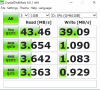
If you watch my video I posted on Ytube. I bought an expensive USB stick to use like an internal SSD drive for stuff I don't need on the internal 512GB nvme drive.
I installed crystal disk mark and got these results.
Now your thinking the same as me what a load of ****e.
So I tested it on my desktop pc and got this
So I tried a different USB slot, same.
Next I went into the bios and changed USB Legacy from Enabled to Auto
And charge external devices to Enabled.
I then got this
Thought great cracked it.
I then changed the settings back to as they were and its still 289.5MB's
So I don't know what went on inside but I did try the initial slow tests over a couple of days.
Thought I'd pass it on.Attached Files:
iunlock likes this. -
-
ok .. so from what i have heard and found on the wide wide webs , the 1070 is without lm but a normal repaste also a really good device ! i also wouldnt trust lm on a notebook when it has a vapor chamber where you dont know the thickness .. ( unless the company you bought it from, gives you a guarantee that it wont loose on performance cause the lm dries up or eats the heatsink away ) ... and for the 1060 model .. i got that one
with vsync always on im gaming battlefield 1 on high settings dx11 for multiple hours and my temps for cpu stay in the low 80 to 70s , and my gpu is around 70 (repaste with kryonaut ) all on balance mode ( 25w is enough tdp for the cpu to run bf1 )
-
I looked at your posts everywhere and couldn't find your XTU/Throttlestop settings...am I going blind?
-
Got it you might receive a PM from me soonish then. I sold the XPS as I started to use it as a secondary gaming machine and the severe ghosting of the screen + low perfs of the 1050 were driving me mad. But while I had it it was simply perfect temps wise with your mod. Crazy how it turns out you
can cool such laptops appropriately and it's all about manufacturers cutting costs.
I'm really thinking about LMing the Blade but I've seen mixed reports here which is why I was asking if you were planning on showing us your build, so we could see how you pulled such amazing results.iunlock likes this. -
+1.5 year old Conductonaut Liquid Metal. Fresh as day 1.
![[IMG]](images/storyImages/xVzR6CD.jpg)
THIS!Ashtrix, raz8020, Falkentyne and 4 others like this. -
LM is absolutely not worth it you are 100% correct. I have done plenty of research into this as an option for the Blade and I firmly stand by a big NO. Agree with you!
Is it possible? Sure.. but it’s definitely not worth it and the potential issues that comes with it.Last edited: Aug 28, 2018 -
Hey all, getting a problem when hooking up Blade to external monitor. Windows and google Chrome/applications seem to lag a ton, jittering and momentarily freezing. but gaming is no problem (pushes QHD with high fps, no screen lag or glitching). So i dont get what the issue is, im using a displayport cable directly to monitor, my OMEN X has no problems same circumstances. Suggestions?
edit: learning now this is a windows+intel+nvidia problem with optimus laptops. what a nightmare.Last edited: Aug 28, 2018 -
Try check refresh rate on your monitor, I had also similar experience, it somehow changed to 25, changed it back to 60Hz (it’s 4K, not 144Hz one), and solved.
-
So what are good temperatures for long term use?
-
Max load 80ish. Mine sometimes one or two cores hits low 90ish, maybe because I let the turbo boost and core clock on default. I’ll try Fans cooler pad to see if it can bring lower temperature.
-
"To be fair, I should be the one asking if you can read lol... I specifically said "...particularity aluminum," to make a point in respect to this topic."
In respect to what topic? Nobody was talking about aluminum, the topic is copper and a copper vapor chamber. You just brought up aluminum to try to btfo me by "everybody knows that aluminum is funny but this is not aluminum". Irrelevant. Learn to read.
"I travel a lot with my MBP and it has been in and out of airports for years now."
I really don't know if your attention span is so short or whether you're just f***** with me. I never denied that it is possible to apply LM in such a way that it won't spill. The issue is with copper/gallium interactions, not with LM spilling out.
Show me a portable system where you actively used LM for several years. I can see in your signature that you used many systems in the last few years. Did you use all of them at the same time? Did you actively use each for half a year? Do you believe your personal experience is comparable to that of somebody who doesn't have as much money as you and intends to use the system as their daily work and gaming driver for longer than just a few months. There is a clear correlation between the speed of the process and the temperature.
"Regarding the actual heat pipes / vapor chambers, you do realize that you don't LM those right?"
Oh, you don't? Then educate me, where did you put the LM? Would you like to convince me that there is no contact of LM with the copper plate on the bottom side of the vapor chamber?
"Why would you even be talking about galvanizing the vapor chamber?"
I explained this in my previous post. To prevent contact of LM with copper because nickel has more similar properties to LM and it could significantly slow down the corrosion.
"but your chemistry lesson doesn't match up to the reality of the outcome of all the successful LM'ed systems out there in the World."
What a solid piece of evidence! Nobody in these few years managed to destroy their vapor chamber therefore it is safe! And I guess, if they did, they didn't have as much expertise as you and they did it incorrectly.
"There are a lot of us on here that clearly understand the science with what we're working with. One doesn't need to be an expert on material science to understand this topic. A prime example is how you don't know what you're talking about when it comes to the computer side of things, as it clearly shows. Although you may be well versed in the science aspect of the elements, it doesn't mean you're well versed with having actual experience with the systems. Fair enough?"
Ah, I see. Mr. Intelligent. I am the one who doesn't know what I'm talking about when it comes to the computer side of things. .... what are you even talking about?
" Understand the key points here:
1. It's a recommendation. An opinion, emphasized with "For gaming."
2. I've pointed out a specific scenario that potential buyers of this machine should know if they plan to drive it like they stole it.
3. I emphasized the obvious of the fact that heat is not electronics best friend with some humor, which you clearly didn't get..."
Yea and your recommendation is wrong. You know very well that an opinion of somebody with lots of medals and reputation here bears certain weight. And you dare to claim that you'd only recommend this if one's willing to LM it. That's simply stupid. The benefits of LM, as demonstrated by several people who LM'd RB15, are negligible. You should rather emphasize that this recommendation of
" "As I've mentioned earlier, I'd only recommend this laptop if you'll be repasting it with LM. (For gaming..)"
Is not for gaming but for those who measure their e-peen with the percentile they achieve in FireStrike.
"If 99C and high temps are acceptable to you, then have it."
People managed to prevent 90s temperatures with simple software side modifications. No need for LM.
"Oh and btw... you do realize that LM isn't just pure gallium right? (sigh...)"
I really don't know at this point. Are you fabricating random assumptions? Did I claim it was pure gallium? No I did not. Is it an important information that it contains Indium and Tin too? Do Indium and Tin prevent the corrosion? Why are you bringing this up?
Last edited: Aug 29, 2018 -
How does one delete a message, I accidentally replied to myself?
George24 likes this. -
All gaming laptops should use a laptop cooler period.
-
Do they make a noticable difference if you are gaming on a desk?
-
Never used it my old Blade always max low 80ish on most games back then with only undervolting and increase the bottom areas with notebook feet only, first time it bump to high 90ish was with AC Origins, keep in mind that’s cpu temperature, gpu will remain on high 70ish max, including Blade 15. Maybe nowadays games require more CPU works.Vistar Shook likes this.
Razer Blade 15.6" (GTX 1060/1070, 2018 edition) Owner's Lounge
Discussion in 'Razer' started by X33nbat, May 20, 2018.